Website Privacy Policy

Last Modified:  February 2026

Update: February 2, 2026: This Privacy Policy has been updated to address additional rights for individuals in the European Union/UK.

Below is the Website Privacy Policy for the amplify.com site (“Privacy Policy”). For purposes of clarity and as further outlined below, this Privacy Policy does not apply to student data. You can visit this page to read about the principles and policy governing student data collected and maintained on behalf of our school customers.

We advise you to read this Privacy Policy in its entirety, including the jurisdiction-specific provisions in the appendix. Our Notice at Collection for California Residents is available in the Notice for our California Customers.

Who We Are / What This Privacy Policy Covers

Amplify Education, Inc. (“Amplify”) recognizes the importance of protecting the privacy and security of your personal information. This Privacy Policy describes our practices in connection with information that we may collect through your use of this website (the “Site”).

This Privacy Policy does not apply to Amplify’s handling of:

  • student data or other information collected from users of Amplify’s products that support classroom instruction and learning, which are governed by our Customer Privacy Policy.
  • staff or applicant data that we process in accordance with our staff or applicant privacy notice, respectively.

If you have any question as to what legal agreement or privacy policy controls the collection and use of your information, please contact us using information below in the Contact Us section.

This Privacy Policy is incorporated into and is subject to our Website Terms of Use, which governs your use of the Site.

Our Role: We are the controller of all personal information (as defined below) that we receive through our Site and can be reached by email at privacy@amplify.com or by mail at Amplify Education, Inc., 55 Washington St.#800, Brooklyn, NY, 11201.

1. What personal information do we collect?

When you visit and / or interact with our Site, we may collect the following information about you that, alone or in combination, could be used to identify you or your device (“personal information”):

  • Contact Information, such as name, district / school name, professional affiliation, title / role, email address, shipping address, address and phone number.
  • Account Information, such as customer user login and password. 
  • Demographic Information, such as age and gender.
  • Information You Submit, such as information voluntarily provided on message boards, feedback sections, and other public areas of the Site.
  • Site Activity Information, which is collected when you access and interact with the Site, we and our Service Providers (as defined below) may collect certain information about those visits. For example, we or our Service Providers may receive and record information about your computer and browser, including your IP address, browser type, and other software or hardware information. If you access the Site from a mobile or other device, we may collect a unique device identifier assigned to that device, or other characteristics of the device hardware, operating system and configurations for that device. On certain pages of the Site, we may use third party tools to help us look at mouse movements, clicks, keystrokes, data or text entered, and the pages you visit.
  • Location Information, such as state, country and / or zip code, which we use to help us customize your experience, as well as to help us facilitate your privacy rights.
  • Audio, electronic, visual, or similar information: such as customer service interactions, call recordings, chat transcripts, files you attach, and email, text, or other correspondence.

If you make a purchase through our online store, you may provide payment and other information directly to our third party e-commerce platform to complete your purchase.

We ask that you not send us, and you not disclose, any government identifiers (such as social security numbers) or information related to racial or ethnic origin, health, or criminal background on or through the Site or otherwise.

2. Where/How do we collect personal information?

Amplify may collect personal information directly from you at various points, including the following:

  • Product Information and Newsletters. When you submit a request to obtain information about our products, services or other informational material or subscribe to one of our newsletters, you may be asked to submit information such as name, professional affiliation, email address, company name, address and phone and details on your query or interests in our products and services. This information is collected to help us process your request.
  • Customer Support. When you submit a form to contact our customer service, you may be asked to submit information such as name, e-mail, district, customer user login and password and details on your query. In addition, some features of our Site, such as our customer live chat functionality or other customer service systems may allow you to voluntarily provide personal information to us. This information is collected to help us process your request. Please only provide what is needed to facilitate the support request.
  • Product Orders. If you use e-commerce areas of our Site to order our products, we request information from you on our order form. To purchase products through the Site, you must provide contact information (such as name and shipping address) and financial information (such as credit card number). This information is used for billing purposes and to fill your orders. We will also use this information to contact you to confirm your order or to inform you of any issues or delays.
  • Registration. You may be asked to submit information to use certain parts of the Site (such as posting comments on certain areas of the Site), register for an event or webinar, or view restricted content that may be available on the Site. For instance, you may be asked to provide your name, email address and event or webinar-related preferences to help us process your registration or content request.
  • Public Areas and Discussion Forums. Any information you share in public areas, such as message boards or feedback sections, becomes public. Please be careful about what you disclose and do not post any personal information that you expect to keep private.
  • Contests and Sweepstakes. When we run a contest or sweepstakes relating to the Site or Amplify, it will be accompanied by a set of rules. The rules for each contest/sweepstakes will specify how the information gathered from you for your entry will be used and disclosed.

As you visit or use our Site, we may collect Site activity information through cookies and similar technologies.

  • Cookies, Pixels, and Other Tracking Technologies. Cookies and other tracking technologies (such as pixels, beacons, and Adobe Flash technology) are small data files that are placed on your computer or mobile device when you visit a website. They allow the website or mobile app to remember your actions and preferences over a period of time. We use the following types of cookies:
    • Strictly necessary cookies – These are cookies that are required for the operation of our Site. They include, for example, cookies that enable you to log into secure areas of our Site. These cookies are not generally stored beyond the browser session and are less likely to include personal information. This category of cookies cannot be disabled.
    • Functionality Cookies – We use these cookies so that we recognize you on our Site and remember your previously selected preferences. These cookies are stored on your device between browsing sessions but expire after a pre-defined period. These cookies enable our Site to “recognize” you when you use our Site, including your preferences such as your preferred language , time, and location. A mix of first party (placed by us) and third-party cookies (placed by third parties) are used.
    • Analytics Cookies – These cookies help us and our Service Providers compile statistics and analytics about users of the Site, including Site Activity Information. For example, we use Google Analytics to help us understand how users interact with the Platform. Google Analytics uses cookies to track your interactions with the Site, then collects that information and reports it to us. This information helps us improve the Site so that we can better serve you. To learn more about Google Analytics, visit https://support.google.com/analytics/answer/6004245?hl=en. If you wish, you can opt-out of Google Analytics by installing the Google Analytics Opt-out Browser Add-on, available on https://tools.google.com/dlpage/gaoptout.
    • Advertising Cookies – We use these cookies to collect information about your visit to our Site, the content you viewed, the links you followed and information about your browser, device, and your IP address. We sometimes share some limited aspects of this data with third parties for advertising purposes. We may also share Site Activity Information collected through cookies with our advertising partners. This means that when you visit another website, you may be shown advertising based on your browsing patterns on our Site.

For information on how to opt-out of these technologies, please see What Choices Do You Have? below.

  • Social Plugins. Certain areas of our Site permit you to utilize social media functionality, such as the Facebook “Like” or Google “+1” buttons (“Social Plugins”). To use a Social Plugin, you must authorize the third-party provider of that Social Plugin, e.g. Facebook or Google, to access, collect, and/or disclose your information related to your use of that Social Plugin, subject to that company’s privacy policies, which may differ from this Privacy Policy. In addition, such providers may be able to collect information about you, including your activity on the Site, and they may notify your connections on their social networking platform about your use of the Site. Such services may also employ unique identifiers that allow your activity to be monitored across multiple websites for purposes of delivering more targeted advertising to you.

Amplify also receives information from other sources.

  • Information from Other Sources. We may supplement any information we collect via this Site with information from publicly or commercially available sources.

3. How do we use personal information?

We may use any personal information and other information we collect from and about you for the following purposes and as described elsewhere in this Privacy Policy:

  • To provide and manage the Site. We use the personal information we collect from and about you to provide the Site and features to you, including to measure and improve its services and features, to personalize your experience by delivering relevant content, to deliver marketing messages, to allow you to comment on content, to provide you with customer support, and to respond to inquiries. We may also use and disclose aggregate or anonymous data about your use of and activity on the Site to assist us in this regard and for any other purpose.
  • To contact you. Amplify may periodically send promotional materials (e.g., newsletters) or notifications related to the Site and to Amplify’s business to the contact information you provided to us at registration.
  • To improve our products and services. We may use your personal information for our business purposes, such as data analysis, audits, developing new products and services, enhancing the Site, improving our services, identifying usage trends, and determining the effectiveness of our promotional campaigns.
  • For marketing and advertising. We may use your personal information to help us market our products to you or your school district.

4. To whom do we disclose personal information?

We may disclose any personal information and other information we collect from and about you for the following purposes and as described elsewhere in this Privacy Policy:

  • To share with our affiliated education companies. Amplify may share your personal information with Amplify’s affiliated education companies for the purposes described in this Privacy Policy.
  • To allow service providers to assist us. We may engage third party service providers, agents and partners (“Service Providers”) to perform functions on our behalf, such as analytics, credit card processing, shipping or stocking orders and providing customer service. We may disclose your personal information to such Service Providers to enable them to assist us in these efforts.
  • To allow our marketing and advertising partners to assist us. We may engage marketing and advertising partners to help us market and advertise our products and services, including via digital ads sent in connection with your visit to the Site. We may disclose Site Activity information, as well as contact information and other aggregate insights to such partners to enable them to assist us in these efforts.
  • To protect the rights of Amplify and our users. There may be instances when Amplify may disclose your personal information, in situations where Amplify has a good faith belief that such disclosure is necessary or appropriate in order to: (i) protect, enforce, or defend the legal rights, privacy, safety, operations, or property of Amplify, our parents, subsidiaries or affiliates or our or their employees, agents and contractors (including enforcement of our agreements, including our terms of use); (ii) protect the rights, safety, privacy, security or property of users of the Site or others; (iii) protect against fraud or for risk management purposes; (iv) comply with the law or legal process, including laws outside your country of residence; (v) respond to requests from public and government authorities, including those outside your country of residence; or (vi) allow us to pursue available remedies or limit the damages that we may sustain.
  • To complete a merger or sale of assets. If Amplify sells all or part of its business or makes a sale or transfer of its assets or is otherwise involved in a merger, transfer or other disposition of all or part of its business, assets or stock (including in connection with any bankruptcy or similar proceedings), Amplify may transfer your personal information to the party or parties involved in the transaction.

5. What rights and choices do you have?

Opt-out of Marketing Communications. If you want to stop receiving promotional materials from Amplify, you can follow the unsubscribe instructions at the bottom of each email. There are certain service notification emails that you may not opt-out of, such as notifications of changes to the Site or policies. If you have additional questions, please contact us using information below in the Contact Us section.

Opt-of Cookies and Similar Tracking Technologies. There are a few ways to opt out or delete cookies.

  • On Your Browser. Most browsers are initially set to accept cookies, but your browser may permit you to change your settings to notify you of a cookie being set or updated, or to block cookies altogether. Please consult the “Help” section of your browser for more information. Please note that by blocking any or all cookies you may not have access to certain features, content or personalization that may be available through the Site. Please also note that you must opt out separately on each device (including each web browser on each device) that you use to access our Site if you wish to opt out, and if you clear your cookies or if you use a different browser or device, you will need to renew your opt-out preferences.
  • Interest-Based Advertising. Some advertisers and marketing companies participate in the self-regulatory programs of the Digital Advertising Alliance (“DAA”) and European Interactive Digital Advertising Alliance (“eDAA”) in connection with online interest-based advertising. DAA and eDAA provide consumers with the ability to opt out of receiving interest-based advertising from their program participants at the following links:

What Rights Do You Have?

6. Security

Amplify uses commercially reasonable administrative, technical, personnel and physical measures to safeguard personal information in its possession against loss, theft and unauthorized use, disclosure or modification.

7. Data retention / Deletion

We will retain your personal information for the period necessary to fulfill the purposes outlined in this Privacy Policy unless a longer retention period is required or allowed by law. Even after we have deleted your personal information from our systems, copies of some information from your account may remain viewable in some circumstances – where, for example, you have shared information with social media platforms and other unaffiliated services. We may also retain backup information related to your account on our servers for some time after cancellation for fraud detection or to comply with applicable law or our internal security policies. Because of the nature of caching technology, your account may not be instantly inaccessible to others, and there may be a delay in the removal of the content from elsewhere on the Internet and from search engines.

8. Data Storage and Transfers

We are a United States Company, and our servers are hosted, managed, and controlled by us in the United States. If you are outside of the United States, we use industry standards to protect your data when it leaves your country of residence and your data will always be protected in accordance with this Privacy Policy, Applicable Laws and our Agreement regardless of the storage location.

Additionally, where we transfer your personal information to service providers outside of the United Kingdom (UK), European Economic Area (EEA), or other region that offers similar protections, we use specific appropriate safeguards to contractually obligate such service providers to protect personal information in accordance with Amplify’s commitment to privacy and security and applicable data protection laws.

If you have questions or wish to obtain more information about the international transfer of your personal information or the implemented safeguards, please contact us using the contact information below.

9. External third-party services

The Site may be linked to sites operated by unaffiliated companies, and may carry advertisements or offer content, functionality, games, newsletters, contests or sweepstakes, or applications developed and maintained by unaffiliated companies. Amplify is not responsible for the privacy practices of unaffiliated companies, and once you leave the Site via a link or enable an unaffiliated service, you are subject to the applicable privacy policy of the unaffiliated service.

10. Updates to this policy

Amplify may modify this Privacy Policy. Please look at the Last Revised Date at the top of this Privacy Policy to see when this Privacy Policy was last revised. Any changes to this Privacy Policy will become effective when we post the revised Privacy Policy on the Site. If you do not wish to be bound by the terms of the revised Privacy Policy, you must discontinue your use of the Site.

11. Contact us

If you have questions about this Privacy Policy, please contact us at:

Email: privacy@amplify.com
Mail: Amplify Education, Inc.
55 Washington St.#800
Brooklyn, NY, 11201
Phone: (800) 823-1969
Attn: General Counsel

Appendix – Supplemental Disclosures

1. Notice for our California Customers

We retain your personal information for as long as you are an active user of our Site or continue to have an account with us, and in accordance with our legal obligations (which may require us to hold information to provide financial and other reporting and to defend against potential claims). If you are a California resident, please see below for information about your rights pursuant to California law.

Personal Information We Collect
How We Use Personal Information
Contact Information
  • To provide you with customer support and respond to inquiries.
  • To contact you with promotional emails (e.g. newsletters) or notifications related to the Site
  • To help us verify the identity of our user
  • As otherwise required or permitted by law, or as we may notify you at the time of collection
Account Information
  • To provide and manage the Site
  • To improve our products and services
  • As otherwise required or permitted by law, or as we may notify you at the time of collection
Payment Information
  • To complete your payment of purchases made through the Site
  • For internal operations (e.g. to improve and update our products)
  • For security and fraud prevention
  • As otherwise required or permitted by law, or as we may notify you at the time of collection
Information You Submit
  • To provide the Site and features to you, including to allow you to comment
  • To improve our products and services
  • As otherwise required or permitted by law, or as we may notify you at the time of collection.
Site Activity Information
  • We sell or share information about your Site activity with third parties for targeted advertisements on and off of Amplify. We also use this information to:
    • To provide and manage the Site
    • To improve our products and services
    • For internal operations (e.g. to improve and update our products)
    • For security, safety, and due diligence purposes
    • As otherwise required or permitted by law, or as we may notify you at the time of collection
Location Information
  • We use location information , such as state, country and / or zip code, which we use to help us customize your experience, as well as to help us facilitate your privacy rights.
Inferences
  • We may make inferences about your interests and personal preferences (such as the content you like to consume). We also use this information to:
    • To personalize your experience on the Site
    • For internal operations (e.g. to improve and update our products)
    • As otherwise required or permitted by law, or as we may notify you at the time of collection

Some of the information described above may be considered “sensitive” under the laws of certain jurisdictions (including payment information and account login credentials (“Sensitive Information”). Whether information is Sensitive Information will depend on the laws of your jurisdiction. We only use Sensitive Information, such as payment information and account credentials for necessary or reasonably expected purposes – specifically, to provide you with our Services (i.e., fulfill purchases and to allow account logins).

Shine the Light

California’s Shine the Light law (Civil Code § 1798.83) permits California residents to request certain information regarding our disclosure of certain categories of personal information to third parties for their own direct marketing purposes in the preceding calendar year. We do not share personal information, as defined by California’s Shine the Light law, with third parties for their own direct marketing purposes.

Notice of Financial Incentive 

 As part of our services, there may be opportunities for you to complete surveys and questionnaires. As an incentive for completing the survey or questionnaire, you can voluntarily provide your personal information, which in turn enters you into a raffle drawing or enables us to provide you with other benefits, discounts, offers, or deals that may constitute a financial incentive under California law (“Financial Incentive”). The categories of personal information required for us to provide the Financial Incentives include: contact information and any other information that you choose to provide when you complete the survey.

Participation is voluntary and you can opt out at any time before your survey is complete.

The value of the personal information we collect in connection with our Financial Incentives is equivalent to the value of the benefit offered.

2. Additional U.S. State Privacy Law Rights

Residents of certain U.S. states have the following rights, regarding your personal information (each of which are subject to various exceptions and limitations):

  • Access. You have the right to request, up to two times every 12 months, that we disclose to you the categories of personal information collected about you, the categories of sources from which the personal information is collected, the categories of personal information sold or shared, the business or commercial purpose for collecting, selling, or sharing the personal information, the categories of third parties with whom personal information was shared, and the specific pieces of personal information collected about you.
  • Correct. You have the right to request that we correct inaccurate personal information collected from you. 
  • Deletion. You can request that we delete your personal information that we maintain about you.
  • Opt-out (Do Not Sell or Share My Personal Information). Under several U.S. state privacy laws, consumers have the right to opt-out of the “sale” of their personal information (defined very broadly to include situations where we provide personal information to partners who provide advertising services to us) and the “sharing” of personal information in connection with the display of targeted advertising across third party websites. While we do not sell your personal information, we do share it in connection with our advertising efforts. Please also note that we do not knowingly sell or share the Personal Information of minors under 16 years of age.

We also honor the Global Privacy Control, a browser-based opt-out signal. We do not respond to other browser-based signals that do not meet applicable state law requirements, which may include older Do Not Track signals.

  • No Discrimination. You have the right not to be discriminated against for exercising these rights.
  • Appeals. You have a right to appeal decisions concerning your ability to exercise your consumer rights. 
  • Submission of Requests. You may exercise the above rights by emailing us at privacy@amplify.com. Note that we may deny certain requests, or fulfill a request only in part, based on our legal rights and obligations. For example, we may retain personal information as permitted by law, such as for tax or other record keeping purposes, to maintain an active account, and to process transactions and facilitate customer requests.
  • Authorized Agent. You may designate an authorized agent to make a request on your behalf. When submitting the request, please ensure the authorized agent identifies himself/herself/itself as an authorized agent and can show written permission from you to represent you. We may contact you directly to confirm that you have authorized the agent to act on your behalf or confirm your identity.
  • Verification. Whether you submit a request directly on your own behalf, or through an authorized agent, we will take reasonable steps to verify your identity prior to responding to your requests. The verification steps will vary depending on the sensitivity of the personal information and whether you have an account with us.
3. Notice for European Economic Area and United Kingdom Customers

As detailed at the beginning of our Privacy Policy (under the section titled “Our Role”), Amplify acts as a controller with respect to personal information collected as you interact with our Site.

Lawful Basis for Processing

We rely on the following lawful bases for our processing activities:

  • Consent;
    • We obtain your consent to collect and process device and usage data via cookies on our Site to understand how individuals use our Site and to help us measure the effectiveness of our advertising and marketing campaigns.
  • Pursuant to a contract with the user of our Site;
    • We process all categories of personal information that we collect to provide and manage our Site, including payment processing, where this is required in order for us to perform our obligations under our contract with you.
  • To comply with our legal obligations;
    • We process all categories of personal information that we collect to ensure the safety and security of our Site where we are complying with security requirements under data protection and cyber and information security law.
    • We process all categories of personal information that we collect to comply with our legal obligations which includes, for example, to access, retain or share certain personal information where we receive a valid request from a government body, law enforcement body, judicial body regulator or similar, to deal with legal claims and prospective legal claims, and to ensure we are complying with applicable laws.
  • When we have a legitimate interest in doing so, which is not outweighed by the risks to the individual. We rely on our legitimate interest to process all categories of personal information:
    • to provide, manage, and improve the Site where such activities are not strictly required under our contract, including personalizing your experience on the Site.
    • to ensure the safety and security of our Site where this is important but not required under the data protection law or cyber and information security laws.
    • to respond to queries or otherwise communicate with you in relation to our Site and the operation of our business where this is not strictly required under a contract with you.
    • internal research and certain marketing purposes (e.g. to periodically send newsletters and other promotional materials), which will not be based on Student Data or directed to K–12 students.

Your Data Subject Rights

If you are located in the EEA/UK, you have the following rights, subject to certain exceptions:

  • Right of access: You have the right to ask us for confirmation on whether we are processing your personal information and access to that personal information.
  • Right to correction: You have the right to have your personal information corrected.
  • Right to erasure: You have the right to ask us to delete your personal information.
  • Right to withdraw consent: You have the right to withdraw consent that you have provided.
  • Right to lodge a complaint with a supervisory authority: You have the right to lodge a complaint with a supervisory authority.
  • Right to restriction of processing: You have the right to request the limiting of our processing under limited circumstances.
  • Right to data portability: You have the right to receive the personal information that you have provided to us, in a structured, commonly used, and machine-readable format, and you have the right to transmit that information to another controller, including to have it transmitted directly, where technically feasible.
  • Right to object: You have the right to object to our processing of your personal information

To exercise any of these rights, contact us as set forth in the section entitled “Contact Us” above and specify which European privacy right you intend to exercise. We may require additional information from you to allow us to confirm your identity. Please note that we store information as necessary to fulfill the purposes for which it was collected, and may continue to retain and use the information even after a data subject request for purposes of our legitimate interests, including to comply with our legal obligations, resolve disputes, prevent fraud, and enforce our agreements.

Complaints

If you have any issues with our compliance, you have the right to lodge a complaint with an EEA or UK supervisory authority. We would, however, appreciate the opportunity to address your concerns before you approach a data protection regulator, and would welcome you directing an inquiry first to us. To do so, please contact us by email at privacy@amplify.com or by mail at Amplify Education, Inc., 55 Washington St.#800, Brooklyn, NY, 11201.

School year 2026–2027 requirements

iPad® 7+
Description: 1024 x 788 or higher, 32GB or higher
Operating system: iPadOS 18+
Browser: Safari 18+
PC
Description: 1.4 GHz dual core or greater, 1024 x 768 or higher, 4GB of RAM or higher
Operating system: Windows: 10+
Browser: Chrome (latest 2 versions)
Chromebook
Description: 1.4 GHz dual core or greater, 1024 x 768 or higher, 4GB of RAM or higher
Operating system: Chrome OS
Browser: Chrome (latest 2 versions)
Mac®
Description: 1.4 GHz dual core or greater, 1024 x 768 or higher, 4GB of RAM or higher
Operating system: macOS 15+
Browser: Safari 15+, Chrome (latest 2 versions)
iPadiPad Air® 4
iPad 8+
Chromebook™Acer Chromebook 314
Samsung Chromebook 4
Dell™ Chromebook 3120
HP Chromebook x360
MacMacBook Pro®
MacBook Air®
Interactive BoardA Google certified EDLA device, such as the SMART RX Series

The following devices are not supported due to known sub-optimal performance from older hardware or complicated settings:

MicrosoftSurface Tablet®

School year 2025–2026 requirements

iPad® 7+
Description: 1024 x 788 or higher, 32GB or higher
Operating system: iPadOS 17+
Browser: Safari 17+
PC
Description: 1.4 GHz dual core or greater, 1024 x 768 or higher, 4GB of RAM or higher
Operating system: Windows: 10+
Browser: Chrome (latest 2 versions)
Chromebook
Description: 1.4 GHz dual core or greater, 1024 x 768 or higher, 4GB of RAM or higher
Operating system: Chrome OS
Browser: Chrome (latest 2 versions)
Mac®
Description: 1.4 GHz dual core or greater, 1024 x 768 or higher, 4GB of RAM or higher
Operating system: macOS 14+
Browser: Safari 15+, Chrome (latest 2 versions)
iPadiPad Air® 4
iPad 8+
Chromebook™Acer Chromebook 314
Samsung Chromebook 4
Dell™ Chromebook 3120
HP Chromebook x360
MacMacBook Pro®
MacBook Air®
iMac®
Interactive BoardA Google certified EDLA device, such as the SMART RX Series

The following devices are not supported due to known sub-optimal performance from older hardware or complicated settings:

MicrosoftSurface Tablet®

We will provide active support of our applications on the following devices for the full school year listed below.

Device final support year

iPad 62024–2025
iPad Air 32025–2026
iPad 52022–2023
iPad Air 22021–2022
iPad 22018/2019
iPad 32018/2019
iPad 42018/2019

Network environment

MINIMUM

REQUIREMENTS
User devices:Connect to Amplify servers via ports 80 and 443.
Latency:No more than 165 ms during peak utilization.
Connection speed:2 mbps per device during peak usage (10 mbps recommended). Boost Reading requires a connection speed of 10 mbps per user for optimal performance.
URLs:For the complete list of URLs to allow, please visit https://amplify.com/allowlist/.

Requirements

mCLASS assessments are optimized for most touchscreen devices using Chrome™ or Safari® web browsers. The teacher-led, observational assessments are best conducted using touchscreen but will function using a laptop and mouse as well. Please check our device support lifecycles and purchase recommendations lists below prior to purchasing.

Boost Close Reading is currently not supported on iPads.

Due to its smaller screen, the iPad Mini is not supported.

Amplify curriculum applications require the ability to project from the teacher’s device.

Boost Reading Benchmark uses speech recognition software to analyze students’ oral reading. For the most accurate results, use a wired dual-ear headset with a boom microphone that extends in front of the student’s mouth. Avoid headsets with active noise cancellation (ANC) unless that feature can be disabled. Bluetooth headsets are currently incompatible with our speech recognition technology and should not be used.

iPhone 13 and later running iOS 17+ and Safari
Galaxy 11 and later running Android 15+ and Chrome

Oregon Enhanced ELA State Review for K–5

To view this protected page, enter the password below:


What’s new

The Tech User Manual has been updated for EOY.

About mCLASS in Louisiana

The Louisiana Department of Education is committed to providing literacy instruction for all by:

  • Aligning core curriculum, instruction, and assessments with the Science of Reading.
  • Providing appropriate literacy interventions to address difficulty with reading development.
  • Implementing practices based on the Science of Reading in every classroom, every day.
  • Offering aligned resources to parents, guardians, and family members.

Built on decades of research at the Center on Teaching and Learning at the University of Oregon (a national center for early childhood assessment and instruction), the mCLASS suite meets Louisiana’s early literacy goals for its students with a robust core curriculum and a suite of reporting, grouping, lesson, and caregiver support features.

DIBELS measures at each grade level 
Measure Grade K Grade 1 Grade 2 Grade 3
Letter naming fluency A large, light peach-colored checkmark on a transparent background. A large, light peach-colored checkmark on a transparent background.    
Phonemic segmentation fluency A large, light peach-colored checkmark on a transparent background. A large, light peach-colored checkmark on a transparent background.    
Nonsense word fluency A large, light peach-colored checkmark on a transparent background. A large, light peach-colored checkmark on a transparent background. A large, light peach-colored checkmark on a transparent background. A large, light peach-colored checkmark on a transparent background.
Word reading fluency A large, light peach-colored checkmark on a transparent background. A large, light peach-colored checkmark on a transparent background. A large, light peach-colored checkmark on a transparent background. A large, light peach-colored checkmark on a transparent background.
Oral reading fluency   A large, light peach-colored checkmark on a transparent background. A large, light peach-colored checkmark on a transparent background. A large, light peach-colored checkmark on a transparent background.
Maze (basic comprehension)     A large, light peach-colored checkmark on a transparent background. A large, light peach-colored checkmark on a transparent background.

Enrollment resources

EOY enrollment timeline: 

  • 3/3- 3/17: Admin Portal closed 
    • Students and staff are still able to log into mCLASS
    • Students are still able to assess Progress Monitoring
    • No EOY assessments taking place at this time 
    • Data Reporting (classroom and aggregate reports) is still available
  • 3/18: Admin Portal reopens 
  • 4/1: EOY begins

Student Transfers:

For instructions on transferring students into a district from a different district within the state, see the Transferring Students section of the Test Coordinator Manual: K–3 EOY.

To add students to your district who are transferring to your school from outside of LDOE, please follow the process in the Enrolling Students section of this article.

End of Year and G3 Summer window resources

  • Test Coordinator Manual (District and School Test Coordinators only): This manual provides instructions for administrative tasks for DTCs and STCs.
  • Test Administrator Manual for the Secure K–2 End of Year Literacy Assessment: This manual for Test Administrators provides instructions for administering the secure EOY assessment.
  • Test Administration Manual: Grade 3 End of Year Literacy Assessment:  This manual for Test Administrators provides instructions for administering EOY assessment to Grade 3 students.
  • Tech User Guide: This manual for District and School Technology Coordinators provides instructions for installing the safe browser (Windows/Mac) or kiosk mode applications (Chromebook) needed for secure EOY assessment.
  • Accessibility and Accommodations Manual: This manual includes information about the accessibility features offered for secure EOY assessment, as well as the standard DIBELS 8th Edition Accommodations.
  • For information about student demographics in the Admin Portal, see LDOE Admin Portal: Demographics.
  • New Troubleshooting for ChromeOS Kiosk Mode guide is available for Technology Coordinators supporting Test Administrators who encounter an error message when launching the Chrome kiosk mode applications.

How to: Install the Safe Exam Browser

This section provides instructions for installing the Safe Exam Browser (SEB), which is needed to assess K-2 students during EOY in Louisiana. Depending on your device type, download the SEB app from the Apple App Store or this site.

If you are using a Chromebook, you will use kiosk mode instead of the SEB. The Tech User Guide includes instructions for installing the applications needed to use kiosk mode, as well as instructions for installing the SEB and additional information to set up devices for secure End of Year (EOY) assessment.

Windows

Browser: Chrome (latest 2 versions)

iPad

  • Navigate to Safe Exam Browser in the App Store on your iPad.
  • Tap the Safe Exam Browser app icon to open the app page.
  • Tap Get to download and install the app.
  • For instructions on installing the SEB, see the Tech User Manual.

macOS

  • Download the DMG file.
  • Depending on your browser, a download page may open in a new tab, displaying the download progress. When the download is complete, close the tab. 
  • For instructions on installing the SEB, see the Tech User Manual.

Progress Monitoring

This guide provides instructions for administering progress monitoring (PM) assessments in Louisiana schools. 

Please note that the steps for accessing and administering PM assessments are different for schools with an mCLASS Intervention license than for schools that do not have an mCLASS Intervention license.

Amplify Tutoring: HDT driven by mCLASS data

An adult and child sit at a table, smiling and giving each other a high five. The child wears blue headphones and a laptop is on the table. The background is light blue.

Grounded in evidence-based practices and taught by caring, consistent tutors, our high-impact tutoring programs use high-quality instructional materials and data-driven mCLASS® products to empower students.

  • Data-driven, personalized instruction
  • Research-backed solutions tailored to support your MTSS framework
  • Customizable–before, during or after school year-long, semester-long and summer programming
  • Comprehensive program management and staffing support

Professional development

Amplify professional development (PD) provides learning experiences that intentionally develop the knowledge and skills you need for effective and self-sustaining implementation.

Go to the PD Library to access self-paced online courses, webinar recordings, videos, and more to help you learn how to administer and score the assessment and develop a deeper understanding of reporting and instruction.

If you are interested in purchasing additional PD for your school or district, please reach out to your account executive.

Additional mCLASS information

mCLASS gives you instant results and clear next steps for each student. Quick and actionable reports provide detailed insight into students’ reading development across foundational literacy skills for teachers, specialists, administrators, and caregivers.

View the EOY mCLASS Reporting Guide to learn more.

View the BOY/MOY mCLASS Reporting Guide to learn more.

Additional resources around mCLASS reporting can be found by navigating to the Programs & Apps section and then selecting PD Library

Graph showing emma ashley's progress in letter sounds from august to may, starting well below benchmark at 20, reaching 74 by december, and surpassing the benchmark with 90 in may.

To continue your own professional learning around the Science of Reading, join your colleagues who’ve subscribed to our podcasts and communities!

Science of Reading: The Podcast delivers the latest insights from researchers and practitioners in early reading. Further your professional development with each episode by subscribing and downloading now.

Science of Reading: The Community is built for those committed to fostering conversation around the Science of Reading and implementing best practices in the classroom (including the virtual classroom).

What does classroom instruction look like when it is based on Science of Reading practices? We’ve outlined a Science of Reading action plan to guide your evaluation in our new FREE ebook, Science of Reading: Making the shift.

A presentation slide titled "Science of Reading: Making the shift" with subtitle "Surveying classroom instruction" and colorful ribbon graphics.

The mCLASS Home Connect website houses literacy resources for parents and caregivers, including at-home lessons organized by skill to help students at home during remote learning. Our mCLASS parent/caregiver letters in English and Spanish ensure that families know how to best support their students.

Screenshot of the mclass home connect website showing educational activities in three categories: word race, count the ways, and mystery game, with navigation options at the top.

mCLASS support

Our chat agents are standing by to assist you!
Simply log in at my.amplify.com/login/louisiana and select the orange button in the lower right corner to chat live with our support team.

Important note:
Our support hours are Monday through Friday, 7 a.m. to 6 p.m. CT.

Check out the DIBELS 8 LDOE Help Center for more help at any point during implementation.

A laptop screen displaying the AmplifyELA program with sections for different grade levels and core units, featuring colorful icons and a menu on the left side.

Additional Amplify products

Get in touch with us to learn more about bringing other high-quality Amplify programs to your school or district.

Customer Privacy Policy

Last Modified: January 23, 2026 | Update History

Most recent update: This Privacy Policy has been updated to address additional rights for individuals in the European Union/UK.

We advise you to read this Privacy Policy in its entirety, including the jurisdiction-specific provisions in the appendix. Click here to review Our U.S. Notice At Collection.

Customer Privacy Policy: K–12 Schools

Who We Are

Amplify Education, Inc. (“Amplify”) is leading the way in next-generation curriculum and assessment. Amplify’s programs provide teachers with powerful tools that help them understand and respond to the needs of each student and use data in a way that is safe, secure, and effective.

Our Products and Services

Amplify’s products support classroom instruction and learning and include Amplify CKLA, Amplify ELA, Amplify Caminos, Amplify Science, Amplify Desmos Math, Boost Reading, Boost Math, mCLASS, Mathigon, associated professional development and tutoring services, and services at classroom.amplify.com (for creating and assigning activities) and student.amplify.com (for use of the activities or curricula as directed by an instructor), and any other product or service that links to this Privacy Policy (together, the “Products”).

Our Approach to Student Data Privacy 

In the course of providing the Products to Schools and their Authorized School Users, Amplify collects, receives, generates, or has access to Student Data (defined below). We consider Student Data to be confidential and we collect and use Student Data solely for educational purposes in connection with providing our Products to, or on behalf of the School as described in this Privacy Policy and our Agreements (defined below). We work to maintain the security and confidentiality of Student Data that we collect or store, and we enable Schools to control the use, access, sharing, and retention of Student Data.

Our Products are geared towards K–12 students (“Students”), and the educators, agents and staff members who use the Products as authorized by their School (“Educators”). Information that directly relates to an identifiable Student (“Student Data”) is owned and controlled by the School, and Amplify receives Student Data as a “school official” under Section 99.31 of the Family Educational Rights and Privacy Act of 1974 (“FERPA”) for the purpose of providing the Products hereunder. In addition, we rely on the School acknowledging that it is acting as the parent’s agent and consenting on the parent’s behalf to process personal information of Students under the age of 13 (“Child Users”) in accordance with the Children’s Online Privacy Protection Act (“COPPA”).

Our collection and use of Student Data is governed by our Agreements with Schools, including this Privacy Policy (“Privacy Policy”), and applicable laws which may include FERPA, COPPA, the Protection of Pupil Rights Amendment (“PPRA”), as well as other applicable federal, state, and local privacy laws and regulations (“Applicable Laws”). As noted above, with respect to FERPA, Amplify receives Student Data as a “school official” under Section 99.31 of FERPA for the purpose of providing its Products, and such Student Data is owned and controlled by the School.

Schools may provide authorization in two ways:

  1. by the School agreeing to our Customer Terms and Conditions located at amplify.com/customer-terms or another written agreement between Amplify and the School, as applicable; or
  2. by an Educator agreeing to the Acceptable Use Policy located at amplify.com/acceptable-use-policy/ (“AUP”) on behalf of the School as outlined in the AUP.

In each case, we collect Student Data and provide these Products solely for the use and benefit of the School and for no other commercial purpose. We require all Schools to review this Privacy Policy, available at amplify.com/customer-privacy, and to make a copy of the Privacy Policy available to the parents or guardians of Child Users.

We also provide limited opportunities for individual users to sign up for an account for use of our Products at-home or otherwise outside of the authorization of a School (“Home Users”). See the Appendix–Supplemental Disclosures for additional information that applies to our Home Users.

What This Privacy Policy Covers 

This Customer Privacy Policy (“Privacy Policy”) describes how Amplify collects, uses, and discloses personal information through the provision of Products.

For purposes of this Privacy Policy, “you” and “your” means Authorized Users (defined below).

This Privacy Policy does not apply to Amplify’s handling of:

  • information collected from users of Amplify’s company website, which is governed by our Website Privacy Policy.
  • job applicant data that we process in accordance with our applicant privacy notice.

There may be different contractual terms or privacy policies in place with some Schools. Such other terms or policies supersede this Privacy Policy for information collected or released under those terms. If you have any questions as to which legal agreement or privacy policy controls the collection and use of your personal information, please contact us using the information provided below. Unless expressly superseded, this Privacy Policy is incorporated into and is subject to the Agreement that governs your use of the Products.

Our Role

Amplify as a processor/service provider: Our School customers are the controllers of Student Data (as well as certain other Educator personal information to the extent required by law or Amplify’s agreement with the School) (together “School Data”).

Amplify acts as a processor/service provider for our School customers with respect to School Data, which means when we use School Data, we do so solely on the instruction of the School. School Data is subject to the School’s privacy policies; therefore, you will need to contact the School directly if you have any questions or would like to exercise your rights with respect to School Data.

Amplify as a controller: We are the controller of all other personal information we collect from non-Student Authorized Users (“Amplify Data”) and can be reached by email at privacy@amplify.com or by mail at Amplify Education, Inc., 55 Washington St.#800, Brooklyn, NY, 11201.
Policy

1. Definitions

Capitalized terms not defined in this section or elsewhere in this Privacy Policy will have the meaning set forth by Applicable Laws.

Agreement” means the underlying contractual agreement between Amplify and the School.

Authorized Users” means all users of our Products, including Authorized School Users, parents and legal guardians, and Home Users.

Authorized School Users” means Students and Educators.

Local Education Authority” means a local education agency or authority, school district, school network, independent school, or other regional education system.

Non-Student Data” means information that is linked or linkable to Authorized Users who are not Students.

School” means the Local Education Authority or State Agency.

State Agency” means the educational agency primarily responsible for the supervision of public elementary and secondary schools in any of the 50 states, the Commonwealth of Puerto Rico, the District of Columbia, or other territories and possessions of the United States, as well as a national or regional ministry or department of education in other countries, as applicable.

2. What personal information do we collect?

When you access or use our Products, you may choose to provide us with personal information, including Student Data. This information may be provided to us directly (e.g. when an account is created or through communications with us) or through your interactions with our Products.

Student Data. Below is a list of the categories of Student Data that may be collected by Amplify or its Products, either directly or through the Authorized School User’s use of the various features and configurations of the Products:

  • Identifier and Enrollment Data, such as name, email, school / state ID number, username and password, grade level, homeroom, courses, teacher names.
    • Why? Most of Amplify’s Products require some basic information about who is in a classroom and who teaches the class—Student or teacher Identifier and Enrollment data. This information is provided to Amplify by the School, either directly from the School’s student information system or via a third party with whom the School contracts to provide that information.
  • Demographic Data, such as date of birth, socioeconomic status, race, national origin, and preferred or primary language.
    • Why? To support school instructional and reporting requirements, Amplify’s Products allow Schools to view reports and analyze data using Demographic Data. Generally, Demographic Data is provided on a voluntary basis by the School. For example, a School may wish to analyze Student literacy assessment results based on English Language Learner status to better tailor classroom instruction, and in that case, the School may provide Demographic Data to enable that reporting.
  • School Records, such as grades, attendance, assessment results, and whether an Individualized Education Plan (IEP or local equivalent) is in place.
    • Why? Some of our Products support grading assignments and administering formative, diagnostic, and curriculum-based assessments. Teachers use that information to support Students’ progress in the program or help with instructional decisions. We do not collect specific details from an IEP, nor do we collect protected health information or other sensitive information.
  • Schoolwork and Student Generated Content, which includes any information contained in Student assignments and assessments, including information in response to instructional activities and participation in collaborative or interactive features of our Products, such as Student responses to academic questions and Student-written essays, as well as images, video, and audio recordings.
    • Why? As part of the digital learning experience, some of our Products may enable Students to write text and create and upload images, video, and audio recordings. For example, in Amplify ELA, students may write essays or submit short-form responses in our platform as part of a lesson on literature. As another example, in Boost Reading, student interactions with reading skills games are recorded to keep track of the student’s progress to level up in the program and to provide visibility to teachers on how students are mastering the skills.
  • Teacher Comments and Feedback, such as scores, written comments, or other feedback that Educators may provide about Student responses or student course performance.
    • Why? To enable teachers to track the performance and provide feedback to their students.
  • Non-Student Data. We may collect the following types of personal information from all other Authorized Users:
    • Contact Information, such as name and email address, as well as grade level taught, school name and school location, whether you are an Educator or Home User that creates an account or uses our Products or communicates with us.
    • Account Information, such as user login and password, for account creation and access purposes.
    • Survey Responses, which you provide in response to surveys or questionnaires.
  • Device and Usage Data. Depending on the Product, we may collect certain information about the device used to connect to our Product, such as device type and model, browser configurations, and persistent identifiers, such as IP addresses and unique device identifiers. We may collect device diagnostic information, such as battery level, usage logs, and error logs, as well as usage, viewing, and technical information (e.g., email open rates), such as the number of requests a device makes, to ensure proper system capacity for all Authorized Users. We may collect IP addresses and use that information to approximate device location to support operation of the Product. To the extent that we collect this information, this data is solely used to support operation of the Product and is not linked to Student Data. For purposes of clarity, Amplify does not use Student Data for marketing or advertising purposes (see section 6 of this Privacy Policy for more information about our commitments regarding Student Data).
    • Why? We use this information to remember returning users and facilitate ease of login, to customize the function and appearance of the Products, and to improve the learning experience. This information also helps us track product usage for various purposes, including website optimization, to ensure proper system capacity, troubleshoot and fix errors, provide technical assistance and customer support, provide and monitor the effectiveness of our Products, monitor and address security concerns, and compile analytics for product improvement and other internal purposes.
    • How? Cookies and Similar Technologies. We collect device and usage data through “cookies,” Web beacons, HTML5 local storage, and other similar technologies, which are used in some of our Products solely to support operation of the Products as described above. While we may use third party cookies and similar technologies for advertising and marketing purposes on our website (in accordance with our Website Privacy Policy), we do not permit such tracking technologies to be present on Student-facing portions of the Products. In particular, we only use the following types of cookies in our Products:
      • Strictly necessary cookies – These are cookies that are required for the operation of our websites and applications that host our Products. They include, for example, cookies that enable you to log into secure areas of our Products. These cookies are not generally stored beyond the browser session and are less likely to include personal information. This category of cookies cannot be disabled.
      • Functionality Cookies – We use these cookies so that we recognize you on the websites and apps that host our Products and remember your previously selected preferences. These cookies are stored on your device between browsing sessions but expire after a pre-defined period. These cookies enable us to “recognize” you when you use our Products, including your preferences such as your preferred language, time, and location. A mix of first party (placed by us) and third-party cookies (placed by third parties) are used.
      • Performance Cookies – These cookies help us and service providers acting on our behalf compile statistics and analytics about users of our Products that are accessed via websites and apps, including Device and Usage Information.
    • Learn how to opt out of cookies and similar technologies by reading the “What Rights and Choices Do You Have?” section of this Privacy Policy below.

3. How do we use personal information?

Student Data. Amplify uses Student Data for educational purposes, to provide the Products, and to ensure secure and effective operation of our Products, including:

  • to provide and improve our educational Products;
  • to support School and Authorized School Users’ activities;
  • to ensure secure and effective operation of our Products;
  • for purposes requested or authorized by the School or Authorized School User or as otherwise permitted by Applicable Laws;
  • for customer support purposes, to respond to the inquiries and fulfill the requests of the School and their Authorized School Users;
  • to enforce Product access and security controls; and
  • to conduct system audits and improve protections against the misuse of our Products, or to detect and prevent fraud and other harmful activities.
  • to enable the adaptive and personalized learning features of the Products.

Non-Student Data. Amplify may use Non-Student Data for the purposes for which Student Data is used as set forth above. In addition, Amplify may use Non-Student Data to provide customized content, advertising and marketing in limited circumstances (e.g. to periodically send newsletters and other promotional materials) directed to Educators and Home Users. For sake of clarity, we do not use Student Data for marketing purposes and we do not direct marketing to Students. Amplify may also use Non-Student Data for internal research and analytics, including generating insights on the use of our Products by Educators in certain Schools so that we can better serve those communities. We will also use Non-Student Data as otherwise required or permitted by law, or as we may notify you at the time of collection. Learn how to opt out of these communications by reading the “What Rights and Choices Do You Have?” section of this Privacy Policy below.

Amplify may use aggregate or de-identified data as described in the Aggregate/De-identified Data section below.

4. To whom do we disclose personal information?

Student Data. We disclose Student Data to third parties only as needed to provide the Products under the Agreement, as directed or permitted by the School or Authorized School User, and as required by law. Such disclosures may include but are not limited to the following:

  • to other Authorized School Users of the School entitled to access such data in connection with the Products;
  • to our service providers, subprocessors, or vendors who have a legitimate need to access such data in order to assist us in providing or supporting our Products, such as platform, infrastructure, and application software. We contractually bind such parties to protect Student Data in a manner consistent with those practices set forth in this Privacy Policy and in accordance with Applicable Laws. A list of Amplify subprocessors is available at https://www.amplify.com/subprocessors;
  • to comply with the law, respond to requests in legal or government enforcement proceedings (such as complying with a subpoena), protect our rights in a legal dispute, or seek assistance of law enforcement in the event of a threat to our rights, security, or property or that of our affiliates, customers, Authorized Users, or others;
  • in the event Amplify or all or part of its assets are acquired or transferred to another party, including in connection with any bankruptcy or similar proceedings, provided that successor entity will be required to comply with the privacy protections in this Privacy Policy with respect to information collected under this Privacy Policy, or we will provide the School with notice and an opportunity to opt out of the transfer of such data prior to the transfer; and
  • except as restricted by Applicable Laws or contracts with the School, we may also share Student Data with Amplify’s affiliated education companies, provided that such disclosure is solely for the purposes of providing Products and at all times is subject to this Policy.

Non-Student Data. Amplify discloses Non-Student Data for the purposes for which Student Data is used as set forth above. Amplify may also disclose Non-Student Data as otherwise required or permitted, or as disclosed at the time of collection. Please note that we do not share mobile information or opt-in consent with third parties / affiliates for their own marketing or promotional purposes.

5. Aggregate/De-identified data

Amplify may use de-identified or aggregate data for purposes allowed under FERPA and other Applicable Laws, to research, develop, and improve educational sites, services, and applications and to demonstrate the effectiveness of the Amplify Products. Amplify will not attempt to re-identify de-identified data. We may use aggregate information (which is information that has been collected in summary form such that the data cannot be associated with any individual) for analytics and reports. For example, our promotional materials may note the total number of students served by our programs in the prior year, but that information cannot be used to identify any one student. We may also share de-identified or aggregate data with research partners to help us analyze the information for product improvement and development purposes.

Records and information are de-identified when all personal information has been removed or obscured, such that the remaining information does not reasonably identify a specific individual. We de-identify Student Data in compliance with Applicable Laws and in accordance with the guidelines of NIST SP 800-122. Amplify has implemented internal procedures and controls to protect against the re-identification of de-identified Student Data. Amplify does not disclose de-identified data to its research partners unless that party has agreed in writing not to attempt to re-identify such data.

6. Data prohibitions, Advertising, Advertising limitations

Amplify will not:

  • sell Student Data to third parties;
  • use or disclose Student Data to inform, influence, or enable targeted advertising to a Student based on Student Data or information or data inferred over time from the Student’s usage of the Products;
  • use Student Data to develop a profile of a Student for any purpose other than providing the Products to a School or Authorized School User, or as authorized by a parent or legal guardian;
  • use Student Data for any commercial purpose other than to provide the Products to the School or Authorized School User, or as permitted by Applicable Laws.

7. External third-party services

This Privacy Policy applies solely to Amplify’s Products and practices. Schools and other Authorized Users may choose to connect or use our Products in conjunction with third-party services and Products. Additionally, our sites and Products may contain links to third-party websites or services . This Privacy Policy does not address, and Amplify is not responsible for, the privacy, information, or other practices of such third parties. Schools should carefully consider which third-party applications to include among the Products and services they provide to Students and vet the privacy and data security standards of those providers.

Authorized Users may be able to log in to our Products using third-party sign-in services such as Clever, ClassLink or Google. These services authenticate your identity and provide you with the option to share certain personal information with us, including your name and email address, to pre-populate our account sign-up form. If you choose to enable a third party to share your third-party account credentials with Amplify, we may obtain personal information via that mechanism. You may configure your accounts on these third-party platform services to control what information they share.

8. Security

Amplify maintains a comprehensive information security program and uses industry standard administrative, technical, operational, and physical measures to safeguard Student Data in its possession against loss, theft and unauthorized use, disclosure, or modification. Amplify performs periodic risk assessments of its information security program and prioritizes the remediation of identified security vulnerabilities. Please see https://amplify.com/security for a detailed description of Amplify’s security program.

In the event Amplify discovers or is notified that Student Data within our possession or control was disclosed to, or acquired by, an unauthorized party, we will investigate the incident, take steps to mitigate the potential impact, and notify the School in accordance with Applicable Laws.

Non-Student Data

Outside of Student Data, Amplify uses commercially reasonable administrative, technical, personnel, and physical measures to safeguard personal information in its possession against loss, theft, and unauthorized use, disclosure or modification.

9. Data Storage and Transfers

We are a United States Company, and our servers are hosted, managed, and controlled by us in the United States. If you are outside of the United States, we use industry standards to protect your data when it leaves your country of residence and your data will always be protected in accordance with this Privacy Policy, Applicable Laws and our Agreement regardless of the storage location.

Additionally, where we transfer your personal information to service providers outside of the United Kingdom (UK), European Economic Area (EEA), or other region that offers similar protections, we use specific appropriate safeguards to contractually obligate such service providers to protect personal information in accordance with Amplify’s commitment to privacy and security and applicable data protection laws.

If you have questions or wish to obtain more information about the international transfer of your personal information or the implemented safeguards, please contact us using the contact information below.

10. Data Retention / Deletion

Student Data

Upon request, we provide the School the opportunity to review and delete the personal information collected from Students. We will retain Student Data for the period necessary to fulfill the purposes outlined in this Privacy Policy and our Agreement with the School. We do not knowingly retain Student Data beyond the time period required to support the School or Authorized School User’s educational purpose, unless authorized by the School or Authorized School User. Upon request, Amplify will return, delete, or destroy Student Data stored by Amplify in accordance with applicable law and customer requirements. We may not be able to delete all data in all circumstances, such as information retained in technical support records, customer service records, back-ups, and similar business records. All such information will be protected in accordance with this Privacy Policy and our Agreement until it has been permanently deleted. Unless otherwise notified by the School, we will delete or de-identify Student Data after termination of our Agreement with the School.

Non-Student Data

Outside of Student Data, we keep personal information as long as it is necessary or relevant for the practices described in this Privacy Policy or as otherwise required by our Agreement with the School, if applicable. We determine the appropriate retention period for personal information on the basis of the amount, nature and sensitivity of the personal information being processed, the potential risk of harm from unauthorized use or disclosure of the personal information, whether we can achieve the purposes of the processing through other means, and on the basis of applicable legal requirements (such as applicable statutes of limitations).

11. What rights and choices do you have?

What Choices Do You Have?

Marketing/Advertising

As noted above, we do not use Student Data for marketing purposes and we do not direct marketing to Students. Amplify does not use third party cookies and similar technologies for advertising and marketing purposes on Student-facing portions of the Products. The choices below apply to Non-Student Authorized Users.

Opt-out of Marketing Communications. If you want to stop receiving promotional materials from Amplify, you can follow the unsubscribe instructions at the bottom of each email or email us at privacy@amplify.com. Amplify does not send marketing communications to Students.

Opt-out of Cookies and Similar Tracking Technologies. With respect to cookies, you may be able to reject cookies through your browser or device controls. Note that you have to opt-out of cookies on each browser or device that you use. If you replace, change, or upgrade your browser or device, or delete your cookies, you may need to use these opt-out tools again. Please be aware that disabling cookies may negatively impact your experience as some features may not work properly. To learn more about browser cookies, including how to manage or delete them, check the “Help,” “Tools,” or similar section of your browser.

What Rights Do You Have?

Individuals in the U.S.

  • What Rights Do You Have With Respect to Student Data?
    • Review and Correction. FERPA requires schools to provide parents with access to their children’s education records, and parents may request that the school correct records that they believe to be inaccurate or misleading.
    • If you are a parent or guardian and would like to review, correct, or update your child’s data stored in our Products, contact your School. Amplify will work with your School to enable your access to and, if applicable, correction of your child’s education records.
    • If you have any questions about whom to contact or other questions about your child’s data, you may contact us using the information provided below.
    • Other Privacy Rights? Please see section 3 of our supplemental disclosures: “Additional U.S. State Privacy Law Rights” for more information about your U.S. privacy rights

Individuals in the EU/UK

Please see section 4 of our supplemental disclosures: “Notice for European Economic Area and United Kingdom Customers” for more information about your EU/UK privacy rights.

12. COPPA

We do not knowingly collect personal information from a Child User unless and until a School or Educator, with the permission of the School, has authorized us to collect such information to provide the Products. Amplify relies on the School acknowledging that it is acting as the parent’s agent and consenting on the parent’s behalf to process personal information of Child Users in accordance with all applicable provisions of COPPA. To the extent COPPA applies to the information we collect, we process such information for educational purposes only, and no other commercial purpose, at the direction of the School and on the basis of the School’s authorization. If you are a parent or guardian and have questions about your child’s use of the Products and any personal information collected, please direct these questions to your child’s school.

Please refer to the Appendix–Supplemental Disclosures if you are a Home User.

13. Updates to this Privacy Policy

We may change this Privacy Policy in the future. For example, we may update it to comply with new laws or regulations, to conform to industry best practices, or to reflect changes in our product offerings. When these changes do not reflect material changes in our practices with respect to use and/or disclosure of Authorized Users’ personal information, including Student Data, such changes to the Privacy Policy will become effective when we post the revised Privacy Policy on our website. In the event there are material changes in our practices that would result in Authorized Users’ personal information being used in a materially different manner than was disclosed when the information was collected, with respect to Student Data, we will notify the School, and with respect to other information, we will notify you via email and provide an opportunity to opt out before such changes take effect.

14. Contact us

If you have questions about this Privacy Policy, please contact us at:

Email: privacy@amplify.com
Mail: Amplify Education, Inc.
55 Washington St.#800
Brooklyn, NY, 11201
Phone: (800) 823-1969
Attn: General Counsel

To report a security vulnerability, visit https://amplify.com/report-a-vulnerability/.

Appendix – Supplemental Disclosures

1. Mathigon and Amplify Classroom accounts

While our Products are geared towards Schools we do provide a limited opportunity for Home Users to use the Products at home—outside of the school context. We do not allow persons under the age of 13 (or those under the age of consent in any applicable jurisdiction) to register for an account with us outside the school context.

If you are a Home User, you are prohibited from collecting or providing any personal information from students or minors. You are permitted to access the platform for instructional purposes, but you may not enroll or roster minors, create accounts for minors, or input any personal information of minors into the Product.

Please note that most parts of Mathigon can be used without creating an account or providing any personal information that directly identifies you.

What Rights Do You Have? If you are a Child User who is 13 or older with a legacy Mathigon account (or the parent or guardian of a Child User with a legacy Mathigon account), you may request that we provide for your review, delete from our records, or cease collecting any Child User personal information. To the extent that you are unable to exercise these rights through self-service features within your account with us, please contact us by sending an email to: help@amplify.com and we will provide assistance.

2. U.S. Notice at Collection

Personal Information We Collect How We Use Personal Information

Student Data, which includes:

  • Roster Information
  • Demographic Data, such as race and national origin
  • School Records
  • Account Information
  • Schoolwork and Student Generated Content
  • Teacher Comments and Feedback
  • Device and Usage Data
  • To provide and improve our educational Products;
  • To support Schools’ and Authorized School Users’ activities;
  • To ensure secure and effective operation of our Products;
  • For purposes requested or authorized by the School or Authorized School Users, or as otherwise permitted by Applicable Laws;
  • For adaptive or personalized learning features of the Products; provided that Student Data is not disclosed;
  • For customer support purposes, to respond to the inquiries and fulfill the requests of the School and their Authorized School Users;
  • To enforce product access and security controls; and
  • To conduct system audits and improve protections against the misuse of our Products, or to detect and prevent fraud and other harmful activities.

Authorized Users, which includes:

  • Contact Information
  • Account Information
  • Survey Responses
  • Device and Usage Data
  • For the purposes for which Student Data is used as set forth above;
  • For marketing purposes in limited circumstances (e.g. to periodically send newsletters and other promotional materials), which will not be based on Student Data or directed to K–12 students;
  • For internal research and analytics; and
  • As otherwise required or permitted, or as we may notify you at the time of collection.

Some of the information described above may be considered “sensitive” under the laws of certain jurisdictions (i.e., account credentials and race/national origin) (“Sensitive Information”). We use Sensitive Information for necessary or reasonably expected purposes – specifically, to provide you with our Services (i.e., account credentials are used to allow account logins and race/national origin are used for the School’s reporting purposes when voluntarily provided by the School).

We do not sell or share your personal information, as described in California law.

We retain your personal information for as long as reasonably necessary for the purposes disclosed in the chart above. Additional information about our retention of Student Data and personal information from other Authorized Users can be found in Section 10 of this Privacy Policy.

Please see the Additional U.S. State Privacy Law Rights section of this appendix for information about your privacy rights pursuant to applicable U.S. law.

Notice of Financial Incentive

From time to time, to support our services, we offer opportunities to complete surveys and questionnaires. As an incentive for completing the survey or questionnaire, you can voluntarily provide personal information as an entry into a raffle drawing or to obtain other benefits, discounts, offers, or deals that may constitute a financial incentive under California law (“Financial Incentive”). The categories of personal information required for us to provide the Financial Incentives include: contact information and any other information that you choose to provide when you complete the survey.

Participation is voluntary and you can opt out at any time before the survey is complete. We do not allow students to participate in our surveys.

The value of the personal information we collect in connection with our Financial Incentives is equivalent to the value of the benefit offered.

3. Additional U.S. State Privacy Law Rights

Note for Requests Relating to Student Data: Because Amplify provides the Products to Schools as a “School Official,” we collect, retain, use, and disclose Student Data only for or on behalf of the School for educational purposes, including the purpose of providing the Products specified in our Agreement with the School and for no other commercial purpose. Accordingly, we act as a “service provider” for the School with respect to School Data. We work with the School to support and assist them in addressing privacy requests relating to School Data. Please reach out to your School directly if you wish to exercise any privacy rights that may be available to you.

For all other requests: With respect to Amplify Data, individuals residing in certain U.S. states have the following rights, regarding your personal information (each of which is subject to various exceptions and limitations):

  • Access. You have the right to request, up to two times every 12 months, that we disclose to you the categories of personal information collected about you; the categories of sources from which the personal information is collected; the categories of personal information sold or shared; the business or commercial purpose for collecting, selling, or sharing the personal information; the categories of third parties with whom personal information was shared; and the specific pieces of personal information collected about you.
  • Correction. You have the right to request that we correct inaccurate personal information collected from you.
  • Deletion. You have the right to request that we delete the personal information that we maintain about you. Even after the deletion of your account, some personal information may remain on our servers, such as in technical support logs, server caches, data backups, or email conversations. These will be automatically deleted after a reasonable amount of time, unless we are legally required to retain information for longer, or unless there is a legitimate business reason (e.g. security and fraud prevention or financial record-keeping). We are not required to delete any information which has been aggregated or de-identified in accordance with Section 5.
  • No Discrimination. You have the right not to be discriminated against for exercising these rights.
  • Appeals. You have a right to appeal decisions concerning your ability to exercise your consumer rights.

See Submitting Requests section below for details on submitting a request to exercise these rights.

4. Notice for European Economic Area (EEA) and United Kingdom (UK) Customers

As detailed at the beginning of our Privacy Policy (under the section titled “Our Role”), Amplify operates primarily as a processor that collects personal information on behalf of the School, and we act as a controller in limited circumstances where we offer Products outside the school context.

If you represent a School in the EEA or the UK, please note that we process personal information in accordance with this Privacy Policy, our Acceptable Use Policy, and our standard Data Protection Agreement, which sets out our responsibilities when it comes to our processing activities. Schools must send an email to privacy@amplify.com to enter into that DPA.

Lawful Basis for Processing

We rely on the following lawful bases for our processing activities:

  • Consent;
    • We obtain your consent to use cookies to collect and process device and usage data to understand how individuals use our Products.
  • Pursuant to a contract for use of our Products;
    • We process School Data to provide our Products (e.g., to create, authenticate and manage your account, to verify your identity, to manage our Products) pursuant to the Agreement between us and the School, as required in order for us to perform our obligations.
  • To comply with our legal obligations;
    • We process all categories of personal information that we collect to ensure the safety and security of our Products where we are complying with security requirements under data protection and cyber and information security law.
    • We process all categories of personal information that we collect to comply with our legal obligations which includes, for example, to access, retain or share certain personal information where we receive a valid request from a government body, law enforcement body, judicial body regulator or similar, to deal with legal claims and prospective legal claims, and to ensure we are complying with applicable laws.
  • When we have a legitimate interest in doing so, which is not outweighed by the risks to the individual.
    • We process all categories of personal information that we collect to support the provision, effective management, and improvement of our Products where such activities are not strictly required under our contract. This is in our legitimate interests to ensure that we are providing the best possible service.
    • We process all categories of personal information that we collect to ensure the safety and security of our services where this is important but not required under the data protection law or cyber and information security laws. This is in our legitimate interests to ensure the security of our services and systems, to prevent threats, abuse or fraudulent or unlawful activity, to promote safety and security and to ensure our Products are used in accordance with our terms and conditions.
    • We process the contact information of Non-Student Authorized Users to manage our relationship, including to respond to queries or otherwise communicate with you in relation to our Products and the operation of our business where this is not strictly required under a contract with you. This is in our legitimate interests to communicate with and resolve queries from users of our Products and to ensure that we are providing the best possible service.

We process the contact information and survey data of Non-Student Authorized Users for internal research and marketing purposes in limited circumstances (e.g. to periodically send newsletters and other promotional materials), which will not be based on Student Data or directed to Students. This is in our legitimate interests to understand our customers and prospective customers, understand how our products and services are perceived in the market, to promote our products, and to grow and develop our business.

Your Data Subject Rights

Note for Requests Relating to School Data: Amplify acts as processor to its School customers with respect to all School Data. We work with our School customers to support and assist them in addressing privacy requests relating to School Data. Please reach out to your School directly if you wish to exercise any privacy rights that may be available to you.

For all other Requests With respect to Amplify Data, you have the following rights if you are in the EEA or UK, subject to certain exceptions:

  • Right of access: You have the right to ask us for confirmation on whether we are processing your personal information and access to that personal information.
  • Right to correction: You have the right to have your personal information corrected.
  • Right to erasure: You have the right to ask us to delete your personal information.
  • Right to withdraw consent: You have the right to withdraw consent that you have provided.
  • Right to lodge a complaint with a supervisory authority: You have the right to lodge a complaint with a supervisory authority.
  • Right to restriction of processing: You have the right to request the limiting of our processing under limited circumstances.
  • Right to data portability: You have the right to receive the personal information that you have provided to us, in a structured, commonly used, and machine-readable format, and you have the right to transmit that information to another controller, including to have it transmitted directly, where technically feasible.
  • Right to object: You have the right to object to our processing of your personal information

See Submitting Requests section below for details on submitting a request to exercise these rights.

5. Submitting Requests

To exercise any of the rights described in sections 2 and 3 of this appendix, email us at privacy@amplify.com and specify which privacy right you intend to exercise. We may require additional information from you to allow us to confirm your identity. The verification steps will vary depending on the sensitivity of the personal information and whether you have an account with us. Please note that your rights may not apply in all cases. For example, we may need to retain your personal information to comply with our legal obligations, resolve disputes, prevent fraud and enforce our agreements. We will inform you if we are not able to fully respond to your requests. You may designate an authorized agent to make a request on your behalf. When submitting the request, please ensure the authorized agent identifies himself/herself/itself as an authorized agent and can show written permission from you to represent you. We may contact you directly to confirm that you have authorized the agent to act on your behalf or confirm your identity.

Complaints

If you have any issues, you have the right to lodge a complaint with an EEA or UK supervisory authority. We would, however, appreciate the opportunity to address your concerns before you approach a data protection regulator and would welcome you directing an inquiry first to us. To do so, please contact us by email at privacy@amplify.com or by mail at Amplify Education, Inc., 55 Washington St.#800, Brooklyn, NY, 11201.
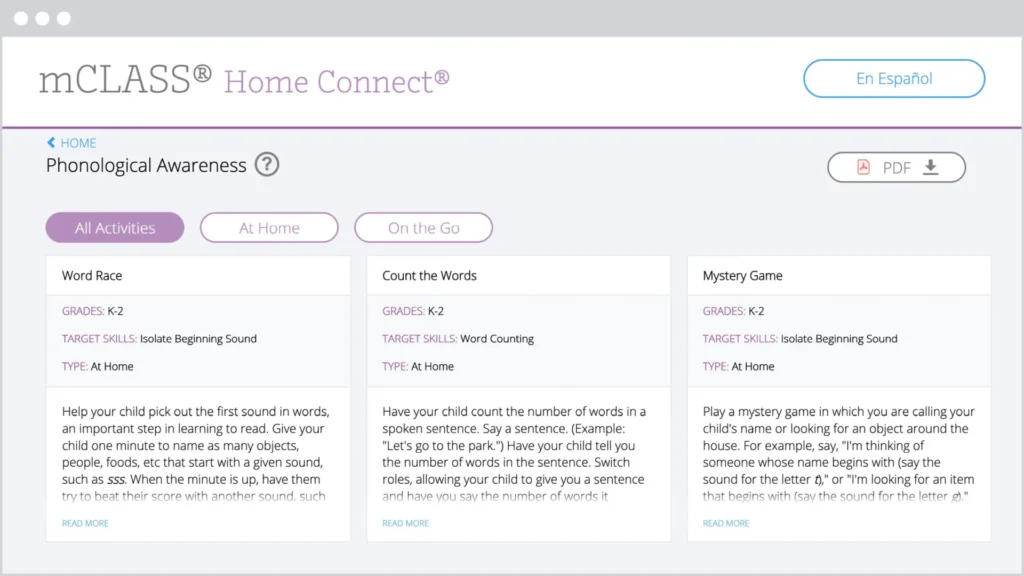
6. Google APIs

Amplify uses Google’s Application Programming Interface (API) Services to enable Authorized Users to log in to Amplify, import classes and rosters from Google Classroom, create assignments in Google Classroom, and copy, edit, and publish Amplify content using Google Slides. Amplify will use and transfer information received from Google’s API in accordance with Google API Service User Data Policy, including the Limited Use requirements.

Update History:

Update: 6/13/2025: This Policy has been updated to align with product updates and to provide additional context for authorized educational use of Amplify’s Products.

Update 6/27/2024: The Policy has been updated to include an explanation regarding Google APIs in the Appendix — Supplemental Disclosures section.

Update 6/30/2023: This Privacy Policy has been updated to address new state law data privacy requirements.

Free K12 Teaching Lessons & Resources – Amplify Classroom

To view this protected page, enter the password below:


Classroom -TEST PAGE

To view this protected page, enter the password below:


Free, high-quality lessons without the scavenger hunt.

Discover more than a thousand free lessons bursting with interactivity—across K–12 math, literacy, and science.

Math: Grades K–5
A cartoon purple frog sits on a green hill with a purple bug on the left and a yellow crown on the right, all on a bright green background.
Math: Grades 9–12
A quadratic equation, ax² + bx + c, appears above a blue and purple table with an arrow pointing from the equation to the table.
Science: Grades 4–8
Two low-poly, fictional creatures face off: a green, bird-like animal with spikes and a red, bear-like beast with sharp teeth and orange markings—perfect for sparking imagination using free teaching resources.
Literacy: Grades K–5
A card with the letter u0022yu0022 labeled as in u0022mythu0022 next to a speech bubble card showing the phonetic symbol /e/.
Math: Desmos classics Grades 6–8
Three raccoons balance on one side of a seesaw, while a 21 lb weight balances the other side on a grassy surface.
Polypad manipulatives:
A square divided into seven colorful geometric shapes: two triangles, two parallelograms, one square, and two smaller triangles in green, red, purple, orange, teal, and magenta.

More than 300,000 teachers turn to Amplify Classroom for captivating lessons and virtual manipulatives.

Grade 1 Math

Leaping Lily Pads

Grade 6 Science

Behaviors and Structures Support Survival

Kindergarten Literacy

The Boy and the Violin

Grades K–12

Polypad manipulatives

Algebra 1

Shelley the Snail

Get your classroom buzzing with our powerful teaching tools.

Tailor lessons to fit your needs.

Share and celebrate student ideas.

Take snapshots of classwork to foster discussion and highlight student thinking.

Gain insights into student thinking.

Monitor your students’ ideas in real time so you can adapt instruction on the fly.

Control the flow of instruction.

Pace students to specific parts of the lesson, or pause to explore concepts more deeply.

What are people saying?

A purple octopus with eight tentacles, each holding a clam, is shown above a row of number buttons labeled 5, 6, 7, 8, and 9. The number 8 is highlighted.

Martin Joyce

@martinsean

Love this #AmplifyClassroom kindergarten activity! First the octopus checks sums of 8 then the sea urchin comes out. Great job. I’ve been wary about making my kids not hate math (no drill n kill) and they’re asking can we do math on the computer before bed. Yes! Cc @ddmeyer

A user interface with four circular icons—Anonymize, Pace, Sync to Me, and Paused—above a dropdown menu labeled "Sort by Time Entered," designed as a free teaching platform for easy access to lesson plans.

Traci Jackson

@traciteacher

After an audible groan b/c the activity was paused, Ss made sense of ordered pairs through a purposeful #AmplifyClassroom experience! This S pair wrote without any prompting. Great collaboration and learning in 5th grade today!

Mark Labuda

@mrmlabuda

Hands down the best virtual manipulatives I’ve ever come across.

Screenshot of the Facebook group "Amplify Classroom Educators (formerly Desmos Educators)" with a join group button, highlighting educational images, group details, and access to free teaching resources.

Join our community

More than 30,000 educators share advice, lessons, wins, and more in our Amplify Classroom Educators Group. Be a part of the conversation!

Interested in learning about the benefits of being an Amplify customer?

Amplify Classroom FAQ

Amplify Classroom (formerly Desmos Classroom) is a free K–12 teaching platform that gives educators access to a library of high-quality, interactive lessons in math, literacy, and science. The platform is built with tools that promote student engagement and collaboration, while giving teachers real-time visibility into student thinking.

Amplify Classroom supports K–12 educators across math, science, and literacy. The platform offers more than 1,000 free interactive lessons, with content designed to build deeper understanding and student engagement at every grade level.

No. Teachers can create a free Amplify Classroom account and immediately access teaching tools and hundreds of lessons without a district license or subscription. Paid programs such as Amplify Desmos Math and Amplify Core Knowledge Language Arts (CKLA) also run on Amplify Classroom, and you can access that content through the same platform if your school or district subscribes to these programs.

Some schools and districts require that specific URLs be added to their allowlist before teachers can access Amplify Classroom. A full list of permitted domains can be found at amplify.com/allowlist. Teachers should share this information with their school or district IT team.

Amplify Classroom offers built-in tools that promote real-time teacher visibility and student engagement. Key features include:

  • Real-time student insights: See student responses and thinking as they happen, all in one easy-to-use teacher dashboard.
  • Teacher pacing controls: Pause a lesson or advance all student screens simultaneously.
  • Select and sequence student work: Highlight student ideas live by selecting and sharing student work during a discussion.
  • Anonymous student sharing: Display student work to the class without showing students’ real names.
  • Lesson customization: Copy and edit pre-built K–12 lessons or build your own from scratch using our drag-and-drop lesson builder.
  • Class management tools: Create and manage multiple classes, add co-teachers, and organize rosters.

Yes. Teachers can customize our K–12 lessons or even create lessons from scratch to meet their students’ unique needs. This includes adding things like pre-made screens, images, multiple-choice questions, graphs, and more with our drag-and-drop lesson builder.

Yes. Many teachers use Amplify Classroom to supplement their existing curriculum. The platform can be integrated into any part of a teacher’s day, with a wide library of lessons and tools for core or supplemental instruction.

For schools seeking a full core curriculum, Amplify also offers paid programs including Amplify Desmos Math and Amplify CKLA, both fully integrated into the platform.

Yes. Amplify Classroom supports signing in with Google. Teachers can import class rosters directly from Google Classroom to streamline setup. For Amplify customers, Clever integration is available for school and district rostering. You can learn more about our integrations here.

Amplify Classroom is built to facilitate compliance with applicable student data privacy laws, including FERPA, COPPA and other applicable laws related to the collection and use of student data. To provide Amplify Classroom to students, Amplify receives Student Data as a “school official” in accordance with Section 99.31 of FERPA and COPPA guidance, and operates at the direction of the school. You can read more about this in our Acceptable Use Policy and Customer Privacy Policy.

Oregon Math State Review for 9–12

To view this protected page, enter the password below:


Oregon Math State Review for 6–8

To view this protected page, enter the password below:


Oregon ELA State Review for 6–8

To view this protected page, enter the password below:


Oregon ELA Review for Elementary (K–5)

To view this protected page, enter the password below:


Amplify CKLA 1st Edition resources

Coming March 13, Amplify will be providing links below so that you can easily access and print Student Workbook pages, which students complete as part of the daily lessons. In addition to providing daily opportunities for students to respond to text and apply skills and knowledge, Workbooks feature formative assessments for each day’s objectives.

In the meantime, Student Workbook pages are accessible and printable from the Teacher Resource site by following these steps:

  1. Log in to the 1st Edition Teacher Resource site. The 1st Edition resource site can be accessed by following this link or navigating to ckla.amplify.com. (Note: If you don’t have a login, click “Register” to create a login using access code CKLA01)
  2. Open the Digital Planning Guide.
  3. Navigate to a grade, lesson, and lesson activity—you will find the workbook page hyperlinked in the lesson activity at point of use.
  4. Click on the hyperlinked workbook page to open it up in your browser.
  5. Print the workbook page directly from your browser or save the page to your computer.
Illustration of a mesoamerican scene, featuring a large pyramid and a foreground portrait of an indigenous woman, with people harvesting crops in the background.

Welcome to the Baltimore Tutoring Project!

Baltimore City Schools and Amplify have partnered to provide virtual reading tutoring services. Amplify Tutoring aligns with the mission of Amplify in extending the reach of classroom teachers and supporting rigorous and riveting learning experiences for students. The purpose of this high impact tutoring is to support and accelerate student achievement in foundational literacy skills in order to address unfinished learning and achievement gaps. Classroom teachers teach foundational literacy skills in whole group and small group settings; Amplify tutoring is one way to support teachers in meeting the needs of their students by providing additional opportunities for struggling students to work in small groups with a tutor. 

Two students using a laptop in a classroom with "amplify" and "baltimore city public schools" logos displayed.

Welcome, Baltimore Educators!

We’ve created this website with resources that will help ensure the success of your high-impact tutoring program.

Log In to Amplify Tutoring

Logging in with a personal device

  1. If you’re already logged into Clever, go to tutor.amplify.com and click Log In with Clever. You will be taken directly to Amplify Tutoring.
  2. If you’re NOT logged into Clever, go to tutor.amplify.com and click Log In with Clever.
  3. Scan the Clever badge OR enter your school name and your Clever username and password and click Log in
Young girl with headphones using a laptop for online learning, interacting with a school login page.
Screenshot of a login page with options to log in with google, clever, amplify, and a qr code, highlighted by a red arrow pointing at the "log in with amplify" button.

Logging in with a shared device

  1. If you’re using a shared device, go to tutor.amplify.com and click Log In with Amplify.
  2. Enter your Amplify Reading username and password.
  3. Click Log in.

Logging in for the first time

After you log in for the first time, scroll down to complete the welcome tutorial.

Illustration of a computer monitor displaying a page labeled "abc" with a welcoming message, "welcome to the new blackboard!" above it.

Join a Tutoring Session

  1. After you log in, click your class.
  2. Click Blackboard Collaborate and then click Join session.
  3. In the list that displays, click your class name to join the scheduled session. Note: You can only join a session at the time it is scheduled. If the scheduled session isn’t in progress, you will see “Room disabled” under Blackboard Collaborate.
  4. If you’re joining for the first time, click Allow to give your browser permission to use the microphone and camera. Check to make sure each is working.
  5. To stop seeing onscreen instructions: click Later under Start Tutorial, then click X on the next prompt.

You should now be able to see and hear your tutor and the other students in your session.

Screenshot of an online education platform interface labeled "rmeyer tutoring grade 1 - test" with a menu on the left and a large red arrow pointing to "attendence.

Test Session Audio and Video

A minimalistic user interface of an online platform displayed on a laptop screen, showing a welcome message and options for uploading content and checking audio.
  1. To test audio and video, you must first join a session. Audio and video settings can only be tested in a session.
  2. Open the Collaborate panel by clicking the purple icon in the lower-right corner of the page.
  3. Click the My Settings icon in the panel that opens.
  4. Click Set up your camera and microphone.
  5. Test your microphone, and grant permission to your microphone if asked.
  6. Test your camera, and grant permission to your camera if asked.

Your tutor and the other students in your session should now be able to see and hear you.

Clearing cache and cookies

Here are instructions to clearing cache and cookies

Download PDF

Two women, one middle-aged and one younger, working together on a laptop in a library, with two other people in the background.

Webinars

View our latest webinars for more information

Amplify Tutoring – Scheduling Training Session for School POCs

https://youtu.be/H-3PZHVNBRY

Watch now

Amplify Tutoring Identifying Students Training

https://youtu.be/3eKSWtsMgQ4

Watch now

Student-friendly resources

Student log-in instructions

Here is a PDF of student log-in instructions

Download PDF

Two young girls, smiling and looking at a tablet together in a colorful classroom, engaged in an online reading program.

Additional resources

Three colleagues, one holding a laptop and another holding a tablet, discuss work in front of a wall covered in colorful sticky notes.

Amplify family letter

Here is an Amplify family letter for your use.

Download PDF

Student inventory of devices

How to obtain an additional inventory of student devices PDF

Download PDF

Boost Reading classroom of learning children reading program
An adult sits on a couch using a laptop while a child next to them does homework in a notebook.

Family Letter- Pivoting to Remote Learning

Here is an Amplify Family Letter- Pivoting to Remote Learning for your use.

Download PDF

Connect, Reflect, Share!

Una mujer ayuda a dos estudiantes con una computadora portátil en un salón de clases. Un estudiante escribe en un cuaderno mientras el otro mira la pantalla. Los carteles adornan la pared detrás de ellos.

Complete this optional Google form to share highlights from tutoring. We would love to capture and share your a-ha moments, the practices/strategies/resources you have found helpful, and/or celebrations of your students’ growth as readers and your development as a tutor!

Please use the form below to alert us of issues and concerns. We will look at trends, solutions, and reach out to schools if needed.

Contact us for support

Want to learn more?

Visit our main tutoring page for more information

Visit site

Welcome, Program 6 reviewers, to Amplify CKLA California Transitional Kindergarten!

We’re honored to introduce you to Amplify Core Knowledge Language Arts (CKLA) California Transitional Kindergarten (TK). We’re confident you’ll find this comprehensive program to be a powerful tool for bringing the vision of the California ELA/ELD Framework and the California Preschool/Transitional Kindergarten Learning Foundations (PTKLF) to life in classrooms across the state.

Please start with the video on the right to learn how to navigate the program and access key features referenced within our submission. Below you’ll find additional resources to support your review.

Your review samples

Print samples

You will receive three boxes of physical samples as part of your review. Box 1 will contain your Reviewer Binder. This binder contains logistical information and printed copies of the Evaluation Criteria Map and Foundations Alignment Map. Boxes 2 and 3 will contain physical samples. As you begin the process of organizing your materials, please refer to the inventory checklist found inside each box as well as within your Reviewer Binder.

Digital samples

In order to access your digital samples, you’ll need to log in to our platform using your unique login credentials found on a Digital Access Flyer inside of your Reviewer Binder. Once you have located the flyer:

  • Click the orange button below to access the platform.
  • Click “Log in with Amplify.”
  • Enter the username and password provided on your Digital Review Credential flyer.

Navigation tips

Before you get started, please review these important functionality notes:

Criteria Map and Standards Maps must be opened on Microsoft Word on your desktop to function as intended. If you open the documents without Microsoft Word on your desktop, citations will be cut off at the bottom of most tables within the document.

Many of our citations are deep-links to PDFs, meaning they will take you to the right page or the first page in the sequence for the citation in question. To ensure this functionality works, please disable any PDF-viewing extensions or plug-ins such as Adobe Acrobat Pro Browser Extension.

[Reviewer navigation video] Amplify CKLA California TK

Category 1: English Language Arts (ELA) content/alignment with Foundations

Alignment documents

The links below provide the alignment documents for Amplify CKLA California Transitional Kindergarten.

Category 2: Program Organization

Program structure

Amplify CKLA California Transitional Kindergarten is a comprehensive English language arts curriculum designed to prepare young children for later reading success by building foundational language and literacy skills. Amplify CKLA California TK materials and instruction provide explicit, systematic support for developing young children’s language, literacy, and content knowledge within the context of developmentally-appropriate early childhood settings, incorporating and reflecting the key themes and practices of the CA PTKLF and Framework.

[Reviewer highlight video] Program organization

The flexible pacing recommendations of the program provide teachers with options to decide how best to keep students engaged while completing Amplify CKLA California Transitional Kindergarten instruction (e.g., wiggle breaks, hands-on participation, singing songs, brain breaks, etc.).

[Reviewer highlight video] Lesson organization

The literacy skills, vocabulary, and content knowledge developed in Amplify CKLA California Transitional Kindergarten are explicitly designed to provide a foundation for the skills and content taught in TK classrooms. The teacher-directed and student-led activities in Amplify CKLA California Transitional Kindergarten reflect all strands of the CA PTKLF foundational language sub-domains:

  • Listening and speaking
  • Foundational literacy skills
  • Reading and writing

Amplify CKLA California TK domains of instruction are carefully chosen and sequenced to build prerequisite knowledge so that students can use that knowledge as they assimilate new, more complex information. The seven domains in Amplify CKLA California Transitional Kindergarten are:

  • Important People in American History
  • All About Me
  • Families and Communities
  • Classic Tales
  • Plants
  • Animals
  • Habitats

Amplify CKLA California TK empowers teachers to deliver effective instruction and keeps students engaged with with the following resources:

  • Teacher Guides
  • Flip Books
  • Image Cards
  • Center Cards
  • Activity Pages and Take-Home Pages
  • Nursery Rhymes and Songs Posters
  • Big Book: Classic Tales
  • Trade Books

Activities are play-based, engaging, challenging, and adaptive for the full range of TK learners. Teacher materials also support teachers and aides in facilitating activities, establishing routines, and identifying effective procedures.

Scope and sequence

Click here to view the scope and sequence for Amplify CKLA California Transitional Kindergarten. 

Category 3: Assessments

Amplify CKLA California TK assessments are designed to provide a snapshot of whether or not each student is mastering specific Core Content and Language Arts Objectives. The program incorporates multiple methods of assessing what students know and are able to do in each domain. Methods of assessments include:

  • Observational/anecdotal assessments.
  • Reteaching moments with aligned progress monitoring.
  • Portfolio Collections (student work samples).
  • Task assessments.
  • Developmental progression monitoring.

Amplify CKLA California TK provides tools to facilitate collecting, analyzing, and sharing data on student progress and development. These include:

  • Ready-made data collection forms with scoring guidelines (Not Yet, Progressing, Ready).
  • Caregiver communication letters.

[Reviewer highlight video] Program alignment to Category 3

Category 4: Universal Access

Amplify CKLA California Transitional Kindergarten materials provide students with a range of skills and abilities, with opportunities for participation across all contexts of differentiated instruction in reading, writing, speaking, listening, and language.

Examples include the following:

  • Teacher Guides feature sidebar differentiation tips.
  • Classroom routines, such as taking attendance, rely on both visual and verbal prompts that can be individually tailored to students’ needs.
  • Small-group activities often include suggested rounds of play that increase with difficulty and give teachers the choice to move forward to increase the level of challenge or repeat levels of play that prove challenging.
  • Extension activities involve materials that can be adapted to scaffold students in a variety of ways; teachers can provide more or less structure and input depending on the needs of the students.
  • Differentiation supports grounded in UDL include visuals, realia, multimodal instruction, and other materials relevant to all students.

Category 5: Instructional Planning and Teacher Support

Amplify CKLA California TK empowers teachers to deliver effective instruction with various resources. The program provides comprehensive planning and support materials designed to help teachers prepare for and execute lessons effectively and fulfill the requirements of Category 5.

Teacher materials

Planning and preparation resources

Each Teacher Guide contains all the information needed for each day of instruction. The following sections are included in each Teacher Guide:

  • Assessments
  • Introduction
  • Learning Centers
  • Transitions
  • Starting the Day
  • Skills Instruction
  • Listening & Learning Instruction
  • Pausing Points

The Domain Calendar shows the titles of activities and read-alouds taught on each day of instruction throughout the entire domain during the three main contexts for instruction:

  • Starting the Day
  • Skills
  • Listening & Learning

Caregiver supports

The home-school connection letter template provides an easy way to share important information and set expectations with caregivers at the beginning of the school year.

Caregiver letters suggest ways parents and caregivers can support and reinforce learning at home through everyday activities. They also include high-quality texts and nursery rhymes and songs that parents can use to support students’ learning.

Welcome, Program 3 reviewers!

We’re honored to introduce you to Amplify California Language Arts. We’re confident you’ll find this comprehensive program to be a powerful tool for bringing the vision of the California ELA/ELD Framework to life in classrooms across the state.

Please start with the video on the right to learn how to navigate the program and access key features referenced within our submission. Below you’ll find additional resources to support your review.

Your review samples

We’re excited for you to begin your review of Amplify California Language Arts, a comprehensive biliteracy program for kindergarten through grade 6.

Reviewer Binders (K–6)

Your physical samples should have arrived in grade-specific boxes with three Reviewer Binders.

  • The first binder will contain logistical program review information and the printed Evaluation Criteria Map.
  • The second binder will contain the printed Standards Maps for grades K–2.
  • The third binder will contain the printed Standards Maps for grades 3–6.

Physical samples (trade books)

Your review of the program will be entirely digital with the exception of the trade books that you will be receiving as physical samples. You can expect to receive 13 boxes of physical materials for your review. Twelve boxes of trade books, one for each grade K–5, in English and Spanish, and one box containing your Reviewer Binders.

As you begin the process of organizing your materials, please refer to the inventory checklist found inside each box as well as within your Reviewer Binder.

Digital review materials

In order to access your digital review materials, you’ll need to log in to our platform using your unique login credentials found on a Digital Review Credential flyer inside of your Reviewer Binder. Once you have located the flyer:

  • Click the orange button below to access the platform.
  • Click “Log in with Amplify.”
  • Enter the username and password provided on your Digital Review Credential flyer.

Navigation tips

Before you get started, please review these important functionality notes:

Criteria Map and Standards Maps must be opened on Microsoft Word on your desktop to function as intended. If you open the documents without Microsoft Word on your desktop, citations will be cut off at the bottom of most tables within the document.

Many of our citations are deep-links to PDFs, meaning they will take you to the right page or the first page in the sequence for the citation in question. To ensure this functionality works, please disable any PDF-viewing extensions or plug-ins such as Adobe Acrobat Pro Browser Extension.

[Reviewer program navigation video] Grades K–5

[Reviewer program navigation video] Grade 6

Click here for additional information on navigating the program for grade 6.

Category 1: English Language Arts (ELA) and English Language Development (ELD) content/alignment to standards

Evaluation Criteria Map

Linked below is the Evaluation Criteria Map. Please note that you will need to be logged into the digital platform to access the links in the Evaluation Criteria Map.

ELA Standards Maps

The links below provide the Standards Maps for Amplify California Language Arts for each grade level.

ELD Standards Maps

Category 2: Program organization

Amplify California Language Arts’ biliteracy program is a comprehensive curriculum provides a full year of evidence-based instruction for each grade level, with both integrated and designated English Language Development instruction designed to give multilingual/English learners the tools to thrive. Amplify’s biliteracy program for grades K–6 includes:

  • Core English language arts instruction: Amplify Core Knowledge Language Arts (CKLA) California (grades K–5) and Amplify ELA California (grade 6) covering knowledge building and foundational skills.
    • Provides upper grade foundational skills instruction for grades 3–6.
  • Core Spanish language arts instruction: Amplify Caminos California, a fully parallel SLA program that works in tandem with English core instruction across all grades.
    • Provides upper grade foundational skills instruction for grades 3–6.
  • Designated English Language Development: Language Studio California is the designated English Language Development companion that directly aligns with and supports core English instruction. 
  • Newcomer Support: Amplify California Language Arts Newcomer Support to facilitate instruction for students who are new to both English and the United States.

Program structure

Amplify’s California Language Arts programs are built on what the research shows: Strong readers need both word recognition and language comprehension. Our comprehensive curriculum suite follows the Simple View of Reading bringing together foundational skills and knowledge building to deliver instruction grounded in the Science of Reading.

This model is integral to the structure of the Amplify biliteracy program, which directly aligns with the CA CCSS ELA and ELD standards by combining rigorous decoding and skills instruction with research-based knowledge and language development instruction. In its early grades, the Amplify biliteracy program uses a two-strand structure—Skills/Lectoescritura and Knowledge/Conocimiento—to effectively address this learning challenge while meeting standards expectations for both language development and academic content mastery.

Diagram with three orange squares labeled: "Language comprehension," "Word recognition," and "Skilled reading," connected by multiplication and equals signs, with Spanish headings above each square.

[Reviewer highlight video] Program organization for Category 2

[Reviewer highlight video] Program structure for grades K–2

[Reviewer highlight video] Program structure for grades 3–5

[Reviewer highlight video] Program structure for grade 6

Amplify Caminos California lessons are designed to allow all students time to work toward learning objectives, including peer collaboration and discussion. Since each lesson activity is aligned to subsequent activities, students’ understanding and analysis develops progressively throughout the lesson.

Each lesson follows a predictable structure with clearly marked components, beginning with warm-up routines, progressing through explicit instruction with guided practice, and concluding with independent application activities. The program provides detailed teacher language, including question stems and discussion prompts, ensuring clear and consistent delivery of instruction.

Amplify CKLA California and Amplify Caminos California empower teachers to deliver effective instruction and keep students engaged with the following resources:

  • Teacher Guides
  • Assessment Guides
  • Authentic texts and trade books
  • Knowledge Image Cards
  • Knowledge Flip Books
  • Remediation and intervention resources
  • Decodable readers
  • Student Readers and novels
  • Student Activity Books
  • Dedicated ELD support with Language Studio California
  • Poet’s Journals
  • eReaders
  • Sound Library featuring articulation videos and songs
  • Instructional routine modeling videos
  • Assignable Practice Games
  • On-demand professional development

Amplify ELA California students stay engaged with the following resources:

  • Teacher Guides that include:
    • Detailed lesson plans
    • Standards alignment and exit tickets
    • Real-time differentiation strategies
    • Robust reporting
  • Student Editions that include:
    • High-quality narrative and informational texts
    • Videos, audio supports, and digital experiences that capture their attention
    • Personal Writing Journal to keep all student writing in one place
  • Dedicated ELD support with Language Studio California
  • Trade books

Core literacy philosophy

Support every learner. Meet all learning needs with a Multi-Tiered System of Supports (MTSS) that brings together universal screening, scaffolded core instruction, support for multilingual/English learners, and data-driven intervention to ensure every student gets what they need to succeed.

Deliver consistent foundational skills instruction. Daily explicit, systematic skills instruction in grades K–2, with targeted yet flexible support for students still building decoding confidence in grades 3–6, ensures mastery of essential reading foundations.

Build lasting knowledge across all grades. Through coherently sequenced, content-rich instruction that revisits key vocabulary and concepts with increasing complexity, students build meaningful connections that deepen their vocabulary and reading comprehension.

Strengthen reading through writing at every level. Regular writing instruction grounded in the Science of Writing supports reading comprehension, improves sentence-level writing, and provides the foundation for high-quality composition. As students progress through the upper grades, they engage in increasingly complex analytical tasks—synthesizing ideas, drawing generalizations, and interpreting multiple textual layers through both focused quick-writes and comprehensive essays. 

Foster oral language development. Structured opportunities for academic conversation and evidence-based dialogue build students’ ability to express complex ideas with precision and allow them to participate confidently in classroom discussions.

Measure growth with comprehensive assessments. Assessments range from in-the-moment checks for understanding to summative assessments that measure progress toward skills mastery and standards proficiency, providing the data needed to drive targeted instruction.

Scope and sequence

Below you can view the scope and sequence documents for each grade level. 

Routines

Amplify CKLA California, Amplify Caminos California, and Amplify ELA California include several structured instructional routines that provide predictable patterns for both teachers and students:

Discussion and collaboration routines:

  • Turn and Talk: Partners discuss text-specific content using sentence starters and frames
  • Think-Pair-Share: Students engage in individual thinking, partner discussion, and whole-class sharing
  • Partner reading: Students sit shoulder-to-shoulder, taking turns reading and listening

Foundational Skills routines:

  • Sound-spelling review: Warm-up activities that reinforce phonics patterns
  • Oral blending warm-ups: Teacher-guided practice progressing to independent application
  • Finger-tapping: Techniques for blending sounds
  • Chaining activities: Students manipulate letters to transform one word into another
  • Word Work: Daily short activities focused on domain-specific and academic vocabulary

Knowledge-building routines:

  • Teacher modeling: Demonstration of proper intonation, expression, and pacing
  • Choral reading: Whole-class reading practice
  • Partner reading: Paired fluency practice

Close reading routines

The program includes carefully structured close reading activities that guide students through multiple encounters with complex texts. These routines help students develop deeper comprehension through systematic analysis and discussion.

Each routine includes comprehensive instructional guides with clear-cut directions for implementation, straightforward explanations of concepts, and suggestions for discussion.

Cross-Linguistic Transfer routines

The Cross-Linguistic Transfer (CLT) routines are easy-to-implement, 10–15 minute mini-lessons designed to help bridge English and Spanish literacy and language development. These structured routines are organized by grade bands for K–2, grades 3–5 and grade 6, covering five skill areas:

  • Oral language
  • Reading
  • Vocabulary
  • Language
  • Writing

[Reviewer highlight video] Amplify’s program alignment to Cross-Linguistic Transfer criteria

Designated English Language Development materials

Language Studio California is a K–8 content-based companion for English language learners. Built on Amplify CKLA California and Amplify ELA California’s carefully sequenced Knowledge Domains, it combines engaging content knowledge with targeted supports and research-based strategies to help students move swiftly toward language proficiency. This program includes:

  • Real-world content to provide authentic opportunities to practice reading, writing, speaking, and listening.
  • Scaffolding strategies and differentiated instruction to offer targeted support along five English proficiency levels.
  • Progress monitoring tools to help teachers provide consistent and effective support.
  • Teacher Guides that:
    • Provide impactful progress monitoring tools including formative and summative assessments, and Language Proficiency Assessment rubrics.
    • Offer varied differentiation strategies including Support, Challenge, and Access supports in each lesson segment.
    • Are organized into thoughtful lesson segments—Talk Time, Building Background, On Stage and more—that make learning objectives concrete.
  • Activities that:
    • Expand on domain knowledge from core content and read-alouds and prompt collaborative conversation to practice oral fluency.
    • Support hands-on language activities to promote authentic interaction in the classroom.
    • Help students bridge experiences and knowledge with images, vocabulary activities, graphic organizers, anticipation guides, writing space, and more.

Category 3: Assessments

Systematic MTSS alignment

In alignment with the additional 2025 Guidance 3.1.a, the assessment systems align with MTSS tiers, including universal screening, diagnostic assessments for students demonstrating a need for additional support, and progress monitoring tools that complement California’s required reading difficulties screening schedule per SB 114.

Tier 1:
Universal/ differentiated support
Tier 2: 
Supplemental/ targeted
support
Tier 3: 
Intensified/ intensive
support
Core instruction assessments


Frequency of administration
Amplify CKLA California, Amplify Caminos California, Amplify ELA California assessments

Daily, Weekly, Monthly
Amplify CKLA California, Amplify Caminos California, Amplify ELA California assessments

Daily, Weekly, Monthly
Amplify CKLA California, Amplify Caminos California, Amplify ELA California assessments

Daily, Weekly, Monthly
Universal screening assessments

Frequency of administration
mCLASS DIBELS and Lectura


3 times per year – BOY, MOY, EOY
mCLASS DIBELS and Lectura


3 times per year – BOY, MOY, EOY
mCLASS DIBELS and Lectura


3 times per year – BOY, MOY, EOY
Formal progress monitoring assessments


Frequency of administration
mCLASS DIBELS and Lectura


3 times per year – BOY, MOY, EOY
mCLASS DIBELS and Lectura


Monthly
mCLASS DIBELS and Lectura


Bi-weekly
Informal progress monitoring assessments


Frequency of administration
Amplify CKLA California, Amplify Caminos California, Amplify ELA California core assessments

Daily
Intervention Toolkit progress monitoring assessments


When linked to a lesson in the toolkit
Intervention Toolkit progress monitoring assessments


When linked to a lesson in the toolkit
Diagnostic assessment


Frequency of administration
Amplify skill diagnostic assessment


Amplify Spanish skill diagnostic assessment

Optional after universal screening assessment is administered
Amplify skill diagnostic assessment


Amplify Spanish skill diagnostic assessment

After universal screening assessment is administered

Universal assessment system

Amplify’s mCLASS® DIBELS® 8th Edition (K–8) and mCLASS Lectura (K–6) are universal and dyslexia screening assessments that should be administered three times per year (BOY, MOY, and EOY) to all students. The assessments evaluate student literacy risk, determine progress toward grade-level goals, and indicate the level of instructional  support a student may need. Beginning-of-year screenings require adequate instructional time before administration, particularly in grades K–1, while mid-year and end-of-year assessments evaluate instructional effectiveness and guide tier placement adjustments. These screenings also identify students at risk for dyslexia. Universal screening provides essential data for targeting instruction and measuring instructional system effectiveness.

Core instruction assessments

Amplify CKLA California, Amplify Caminos California, and Amplify ELA California provide a comprehensive suite of assessments for grades K–6 that range from low-stakes, informal formative assessments to more formal summative assessments. These assessments incorporate a variety of methods and question types, including multiple-choice questions, open-ended questions, and oral and written responses.

Formative assessments:

  • Checks for Understanding: Incorporated into each lesson segment throughout daily instruction. Quick pulse-checks that provide immediate feedback during lesson delivery (grades K–5). 
  • Daily formative assessments: Highlighted moments within each lesson for teachers to plan to track mastery of Primary Focus objectives and standards of each lesson to get a clear snapshot of individual and whole-class progress (grades K–5). 
  • Activity pages: Completed as part of lessons and can be used to assess lesson content understanding through various formats (grades K–5).
  • Exit Tickets: Located at the end of lessons, these provide a quick gauge of students’ ability to meet the lesson’s focus standards (grade 6).  
  • Writing Prompts: Prompts integrated throughout lessons during writing activities that provide skill snapshots within lessons and tracks patterns of skill development over time (grade 6).
  • Independent reading activities (Solos): At the end of every lesson, students complete an independent reading activity (“Solo”) with reading questions that are scored to measure comprehension (grade 6).

Summative assessments:

  • Skills end-of-unit assessments (grades K–2) 
  • Knowledge end-of-domain assessments (grades K–2) 
  • End-of-unit assessments (grades 3–5) 
  • Unit essays: A culminating end-of-unit set of lessons that guide students through crafting an essay with a rubric to score mastery of writing skills (grade 6)
  • Unit reading assessments: Auto-scored responses and two constructed response items evaluate comprehension, content understanding, and reading skills using the passages students read during the unit (grade 6)

Performance assessments

Student Performance Assessments are multi-day assessments administered in Grades K–5 at the beginning, middle, and end of year to help teachers gauge student mastery of grade-level Core content. These assessments provide critical data to help teachers set targeted instructional goals and monitor individual and class-wide progress towards core objectives.

Progress monitoring

Amplify’s mCLASS® DIBELS® 8th Edition and mCLASS Lectura provide formal progress monitoring in the discrete skills that are indicative of reading growth and predictive of overall success to provide the most instructionally meaningful information to teachers.

Informal progress monitoring tools can be found within the Intervention Toolkit, including materials for teachers to record, track, and evaluate student progress.

Diagnostic assessment

Interventions within Amplify’s literacy programs are informed by a skill diagnostic assessment that provides detailed data on foundational literacy skill deficits. The Amplify Skill Diagnostic Assessment and Amplify Spanish Skill Diagnostic assessment serve as critical tools in this process, administered specifically to students identified as at risk for reading difficulty through universal screening assessments—particularly those demonstrating mCLASS DIBELS 8th Edition or mCLASS Lectura composite scores in the Well Below or Below Benchmark ranges. These diagnostic assessments provide teachers with the precise skills to begin intervention and remediation.

Category 4: Universal Access

Amplify CKLA California, Amplify Caminos California, and Amplify ELA California are developed using the Universal Design for Learning framework to proactively ensure that all learners can access and participate in meaningful, challenging learning opportunities.

Universal Design for Learning

Amplify CKLA California, Amplify Caminos California, and Amplify ELA California incorporate opportunities for engagement, representation, action, and expression based on the guidelines of Universal Design for Learning.

  • Multiple Means of Engagement: The programs incorporate interesting and motivating ways for students to interact with information and content. The Universal Access section in the introduction of each lesson provides specific lesson-level options based on the needs of individual classrooms and students. Scaffolding for students with various levels of need is incorporated into the design of each lesson.
  • Multiple Means of Representation: The programs provide multiple means of presenting content to maximize student understanding. This includes digital component files that allow for a range of presentations of images and text to support learning. Amplify provides access to universal supports such as point-of-use audio for all core texts, embedded definitions for critical vocabulary, and glossaries in multiple languages. The programs include clarification on language found throughout the program, with sidebars that include support on transition words and syntax, and illustrations to help students understand the concepts they are learning.
  • Multiple Means of Action and Expression: The programs include a range of methods for all students, including Multilingual/English Learners, to navigate and demonstrate learning. This includes physical actions, a range of methods for response, appropriate tools for composition, and varied scaffolding. Lessons provide multiple ways for students to interact with text, allowing their brains to process the language through distinct pathways. Activities harness multiple learning modes, using media tools, digital apps, and a variety of visual and physical experiences to strategically support and enhance student learning.
  • Accessibility: Universal access features include visual aids, enlarged materials, physical objects, and multiple learning modalities through activities like Push & Say and Wiggle Cards. The Universal Access section in the introduction of each lesson provides specific lesson-level options based on the needs of individual classrooms and students.

Embedded differentiation

Amplify CKLA California, Amplify Caminos California, and Amplify ELA California provide built-in differentiation strategies in every lesson for all students.

  • Pre-teaching supports include mini-lessons on:
    • Core vocabulary building
    • Core connections
    • Essential background information building
    • What Have We Already Learned?/What Do We Already Know?
  • Differentiated Support for Core Instruction tables, located in the overview of each K–2 Skills Teacher Guide, provide a list of specific opportunities for reteaching and additional support in each lesson based on skill.
  • Support and Challenge Sidebars in lesson margins offer educators immediate guidance in implementing point-of-use differentiation techniques.
  • Flexible Grouping within lessons provides opportunities for teachers to facilitate small groups, partners, or individualized support based on students’ needs. In the Skills Strand, teachers receive specific guidance for differentiated small group instruction, with targeted support and activities outlined for both Group 1 (students needing additional support) and Group 2 (on-level students) based on data. 
  • Amplify ELA California and Amplify Caminos California provide point-of-use supports embedded within key core lesson activities with six levels of differentiation. The goal of these supports is to fully enable access to grade-level content for all students, including students with disabilities, English learners, and students ready for an additional level of challenge.
  • The Universal Access section of Advance Preparation in each lesson includes varied strategies to ensure all students can access and engage in each lesson.
  • Frequent use of graphic organizers and visual supports in lessons provide opportunities for differentiation based on need. The program also includes a variety of technological supports, such as eReaders with audio.
  • Extension opportunities are suggested throughout lessons, often embedded in writing tasks, which include prompts to use more complex and descriptive vocabulary, figurative language,  multi-clause and complex sentences, and  informational text characteristics.

Assessment-driven MTSS resources

  • The K–6 Intervention Toolkit is available online and provides easy-to-use resources that assist teachers in filling gaps in students’ reading skills, with activities to support print concepts, phonological awareness, phonics, fluency, and other key skills.
  • Fluency packets (Grades 2–6)
  • Foundational Skills Intervention Program for Grades 3–6 support students who would benefit from direct and explicit intervention instruction in the full continuum of foundational skills in the upper grades
  • Flexible Instructional Time including:
    • Pausing Points built into the curriculum that provide teachers with dedicated time to address specific student needs through targeted reteaching, remediation, practice, and extension activities 
    • Pausing Point activities designed to support multilingual/English learners’ competence and confidence through differentiated whole-group, small-group, or individual instruction
  • Boost Reading and Boost Lectura are student-led digital intervention programs that follow the scope and sequences of Amplify CKLA California and Amplify Caminos California respectively, to reinforce the same foundational skills taught in core instruction. It integrates easily into daily routines, while the robust data provided by mCLASS® DIBELS® 8th Edition offers a detailed view of how students progress across all instructional tiers.

Category 5: Instructional Planning and Teacher Support

Amplify CKLA California, Amplify Caminos California, and Amplify ELA California teachers are empowered to deliver effective instruction with various print and digital resources. The program provides comprehensive planning and support materials designed to help teachers prepare for and execute lessons effectively and fulfill the requirements of Category 5.

Implementation supports across K–6

Planning and preparation resources

  • Unit Overviews that provide important background and context for the texts students will read, including highlighted elements within the text and guidance for how students will work with those elements
  • Sub-unit Overviews (Grade 6) that provide an overview of Lesson Objectives and reading and writing assignments, as well as a list of any projections, multimedia, or digital apps that can be projected from the teacher’s included digital license
  • Lesson-by-lesson preparation checklists (Grade 6) accompanying each Sub-unit Overview
  • Lesson Briefs for each individual lesson providing important background and context
  • Content knowledge materials regarding topics that students will examine

Point-of-use instructional guidance

  • Teacher Editions that feature insets of the same text and activity instructions as the corresponding Student Edition, wrapping teacher instruction around these materials
  • Activity guidance at point of use
  • Lesson standards clearly called out
  • Discussion suggestions embedded in lessons
  • Differentiation tips at point of use
  • Detailed Instructional Guides in each activity that include sequencing and grouping suggestions, tips for facilitating discussion, possible student responses and exemplars
  • On-the-Fly supports (Grade 6)—quick call-outs to the identifying features of “on track” and “needs support” students accompanied by short models of student guidance to foster strong performance

Multimedia and digital support

  • Teacher tip videos provide modeling and guidance for implementing key foundational skills routines within the program
  • Digital platform access where teachers can access printable PDFs of differentiated support materials for multilingual/English learners and students struggling to read, including translated Unit Background and Context documents and Text Previews
  • Teacher Dashboard and reporting tools provide real-time visibility into student progress and work for immediate instructional response

Caregiver supports

Communication and overview resources

  • Caregiver Hub available in English and Spanish that provides an overview of the curriculum
  • Caregiver Letters for each K–2 Knowledge Domain and unit in Grades 3–5 that provide an overview of the content, the skills students learn, as well as practical methods that continue the learning and knowledge building at home
  • Unit-specific Caregiver Letters (Grade 6) that provide detailed information regarding what students will read and learn in each unit, including conversation starters that allow caregivers to ask questions and discuss specific aspects of a unit with their student
  • Welcome letters that explain the assessment and placement process while inviting parent involvement and offering support
  • Editable Home-School Communication letters available in English and Spanish
  • Editable Progress Reports for teachers to update parents and guardians on what their child is learning

Content and learning support materials

  • Unit Background and Context documents that provide an introduction and overview to the unit’s topic and themes, available in English and Spanish
  • Text Previews that provide a brief introduction to formative, independent reading assignments (called Solos in Grade 6), available in English and Spanish
  • Unit Overview and Support documents (Grade 6) designed for caregivers that provide information about important questions, assignments, and key aspects of the unit texts, available in English and Spanish
  • Conversation starters included in Knowledge Strand Caregiver Letters to discuss domain topics at home

Home practice and extension activities

  • Take-Home pages in the Skills Strand that include copies of decodable passages, enabling students to share their reading progress with families and continue practicing their skills outside of school
  • Take-Home Letters in the Skills Strand that provide specific guidance for parents to support skills practice at home, such as sound-sorting activities, with detailed instructions and materials for home practice activities
  • Take-Home pages in the Knowledge Strand that provide suggested activities families can do together to reinforce and extend learning beyond the classroom
  • Games and activities on Take-Home Pages that extend classroom instruction, including all the materials and instruction necessary to help families assist students in a fun and engaging way
  • Digital access to decodable texts through the Amplify Caregiver Hub, allowing students to practice their reading skills both in class and at home
  • Weekly spelling lists and directions to decoding activities that can be practiced at home

Welcome, K–8 Program 2 reviewers!

We’re honored to introduce you to Amplify California Language Arts. We’re confident you’ll find this comprehensive program to be a powerful tool for bringing the vision of the California ELA/ELD Framework to life in classrooms across the state.

Please start with the video on the right to learn how to navigate the program and access key features referenced within our submission. Below you’ll find additional resources to support your review.

Your review samples

We’re excited for you to begin your review of Amplify Core Knowledge Language Arts (CKLA) California and Amplify ELA California, Language Studio California for grades K–8. Physical and digital review materials will vary by grade level.

Reviewer Binders (K–8)

Your physical samples should have arrived in grade-specific boxes with three Reviewer Binders.

  • The first binder will contain logistical program review information and the printed Evaluation Criteria Map.
  • The second binder will contain the printed Standards Maps for grades K–4.
  • The third binder will contain the printed Standards Maps for grades 5–8.

Physical samples (K–5)

You can expect to receive 15 boxes of physical materials for your review. As you begin the process of organizing your materials, please refer to the inventory checklist found inside each box as well as within your Reviewer Binder. Please note you will not receive any physical samples for grades 6–8 ELA or Language Studio for grades K-8. Your review of the program for grades 6–8 ELA and Language Studio for grades K-8 will be entirely digital.

Digital samples

In order to access your digital samples, you’ll need to log in to our platform using your unique login credentials found on a Digital Review Credential flyer inside of your Reviewer Binder. Once you have located the flyer:

  • Click the orange button below to access the platform.
  • Click “Log in with Amplify.”
  • Enter the username and password provided on your Digital Review Credential flyer.

Navigation tips

Before you get started, please review these important functionality notes:

Criteria Map and Standards Maps must be opened on Microsoft Word on your desktop to function as intended. If you open the documents without Microsoft Word on your desktop, citations will be cut off at the bottom of most tables within the document.

Many of our citations are deep-links to PDFs, meaning they will take you to the right page or the first page in the sequence for the citation in question. To ensure this functionality works, please disable any PDF-viewing extensions or plug-ins such as Adobe Acrobat Pro Browser Extension.

[Reviewer program navigation video] Grades K–5

[Reviewer program navigation video] Grades 6–8

Click here for additional information on navigating the digital materials for grades 6–8.

Category 1: English Language Arts (ELA) and English Language Development (ELD) Content/Alignment to Standards

Evaluation Criteria Map

Linked below is the Evaluation Criteria Map for grades K–8. Please note that you will need to be logged into the digital platform to access the links in the Evaluation Criteria Map.

ELA Standards Maps

The links below provide the Standards Maps for Amplify California Language Arts for each grade level. Please note that you will need to be logged into the digital platform to access the links in the Standards Maps.

ELD Standards Maps

Category 2: Program Organization

The Amplify California Language Arts Program 2 submission includes Amplify CKLA California for Grades K–5, Amplify ELA California for Grades 6–8, and Amplify Language Studio California for Grades K–8. This comprehensive curriculum provides a full year of evidence-based instruction for each grade level, with both integrated and designated English Language Development instruction designed to give English learners the tools to thrive.

Program structure

Amplify’s California Language Arts programs are built on what the research shows: Strong readers need both word recognition and language comprehension. Our comprehensive curriculum suite follows the Simple View of Reading and The Reading Rope–bringing together foundational skills and knowledge building to deliver instruction grounded in the Science of Reading.

Flowchart illustrating skilled reading as the product of language comprehension and word recognition, grounded in the science of reading.
Diagram illustrating the interplay between language comprehension and word recognition in reading, as seen in early literacy stages. It highlights pathways through knowledge, vocabulary, and sentence understanding, reflecting principles from the CKLA reading program.

Each lesson follows a predictable structure with clearly marked components, beginning with warm-up routines, progressing through explicit instruction with guided practice, and concluding with independent application activities. The program provides detailed teacher language, including question stems and discussion prompts, ensuring clear and consistent delivery of instruction.

[Reviewer highlight video] Program organization for Category 2

[Reviewer highlight video] Program structure for grades K–2

[Reviewer highlight video] Program structure for grades 3–5

[Reviewer highlight video] Program structure for grades 6–8

Amplify CKLA California empowers teachers to deliver effective instruction and keeps students engaged with with the following resources:

  • Teacher Guides
  • Assessment Guides
  • Authentic texts and trade books
  • Knowledge Image Cards
  • Knowledge Flip Books
  • Remediation and intervention resources
  • Decodable readers
  • Student Readers and novels
  • Student Activity Books
  • Dedicated ELD support with Language Studio California
  • Poet’s Journals
  • eReaders
  • Sound Library featuring articulation videos and songs
  • Instructional routine modeling videos
  • Assignable Practice Games
  • On-demand professional development

Amplify ELA California students stay engaged with the following resources:

  • Teacher Guides that include:
    • Detailed lesson plans
    • Standards alignment and exit tickets
    • Real-time differentiation strategies
    • Robust reporting
  • Student Editions that include:
    • High-quality narrative and informational texts
    • Videos, audio supports, and digital experiences that capture their attention
    • Personal Writing Journal to keep all student writing in one place
  • Dedicated ELD support with Language Studio California
  • Trade Books

Core literacy philosophy

Support every learner. Meet all learning needs with a Multi-Tiered System of Supports (MTSS) that brings together universal screening, scaffolded core instruction, support for English learners, and data-driven intervention to ensure every student gets what they need to succeed.

Provide intentional ELD support. Honor students’ linguistic assets while building academic English through both integrated and designated instruction.

Deliver consistent foundational skills instruction. Daily explicit, systematic skills instruction in grades K–2, with targeted yet flexible support for students still building decoding confidence in grades 3–8, ensures mastery of essential reading foundations.

Build lasting knowledge across all grades. Through coherently sequenced, content-rich instruction that revisits key vocabulary and concepts with increasing complexity, students build meaningful connections that deepen their vocabulary and reading comprehension.

Strengthen reading through writing at every level. Regular writing instruction grounded in the Science of Writing supports reading comprehension, improves sentence-level writing, and provides the foundation for high-quality composition. As students progress through the upper grades, they engage in increasingly complex analytical tasks—synthesizing ideas, drawing generalizations, and interpreting multiple textual layers through both focused quick-writes and comprehensive essays. 

Foster oral language development. Structured opportunities for academic conversation and evidence-based dialogue build students’ ability to express complex ideas with precision and allow them to participate confidently in classroom discussions.

Measure growth with comprehensive assessments. Assessments range from in-the-moment checks for understanding to summative assessments that measure progress toward skills mastery and standards proficiency, providing the data needed to drive targeted instruction.

Scope and sequence

Below you can view the scope and sequence for each grade level. 

Routines

Amplify CKLA California and Amplify ELA California include several structured instructional routines that provide predictable patterns for both teachers and students:

Discussion and collaboration routines:

  • Turn and Talk: Partners discuss text-specific content using sentence starters and frames
  • Think-Pair-Share: Students engage in individual thinking, partner discussion, and whole-class sharing
  • Partner reading: Students sit shoulder-to-shoulder, taking turns reading and listening

Foundational Skills routines:

  • Sound-spelling review: Warm-up activities that reinforce phonics patterns
  • Oral blending warm-ups: Teacher-guided practice progressing to independent application
  • Finger-tapping: Techniques for blending sounds
  • Chaining activities: Students manipulate letters to transform one word into another
  • Word Work: Daily short activities focused on domain-specific and academic vocabulary

Knowledge-Building Routines:

  • Teacher modeling: Demonstration of proper intonation, expression, and pacing
  • Choral reading: Whole-class reading practice
  • Partner reading: Paired fluency practice

Close reading routines

The program includes carefully structured close reading activities that guide students through multiple encounters with complex texts. These routines help students develop deeper comprehension through systematic analysis and discussion.

Each routine includes comprehensive instructional guides with clear-cut directions for implementation, straightforward explanations of concepts, and suggestions for discussion.

Designated English Language Development materials

Language Studio California is a K–8 content-based companion for English language learners. Built on Amplify CKLA California’s and Amplify ELA California’s carefully sequenced Knowledge Domains and units, it combines engaging content knowledge with targeted supports and research-based strategies to help students move swiftly toward language proficiency. This program includes:

  • Real-world content to provide authentic opportunities to practice reading, writing, speaking, and listening.
  • Scaffolding strategies and differentiated instruction to offer targeted support along with five English proficiency levels.
  • Progress-monitoring tools to help teachers provide consistent and effective support.
  • Teacher Guides that:
    • Provide impactful progress monitoring tools including formative and summative assessments and Language Proficiency Assessment rubrics.
    • Offer varied differentiation strategies including Support, Challenge, and Access Supports in each lesson segment.
    • Are organized into thoughtful lesson segments—Talk Time, Building Background, On Stage and more—that make learning objectives concrete.
  • Activities that:
    • Expand on domain knowledge from core content and read-alouds and prompt collaborative conversation to practice oral fluency.
    • Support hands-on language activities to promote authentic interaction in the classroom.
    • Help students bridge experiences and knowledge with images, vocabulary activities, graphic organizers, anticipation guides, writing space, and more.

Category 3: Assessments

Systematic MTSS alignment

In alignment with the additional 2025 Guidance 3.1.a, the assessment systems align with MTSS tiers, including universal screening, diagnostic assessments for students demonstrating a need for additional support, and progress monitoring tools that complement the California’s required universal screening schedule per SB 114.

Tier 1:
Universal/ differentiated support
Tier 2: 
Supplemental/ targeted support
Tier 3: 
Intensified/ intensive support
Core instruction assessments


Frequency of administration
Amplify CKLA California, Amplify Caminos California, Amplify ELA California assessments

Daily, Weekly, Monthly
Amplify CKLA California, Amplify Caminos California, Amplify ELA California assessments

Daily, Weekly, Monthly
Amplify CKLA California, Amplify Caminos California, Amplify ELA California assessments

Daily, Weekly, Monthly
Universal screening assessments

Frequency of administration
mCLASS DIBELS and Lectura


3 times per year – BOY, MOY, EOY
mCLASS DIBELS and Lectura


3 times per year – BOY, MOY, EOY
mCLASS DIBELS and Lectura


3 times per year – BOY, MOY, EOY
Formal progress monitoring assessments

Frequency of administration
mCLASS DIBELS and Lectura


3 times per year – BOY, MOY, EOY
mCLASS DIBELS and Lectura


Monthly
mCLASS DIBELS and Lectura


Bi-weekly
Informal progress monitoring assessments


Frequency of administration
Amplify CKLA California, Amplify Caminos California, Amplify ELA California core assessments

Daily
Intervention Toolkit progress monitoring assessments


When linked to a lesson in the toolkit
Intervention Toolkit progress monitoring assessments


When linked to a lesson in the toolkit
Diagnostic assessment


Frequency of administration
Amplify skill diagnostic assessment

Amplify Spanish skill diagnostic assessment

Optional after universal screening assessment is administered
Amplify skill diagnostic assessment

Amplify Spanish skill diagnostic assessment

After universal screening assessment is administered

Universal assessment system

Amplify’s mCLASS® DIBELS® 8th Edition and mCLASS Lectura are universal and dyslexia screening assessments that should be administered three times per year (BOY, MOY and EOY) to all students. The assessments evaluate student literacy risk, determine progress toward grade-level goals, and indicate the level of instructional  support a student may need. Beginning-of-year screenings require adequate instructional time before administration, particularly in grades K–1, while mid-year and end-of-year assessments evaluate instructional effectiveness and guide tier placement adjustments. These screenings also identify students at risk for dyslexia. Universal screening provides essential data for targeting instruction and measuring instructional system effectiveness.

Core instruction assessments

Amplify CKLA California and Amplify ELA California provide a comprehensive suite of assessments for Grades K–8 that range from low-stakes, informal formative assessments to more formal summative assessments. These assessments incorporate a variety of methods and question types, including multiple-choice questions, open-ended questions, and oral and written responses.

Formative assessments:

  • Checks for Understanding: Incorporated into each lesson segment throughout daily instruction. Quick pulse-checks that provide immediate feedback during lesson delivery (grades K–5). 
  • Daily formative assessments: Highlighted moments within each lesson for teachers to plan to track mastery of Primary Focus objectives and standards of each lesson to get a clear snapshot of individual and whole-class progress (grades K–5). 
  • Activity pages: Completed as part of lessons and can be used to assess lesson content understanding through various formats (grades K–5).
  • Exit Tickets: Located at the end of lessons, these provide a quick gauge of students’ ability to meet the lesson’s focus standards (grades 6–8).  
  • Writing Prompts: Prompts integrated throughout lessons during writing activities that provide skill snapshots within lessons and tracks patterns of skill development over time (grades 6–8).
  • Independent reading activities (Solos): At the end of every lesson, students complete an independent reading activity (“solo”) with reading questions that are scored to measure comprehension (grades 6–8).

Summative assessments:

  • Skills end-of-unit assessments (grades K–2) 
  • Knowledge end-of-domain assessments (grades K–2) 
  • End-of-unit assessments (grades 3–5) 
  • Unit essays: A culminating end-of-unit set of lessons that guide students through crafting an essay with a rubric to score mastery of writing skills (grades 6–8)
  • Unit Reading Assessments: Auto-scored responses and two constructed response items evaluate comprehension, content understanding, and reading skills using the passages students read during the unit (grades 6–8)

Performance Assessments

Student Performance Assessments are multi-day assessments administered in Grades K-5 at the beginning, middle, and end of year to help teachers gauge student mastery of grade-level Core content. These assessments provide critical data to help teachers set targeted instructional goals and monitor individual and class-wide progress towards core objectives.

Progress monitoring

Amplify’s mCLASS® DIBELS® 8th Edition and mCLASS Lectura provide formal progress monitoring in the discrete skills that are indicative of reading growth and predictive of overall success to provide the most instructionally meaningful information to teachers.

Informal progress monitoring tools can be found within the Intervention Toolkit, including materials for teachers to record, track, and evaluate student progress.

Diagnostic assessment

Interventions within Amplify’s literacy programs are informed by a skill diagnostic assessment that provides detailed data on foundational literacy skill deficits. The Amplify Skill Diagnostic Assessment and Amplify Spanish Skill Diagnostic assessment serve as critical tools in this process, administered specifically to students identified as at risk for reading difficulty through universal screening assessments—particularly those demonstrating mCLASS DIBELS 8th Edition or mCLASS Lectura composite scores in the Well Below or Below Benchmark ranges. These diagnostic assessments provide teachers with the precise skills to begin intervention and remediation.

Category 4: Universal Access

Amplify CKLA California and Amplify ELA California were built on the principles of Universal Design for Learning (UDL) and reviewed by CAST, a nonprofit education research and development organization. The program is developed using the Universal Design for Learning framework to proactively ensure that all learners can access and participate in meaningful, challenging learning opportunities.

Universal Design for Learning

The programs incorporate opportunities for engagement, representation, action, and expression based on the guidelines of Universal Design for Learning.

  • Multiple Means of Engagement: The programs incorporate interesting and motivating ways for students to interact with information and content. In Amplify CKLA California, the Universal Access section in the introduction of each lesson provides specific lesson-level options based on the needs of individual classrooms and students. Scaffolding for students with various levels of need is incorporated into the design of each lesson.
  • Multiple Means of Representation: The programs provide multiple means of presenting content to maximize student understanding. This includes digital component files that allow for a range of presentations of images and text to support learning. Amplify provides access to universal supports such as point-of-use audio for all core texts, embedded definitions for critical vocabulary, and glossaries in multiple languages. Amplify CKLA California includes clarification on language found throughout the program, with sidebars that include support on transition words and syntax, and illustrations to help students understand the concepts they are learning.
  • Multiple Means of Action and Expression: The programs include a range of methods for all students, including English Learners, to navigate and demonstrate learning. This includes physical actions, a range of methods for response, appropriate tools for composition, and varied scaffolding. In Amplify ELA California, lessons provide multiple ways for students to interact with text, allowing their brains to process the language through distinct pathways. Activities harness multiple learning modes, using media tools, digital apps, and a variety of visual and physical experiences to strategically support and enhance student learning.
  • Accessibility: Universal access features include visual aids, enlarged materials, physical objects, and multiple learning modalities through activities like Push & Say and Wiggle Cards. The Universal Access section in the introduction of each lesson provides specific lesson-level options based on the needs of individual classrooms and students.

Embedded differentiation

Amplify CKLA California and Amplify ELA California provide built-in differentiation strategies in every lesson for all students.

Throughout the Teacher Guides, point-of-use Differentiation icons provide targeted instructional strategies and supports. These icons indicate specific guidance for advanced learners, students who need additional support, and English learners, allowing teachers to easily identify and implement appropriate scaffolds and extensions during instruction. In addition, teachers are provided with recommendations for resources to use with each group of students.

  • Pre-teaching supports include mini-lessons on:
    • Core vocabulary words
    • Core Connections
    • Essential Background Information or Terms
    • What Have We Already Learned/What Do We Already Know?
  • Differentiated Support for Core Instruction tables, located in the overview of each K–2 Skills Teacher Guide, provide a list of specific opportunities for reteaching and additional support in each lesson based on skill.
  • Support and Challenge Sidebars in lesson margins offer educators immediate guidance in implementing point-of-use differentiation techniques.
  • Flexible Grouping within lessons provides opportunities for teachers to facilitate small groups, partners, or individualized support based on students’ needs. In the Skills Strand, teachers receive specific guidance for differentiated small-group instruction, with targeted support and activities outlined for both Group 1 (students needing additional support) and Group 2 (on-level students) based on data. 
  • Amplify ELA California provides point-of-use supports embedded within key core lesson activities with six levels of differentiation. The goal of these supports is to fully enable access to grade-level content for all students, including students with disabilities, English learners, and students ready for an additional level of challenge.
  • The Universal Access section of Advance Preparation in each lesson includes varied strategies to ensure all students can access and engage in each lesson.
  • Frequent use of graphic organizers and visual supports in lessons provide opportunities for differentiation based on need. The program also includes a variety of technological supports, such as eReaders with audio.
  • Extension opportunities are suggested throughout lessons, often embedded in writing tasks, which include prompts to use more complex and descriptive vocabulary, figurative language,  multi-clause and complex sentences, and  informational text characteristics.

Assessment-Driven MTSS resources

  • The K–8 Intervention Toolkit is available online and provides easy-to-use resources that assist teachers in filling gaps in students’ reading skills, with activities to support print concepts, phonological awareness, phonics, fluency, and other key skills
  • Fluency Packets (Grades 2–5)
  • Foundational Skills Intervention Program for Grades 3–8 support students who would benefit from direct and explicit intervention instruction in the full continuum of foundational skills in the upper grades
  • Flexible Instructional Time including:
    • Pausing Points built into the curriculum that provide teachers with dedicated time to address specific student needs through targeted reteaching, remediation, practice, and extension activities 
    • Pausing Point activities designed to support English learners’ competence and confidence through differentiated whole-group, small-group, or individual instruction
  • Boost Reading is a K–5 student-led digital intervention program. Boost Reading follows Amplify CKLA California’s scope and sequence to reinforce the same foundational skills taught in core instruction. It integrates easily into daily routines, while the robust data provided by mCLASS® DIBELS® 8th Edition offers a detailed view of how students progress across all instructional tiers.

Category 5: Instructional Planning and Teacher Support

Amplify CKLA California and Amplify ELA California teachers are empowered to deliver effective instruction with various print and digital resources. The program provides comprehensive planning and support materials designed to help teachers prepare for and execute lessons effectively and fulfill the requirements of Category 5.

Implementation supports across K–8

Planning and preparation resources

  • Unit Overviews that provide important background and context for the texts students will read, including highlighted elements within the text and guidance for how students will work with those elements
  • Sub-unit Overviews (Grades 6–8) that provide an overview of Lesson Objectives and reading and writing assignments, as well as a list of any projections, multimedia, or digital apps that can be projected from the teacher’s included digital license
  • Lesson-by-lesson preparation checklists (Grades 6–8) accompanying each Sub-unit Overview
  • Lesson Briefs for each individual lesson providing important background and context
  • Content knowledge materials regarding topics that students will examine

Point-of-use instructional guidance

  • Teacher Editions that feature insets of the same text and activity instructions as the corresponding Student Edition, wrapping teacher instruction around these materials
  • Activity guidance at point of use
  • Lesson standards clearly called out
  • Discussion suggestions embedded in lessons
  • Differentiation tips at point of use
  • Detailed Instructional Guides in each activity that include sequencing and grouping suggestions, tips for facilitating discussion, possible student responses and exemplars
  • Student Supports in all core lessons that provide teachers with targeted supports in daily core instruction, addressing which might serve the student best in the moment—support, strengthen, stretch—with additional call-outs for newcomers

Multimedia and digital support

  • Teacher tip videos provide modeling and guidance for implementing key foundational skills routines within the program
  • Digital platform access where teachers can access printable PDFs of differentiated support materials for English learners and students struggling with reading, including translated Unit Background and Context documents and Text Previews
  • Teacher dashboard and reporting tools (Grade 6–8) provide real-time visibility into student progress and work for immediate instructional response

Caregiver supports

Communication and overview resources

  • Caregiver Hub available in English and Spanish that provides an overview of the curriculum
  • Caregiver Letters for each K–2 Knowledge Domain and unit in Grades 3–5 that provide an overview of the content, the skills students learn, as well as practical methods that continue the learning and knowledge building at home
  • Unit-specific Caregiver Letters (Grades 6–8) that provide detailed information regarding what students will read and learn in each unit, including conversation starters that allow caregivers to ask questions and discuss specific aspects of a unit with their student
  • Welcome letters that explain the assessment and placement process while inviting parent involvement and offering support
  • Editable Home-School Communication letters available in English and Spanish
  • Editable Progress Reports for teachers to update parents and guardians on what their child is learning

Content and learning support materials

  • Unit Background and Context documents that provide an introduction and overview to the unit’s topic and themes, available in English and Spanish
  • Text Previews that provide a brief introduction to formative, independent reading assignments (called Solos in Grades 6–8), available in English and Spanish
  • Unit Overview and Support documents (Grades 6–8) designed for caregivers that provide information about important questions, assignments, and key aspects of the unit texts, available in English and Spanish
  • Conversation starters included in Knowledge Strand Caregiver Letters to discuss domain topics at home

Home practice and extension activities

  • Take-Home pages in the Skills Strand that include copies of decodable passages, enabling students to share their reading progress with families and continue practicing their skills outside of school
  • Take-Home Letters in the Skills Strand that provide specific guidance for parents to support skills practice at home, such as sound-sorting activities, with detailed instructions and materials for home practice activities
  • Take-Home pages in the Knowledge Strand that provide suggested activities families can do together to reinforce and extend learning beyond the classroom
  • Games and activities on take-home pages that extend classroom instruction, including all the materials and instruction necessary to help families assist students in a fun and engaging way
  • Digital access to decodable texts through the Amplify Caregiver Hub, allowing students to practice their reading skills both in class and at home
  • Weekly spelling lists and directions to decoding activities that can be practiced at home

Welcome, LAUSD educators!

Introducing Amplify Desmos Math California, a curiosity-driven TK–12 program that builds lifelong math proficiency. Each lesson poses problems that invite a variety of approaches before guiding students to synthesize their understanding of the learning goals. Students encounter math problems they’re eager to solve, while teachers spend more time where it’s most impactful—creating a collaborative classroom of learners.

Start by watching our welcome video to the right, then learn more about the program and begin your review below.

Curriculum overview

Watch the videos below for an overview of Amplify Desmos Math California:

Built for California

An educational worksheet on robots, featuring a graph with red, purple, and blue robot icons, and instructions for a warm-up activity.

The Amplify Desmos Math California program is designed around the vision articulated in the Mathematics Framework for California Public Schools: Kindergarten Through Grade Twelve to enable all California students to become powerful users of mathematics. Our program incorporates the latest research in student learning, meaning that we:

  • Focus on the Big Ideas: Amplify Desmos Math California’s courses, units, and lessons are centered around the Big Ideas. Big Ideas, like standards, are not considered in isolation. In addition to each unit and lesson’s focal Big Ideas, Amplify Desmos Math California also provides connections among the Big Ideas across units and lessons.
  • Center on open and engaging tasks: Amplify Desmos Math California is grounded in engaging tasks meant to address students’ often-asked question: “Why am I learning this?”  Students are invited into learning with low-floor, high-ceiling tasks that provide an entry point for all. Open tasks in Amplify Desmos Math California provide the space for students to try on multiple strategies and represent their thinking in different ways, and allow student explanation and discussion to serve as the center of the classroom. All lessons offer both print and digital representations.
  • Provide enhanced digital experiences: Amplify Desmos Math California includes digitally-enhanced lesson activities, incorporating interactive digital tools alongside print materials. These purposefully-placed resources allow students to visualize mathematical concepts, receive actionable feedback while practicing, encounter personalized learning support from an onscreen tutor, and engage in discussions about their thinking and approaches.
  • Treat core instruction and differentiation as integral partners: The Amplify Desmos Math California curriculum provides teachers with lessons, strategies, and resources to eliminate barriers and increase access to grade-level content without reducing the mathematical demand of tasks. Every activity has multiple entry points to ensure that all students are supported and challenged. Intervention and personalized learning activities are directly connected to lesson content and offer students individualized support as they dive into the mathematics.

About the program

Taking the IM content further.

A laptop displays a math activity about platform heights and tube length, while a worksheet titled "Hamster Homes" is visible in the background.

Amplify Desmos Math California is a curiosity-driven program that builds lifelong math proficiency. Each lesson poses problems that invite a variety of approaches before guiding students to connect their understanding of the learning goals.

Students encounter math problems they’re eager to solve, while teachers spend more time where it’s most impactful: creating a collaborative classroom of learners.

We chose to base our program on the extensively field-tested IM K–12 MathTM authored by Illustrative Mathematics. IM K–12 Math is a problem-based curriculum. It asks students to grapple with well-designed and thoughtfully sequenced real-world mathematical problems to build their understanding of how to efficiently solve them.

Begin your review to see how we’ve taken the IM K–12 Math content further.

Begin your review

Using a Google Chrome or Safari web browser, click the orange button below or navigate to learning.amplify.com and select “Log in with Amplify.” Please note, these demo accounts expire on April 04, 2026.

K–8 English credentials

  • Username: t1.lausd_adm_k8@demo.tryamplify.net
  • Password: Amplify1-lausd_adm_k8

K–8 Spanish credentials

  • Username: t1.lausd_k8_spanish@demo.tryamplify.net
  • Password: Amplify1-lausd_k8_spanish

AGA credentials

  • Username: t1.lausd_aga@demo.tryamplify.net
  • Password: Amplify1-lausd_aga

Welcome, K–8 Program 1 reviewers!

We’re honored to introduce you to Amplify California Language Arts. We’re confident you’ll find this comprehensive program to be a powerful tool for bringing the vision of the California ELA Framework to life in classrooms across the state.

Please start with the video on the right to learn how to navigate the program and access key features referenced within our submission. Below you’ll find additional resources to support your review.

Your review samples

We’re excited for you to begin your review of Amplify Core Knowledge Language Arts (CKLA) California and Amplify ELA California. Physical and digital review materials will vary by grade level.

Reviewer Binders (K–8)

Your physical samples should have arrived in grade-specific boxes with three Reviewer Binders.

  • The first binder will contain logistical program review information and the printed Evaluation Criteria Map.
  • The second binder will contain the printed Standards Maps for grades K–4.
  • The third binder will contain the printed Standards Maps for grades 5–8.

Physical samples (K–5)

You can expect to receive 15 boxes of physical materials for your review. As you begin the process of organizing your materials, please refer to the inventory checklist found inside each box as well as within your Reviewer Binder. Please note you will not receive any physical samples for grades 6–8. Your review of the program for grades 6–8 will be entirely digital.

Digital samples (K–8)

In order to access your digital samples, you’ll need to log in to our platform using your unique login credentials found on a Digital Review Credential flyer inside of your Reviewer Binder. Once you have located the flyer:

  • Click the orange button below to access the platform.
  • Click “Log in with Amplify.”
  • Enter the username and password provided on your Digital Review Credential flyer.

Navigation tips

Before you get started, please review these important functionality notes:

Criteria Map and Standards Maps must be opened on Microsoft Word on your desktop to function as intended. If you open the documents without Microsoft Word on your desktop, citations will be cut off at the bottom of most tables within the document.

Many of our citations are deep-links to PDFs, meaning they will take you to the right page or the first page in the sequence for the citation in question. To ensure this functionality works, please disable any PDF-viewing extensions or plug-ins such as Adobe Acrobat Pro Browser Extension.

[Reviewer program navigation video] Grades K–5

[Reviewer program navigation video] Grades 6–8

Click here for additional information on navigating the digital materials for grades 6–8.

Category 1: English Language Arts (ELA) and English Language Development (ELD) Content/Alignment to Standards

Evaluation Criteria Map

Linked below is the Evaluation Criteria Map for grades K–8. Please note that you will need to be logged into the digital platform to access the links in the Evaluation Criteria Map.

ELA Standards Maps

The links below provide the Standards Maps for Amplify California Core Language Arts for each grade level. Please note that you will need to be logged into the digital platform to access the links in the Standards Maps.

Category 2: Program Organization

The Amplify California Language Arts Program 1 submission includes Amplify CKLA California for Grades K–5 and Amplify ELA California for Grades 6–8. This comprehensive curriculum provides a full year of evidence-based instruction for each grade level, transitioning from foundational literacy to advanced text analysis.

Program structure

Amplify’s California Language Arts programs are built on what the research shows: Strong readers need both word recognition and language comprehension. Our comprehensive curriculum suite follows the Simple View of Reading and The Reading Rope–bringing together foundational skills and knowledge building to deliver instruction grounded in evidence-based literacy practices.

Flowchart illustrating skilled reading as the product of language comprehension and word recognition, grounded in the science of reading.
Diagram illustrating the interplay between language comprehension and word recognition in reading, as seen in early literacy stages. It highlights pathways through knowledge, vocabulary, and sentence understanding, reflecting principles from the CKLA reading program.

Each lesson follows a predictable structure with clearly marked components, beginning with warm-up routines, progressing through explicit instruction with guided practice, and concluding with independent application activities. The program provides detailed teacher language, including question stems and discussion prompts, ensuring clear and consistent delivery of instruction.

[Reviewer highlight video] Program organization for Category 2

[Reviewer highlight video] Program structure for grades K–2

[Reviewer highlight video] Program structure for grades 3–5

[Reviewer highlight video] Program structure for grades 6–8

Amplify CKLA California empowers teachers to deliver effective instruction and keeps students engaged with the following resources:

  • Teacher Guides
  • Assessment Guides
  • Authentic texts and trade books
  • Knowledge Image Cards
  • Knowledge Flip Books
  • Remediation and intervention resources
  • Decodable readers
  • Student Readers and novels
  • Student Activity Books
  • Poet’s Journals
  • eReaders
  • Sound Library featuring articulation videos and songs
  • Instructional routine modeling videos
  • Assignable Practice Games
  • On-demand professional development

Amplify ELA California students stay engaged with the following resources:

  • Teacher Guides that include:
    • Detailed lesson plans
    • Standards alignment and exit tickets
    • Real-time differentiation strategies
    • Robust reporting
  • Student Editions that include:
    • High-quality narrative and informational texts
    • Videos, audio supports, and digital experiences that capture their attention
    • Personal Writing Journal to keep all student writing in one place
  • Trade Books

Core literacy philosophy

Support every learner. Meet all learning needs with a Multi-Tiered System of Supports (MTSS) that brings together universal screening, scaffolded core instruction, support for English learners, and data-driven intervention to ensure every student gets what they need to succeed.

Deliver consistent foundational skills instruction. Daily explicit, systematic skills instruction in grades K–2, with targeted yet flexible support for students still building decoding confidence in grades 3–8, ensures mastery of essential reading foundations.

Build lasting knowledge across all grades. Through coherently sequenced, content-rich instruction that revisits key vocabulary and concepts with increasing complexity, students build meaningful connections that deepen their vocabulary and reading comprehension.

Strengthen reading through writing at every level. Regular writing instruction grounded in the Science of Writing supports reading comprehension, improves sentence-level writing, and provides the foundation for high-quality composition. As students progress through the upper grades, they engage in increasingly complex analytical tasks—synthesizing ideas, drawing generalizations, and interpreting multiple textual layers through both focused quick-writes and comprehensive essays. 

Foster oral language development. Structured opportunities for academic conversation and evidence-based dialogue build students’ ability to express complex ideas with precision and allow them to participate confidently in classroom discussions.

Measure growth with comprehensive assessments. Assessments range from in-the-moment checks for understanding to summative assessments that measure progress toward skills mastery and standards proficiency, providing the data needed to drive targeted instruction.

Scope and sequence

Below you can view the scope and sequence for each grade level. 

Routines

Amplify CKLA California and Amplify ELA California include several structured instructional routines that provide predictable patterns for both teachers and students:

Discussion and collaboration routines:

  • Turn and Talk: Partners discuss text-specific content using sentence starters and frames
  • Think-Pair-Share: Students engage in individual thinking, partner discussion, and whole-class sharing
  • Partner reading: Students sit shoulder-to-shoulder, taking turns reading and listening

Foundational Skills routines:

  • Sound-spelling review: Warm-up activities that reinforce phonics patterns
  • Oral blending warm-ups: Teacher-guided practice progressing to independent application
  • Finger tapping: Techniques for blending sounds
  • Chaining activities: Students manipulate letters to transform one word into another
  • Word Work: Daily short activities focused on domain-specific and academic vocabulary

Knowledge-building routines:

  • Vocabulary preview: Introduction of new words before reading
  • Read-aloud procedures: Established routines for introducing and discussing complex texts
  • Text discussions: Structured comprehension conversations with scaffolded questioning

Fluency routines:

  • Teacher modeling: Demonstration of proper intonation, expression, and pacing
  • Choral reading: Whole-class reading practice
  • Partner reading: Paired fluency practice

Close reading routines

The program includes carefully structured close reading activities that guide students through multiple encounters with complex texts. These routines help students develop deeper comprehension through systematic analysis and discussion.

Each routine includes comprehensive instructional guides with clear-cut directions for implementation, straightforward explanations of concepts, and suggestions for discussion.

Category 3: Assessments

Systematic MTSS alignment

In alignment with the additional 2025 Guidance 3.1.a, the assessment systems align with MTSS tiers, including universal screening, diagnostic assessments for students demonstrating a need for additional support, and progress monitoring tools that complement California’s required universal screening schedule per SB 114.

Tier 1:
Universal/ differentiated support
Tier 2: 
Supplemental/ targeted support
Tier 3: 
Intensified/ intensive support
Core instruction assessments


Frequency of administration
Amplify CKLA California, Amplify ELA California assessments


Daily, Weekly, Monthly
Amplify CKLA California, Amplify ELA California assessments


Daily, Weekly, Monthly
Amplify CKLA California, Amplify ELA California assessments


Daily, Weekly, Monthly
Universal screening assessments

Frequency of administration
mCLASS DIBELS and mCLASS Lectura

3 times per year – BOY, MOY, EOY
mCLASS DIBELS and mCLASS Lectura

3 times per year – BOY, MOY, EOY
mCLASS DIBELS and mCLASS Lectura

3 times per year – BOY, MOY, EOY
Formal progress monitoring assessments


Frequency of administration
mCLASS DIBELS and mCLASS Lectura


3 times per year – BOY, MOY, EOY
mCLASS DIBELS and mCLASS Lectura


Monthly
mCLASS DIBELS and mCLASS Lectura


Bi-weekly
Informal progress monitoring assessments


Frequency of administration
Amplify CKLA California, Amplify ELA California core assessments


Daily
Intervention Toolkit progress monitoring assessments


When linked to a lesson in the toolkit
Intervention Toolkit progress monitoring assessments


When linked to a lesson in the toolkit
Diagnostic assessment


Frequency of administration
Amplify skill diagnostic assessment


Optional after universal screening assessment is administered
Amplify skill diagnostic assessment


After universal screening assessment is administered

Universal assessment system

Amplify’s mCLASS® DIBELS® 8th Edition (K–8) and mCLASS Lectura (K–6) are universal and dyslexia screening assessments that should be administered three times per year (BOY, MOY and EOY) to all students. The assessments evaluate student literacy risk, determine progress toward grade-level goals, and indicate the level of instructional  support a student may need. Beginning-of-year screenings require adequate instructional time before administration, particularly in grades K–1, while mid-year and end-of-year assessments evaluate instructional effectiveness and guide tier placement adjustments. These screenings also identify students at risk for dyslexia. Universal screening provides essential data for targeting instruction and measuring instructional system effectiveness.

Core instruction assessments

Amplify CKLA California and Amplify ELA California provide a comprehensive suite of assessments for Grades K–8 that range from low-stakes, informal formative assessments to more formal summative assessments. These assessments incorporate a variety of methods and question types, including multiple-choice questions, open-ended questions, and oral and written responses.

Formative assessments:

  • Checks for Understanding: Incorporated into each lesson segment throughout daily instruction. Quick pulse-checks that provide immediate feedback during lesson delivery (grades K–5). 
  • Daily formative assessments: Highlighted moments within each lesson for teachers to plan to track mastery of Primary Focus objectives and standards of each lesson to get a clear snapshot of individual and whole-class progress (grades K–5). 
  • Activity pages: Completed as part of lessons and can be used to assess lesson content understanding through various formats (grades K–5).
  • Exit Tickets: Located at the end of lessons, these provide a quick gauge of students’ ability to meet the lesson’s focus standards (grades 6–8).  
  • Writing Prompts: Prompts integrated throughout lessons during writing activities that provide skill snapshots within lessons and tracks patterns of skill development over time (grades 6–8).
  • Independent reading activities (Solos): At the end of every lesson, students complete an independent reading activity (“Solo”) with reading questions that are scored to measure comprehension (grades 6–8).

Summative assessments:

  • Skills end-of-unit assessments (grades K–2) 
  • Knowledge end-of-domain assessments (grades K–2) 
  • End-of-unit assessments (grades 3–5) 
  • Unit essays: A culminating end-of-unit set of lessons that guide students through crafting an essay with a rubric to score mastery of writing skills (grades 6–8)
  • Unit Reading Assessments: Auto-scored responses and two constructed response items evaluate comprehension, content understanding, and reading skills using the passages students read during the unit (grades 6–8)

Performance Assessments

Student Performance Assessments are multi-day assessments administered in Grades K–5 at the beginning, middle, and end of year to help teachers gauge student mastery of grade-level Core content. These assessments provide critical data to help teachers set targeted instructional goals and monitor individual and class-wide progress towards core objectives.

Progress monitoring

Amplify’s mCLASS® DIBELS® 8th Edition and mCLASS Lectura provide formal progress monitoring in the discrete skills that are indicative of reading growth and predictive of overall success to provide the most instructionally meaningful information to teachers.


Informal progress monitoring tools can be found within the Intervention Toolkit, including materials for teachers to record, track, and evaluate student progress.

Diagnostic assessment

Interventions within Amplify’s literacy programs are informed by a skill diagnostic assessment that provides detailed data on foundational literacy skill deficits. The Amplify Skill Diagnostic Assessment and Amplify Spanish Skill Diagnostic assessment serve as critical tools in this process, administered specifically to students identified as at risk for reading difficulty through universal screening assessments—particularly those demonstrating mCLASS DIBELS 8th Edition or mCLASS Lectura composite scores in the Well Below or Below Benchmark ranges. These diagnostic assessments provide teachers with the precise skills to begin intervention and remediation.

Category 4: Universal Access

Amplify CKLA California and Amplify ELA California were built on the principles of Universal Design for Learning (UDL) and reviewed by CAST, a nonprofit education research and development organization. The program is developed using the Universal Design for Learning framework to proactively ensure that all learners can access and participate in meaningful, challenging learning opportunities.

Universal Design for Learning

The programs incorporate opportunities for engagement, representation, action, and expression based on the guidelines of Universal Design for Learning.

  • Multiple Means of Engagement: The programs incorporate interesting and motivating ways for students to interact with information and content. In Amplify CKLA California, the Universal Access section in the introduction of each lesson provides specific lesson-level options based on the needs of individual classrooms and students. Scaffolding for students with various levels of need is incorporated into the design of each lesson.
  • Multiple Means of Representation: The programs provide multiple means of presenting content to maximize student understanding. This includes digital component files that allow for a range of presentations of images and text to support learning. Amplify provides access to universal supports such as point-of-use audio for all core texts, embedded definitions for critical vocabulary, and glossaries in multiple languages. Amplify CKLA California includes clarification on language found throughout the program, with sidebars that include support on transition words and syntax, and illustrations to help students understand the concepts they are learning.
  • Multiple Means of Action and Expression: The programs include a range of methods for all students, including English learners, to navigate and demonstrate learning. This includes physical actions, a range of methods for response, appropriate tools for composition, and varied scaffolding. In Amplify ELA California, lessons provide multiple ways for students to interact with text, allowing their brains to process the language through distinct pathways. Activities harness multiple learning modes, using media tools, digital apps, and a variety of visual and physical experiences to strategically support and enhance student learning.
  • Accessibility: Universal access features include visual aids, enlarged materials, physical objects, and multiple learning modalities through activities like Push & Say and Wiggle Cards. The Universal Access section in the introduction of each lesson provides specific lesson-level options based on the needs of individual classrooms and students.

Embedded differentiation

Amplify CKLA California and Amplify ELA California provide built-in differentiation strategies in every lesson for all students.

  • Pre-teaching supports include mini-lessons on:
    • Core vocabulary building
    • Core connections
    • Essential background information building
    • What Have We Already Learned?/What Do We Already Know?
  • Differentiated Support for Core Instruction tables, located in the overview of each K–2 Skills Teacher Guide, provide a list of specific opportunities for reteaching and additional support in each lesson based on skill.
  • Support and Challenge Sidebars in lesson margins offer educators immediate guidance in implementing point-of-use differentiation techniques.
  • Flexible Grouping within lessons provides opportunities for teachers to facilitate small groups, partners, or individualized support based on students’ needs. In the Skills Strand, teachers receive specific guidance for differentiated small-group instruction, with targeted support and activities outlined for both Group 1 (students needing additional support) and Group 2 (on-level students) based on data. 
  • Amplify ELA California provides point-of-use supports embedded within key core lesson activities with six levels of differentiation. The goal of these supports is to fully enable access to grade-level content for all students, including students with disabilities, English learners, and students ready for an additional level of challenge.
  • The Universal Access section of Advance Preparation in each lesson includes varied strategies to ensure all students can access and engage in each lesson.
  • Frequent use of graphic organizers and visual supports in lessons provide opportunities for differentiation based on need. The program also includes a variety of technological supports, such as eReaders with audio.
  • Extension opportunities are suggested throughout lessons, often embedded in writing tasks, which include prompts to use more complex and descriptive vocabulary, figurative language,  multi-clause and complex sentences, and  informational text characteristics.

Assessment-driven MTSS resources

  • The K–8 Intervention Toolkit is available online and provides easy-to-use resources that assist teachers in filling gaps in students’ reading skills, with activities to support print concepts, phonological awareness, phonics, fluency, and other key skills
  • Fluency Packets (Grades 2–5)
  • Foundational Skills Intervention Program for Grades 3–8 support students who would benefit from direct and explicit intervention instruction in the full continuum of foundational skills in the upper grades
  • Flexible Instructional Time including:
    • Pausing Points built into the curriculum that provide teachers with dedicated time to address specific student needs through targeted reteaching, remediation, practice, and extension activities 
    • Pausing Point activities designed to support English learners’ competence and confidence through differentiated whole-group, small-group, or individual instruction
  • Boost Reading is a K–5 student-led digital intervention program. Boost Reading follows Amplify CKLA California’s scope and sequence to reinforce the same foundational skills taught in core instruction. It integrates easily into daily routines, while the robust data provided by mCLASS® DIBELS® 8th Edition offers a detailed view of how students progress across all instructional tiers.

Category 5: Instructional Planning and Teacher Support

Amplify CKLA California and Amplify ELA California teachers are empowered to deliver effective instruction with various print and digital resources. The program provides comprehensive planning and support materials designed to help teachers prepare for and execute lessons effectively and fulfill the requirements of Category 5.

Implementation supports across K–8

Planning and preparation resources

  • Unit Overviews that provide important background and context for the texts students will read, including highlighted elements within the text and guidance for how students will work with those elements
  • Sub-unit Overviews (Grades 6–8) that provide an overview of Lesson Objectives and reading and writing assignments, as well as a list of any projections, multimedia, or digital apps that can be projected from the teacher’s included digital license
  • Lesson-by-lesson preparation checklists (Grades 6–8) accompanying each Sub-unit Overview
  • Lesson Briefs for each individual lesson providing important background and context
  • Content knowledge materials regarding topics that students will examine

Point-of-use instructional guidance

  • Teacher Editions that feature insets of the same text and activity instructions as the corresponding Student Edition, wrapping teacher instruction around these materials
  • Activity guidance at point of use
  • Lesson standards clearly called out
  • Discussion suggestions embedded in lessons
  • Differentiation tips at point of use
  • Detailed Instructional Guides in each activity that include sequencing and grouping suggestions, tips for facilitating discussion, possible student responses and exemplars
  • Student Supports in all core lessons provide teachers with targeted supports in daily core instruction, addressing which might serve the student best in the moment—support, strengthen, stretch—with additional call-outs for newcomers

Multimedia and digital support

  • Teacher tip videos provide modeling and guidance for implementing key foundational skills routines within the program
  • Digital platform access where teachers can access printable PDFs of differentiated support materials for English learners and readers struggling with text, including translated Unit Background and Context Documents and Text Previews
  • Teacher Dashboard and reporting tools (Grade 6–8) that provide real-time visibility into student progress and work for immediate instructional response

Caregiver supports

Communication and overview resources

  • Caregiver Hub available in English and Spanish that provides an overview of the curriculum
  • Caregiver Letters for each K–2 Knowledge Domain and unit in Grades 3–5 that provide an overview of the content, the skills students learn, as well as practical methods that continue the learning and knowledge building at home
  • Unit-specific Caregiver Letters (Grades 6–8) that provide detailed information regarding what students will read and learn in each unit, including conversation starters that allow caregivers to ask questions and discuss specific aspects of a unit with their student
  • Welcome letters that explain the assessment and placement process while inviting parent involvement and offering support
  • Editable Home-School Communication letters available in English and Spanish
  • Editable Progress Reports for teachers to update parents and guardians on what their child is learning

Content and learning support materials

  • Unit Background and Context documents that provide an introduction and overview to the unit’s topic and themes, available in English and Spanish
  • Text Previews that provide a brief introduction to formative, independent reading assignments (called Solos in Grades 6–8), available in English and Spanish
  • Unit Overview and Support documents (Grades 6–8) designed for caregivers that provide information about important questions, assignments, and key aspects of the unit texts, available in English and Spanish
  • Conversation starters included in Knowledge Strand Caregiver Letters to discuss domain topics at home

Home practice and extension activities

  • Take-Home pages in the Skills Strand that include copies of decodable passages, enabling students to share their reading progress with families and continue practicing their skills outside of school
  • Take-Home Letters in the Skills Strand that provide specific guidance for parents to support skills practice at home, such as sound-sorting activities, with detailed instructions and materials for home practice activities
  • Take-Home pages in the Knowledge Strand that provide suggested activities families can do together to reinforce and extend learning beyond the classroom
  • Games and activities on Take-Home Pages that extend classroom instruction, including all the materials and instruction necessary to help families assist students in a fun and engaging way
  • Digital access to decodable texts through the Amplify Caregiver Hub, allowing students to practice their reading skills both in class and at home
  • Weekly spelling lists and directions to decoding activities that can be practiced at home

Welcome, LAUSD educators!

Introducing Amplify Desmos Math California, a curiosity-driven TK–12 program that builds lifelong math proficiency.

Our program fully aligns with LAUSD’s screen-time resolution. We are 100% print-based, with optional
technology resources available, in direct accordance with the school board’s newly approved guidelines.

Start by watching our welcome video to the right, then learn more about the program and begin your review below.

Curriculum overview

Watch the videos below for an overview of Amplify Desmos Math California:

Built for California

An educational worksheet on robots, featuring a graph with red, purple, and blue robot icons, and instructions for a warm-up activity.

The Amplify Desmos Math California program is designed around the vision articulated in the Mathematics Framework for California Public Schools: Kindergarten Through Grade Twelve to enable all California students to become powerful users of mathematics. Our program incorporates the latest research in student learning, meaning that we:

  • Focus on the Big Ideas: Amplify Desmos Math California’s courses, units, and lessons are centered around the Big Ideas. Big Ideas, like standards, are not considered in isolation. In addition to each unit and lesson’s focal Big Ideas, Amplify Desmos Math California also provides connections among the Big Ideas across units and lessons.
  • Center on open and engaging tasks: Amplify Desmos Math California is grounded in engaging tasks meant to address students’ often-asked question: “Why am I learning this?”  Students are invited into learning with low-floor, high-ceiling tasks that provide an entry point for all. Open tasks in Amplify Desmos Math California provide the space for students to try on multiple strategies and represent their thinking in different ways, and allow student explanation and discussion to serve as the center of the classroom. All lessons offer both print and digital representations.
  • Provide enhanced digital experiences: Amplify Desmos Math California includes digitally-enhanced lesson activities, incorporating interactive digital tools alongside print materials. These purposefully-placed resources allow students to visualize mathematical concepts, receive actionable feedback while practicing, encounter personalized learning support from an onscreen tutor, and engage in discussions about their thinking and approaches.
  • Treat core instruction and differentiation as integral partners: The Amplify Desmos Math California curriculum provides teachers with lessons, strategies, and resources to eliminate barriers and increase access to grade-level content without reducing the mathematical demand of tasks. Every activity has multiple entry points to ensure that all students are supported and challenged. Intervention and personalized learning activities are directly connected to lesson content and offer students individualized support as they dive into the mathematics.

About the program

Taking the IM content further.

A laptop displays a math activity about platform heights and tube length, while a worksheet titled "Hamster Homes" is visible in the background.

Amplify Desmos Math California is a curiosity-driven program that builds lifelong math proficiency. Each lesson poses problems that invite a variety of approaches before guiding students to connect their understanding of the learning goals.

Students encounter math problems they’re eager to solve, while teachers spend more time where it’s most impactful: creating a collaborative classroom of learners.

We chose to base our program on the extensively field-tested IM K–12 MathTM authored by Illustrative Mathematics. IM K–12 Math is a problem-based curriculum. It asks students to grapple with well-designed and thoughtfully sequenced real-world mathematical problems to build their understanding of how to efficiently solve them.

Begin your review to see how we’ve taken the IM K–12 Math content further.

Begin your review

Using a Google Chrome or Safari web browser, click the orange button below or navigate to learning.amplify.com and select “Log in with Amplify.”

English credentials

Spanish credentials

Frequently asked questions

The following FAQ contains the answers to some of the most common questions that we receive from pilot teachers like you.

Still have questions? Your dedicated pilot support coordinator would be happy to help. His or her contact information can be found in the pilot support brochure you received during your pilot implementation training. If you prefer, request that your pilot support coordinator gets in touch with you by completing this form.

A teacher discusses educational content in front of a whiteboard while students in the classroom raise their hands eagerly.

Program questions

It’s true. Our teacher’s guide does not look like the typical guide that comes with a traditional textbook. Here’s why: we aren’t a traditional textbook program. Rather, we’re a next generation curriculum designed to support a shift to a whole new way of teaching science.

With this shift, your district will be faced with supporting a wide-variety of needs from a wide-variety of teachers. For that reason, the resources required to successfully implement a new program will vary considerably from teacher to teacher. That’s precisely why our Teacher’s Reference Guide is chock full of so many rich and varied resources. From scientific background knowledge to suggested teacher talk, standards maps to materials lists, and lesson preparation notes and classroom management tips to strategies for differentiating instruction, this guide is truly meant to serve as an instructional reference.

For everyday instructional use, we recommend that busy classroom teachers use Classroom Slides, which are now available for most K–5 units and will be coming soon for grades 6–8.

Also known as our hands-free TG, Classroom Slides are a brand-new teaching resource that makes delivering daily instruction easy and fun. With a fully customizable PPT available for every lesson of the program, teachers can put down the Teacher’s Guide and focus on what matters most—their students.

Classroom Slides are:

  • Available offline, which means no more sweating unreliable internet connections.
  • Streamlined for easy lesson delivery, including lesson visuals, activity instructions and transitions, animations, investigation setup videos, technology support, and more.
  • Fully editable, allowing teachers to incorporate their own flavor, flair, and favorite resources.

Our development team is working as quickly as possible to make Classroom Slides available to all teachers. That said, at this time they are only available for the first and second units of each grade K–5, with the remaining units being released over the next few months. Due to the popularity of Classroom Slides at the elementary level, development for grades 6–8 is now underway, with all units scheduled for completion by the 2020-2021 school year.

Not to worry. Amplify Science California was developed with plenty of wiggle room built right into the program. This means that you can relax knowing that there’s ample time to get it all done.
 
Most curricula provide 180 days of lessons despite knowing that the typical classroom can’t possibly complete everything in a given school year. Rather than asking you to wade through unnecessary content, we designed a program that addresses 100 percent of the California NGSS in just 66 days at grades K–2 and 88 days at grades 3–5, and 146 days at grades 6–8.

While we took great care in ensuring cohesiveness across units and grade levels, we also know that the ability level of your students changes from year to year. As a result, you need a program that provides adaptable and flexible pacing, and that empowers you to make instructional decisions in the moment.

As you evaluate how well Amplify Science California can accommodate your pacing needs, consider the following:

Progress Builds: Our Progress Builds describe the way in which students’ understanding of the central phenomenon should develop and deepen over the course of a unit. Each Progress Build defines several levels of understanding, with each level integrating and building upon the knowledge and skills from lower levels. Because these Progress Builds are directly tied to the program’s system of assessments, teachers are armed with the data they need to make informed decisions about when to move on, when to slow down, and when to revisit a concept and dive deeper.

A chart titled Animal and Plant Defenses Progress Build outlines three levels of understanding about survival strategies in animals and plants.

Multiple at-bats: Rather than introducing a concept on Monday, testing for mastery on Friday, and knowing students will forget everything by the next Tuesday, we set out to help students build meaningful and lasting knowledge that they can retain and transfer over the course of the entire unit. We accomplish this by giving students multiple opportunities (a.k.a. “at-bats”) to encounter, explore, and experience a concept. Said another way, Amplify Science California is actually made up of a series of multi-modal “mini-lessons”. This intentional cyclical and iterative design mirrors the 5Es, allows teachers the flexibility to speed up or skip ahead once students have demonstrated mastery, and empowers students to learn concepts more deeply than any other program. 

Graphic showing a research process with four steps: spark intrigue with a real-world problem, explore evidence, explain and elaborate, and evaluate claims, connected in a cycle with arrows.

Extension activities: When some students are ready to move on and others are not, our unit extension activities can be a big help. Found in the Lesson Brief section of both the digital and printed Teacher’s Guide, these activities ensure that advanced learners remain engaged and challenged while teachers help the rest of the class build the foundational knowledge they need to be successful later in the unit.

What’s important to remember is that more hands-on doesn’t necessarily mean better, at least according to the California NGSS. That’s because only two of the eight Science and Engineering Practices (SEPs) are directly related to hands-on learning. 

Just as scientists gather evidence from many types of sources, so do students in the Amplify Science California program. Like scientists, students gather evidence from physical models, digital models, texts, videos, photographs, maps, and data sets. By doing so, we provide students more opportunities than any other program to practice using all of the practices called out in the California NGSS Framework.

NGSS 8 Science Practices

  1. Asking questions
  2. Developing and using models
  3. Planning and carrying out investigations
  4. Analyzing and interpreting data
  5. Using mathematics and computational thinking
  6. Constructing explanations
  7. Engaging in arguments from evidence
  8. Obtaining, evaluating, and communicating information

While all of our units engage students in gathering evidence from a rich collection of sources, the reliance on different types of evidence (and evidence sources) varies according to unit. For instance, some units lend themselves to meaningful hands-on experiences, while in other units the phenomena students are investigating are too slow, too dangerous, or too big to be observed directly. In those units, students rely more heavily on other evidence sources such a physical models or simulations.

Unit types in grades K–5
In each K–5 grade, there is one unit that emphasizes investigation, one that emphasizes modeling, and one that emphasizes design. In addition, in grades 3–5, there is also one unit that emphasizes argumentation.

Unit types in grades 6–8
Each 6–8 grade features three types of units: LaunchCore, and Engineering Internships. Each year has one Launch unit, six Core units, and two Engineering Internships.

For teachers who wish to supplement the lessons with even more hands-on activities, optional “flextension” activities are included in many units.

As a blended curriculum, districts who adopt Amplify Science California are outfitted with a variety of print and digital resources as well as hands-on materials kits. To explore the specific components of the program, visit our What’s Included page.

As our customers will tell you, when you adopt Amplify Science California, you aren’t just buying a science curriculum, you’re joining a family. As such, along with materials, your adoption of Amplify Science California also includes care and support through a variety of staff and resources, including: customer support specialists, pedagogical support specialist, implementation specialists, professional learning specialists, educational partnership managers, and more.

Technical questions

To ensure that your hardware and network meet the minimum technical requirements for optimal performance and support of your digital curriculum products please see Amplify’s customer requirements page.

Absolutely! While 1:1 scenarios are great, they aren’t required. That’s because all Amplify Science California lessons were designed with device sharing in mind, and never assume that every student has a separate device. 

When the use of practice apps is called for in a lesson, you have several options:

  • If internet access is unavailable—“Preload” the digital tool on your device or devices for use offline.
  • If limited student devices are available—Have students do the activities in pairs or small groups.
  • If no student devices are available—Project the digital tool to the class and either “drive” the digital tool yourself or invite students to “drive” by using your device.

learning.amplify.com gives you access to the digital Teacher’s Guide and also gives your students (grades 68) access to the digital student experience.

apps.learning.amplify.com/elementary gives your students (grades 25) access to any practice apps referenced in the instruction. The teacher will either need to log in using their credentials, or have student accounts set up.

Tech headaches are never fun. However, implementing the following tips can help you keep the tech gremlins away.

  • Display the student URLs near the classroom display materials.
  • Before you start a unit, download all unit and lesson resources using the Offline Guide found in the Unit Guide of your digital Teacher’s Guide. In the event that connectivity issues strike, you will still be able to conduct your lessons without interruption.
  • Use Chrome or Safari if possible as these are our preferred browsers.
  • Disable pop-up blockers on all devices being used to support lessons.
  • Be prepared for some webpages to open in a new tab and for PDF files to download automatically.
  • Check and test your connections to any projection devices that you might be using throughout the lesson.
  • Display the student URLs near the classroom display materials.

Program overview

Boost Math is a personalized learning math instruction and practice program. The game-based experience engages all students in grade-level mathematics in ways that prepare them for success in, and build enthusiasm around, algebra and later math.

Student experience

When students click on their Curioso icon, they are taken into their quest. Quests consist of brief narrative scenes, punctuated with skill practice in the form of games. Once a student completes a scene, their very own collection of personalized skill games appears on the right side of the screen. Students can play these games in any order.

  • Students in grades 1 and 2 will experience games related to comparing numbers, measuring, and more.
  • Students in grades 3, 4, and 5 will experience games related to fractions, area, multiplication, and more.
  • Students will also experience activities known as “Makers,” which are open-ended activities within each quest related to the quest narrative, giving students an opportunity to apply different math applications to the real world.

Note: This is an early subsection of the product. Some content may be appropriate for some students, but difficult for others. This is feedback we want to hear. The designs are also still in-progress, with many aspects yet to be featured. We welcome all suggestions!

Implementation guidelines

We recommend that students should play for a total of 60 minutes per week, broken up into 3–4, 15–20 minute sessions. Consider using Boost Math during the following times:

  • Small group or centers time
  • Choice time
  • During intervention blocks
  • After school
  • At home
  • Remote learning

Getting your students online

Instruct students to navigate to learning.amplify.com, and log in using the method you typically use when logging into Amplify Reading.

Find and click on the icon for Boost Math, as shown above.

Students will then see the screen showing Sequence Falls, the location in which their Boost Math journey takes place.

Troubleshooting guide

To clear your Chrome browser cache/cookies:

  • On your computer, open Chrome.
  • At the top right, click the three vertical dots.
  • Click More Tools, Clear browsing data.
  • At the top, choose a time range, select All time.
  • Check the boxes next to “Cookies and other site data” and “Cached images and files.”
  • Click Clear data.
  • From the Safari menu at the top of the screen, select “Safari”
  • Select “Preferences” from the drop-down menu
  • Open the “Privacy” tab
  • Select the “Manage Website Data” button
  • Choose “amplify.com” from the list of sites
  • Select the “Remove” button
  • Select “Done”, then close the window

Please check to ensure “cookies” are accepted on your device.

If you still receive an error message or blank screen when accessing an Amplify page, please email Aya Bukres.

Please email Jehan Miah to confirm your login credentials.

To reset your Amplify password: click Login with Amplify, then click the Forgot Password link. If you do not receive an email with password reset instructions, please check your Spam folder. To ensure messages to not go to your Spam inbox, make sure to include the following addresses as trusted sources:

  • do-not-reply@amplify.com
  • noreply@amplify.com
  • noreply@welcome.amplify.com

Inspiring the next generation of St. Tammany scientists, engineers, and curious citizens

To view this protected page, enter the password below:


Vulnerability Disclosure Policy

As a provider of technology solutions to schools, Amplify’s commitment to data privacy and security is essential to our organization. Amplify demonstrates that commitment in part through the physical, technical, and administrative safeguards we maintain to protect student data and other sensitive information entrusted to our care.

Amplify looks forward to working with the security community to find security vulnerabilities and support our efforts to keep our data and systems safe and secure.

Before reporting a vulnerability, please read our program rules, eligibility overview, report submission rules and guidelines, legal terms, and out-of-scope list set out below.

General Rules

  • We appreciate reports on any Amplify-owned asset, but only vulnerabilities that prove to be outside of expected behavior are eligible for acceptance.
  • Reports involving third party services or providers not under Amplify’s control are out-of-scope for submission.
  • Amplify places a high priority on privacy. Vulnerabilities in the areas of inadvertent exposure of our customers’ personally identifiable information (PII) are considered to be of Critical severity.
  • We classify vulnerability severity per CVSS (the Common Vulnerability Scoring Standard). These are general guidelines, and the ultimate decision over a reward – whether to give one and in what amount – is a decision that lies entirely within our discretion on a case-by-case basis.
  • In order to receive an award for validated reports, you must have a HackerOne account. Please note reward decisions are subject to the discretion of Amplify. Please note these are general guidelines, and that reward decisions are subject to the discretion of Amplify.
  • Only interact with test accounts that you created via self sign-up or were provided by Amplify. The use of any credentials outside of these areas for testing purposes, including legacy credentials supplied through the program and leaked credentials from third parties is strictly prohibited.
  • Do not contact Amplify’s customer support for questions or to submit a vulnerability report.
  • Amplify may, in its sole discretion, disqualify you if you breach this policy or fail to comply with any of the program’s rules and terms.
  • Amplify reserves the right to cancel or modify this program without notice at any time.

Eligibility

  • You are not eligible for participation if you 1) are employed by Amplify or any of its affiliates 2) are an immediate family member of a person employed by Amplify or any of its affiliates or 3) left the employment of Amplify or its affiliates or subsidiaries within the past (12) months.
  • You are not eligible for participation if you have been prohibited in writing from participating in the Bug Bounty Program by Amplify at any time.
  • You may not be in violation of any national, state, or local law or regulation with respect to any activities directly or indirectly related to conducting your tests.
  • You may not compromise the privacy or safety of our customer and the operation of our services;
  • You may not cause harm to Amplify, our customers, or others;
  • You must follow the policy guidelines to responsibly disclose vulnerabilities to Amplify.

Vulnerability Submission Rules & Guidelines

  • Any testing conducted on customer data or accounts is strictly prohibited and will result in removal from the program.
  • If during the course of testing you encounter any sensitive data outside of your test accounts (including student or teacher names, login info, assessment data, activity data, and student work, etc.), please cease testing immediately and report what you have found. DO NOT include any text, screenshots, etc. with PII in the report. This action safeguards both potentially vulnerable data and yourself.
  • Do not access, download, or share any data you encounter in your testing.
  • Only interact with test accounts that you created or that we provided. The use of any credentials outside of these areas for testing purposes is strictly prohibited.
  • Provide detailed reports with reproducible steps. If the report is not detailed enough to reproduce the issue, the issue will not be eligible for a reward.
  • In some cases, you may not have all of the context information to assess the impact of a vulnerability. If you’re unsure of the direct impact but are reasonably certain that you have identified a vulnerability, we encourage you to submit a detailed report and state the open questions on impact.
  • When duplicate submissions for the same vulnerability occur, we only award the first report that was received, provided that it can be fully reproduced.
  • Multiple reports describing the same vulnerability against multiple assets or endpoints must be submitted within a single report.
  • Avoid destruction of data and interruption or degradation of our service.
  • Proof of Concept (POC) videos that do not include PII are highly recommended to help verify the issue, provide clarity, and save time on triage.
  • Please provide timely responses to any follow-up questions and requests for additional information.
  • Understand that there could be submissions for which we accept the risk, have other compensating controls, or will not address in the manner expected. When this happens, we will act as transparently as we can to provide you with the necessary context as to how the decision was made.
  • Reports submitted using methods that violate policy rules will not be accepted and may result in account suspension from/denial of entrance to the program.
  • Please refer to any noted out-of-scope areas listed under Out-of-Scope Vulnerabilities.

Out-of-Scope Vulnerabilities

When reporting vulnerabilities, please consider (1) attack scenario / exploitability, and (2) security impact of the bug. The following issues are considered out-of scope. In addition, please refer to any noted Out of Scope areas listed under the program assets.

  • Social engineering (e.g. phishing, vishing, smishing) is prohibited.
  • Clickjacking on pages with no sensitive actions.
  • Unauthenticated/logout/login CSRF.
  • Attacks requiring MITM or physical access to a user’s device.
  • Previously known vulnerable libraries without a working Proof of Concept.
  • Comma Separated Values (CSV) injection without demonstrating a vulnerability.
  • Missing best practices in SSL/TLS configuration.
  • Any activity that could lead to the disruption of our service (DoS).
  • Content spoofing and text injection issues without showing an attack vector/without being able to modify HTML/CSS.
  • XSRF that requires the knowledge of a secret.
  • Automated tools that could generate significant traffic and possibly impair the functioning of our services.
  • Testing or demonstrating the ability to upload unlimited audio/video files to exhaust resources.
  • Leaked credentials from third party providers, including invalid or stale employee credential dumps, and/or leaked personal information of Amplify staff.
  • Leaked credentials for Amplify customers not caused by vulnerabilities in our systems.
  • Vulnerabilities identified via third party services or providers where Amplify is not the owner.
  • Issues that merely result in spam/annoyance without additional impact (e.g sending emails without sufficient rate limiting)
  • Attempts to access our offices or data centers.
  • Any activity that could contribute to the disruption of our service (DoS). Automated scanning tests should be kept to 10 requests per second or less.
  • Self XSS.
  • Broken links and/or crashes in general.
  • Issues that require unlikely user interaction.
  • Issues that do not affect the latest version of modern browsers
  • Issues that require physical access to a victim’s computer/device.
  • Disclosure of information that does not present a significant risk
  • Please refer to any noted out-of-scope areas listed under program assets.

Legal

  • Any information you receive or collect about us, our affiliates or any of our users, employees or agents in connection with the Bug Bounty Program (“Confidential Information”) must be kept confidential and only used in connection with the Bug Bounty Program. You may not use, disclose or distribute any such Confidential Information, including without limitation any information regarding your Submission, without our prior written consent. You must get written consent by submitting a disclosure request through the HackerOne platform.
  • Researchers must follow HackerOne’s disclosure guidelines. Public disclosure or disclosure to other third parties without the explicit permission of Amplify is prohibited.
  • We will not take legal action against you if vulnerabilities are found and responsibly reported in compliance with all of the terms and conditions outlined in this policy.
  • Amplify reserves the right to modify the terms and conditions of this program without notice at any time, and your participation in the Program constitutes acceptance of all terms.

Submit Vulnerability Report

Elk Grove Science K5

To view this protected page, enter the password below:


Phonological awareness games

In Cut It Out, students isolate individual phonemes by listening to a beginning, middle, or ending sound and choosing a picture of the word containing the sound in that position.

Skills
Phonological awareness

  • Blending at the compound word, syllable, onset-rime, and phoneme level

Standards covered

  • CCSS.ELA-LITERACY.RF.1.2.C — Isolate and pronounce initial, medial vowel, and final sounds (phonemes) in spoken single-syllable words.
  • CCSS.ELA-LITERACY.RF.K.2.D — Isolate and pronounce the initial, medial vowel, and final sounds (phonemes) in three-phoneme (consonant-vowel-consonant, or CVC) words.1 (This does not include CVCs ending with /l/, /r/, or /x/.)

In Gem & Nye, students blend sounds into words, starting with compound words and syllables and then moving to beginning (onset) and ending (rime) sounds and finally individual phonemes, to identify the picture of the word the Soundbots say when blended together.

Skills
Phonological awareness

  • Blending at the compound word, syllable, onset-rime, and phoneme level

Standards covered

  • CCSS.ELA-LITERACY.RF.1.2.B — Orally produce single-syllable words by blending sounds (phonemes), including consonant blends.
  • CCSS.ELA-LITERACY.RF.K.2.B — Count, pronounce, blend, and segment syllables in spoken words.
  • CCSS.ELA-LITERACY.RF.K.2.C — Blend and segment onsets and rimes of single-syllable spoken words.

In Wordbots, students practice segmenting words into their onsets and rimes to determine which Startbots and Endbots form a stimulus word.

Skills
Phonological awareness

  • Segment at the compound-word and onset-rime level

Standards covered

  • CCSS.ELA-LITERACY.RF.K.2.C — Blend and segment onsets and rimes of single-syllable spoken words.
  • CCSS.ELA-LITERACY.RF.K.2.B — Count, pronounce, blend, and segment syllables in spoken words.

In Zoom Boom, students practice rhyming by listening to a word and identifying the picture of the word that rhymes with it.

Skills
Phonological awareness

  • Rhyming

Standards covered

  • CCSS.ELA-LITERACY.RF.K.2.A — Recognize and produce rhyming words.

Phonics Games in Amplify Reading: K–2

In Curioso Crossing, students practice accurate and automatic word recognition by identifying the correct spoken word to guide their Curioso safely throughout the land.

Skills
Phonics – Early Decoding; Advanced Decoding

  • Read high-frequency irregular words, regular words, words with inflected endings, two-syllable words, words with prefixes and suffixes, and multi-syllable words

Standards Covered

  • CCSS.ELA-LITERACY.RF.K.3.B — Associate the long and short sounds with the common spellings (graphemes) for the five major vowels.
  • CCSS.ELA-LITERACY.RF.1.3.B — Decode regularly spelled one-syllable words.
  • CCSS.ELA-LITERACY.RF.1.3.C — Know final -e and common vowel team conventions for representing long vowel sounds.
  • CCSS.ELA-LITERACY.RF.1.3.E — Decode two-syllable words following basic patterns by breaking the words into syllables.
  • CCSS.ELA-LITERACY.RF.1.3.F — Read words with inflectional endings.
  • CCSS.ELA-LITERACY.RF.2.3.A — Distinguish long and short vowels when reading regularly spelled one-syllable words.
  • CCSS.ELA-LITERACY.RF.2.3.C — Decode regularly spelled two-syllable words with long vowels.
  • CCSS.ELA-LITERACY.RF.2.3.D — Decode words with common prefixes and suffixes.
  • CCSS.ELA-LITERACY.RF.2.3.F — Recognize and read grade-appropriate irregularly spelled words.
  • CCSS.ELA-LITERACY.RF.K.3.C — Read common high-frequency words by sight (e.g., the, of, to, you, she, my, is, are, do, does).
  • CCSS.ELA-LITERACY.RF.1.3.G — Recognize and read grade-appropriate irregularly spelled words.

In Food Truck, students practice “chopping” blends, ending sounds (rimes), and whole words into beginning sounds (onsets), ending sounds, and individual letters to create orders for their hungry goblin customers. The difficulty of words and segmenting tasks increases with each level as customers order more sophisticated “dishes.”

Skills
Phonics – Early Decoding

  • Decode and spell words with common rime families

Standards Covered

  • CCSS.ELA-LITERACY.RF.K.3.A — Demonstrate basic knowledge of one-to-one letter-sound correspondences by producing the primary sound or many of the most frequent sounds for each consonant.
  • CCSS.ELA-LITERACY.RF.K.3.B — Associate the long and short sounds with the common spellings (graphemes) for the five major vowels.
  • CCSS.ELA-LITERACY.RF.K.3.D — Distinguish between similarly spelled words by identifying the sounds of the letters that differ.
  • CCSS.ELA-LITERACY.RF.K.2.E — Add or substitute individual sounds (phonemes) in simple, one-syllable words to make new words.
  • CCSS.ELA-LITERACY.RF.1.3.B — Decode regularly spelled one-syllable words.

In Grumpy Goblins, students learn sound-spelling correspondences for consonant digraphs and vowel teams by listening to a sound from a goblin and feeding it the piece of toast with the corresponding letter or combination.

Skills
Phonics – Letter Combinations

  • Sound-spelling correspondences for consonant digraphs and vowel teams

Standards Covered

  • CCSS.ELA-LITERACY.RF.K.3.B — Associate the long and short sounds with the common spellings (graphemes) for the five major vowels.
  • CCSS.ELA-LITERACY.RF.1.3.A — Know the spelling-sound correspondences for common consonant digraphs.
  • CCSS.ELA-LITERACY.RF.2.3.B — Know spelling-sound correspondences for additional common vowel teams.

In Hangry Goblins, students practice letter-sound combinations by feeding individual letter sounds, consonant digraphs, blends, and vowel teams to goblins that become more and more “hangry” until they are given the letters that match their demands.

Skills
Phonics – Letter Sound Correspondence

  • Sound-spelling correspondences for individual letters and letter combinations

Standards covered

  • CCSS.ELA-LITERACY.RF.K.3.A — Demonstrate basic knowledge of one-to-one letter-sound correspondences by producing the primary sound or many of the most frequent sounds for each consonant.
  • CCSS.ELA-LITERACY.RF.K.3.B — Associate the long and short sounds with the common spellings (graphemes) for the five major vowels.
  • CCSS.ELA-LITERACY.RF.1.3.A — Know the spelling-sound correspondences for common consonant digraphs.
  • CCSS.ELA-LITERACY.RF.2.3.B — Know spelling-sound correspondences for additional common vowel teams.

In Picky Goblins, students practice sound-spelling correspondences for individual letters by listening to a sound from a goblin and feeding it the piece of toast with the corresponding.

Skills
Phonics – Letter-Sound Correspondence

  • Sound-Spelling Correspondences for single letters

Standards Covered

  • CCSS.ELA-LITERACY.RF.K.3.A — Demonstrate basic knowledge of one-to-one letter-sound correspondences by producing the primary sound or many of the most frequent sounds for each consonant.
  • CCSS.ELA-LITERACY.RF.K.3.B — Associate the long and short sounds with the common spellings (graphemes) for the five major vowels.

In Read All About It, students practice reading sentences with words that include the sound-spelling correspondences, word features (e.g., prefixes/suffixes), and phonics rules (e.g., vowel consonant long e, syllable patterns) they learned and practiced in other games.

Skills
Phonics – Early Decoding; Advanced Decoding

  • Read grade level text accurately

Standards Covered

  • CCSS.ELA-LITERACY.RF.K.3 — Know and apply grade-level phonics and word analysis skills in decoding words.
  • CCSS.ELA-LITERACY.RF.K.4 — Read emergent-reader texts with purpose and understanding.
  • CCSS.ELA-LITERACY.RF.1.3 — Know and apply grade-level phonics and word analysis skills in decoding words.
  • CCSS.ELA-LITERACY.RF.1.4 — Read with sufficient accuracy and fluency to support comprehension.
  • CCSS.ELA-LITERACY.RF.2.3 — Know and apply grade-level phonics and word analysis skills in decoding words.
  • CCSS.ELA-LITERACY.RF.2.4 — Read with sufficient accuracy and fluency to support comprehension.

In Rhyme Time, students practice with different rime families (words that end with the same sounds and rhyme) and decode words in these families by swapping the first letter sounds of words while the ending sounds remain constant.

Skills
Phonics – Early Decoding

  • Decode words with common rime families

Standards Covered

  • CCSS.ELA-LITERACY.RF.K.3.A — Demonstrate basic knowledge of one-to-one letter-sound correspondences by producing the primary sound or many of the most frequent sounds for each consonant.
  • CCSS.ELA-LITERACY.RF.K.3.B — Associate the long and short sounds with the common spellings (graphemes) for the five major vowels.
  • CCSS.ELA-LITERACY.RF.K.3.D — Distinguish between similarly spelled words by identifying the sounds of the letters that differ.
  • CCSS.ELA-LITERACY.RF.K.2.E — Add or substitute individual sounds (phonemes) in simple, one-syllable words to make new words.
  • CCSS.ELA-LITERACY.RF.1.3.B — Decode regularly spelled one-syllable words.

In Tongue Twist, students practice with different rime families (words that end with the same sounds and rhyme) and build words by changing the ending sound (rime) while the beginning (onset) sounds, consonant blends, and consonant digraphs remain constant.

Skills
Phonics – Early Decoding

  • Decode words with common rime families

Standards covered

  • CCSS.ELA-LITERACY.RF.K.3.A — Demonstrate basic knowledge of one-to-one letter-sound correspondences by producing the primary sound or many of the most frequent sounds for each consonant.
  • CCSS.ELA-LITERACY.RF.K.3.B — Associate the long and short sounds with the common spellings (graphemes) for the five major vowels.
  • CCSS.ELA-LITERACY.RF.K.3.D — Distinguish between similarly spelled words by identifying the sounds of the letters that differ.
  • CCSS.ELA-LITERACY.RF.K.2.E — Add or substitute individual sounds (phonemes) in simple, one-syllable words to make new words.
  • CCSS.ELA-LITERACY.RF.1.3.B — Decode regularly spelled one-syllable words.

In Word City, students identify and manipulate beginning, middle, and ending letter sounds to assemble word chains that form buildings.

Skills
Phonics – Early Decoding

  • Letter-sound correspondence
  • Decoding and spelling regular words

Standards Covered

  • CCSS.ELA-LITERACYRF.K.3.A — Demonstrate basic knowledge of one-to-one letter-sound correspondences by producing the primary sound or many of the most frequent sounds for each consonant.
  • CCSS.ELA-LITERACYRF.1.3.A — Know the spelling-sound correspondences for common consonant digraphs.
  • CCSS.ELA-LITERACYRF.1.3.B — Decode regularly spelled one-syllable words.
  • CCSS.ELA-LITERACYRF.1.3.C — Know final -e and common vowel team conventions for representing long vowel sounds.
  • CCSS.ELA-LITERACYRF.2.3.B — Know spelling-sound correspondences for additional common vowel teams.

Microcomprehension Games in Amplify Reading: K–2

In Because This, That, students learn how common text structures give clues to meaning by rearranging sentences to identify cause and effect or problem and solution.

Skills
Microcomprehension

  • Text Structure: Organize sentences using sequence/chronological order

Standards covered

  • CCSS.ELA-LITERACY.RI.1.3 — Describe the connection between two individuals, events, ideas, or pieces of information in a text.
  • CCSS.ELA-LITERACY.RI.1.8 — Identify the reasons an author gives to support points in a text.
  • CCSS.ELA-LITERACY.RI.2.3 — Describe the connection between a series of historical events, scientific ideas or concepts, or steps in technical procedures in a text.
  • CCSS.ELA-LITERACY.RI.2.8 — Describe how reasons support specific points the author makes in a text.

In Connect It!, students practice using different types of conjunctions (temporal and causal, for example) to combine two clauses into a coherent sentence.

Skills
Microcomprehension

  • Syntactic awareness – connectives

Standards covered

  • CCSS.ELA-LITERACY.L.2.3 — Use knowledge of language and its conventions when writing, speaking, reading, or listening.

In Message in a Bottle, students build their awareness of syntax and the impact word order has on meaning by unscrambling scraps of lost messages to reconstruct sentences.

Skills
Microcomprehension

  • Syntactic awareness

Standards covered

  • CCSS.ELA-LITERACY.L.1.1 — Demonstrate command of the conventions of standard English grammar and usage when writing or speaking.
  • CCSS.ELA-LITERACY.L.2.1 — Demonstrate command of the conventions of standard English grammar and usage when writing or speaking.

In Mind the Gap, comprehension levels are assessed through a modified cloze exercise in which students make selections to fill in the blanks of a text where approximately every seventh word has been omitted.

Skills
Microcomprehension

  • Reading fluency
  • Syntactic awareness
  • Inference
  • Comprehension monitoring

Standards covered

  • CCSS.ELA-LITERACY.CCRA.R.1 — Read closely to determine what the text says explicitly and to make logical inferences from it; cite specific textual evidence when writing or speaking to support conclusions drawn from the text.
  • CCSS.ELA-LITERACY.CCRA.R.10 — Read and comprehend complex literary and informational texts independently and proficiently.

In Show Off, students learn how common text structures give clues to meaning, using cues from illustrations to rearrange sentences in the correct sequential or chronological order.
Skills
Microcomprehension

  • Text structure: Organize sentences using problem/solution and cause/effect

Standards covered

  • CCSS.ELA-LITERACY.RI.1.3 — Describe the connection between two individuals, events, ideas, or pieces of information in a text.
  • CCSS.ELA-LITERACY.RI.1.8 — Identify the reasons an author gives to support points in a text.
  • CCSS.ELA-LITERACY.RI.2.3 — Describe the connection between a series of historical events, scientific ideas or concepts, or steps in technical procedures in a text.
  • CCSS.ELA-LITERACY.RI.2.8 — Describe how reasons support specific points the author makes in a text.knowledge of one-to-one letter-sound correspondences by producing the primary sound or many of the most frequent sounds for each consonant.

In Sloppy Scrolls, students practice the art of comprehension monitoring, or ensuring that they continually build and check a mental model of what they read. In the game, students are introduced to a world of enchanted scrolls that have lost their magic: they contain inconsistencies, and no longer make sense. The students must attempt to identify the inconsistencies by tapping the sentences that don’t match the rest of the passage. To increase the challenge of the game, some of the passages are presented without errors.

Skills
Microcomprehension

  • Comprehension Monitoring

Standards Covered

  • CCSS.ELA-LITERACY.RL.2.10 — By the end of the year, read and comprehend literature, including stories and poetry, in the grades 2-3 text complexity band proficiently, with scaffolding as needed at the high end of the range.

In Storyboard, students practice making inferences by completing a storyboard that integrates relevant background knowledge missing from a given sentence.

Skills
Microcomprehension

  • Inference

Standards covered

  • CCSS.ELA-LITERACY.RL.K.1 — With prompting and support, ask and answer questions about key details in a text.
  • CCSS.ELA-LITERACY.RI.K.1 — With prompting and support, ask and answer questions about key details in a text.
  • CCSS.ELA-LITERACY.RL.1.1 — Ask and answer questions about key details in a text.
  • CCSS.ELA-LITERACY.RI.1.1 — Ask and answer questions about key details in a text.

In Super Match, students work on developing cognitive flexibility, or the ability to track multiple elements simultaneously, by completing interactive puzzles that associate pictures and words across multiple dimensions (e.g., color and category, or starting sounds and category).

Skills
Microcomprehension

  • Cognitive flexibility

Standards covered

  • CCSS.ELA-LITERACY.L.1.5.A — Sort words into categories (e.g., colors, clothing) to gain a sense of the concepts the categories represent.
  • CCSS.ELA-LITERACY.L.1.5.B — Define words by category and by one or more key attributes (e.g., a duck is a bird that swims; a tiger is a large cat with stripes).
  • CCSS.ELA-LITERACY.RF.1.3 — Know and apply grade-level phonics and word analysis skills in decoding words.

In Unmask That, students build their understanding of anaphora, a tool authors use to avoid repetition, by linking pronouns to their antecedents in text.

Skills
Microcomprehension

  • Syntactic awareness – anaphora

Standards covered

  • CCSS.ELA-LITERACY.L.1.1 — Demonstrate command of the conventions of standard English grammar and usage when writing or speaking.
  • CCSS.ELA-LITERACY.L.2.1 — Demonstrate command of the conventions of standard English grammar and usage when writing or speaking.

Comprehension Games in Amplify Reading: K–2

In Best Buddy, students examine character traits to determine which school club provides the best fit for their fictional friends.

Skills
Comprehension – Key Ideas and Details

  • Character Traits

Standards Covered

  • CCSS.ELA-LITERACY.RL.1.3 — Describe characters, settings, and major events in a story, using key details.
  • CCSS.ELA-LITERACY.RL.2.3 — Describe how characters in a story respond to major events and challenges.

In Book Club, students compare and contrast two books on the same topic or theme to determine which book best meets the needs of a character in the game.

Skills
Comprehension – Integration of Knowledge and Ideas

  • Compare and Contrast Texts

Standards covered

  • CCSS.ELA-LITERACY.RI.1.9 — Identify basic similarities in and differences between two texts on the same topic (e.g., in illustrations, descriptions, or procedures).
  • CCSS.ELA-LITERACY.Rl.2.9 — Compare and contrast the most important points presented by two texts on the same topic.
  • CCSS.ELA-LITERACY.RL.2.9 — Compare and contrast two or more versions of the same story (e.g., Cinderella stories) by different authors or from different cultures.

In Debate-a-Ball, students practice identifying the best evidence to support a claim. Students pick an animal avatar to compete with an automated opponent in debates on familiar topics. To win, students must put forward the best evidence to support each claim more frequently than their opponents. They are taught to identify evidence that is factual and strongly related to the claim.

Skills
Comprehension – Integration of Knowledge and Ideas

  • Evaluate evidence

Standards covered

  • CSS.ELA-LITERACY.RI.2.8 — Describe how reasons support specific points the author makes in a text.

In Picture This, students complete the illustrations for a story by identifying words that describe its setting, characters, problems, and solutions.

Skills
Comprehension – Key Ideas and Details

  • Story Elements/Plot

Standards covered

  • CCSS.ELA-LITERACY.RL.1.1 — Ask and answer questions about key details in a text.
  • CCSS.ELA-LITERACY.RL.1.3 — Describe characters, settings, and major events in a story, using key details.
  • CCSS.ELA-LITERACY.RL.2.1 — Ask and answer such questions as who, what, where, when, why, and how to demonstrate understanding of key details in a text.
  • CCSS.ELA-LITERACY.RL.2.3 — Describe how characters in a story respond to major events and challenges.

In Storybox, students choose settings, situations, and solutions to send characters on different adventures, using details and context to help them resolve problems and complete the story.

Skills
Comprehension – Key Ideas and Details

  • Story Elements/Plot

Standards covered

  • CCSS.ELA-LITERACY.RL.K.3 — With prompting and support, identify characters, settings, and major events in a story.

In Tube Tales, students learn the attributes of different genres and practice identifying them in brief texts.

Skills
Comprehension – Craft and Structure

  • Text schema

Standards covered

  • CCSS.ELA-LITERACY.RL.2.10 — By the end of the year, read and comprehend literature, including stories and poetry, in the grades 2-3 text complexity band proficiently, with scaffolding as needed at the high end of the range.
  • CCSS.ELA-LITERACY.RI.2.5 — Know and use various text features (e.g., captions, bold print, subheadings, glossaries, indexes, electronic menus, icons) to locate key facts or information in a text efficiently.
  • CCSS.ELA-LITERACY.RI.2.10 — By the end of year, read and comprehend informational texts, including history/social studies, science, and technical texts, in the grades 2-3 text complexity band proficiently, with scaffolding as needed at the high end of the range.

In What’s the Big Idea, students examine pictures, picture sequences, and short passages to practice differentiating the main idea from story details.

Skills
Comprehension – Key Ideas and Details

  • Main idea

Standards covered

  • CCSS.ELA-LITERACY.RI.K.2 — With prompting and support, identify the main topic and retell key details of a text.
  • CCSS.ELA-LITERACY.RI.1.2 — Identify the main topic and retell key details of a text.
  • CCSS.ELA-LITERACY.RI.2.2 — Identify the main topic of a multiparagraph text as well as the focus of specific paragraphs within the text.

Vocabulary Games in Amplify Reading: K–2

In Punchline!, students learn how words can have multiple meanings by channeling their inner comedian to crack homonym-based jokes.

Skills
Vocabulary

  • Multiple-meaning words

Standards covered

  • CCSS.ELA-LITERACY.L.2.4.A — Use sentence-level context as a clue to the meaning of a word or phrase.

In Shades of Meaning, students differentiate the nuances in similar words — first by ordering them from weakest to strongest, largest to smallest, or least to greatest; then by putting them into sentences that further clarify their meaning.

Skills
Vocabulary

  • Shades of meaning

Standards covered

  • CCSS.ELA-LITERACY.L.1.5.D — Distinguish shades of meaning among verbs differing in manner (e.g., look, peek, glance, stare, glare, scowl) and adjectives differing in intensity (e.g., large, gigantic) by defining or choosing them or by acting out the meanings.
  • CCSS.ELA-LITERACY.L.2.5.B — Distinguish shades of meaning among closely related verbs (e.g., toss, throw, hurl) and closely related adjectives (e.g., thin, slender, skinny, scrawny).

Amplify Reading: K–2’s Integrated eReader

eReader Overview

Amplify Reading: K–2 has a new library of over 25 fiction and non-fiction ebooks and an adaptive algorithm that unlocks each book at the exact right point in a reader’s development. Moreover, they contain familiar interactions from the games so that students move seamlessly from text-embedded-in-games to games-embedded-in-text, maximizing their sense of growing competency.

The eReader also provides optional supports for its readers. From the settings icon on the title page of each book, students can turn on sentence numbering, read aloud functionality, and reveal words, as well as adjust the text size.

Student Experience
When students are ready for a text, it will appear as one of their quest steps.

When readers first unlock a new book, they read through it without interruption (with read-aloud support if appropriate).

In the second read, students discover embedded activities that repeat the familiar iconography of a game they previously mastered.

At the end of the book, additional activities evaluate students’ comprehension.

Achievements in books are part of the same overall reward system: helping your Curioso grow, just like achievement in skill-building games. Mastery of the content is reflected in the teacher dashboard within the given skill.

How teachers are using Amplify Reading

Independent study/rotation stations
Amplify Reading is a personalized, differentiated program designed to keep students engaged and on task in independent study. The program is most effective when used for a minimum of 45 minutes per week.

Other common uses
We designed the program to be flexible enough to fit any classroom model. Amplify Reading is browser-based, so it works on Chromebooks, iPads, laptops, desktops, and even iPhones. It can also be used at home to extend learning beyond the classroom.

Getting started with Amplify Science California

Dear Elk Grove K–5 teachers,

Welcome to the Amplify Science California family! Below you’ll find everything you need to successfully kick off your science instruction this year.

– Your California team

Amplify Science - Student reading a book remote & hybrid

Program introduction

Onboarding videos

To start using Amplify Science California quickly in your classroom, check out the following onboarding videos. They cover what you need to know to get started fast, from unpacking materials to quickly start using Amplify Science in your classroom and navigating the digital Teacher’s Reference Guide.

Program pacing

Hands-on materials kit

The following videos give you a quick look into our Amplify Science California classroom kits. For each grade level, you’ll find a “How to unpack your kit” video for the first unit of the program.

Teacher digital resources

Watch this video to understand the basic organization of the digital teacher experience and how to navigate the platform.

Want some practice? Download this exploration guide to practice toggling between teacher view, presentation view, and student view.

Our new digital experience also makes it easy to assign work through our LMS integrations.

Our new digital experience also makes it easy to view student work in real time.

Student digital resources

Watch this video to take a peek at the various student digital resources available to your class.

Use this Student Login Click Path document to support students and families logging in from home.

Essential resources

Your Teacher’s Reference Guide is a tremendously rich resource. It’s also packed! That’s why teachers getting started with Amplify Science love our condensed Unit Guides, lesson planners, and device calendars.

Unit Guides

These short and sweet guides provide a big picture overview of each unit’s phenomenon and storyline, the key questions that guide learning, and how the storyline develops from chapter to chapter. We even spoil the big reveal at the end by pointing out ahead of time what students figure out throughout the unit.

A laptop displays an educational website titled "The Earth System" with lesson modules; a printed Teacher’s Guide with a similar cover design is shown beside it.

Kindergarten

Grade 1

Grade 2

Grade 3

Grade 4

Grade 5

Lesson planners

Our lesson planners give you easy access to direct links to key resources within the program.

Kindergarten

Grade 1

Grade 2

Grade 3

Grade 4

Grade 5

Teacher-provided materials

Your Amplify Science classroom kit includes a wide variety of consumable and non-consumable items. In fact, each kit contains enough non-consumables to support a class of 36 students working in small groups, and enough consumables to support 72 student uses.

In addition to these provided items, there are some teacher-provided items required in each unit. For a consolidated list of teacher-provided items per unit, download the appropriate PDF below.

Device calendars

Our at-a-glance device calendars make device management and sharing between grade-level colleagues a breeze. With one calendar per unit (beginning in grade 2), you can easily see which lessons utilize devices.

Approach to assessment

The Amplify Science California assessment system is grounded in the principle that students benefit from regular and varied opportunities to demonstrate understanding through performance. In practice this means that conceptual understanding is revealed through engagement in the science and engineering practices.

Assessment types at a glance

In your classroom, you’ll be utilizing a variety of formative (F) and summative (S) assessments:

  • End-of-Unit Assessment (S): Assessments toward the end of each unit feature a combination of targeted discussions, student-generated models, and written explanations to gauge students’ knowledge and growth.
  • Pre-Unit Assessments (F): Discussion, modeling, and written explanations to gauge students’ knowledge.
  • On-the-Fly Assessments (OtFA) (F): Multi-dimensional tasks integrated regularly throughout the lessons. OtFA opportunities were designed to help teachers make sense of student activity during a learning experience (e.g., student-to-student talk, writing, and model construction) and to provide evidence of how a student is coming to understand core concepts and developing dexterity with SEPs and CCCs. Three-dimensional assessment opportunities make measuring progress toward NGSS learning goals possible.
  • Self-assessments (F): One per chapter; brief opportunities for students to reflect on their own learning, ask questions, and reveal ongoing wonderings about unit content.
  • Critical Juncture Assessments (F): Variety of multidimensional performance tasks intended to assess student progress, occurring at the end of each chapter. Examples include writing scientific explanations, engaging in argumentation, developing and using models, and designing engineering solutions. Based on student performance on the assessment, teachers have access to recommendations for targeted student interventions, suggested follow-ups, or differentiating classroom instruction.
  • End-of-Unit Assessment (S): Assessments toward the end of each unit feature a combination of targeted discussions, student-generated models, and written explanations to gauge students’ knowledge and growth.

Pre-Unit Assessments

Most Pre-Unit assessments are embedded within an activity of the first lesson of a unit. In kindergarten and grade 1, the Pre-Unit assessment (as well as the End-of-Unit assessment) is oral. In grades 2–5 they are typically written. Refer to the Digital Resources area of the Lesson Brief for materials needed for the assessment activity, such as the Clipboard Assessment Tool (K–1 only), copymasters (grades 2–5 only), and an Assessment Guide that will help you interpret and leverage students’ responses.

If you and your students have Interactive Classroom licenses, students can complete their assessment digitally instead of using the copymaster.

When students complete the assessment pages digitally, you’ll be able to review their work on the View Work page.

Critical Juncture Assessments

Critical Juncture assessments typically occur towards the end of each chapter. The Materials and Preparation section will indicate when there is a Critical Juncture to prepare for, but you can also tell when an activity is designed to be a Critical Juncture assessment by the hummingbird icon that will appear within it. Selecting the hummingbird icon will tell you how to assess students’ understanding with the activity, and how to tailor instruction based on what you find. If you need guidance on the “answers” to the assessment activity, refer to the “Possible Responses” tab.

If you are using Classroom Slides or Interactive Classroom, you’ll see a hummingbird or “Critical Juncture” label in the bottom right corner of one of the slides of the activity.

The notes about assessing understanding and tailoring instruction are located in the notes of that slide (on the right-hand side of the Teacher’s Guide tab in the Interactive Classroom experience; underneath the slide in Classroom Slides).

End-of-Unit Assessments

End-of-Unit assessments are typically the last lesson of a unit. In some units, these are two-part assessments that take place over two lessons. The easiest way to find the End-of-Unit assessment is to skim through the lesson titles. Lessons containing End-of-Unit assessments will always have that noted in the title.

Like the Pre-unit assessment, you can find materials for the End-of-unit assessments in the Digital Resources area of the Lesson Brief.

On-the-Fly Assessments

These embedded assessments leverage the formative opportunities in the learning experience students are already engaged in, such as creating models, analyzing data, actively reading, conducting investigations, and more. Refer to the Critical Juncture section above for guidance on finding information about using them.

Unit-level assessment information

You can find overall information about an individual unit’s assessments in the “Assessment System” resource, which is located within the Teacher References section on the Unit Overview page.

The Assessment System resource contains a comprehensive list of all of the assessment opportunities in the unit, including the assessment’s location, a brief indication of what students are doing in that particular activity, what type of assessment it is, which Disciplinary Core Ideas, science and engineering practices, and cross-cutting concepts it specifically addresses, and the kind of evaluation guidance you can expect for it. If you are in a kindergarten or first grade unit, you will also find information on the Clipboard Assessment Tool (used for supporting oral assessment) in this section.

If you’re interested in focusing on information related to the unit’s Critical Juncture and On-the-Fly assessments in particular, check out the “Embedded Formative Assessments” resource, also located within the Teacher References section on the Unit Overview page.

Three-dimensional assessment connections

All assessment opportunities within Amplify Science California include clear labeling around the Disciplinary Core Ideas (DCIs), Crosscutting Concepts (CCCs), and Science and Engineering Practices (SEPs) to help teachers connect formative and summative assessments to specific NGSS dimensions.

Coming soon

Unlike other publishers, we don’t make you wait until your next adoption to get the latest and greatest from Amplify. We’re always launching new and exciting features. In fact, on this page is a list of new features you can look forward to using during the 2023-2024 school year.

FAQs

Program questions

Amplify Science California is a flexible, blended K–8 science curriculum that addresses 100 percent of the Next Generation Science Standards for California and a significant number of the California English Language Development Standards and Common Core State Standards for English Language Arts, Literacy in Science and Technical Subjects, and Math. Together, the units deliver three-dimensional instruction across the following disciplines: Life Science, Earth and Space Science, Physical Science, and Engineering Design.

Amplify Science California does indeed feature some powerful and engaging digital components, which are gradually introduced beginning at grade 2. However, as a fully blended and flexible program, Amplify Science California can be (and has been) implemented in a wide variety of scenarios.

All lessons were designed with device sharing in mind, and never assume that every student has a separate device. While 1:1 scenarios are great, they aren’t required. When devices are necessary for students to fully experience a concept, teachers can opt to share devices across pairs or small groups, or simply display the Sim or Modeling Tool to the whole class and allow students to “drive” using your device.

Rather than introducing a concept on Monday, testing for mastery on Friday, and knowing students will forget everything by the next Tuesday, we set out to help students build meaningful and lasting knowledge that they can retain and transfer over the course of the entire unit. We accomplish this by giving students multiple opportunities (a.k.a. “at-bats”) to encounter, explore, and experience a concept. Said another way, Amplify Science California is actually made up of a series of multi-modal “mini-lessons.” This intentional, cyclical, and iterative design mirrors the 5Es, allows teachers the flexibility to speed up or skip ahead once students have demonstrated mastery, and empowers students to learn concepts more deeply than any other program.

Yes. Rather than separating performance expectations into physical science units, earth and space science units, and life science units, Amplify Science California units are organized around anchoring phenomena designed to give students opportunities to dive deeply into certain Disciplinary Core Ideas (DCIs) while also drawing from or applying to others. In organizing the Amplify Science California middle school units, we’ve carefully sequenced these ideas within each grade level to support the development of deep and coherent understanding.

Many real-world phenomena cross the domain boundaries of life, physical, or earth and space science (as well as engineering). Each Amplify Science California unit begins with an intriguing real-world phenomenon that poses a problem that needs to be understood and/or solved. By the end of the unit, students will have analyzed the anchor phenomenon across multiple scientific domains, possibly designed and tested an engineering solution, and applied what they’ve learned in a different context.

For example:
In the Light Waves unit, students investigate the anchoring phenomenon of why Australia has a much higher skin cancer rate than countries at similar latitudes like Brazil. The focus of this unit is on Disciplinary Core Ideas related to wave properties (PS4.A) and electromagnetic radiation (PS4.B). Students explore these physical science ideas deeply within the unit, and also draw on ideas from earth science (e.g., latitudinal variation of the sun’s energy) and life science (e.g., the effect of energy on the DNA in the nucleus of a cell) in order to explain the central phenomenon.

Absolutely. Hands-on learning is at the heart of Amplify Science California. Integrated into every unit are opportunities for students to take on the role of scientists and engineers as they gather evidence, think critically, solve problems, and develop and defend their claims.

In addition, our unique combination of focus and flex activities means teachers have more options, opportunities, and materials to make learning active. Each hands-on activity provides clear instructions for the teacher, with more complex activities supported by video demonstrations and illustrations.

What’s important to remember is that more hands-on doesn’t necessarily mean better, at least according to the California NGSS. That’s because only two of the eight Science and Engineering Practices (SEPs) are directly related to hands-on learning.

Just as scientists gather evidence from many types of sources, students in the Amplify Science California program gather evidence not just by making physical models, but also by making and interpreting digital models; reading texts; watching videos; and analyzing photographs, maps, and data sets. By doing do, students are provided with more opportunities than any other program to use all of the practices called out in the California NGSS Framework:

  • Asking questions
  • Developing and using models
  • Planning and carrying out investigations
  • Analyzing and interpreting data
  • Using mathematics and computational thinking
  • Constructing explanations
  • Engaging in arguments from evidence
  • Obtaining, evaluating, and communicating information

While all of our units engage students in gathering evidence from a rich collection of sources, the reliance on different types of evidence (and evidence sources) varies according to unit. For instance, some units lend themselves to meaningful hands-on experiences, while in other units the phenomena students are investigating are too slow, too dangerous, or too big to be observed directly. In those units, students rely more heavily on other evidence sources such a physical models or simulations.

Unit types in grades K–5

In each K–5 grade, there is one unit that emphasizes investigation, one that emphasizes modeling, and one that emphasizes design. In addition, in grades 3–5, there is also one unit that emphasizes argumentation.

Unit types in grades 6–8

Each 6–8 grade features three types of units: LaunchCore, and Engineering Internships. Each year has one Launch unit, six Core units, and two Engineering Internships.

For teachers who want to supplement the lessons with even more hands-on activities, optional “flextension” activities are included in many units.

Yes indeed. Amplify Science California integrates all four STEM disciplines—science, technology, engineering, and math, in addition to English Language Arts—throughout the curriculum. In addition, each grade level features specific units that emphasize engineering design.

Yes, the program includes multiple opportunities for summative assessments.

End-of-unit assessments: At grades K–1 these look like targeted conversations, at grades 2–5 we incorporate written responses, and at grades 6–8 we assess through a combination of auto-scored multiple-choice questions and rubric-scored written responses. These summative assessments for each unit are designed to provide valid, reliable, and fair measures of students’ progress and attainment of three-dimensional learning.

Benchmark assessments: Delivered four times per year in grades 3–5 and three times per year in grades 6–8, benchmark assessments report on students’ facilities with each of the grade appropriate DCIs, SEPs, CCCs, and performance expectations of the California NGSS.

Science Seminars and final written arguments (formative and summative components): In grades 6–8, culminating performance tasks for each core unit invite students to figure out a new real-world problem. They collect and analyze evidence, examine a number of claims, and then engage in a full-class discussion where they must state which claims are best supported by the evidence, all while making clear their reasoning that connects the evidence to the claims. After the seminar, students then individually write their final scientific argument, drawing on the DCIs, SEPs, and CCCs they have used over the course of the unit to develop a sophisticated and convincing argument that addresses the problem they’ve been investigating. Rubrics, scoring guides, and examples of student responses at each scoring level are provided to teachers to support the assessment of students’ understanding of concepts and specific practices.

Amplify Science California provides more than enough instructional content to fill 180 days of instruction. However, unlike other programs that expect you to complete 180 discrete lessons, Amplify Science California includes built-in wiggle room.

For example, the typical elementary classroom delivers science instruction only two times per week. Rather than asking teachers to wade through unnecessary content, we designed our program to address 100 percent of the California NGSS in just 66 days at grades K–2 and 88 days at grades 3–5. When it comes to middle school, we address 100 percent of the California NGSS in 146 lessons.

Some classes might last longer than one session due to a number of reasons (e.g., enthusiastic student conversations, challenging topics requiring deeper dives, more time needed to accommodate diverse learners, etc.). Also, teachers might want to supplement Amplify Science California with some of their own favorite lessons. Lastly, we’ve accounted for the inevitable assembly days, class trips, testing schedules, etc. For teachers that want to go deeper or expand upon a unit topic, we also offer a number of additional lessons that are not core to each unit.

Amplify Science California lessons are designed to be completed in the following time frames:
Lessons in grades K–1 are designed for 45 minutes of science instruction.
Lessons in grades 2–5 are designed for 60 minutes of science instruction.

That said, it’s not a problem if you can’t allocate 45 minutes of science instruction every day at K–1, or 60 minutes per day at 2–5. Since there are a total of 66 lessons to address 100 percent of California NGSS at grades K–2, and 88 lessons to address 100 percent of California NGSS at grades 3–5, you can easily teach the lessons in smaller blocks and cover all of the content over the course of the school year.

Each lesson of every Amplify Science California unit includes point-of-use differentiation strategies and embedded teacher and student supports for diverse learners, including English learners, students who need more support, and students who are ready for more challenge. These strategies and methods ensure that all students have access to the same content as their peers.

Two notable categories of suggested modifications are:

  • English-learner-specific strategies such as English/Spanish glossaries, native language supports, and provision of cognates and other content-specific language scaffolds are provided in each unit.
  • Relatively small alterations and additional scaffolds that provide students with greater access to the content.
    These types of scaffolds benefit all learners and include suggestions such as providing graphic organizers, practice with multiple-meaning words, etc.

With Amplify Science California, the use of technology is always purposeful.

For example:

  • The curriculum has a strong emphasis on literacy, with students reading and analyzing informational texts, and writing scientific explanations and arguments.
  • Digital elements are gradually introduced to students in grades 2–3, with the greatest use of digital elements taking place in grades 4–5, as the phenomena at these grades become more challenging to observe directly.
  • The curriculum’s readers and interactive notebook pages are available in both print and digital across all K–5 units.

This curriculum addresses a significant number of the standards as they pertain to science. Throughout each unit, students read science texts, engage in science talk and argumentation, and write evidence-based science explanations. The curriculum supports vocabulary, language, and reading comprehension development. Students also use measurement tools with precision, record and analyze data, make sense of scientific phenomena, and develop solutions to problems experienced in the real world.

Digital questions

Teacher Support notes including sample teacher talk, student responses, pedagogical support, and possible student responses are provided within your student-facing slides. Simply click “Teach” and reference your private Teacher Guide tab. Students will only see the lesson slides that you are presenting.

You, the teacher, must “Start class” to launch the presentation tab. (Remember, without the presentation tab, students would be able to see your teacher notes.)

Clicking “Starting class” also brings students to the correct slide, which is particularly important for young students who are learning to navigate.

Teachers can either press the “End class” button in the bottom right corner of the slide navigation, or they can simply close the presentation tab.

Clicking “End class” also enables students to navigate through the lesson on their own. That means they’ll be able to return to slides and books to review content, to the Sims and Modeling Tools to replay them, or to notebook pages to update their work.

You can click on the “Student preview” option in the bottom right corner (within the menu that opens when you click the three dots) to open a new browser tab where you can preview the student view using your teacher account.

Any work you complete in this student preview (or elsewhere in the teacher experience) will be automatically saved to your account.

Looking for help?

For login or technology issues, please submit an EGUSD Heat ticket. For curriculum and pedagogical questions, please refer to the support resources below.

Powerful (and free!) pedagogical support

Amplify provides a unique kind of support you won’t find from other publishers. We’ve developed an educational support team of former teachers and administrators who provide pedagogical support for every Amplify curriculum, assessment, and intervention program. This service is completely free for all educators who are using our programs and includes:

  • Guidance for developing lesson plans and intervention plans.
  • Information on where to locate standards and other planning materials.
  • Recommendations and tips for day-to-day teaching with Amplify programs.
  • Support with administering and interpreting assessment data and more.

To reach our pedagogical team, use our live chat within your program, call (800) 823-1969, or email edsupport@amplify.com

Timely technical and program support

Our technical and program support is included and available from 4 a.m. to 4 p.m. PT, Monday through Friday, through a variety of channels, including a live chat program that enables teachers to get immediate help in the middle of the school day.

For your most urgent questions:

  • Use our live chat within your program.
  • Call our toll-free number: (800) 823-1969.

For less urgent questions:

Connect with other teachers

Our Amplify Science Facebook group is a community of Amplify Science educators from across the country. It’s a space to share best practices, ideas, and support on everything from implementation to instruction. Join today.

Administrators, welcome to mCLASS!

Here you’ll find information about enrollment and licensing, technical requirements, professional learning resources, and more.

A young girl with curly hair smiling and holding a stylus and tablet, with colorful abstract shapes in the background.

Onboarding: What to expect

Welcome to mCLASS! There are six basic steps to onboarding. Use this visual as a reference, but also know that our dedicated implementation team will be there to support you during the entire process.

Vertical flowchart showing six sequential steps for a project, starting with "sale closes," and concluding with "continued outreach." steps are connected by dotted lines.

Technology requirements and guidelines

To ensure that your hardware and network meet the minimum technical requirements for performance and support of mCLASS, please see Amplify’s customer requirements page.

You’ll also want to add the URLs on this page to the corresponding district- or school-level filters so that your teachers and students can access their mCLASS materials.

Data sharing agreement

Partnering with Amplify through our data sharing program deepens learning outcomes and gives you the performance analysis you need to make impactful decisions within your district or school. By signing our data sharing agreement, your district will help us to better understand student performance as it relates to your state’s standards. It also allows us to compare results with the curriculum-embedded assessments and state-level assessments. These analyses will help you identify the areas where your teachers and students are excelling or may be experiencing challenges.

Stay tuned for additional updates.

Enrollment and licensing overview

During the enrollment and licensing call, your Amplify implementation partner will walk you through the enrollment process. We recommend exploring the enrollment web tool ahead of the call for suggestions on which enrollment method may be best for your district.

The following guides provide additional information about enrollment methods and the data sharing process.

Button with text "2021 Enrollment methods" and "Download PDF" in orange border. There is an icon of a document with a downward arrow.
A white and orange button with an icon of a document and downward arrow, labeled "Data sharing overview." Below it, there is a link saying "Download PDF".

You can also reference the mCLASS Enrollment Help collection for additional information.

Preparing for your materials

If you have ordered printed assessment kits, you or the materials coordinator at your school or district will receive a shipping logistics survey to ensure a smooth delivery. It is critical that this survey be completed prior to the shipment of materials. If your school or district has not received a survey, reach out to your Amplify implementation manager.

What’s included in the kits?

Below you will find a list of the print materials included in each mCLASS kit.

DIBELS 8th Edition

The mCLASS DIBELS® 8th Edition kits are grade-specific and contain the student materials for assessment with mCLASS software. K–6 (Kits for each grade sold separately):

  • How to Get Started with mCLASS one sheet
  • Student Benchmark Assessment materials
  • Student Progress Monitoring Assessment materials
  • Assessment Administration and Scoring manual

Maze administration:

  • Maze for grades 2–6 is typically administered online to a group of students, each on their own computer or device. No printed materials are needed.
  • If your school does not have sufficient student devices or if your students are not yet ready for online assessment, you may administer Maze with paper and pencil and enter the scores manually. Get more information.

Materials for additional assessments in the mCLASS suite

For customers who use Text Reading and Comprehension (TRC), IDEL®, TRC Spanish, mCLASS® Math, and/or Intervention, we provide the following:

TRC Atlas Benchmark kit

  • 76 leveled readers covering levels A–Z (both fiction and nonfiction)
  • Tabs to organize books by level grouping
  • Information pamphlet

mCLASS: Math

Kindergarten and grade 1 combination kit

  • Activities Guide
  • Counting chips
  • Screening and Progress Monitoring student materials

Grade 2 kit

  • Activities Guide
  • Counting chips
  • Screening and Progress Monitoring Teacher Guide and answer key
  • Screening and Progress Monitoring forms 1–10

Grade 3 kit

  • Activities Guide
  • Screening and Progress Monitoring teacher guide and answer key
  • Screening and Progress Monitoring forms 1–10

Multi-grade kit, including K–3

  • All materials listed above

IDEL

IDEL Multi-grade kit (K–3):

  • Kit includes K–3 student and teacher materials

TRC Spanish

TRC Spanish Benchmark kit (K–3)

  • 20 leveled readers covering Descrubriendo la Lectura (DLL) levels 1–24 (both fiction and nonfiction)
  • Information pamphlet
  • 16 additional texts available online via the mCLASS home training page

Intervention

K–3 and 4–6 kits (sold separately)

  • Printed cards
  • Puppet
  • Whiteboard
  • Sticker book
  • 25 resealable bags
  • Magnifying glass
  • Burst® binder
  • Burst messenger bag
  • User Guides
  • Accordion file
  • Burst posters
  • Light blue carrying case (includes double-tipped markers, dry erase markers, counting chips, and sand timers)
  • Assessment books

Announcements

Use stimulus funding to drive transformation
Learn about ESSER I, II, and III funding (or CARES, CRRSA, and ARP) and how to use these funds to help with learning recovery and acceleration. Districts have significant flexibility in how to use the ESSER money, with ESSER II and III specifying that some of the funds should be used to address unfinished learning. All Amplify programs and services meet the criteria for the funding. Get more information about funding and timelines.

Next steps: How do I support my teachers?

Logging in to mCLASS Home
mCLASS Home is where you will access mCLASS Reporting, Instruction, and other helpful resources. Teachers can log in by navigating to mclass.amplify.com.

Setting up your assessment device
Assessments are administered using the mCLASS app. The mCLASS app is installed by creating a shortcut from your school’s preferred web browser on the desktop or home screen of a teacher’s device. Share this link with teachers for best practices specific to their device’s operating system.

Professional development
We partner with every district to make sure the mCLASS rollout meets their unique needs. Check out our professional development site to get a better understanding of what our team has to offer.

Contact us

Powerful (and free!) pedagogical support
Amplify provides a unique kind of support you won’t find from other publishers. We’ve developed an educational support team of former teachers and administrators who provide pedagogical support at no cost to educators using our programs. This free service includes:

  • Support with administering and interpreting assessment data and more.
  • Guidance for developing lesson plans and intervention plans.
  • Recommendations and tips for day-to-day teaching with mCLASS.

To reach our pedagogical team, click the orange icon while logged into mCLASS to get immediate help, call (866) 629-2446, or email edsupport@amplify.com.

Timely technical and program support
Our Customer Care and Support team is available Monday through Friday, 7 a.m. to 9 p.m. ET, and Sunday, 10 a.m. to 6 p.m. ET, through a variety of channels:

  • Live chat: Click the orange icon while logged into mCLASS to get immediate help in the middle of the school day.
  • Phone: Call our toll-free number: (800) 823-1969.
  • Email: Send an email to help@amplify.com.

Join our community
Our mCLASS Facebook group is a community of mCLASS educators from across the country. It’s a space to share best practices, ideas, and support on everything from implementation to instruction. Join today.

Overview

With Amplify Science, students don’t just passively learn about science concepts. Instead, they take on the role of scientists and engineers to actively investigate and figure out real-world phenomena. They do this through a blend of cohesive and compelling storylines, hands-on investigations, collaborative discussions, literacy-rich activities, and interactive digital tools.


Each unit of Amplify Science engages students in a relevant, real-world problem where they investigate scientific phenomena, engage in collaboration and discussion, and develop models or explanations in order to arrive at solutions.


Overview

A flexible, blended program

Amplify Science includes hands-on activities, print materials, and powerful digital tools to support online and offline teaching and learning. Highly adaptable and user-friendly, the program gives schools and individual teachers flexibility based on their technology resources and preferences.

Rooted in research

Amplify Science is rooted in the Lawrence Hall of Science’s Do, Talk, Read, Write, Visualize model of learning. This research-based approach presents students with multiple modalities through which to explore the NGSS curriculum.


EdReports

Amplify Science empowers students to think, read, and write like real scientists and engineers. Amplify Science for grades K–8 has been rated all-green by EdReports. Read the review on EdReports.

Explore the program

Thank you for your interest in Amplify Science. We have created demo accounts for you to explore our award-winning product. Below are instructions on how to log in and navigate.

Before logging in, watch this video to learn how to navigate the teacher and student digital experience.

  • How to log into the curriculum website:
    • Using a Google Chrome or Safari web browser, go to learning.amplify.com and select “Log in with Amplify”. (Note, if your school uses multiple Amplify products, you may also use my.amplify.com to locate all products in one place.)
  • Enter the following information:

Resources to support your review

Mature woman with gray hair, smiling, wearing a navy blazer and white top, against a plain white background.

Contact us

Support is always available. Our team is dedicated to helping you every step of the way.


Monica Vincent
Lead Account Executive
mvincent@amplify.com

Welcome to Amplify Desmos Math Cherokee CSD!

To view this protected page, enter the password below: