Our new activity page: Inside the renovation
Our new activity page: Inside the renovation
Frequently asked questions
The following FAQ contains the answers to some of the most common questions that we receive from pilot teachers like you.
Still have questions? Your dedicated pilot support coordinator would be happy to help. His or her contact information can be found in the pilot support brochure you received during your pilot implementation training. If you prefer, request that your pilot support coordinator gets in touch with you by completing this form.

Program questions
It’s true. Our teacher’s guide does not look like the typical guide that comes with a traditional textbook. Here’s why: we aren’t a traditional textbook program. Rather, we’re a next generation curriculum designed to support a shift to a whole new way of teaching science.
With this shift, your district will be faced with supporting a wide-variety of needs from a wide-variety of teachers. For that reason, the resources required to successfully implement a new program will vary considerably from teacher to teacher. That’s precisely why our Teacher’s Reference Guide is chock full of so many rich and varied resources. From scientific background knowledge to suggested teacher talk, standards maps to materials lists, and lesson preparation notes and classroom management tips to strategies for differentiating instruction, this guide is truly meant to serve as an instructional reference.
For everyday instructional use, we recommend that busy classroom teachers use Classroom Slides, which are now available for most K–5 units and will be coming soon for grades 6–8.
Also known as our hands-free TG, Classroom Slides are a brand-new teaching resource that makes delivering daily instruction easy and fun. With a fully customizable PPT available for every lesson of the program, teachers can put down the Teacher’s Guide and focus on what matters most—their students.
Classroom Slides are:
- Available offline, which means no more sweating unreliable internet connections.
- Streamlined for easy lesson delivery, including lesson visuals, activity instructions and transitions, animations, investigation setup videos, technology support, and more.
- Fully editable, allowing teachers to incorporate their own flavor, flair, and favorite resources.
Our development team is working as quickly as possible to make Classroom Slides available to all teachers. That said, at this time they are only available for the first and second units of each grade K–5, with the remaining units being released over the next few months. Due to the popularity of Classroom Slides at the elementary level, development for grades 6–8 is now underway, with all units scheduled for completion by the 2020-2021 school year.
Not to worry. Amplify Science California was developed with plenty of wiggle room built right into the program. This means that you can relax knowing that there’s ample time to get it all done.
Most curricula provide 180 days of lessons despite knowing that the typical classroom can’t possibly complete everything in a given school year. Rather than asking you to wade through unnecessary content, we designed a program that addresses 100 percent of the California NGSS in just 66 days at grades K–2 and 88 days at grades 3–5, and 146 days at grades 6–8.
While we took great care in ensuring cohesiveness across units and grade levels, we also know that the ability level of your students changes from year to year. As a result, you need a program that provides adaptable and flexible pacing, and that empowers you to make instructional decisions in the moment.
As you evaluate how well Amplify Science California can accommodate your pacing needs, consider the following:
Progress Builds: Our Progress Builds describe the way in which students’ understanding of the central phenomenon should develop and deepen over the course of a unit. Each Progress Build defines several levels of understanding, with each level integrating and building upon the knowledge and skills from lower levels. Because these Progress Builds are directly tied to the program’s system of assessments, teachers are armed with the data they need to make informed decisions about when to move on, when to slow down, and when to revisit a concept and dive deeper.

Multiple at-bats: Rather than introducing a concept on Monday, testing for mastery on Friday, and knowing students will forget everything by the next Tuesday, we set out to help students build meaningful and lasting knowledge that they can retain and transfer over the course of the entire unit. We accomplish this by giving students multiple opportunities (a.k.a. “at-bats”) to encounter, explore, and experience a concept. Said another way, Amplify Science California is actually made up of a series of multi-modal “mini-lessons”. This intentional cyclical and iterative design mirrors the 5Es, allows teachers the flexibility to speed up or skip ahead once students have demonstrated mastery, and empowers students to learn concepts more deeply than any other program.
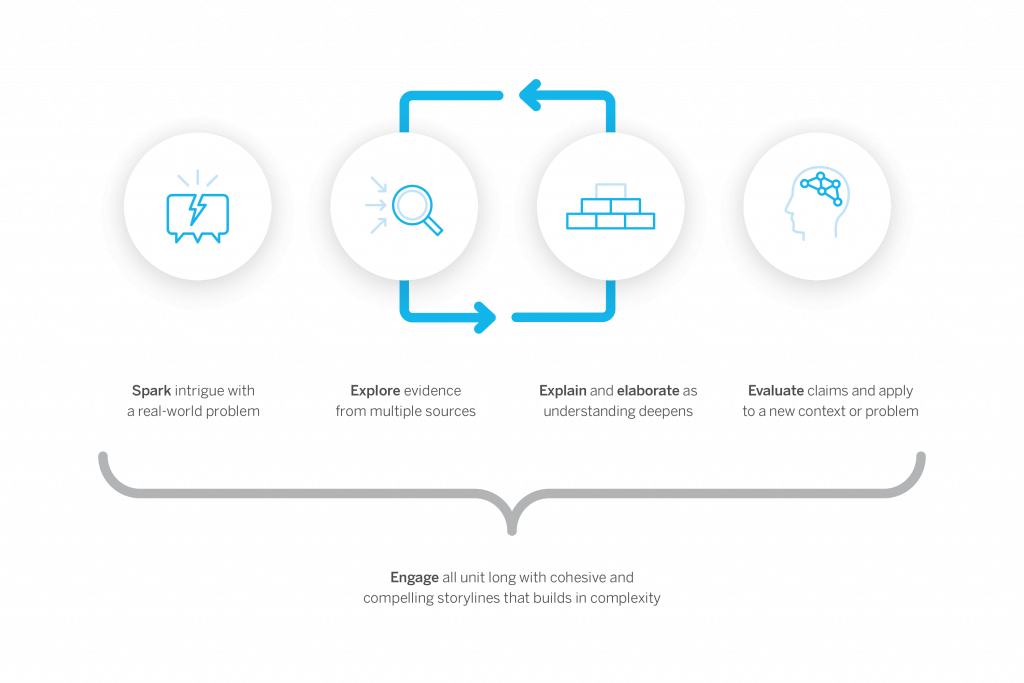
Extension activities: When some students are ready to move on and others are not, our unit extension activities can be a big help. Found in the Lesson Brief section of both the digital and printed Teacher’s Guide, these activities ensure that advanced learners remain engaged and challenged while teachers help the rest of the class build the foundational knowledge they need to be successful later in the unit.
What’s important to remember is that more hands-on doesn’t necessarily mean better, at least according to the California NGSS. That’s because only two of the eight Science and Engineering Practices (SEPs) are directly related to hands-on learning.
Just as scientists gather evidence from many types of sources, so do students in the Amplify Science California program. Like scientists, students gather evidence from physical models, digital models, texts, videos, photographs, maps, and data sets. By doing so, we provide students more opportunities than any other program to practice using all of the practices called out in the California NGSS Framework.
NGSS 8 Science Practices
- Asking questions
- Developing and using models
- Planning and carrying out investigations
- Analyzing and interpreting data
- Using mathematics and computational thinking
- Constructing explanations
- Engaging in arguments from evidence
- Obtaining, evaluating, and communicating information
While all of our units engage students in gathering evidence from a rich collection of sources, the reliance on different types of evidence (and evidence sources) varies according to unit. For instance, some units lend themselves to meaningful hands-on experiences, while in other units the phenomena students are investigating are too slow, too dangerous, or too big to be observed directly. In those units, students rely more heavily on other evidence sources such a physical models or simulations.
Unit types in grades K–5
In each K–5 grade, there is one unit that emphasizes investigation, one that emphasizes modeling, and one that emphasizes design. In addition, in grades 3–5, there is also one unit that emphasizes argumentation.
Unit types in grades 6–8
Each 6–8 grade features three types of units: Launch, Core, and Engineering Internships. Each year has one Launch unit, six Core units, and two Engineering Internships.
For teachers who wish to supplement the lessons with even more hands-on activities, optional “flextension” activities are included in many units.
As a blended curriculum, districts who adopt Amplify Science California are outfitted with a variety of print and digital resources as well as hands-on materials kits. To explore the specific components of the program, visit our What’s Included page.
As our customers will tell you, when you adopt Amplify Science California, you aren’t just buying a science curriculum, you’re joining a family. As such, along with materials, your adoption of Amplify Science California also includes care and support through a variety of staff and resources, including: customer support specialists, pedagogical support specialist, implementation specialists, professional learning specialists, educational partnership managers, and more.
Technical questions
To ensure that your hardware and network meet the minimum technical requirements for optimal performance and support of your digital curriculum products please see Amplify’s customer requirements page.
Absolutely! While 1:1 scenarios are great, they aren’t required. That’s because all Amplify Science California lessons were designed with device sharing in mind, and never assume that every student has a separate device.
When the use of practice apps is called for in a lesson, you have several options:
- If internet access is unavailable—“Preload” the digital tool on your device or devices for use offline.
- If limited student devices are available—Have students do the activities in pairs or small groups.
- If no student devices are available—Project the digital tool to the class and either “drive” the digital tool yourself or invite students to “drive” by using your device.
learning.amplify.com gives you access to the digital Teacher’s Guide and also gives your students (grades 6–8) access to the digital student experience.
apps.learning.amplify.com/elementary gives your students (grades 2–5) access to any practice apps referenced in the instruction. The teacher will either need to log in using their credentials, or have student accounts set up.
Tech headaches are never fun. However, implementing the following tips can help you keep the tech gremlins away.
- Display the student URLs near the classroom display materials.
- Before you start a unit, download all unit and lesson resources using the Offline Guide found in the Unit Guide of your digital Teacher’s Guide. In the event that connectivity issues strike, you will still be able to conduct your lessons without interruption.
- Use Chrome or Safari if possible as these are our preferred browsers.
- Disable pop-up blockers on all devices being used to support lessons.
- Be prepared for some webpages to open in a new tab and for PDF files to download automatically.
- Check and test your connections to any projection devices that you might be using throughout the lesson.
- Display the student URLs near the classroom display materials.
Welcome to Amplify Science Pennsylvania
(K–5)!
Amplify Science is an engaging core curriculum designed for three-dimensional, phenomena-based learning.
With Amplify Science, Pennsylvania students shift from learning about to figuring out science through authentic three-dimensional (3D) learning and phenomena-based exploration. In each unit, students take on the role of a scientist or engineer to investigate a real-world problem. This prepares them to become critical thinkers who can solve problems in their communities and beyond.

What is Amplify Science Pennsylvania?
Customized lessons for Pennsylvania
Amplify Science Pennsylvania (K–5) combines our nationally recognized, proven curriculum with custom lessons specifically designed to ensure you are meeting Pennsylvania’s STEELS standards.

The Lawrence Hall of Science
Developed by the science education experts at UC Berkeley’s Lawrence Hall of Science and the digital learning team at Amplify, our program features:
- A phenomena-based approach in which students construct a complex understanding of each unit’s anchor phenomenon.
- A blend of cohesive storylines, hands-on investigations, rich discussions, literacy-rich activities, and digital tools.
- Carefully crafted units, chapters, lessons, and activities designed to deliver true three-dimensional learning.
- An instructional design that supports all learners in accessing all standards.

Proven to work
Instructional model
The Amplify Science Pennsylvania program is rooted in the proven, research-based pedagogy of Do, Talk, Read, Write, Visualize. Here’s how each element works:
Do
Firsthand investigations are an important part of any science classroom, and Amplify Science Pennsylvania has students getting hands-on in every unit—from building models of protein molecules to experimenting with electrical systems.
Talk
Student-to-student discourse and full-class discussions are an integral part of the program. Students are provided with numerous opportunities to engage in meaningful oral scientific argumentation, all while fostering a collaborative classroom environment.
Read
Students read scientific articles, focusing their reading activities on searching for evidence related to their investigation and on asking and recording questions as they read through fascinating texts on 21st-century topics.
Write
Following real-world practices, students write scientific arguments based on evidence they’ve collected, making clear their reasoning about how a given piece of evidence connects to one of several claims.
Visualize
By manipulating digital simulations and using modeling tools to craft visualizations of their thinking— just as real scientists and engineers
do—students take their learning far beyond the confines of what they can physically see in the classroom in an exciting and authentic way.
Program structure
Our cyclical lesson design ensures that students receive multiple exposures to concepts through a variety of modalities. As they progress through the lessons within a unit, students build and deepen their understanding, increasing their ability to develop and refine complex explanations of the unit’s phenomenon.
It’s this proven program structure and lesson design that enables Amplify Science Pennsylvania to address 100% of the Next Generation Science Standards (NGSS) and support students in mastering the Pennsylvania Science Standards.

Unit types
While every unit delivers three-dimensional learning experiences and engages students in gathering evidence from a rich collection of sources, each unit also emphasizes a particular science and engineering practice.
In grades K–2:
- One unit emphasizes the practice of investigation.
- One unit emphasizes the practice of modeling.
- One unit emphasizes the practice of engineering design.
In grades 3–5, students experience the three unit types above, plus:
One additional unit that emphasizes the practice of argumentation.
Investigation units focus on the process of strategically developing investigations and gathering data to answer questions. Students are first asked to consider questions about what happens in the natural world and why, and are then involved in designing and conducting investigations that produce data to help answer those questions.
Modeling units provide extra support to students engaging in the practice of modeling. Students use physical models, investigate with computer models, and create their own diagrams to help them visualize what might be happening on the nanoscale.
Engineering design units provide opportunities for students to solve complex problems by applying science principles to the design of functional solutions, and iteratively testing those solutions to determine how well they meet preset criteria.
Argumentation units provide students with regular opportunities to explore and discuss available evidence, time and support to consider how evidence may be leveraged in support of claims, and independence that increases as they mount written arguments in support of their claims.
Unit sequence
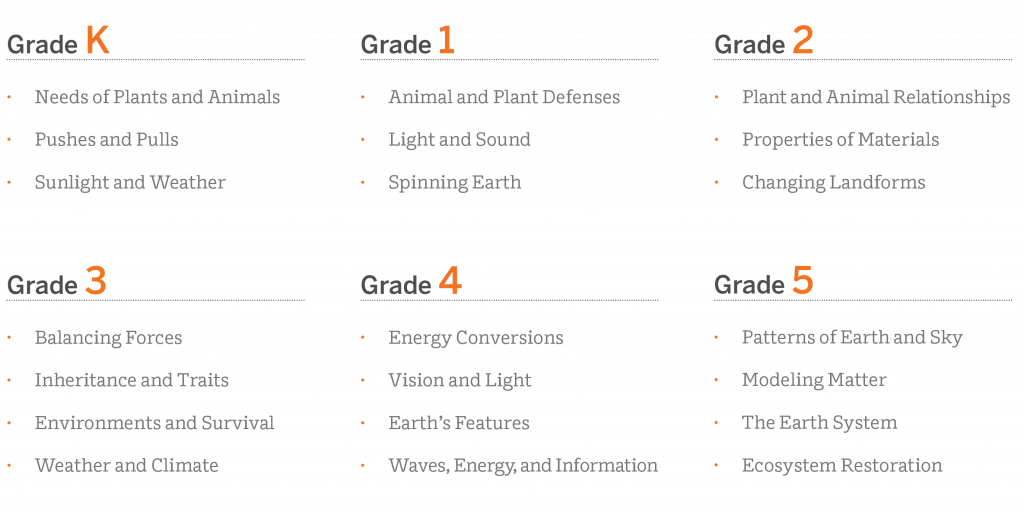
Our lessons follow a structure that is grounded in regular routines while still being flexible enough to allow for a variety of learning experiences.
In fact, our multimodal instruction offers more opportunities for students to construct meaning, and practice and apply concepts, than any other program. What’s more, our modular design means our units can be flexibly arranged to support your instructional goals.
Program components
Available digitally and in print, our unit-specific reference guides are chock-full of helpful resources, including scientific background knowledge, planning information and resources, color-coded 3D Statements, detailed lesson plans, tips for delivering instruction, and differentiation strategies.

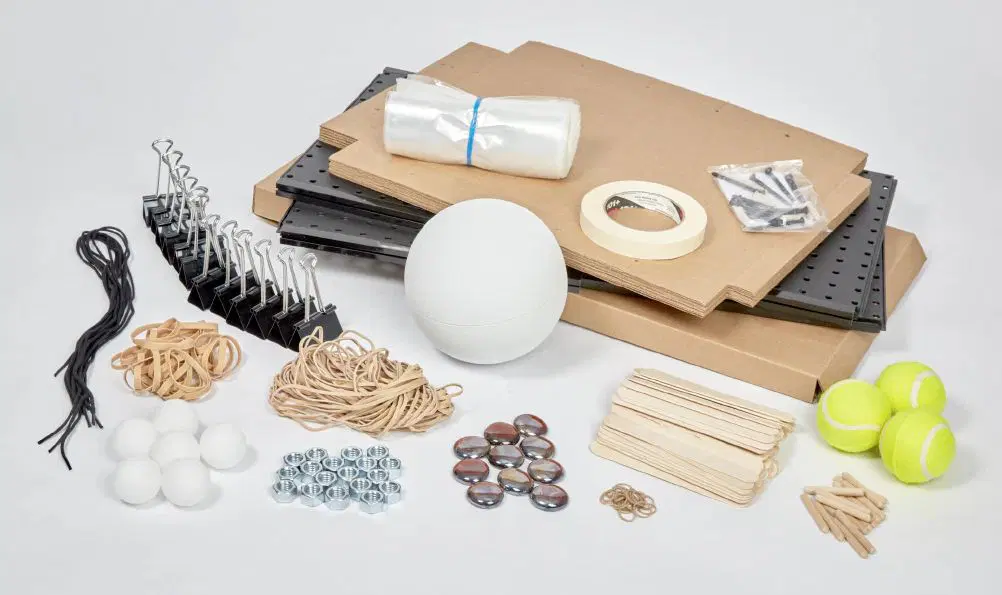
Hands-on learning is an essential part of Amplify Science Pennsylvania and is integrated into every unit. Students actively participate in science, playing the roles of scientists and engineers as they gather evidence, think critically, solve problems, and develop and defend claims about the world around them. Every unit includes hands-on investigations that are critical to achieving the unit’s learning goals.

More hands-on with Flextensions:
Hands-on Flextensions are additional, optional investigations that are included at logical points in the learning progression and give students an opportunity to dig deeper if time permits. These activities offer teachers flexibility to choose to dedicate more time to hands-on learning. Materials referenced in Hands-on Flextension activities will either be included in the unit kit or are easily sourced. Supporting resources such as student worksheets will be included as downloadable PDF files.
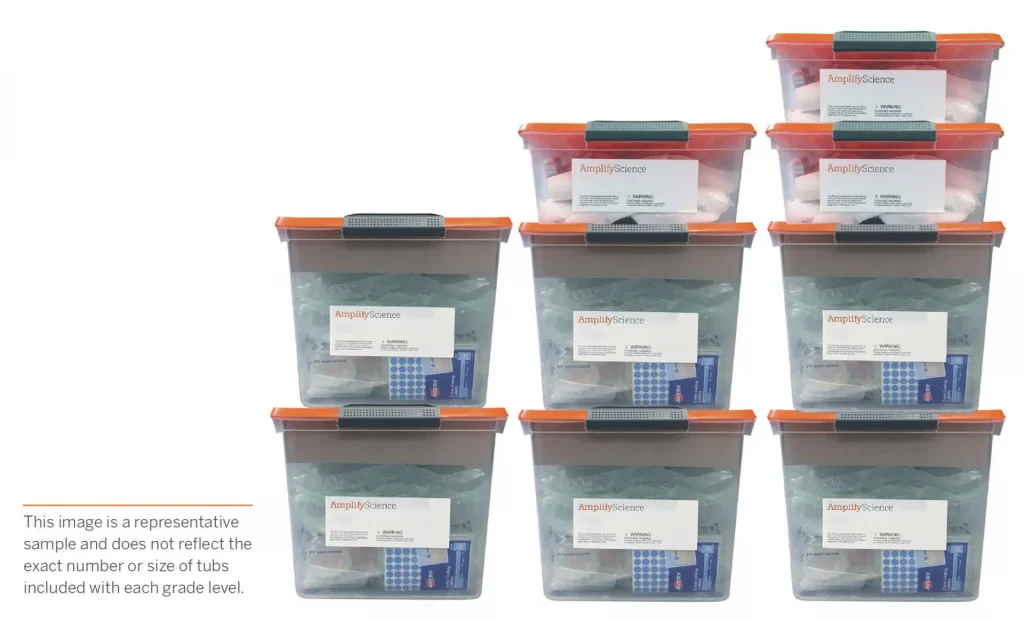
Our kits include enough non-consumable materials to support a class of 36 students and enough consumable items to support 72 students. In other words, each kit can last two years! Plus, our unit-specific kits mean teachers just grab the tub they need for the unit and then put it all back with ease.
Each unit of Amplify Science Pennsylvania (K–5) includes six unique Student Books written by educators at the Lawrence Hall of Science specifically for the program. These content-rich nonfiction and informational texts provide opportunities for students to search for evidence relevant to their firsthand investigations, see science practices and dispositions modeled, extend their science knowledge, provide real-world connections as they master reading-to-learn and close reading skills, and construct evidence-based arguments.
Important note:
Students in grades K–5 are never asked to read alone. Rather, books are read to, with, and by students with ample scaffolding and support provided by the teacher. Big Books are read aloud or together with the class to introduce ideas. Student Books allow for small-group reading and reading in pairs.

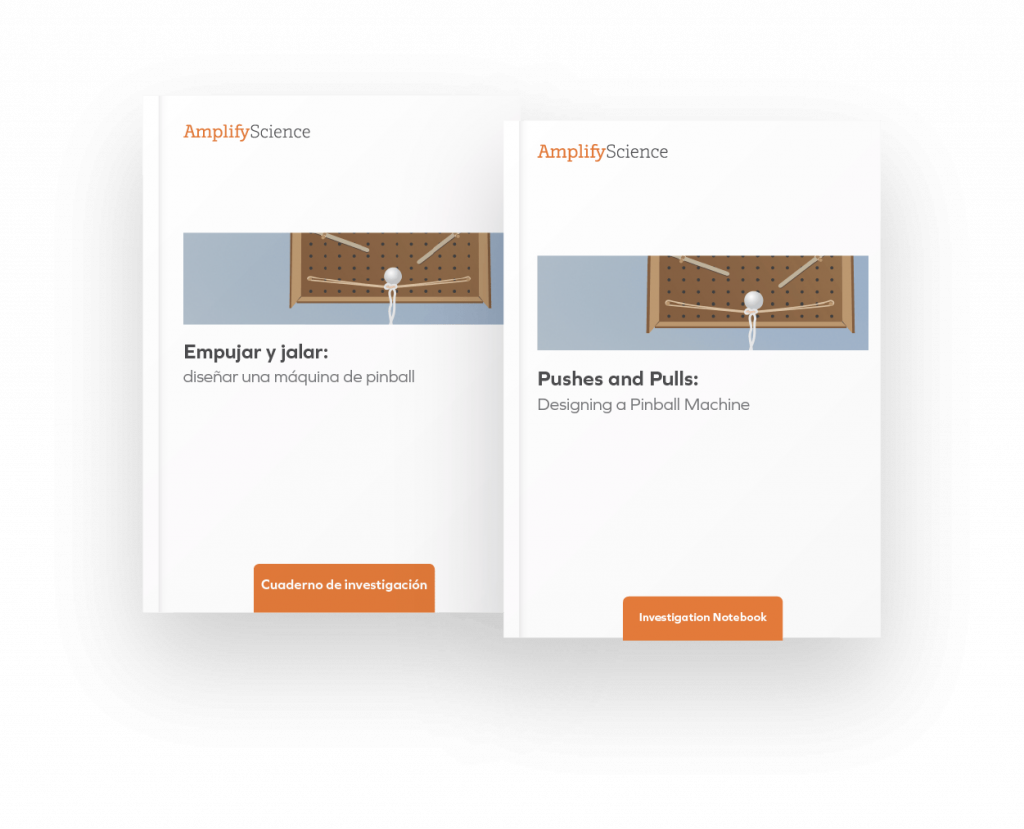
Available for every unit, our Student Investigation Notebooks contain instructions for activities and space for students to record data and observations, reflect on ideas from texts and investigations, and construct explanations and arguments.
In grades K–5, one copy of the Student Investigation Notebook is included in each unit’s materials kit for use as a blackline master. Each notebook is also available as a downloadable PDF on the Unit Guide page of the digital Teacher’s Guide.
Amplify Science Pennsylvania offers digital experience licenses that make elementary instruction more flexible for students and teachers and provide additional means to engage in remote, hybrid, or in-person learning!
Student-facing digital lessons
With the digital experience, students can engage with digital lesson content in one cohesive experience. It’s the same content from Amplify Science Pennsylvania in a new, integrated format, in which students can interact with slides, Sims, modeling tools, videos, books, and more.

Digital student notebook pages
Students can draw, write, record audio, and insert images into their Investigation Notebook pages. Their work is automatically saved and delivered to you in real time. When students edit their work, those edits are immediately reflected on your teacher work review page. You can access student responses by clicking “View Work,” where you can see students’ Investigation Notebook pages from the lesson, updating live.
Assign in Amplify
The digital experience allows flexibility with optional features such as scheduling assignments in advance and setting due dates. You can use Scheduling to determine the date and time that the assignment appears in Student Home. You also have the flexibility to schedule when assignments appear and to use dates to remove assignments from Student Home.
Assign in LMS
You can also assign lessons via our integrations with learning management systems (LMS) such as Google Classroom and Microsoft Teams, or by copying a lesson link and sharing it with students through the platform of your choice. The assignment link you send will provide students with direct access to the full lesson—slides, videos, digital tools, and worksheet activities—no student platform navigation required!
Teacher platform and presentation
Teacher-facing lesson content—including sample teacher talk, student responses, pedagogical support, and possible student responses—shows on a teacher’s private Teacher Guide tab. Students only see the lesson slides that are being presented.

Explore your print samples
With your Amplify Science Pennsylvania print samples, you’ll find unit-specific Teacher’s References Guides, Student Investigation Notebooks, and sets of Student Books for each grade level.
A note about the Teacher Reference Guides:
It’s important that you see the full breadth and depth of our instruction. For that reason, we provide a copy of each of our unit-specific Teacher Reference Guides.
Teachers do not use these robust reference guides for day-to-day teaching. For that, we have a hands-free Teacher’s Guide!

- Teacher’s Reference Guide: Unlike a typical Teacher’s Guide that requires a series of supplemental books to support it, our encyclopedic reference guide is chock-full of everything a teacher needs to fully implement our program and the NGSS.
- Ready-to-Teach Lesson Slides: For daily instruction, teachers need their hands free. That’s why we created ready-to-teach lesson slides for every single lesson. What’s more, the slides are editable and include suggested teacher talk and point-of-use differentiation and other instructional tips. Click to learn more.
A note about the Materials Kits:
Hands-on learning is at the heart of Amplify Science Pennsylvania, and is integrated into every unit. To make hands-on learning more manageable for busy teachers, Amplify Science Pennsylvania materials are organized into unit-specific kits.
What’s different about Amplify’s unit-specific material kits?
- They include more materials. We give teachers enough non-consumable materials to support a class of 36 students and enough consumables to support 72 student uses. In other words, each kit will last two years.
- They’re more manageable. Unlike other programs that require large groups of students to share limited sets of materials, our kits include enough to support small groups of four to five students.
- They include supportive videos. Each hands-on activity provides clear instructions for the teacher, with more complex activities supported by video demonstrations and illustrations.
Grade-specific lists of all materials included in each kit:
- Grade K: Materials Kit List
- Grade 1: Materials Kit List
- Grade 2: Materials Kit List
- Grade 3: Materials Kit List
- Grade 4: Materials Kit List
- Grade 5: Materials Kit List
Spanish-language support
Amplify Science Pennsylvania is committed to providing support to meet the needs of all learners, including multiple access points for Spanish-speaking students. Developed in conjunction with Spanish-language experts and classroom teachers, several components are available in Spanish across the Amplify Science Pennsylvania curriculum.
Spanish-language materials include:
| COMPONENT | TEACHER/STUDENT |
| Student Investigation Notebooks | Student |
| Student Books | Student |
| Printed classroom materials Unit and chapter questions, key concepts, vocabulary cards, etc. |
Teacher and student |
| Copymasters | Teacher |
| Assessments | Teacher |
| Spanish teacher support license This license includes teacher talk, projections, and downloadable PDFs of all print materials in Spanish. |
Teacher |
Resources to support your review
Contact us
Support is always available. Our team is dedicated to helping you every step of the way.
Contact your dedicated Pennsylvania representative.




Administrators, welcome to mCLASS!
Here you’ll find information about enrollment and licensing, technical requirements, professional learning resources, and more.

Onboarding: What to expect
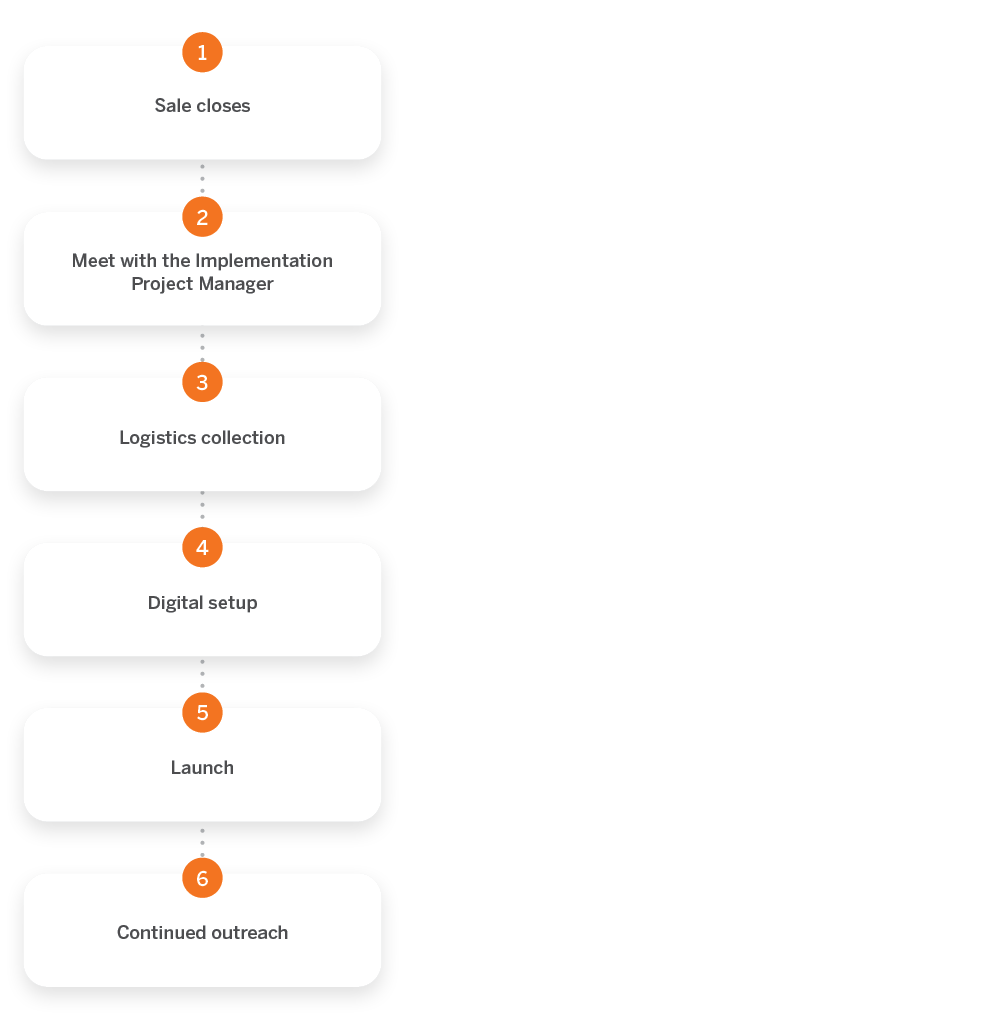
Welcome to mCLASS! There are six basic steps to onboarding. Use this visual as a reference, but also know that our dedicated implementation team will be there to support you during the entire process.
Technology requirements and guidelines
To ensure that your hardware and network meet the minimum technical requirements for performance and support of mCLASS, please see Amplify’s customer requirements page.
You’ll also want to add the URLs on this page to the corresponding district- or school-level filters so that your teachers and students can access their mCLASS materials.
Data sharing agreement
Partnering with Amplify through our data sharing program deepens learning outcomes and gives you the performance analysis you need to make impactful decisions within your district or school. By signing our data sharing agreement, your district will help us to better understand student performance as it relates to your state’s standards. It also allows us to compare results with the curriculum-embedded assessments and state-level assessments. These analyses will help you identify the areas where your teachers and students are excelling or may be experiencing challenges.
Stay tuned for additional updates.
Enrollment and licensing overview
During the enrollment and licensing call, your Amplify implementation partner will walk you through the enrollment process. We recommend exploring the enrollment web tool ahead of the call for suggestions on which enrollment method may be best for your district.
The following guides provide additional information about enrollment methods and the data sharing process.

You can also reference the mCLASS Enrollment Help collection for additional information.
Preparing for your materials
If you have ordered printed assessment kits, you or the materials coordinator at your school or district will receive a shipping logistics survey to ensure a smooth delivery. It is critical that this survey be completed prior to the shipment of materials. If your school or district has not received a survey, reach out to your Amplify implementation manager.
What’s included in the kits?
Below you will find a list of the print materials included in each mCLASS kit.
DIBELS 8th Edition
The mCLASS DIBELS® 8th Edition kits are grade-specific and contain the student materials for assessment with mCLASS software. K–6 (Kits for each grade sold separately):
- How to Get Started with mCLASS one sheet
- Student Benchmark Assessment materials
- Student Progress Monitoring Assessment materials
- Assessment Administration and Scoring manual
Maze administration:
- Maze for grades 2–6 is typically administered online to a group of students, each on their own computer or device. No printed materials are needed.
- If your school does not have sufficient student devices or if your students are not yet ready for online assessment, you may administer Maze with paper and pencil and enter the scores manually. Get more information.
Materials for additional assessments in the mCLASS suite
For customers who use Text Reading and Comprehension (TRC), IDEL®, TRC Spanish, mCLASS® Math, and/or Intervention, we provide the following:
TRC Atlas Benchmark kit
- 76 leveled readers covering levels A–Z (both fiction and nonfiction)
- Tabs to organize books by level grouping
- Information pamphlet
mCLASS: Math
Kindergarten and grade 1 combination kit
- Activities Guide
- Counting chips
- Screening and Progress Monitoring student materials
Grade 2 kit
- Activities Guide
- Counting chips
- Screening and Progress Monitoring Teacher Guide and answer key
- Screening and Progress Monitoring forms 1–10
Grade 3 kit
- Activities Guide
- Screening and Progress Monitoring teacher guide and answer key
- Screening and Progress Monitoring forms 1–10
Multi-grade kit, including K–3
- All materials listed above
IDEL
IDEL Multi-grade kit (K–3):
- Kit includes K–3 student and teacher materials
TRC Spanish
TRC Spanish Benchmark kit (K–3)
- 20 leveled readers covering Descrubriendo la Lectura (DLL) levels 1–24 (both fiction and nonfiction)
- Information pamphlet
- 16 additional texts available online via the mCLASS home training page
Intervention
K–3 and 4–6 kits (sold separately)
- Printed cards
- Puppet
- Whiteboard
- Sticker book
- 25 resealable bags
- Magnifying glass
- Burst® binder
- Burst messenger bag
- User Guides
- Accordion file
- Burst posters
- Light blue carrying case (includes double-tipped markers, dry erase markers, counting chips, and sand timers)
- Assessment books
Announcements
Use stimulus funding to drive transformation
Learn about ESSER I, II, and III funding (or CARES, CRRSA, and ARP) and how to use these funds to help with learning recovery and acceleration. Districts have significant flexibility in how to use the ESSER money, with ESSER II and III specifying that some of the funds should be used to address unfinished learning. All Amplify programs and services meet the criteria for the funding. Get more information about funding and timelines.
Next steps: How do I support my teachers?
Logging in to mCLASS Home
mCLASS Home is where you will access mCLASS Reporting, Instruction, and other helpful resources. Teachers can log in by navigating to mclass.amplify.com.
Setting up your assessment device
Assessments are administered using the mCLASS app. The mCLASS app is installed by creating a shortcut from your school’s preferred web browser on the desktop or home screen of a teacher’s device. Share this link with teachers for best practices specific to their device’s operating system.
Professional development
We partner with every district to make sure the mCLASS rollout meets their unique needs. Check out our professional development site to get a better understanding of what our team has to offer.
Contact us
Powerful (and free!) pedagogical support
Amplify provides a unique kind of support you won’t find from other publishers. We’ve developed an educational support team of former teachers and administrators who provide pedagogical support at no cost to educators using our programs. This free service includes:
- Support with administering and interpreting assessment data and more.
- Guidance for developing lesson plans and intervention plans.
- Recommendations and tips for day-to-day teaching with mCLASS.
To reach our pedagogical team, click the orange icon while logged into mCLASS to get immediate help, call (866) 629-2446, or email edsupport@amplify.com.
Timely technical and program support
Our Customer Care and Support team is available Monday through Friday, 7 a.m. to 9 p.m. ET, and Sunday, 10 a.m. to 6 p.m. ET, through a variety of channels:
- Live chat: Click the orange icon while logged into mCLASS to get immediate help in the middle of the school day.
- Phone: Call our toll-free number: (800) 823-1969.
- Email: Send an email to help@amplify.com.
Join our community
Our mCLASS Facebook group is a community of mCLASS educators from across the country. It’s a space to share best practices, ideas, and support on everything from implementation to instruction. Join today.
USBE Data Analysis for K-3 Reading Assessment Program
Introduction
mCLASS Assessment: Acadience™ Reading
How it works: Quickly identify the needs of each student and inform next steps with instant analysis, reports, and instructional planning tools included in the only licensed mobile version of the research-based Acadience Reading assessment.
- Use short, 1-minute fluency measures for foundational reading skills.
- Replace manual calculations with instant results and recommended activities.
- Compare student progress with predictive, research-based benchmark goals.
- Track progress and target instruction to individual student needs.
- Support decision-making at every level using aggregate reports.
- Translate class- and student-level reports into individualized instruction using the Now What?Tools.
- Get a more complete view of early literacy skills with the new mCLASS:Early Literacy Measures (ELM).
Enrollment for mClass
Please review the Utah Enrollment for mCLASS document for important information about the rostering process for LEAs in Utah.
Benchmark Windows
The USBE has required that each Acadience Reading testing benchmark window occur within the below dates:
BOY — the first benchmark before October 14
MOY — the second benchmark between December 1 and February 5
EOY — the third benchmark between the middle of April and June 15
Benchmark windows for LEAs are set to the state benchmark window dates in mCLASS. Each LEA is to have 2-4 week benchmark period that is within the state benchmark window dates and LEA leaders are to share those dates with staff. The benchmark windows in mCLASS are set to the state benchmark window dates; not the LEA benchmark window dates and this can not be changed in mCLASS. If a student moves into your LEA and your benchmark window is closed, but the state benchmark period is still open, the student must be benchmarked. Should your LEA need an extension of a benchmark window beyond the close of the state benchmark windows, that must be approved by the USBE Assessment Department. Once the benchmark window closes, do not give the benchmark to a student, instead, educators can progress monitor the student on the measures they would have received a benchmark in order to get the students current instructional levels.
If you have questions regarding your current benchmark window dates, feel free to reach out to Amplify Customer Services at help@amplify.com.
Acadience Reading Benchmark Invalidations
Before you invalidate a benchmark probe, review the USBE’s list of acceptable reasons for invalidating on the Frequently Asked Questions: Acadience Reading Invalidations document. If a district/charter has a significant percentage of invalidations, contact and further action will be deployed. If you believe an invalidation is required, please contact your District/Charter Literacy Director. If they need support, they can contact Sara Wiebke, sara.wiebke@schools.utah.gov, to request an invalidation.
Progress Monitoring
The impact of progress monitoring
Progress monitoring is the most powerful tool we offer with regards to student achievement.
“Scores for Daze increase more slowly than they do for other Acadience Reading measures, so more frequent monitoring may not be as informative. For students who need to be monitored on Daze, we recommend monitoring once per month.”
Progress Monitoring with Acadience Reading
© Acadience Learning
October 2012
The Acadience Reading authors recommend progress monitoring students in the Well Below Benchmark category once every 7-10 days (and once every 10-12 days for students in the Below Benchmark category).
Progress monitoring is the practice of testing students briefly but frequently on the skill areas in which they are receiving instruction, to ensure that they are making adequate progress. When students are identified as at risk for reading difficulties, they can receive progress monitoring testing more frequently to ensure that the instruction they are receiving is helping them make progress. (Acadience Learning/October 2012, Progress Monitoring Guide)
The purposes of progress monitoring are:
- to provide ongoing feedback about the effectiveness of instruction,
- to determine students’ progress toward important and meaningful goals, and
- to make timely decisions about changes to instruction so that students will meet those goals.
How to progress monitor?
- Select students for progress monitoring
- Select Acadience Reading materials for progress monitoring
- Set progress monitoring goals
- Determine the frequency of progress monitoring
- Conduct progress monitoring assessment
- Access data through class and student reports
- Evaluate progress and modify instruction.
The key to progress monitoring: Instruction should link to progress monitoring and progress monitoring should link to instruction. They should run parallel and merge as one to confirm student growth in reading.
Check your progress monitoring fidelity report in mCLASS to ensure you are on track with these students. For more information regarding progress monitoring guidelines, visit the official progress monitoring guidelines.
Support Team
Amplify Customer Services
(800) 823-1969
Monday to Friday, 5 a.m. to 5 p.m. MT
help@amplify.com
Educational Support Team
Pedagogical Questions
(800) 823-1969
Monday to Friday, 5 a.m. to 5 p.m. MT
edsupport@amplify.com
For more information, please contact:
Sarah McCarty
Associate Director, Educational Partnership
(812) 593-5776
smccarty@amplify.com
Donna Bright
Educational Partnership Manager
(303) 960-3772
dbright@amplify.com
Robert McCarty
Regional Director of Educational Partnership
(435) 655-1731
rmccarty@amplify.com
Cydnee Carter
Assessment Development Coordinator
(801) 538-7654
cydnee.carter@schools.utah.gov
Liz Williams
Elementary ELA Assessment Specialist
(801) 538-7542
Liz.williams@schools.utah.gov
Sara Wiebke
Literacy Coordinator
(801) 538-7935
sara.wiebke@schools.utah.gov
Krista Hotelling
K-3 Literacy Specialist
(801) 538-7794
krista.hotelling@schools.utah.gov
Christine Elegante
K-3 Literacy Specialist
(801) 538-7551
christine.elegante@schools.utah.gov
Julie Clark
K-3 Literacy Specialist
801-499-2515
julie.clark@schools.utah.gov
Melissa Preziosi
Assessment Data Specialist
(801) 538-7949
melissa.preziosi@schools.utah.gov
Resources
Helpful tips and guides
- Implementation Roadmap Every school system has different objectives and needs, and this document is designed to help you define how the mCLASS system can best support you in achieving your goals.
- Checklist Use this checklist to ensure your staff is trained and your programmatic expectations are clearly communicated to all stakeholders. Completing each of these steps during the correlated benchmark window will help you realize the full value of your mCLASS assessment program.
- mCLASS: Online Help
- Acadience Reading Assessment Manual (Note: You will need to register as a user to get access to the materials; both registration and materials are available at no cost.)
- Acadience Reading Benchmark Goals and Composite Score
- Grouping Worksheets for Acadience Reading
- Acadience Reading Key Skills This document correlates the Acadience Reading measures to Basic Early Literacy Skills.
- The Big Ideas in Early Reading This document is a reference of the five Big Ideas in Early Reading.
- Acadience Reading Reminders A list of reminders the teacher can give to students while assessing Acadience Reading.
- USBE Literacy Framework
- Utah School Report Card: Early Literacy
- Utah State Board of Education Reading on Grade Level Targets for Acadience Reading K-6
- Five leadership practices that drive success in K-2 literacy
mCLASS:Acadience Reading tutorials
- mCLASS:Acadience Reading Next Scoring Practice
- mCLASS Now What? Tools Tutorial
- Pathways of Progress: Purpose
- ?Pathways of Progress: Setting Meaningful Goals
- Pathways of Progress: Highly Skilled Learners Criteria
- ?Goal Setting in mCLASS
- mCLASS How to calculate student pathways video
- Calculating Pathways from DYD Presentation
Technical resources
Amplify Enrollment This guide walks you through the necessary steps to complete enrollment using the manual enrollment tools on Amplify Home. It shows you how to manage staff, student, and class assignment information, and maintain the accuracy of your staff, student, and class assignments.
Devices & Requirements Ensure mCLASS is compatible with your devices and systems for optimal performance and support.
Remote Assessing
Videos:
Remote Assessment Guidance from the Acadience Team:
mCLASS®: Acadience® Reading (formerly known as DIBELS Next)
Key Points:
Before you assess:
1. Determine how you will show student materials and score in mCLASS at the same time.
| Description | |
|
Description Recommended set up |
|
| Modified set up |
Note: mCLASS app is optimized for touchscreen; scoring with a mouse may need more practice. |
2. Familiarize yourself with the digital copies of student materials.
3. Schedule virtual meetings with students. To communicate with English-speaking caregivers, consider sending this email or video. To communicate with Spanish-speaking caregivers, consider sending this email or video.
4. Determine how you will handle scenarios where there’s a lag:
| Description | |
| Record the meeting |
|
| Use a phone |
|
While you assess:
1. Take the opportunity to connect individually with your students as they experience so much change. Don’t make the session solely about testing, and remind caregivers and students that the assessment is a way to see how you can best tailor instruction.
2. Make student materials visible to your student.
For Maze, choose the model that works best for you:
Enter results into the mCLASS web reports
- Students complete online Maze during a video conference
- Put a link to the student assessment site (mclass.amplify.com/student) and the student’s credentials into the chat box (learn how to generate student credentials in this video)
- Ask your student to complete Maze.
- Students complete online Maze outside of a video conference (caregiver support is needed with log-in)
- Students complete Maze on paper
- Locate the benchmark Maze Acadience Learning’s site.
- Print a copy of the form you need (e.g. BOY) for each student in your class.
- Send the form home in a sealed envelope with students, mail the form to caregivers, or have caregivers get forms via school-based pick-up. Provide instructions not to open the envelope until the student is ready to take the assessment.
- Provide parents with instructions on how to proctor the assessment for their child. They need to:
- Give the form to their child
- Sit with their child and read the instructions and practice items
- Tell their child to stop when 3 minutes has elapsed
- Send screenshots of their child’s work via email or text, or return the completed form to the school in a sealed envelope provided by the school.
| Guidance | |
| Acadience:Reading |
Use the share screen feature to display student materials on your screen. Optional next step for measures that have student materials: Zoom users: grant your student control of your screen so you can see their cursor as they read:
Note: For Mac OSX, you will need to give Zoom access in the Accessibility tab in the Privacy and Security preferences of your Mac. For more information on giving Zoom access in Security and Privacy, click here. |
3. Score in mCLASS.
| Benchmark | Progress monitoring | |
| Acadience Reading (formerly known as DIBELS Next) | Available for free download on the Acadience Learning website | |
NEW AND NOTEWORTHY UPDATES
mCLASS Texas Edition, mCLASS Lectura, and mCLASS Intervention!
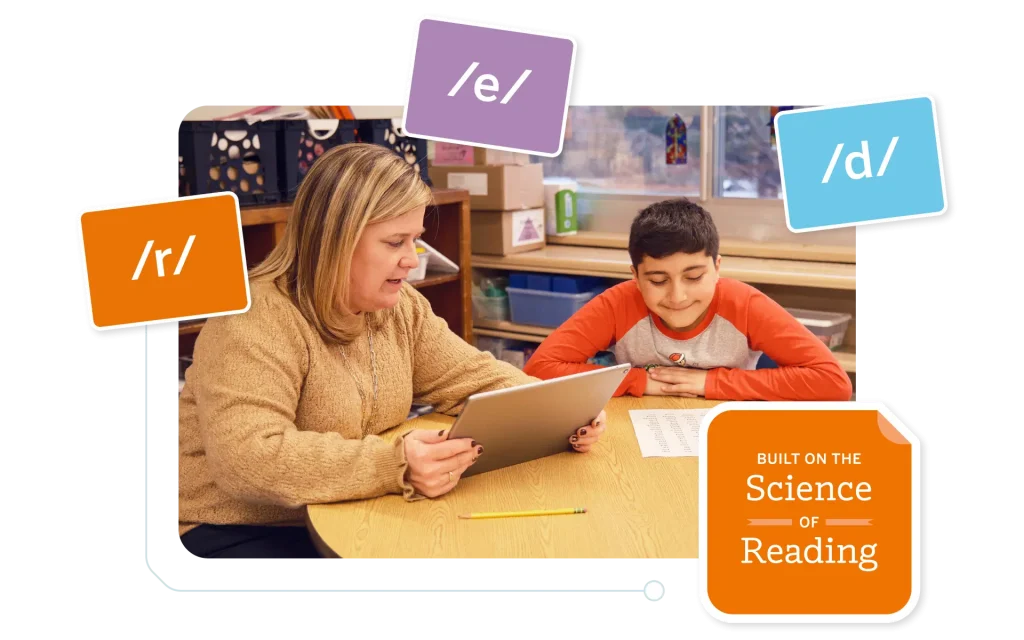
mCLASS® Texas Edition, mCLASS Lectura, and mCLASS® Intervention are introducing enhancements for the next school year. Explore the following improvements designed to save you time, extend your reach, and support your efforts to deliver the learning experiences your students deserve.
Updates
mCLASS Texas Edition expands to support grades 7–8.
This expansion supports a full K–8 literacy model (alongside Amplify Texas ELAR 6–8), to help you identify where both elementary and middle school students need support and to guide you on the next steps. With mCLASS Texas Edition for grades 7–8, you can support middle school students with reading fundamentals, monitor progress for grade-level and below-grade-level skills, and find instructional guidance based on best practices for middle school.
mCLASS Texas Edition Home Connect available in 15 additional languages
Starting Sept. 1, all mCLASS Texas Edition customers can generate Home Connect letters in 15 additional languages: Simplified Chinese (Mandarin), Traditional Chinese (Cantonese), Vietnamese, Russian, Punjabi, Filipino, Armenian, Korean, Hmong, Japanese, Ukrainian, Arabic, Farsi, Dari, and Pashto.
These translated letters include all essential features of our English and Spanish versions, ensuring every family receives their student’s complete mCLASS Texas Edition results, including: Vocabulary, Spelling, RAN, and Oral Language scores, plus targeted activities to support their child’s learning at home.

Enhanced district-level insights: New mCLASS Texas Edition progress monitoring data columns launch July 1.
Starting July 1, the mCLASS Texas Edition Progress Monitoring Download Your Data (DYD) Report will include three new columns that bring student growth insights to school and district leadership:
Aimline Status—Description of the progress monitoring result’s position in relation to the aimline
Aimline Value By Date—Score on the aimline on the day that the progress monitoring test is administered
Growth Goal Set—Score the student is striving to achieve by the start date of the next benchmark period
School and district leaders will gain the same detailed progress monitoring visibility teachers have relied on, now scaled across the entire district. This means data-driven decisions can be made faster, and students who need additional support will be identified as soon as possible.

mCLASS Reading becomes mCLASS Literacy.
Starting July 10, 2026, the brand name in our platform will shift from mCLASS Reading to mCLASS Literacy. This change is intended to reflect the importance of both reading and comprehension.

Updated Zones of Growth framework
On Sept. 1, 2026, the Zones of Growth framework will be updated using a recent national data set. Predictive growth rates will be based on students with the exact same scores, ensuring prediction accuracy is even more precise. Zones of Growth will also be updated for DIBELS Data System users.

New mCLASS Intervention Demo Mode available
We’ve also launched Demo Mode in mCLASS Intervention, which will help you explore the grouping and lesson generation platform through either self-guided exploration or a guided tour. To access the demo, log into your mCLASS program, navigate to the Intervention tab, and select “Try Demo.”

mCLASS Lectura update: phonemic awareness measure option for kindergarten and grade 1
Fluidez en la segmentación de fonemas (FSF) will be added to mCLASS Lectura as an optional measure for kindergarten and grade 1. FSF is a standardized, individually-administered phonemic awareness assessment that measures students’ ability to fluently segment words, a skill which is predictive of Spanish reading proficiency and is also transferable to support the development of English phonemic awareness.
FSF does not impact the overall mCLASS Lectura Composite Score.

Noteworthy features
PD Library
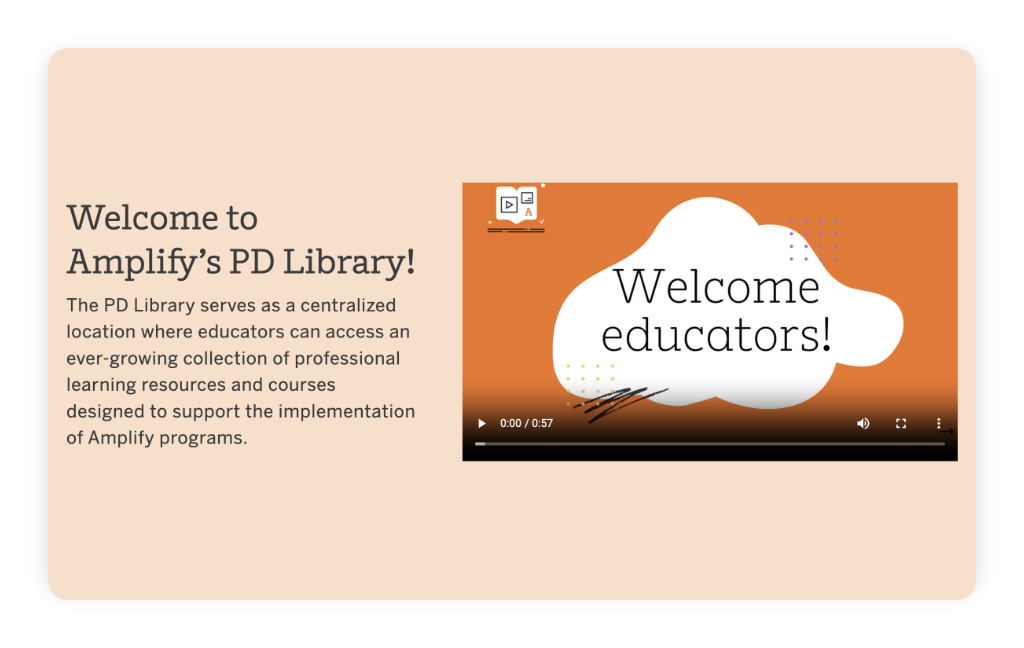
You’ll find helpful professional development (PD) resources in the PD Library to ensure your mCLASS implementation runs smoothly. When you’re logged into mCLASS, the PD Library can be accessed by clicking the PD Library button on the left navigation bar.
Demo mode in English Classroom Reporting
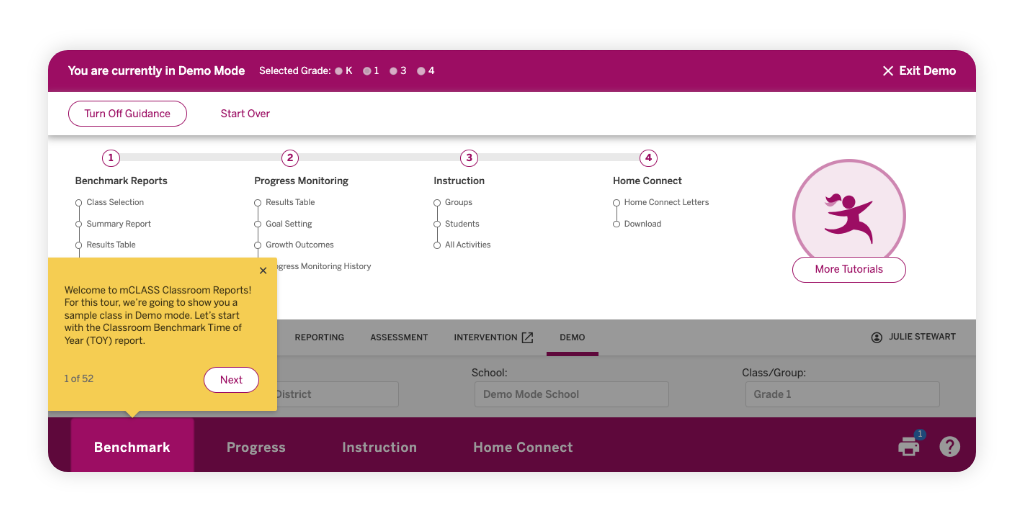
mCLASS English Classroom Reporting features a demo mode that guides teachers through sample classroom and student reports, highlighting realistic student data within the complete set of mCLASS instructional tools. This demo mode is especially helpful for onboarding purposes with teachers new to using mCLASS.
NEW AND NOTEWORTHY UPDATES
mCLASS DIBELS 8th Edition, mCLASS Lectura, and mCLASS Intervention!
mCLASS® DIBELS® 8th Edition, mCLASS Lectura, and mCLASS® Intervention are introducing enhancements for the next school year. Explore the following improvements designed to save you time, extend your reach, and support your efforts to deliver the learning experiences your students deserve.
Updates
mCLASS DIBELS 8th Edition expands to support grades 7–8.
This expansion supports a full K–8 literacy model (alongside Amplify ELA), to help you identify where both elementary and middle school students need support and to guide you on the next steps. With mCLASS DIBELS 8th Edition for grades 7–8, you can support middle school students with reading fundamentals, monitor progress for grade-level and below-grade-level skills, and find instructional guidance based on best practices for middle school.
mCLASS DIBELS 8th Edition Home Connect available in 15 additional languages
Starting Sept. 1, all mCLASS DIBELS 8th Edition customers can generate Home Connect letters in 15 additional languages: Simplified Chinese (Mandarin), Traditional Chinese (Cantonese), Vietnamese, Russian, Punjabi, Filipino, Armenian, Korean, Hmong, Japanese, Ukrainian, Arabic, Farsi, Dari, and Pashto.
These translated letters include all essential features of our English and Spanish versions, ensuring every family receives their student’s complete mCLASS DIBELS 8th Edition results, including: Vocabulary, Spelling, RAN, and Oral Language scores, plus targeted activities to support their child’s learning at home.

Enhanced district-level insights: New mCLASS DIBELS 8th Edition progress monitoring data columns launch July 1.
Starting July 1, the mCLASS DIBELS 8th Edition Progress Monitoring Download Your Data (DYD) Report will include three new columns that bring student growth insights to school and district leadership:
Aimline Status—Description of the progress monitoring result’s position in relation to the aimline
Aimline Value By Date—Score on the aimline on the day that the progress monitoring test is administered
Growth Goal Set—Score the student is striving to achieve by the start date of the next benchmark period
School and district leaders will gain the same detailed progress monitoring visibility teachers have relied on, now scaled across the entire district. This means data-driven decisions can be made faster, and students who need additional support will be identified as soon as possible.
mCLASS Reading becomes mCLASS Literacy.
Starting July 10, 2026, the brand name in our platform will shift from mCLASS Reading to mCLASS Literacy. This change is intended to reflect the importance of both reading and comprehension.

Updated Zones of Growth framework
On Sept. 1, 2026, the Zones of Growth framework will be updated using a recent national data set. Predictive growth rates will be based on students with the exact same scores, ensuring prediction accuracy is even more precise. Zones of Growth will also be updated for DIBELS Data System users.
New mCLASS Intervention Demo Mode available
We’ve also launched Demo Mode in mCLASS Intervention, which will help you explore the grouping and lesson generation platform through either self-guided exploration or a guided tour. To access the demo, log into your mCLASS program, navigate to the Intervention tab, and select “Try Demo.”

mCLASS Lectura update: phonemic awareness measure option for kindergarten and grade 1
Fluidez en la segmentación de fonemas (FSF) will be added to mCLASS Lectura as an optional measure for kindergarten and grade 1. FSF is a standardized, individually-administered phonemic awareness assessment that measures students’ ability to fluently segment words, a skill which is predictive of Spanish reading proficiency and is also transferable to support the development of English phonemic awareness.
FSF does not impact the overall mCLASS Lectura Composite Score.
Revised print materials for two mCLASS Lectura progress monitoring forms
We’ve corrected typos in the print materials for two Fluidez en Palabras (FEP) student progress monitoring forms. Beginning July 1, 2026, you will see a pop-up when you begin assessing students for these two forms which will provide instructions on how to find and print updated student materials.
Noteworthy features
PD Library
You’ll find helpful professional development (PD) resources in the PD Library to ensure your mCLASS implementation runs smoothly. When you’re logged into mCLASS, the PD Library can be accessed by clicking the PD Library button on the left navigation bar.
Demo mode in English Classroom Reporting
mCLASS English Classroom Reporting features a demo mode that guides teachers through sample classroom and student reports, highlighting realistic student data within the complete set of mCLASS instructional tools. This demo mode is especially helpful for onboarding purposes with teachers new to using mCLASS.
Utah – USBE Data Analysis for K-3 Reading Assessment Program – New
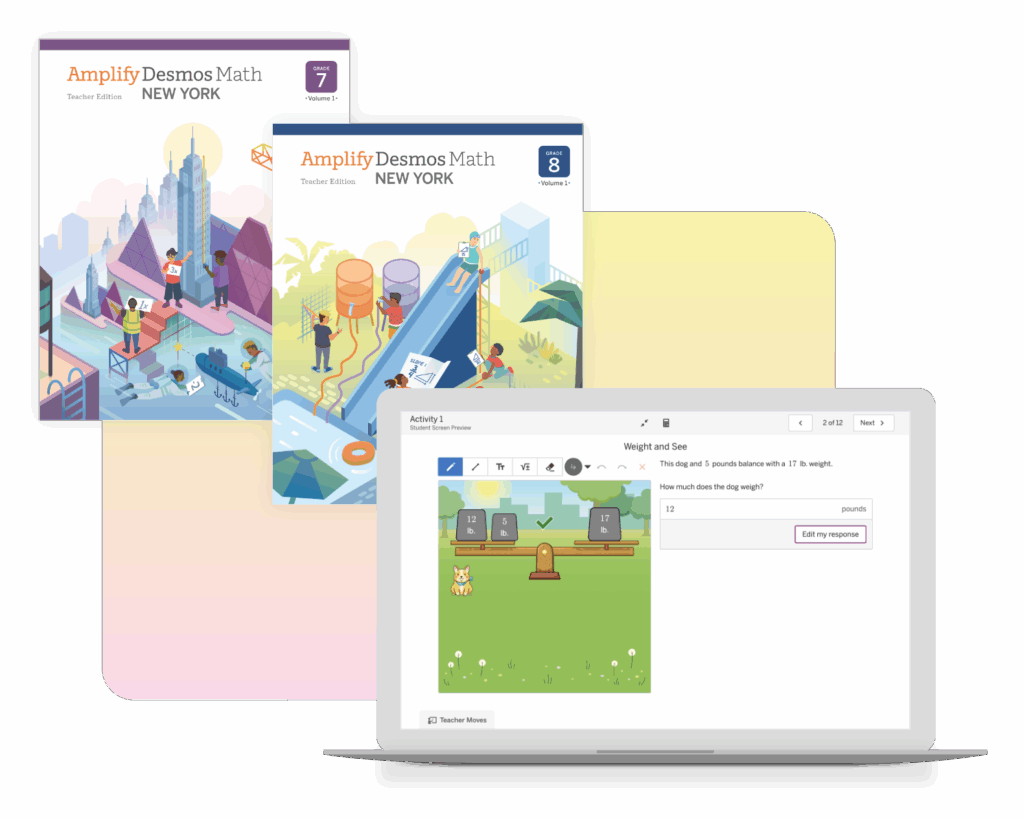
Amplify Desmos Math
for New York
Welcome to Amplify Desmos Math, a powerful new core program from Amplify and Desmos Classroom built for NYC teachers and students.
Amplify Desmos Math is built on four core tenets:
- Math can motivate students.
- A structured approach to problem-based learning can best tend to all aspects of rigor.
- Student thinking is valuable and visible.
- Students can catch up while keeping up with grade-level math.

What if your students asked to do more math?
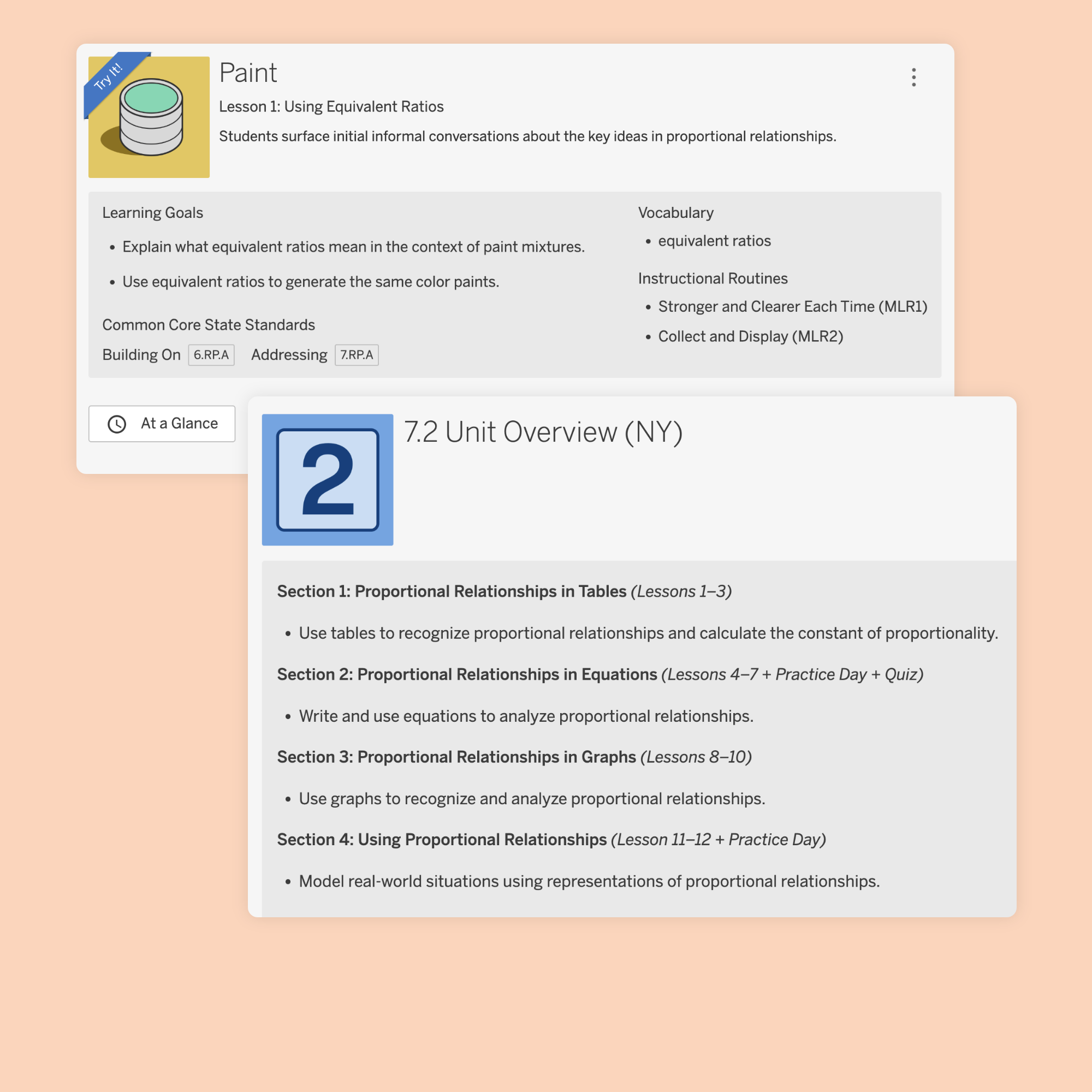
Amplify Desmos Math lessons are powerful in their ability to elicit student thinking and spark interesting, productive discussions.
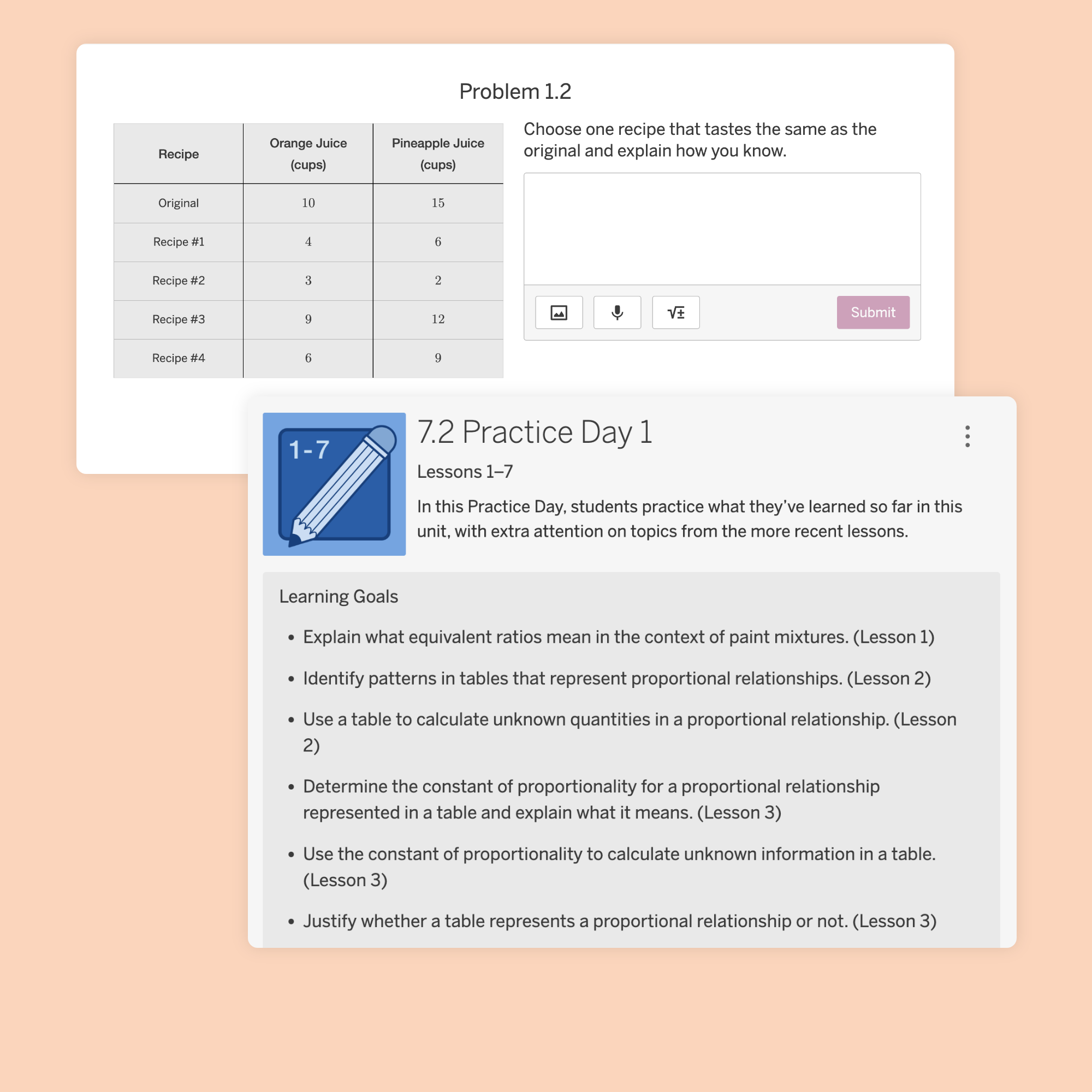
The lessons pose problems that invite a variety of approaches with their dynamic and interactive learning experiences on devices, as well as experiences on paper that are flexible, creative, and engaging.
As students work online, they interact with visuals and simulations that show their thinking and decisions. When appropriate, students see other students’ responses and engage in collaborative math discussions.
A Responsive Feedback feature responds to student thinking by showing the mathematical meaning behind it. This is more powerful than simply evaluating thinking as right or wrong, because it motivates and engages students in the learning process.
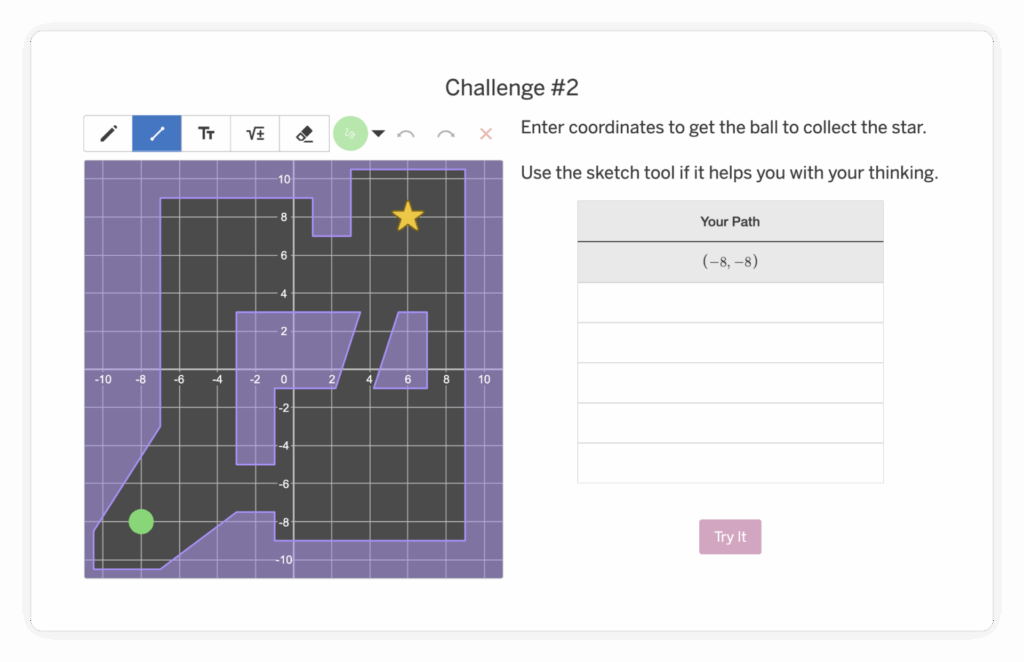
In this Grade 6 activity, students internalize the coordinate plane by plotting points to navigate the marble through the maze to collect the star.
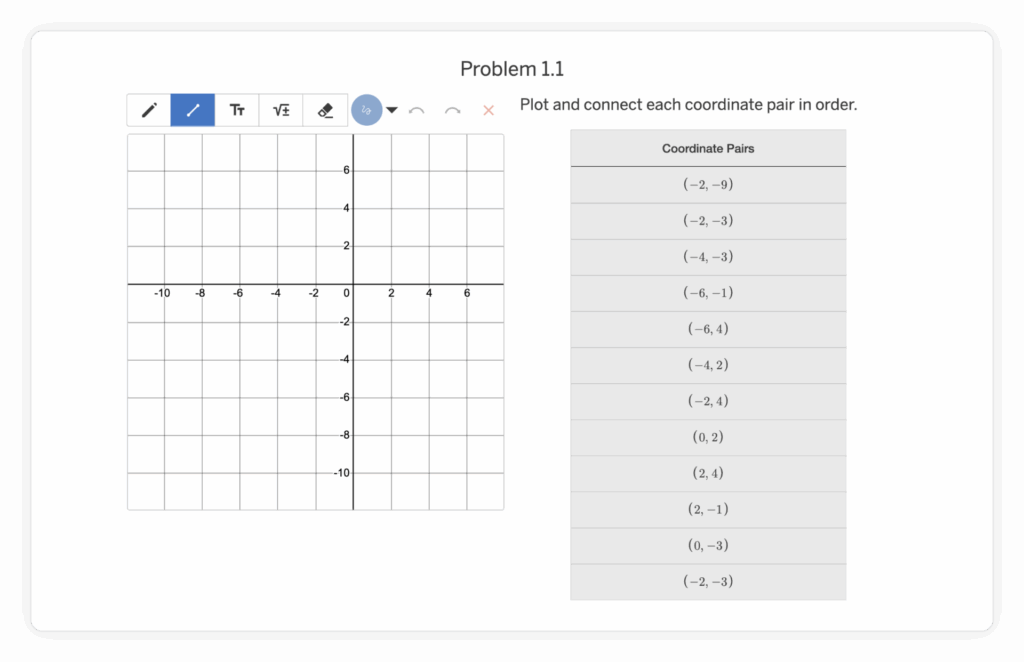
This prepares students to accurately and efficiently plot points with positive and negative coordinates on grids with different scales and explain the relationship between ordered pairs that differ only by the signs of the coordinates.
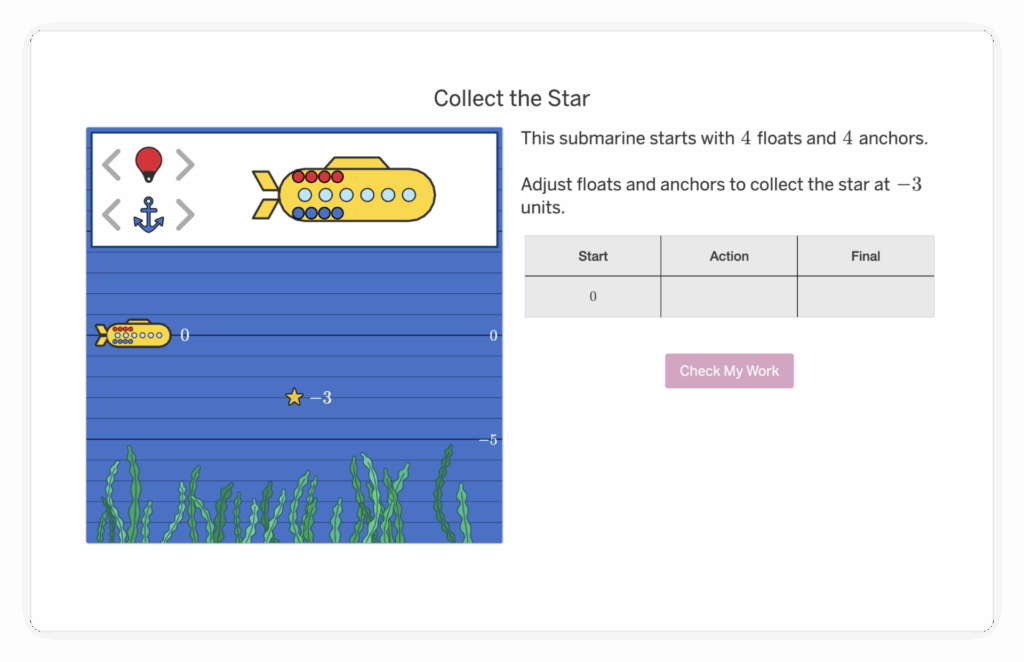
In this Grade 7 activity, students explore positive and negative integer operations using the up and down movement of a submarine.
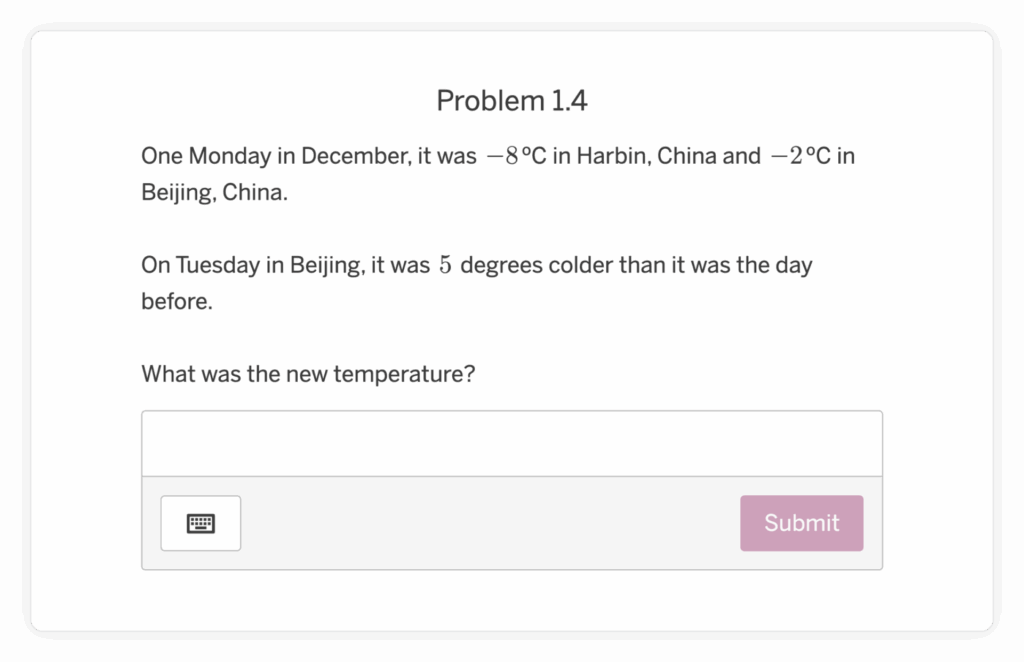
Students are then prepared apply this understanding in a variety of word problem contexts.
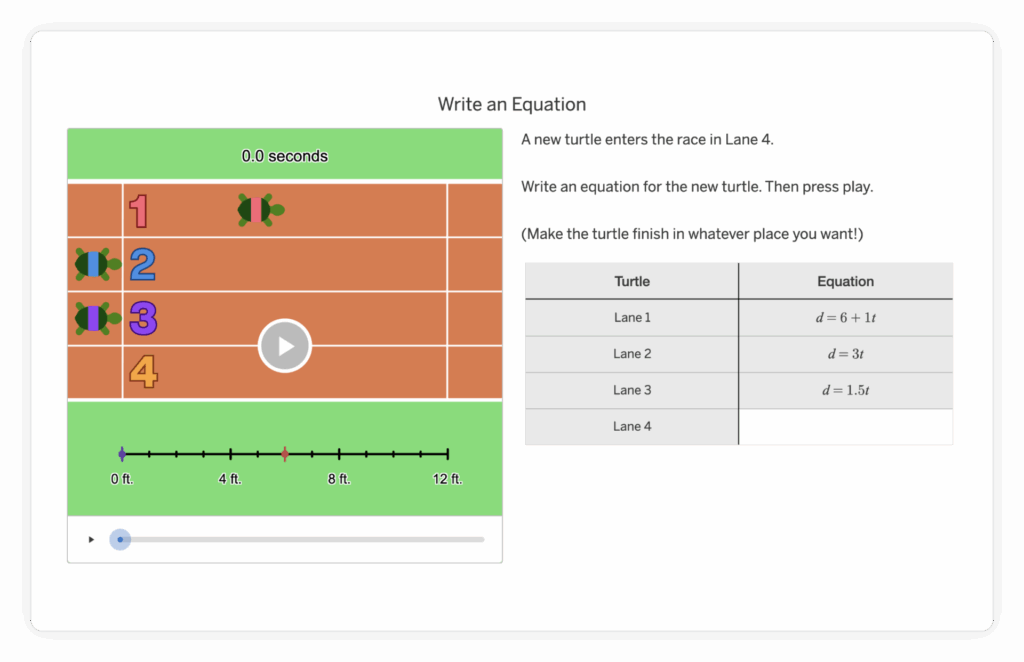
In this Grade 8 activity, students create rate, distance, and time equations based on turtle races.
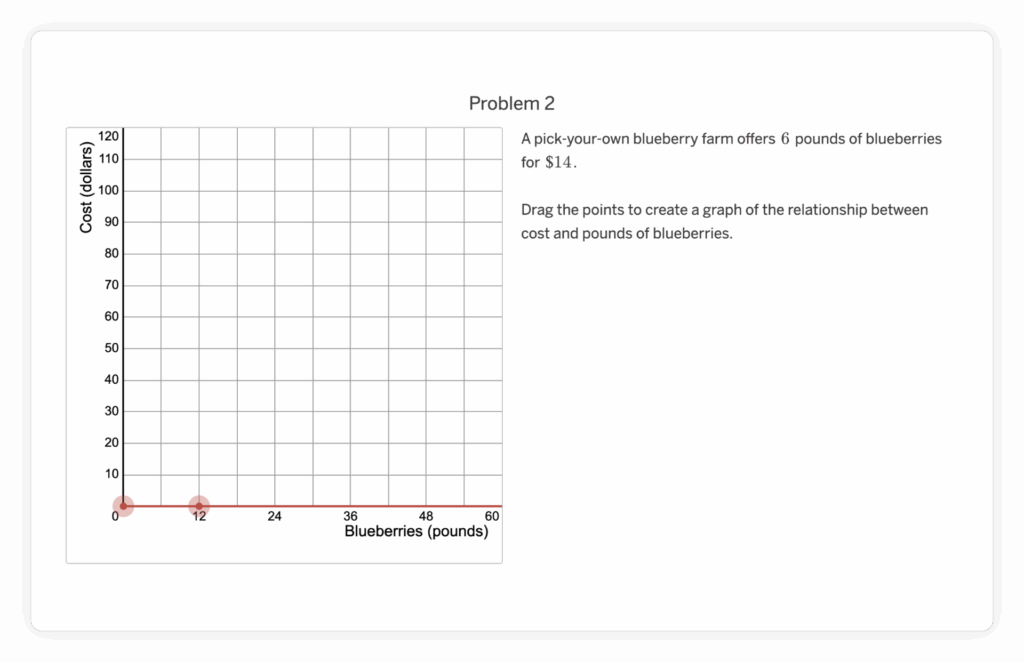
This prepares students to understand that a graph representing a proportional relationship is a line through (0, 0) and (1, k). They also begin to see connections between a context and features of a corresponding graph, equation, and table.
Data at your fingertips on the road to mastery
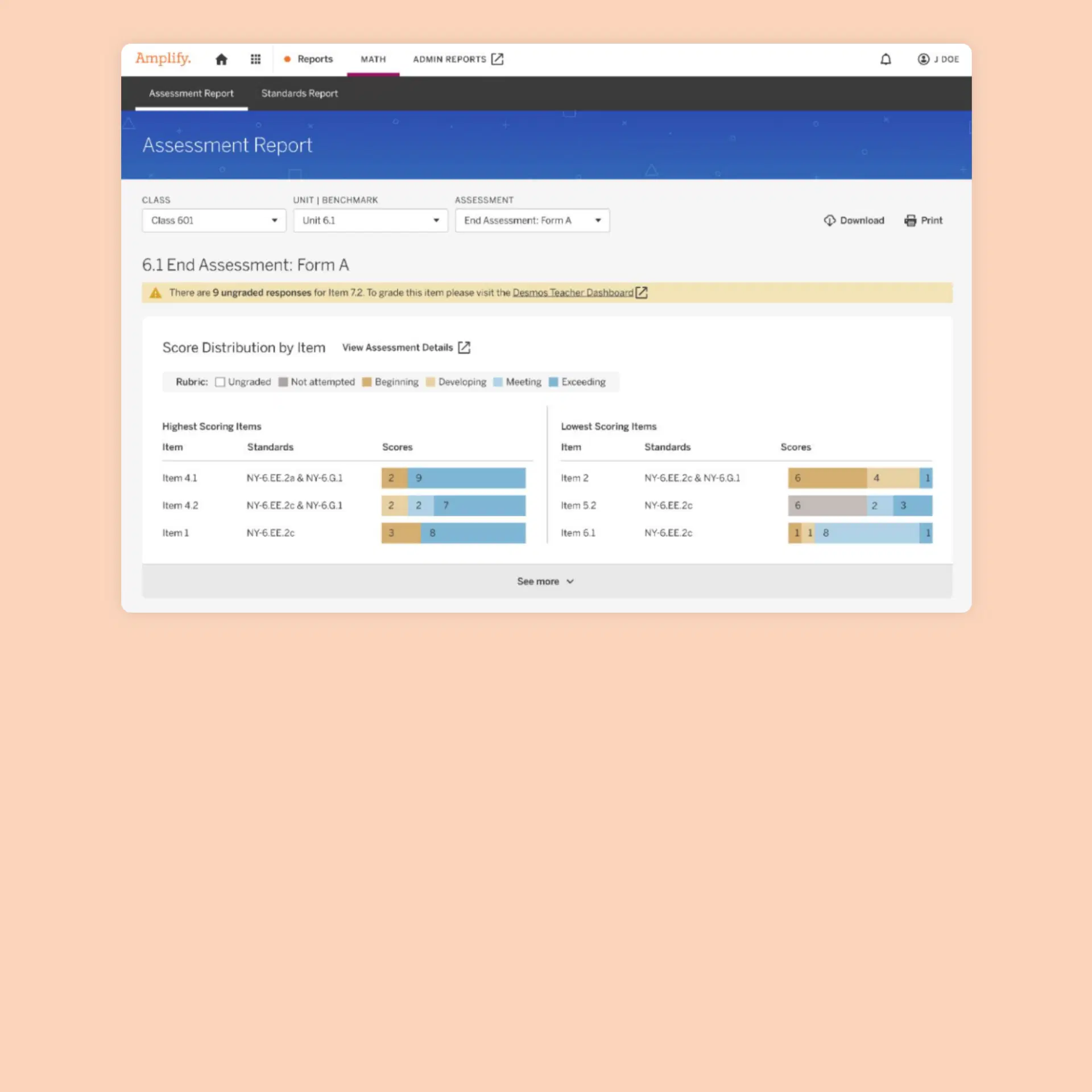
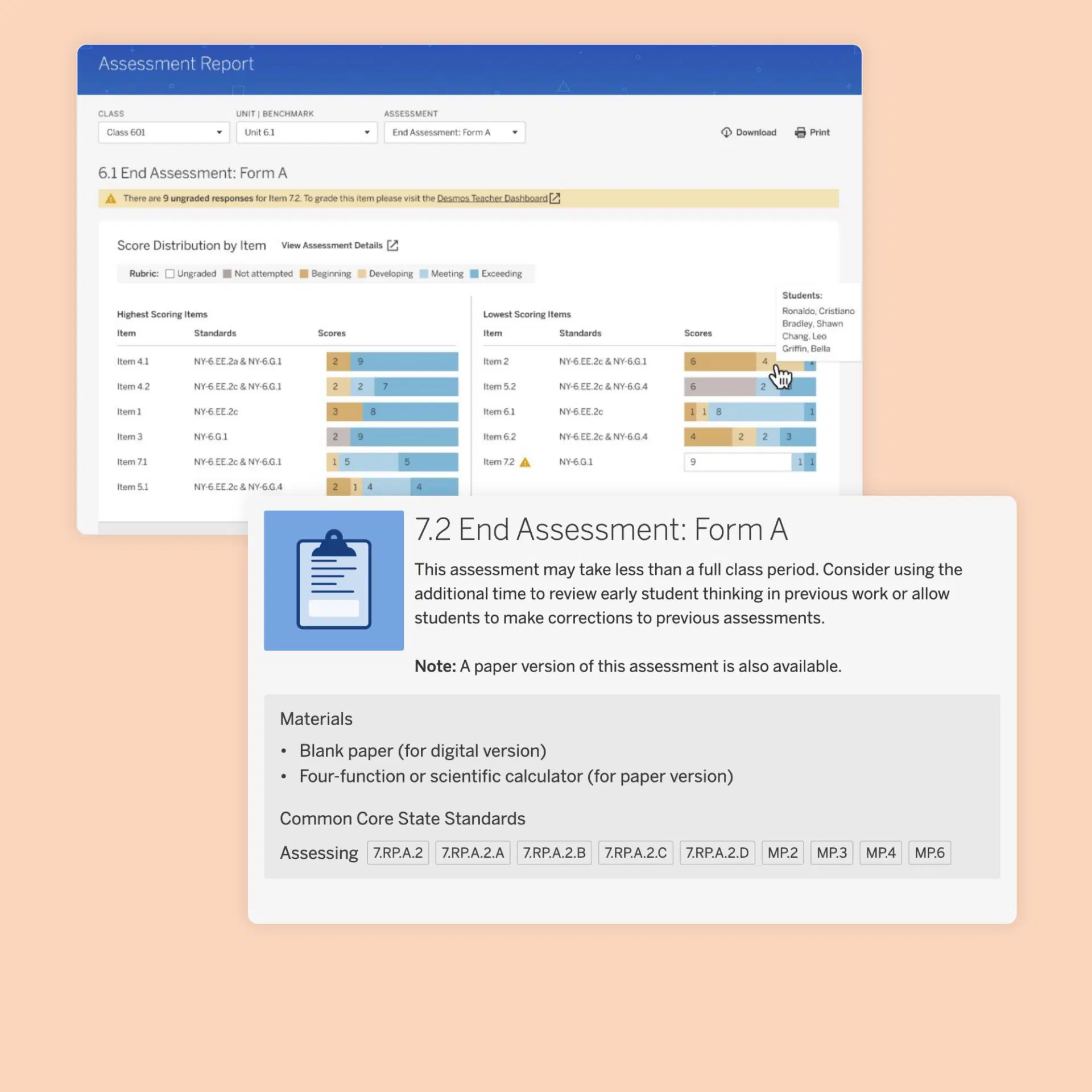
Facilitate a collaborative, connected classroom community.
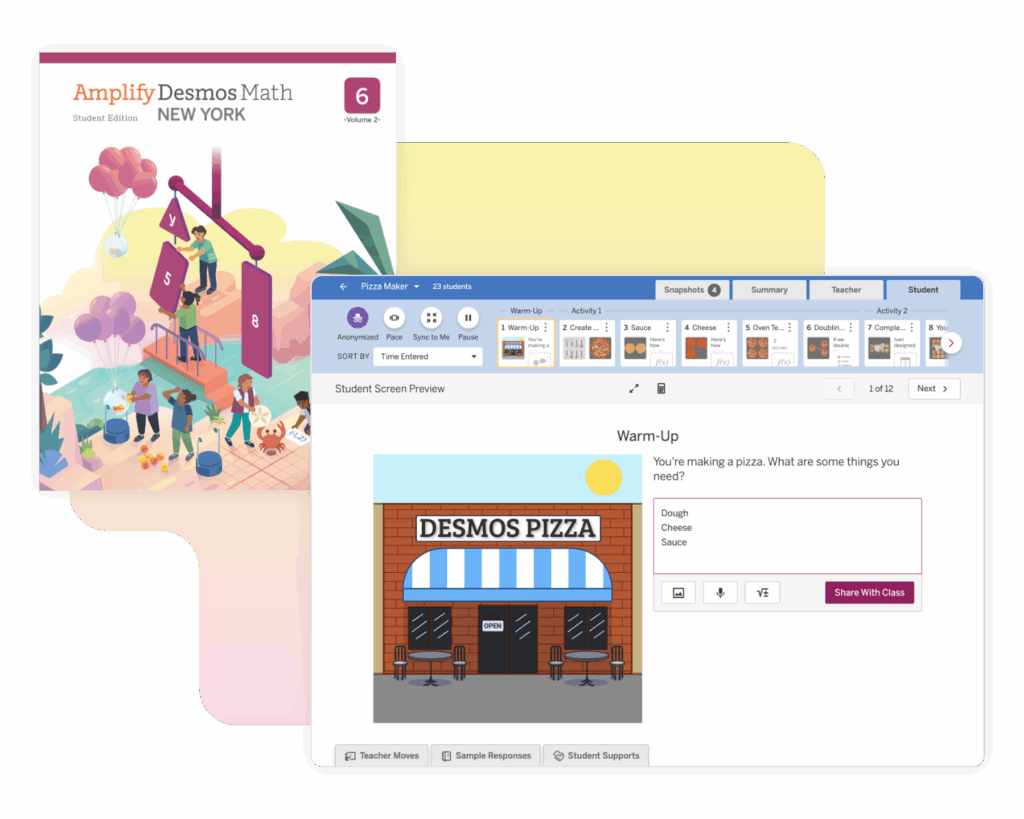
The powerful teacher facilitation tools in Amplify Desmos Math give teachers insight into student thinking in real time. Teachers can select student work to display and discuss quickly and easily, leading to better questions that guide more productive discussions.
Amplify Desmos Math helps guide the learning process by connecting students to each other and to an understanding that they can use math to make sense of the world. Students learn and collaborate in every lesson. Whether using print, digital, or a mix of both, students stay connected to each other’s ideas and thinking, fueling classroom conversations and a shared understanding of math.

Standards alignment
Amplify Desmos Math is customized specifically to meet the New York State Next Generation Math Learning Standards. Within each document below, you’ll find direct links to lessons and activities where each individual standard is addressed.
Grade 6 correlation
Grade 7 correlation
Grade 8 correlation
The program is also aligned with the expectations outlined in the New York City Department of Education Definition of Culturally Responsive-Sustaining Education and the New York State Culturally Responsive-Sustaining Education Framework. Download the CR-SE alignment.
Digital review
Ready to explore the program? To log in, click the orange “Review now” button below, select “Log in with Amplify” and use the following login credentials:
Username: t.nycadmsample-01@tryamplify.net
Password: AmplifyNumber1
To review Algebra 1 content from Desmos Math 6–A1, which serves as the foundation for Amplify Desmos Math, click this link after logging in using the credentials above.

Support
Throughout your review, you can reach our support team by email or phone. We are available any time over:
Live chat: Click the orange icon while logged in to get immediate help.
Phone: Call our toll-free number: (888)-960-0380.
Email: Send an email to help@amplify.com. In the message body, please include your name and question. Provide as much detail as possible, so we can help you find a solution.