Customer Privacy Policy

Last Modified: January 23, 2026 | Update History

Most recent update: This Privacy Policy has been updated to address additional rights for individuals in the European Union/UK.

We advise you to read this Privacy Policy in its entirety, including the jurisdiction-specific provisions in the appendix. Click here to review Our U.S. Notice At Collection.

Customer Privacy Policy: K–12 Schools

Who We Are

Amplify Education, Inc. (“Amplify”) is leading the way in next-generation curriculum and assessment. Amplify’s programs provide teachers with powerful tools that help them understand and respond to the needs of each student and use data in a way that is safe, secure, and effective.

Our Products and Services

Amplify’s products support classroom instruction and learning and include Amplify CKLA, Amplify ELA, Amplify Caminos, Amplify Science, Amplify Desmos Math, Boost Reading, Boost Math, mCLASS, Mathigon, associated professional development and tutoring services, and services at classroom.amplify.com (for creating and assigning activities) and student.amplify.com (for use of the activities or curricula as directed by an instructor), and any other product or service that links to this Privacy Policy (together, the “Products”).

Our Approach to Student Data Privacy 

In the course of providing the Products to Schools and their Authorized School Users, Amplify collects, receives, generates, or has access to Student Data (defined below). We consider Student Data to be confidential and we collect and use Student Data solely for educational purposes in connection with providing our Products to, or on behalf of the School as described in this Privacy Policy and our Agreements (defined below). We work to maintain the security and confidentiality of Student Data that we collect or store, and we enable Schools to control the use, access, sharing, and retention of Student Data.

Our Products are geared towards K–12 students (“Students”), and the educators, agents and staff members who use the Products as authorized by their School (“Educators”). Information that directly relates to an identifiable Student (“Student Data”) is owned and controlled by the School, and Amplify receives Student Data as a “school official” under Section 99.31 of the Family Educational Rights and Privacy Act of 1974 (“FERPA”) for the purpose of providing the Products hereunder. In addition, we rely on the School acknowledging that it is acting as the parent’s agent and consenting on the parent’s behalf to process personal information of Students under the age of 13 (“Child Users”) in accordance with the Children’s Online Privacy Protection Act (“COPPA”).

Our collection and use of Student Data is governed by our Agreements with Schools, including this Privacy Policy (“Privacy Policy”), and applicable laws which may include FERPA, COPPA, the Protection of Pupil Rights Amendment (“PPRA”), as well as other applicable federal, state, and local privacy laws and regulations (“Applicable Laws”). As noted above, with respect to FERPA, Amplify receives Student Data as a “school official” under Section 99.31 of FERPA for the purpose of providing its Products, and such Student Data is owned and controlled by the School.

Schools may provide authorization in two ways:

  1. by the School agreeing to our Customer Terms and Conditions located at amplify.com/customer-terms or another written agreement between Amplify and the School, as applicable; or
  2. by an Educator agreeing to the Acceptable Use Policy located at amplify.com/acceptable-use-policy/ (“AUP”) on behalf of the School as outlined in the AUP.

In each case, we collect Student Data and provide these Products solely for the use and benefit of the School and for no other commercial purpose. We require all Schools to review this Privacy Policy, available at amplify.com/customer-privacy, and to make a copy of the Privacy Policy available to the parents or guardians of Child Users.

We also provide limited opportunities for individual users to sign up for an account for use of our Products at-home or otherwise outside of the authorization of a School (“Home Users”). See the Appendix–Supplemental Disclosures for additional information that applies to our Home Users.

What This Privacy Policy Covers 

This Customer Privacy Policy (“Privacy Policy”) describes how Amplify collects, uses, and discloses personal information through the provision of Products.

For purposes of this Privacy Policy, “you” and “your” means Authorized Users (defined below).

This Privacy Policy does not apply to Amplify’s handling of:

  • information collected from users of Amplify’s company website, which is governed by our Website Privacy Policy.
  • job applicant data that we process in accordance with our applicant privacy notice.

There may be different contractual terms or privacy policies in place with some Schools. Such other terms or policies supersede this Privacy Policy for information collected or released under those terms. If you have any questions as to which legal agreement or privacy policy controls the collection and use of your personal information, please contact us using the information provided below. Unless expressly superseded, this Privacy Policy is incorporated into and is subject to the Agreement that governs your use of the Products.

Our Role

Amplify as a processor/service provider: Our School customers are the controllers of Student Data (as well as certain other Educator personal information to the extent required by law or Amplify’s agreement with the School) (together “School Data”).

Amplify acts as a processor/service provider for our School customers with respect to School Data, which means when we use School Data, we do so solely on the instruction of the School. School Data is subject to the School’s privacy policies; therefore, you will need to contact the School directly if you have any questions or would like to exercise your rights with respect to School Data.

Amplify as a controller: We are the controller of all other personal information we collect from non-Student Authorized Users (“Amplify Data”) and can be reached by email at privacy@amplify.com or by mail at Amplify Education, Inc., 55 Washington St.#800, Brooklyn, NY, 11201.

Policy

1. Definitions

Capitalized terms not defined in this section or elsewhere in this Privacy Policy will have the meaning set forth by Applicable Laws.

Agreement” means the underlying contractual agreement between Amplify and the School.

Authorized Users” means all users of our Products, including Authorized School Users, parents and legal guardians, and Home Users.

Authorized School Users” means Students and Educators.

Local Education Authority” means a local education agency or authority, school district, school network, independent school, or other regional education system.

Non-Student Data” means information that is linked or linkable to Authorized Users who are not Students.

School” means the Local Education Authority or State Agency.

State Agency” means the educational agency primarily responsible for the supervision of public elementary and secondary schools in any of the 50 states, the Commonwealth of Puerto Rico, the District of Columbia, or other territories and possessions of the United States, as well as a national or regional ministry or department of education in other countries, as applicable.

2. What personal information do we collect?

When you access or use our Products, you may choose to provide us with personal information, including Student Data. This information may be provided to us directly (e.g. when an account is created or through communications with us) or through your interactions with our Products.

Student Data. Below is a list of the categories of Student Data that may be collected by Amplify or its Products, either directly or through the Authorized School User’s use of the various features and configurations of the Products:

  • Identifier and Enrollment Data, such as name, email, school / state ID number, username and password, grade level, homeroom, courses, teacher names.
    • Why? Most of Amplify’s Products require some basic information about who is in a classroom and who teaches the class—Student or teacher Identifier and Enrollment data. This information is provided to Amplify by the School, either directly from the School’s student information system or via a third party with whom the School contracts to provide that information.
  • Demographic Data, such as date of birth, socioeconomic status, race, national origin, and preferred or primary language.
    • Why? To support school instructional and reporting requirements, Amplify’s Products allow Schools to view reports and analyze data using Demographic Data. Generally, Demographic Data is provided on a voluntary basis by the School. For example, a School may wish to analyze Student literacy assessment results based on English Language Learner status to better tailor classroom instruction, and in that case, the School may provide Demographic Data to enable that reporting.
  • School Records, such as grades, attendance, assessment results, and whether an Individualized Education Plan (IEP or local equivalent) is in place.
    • Why? Some of our Products support grading assignments and administering formative, diagnostic, and curriculum-based assessments. Teachers use that information to support Students’ progress in the program or help with instructional decisions. We do not collect specific details from an IEP, nor do we collect protected health information or other sensitive information.
  • Schoolwork and Student Generated Content, which includes any information contained in Student assignments and assessments, including information in response to instructional activities and participation in collaborative or interactive features of our Products, such as Student responses to academic questions and Student-written essays, as well as images, video, and audio recordings.
    • Why? As part of the digital learning experience, some of our Products may enable Students to write text and create and upload images, video, and audio recordings. For example, in Amplify ELA, students may write essays or submit short-form responses in our platform as part of a lesson on literature. As another example, in Boost Reading, student interactions with reading skills games are recorded to keep track of the student’s progress to level up in the program and to provide visibility to teachers on how students are mastering the skills.
  • Teacher Comments and Feedback, such as scores, written comments, or other feedback that Educators may provide about Student responses or student course performance.
    • Why? To enable teachers to track the performance and provide feedback to their students.
  • Non-Student Data. We may collect the following types of personal information from all other Authorized Users:
    • Contact Information, such as name and email address, as well as grade level taught, school name and school location, whether you are an Educator or Home User that creates an account or uses our Products or communicates with us.
    • Account Information, such as user login and password, for account creation and access purposes.
    • Survey Responses, which you provide in response to surveys or questionnaires.
  • Device and Usage Data. Depending on the Product, we may collect certain information about the device used to connect to our Product, such as device type and model, browser configurations, and persistent identifiers, such as IP addresses and unique device identifiers. We may collect device diagnostic information, such as battery level, usage logs, and error logs, as well as usage, viewing, and technical information (e.g., email open rates), such as the number of requests a device makes, to ensure proper system capacity for all Authorized Users. We may collect IP addresses and use that information to approximate device location to support operation of the Product. To the extent that we collect this information, this data is solely used to support operation of the Product and is not linked to Student Data. For purposes of clarity, Amplify does not use Student Data for marketing or advertising purposes (see section 6 of this Privacy Policy for more information about our commitments regarding Student Data).
    • Why? We use this information to remember returning users and facilitate ease of login, to customize the function and appearance of the Products, and to improve the learning experience. This information also helps us track product usage for various purposes, including website optimization, to ensure proper system capacity, troubleshoot and fix errors, provide technical assistance and customer support, provide and monitor the effectiveness of our Products, monitor and address security concerns, and compile analytics for product improvement and other internal purposes.
    • How? Cookies and Similar Technologies. We collect device and usage data through “cookies,” Web beacons, HTML5 local storage, and other similar technologies, which are used in some of our Products solely to support operation of the Products as described above. While we may use third party cookies and similar technologies for advertising and marketing purposes on our website (in accordance with our Website Privacy Policy), we do not permit such tracking technologies to be present on Student-facing portions of the Products. In particular, we only use the following types of cookies in our Products:
      • Strictly necessary cookies – These are cookies that are required for the operation of our websites and applications that host our Products. They include, for example, cookies that enable you to log into secure areas of our Products. These cookies are not generally stored beyond the browser session and are less likely to include personal information. This category of cookies cannot be disabled.
      • Functionality Cookies – We use these cookies so that we recognize you on the websites and apps that host our Products and remember your previously selected preferences. These cookies are stored on your device between browsing sessions but expire after a pre-defined period. These cookies enable us to “recognize” you when you use our Products, including your preferences such as your preferred language, time, and location. A mix of first party (placed by us) and third-party cookies (placed by third parties) are used.
      • Performance Cookies – These cookies help us and service providers acting on our behalf compile statistics and analytics about users of our Products that are accessed via websites and apps, including Device and Usage Information.
    • Learn how to opt out of cookies and similar technologies by reading the “What Rights and Choices Do You Have?” section of this Privacy Policy below.

3. How do we use personal information?

Student Data. Amplify uses Student Data for educational purposes, to provide the Products, and to ensure secure and effective operation of our Products, including:

  • to provide and improve our educational Products;
  • to support School and Authorized School Users’ activities;
  • to ensure secure and effective operation of our Products;
  • for purposes requested or authorized by the School or Authorized School User or as otherwise permitted by Applicable Laws;
  • for customer support purposes, to respond to the inquiries and fulfill the requests of the School and their Authorized School Users;
  • to enforce Product access and security controls; and
  • to conduct system audits and improve protections against the misuse of our Products, or to detect and prevent fraud and other harmful activities.
  • to enable the adaptive and personalized learning features of the Products.

Non-Student Data. Amplify may use Non-Student Data for the purposes for which Student Data is used as set forth above. In addition, Amplify may use Non-Student Data to provide customized content, advertising and marketing in limited circumstances (e.g. to periodically send newsletters and other promotional materials) directed to Educators and Home Users. For sake of clarity, we do not use Student Data for marketing purposes and we do not direct marketing to Students. Amplify may also use Non-Student Data for internal research and analytics, including generating insights on the use of our Products by Educators in certain Schools so that we can better serve those communities. We will also use Non-Student Data as otherwise required or permitted by law, or as we may notify you at the time of collection. Learn how to opt out of these communications by reading the “What Rights and Choices Do You Have?” section of this Privacy Policy below.

Amplify may use aggregate or de-identified data as described in the Aggregate/De-identified Data section below.

4. To whom do we disclose personal information?

Student Data. We disclose Student Data to third parties only as needed to provide the Products under the Agreement, as directed or permitted by the School or Authorized School User, and as required by law. Such disclosures may include but are not limited to the following:

  • to other Authorized School Users of the School entitled to access such data in connection with the Products;
  • to our service providers, subprocessors, or vendors who have a legitimate need to access such data in order to assist us in providing or supporting our Products, such as platform, infrastructure, and application software. We contractually bind such parties to protect Student Data in a manner consistent with those practices set forth in this Privacy Policy and in accordance with Applicable Laws. A list of Amplify subprocessors is available at https://www.amplify.com/subprocessors;
  • to comply with the law, respond to requests in legal or government enforcement proceedings (such as complying with a subpoena), protect our rights in a legal dispute, or seek assistance of law enforcement in the event of a threat to our rights, security, or property or that of our affiliates, customers, Authorized Users, or others;
  • in the event Amplify or all or part of its assets are acquired or transferred to another party, including in connection with any bankruptcy or similar proceedings, provided that successor entity will be required to comply with the privacy protections in this Privacy Policy with respect to information collected under this Privacy Policy, or we will provide the School with notice and an opportunity to opt out of the transfer of such data prior to the transfer; and
  • except as restricted by Applicable Laws or contracts with the School, we may also share Student Data with Amplify’s affiliated education companies, provided that such disclosure is solely for the purposes of providing Products and at all times is subject to this Policy.

Non-Student Data. Amplify discloses Non-Student Data for the purposes for which Student Data is used as set forth above. Amplify may also disclose Non-Student Data as otherwise required or permitted, or as disclosed at the time of collection. Please note that we do not share mobile information or opt-in consent with third parties / affiliates for their own marketing or promotional purposes.

5. Aggregate/De-identified data

Amplify may use de-identified or aggregate data for purposes allowed under FERPA and other Applicable Laws, to research, develop, and improve educational sites, services, and applications and to demonstrate the effectiveness of the Amplify Products. Amplify will not attempt to re-identify de-identified data. We may use aggregate information (which is information that has been collected in summary form such that the data cannot be associated with any individual) for analytics and reports. For example, our promotional materials may note the total number of students served by our programs in the prior year, but that information cannot be used to identify any one student. We may also share de-identified or aggregate data with research partners to help us analyze the information for product improvement and development purposes.

Records and information are de-identified when all personal information has been removed or obscured, such that the remaining information does not reasonably identify a specific individual. We de-identify Student Data in compliance with Applicable Laws and in accordance with the guidelines of NIST SP 800-122. Amplify has implemented internal procedures and controls to protect against the re-identification of de-identified Student Data. Amplify does not disclose de-identified data to its research partners unless that party has agreed in writing not to attempt to re-identify such data.

6. Data prohibitions, Advertising, Advertising limitations

Amplify will not:

  • sell Student Data to third parties;
  • use or disclose Student Data to inform, influence, or enable targeted advertising to a Student based on Student Data or information or data inferred over time from the Student’s usage of the Products;
  • use Student Data to develop a profile of a Student for any purpose other than providing the Products to a School or Authorized School User, or as authorized by a parent or legal guardian;
  • use Student Data for any commercial purpose other than to provide the Products to the School or Authorized School User, or as permitted by Applicable Laws.

7. External third-party services

This Privacy Policy applies solely to Amplify’s Products and practices. Schools and other Authorized Users may choose to connect or use our Products in conjunction with third-party services and Products. Additionally, our sites and Products may contain links to third-party websites or services . This Privacy Policy does not address, and Amplify is not responsible for, the privacy, information, or other practices of such third parties. Schools should carefully consider which third-party applications to include among the Products and services they provide to Students and vet the privacy and data security standards of those providers.

Authorized Users may be able to log in to our Products using third-party sign-in services such as Clever, ClassLink or Google. These services authenticate your identity and provide you with the option to share certain personal information with us, including your name and email address, to pre-populate our account sign-up form. If you choose to enable a third party to share your third-party account credentials with Amplify, we may obtain personal information via that mechanism. You may configure your accounts on these third-party platform services to control what information they share.

8. Security

Amplify maintains a comprehensive information security program and uses industry standard administrative, technical, operational, and physical measures to safeguard Student Data in its possession against loss, theft and unauthorized use, disclosure, or modification. Amplify performs periodic risk assessments of its information security program and prioritizes the remediation of identified security vulnerabilities. Please see https://amplify.com/security for a detailed description of Amplify’s security program.

In the event Amplify discovers or is notified that Student Data within our possession or control was disclosed to, or acquired by, an unauthorized party, we will investigate the incident, take steps to mitigate the potential impact, and notify the School in accordance with Applicable Laws.

Non-Student Data

Outside of Student Data, Amplify uses commercially reasonable administrative, technical, personnel, and physical measures to safeguard personal information in its possession against loss, theft, and unauthorized use, disclosure or modification.

9. Data Storage and Transfers

We are a United States Company, and our servers are hosted, managed, and controlled by us in the United States. If you are outside of the United States, we use industry standards to protect your data when it leaves your country of residence and your data will always be protected in accordance with this Privacy Policy, Applicable Laws and our Agreement regardless of the storage location.

Additionally, where we transfer your personal information to service providers outside of the United Kingdom (UK), European Economic Area (EEA), or other region that offers similar protections, we use specific appropriate safeguards to contractually obligate such service providers to protect personal information in accordance with Amplify’s commitment to privacy and security and applicable data protection laws.

If you have questions or wish to obtain more information about the international transfer of your personal information or the implemented safeguards, please contact us using the contact information below.

10. Data Retention / Deletion

Student Data

Upon request, we provide the School the opportunity to review and delete the personal information collected from Students. We will retain Student Data for the period necessary to fulfill the purposes outlined in this Privacy Policy and our Agreement with the School. We do not knowingly retain Student Data beyond the time period required to support the School or Authorized School User’s educational purpose, unless authorized by the School or Authorized School User. Upon request, Amplify will return, delete, or destroy Student Data stored by Amplify in accordance with applicable law and customer requirements. We may not be able to delete all data in all circumstances, such as information retained in technical support records, customer service records, back-ups, and similar business records. All such information will be protected in accordance with this Privacy Policy and our Agreement until it has been permanently deleted. Unless otherwise notified by the School, we will delete or de-identify Student Data after termination of our Agreement with the School.

Non-Student Data

Outside of Student Data, we keep personal information as long as it is necessary or relevant for the practices described in this Privacy Policy or as otherwise required by our Agreement with the School, if applicable. We determine the appropriate retention period for personal information on the basis of the amount, nature and sensitivity of the personal information being processed, the potential risk of harm from unauthorized use or disclosure of the personal information, whether we can achieve the purposes of the processing through other means, and on the basis of applicable legal requirements (such as applicable statutes of limitations).

11. What rights and choices do you have?

What Choices Do You Have?

Marketing/Advertising

As noted above, we do not use Student Data for marketing purposes and we do not direct marketing to Students. Amplify does not use third party cookies and similar technologies for advertising and marketing purposes on Student-facing portions of the Products. The choices below apply to Non-Student Authorized Users.

Opt-out of Marketing Communications. If you want to stop receiving promotional materials from Amplify, you can follow the unsubscribe instructions at the bottom of each email or email us at privacy@amplify.com. Amplify does not send marketing communications to Students.

Opt-out of Cookies and Similar Tracking Technologies. With respect to cookies, you may be able to reject cookies through your browser or device controls. Note that you have to opt-out of cookies on each browser or device that you use. If you replace, change, or upgrade your browser or device, or delete your cookies, you may need to use these opt-out tools again. Please be aware that disabling cookies may negatively impact your experience as some features may not work properly. To learn more about browser cookies, including how to manage or delete them, check the “Help,” “Tools,” or similar section of your browser.

What Rights Do You Have?

Individuals in the U.S.

  • What Rights Do You Have With Respect to Student Data?
    • Review and Correction. FERPA requires schools to provide parents with access to their children’s education records, and parents may request that the school correct records that they believe to be inaccurate or misleading.
    • If you are a parent or guardian and would like to review, correct, or update your child’s data stored in our Products, contact your School. Amplify will work with your School to enable your access to and, if applicable, correction of your child’s education records.
    • If you have any questions about whom to contact or other questions about your child’s data, you may contact us using the information provided below.
    • Other Privacy Rights? Please see section 3 of our supplemental disclosures: “Additional U.S. State Privacy Law Rights” for more information about your U.S. privacy rights

Individuals in the EU/UK

Please see section 4 of our supplemental disclosures: “Notice for European Economic Area and United Kingdom Customers” for more information about your EU/UK privacy rights.

12. COPPA

We do not knowingly collect personal information from a Child User unless and until a School or Educator, with the permission of the School, has authorized us to collect such information to provide the Products. Amplify relies on the School acknowledging that it is acting as the parent’s agent and consenting on the parent’s behalf to process personal information of Child Users in accordance with all applicable provisions of COPPA. To the extent COPPA applies to the information we collect, we process such information for educational purposes only, and no other commercial purpose, at the direction of the School and on the basis of the School’s authorization. If you are a parent or guardian and have questions about your child’s use of the Products and any personal information collected, please direct these questions to your child’s school.

Please refer to the Appendix–Supplemental Disclosures if you are a Home User.

13. Updates to this Privacy Policy

We may change this Privacy Policy in the future. For example, we may update it to comply with new laws or regulations, to conform to industry best practices, or to reflect changes in our product offerings. When these changes do not reflect material changes in our practices with respect to use and/or disclosure of Authorized Users’ personal information, including Student Data, such changes to the Privacy Policy will become effective when we post the revised Privacy Policy on our website. In the event there are material changes in our practices that would result in Authorized Users’ personal information being used in a materially different manner than was disclosed when the information was collected, with respect to Student Data, we will notify the School, and with respect to other information, we will notify you via email and provide an opportunity to opt out before such changes take effect.

14. Contact us

If you have questions about this Privacy Policy, please contact us at:

Email: privacy@amplify.com
Mail: Amplify Education, Inc.
55 Washington St.#800
Brooklyn, NY, 11201
Phone: (800) 823-1969
Attn: General Counsel

To report a security vulnerability, visit https://amplify.com/report-a-vulnerability/.

Appendix – Supplemental Disclosures

1. Mathigon and Amplify Classroom accounts

While our Products are geared towards Schools we do provide a limited opportunity for Home Users to use the Products at home—outside of the school context. We do not allow persons under the age of 13 (or those under the age of consent in any applicable jurisdiction) to register for an account with us outside the school context.

If you are a Home User, you are prohibited from collecting or providing any personal information from students or minors. You are permitted to access the platform for instructional purposes, but you may not enroll or roster minors, create accounts for minors, or input any personal information of minors into the Product.

Please note that most parts of Mathigon can be used without creating an account or providing any personal information that directly identifies you.

What Rights Do You Have? If you are a Child User who is 13 or older with a legacy Mathigon account (or the parent or guardian of a Child User with a legacy Mathigon account), you may request that we provide for your review, delete from our records, or cease collecting any Child User personal information. To the extent that you are unable to exercise these rights through self-service features within your account with us, please contact us by sending an email to: help@amplify.com and we will provide assistance.

2. U.S. Notice at Collection

Personal Information We Collect How We Use Personal Information

Student Data, which includes:

  • Roster Information
  • Demographic Data, such as race and national origin
  • School Records
  • Account Information
  • Schoolwork and Student Generated Content
  • Teacher Comments and Feedback
  • Device and Usage Data
  • To provide and improve our educational Products;
  • To support Schools’ and Authorized School Users’ activities;
  • To ensure secure and effective operation of our Products;
  • For purposes requested or authorized by the School or Authorized School Users, or as otherwise permitted by Applicable Laws;
  • For adaptive or personalized learning features of the Products; provided that Student Data is not disclosed;
  • For customer support purposes, to respond to the inquiries and fulfill the requests of the School and their Authorized School Users;
  • To enforce product access and security controls; and
  • To conduct system audits and improve protections against the misuse of our Products, or to detect and prevent fraud and other harmful activities.

Authorized Users, which includes:

  • Contact Information
  • Account Information
  • Survey Responses
  • Device and Usage Data
  • For the purposes for which Student Data is used as set forth above;
  • For marketing purposes in limited circumstances (e.g. to periodically send newsletters and other promotional materials), which will not be based on Student Data or directed to K–12 students;
  • For internal research and analytics; and
  • As otherwise required or permitted, or as we may notify you at the time of collection.

Some of the information described above may be considered “sensitive” under the laws of certain jurisdictions (i.e., account credentials and race/national origin) (“Sensitive Information”). We use Sensitive Information for necessary or reasonably expected purposes – specifically, to provide you with our Services (i.e., account credentials are used to allow account logins and race/national origin are used for the School’s reporting purposes when voluntarily provided by the School).

We do not sell or share your personal information, as described in California law.

We retain your personal information for as long as reasonably necessary for the purposes disclosed in the chart above. Additional information about our retention of Student Data and personal information from other Authorized Users can be found in Section 10 of this Privacy Policy.

Please see the Additional U.S. State Privacy Law Rights section of this appendix for information about your privacy rights pursuant to applicable U.S. law.

Notice of Financial Incentive

From time to time, to support our services, we offer opportunities to complete surveys and questionnaires. As an incentive for completing the survey or questionnaire, you can voluntarily provide personal information as an entry into a raffle drawing or to obtain other benefits, discounts, offers, or deals that may constitute a financial incentive under California law (“Financial Incentive”). The categories of personal information required for us to provide the Financial Incentives include: contact information and any other information that you choose to provide when you complete the survey.

Participation is voluntary and you can opt out at any time before the survey is complete. We do not allow students to participate in our surveys.

The value of the personal information we collect in connection with our Financial Incentives is equivalent to the value of the benefit offered.

3. Additional U.S. State Privacy Law Rights

Note for Requests Relating to Student Data: Because Amplify provides the Products to Schools as a “School Official,” we collect, retain, use, and disclose Student Data only for or on behalf of the School for educational purposes, including the purpose of providing the Products specified in our Agreement with the School and for no other commercial purpose. Accordingly, we act as a “service provider” for the School with respect to School Data. We work with the School to support and assist them in addressing privacy requests relating to School Data. Please reach out to your School directly if you wish to exercise any privacy rights that may be available to you.

For all other requests: With respect to Amplify Data, individuals residing in certain U.S. states have the following rights, regarding your personal information (each of which is subject to various exceptions and limitations):

  • Access. You have the right to request, up to two times every 12 months, that we disclose to you the categories of personal information collected about you; the categories of sources from which the personal information is collected; the categories of personal information sold or shared; the business or commercial purpose for collecting, selling, or sharing the personal information; the categories of third parties with whom personal information was shared; and the specific pieces of personal information collected about you.
  • Correction. You have the right to request that we correct inaccurate personal information collected from you.
  • Deletion. You have the right to request that we delete the personal information that we maintain about you. Even after the deletion of your account, some personal information may remain on our servers, such as in technical support logs, server caches, data backups, or email conversations. These will be automatically deleted after a reasonable amount of time, unless we are legally required to retain information for longer, or unless there is a legitimate business reason (e.g. security and fraud prevention or financial record-keeping). We are not required to delete any information which has been aggregated or de-identified in accordance with Section 5.
  • No Discrimination. You have the right not to be discriminated against for exercising these rights.
  • Appeals. You have a right to appeal decisions concerning your ability to exercise your consumer rights.

See Submitting Requests section below for details on submitting a request to exercise these rights.

4. Notice for European Economic Area (EEA) and United Kingdom (UK) Customers

As detailed at the beginning of our Privacy Policy (under the section titled “Our Role”), Amplify operates primarily as a processor that collects personal information on behalf of the School, and we act as a controller in limited circumstances where we offer Products outside the school context.

If you represent a School in the EEA or the UK, please note that we process personal information in accordance with this Privacy Policy, our Acceptable Use Policy, and our standard Data Protection Agreement, which sets out our responsibilities when it comes to our processing activities. Schools must send an email to privacy@amplify.com to enter into that DPA.

Lawful Basis for Processing

We rely on the following lawful bases for our processing activities:

  • Consent;
    • We obtain your consent to use cookies to collect and process device and usage data to understand how individuals use our Products.
  • Pursuant to a contract for use of our Products;
    • We process School Data to provide our Products (e.g., to create, authenticate and manage your account, to verify your identity, to manage our Products) pursuant to the Agreement between us and the School, as required in order for us to perform our obligations.
  • To comply with our legal obligations;
    • We process all categories of personal information that we collect to ensure the safety and security of our Products where we are complying with security requirements under data protection and cyber and information security law.
    • We process all categories of personal information that we collect to comply with our legal obligations which includes, for example, to access, retain or share certain personal information where we receive a valid request from a government body, law enforcement body, judicial body regulator or similar, to deal with legal claims and prospective legal claims, and to ensure we are complying with applicable laws.
  • When we have a legitimate interest in doing so, which is not outweighed by the risks to the individual.
    • We process all categories of personal information that we collect to support the provision, effective management, and improvement of our Products where such activities are not strictly required under our contract. This is in our legitimate interests to ensure that we are providing the best possible service.
    • We process all categories of personal information that we collect to ensure the safety and security of our services where this is important but not required under the data protection law or cyber and information security laws. This is in our legitimate interests to ensure the security of our services and systems, to prevent threats, abuse or fraudulent or unlawful activity, to promote safety and security and to ensure our Products are used in accordance with our terms and conditions.
    • We process the contact information of Non-Student Authorized Users to manage our relationship, including to respond to queries or otherwise communicate with you in relation to our Products and the operation of our business where this is not strictly required under a contract with you. This is in our legitimate interests to communicate with and resolve queries from users of our Products and to ensure that we are providing the best possible service.

We process the contact information and survey data of Non-Student Authorized Users for internal research and marketing purposes in limited circumstances (e.g. to periodically send newsletters and other promotional materials), which will not be based on Student Data or directed to Students. This is in our legitimate interests to understand our customers and prospective customers, understand how our products and services are perceived in the market, to promote our products, and to grow and develop our business.

Your Data Subject Rights

Note for Requests Relating to School Data: Amplify acts as processor to its School customers with respect to all School Data. We work with our School customers to support and assist them in addressing privacy requests relating to School Data. Please reach out to your School directly if you wish to exercise any privacy rights that may be available to you.

For all other Requests With respect to Amplify Data, you have the following rights if you are in the EEA or UK, subject to certain exceptions:

  • Right of access: You have the right to ask us for confirmation on whether we are processing your personal information and access to that personal information.
  • Right to correction: You have the right to have your personal information corrected.
  • Right to erasure: You have the right to ask us to delete your personal information.
  • Right to withdraw consent: You have the right to withdraw consent that you have provided.
  • Right to lodge a complaint with a supervisory authority: You have the right to lodge a complaint with a supervisory authority.
  • Right to restriction of processing: You have the right to request the limiting of our processing under limited circumstances.
  • Right to data portability: You have the right to receive the personal information that you have provided to us, in a structured, commonly used, and machine-readable format, and you have the right to transmit that information to another controller, including to have it transmitted directly, where technically feasible.
  • Right to object: You have the right to object to our processing of your personal information

See Submitting Requests section below for details on submitting a request to exercise these rights.

5. Submitting Requests

To exercise any of the rights described in sections 2 and 3 of this appendix, email us at privacy@amplify.com and specify which privacy right you intend to exercise. We may require additional information from you to allow us to confirm your identity. The verification steps will vary depending on the sensitivity of the personal information and whether you have an account with us. Please note that your rights may not apply in all cases. For example, we may need to retain your personal information to comply with our legal obligations, resolve disputes, prevent fraud and enforce our agreements. We will inform you if we are not able to fully respond to your requests. You may designate an authorized agent to make a request on your behalf. When submitting the request, please ensure the authorized agent identifies himself/herself/itself as an authorized agent and can show written permission from you to represent you. We may contact you directly to confirm that you have authorized the agent to act on your behalf or confirm your identity.

Complaints

If you have any issues, you have the right to lodge a complaint with an EEA or UK supervisory authority. We would, however, appreciate the opportunity to address your concerns before you approach a data protection regulator and would welcome you directing an inquiry first to us. To do so, please contact us by email at privacy@amplify.com or by mail at Amplify Education, Inc., 55 Washington St.#800, Brooklyn, NY, 11201.

6. Google APIs

Amplify uses Google’s Application Programming Interface (API) Services to enable Authorized Users to log in to Amplify, import classes and rosters from Google Classroom, create assignments in Google Classroom, and copy, edit, and publish Amplify content using Google Slides. Amplify will use and transfer information received from Google’s API in accordance with Google API Service User Data Policy, including the Limited Use requirements.

Update History:

Update: 6/13/2025: This Policy has been updated to align with product updates and to provide additional context for authorized educational use of Amplify’s Products.

Update 6/27/2024: The Policy has been updated to include an explanation regarding Google APIs in the Appendix — Supplemental Disclosures section.

Update 6/30/2023: This Privacy Policy has been updated to address new state law data privacy requirements.
Welcome to Amplify Science!

This site contains resources designed to support Clark County’s use of Amplify Science for grades K–8. Check back for exciting updates!

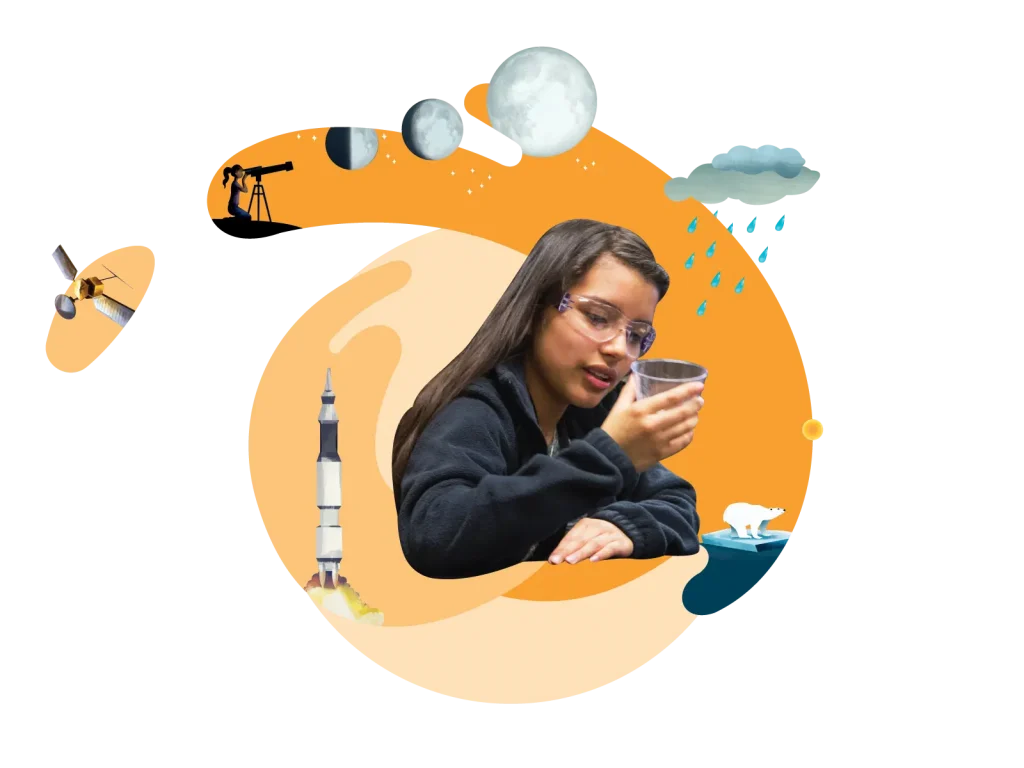
A woman holding a glass, overlaid with illustrations of a telescope, rocket, polar bear, and rain.

Program Introduction

Learn more about Amplify Science

Click the buttons below to explore the Amplify Science Program Guide. You can access the full digital Teacher’s Guide from the Program Guide to explore the program.

Clark County Training Sessions – Reference Materials

2021-2022 Session Materials

Unit 2: Standard Curriculum Relaunch / Guided Planning

New Teacher Training Part 1

2020-2021 Session Materials

New Teacher Orientation Part I

Returning and New Teacher Part II

Orientation Sessions

Remote Learning Session

Unit 2 Unpacking Session Materials

Unit 3 Unpacking the Unit Phenomenon

Unit 4 Unpacking Amplify Science for Hybrid Learning

2021-2022 Session Materials

Unit 2: Standard Curriculum Relaunch / Guided Planning

New Teacher Training Part 1

2020-2021 Session Materials

New Teacher Orientation Part I

Returning and New Teacher Part II

Orientation Sessions

Remote Learning Session

Unit 2 Unpacking Session Materials

Unit 3 Unpacking the Unit Phenomenon

Unit 4 Unpacking Amplify Science for Hybrid Learning

2021-2022 Session Materials

Unit 2: Standard Curriculum Relaunch / Guided Planning

New Teacher Training Part 1

2020-2021 Session Materials

New Teacher Orientation Part I

Returning and New Teacher Part II

Orientation Sessions

Remote Learning Session

Unit 2 Unpacking Session Materials

Unit 3 Unpacking the Unit Phenomenon

Unit 4 Unpacking Amplify Science for Hybrid Learning

2021-2022 Session Materials

Gr 8 Scope and Sequence 2021-22

2020-2021 Session Materials

Grade Level Orientation and Refresher

[Synchronous Session Agenda] LAUSD MS, Summer 21

Navigating Program Essentials

[Asynchronous Session Agenda] LAUSD MS, Summer 21

Remote Learning Session (6-8)

Grade 6

Gr 6 Scope and Sequence 2021-22

Grade 7

Gr 7 Scope and Sequence 2021-22

Grade 8

Gr 8 Scope and Sequence 2021-22

New! Lesson Prep Videos

Unit 1

Grade 3 Lesson Prep Videos can be found in the Resources section in the Amplify Science- Elementary group in Schoology. Access code: W4PK-W466-63F5B

Grade 4 Lesson Prep Videos can be found in the Resources section in the Amplify Science- Elementary group in Schoology. Access code: W4PK-W466-63F5B

Grade 5 Lesson Prep Videos can be found in the Resources section in the Amplify Science- Elementary group in Schoology. Access code: W4PK-W466-63F5B

Remote Learning Resources

We’ve created some guidance on resources you can send home with students and ways for you to adapt our K-5 or 6-8 curriculum for remote learning.

Learn more at Remote Learning Resources for Amplify Science

Onboarding: What to expect

Welcome to Amplify Science! To help you know what’s coming next, we created the following visual that outlines the steps of the onboarding process. You can use it as a reference.

Icons illustrating steps for teachers: attend workshop, log into guide, gather materials, ensure student access to tools, prepare lesson.

Onboarding videos

To start using Amplify Science quickly in your classroom, check out the following onboarding videos. They cover what you need to know to get started fast, from unpacking materials to logging in and navigating the digital Teacher’s Guide.

Unpacking your first hands-on materials kit

The following videos give you a quick look into our Amplify Science classroom kits. For each grade level, we have a video for the first unit in the scope and sequence, and we show you how to unpack the kits for all the units.

A woman in a classroom setting demonstrates a large book with illustrations while sitting at a desk. She gestures towards the book, which is held open. An orange play button overlay is centered on the image.

Looking for help?

Powerful (and free!) pedagogical support

Amplify provides a unique kind of support you won’t find from other publishers. We have developed an educational support team of former teachers and administrators who provide pedagogical support for every Amplify curriculum, assessment, and intervention program. This service is completely free for all educators who are using our programs and includes:

  • Guidance for developing lesson plans and intervention plans
  • Information on where to locate standards and other planning materials
  • Recommendations and tips for day-to-day teaching with Amplify programs
  • Support with administering and interpreting assessment data and more

To reach our pedagogical team, use our live chat within your program, call (800) 823-1969, or email edsupport@amplify.com

Timely technical and program support

Our technical and program support is included and available from 7 a.m. to 7 p.m. ET, Monday through Friday, through a variety of channels, including a live chat program that enables teachers to get immediate help in the middle of the school day.

For your most urgent questions:

  • Use our live chat within your program
  • Call our toll-free number: (800) 823-1969

For less urgent questions:

Amplify’s Subprocessors

This page provides the current list of third party service providers that Amplify engages to help us provide our services and may have access to Personal Information of our customers (“Subprocessors”) as outlined in Amplify’s Customer Privacy Policy.

How to get notified of changes

Please use the “Subscribe to Updates” functionality at the top of the page to receive emails from Amplify regarding updates to the list of Subprocessors and/or changes to the information provided on this page. Should you choose not to use this functionality to receive email notifications, it is our expectation that you check the link regularly for any updates.

Our commitments regarding Service Providers

All of the Subprocessors listed below have a legitimate need to access Personal Information in order to provide their service to Amplify as a part of Amplify’s provision of the services to our customers. With regard to Subprocessors, Amplify commits to:

  • Conduct due diligence on the data privacy and security measures of new Subprocessors before providing access to Personal Information and monitor on an annual basis thereafter. As part of this process, Amplify reviews the Subprocessor’s security documentation, practices, and posture to ensure alignment with Amplify’s information security program and standards;
  • Enter into a written agreement which requires at least the same level of protection for Personal Information and individuals as set out in Amplify’s Customer Privacy Policy and our agreements with customers, as applicable, before providing access to Personal Information;
  • Restrict the Subprocessor’s access to Personal Information to only what is necessary to fulfill our contractual obligations or as otherwise permitted under the agreements with our customers or under applicable data privacy laws; and
  • Remain liable for any processing of Personal Information carried out by Subprocessors to the same extent we would be liable if performing the services ourselves.

Subprocessors

Amplify’s Subprocessors of Personal Information are:

Subprocessor Purpose Location Student Data Educator Data
Amazon Web Services Cloud hosting services United States A large, light peach-colored checkmark on a transparent background.
A large, light peach-colored checkmark on a transparent background.
Anthology (formerly Blackboard) Video conferencing and attendee tracking for tutoring services United States A large, light peach-colored checkmark on a transparent background.
A large, light peach-colored checkmark on a transparent background.
Boomi, Inc. Data integration United States   A large, light peach-colored checkmark on a transparent background.
Datadog Performance and security monitoring United States A large, light peach-colored checkmark on a transparent background.
A large, light peach-colored checkmark on a transparent background.
dbt Labs, Inc. Run database queries United States A large, light peach-colored checkmark on a transparent background.
A large, light peach-colored checkmark on a transparent background.
Egnyte, Inc. Secure file exchange United States A large, light peach-colored checkmark on a transparent background.
A large, light peach-colored checkmark on a transparent background.
Fivetran, Inc. Database loading United States A large, light peach-colored checkmark on a transparent background.
A large, light peach-colored checkmark on a transparent background.
Gainsight, Inc. Customer support United States   A large, light peach-colored checkmark on a transparent background.
Google, LLC Cloud hosting services United States A large, light peach-colored checkmark on a transparent background.
A large, light peach-colored checkmark on a transparent background.
Google, LLC (Looker) Data warehouse analytics United States A large, light peach-colored checkmark on a transparent background.
A large, light peach-colored checkmark on a transparent background.
HubSpot Email delivery United States   A large, light peach-colored checkmark on a transparent background.
MongoDB, Inc. Database hosting United States A large, light peach-colored checkmark on a transparent background. A large, light peach-colored checkmark on a transparent background.
Salesforce Customer relationship management United States   A large, light peach-colored checkmark on a transparent background.
SchoolDay (formerly GG4L) Secure rostering United States A large, light peach-colored checkmark on a transparent background. A large, light peach-colored checkmark on a transparent background.
Snowflake, Inc. Database hosting United States A large, light peach-colored checkmark on a transparent background. A large, light peach-colored checkmark on a transparent background.
Talkdesk, Inc. Customer support United States   A large, light peach-colored checkmark on a transparent background.
Twilio, Inc. (Sendgrid) Email delivery United States A large, light peach-colored checkmark on a transparent background. A large, light peach-colored checkmark on a transparent background.

Updates

Date of Change Change Notes
October 10, 2025 Changed Blackboard to Anthology and GG4L to SchoolDay. Update MongoDB purpose. Added Datadog to the Students Subprocessor List. Created Educators Subprocessor List. Anthology and SchoolDay updated their corporate branding. Added list of Educator Data Subprocessors to clarify which partners process educator data.
June 14, 2024
Removed Desmos Studio, PBC, Qualfon Data Services Group, LLC, and Zendesk, Inc. These partners and services are no longer used for customer support.
July 27, 2023
Added Fivetran
September 15, 2022
Corrected name of Desmos Studio, PBC.
July 21, 2022 Added Desmos Collective LLC, Google, MongoDB, Twilio, and Zendesk These services support Mathigon.org and Desmos Classroom
July 20, 2022 Added Qualfon Data Services Group, LLC
October 4, 2021 Added Blackboard, Inc.
July 26, 2021 Fishtown Analytics, Inc. renamed to dbt Labs, Inc.
June 17, 2021 Updated with data warehousing and roster services providers
May 28, 2021 Initial public posting.

New and noteworthy updates to mCLASS, mCLASS Lectura, and mCLASS Intervention!

mCLASS®, mCLASS Lectura, and mCLASS Intervention are introducing enhancements for the next school year. Explore the following improvements designed to save you time, extend your reach, and support your efforts to deliver the rigorous and riveting learning experiences your students deserve.

Updates

Enhanced mCLASS enrollment

Amplify’s enrollment improvements will provide mCLASS users with a quicker and more efficient set up this back-to-school season. These enhancements will also provide a consistent experience across your Amplify programs. Please note that our current mCLASS enrollment system will be retired, and customers who are affected have been contacted.

Additional benefits include the ability to set benchmark windows through Amplify’s Admin Portal and to create groups of students to which you can assign assessments.

More information can be found at https://start.amplify.com/24-25-mclass-enrollment/.

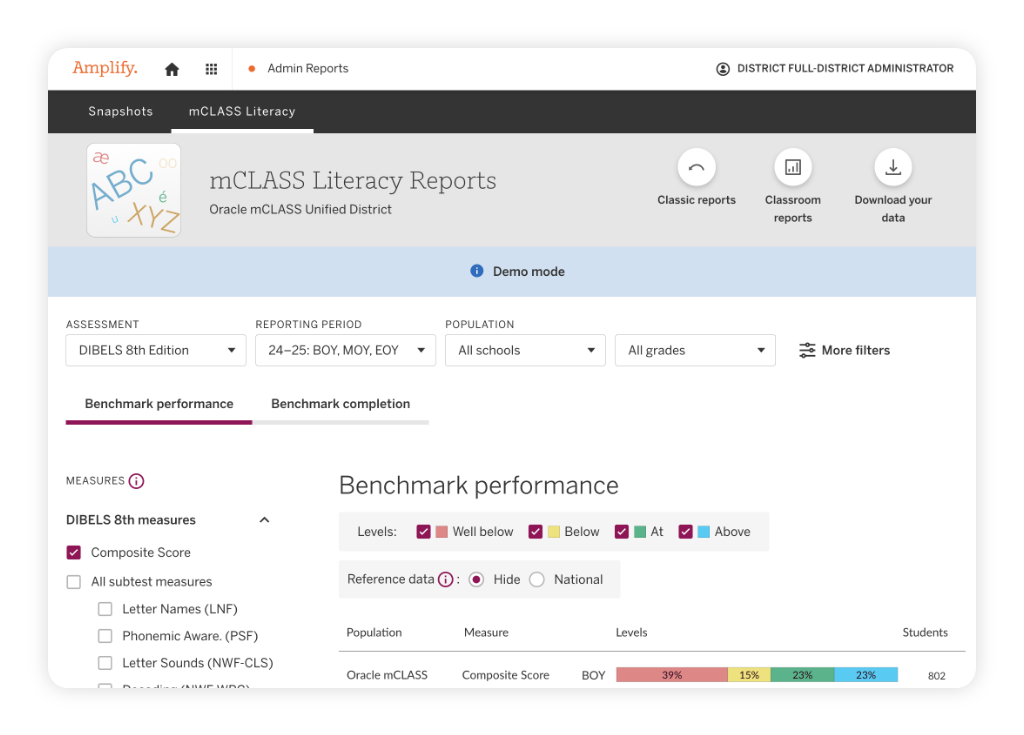
New mCLASS DIBELS 8th Edition and mCLASS Lectura Admin Reports

We are excited to announce that changes to the Admin Reports for mCLASS are coming next school year. With these updates, you will experience a new admin reporting suite, replacing the previous Reporting and Analysis Suite (RAS), that delivers a more robust and user-friendly experience. This update includes several enhancements, including:

  • Faster performance: Spend less time waiting and more time making decisions with significantly reduced load and refresh times.
  • Improved user interface: Enjoy a cleaner, more intuitive design that makes navigation and data analysis even easier.
  • Saved filters between reports: Enjoy seamless transitions with the ability to maintain your filters across various reports.
  • National reference data analysis: Compare your school or district’s performance with the national data of all students assessed with mCLASS.
  • Enhanced assessment tracking: Complete data analysis for all students, including those with partial or no assessment results, through Benchmark Download Your Data (DYD) updates.
  • Improved student list for reports: Access better-organized student lists within the benchmark completion reports for more efficient monitoring.
  • Custom demographics in reports: Tailor your benchmark and progress monitoring DYDs using custom demographics for a more personalized analysis.
  • New monitoring capabilities: Track progress monitoring fidelity and download details about students who participate in mCLASS Intervention groups.

Former Acadience and IDEL users, please note: As a result of the transition to new Admin Reports, historical data for Acadience Reading (formerly DIBELS® Next), and IDEL will not be available next year. Please be sure to download any data from these programs for your records.

Learn how to download historical data for teachers and admin.

A dashboard displaying mCLASS Literacy Reports with benchmark performance data for DIBELS 8th Edition, filtering options, and color-coded score levels.

mCLASS Intervention updates

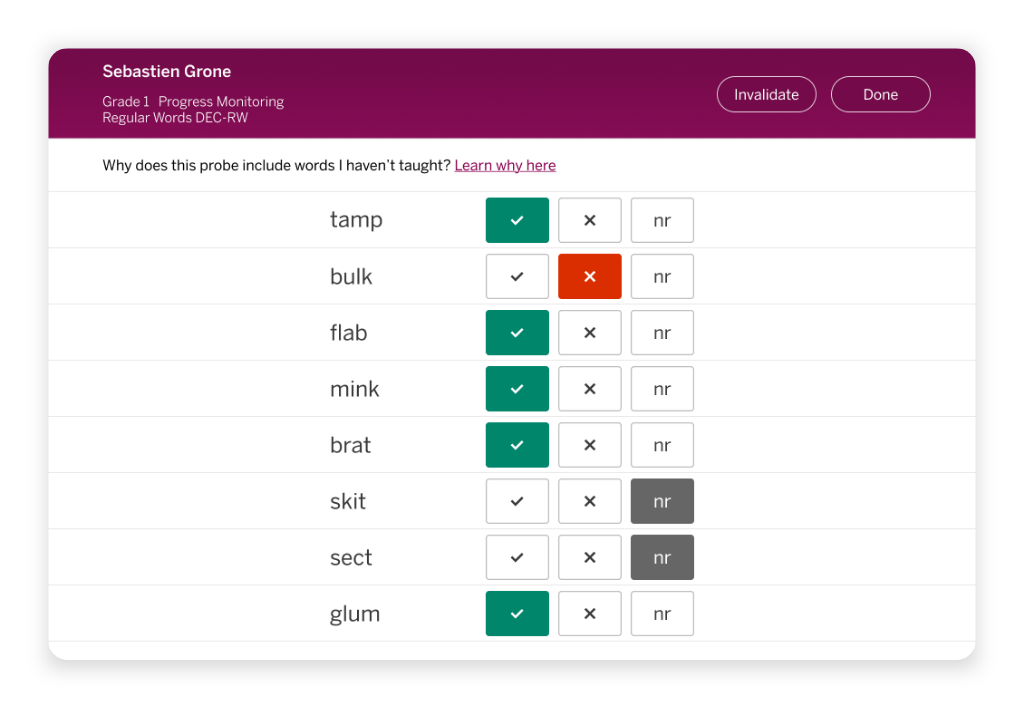
mCLASS Intervention’s Decode assessment will have a new look and feel, resembling the DIBELS 8th Edition measures. mCLASS Intervention will also be integrated with Amplify’s global navigation menu, giving educators quicker access to Classroom Reporting, the teacher-facing Assessment app and more.

Progress monitoring interface showing a list of words with checkboxes for correct, incorrect, and not recorded responses for a student named Sebastien Grone.

Enhancements to student-led assessments

Students and educators will notice helpful updates to the student-facing platform:

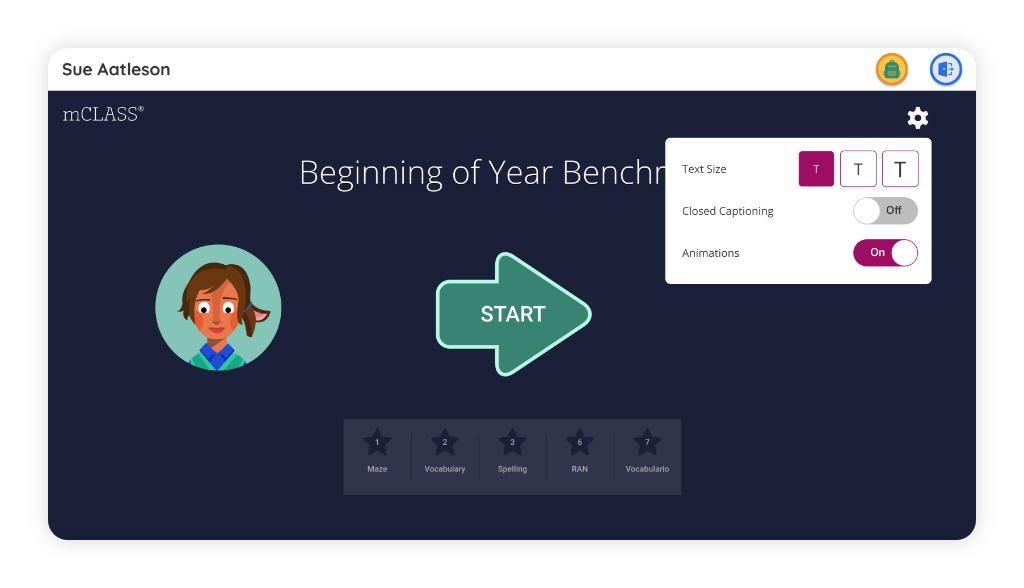
The owl animations in the student-facing mCLASS assessments will be replaced with a familiar character from the Boost Reading and Boost Lectura program, Alyx!

There will also be additional accessibility updates, including an in-app magnification tool that will allow for the size of all on-screen text to increase, and an option to turn off animations to reduce distractions.

A digital assessment screen shows "Beginning of Year Benchmark" with a start button, a cartoon avatar, and a settings menu for text size, closed captioning, and animations.

Improved navigation

This year, we’re rolling out a more user-friendly navigation experience with:

  • An accessible sidebar menu for quick access to key educator resources within sections like Content, PD Library, and Apps.
  • A new Apps menu organized by subject.
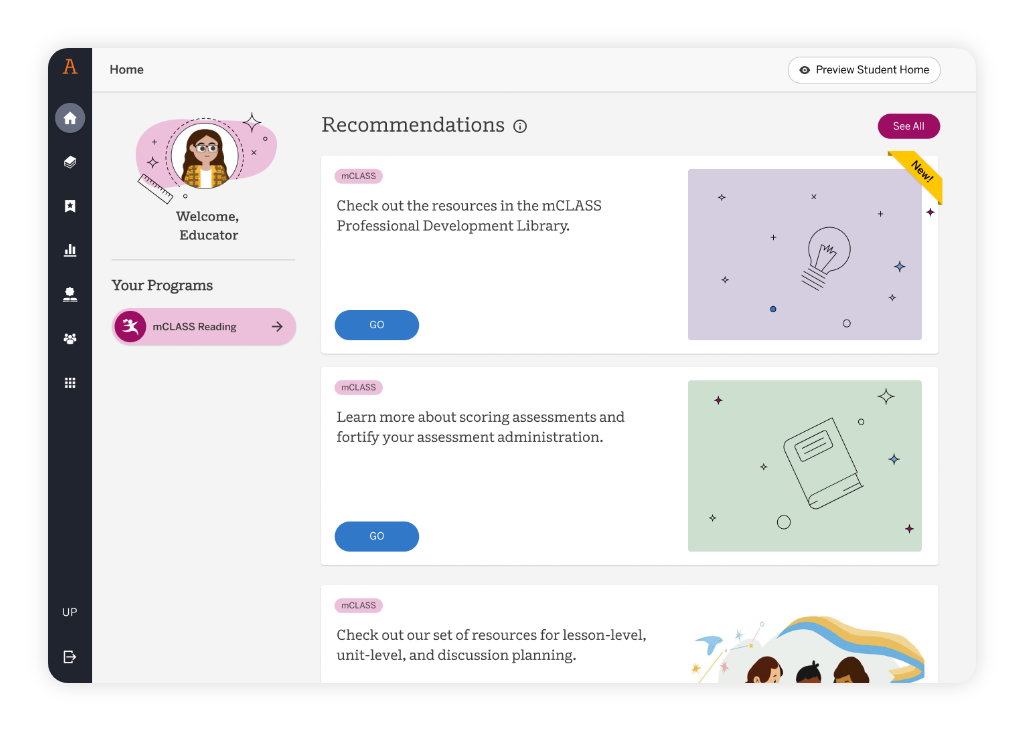
A dashboard interface showing program recommendations, each with a title, description, and “GO” button, along with illustrated icons for lightbulb, book, and people.

Free content for you to explore

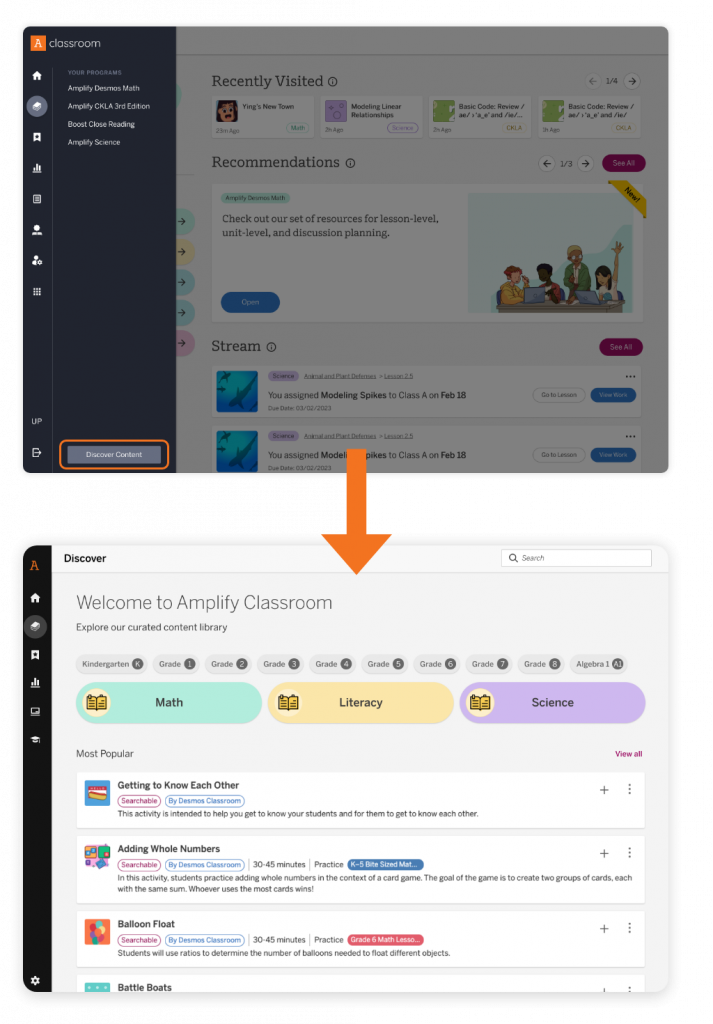
Explore a growing library of free math, science, and literacy content using the Discover button. You can even assign these activities to students through the digital platform, giving them more ways than ever to explore, engage, and learn!

Screenshot showing a user navigating from the Amplify Classroom dashboard to the Discover Content library, with interface elements for browsing educational resources by subject and grade.

Noteworthy features

PD Library

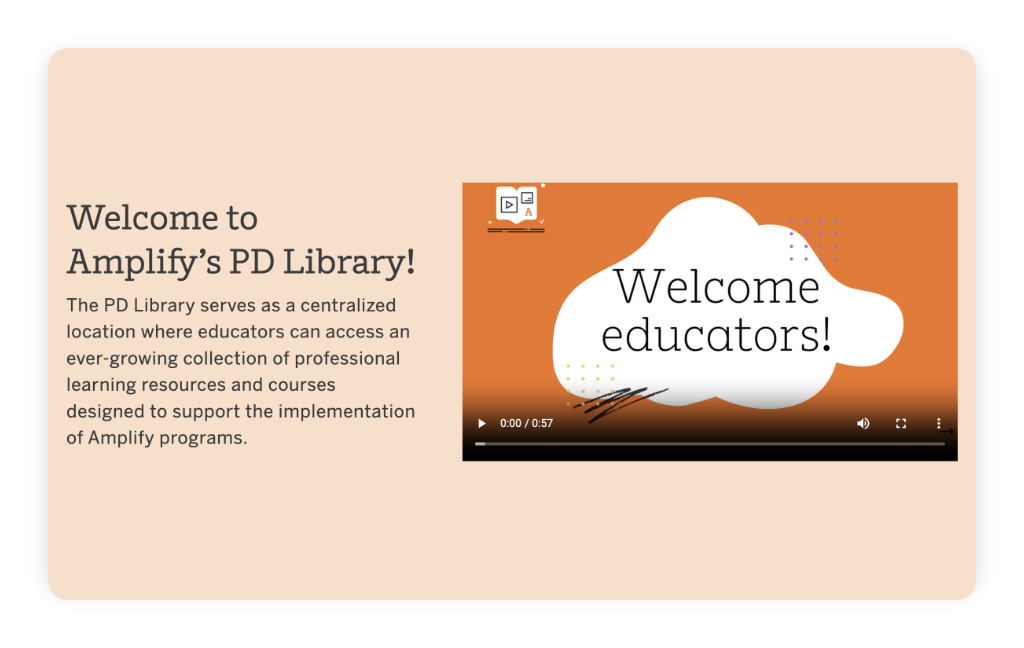
You’ll find helpful professional development (PD) resources in the PD Library to ensure your mCLASS implementation runs smoothly. The PD Library can be accessed through the Programs & Apps menu in the top navigation bar when you’re logged into mCLASS.

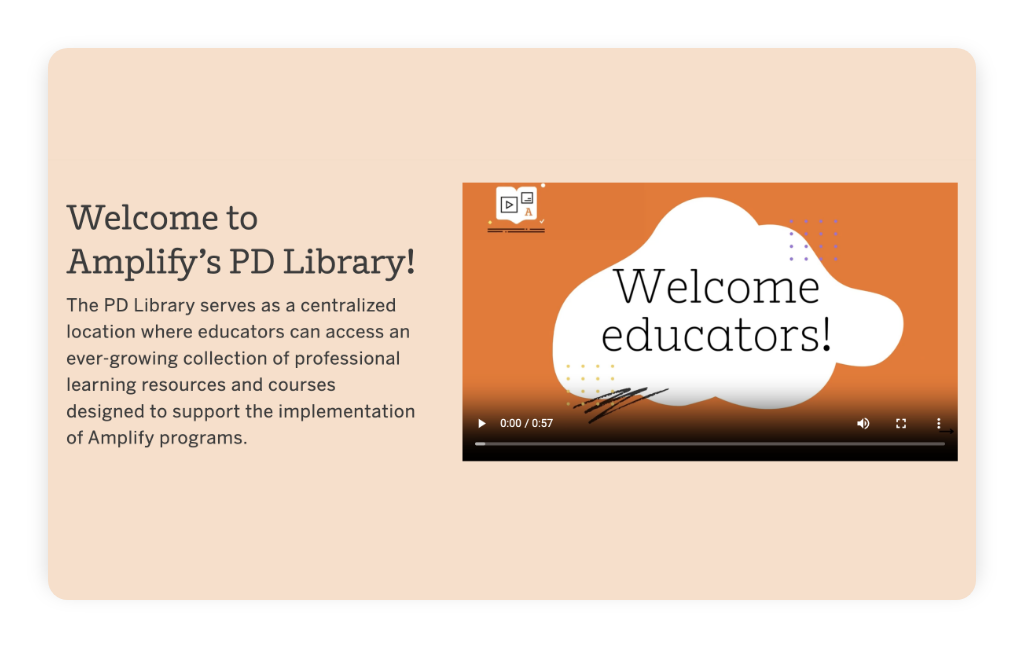
A webpage introducing Amplify’s PD Library, with text describing its resources for educators and a video titled “Welcome educators!” on an orange background.

Demo mode in English Classroom Reporting

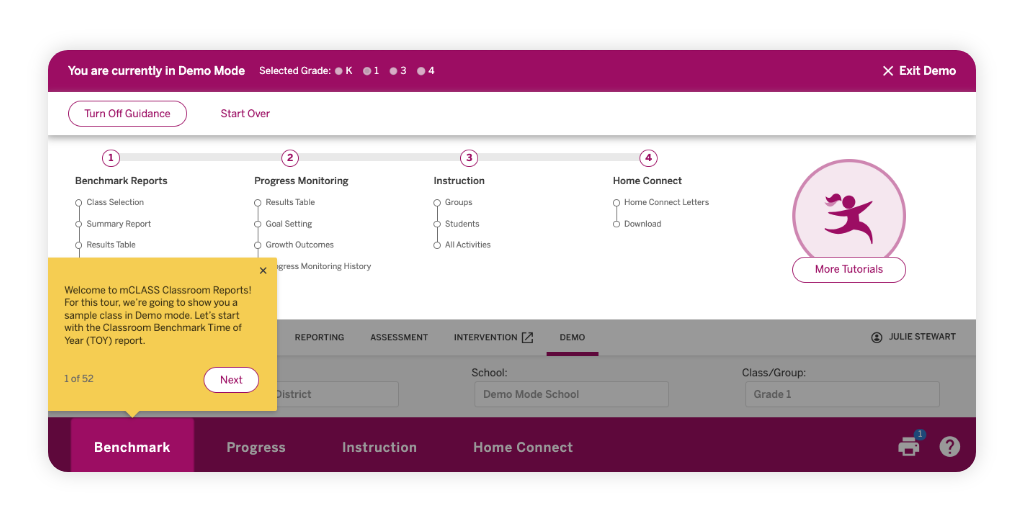
mCLASS English Classroom Reporting features a demo mode that guides teachers through sample classroom and student reports, highlighting realistic student data within the complete set of mCLASS instructional tools. This demo mode is especially helpful for onboarding purposes with teachers new to using mCLASS.

A demo mode dashboard for a classroom report tool, with a yellow pop-up instruction and highlighted "Benchmark" tab at the bottom.

Amplify Desmos Math updates are coming!

As we look ahead to the upcoming school year, we’re continuing to enhance Amplify Demos Math. From time-saving platform enhancements to new features, these updates are designed to help you deliver engaging math instruction while making planning, assigning, and differentiation easier than ever.

Whether you’re using Amplify Desmos Math on its own or alongside Personalized Learning, Boost Math®, or mCLASS® Math, this page highlights what’s already available and what’s coming next.

Two children place number and variable tiles on a balance scale, surrounded by math symbols, a protractor, floating balloons, and the engaging world of Amplify Desmos Math.

Updates coming for the 2026–27 school year

To help you plan for the year ahead with confidence, we’re previewing some of the exciting enhancements coming your way.

Platform updates

We’re improving the overall classroom experience with platform enhancements that make lessons easier to navigate and instruction easier to manage.

  • Activity pages are being redesigned to feature a left sidebar, informational tabs, and lesson screens at the top of the page. This optional reconfiguration will allow you to immediately see each lesson and more easily access relevant resources and tools. You will be able to turn on the new design – or turn it off to return to the original design – with a toggle located on the page.
  • We’re making updates to our Recently Visited section on Educator Home. You’ll see both activity and units reflected there, and have the ability to star a unit or lesson to pin it to the front of your list
  • Presentation tools are also expanding, making it easier to facilitate lessons, annotate in real time, and manage instruction from anywhere in the room.
  • You will be able to assign Teacher Presentation Screens to individual students who need access on their own devices for reference or accessibility purposes.

Administrator Report improvements

  • The existing Administrator Reports for Unit Performance will be replaced with a new and improved Student Performance report that will provide school and district administrators with aggregated views of student performance on end-of-unit assessments as well as standards. The report will support grouping this data by school and class without having to access reporting for individual classrooms.

AI-powered teacher tools

We’ve developed new tools to enhance your ability to connect and collaborate with families! These will be available when you opt in through Amplify Labs.

  • Discussion Moments, launching for grades 6–8 in 2026–27, will support rich classroom conversations by highlighting student ideas directly within lessons, making it easier to pause, reflect, and discuss mathematical thinking.
  • Newsletter Generator, for grades K–5, allows you to create your own customizable communication to share out with families. 

Using mCLASS Math? Explore upcoming updates and noteworthy features for assessment, progress monitoring, and reporting on the mCLASS Math Program Highlights page.

A laptop screen shows a Spanish math lesson on place value. Behind the laptop sit four colorful educational booklets labeled Amplify Desmos Math, Grade 5, supporting engaging and interactive learning.

New offerings

Amplify Desmos Math continues to grow to support more learners across grade levels and instructional pathways.

  • Expanded Spanish student and teacher materials will better serve multilingual classrooms by providing access to high-quality math instruction in both print and digital formats.
  • New PreK and Transitional Kindergarten offerings emphasize hands-on, developmentally appropriate learning.
  • For middle school, Accelerated 6 and Accelerated 7 will be available for full release soon, offering a two-year pathway that condenses grades 6–8.
  • At the high school level, Amplify Desmos Math will soon be commercially available as complete high school course sequences, including Algebra 1, Geometry, Algebra 2, and Integrated Math pathways.

Note: Some offerings and enhancements may require an additional purchase.

Noteworthy features

These features are already available or rolling out soon to help you plan, teach, and support students more efficiently.

Screenshot of an online class dashboard for Amplify Desmos Math, featuring filters for programs, classes, and students, plus options to go to a lesson or dashboard.
  • Use Stream filtering tools to search by student name and quickly view everything assigned to a particular learner.
  • Assign work to individual students, create and reuse named groups, or assign multiple Personalized Learning activities at once using batch assign, making it easier to differentiate instruction and support small groups without extra setup time.
  • Preview student work directly from the Stream to check progress and decide on next steps more efficiently.
  • Individual Student Reports provide a unified view of student progress across math products, offering a clear, shareable snapshot to support caregiver communication and student conferencing. 
  • Download and print screens of any lesson or activity by selecting the three-dot menu to the right of the activity (or lesson) title and selecting View PDF. 
A completion screen in Amplify Desmos Math displays a target with an arrow and star, a “Let’s Celebrate!” banner, and a message about practicing counting groups of 11-20 objects. A blue Done button is highlighted.

Personalized Learning activities are now clearer and easier for students to manage.

Personalized Learning activities now include a clear Done button, helping students understand when their work is complete.

  • Once an activity is finished, it moves out of the To Do list and into Past Work, reducing confusion and supporting student organization.
  • You also have improved visibility and guidance for addressing unfinished work, redoing activities, and when Personalized Learning data appears in reporting.
A computer screen displays the "Browse by Core Program" page for Boost Math, listing various math curriculum scope and sequence resources, including Amplify Desmos Math.

Easier planning and navigation across resources

Planning instruction is simpler with an improved Browse Instructional Resources experience designed to reduce clicks and help you quickly find the materials you need.

  • Locate resources more easily for small-group instruction, practice, or extension.
  • Get more control over the student experience, including the option to remove Math Adventures from Student Home when those activities aren’t part of their instructional plan.

Using Boost Math as part of your math solution? Learn more about recent enhancements to Boost Math, including updates to instructional pathways and more options to further the impact of your Multi-Tiered System of Supports (MTSS).

NEW AND NOTEWORTHY UPDATES

mCLASS DIBELS 8th Edition, mCLASS Lectura, and mCLASS Intervention!

mCLASS® DIBELS® 8th Edition, mCLASS Lectura, and mCLASS® Intervention are introducing enhancements for the next school year. Explore the following improvements designed to save you time, extend your reach, and support your efforts to deliver the learning experiences your students deserve.

Updates

mCLASS DIBELS 8th Edition expands to support grades 7–8.

This expansion supports a full K–8 literacy model (alongside Amplify ELA), to help you identify where both elementary and middle school students need support and to guide you on the next steps. With mCLASS DIBELS 8th Edition for grades 7–8, you can support middle school students with reading fundamentals, monitor progress for grade-level and below-grade-level skills, and find instructional guidance based on best practices for middle school.

mCLASS DIBELS 8th Edition Home Connect available in 15 additional languages

Starting Sept. 1, all mCLASS DIBELS 8th Edition customers can generate Home Connect letters in 15 additional languages: Simplified Chinese (Mandarin), Traditional Chinese (Cantonese), Vietnamese, Russian, Punjabi, Filipino, Armenian, Korean, Hmong, Japanese, Ukrainian, Arabic, Farsi, Dari, and Pashto.

These translated letters include all essential features of our English and Spanish versions, ensuring every family receives their student’s complete mCLASS DIBELS 8th Edition results, including: Vocabulary, Spelling, RAN, and Oral Language scores, plus targeted activities to support their child’s learning at home.

A student progress report showing name, school, scores, and colored bar graphs for literacy skills: Letter Naming Fluency and Phonemic Awareness—including mCLASS Lectura—with some text in English and Persian. mCLASS coming soon.

Enhanced district-level insights: New mCLASS DIBELS 8th Edition progress monitoring data columns launch July 1.

Starting July 1, the mCLASS DIBELS 8th Edition Progress Monitoring Download Your Data (DYD) Report will include three new columns that bring student growth insights to school and district leadership:

Aimline Status—Description of the progress monitoring result’s position in relation to the aimline

Aimline Value By Date—Score on the aimline on the day that the progress monitoring test is administered

Growth Goal Set—Score the student is striving to achieve by the start date of the next benchmark period

School and district leaders will gain the same detailed progress monitoring visibility teachers have relied on, now scaled across the entire district. This means data-driven decisions can be made faster, and students who need additional support will be identified as soon as possible.

A spreadsheet displays student assessment data with columns for score, aimline status, aimline value by date, growth goal set, and date of birth. Stay tuned—mCLASS coming soon will enhance these insights even further.

mCLASS Reading becomes mCLASS Literacy.

Starting July 10, 2026, the brand name in our platform will shift from mCLASS Reading to mCLASS Literacy. This change is intended to reflect the importance of both reading and comprehension.

Screenshot of an educational dashboard showing recent activity, recommended tasks, and a navigation menu on the left side, with a highlight for mCLASS Lectura and an announcement that mCLASS coming soon.

Updated Zones of Growth framework

On Sept. 1, 2026, the Zones of Growth framework will be updated using a recent national data set. Predictive growth rates will be based on students with the exact same scores, ensuring prediction accuracy is even more precise. Zones of Growth will also be updated for DIBELS Data System users.

A student performance report displays growth outcomes, benchmark scores, and progress monitoring data for Marco Acosta in multiple literacy skill areas using mCLASS Lectura.

New mCLASS Intervention Demo Mode available

We’ve also launched Demo Mode in mCLASS Intervention, which will help you explore the grouping and lesson generation platform through either self-guided exploration or a guided tour. To access the demo, log into your mCLASS program, navigate to the Intervention tab, and select “Try Demo.”

A popup window explains how to create mCLASS Intervention groups with the "Create Groups" button, and notes that mCLASS Lectura integration is coming soon.

mCLASS Lectura update: phonemic awareness measure option for kindergarten and grade 1

Fluidez en la segmentación de fonemas (FSF) will be added to mCLASS Lectura as an optional measure for kindergarten and grade 1. FSF is a standardized, individually-administered phonemic awareness assessment that measures students’ ability to fluently segment words, a skill which is predictive of Spanish reading proficiency and is also transferable to support the development of English phonemic awareness.

FSF does not impact the overall mCLASS Lectura Composite Score.

Instructional card showing a speech bubble with a Spanish phonemic awareness activity from mCLASS Lectura, and "Incorrecto" and "Correcto" buttons at the bottom.

Revised print materials for two mCLASS Lectura progress monitoring forms

We’ve corrected typos in the print materials for two Fluidez en Palabras (FEP) student progress monitoring forms. Beginning July 1, 2026, you will see a pop-up when you begin assessing students for these two forms which will provide instructions on how to find and print updated student materials.

Noteworthy features

PD Library

You’ll find helpful professional development (PD) resources in the PD Library to ensure your mCLASS implementation runs smoothly. When you’re logged into mCLASS, the PD Library can be accessed by clicking the PD Library button on the left navigation bar.

A webpage introducing Amplify’s PD Library, with text describing its resources for educators and a video titled “Welcome educators!” on an orange background.

Demo mode in English Classroom Reporting

mCLASS English Classroom Reporting features a demo mode that guides teachers through sample classroom and student reports, highlighting realistic student data within the complete set of mCLASS instructional tools. This demo mode is especially helpful for onboarding purposes with teachers new to using mCLASS.

A demo mode dashboard for a classroom report tool, with a yellow pop-up instruction and highlighted "Benchmark" tab at the bottom.

Amplify CKLA updates for Back to School 2021

To view this protected page, enter the password below:


Website Privacy Policy

Last Modified:  February 2026

Update: February 2, 2026: This Privacy Policy has been updated to address additional rights for individuals in the European Union/UK.

Below is the Website Privacy Policy for the amplify.com site (“Privacy Policy”). For purposes of clarity and as further outlined below, this Privacy Policy does not apply to student data. You can visit this page to read about the principles and policy governing student data collected and maintained on behalf of our school customers.

We advise you to read this Privacy Policy in its entirety, including the jurisdiction-specific provisions in the appendix. Our Notice at Collection for California Residents is available in the Notice for our California Customers.

Who We Are / What This Privacy Policy Covers

Amplify Education, Inc. (“Amplify”) recognizes the importance of protecting the privacy and security of your personal information. This Privacy Policy describes our practices in connection with information that we may collect through your use of this website (the “Site”).

This Privacy Policy does not apply to Amplify’s handling of:

  • student data or other information collected from users of Amplify’s products that support classroom instruction and learning, which are governed by our Customer Privacy Policy.
  • staff or applicant data that we process in accordance with our staff or applicant privacy notice, respectively.

If you have any question as to what legal agreement or privacy policy controls the collection and use of your information, please contact us using information below in the Contact Us section.

This Privacy Policy is incorporated into and is subject to our Website Terms of Use, which governs your use of the Site.

Our Role: We are the controller of all personal information (as defined below) that we receive through our Site and can be reached by email at privacy@amplify.com or by mail at Amplify Education, Inc., 55 Washington St.#800, Brooklyn, NY, 11201.

1. What personal information do we collect?

When you visit and / or interact with our Site, we may collect the following information about you that, alone or in combination, could be used to identify you or your device (“personal information”):

  • Contact Information, such as name, district / school name, professional affiliation, title / role, email address, shipping address, address and phone number.
  • Account Information, such as customer user login and password. 
  • Demographic Information, such as age and gender.
  • Information You Submit, such as information voluntarily provided on message boards, feedback sections, and other public areas of the Site.
  • Site Activity Information, which is collected when you access and interact with the Site, we and our Service Providers (as defined below) may collect certain information about those visits. For example, we or our Service Providers may receive and record information about your computer and browser, including your IP address, browser type, and other software or hardware information. If you access the Site from a mobile or other device, we may collect a unique device identifier assigned to that device, or other characteristics of the device hardware, operating system and configurations for that device. On certain pages of the Site, we may use third party tools to help us look at mouse movements, clicks, keystrokes, data or text entered, and the pages you visit.
  • Location Information, such as state, country and / or zip code, which we use to help us customize your experience, as well as to help us facilitate your privacy rights.
  • Audio, electronic, visual, or similar information: such as customer service interactions, call recordings, chat transcripts, files you attach, and email, text, or other correspondence.

If you make a purchase through our online store, you may provide payment and other information directly to our third party e-commerce platform to complete your purchase.

We ask that you not send us, and you not disclose, any government identifiers (such as social security numbers) or information related to racial or ethnic origin, health, or criminal background on or through the Site or otherwise.

2. Where/How do we collect personal information?

Amplify may collect personal information directly from you at various points, including the following:

  • Product Information and Newsletters. When you submit a request to obtain information about our products, services or other informational material or subscribe to one of our newsletters, you may be asked to submit information such as name, professional affiliation, email address, company name, address and phone and details on your query or interests in our products and services. This information is collected to help us process your request.
  • Customer Support. When you submit a form to contact our customer service, you may be asked to submit information such as name, e-mail, district, customer user login and password and details on your query. In addition, some features of our Site, such as our customer live chat functionality or other customer service systems may allow you to voluntarily provide personal information to us. This information is collected to help us process your request. Please only provide what is needed to facilitate the support request.
  • Product Orders. If you use e-commerce areas of our Site to order our products, we request information from you on our order form. To purchase products through the Site, you must provide contact information (such as name and shipping address) and financial information (such as credit card number). This information is used for billing purposes and to fill your orders. We will also use this information to contact you to confirm your order or to inform you of any issues or delays.
  • Registration. You may be asked to submit information to use certain parts of the Site (such as posting comments on certain areas of the Site), register for an event or webinar, or view restricted content that may be available on the Site. For instance, you may be asked to provide your name, email address and event or webinar-related preferences to help us process your registration or content request.
  • Public Areas and Discussion Forums. Any information you share in public areas, such as message boards or feedback sections, becomes public. Please be careful about what you disclose and do not post any personal information that you expect to keep private.
  • Contests and Sweepstakes. When we run a contest or sweepstakes relating to the Site or Amplify, it will be accompanied by a set of rules. The rules for each contest/sweepstakes will specify how the information gathered from you for your entry will be used and disclosed.

As you visit or use our Site, we may collect Site activity information through cookies and similar technologies.

  • Cookies, Pixels, and Other Tracking Technologies. Cookies and other tracking technologies (such as pixels, beacons, and Adobe Flash technology) are small data files that are placed on your computer or mobile device when you visit a website. They allow the website or mobile app to remember your actions and preferences over a period of time. We use the following types of cookies:
    • Strictly necessary cookies – These are cookies that are required for the operation of our Site. They include, for example, cookies that enable you to log into secure areas of our Site. These cookies are not generally stored beyond the browser session and are less likely to include personal information. This category of cookies cannot be disabled.
    • Functionality Cookies – We use these cookies so that we recognize you on our Site and remember your previously selected preferences. These cookies are stored on your device between browsing sessions but expire after a pre-defined period. These cookies enable our Site to “recognize” you when you use our Site, including your preferences such as your preferred language , time, and location. A mix of first party (placed by us) and third-party cookies (placed by third parties) are used.
    • Analytics Cookies – These cookies help us and our Service Providers compile statistics and analytics about users of the Site, including Site Activity Information. For example, we use Google Analytics to help us understand how users interact with the Platform. Google Analytics uses cookies to track your interactions with the Site, then collects that information and reports it to us. This information helps us improve the Site so that we can better serve you. To learn more about Google Analytics, visit https://support.google.com/analytics/answer/6004245?hl=en. If you wish, you can opt-out of Google Analytics by installing the Google Analytics Opt-out Browser Add-on, available on https://tools.google.com/dlpage/gaoptout.
    • Advertising Cookies – We use these cookies to collect information about your visit to our Site, the content you viewed, the links you followed and information about your browser, device, and your IP address. We sometimes share some limited aspects of this data with third parties for advertising purposes. We may also share Site Activity Information collected through cookies with our advertising partners. This means that when you visit another website, you may be shown advertising based on your browsing patterns on our Site.

For information on how to opt-out of these technologies, please see What Choices Do You Have? below.

  • Social Plugins. Certain areas of our Site permit you to utilize social media functionality, such as the Facebook “Like” or Google “+1” buttons (“Social Plugins”). To use a Social Plugin, you must authorize the third-party provider of that Social Plugin, e.g. Facebook or Google, to access, collect, and/or disclose your information related to your use of that Social Plugin, subject to that company’s privacy policies, which may differ from this Privacy Policy. In addition, such providers may be able to collect information about you, including your activity on the Site, and they may notify your connections on their social networking platform about your use of the Site. Such services may also employ unique identifiers that allow your activity to be monitored across multiple websites for purposes of delivering more targeted advertising to you.

Amplify also receives information from other sources.

  • Information from Other Sources. We may supplement any information we collect via this Site with information from publicly or commercially available sources.

3. How do we use personal information?

We may use any personal information and other information we collect from and about you for the following purposes and as described elsewhere in this Privacy Policy:

  • To provide and manage the Site. We use the personal information we collect from and about you to provide the Site and features to you, including to measure and improve its services and features, to personalize your experience by delivering relevant content, to deliver marketing messages, to allow you to comment on content, to provide you with customer support, and to respond to inquiries. We may also use and disclose aggregate or anonymous data about your use of and activity on the Site to assist us in this regard and for any other purpose.
  • To contact you. Amplify may periodically send promotional materials (e.g., newsletters) or notifications related to the Site and to Amplify’s business to the contact information you provided to us at registration.
  • To improve our products and services. We may use your personal information for our business purposes, such as data analysis, audits, developing new products and services, enhancing the Site, improving our services, identifying usage trends, and determining the effectiveness of our promotional campaigns.
  • For marketing and advertising. We may use your personal information to help us market our products to you or your school district.

4. To whom do we disclose personal information?

We may disclose any personal information and other information we collect from and about you for the following purposes and as described elsewhere in this Privacy Policy:

  • To share with our affiliated education companies. Amplify may share your personal information with Amplify’s affiliated education companies for the purposes described in this Privacy Policy.
  • To allow service providers to assist us. We may engage third party service providers, agents and partners (“Service Providers”) to perform functions on our behalf, such as analytics, credit card processing, shipping or stocking orders and providing customer service. We may disclose your personal information to such Service Providers to enable them to assist us in these efforts.
  • To allow our marketing and advertising partners to assist us. We may engage marketing and advertising partners to help us market and advertise our products and services, including via digital ads sent in connection with your visit to the Site. We may disclose Site Activity information, as well as contact information and other aggregate insights to such partners to enable them to assist us in these efforts.
  • To protect the rights of Amplify and our users. There may be instances when Amplify may disclose your personal information, in situations where Amplify has a good faith belief that such disclosure is necessary or appropriate in order to: (i) protect, enforce, or defend the legal rights, privacy, safety, operations, or property of Amplify, our parents, subsidiaries or affiliates or our or their employees, agents and contractors (including enforcement of our agreements, including our terms of use); (ii) protect the rights, safety, privacy, security or property of users of the Site or others; (iii) protect against fraud or for risk management purposes; (iv) comply with the law or legal process, including laws outside your country of residence; (v) respond to requests from public and government authorities, including those outside your country of residence; or (vi) allow us to pursue available remedies or limit the damages that we may sustain.
  • To complete a merger or sale of assets. If Amplify sells all or part of its business or makes a sale or transfer of its assets or is otherwise involved in a merger, transfer or other disposition of all or part of its business, assets or stock (including in connection with any bankruptcy or similar proceedings), Amplify may transfer your personal information to the party or parties involved in the transaction.

5. What rights and choices do you have?

Opt-out of Marketing Communications. If you want to stop receiving promotional materials from Amplify, you can follow the unsubscribe instructions at the bottom of each email. There are certain service notification emails that you may not opt-out of, such as notifications of changes to the Site or policies. If you have additional questions, please contact us using information below in the Contact Us section.

Opt-of Cookies and Similar Tracking Technologies. There are a few ways to opt out or delete cookies.

  • On Your Browser. Most browsers are initially set to accept cookies, but your browser may permit you to change your settings to notify you of a cookie being set or updated, or to block cookies altogether. Please consult the “Help” section of your browser for more information. Please note that by blocking any or all cookies you may not have access to certain features, content or personalization that may be available through the Site. Please also note that you must opt out separately on each device (including each web browser on each device) that you use to access our Site if you wish to opt out, and if you clear your cookies or if you use a different browser or device, you will need to renew your opt-out preferences.
  • Interest-Based Advertising. Some advertisers and marketing companies participate in the self-regulatory programs of the Digital Advertising Alliance (“DAA”) and European Interactive Digital Advertising Alliance (“eDAA”) in connection with online interest-based advertising. DAA and eDAA provide consumers with the ability to opt out of receiving interest-based advertising from their program participants at the following links:

What Rights Do You Have?

6. Security

Amplify uses commercially reasonable administrative, technical, personnel and physical measures to safeguard personal information in its possession against loss, theft and unauthorized use, disclosure or modification.

7. Data retention / Deletion

We will retain your personal information for the period necessary to fulfill the purposes outlined in this Privacy Policy unless a longer retention period is required or allowed by law. Even after we have deleted your personal information from our systems, copies of some information from your account may remain viewable in some circumstances – where, for example, you have shared information with social media platforms and other unaffiliated services. We may also retain backup information related to your account on our servers for some time after cancellation for fraud detection or to comply with applicable law or our internal security policies. Because of the nature of caching technology, your account may not be instantly inaccessible to others, and there may be a delay in the removal of the content from elsewhere on the Internet and from search engines.

8. Data Storage and Transfers

We are a United States Company, and our servers are hosted, managed, and controlled by us in the United States. If you are outside of the United States, we use industry standards to protect your data when it leaves your country of residence and your data will always be protected in accordance with this Privacy Policy, Applicable Laws and our Agreement regardless of the storage location.

Additionally, where we transfer your personal information to service providers outside of the United Kingdom (UK), European Economic Area (EEA), or other region that offers similar protections, we use specific appropriate safeguards to contractually obligate such service providers to protect personal information in accordance with Amplify’s commitment to privacy and security and applicable data protection laws.

If you have questions or wish to obtain more information about the international transfer of your personal information or the implemented safeguards, please contact us using the contact information below.

9. External third-party services

The Site may be linked to sites operated by unaffiliated companies, and may carry advertisements or offer content, functionality, games, newsletters, contests or sweepstakes, or applications developed and maintained by unaffiliated companies. Amplify is not responsible for the privacy practices of unaffiliated companies, and once you leave the Site via a link or enable an unaffiliated service, you are subject to the applicable privacy policy of the unaffiliated service.

10. Updates to this policy

Amplify may modify this Privacy Policy. Please look at the Last Revised Date at the top of this Privacy Policy to see when this Privacy Policy was last revised. Any changes to this Privacy Policy will become effective when we post the revised Privacy Policy on the Site. If you do not wish to be bound by the terms of the revised Privacy Policy, you must discontinue your use of the Site.

11. Contact us

If you have questions about this Privacy Policy, please contact us at:

Email: privacy@amplify.com
Mail: Amplify Education, Inc.
55 Washington St.#800
Brooklyn, NY, 11201
Phone: (800) 823-1969
Attn: General Counsel

Appendix – Supplemental Disclosures

1. Notice for our California Customers

We retain your personal information for as long as you are an active user of our Site or continue to have an account with us, and in accordance with our legal obligations (which may require us to hold information to provide financial and other reporting and to defend against potential claims). If you are a California resident, please see below for information about your rights pursuant to California law.

Personal Information We Collect
How We Use Personal Information
Contact Information
  • To provide you with customer support and respond to inquiries.
  • To contact you with promotional emails (e.g. newsletters) or notifications related to the Site
  • To help us verify the identity of our user
  • As otherwise required or permitted by law, or as we may notify you at the time of collection
Account Information
  • To provide and manage the Site
  • To improve our products and services
  • As otherwise required or permitted by law, or as we may notify you at the time of collection
Payment Information
  • To complete your payment of purchases made through the Site
  • For internal operations (e.g. to improve and update our products)
  • For security and fraud prevention
  • As otherwise required or permitted by law, or as we may notify you at the time of collection
Information You Submit
  • To provide the Site and features to you, including to allow you to comment
  • To improve our products and services
  • As otherwise required or permitted by law, or as we may notify you at the time of collection.
Site Activity Information
  • We sell or share information about your Site activity with third parties for targeted advertisements on and off of Amplify. We also use this information to:
    • To provide and manage the Site
    • To improve our products and services
    • For internal operations (e.g. to improve and update our products)
    • For security, safety, and due diligence purposes
    • As otherwise required or permitted by law, or as we may notify you at the time of collection
Location Information
  • We use location information , such as state, country and / or zip code, which we use to help us customize your experience, as well as to help us facilitate your privacy rights.
Inferences
  • We may make inferences about your interests and personal preferences (such as the content you like to consume). We also use this information to:
    • To personalize your experience on the Site
    • For internal operations (e.g. to improve and update our products)
    • As otherwise required or permitted by law, or as we may notify you at the time of collection

Some of the information described above may be considered “sensitive” under the laws of certain jurisdictions (including payment information and account login credentials (“Sensitive Information”). Whether information is Sensitive Information will depend on the laws of your jurisdiction. We only use Sensitive Information, such as payment information and account credentials for necessary or reasonably expected purposes – specifically, to provide you with our Services (i.e., fulfill purchases and to allow account logins).

Shine the Light

California’s Shine the Light law (Civil Code § 1798.83) permits California residents to request certain information regarding our disclosure of certain categories of personal information to third parties for their own direct marketing purposes in the preceding calendar year. We do not share personal information, as defined by California’s Shine the Light law, with third parties for their own direct marketing purposes.

Notice of Financial Incentive 

 As part of our services, there may be opportunities for you to complete surveys and questionnaires. As an incentive for completing the survey or questionnaire, you can voluntarily provide your personal information, which in turn enters you into a raffle drawing or enables us to provide you with other benefits, discounts, offers, or deals that may constitute a financial incentive under California law (“Financial Incentive”). The categories of personal information required for us to provide the Financial Incentives include: contact information and any other information that you choose to provide when you complete the survey.

Participation is voluntary and you can opt out at any time before your survey is complete.

The value of the personal information we collect in connection with our Financial Incentives is equivalent to the value of the benefit offered.

2. Additional U.S. State Privacy Law Rights

Residents of certain U.S. states have the following rights, regarding your personal information (each of which are subject to various exceptions and limitations):

  • Access. You have the right to request, up to two times every 12 months, that we disclose to you the categories of personal information collected about you, the categories of sources from which the personal information is collected, the categories of personal information sold or shared, the business or commercial purpose for collecting, selling, or sharing the personal information, the categories of third parties with whom personal information was shared, and the specific pieces of personal information collected about you.
  • Correct. You have the right to request that we correct inaccurate personal information collected from you. 
  • Deletion. You can request that we delete your personal information that we maintain about you.
  • Opt-out (Do Not Sell or Share My Personal Information). Under several U.S. state privacy laws, consumers have the right to opt-out of the “sale” of their personal information (defined very broadly to include situations where we provide personal information to partners who provide advertising services to us) and the “sharing” of personal information in connection with the display of targeted advertising across third party websites. While we do not sell your personal information, we do share it in connection with our advertising efforts. Please also note that we do not knowingly sell or share the Personal Information of minors under 16 years of age.

We also honor the Global Privacy Control, a browser-based opt-out signal. We do not respond to other browser-based signals that do not meet applicable state law requirements, which may include older Do Not Track signals.

  • No Discrimination. You have the right not to be discriminated against for exercising these rights.
  • Appeals. You have a right to appeal decisions concerning your ability to exercise your consumer rights. 
  • Submission of Requests. You may exercise the above rights by emailing us at privacy@amplify.com. Note that we may deny certain requests, or fulfill a request only in part, based on our legal rights and obligations. For example, we may retain personal information as permitted by law, such as for tax or other record keeping purposes, to maintain an active account, and to process transactions and facilitate customer requests.
  • Authorized Agent. You may designate an authorized agent to make a request on your behalf. When submitting the request, please ensure the authorized agent identifies himself/herself/itself as an authorized agent and can show written permission from you to represent you. We may contact you directly to confirm that you have authorized the agent to act on your behalf or confirm your identity.
  • Verification. Whether you submit a request directly on your own behalf, or through an authorized agent, we will take reasonable steps to verify your identity prior to responding to your requests. The verification steps will vary depending on the sensitivity of the personal information and whether you have an account with us.
3. Notice for European Economic Area and United Kingdom Customers

As detailed at the beginning of our Privacy Policy (under the section titled “Our Role”), Amplify acts as a controller with respect to personal information collected as you interact with our Site.

Lawful Basis for Processing

We rely on the following lawful bases for our processing activities:

  • Consent;
    • We obtain your consent to collect and process device and usage data via cookies on our Site to understand how individuals use our Site and to help us measure the effectiveness of our advertising and marketing campaigns.
  • Pursuant to a contract with the user of our Site;
    • We process all categories of personal information that we collect to provide and manage our Site, including payment processing, where this is required in order for us to perform our obligations under our contract with you.
  • To comply with our legal obligations;
    • We process all categories of personal information that we collect to ensure the safety and security of our Site where we are complying with security requirements under data protection and cyber and information security law.
    • We process all categories of personal information that we collect to comply with our legal obligations which includes, for example, to access, retain or share certain personal information where we receive a valid request from a government body, law enforcement body, judicial body regulator or similar, to deal with legal claims and prospective legal claims, and to ensure we are complying with applicable laws.
  • When we have a legitimate interest in doing so, which is not outweighed by the risks to the individual. We rely on our legitimate interest to process all categories of personal information:
    • to provide, manage, and improve the Site where such activities are not strictly required under our contract, including personalizing your experience on the Site.
    • to ensure the safety and security of our Site where this is important but not required under the data protection law or cyber and information security laws.
    • to respond to queries or otherwise communicate with you in relation to our Site and the operation of our business where this is not strictly required under a contract with you.
    • internal research and certain marketing purposes (e.g. to periodically send newsletters and other promotional materials), which will not be based on Student Data or directed to K–12 students.

Your Data Subject Rights

If you are located in the EEA/UK, you have the following rights, subject to certain exceptions:

  • Right of access: You have the right to ask us for confirmation on whether we are processing your personal information and access to that personal information.
  • Right to correction: You have the right to have your personal information corrected.
  • Right to erasure: You have the right to ask us to delete your personal information.
  • Right to withdraw consent: You have the right to withdraw consent that you have provided.
  • Right to lodge a complaint with a supervisory authority: You have the right to lodge a complaint with a supervisory authority.
  • Right to restriction of processing: You have the right to request the limiting of our processing under limited circumstances.
  • Right to data portability: You have the right to receive the personal information that you have provided to us, in a structured, commonly used, and machine-readable format, and you have the right to transmit that information to another controller, including to have it transmitted directly, where technically feasible.
  • Right to object: You have the right to object to our processing of your personal information

To exercise any of these rights, contact us as set forth in the section entitled “Contact Us” above and specify which European privacy right you intend to exercise. We may require additional information from you to allow us to confirm your identity. Please note that we store information as necessary to fulfill the purposes for which it was collected, and may continue to retain and use the information even after a data subject request for purposes of our legitimate interests, including to comply with our legal obligations, resolve disputes, prevent fraud, and enforce our agreements.

Complaints

If you have any issues with our compliance, you have the right to lodge a complaint with an EEA or UK supervisory authority. We would, however, appreciate the opportunity to address your concerns before you approach a data protection regulator, and would welcome you directing an inquiry first to us. To do so, please contact us by email at privacy@amplify.com or by mail at Amplify Education, Inc., 55 Washington St.#800, Brooklyn, NY, 11201.

Updates to Boost Reading Texas and Boost Lectura Texas!

Boost Reading Texas and Boost Lectura Texas are introducing enhancements for the next school year. Explore the following improvements designed to save you time, extend your reach, and support your efforts to deliver the learning experiences your students deserve.

A young girl wearing headphones sits at a desk using a laptop, with cartoon backgrounds and a blue animated character above her, helping boost reading skills in a fun and engaging way.

Recent updates

Teacher Dashboard updates (January 2026)

In January 2026, we updated the Boost Reading Texas, Boost Lectura Texas, and Biliteracy Teacher Dashboards with new reporting options, to streamline and strengthen intervention support for your students.

Updates to the dashboards include:

  • The new Skill View in the Trouble Spots section.
  • Enhanced Monthly Growth reporting, which now shows trends in Performance, Growth, and Risk of Reading Difficulty (for Boost Reading).
  • Enhanced benchmark reporting.
  • Improved Skill Placement reporting.

Check out more information on these specific updates and view our walkthrough videos.

Side-by-side screenshots show a “Trouble Spots” dashboard, listing student groups by skill to boost reading skills, with names and resource links under “Early Decoding,” “Phonological Awareness,” and “Letter Combinations.”.

The Trouble Spots section of the Teacher Dashboard can now be viewed by Skill and/or Student.

Noteworthy features

PD Library

You’ll find plenty of professional development (PD) resources in the PD Library to ensure that your Boost Reading Texas and Boost Lectura Texas implementation runs smoothly. When logged into Boost Reading Texas or Boost Lectura Texas, you can access the PD Library by selecting the PD Library button on the left navigation bar.

NEW AND NOTEWORTHY UPDATES

mCLASS Texas Edition, mCLASS Lectura, and mCLASS Intervention!

mCLASS® Texas Edition, mCLASS Lectura, and mCLASS® Intervention are introducing enhancements for the next school year. Explore the following improvements designed to save you time, extend your reach, and support your efforts to deliver the learning experiences your students deserve.

Updates

mCLASS Texas Edition expands to support grades 7–8.

This expansion supports a full K–8 literacy model (alongside Amplify Texas ELAR 6–8), to help you identify where both elementary and middle school students need support and to guide you on the next steps. With mCLASS Texas Edition for grades 7–8, you can support middle school students with reading fundamentals, monitor progress for grade-level and below-grade-level skills, and find instructional guidance based on best practices for middle school.

mCLASS Texas Edition Home Connect available in 15 additional languages

Starting Sept. 1, all mCLASS Texas Edition customers can generate Home Connect letters in 15 additional languages: Simplified Chinese (Mandarin), Traditional Chinese (Cantonese), Vietnamese, Russian, Punjabi, Filipino, Armenian, Korean, Hmong, Japanese, Ukrainian, Arabic, Farsi, Dari, and Pashto.

These translated letters include all essential features of our English and Spanish versions, ensuring every family receives their student’s complete mCLASS Texas Edition results, including: Vocabulary, Spelling, RAN, and Oral Language scores, plus targeted activities to support their child’s learning at home.

A student reading assessment report for Alex Phan shows overall DIBELS score, test details, decoding accuracy and fluency scores, explanations of each reading skill assessed, and notes that mCLASS Lectura is coming soon.

Enhanced district-level insights: New mCLASS Texas Edition progress monitoring data columns launch July 1.

Starting July 1, the mCLASS Texas Edition Progress Monitoring Download Your Data (DYD) Report will include three new columns that bring student growth insights to school and district leadership:

Aimline Status—Description of the progress monitoring result’s position in relation to the aimline

Aimline Value By Date—Score on the aimline on the day that the progress monitoring test is administered

Growth Goal Set—Score the student is striving to achieve by the start date of the next benchmark period

School and district leaders will gain the same detailed progress monitoring visibility teachers have relied on, now scaled across the entire district. This means data-driven decisions can be made faster, and students who need additional support will be identified as soon as possible.

A spreadsheet displays student assessment data with columns for score, aimline status, aimline value by date, growth goal set, and date of birth. Stay tuned—mCLASS coming soon will enhance these insights even further.

mCLASS Reading becomes mCLASS Literacy.

Starting July 10, 2026, the brand name in our platform will shift from mCLASS Reading to mCLASS Literacy. This change is intended to reflect the importance of both reading and comprehension.

Dashboard interface showing a navigation menu on the left, user welcome message, recently visited modules, recommendations, and program options—including mCLASS Lectura and a preview of mCLASS coming soon—for an education platform.

Updated Zones of Growth framework

On Sept. 1, 2026, the Zones of Growth framework will be updated using a recent national data set. Predictive growth rates will be based on students with the exact same scores, ensuring prediction accuracy is even more precise. Zones of Growth will also be updated for DIBELS Data System users.

A student performance report displays growth outcomes, benchmark scores, and progress monitoring data for Marco Acosta in multiple literacy skill areas using mCLASS Lectura.

New mCLASS Intervention Demo Mode available

We’ve also launched Demo Mode in mCLASS Intervention, which will help you explore the grouping and lesson generation platform through either self-guided exploration or a guided tour. To access the demo, log into your mCLASS program, navigate to the Intervention tab, and select “Try Demo.”

A pop-up message explains how to start forming mCLASS Intervention groups, with a highlighted “Create Groups” button below it. Look out for mCLASS Lectura, coming soon to further enhance your intervention experience.

mCLASS Lectura update: phonemic awareness measure option for kindergarten and grade 1

Fluidez en la segmentación de fonemas (FSF) will be added to mCLASS Lectura as an optional measure for kindergarten and grade 1. FSF is a standardized, individually-administered phonemic awareness assessment that measures students’ ability to fluently segment words, a skill which is predictive of Spanish reading proficiency and is also transferable to support the development of English phonemic awareness.

FSF does not impact the overall mCLASS Lectura Composite Score.

Instructional card showing a speech bubble with a Spanish phonemic awareness activity from mCLASS Lectura, and "Incorrecto" and "Correcto" buttons at the bottom.

Noteworthy features

PD Library

You’ll find helpful professional development (PD) resources in the PD Library to ensure your mCLASS implementation runs smoothly. When you’re logged into mCLASS, the PD Library can be accessed by clicking the PD Library button on the left navigation bar.

A webpage introducing Amplify’s PD Library, with text describing its resources for educators and a video titled “Welcome educators!” on an orange background.

Demo mode in English Classroom Reporting

mCLASS English Classroom Reporting features a demo mode that guides teachers through sample classroom and student reports, highlighting realistic student data within the complete set of mCLASS instructional tools. This demo mode is especially helpful for onboarding purposes with teachers new to using mCLASS.

A demo mode dashboard for a classroom report tool, with a yellow pop-up instruction and highlighted "Benchmark" tab at the bottom.

Updates to Boost Reading and Boost Lectura!

Boost Reading and Boost Lectura are introducing enhancements for the next school year. Explore the following improvements designed to save you time, extend your reach, and support your efforts to deliver the learning experiences your students deserve.

A young girl wearing headphones sits at a desk using a laptop, with cartoon backgrounds and a blue animated character above her, helping boost reading skills in a fun and engaging way.

Recent updates

Teacher Dashboard updates (January 2026)

In January 2026, we updated the Boost Reading, Boost Lectura, and Biliteracy Teacher Dashboards with new reporting options, to streamline and strengthen intervention support for your students.

Updates to the dashboards include:

  • The new Skill View in the Trouble Spots section.
  • Enhanced Monthly Growth reporting, which now shows trends in Performance, Growth, and Risk of Reading Difficulty (for Boost Reading).
  • Enhanced benchmark reporting.
  • Improved Skill Placement reporting.

Check out more information on these specific updates and view our walkthrough videos.

Side-by-side screenshots show a “Trouble Spots” dashboard, listing student groups by skill to boost reading skills, with names and resource links under “Early Decoding,” “Phonological Awareness,” and “Letter Combinations.”.

The Trouble Spots section of the Teacher Dashboard can now be viewed by Skill and/or Student.

Noteworthy features

PD Library

You’ll find plenty of professional development (PD) resources in the PD Library to ensure that your Boost Reading and Boost Lectura implementation runs smoothly. When logged into Boost Reading or Boost Lectura, you can access the PD Library by selecting the PD Library button on the left navigation bar.

Exciting updates are coming for Boost Reading!

To view this protected page, enter the password below:


mCLASS®

Starting in 2025–2026, California Education Code Section 53008 requires LEAs to annually screen K-2 students for reading difficulties, including dyslexia, using CDE-approved instruments. LAUSD implements the Reading Difficulties Risk Screener through mCLASS DIBELS 8th Edition and mCLASS Lectura.

These research-backed assessments provide real-time insights into literacy development, enabling educators to identify at-risk learners, differentiate instruction, and implement targeted interventions. This ensures state compliance while reinforcing LAUSD’s commitment to evidence-based literacy instruction for all students.

Click here to go back to the LAUSD homepage.

A teacher helping a student use mCLASS on a tablet

Getting Started

One Amplify app for everything.

Educators can log into Schoology, using their LAUSD Single Sign-On (SSO), to access the Amplify app. One click into the Amplify app takes you to the Educator Home page and into the mCLASS Portal.

White letter "a" with a modern design on an orange background.

Attention iOS device users:

You must sync your device before upgrading your iOS version. If you update your iOS version before syncing, all unsynced mCLASS data will be lost since any Apple-related software updates clear Safari’s cache memory. If your device prompts you to upgrade your iOS version, tap cancel or close to decline and then sync your assessments. We encourage you to follow best practices and sync your assessment data regularly. Establishing a regular sync routine helps ensure that your assessment data isn’t lost due to device changes, software updates, or any unforeseen issues.

  • DIBELS 8 Help Guide
  • mCLASS Classes and Groups Help – Refer to our mCLASS Help system for instructions on using Amplify’s enrollment tools for administrators and other staff with school-wide or system access. If you need to help teachers administer mCLASS or assist substitute teachers with assessing a class, you can add yourself to a class. You can also create student groups to organize students within classes or to share students across classes with other staff.

mCLASS Instruction

How mCLASS® Instruction works

All schools in LAUSD have access to mCLASS® Instruction, which can help you use your benchmark data to individualize instruction for each student. You can access the following tools at Amplify Home > My Assessments > DIBELS 8th Edition (in the upper-left corner you will see an Instruction button). View our Instruction webcast for overviews of the tools.

  • mCLASS® Item-Level Advisor automatically highlights important patterns, offering detailed analysis and suggesting next steps for targeted instruction.
  • mCLASS® Small-Group Advisor uses results to create optimal groups of students with similar needs and selects targeted instructional activities at the appropriate level.
  • mCLASS® Home Connect® allows you to easily provide parents with progress reports and specific activities to help bolster students’ learning at home.

Student Online Assessments

How to enable the mCLASS Student Online Assessments Video

Online Assessments:

  • MAZE Online (required for DIBELS 8 composite)
  • Spelling Online (available in Spanish)- In the Spelling assessment, students hear a target word and use letter tiles to spell the word. These words include the phoneme-grapheme correspondences that students at each grade level are expected to learn over the course of a year based upon the scopes and sequences of published reading and spelling curricula. The final score is the number of words spelled correctly, with partial credit provided for correct spelling sequences within a word. This makes the Spelling measure more sensitive to students’ actual spelling skills, giving more information about their progress.
  • Vocabulary Online (available in Spanish)- In the Vocabulary assessment, students demonstrate their knowledge of grade-specific words, as well as their skill at deriving meaning from context. The assessment covers words that are high utility (i.e. Tier 2) and content specific (i.e. Tier 3). Depending on grade level, students may be asked to answer questions about the word, to fill in a blank correctly with the word, or to match the word with its definition.

Progress Monitoring

DIBELS 8 Progress Monitoring

  • Progress monitoring materials are included in the DIBELS 8 benchmark booklets.

January updates

mCLASS Updates for January 2020

Collaborate on collections

We love connection and creativity for students and teachers. Now, teachers can work together to collaboratively create collections of activities. Get your whole department involved! To get started, find the dropdown menu in your collection and select “manage editors.” Add as many editors as you want, then dive in.

Demos Math Collaboration on collections

Algebra 1 is now available

Students can now meet the complete cast of Algebra 1 characters, from Shelley the Snail to Carlos’s fish, while deepening their understanding of algebraic relationships, functions, and statistics. 

Laptop screen displaying a Desmos Math 6–A1 game interface with a farm theme, featuring animated animals like a rabbit, penguin, snail, and frog, and a data table

Hablamos español!

The full Desmos 6–A1 curriculum is available in Spanish. To access, click on the globe icon in the top right-hand corner and select Español (LATAM). 

Desmos Math Spanish

Beautiful new design updates

We’ve updated the appearance of our entire digital platform to provide a cohesive experience for users across Amplify and Desmos Classroom. We’re continuing to improve accessibility while considering use of color, contrast, font sizes, text spacing, and hierarchy. These exciting navigation updates will mean an updated look and feel. You’ll still be able to access every feature you know, plus more!

Desmos Math Warm up

New features you can add to your lessons

Polypad

Using Polypad inside Desmos Math 6–A1 activities is easy—just add a Polypad component! You can start by creating Polypad content, or easily importing pre-made Polypad content.

Learn more in our latest Polypad Pointer video:

Desmos Math comparing fractions

Challenge Creator

Add a social and creative experience to lessons with Challenge Creator! Teachers can now design their own challenges for students to create, share, and discuss ideas in activities. Check out our activity or try building your own.

Desmos Math Class Gallery

Students can now share their thinking in more ways!

With our improved Free Response components, students can now share responses using text, uploaded images, or recorded audio.

Desmos Math lesson synthesis

Live chat support

If you need help, just click on the Amplify chat icon in the button right-hand corner of your screen. You can ask a question or share your feedback. Our team is here to help you!

Desmos Math live chat support

Acceptable Use Policy

Amplify Education, Inc. (“Amplify”) products support classroom instruction and learning and include Amplify CKLA, Amplify ELA, Amplify Science, Amplify Desmos Math, Desmos Math, Boost Reading, Boost Math, mCLASS, Mathigon, services at classroom.amplify.com (for creating and assigning activities) and student.amplify.com (for use of the activities or curricula as directed by an instructor), and any other product or service that links to this Acceptable Use Policy (together, the “Products”). This Acceptable Use Policy (the “AUP”) provides the general terms and conditions applicable to your use of the Products. By accessing, downloading, or using the Products, you agree to be bound by the terms of this AUP. 

Notwithstanding the foregoing, nothing in this AUP supersedes or limits your rights under the terms of any other agreement you or your institution have entered into with Amplify regarding the use of Products. In the event of any conflict between the AUP and the terms and conditions of an applicable agreement that you or your institution have entered into with Amplify, the terms and conditions of such agreement shall control.

Our Products are geared towards K–12 students, educators, and staff who use the Products as authorized by their School District or State Agency (each as defined in the Privacy Policy (defined below), and together, “School”) (“Authorized School Users”). Student Data (defined below) is owned and controlled by the School, and Amplify receives Student Data as a “school official” under Section 99.31 of the Family Educational Rights and Privacy Act of 1974 (“FERPA”) for the purpose of providing the Products hereunder. In addition, we rely on the School acknowledging that it is acting as the parent’s agent and consenting on the parent’s behalf to process personal information of students under the age of 13 (“Child Users”) in accordance with the Children’s Online Privacy Protection Act (“COPPA”). 

Schools may provide authorization in two ways: 

(1) by the School agreeing to our Customer Terms and Conditions located at amplify.com/customer-terms or another agreement between Amplify and the School, as applicable; or 

(2) by an educator, staff member, or agent of a School (“Educator”) agreeing to this AUP. If you are an Educator and wish to use the Products in your classroom, you represent and warrant that the use of the Products in your classroom has been authorized by your School, and that you are authorized to accept this AUP on behalf of the School.

In each case, we provide these Products solely for the benefit of the School and for no other commercial purpose. We require all Schools to review our Privacy Policy, available at amplify.com/customer-privacy (“Privacy Policy”), and to make a copy of the Privacy Policy available to the parents or guardians of Child Users.

We also provide limited opportunities for individual users to sign up for a restricted account for at-home use of our Products (together, with Authorized School Users, “Authorized Users”). Please see Additional terms for Mathigon and Amplify Classroom accounts (Section 18) for additional information.

1. License

Subject to compliance with this AUP, you are granted a non-transferable, non-exclusive, non-sublicensable license to access and use the Products. You understand that your use of the Products does not confer to you any intellectual property rights held by Amplify or its licensors. Unless otherwise indicated, any future release, update, or other addition to functionality or content of the Products will be subject to this AUP. 

2. Restrictions

You may access and use the Products solely for non-commercial instructional and administrative purposes. Guidelines for such purposes may be set forth at http://amplify.com/amplify-program-usage-guidelines and additional guidelines may be detailed in materials associated with the Product You are accessing. Further, You may not, except as expressly authorized by Amplify: (a) copy, modify, translate, distribute, disclose, or create derivative works based on the contents of, sell, or otherwise exploit, the Products, or any part thereof; (b) decompile, disassemble, reverse engineer the Products, or otherwise use the Products to develop functionally similar products or services; (c) modify, alter, or delete any of the copyright, trademark, or other proprietary notices in or on the Products; (d) rent, lease, or lend the Products or use the Products for the benefit of any third party; (e) avoid, circumvent, or disable any security or digital rights management device, procedure, protocol, or mechanism in the Products; (f) use any content from the Products, including but not limited to text, images, videos, assessments, lesson plans, or code, as input or training material for any machine learning or artificial intelligence system, including large language models, neural networks, or other algorithmic models, for any purposes, commercial or non-commercial; or (g) permit any Authorized User or third party to do any of the foregoing. You also agree that any works created in violation of this section are derivative works, and, as such, You agree to assign, and hereby assign, all right, title, and interest in such works to Amplify. The Products and derivatives thereof may be subject to export control laws, restrictions, regulations, and orders of the U.S. and other jurisdictions (together, “Export Laws”). You agree to comply with all applicable Export Laws, and will not, and will not permit Authorized Users to, export, or transfer for the purpose of re-export, any Product to any prohibited or embargoed country in violation of any U.S. export law or regulation. Further, You represent that You are not located in a country that is subject to a U.S. Government embargo, subject to sanctions by the U.S. Office of Foreign Assets Control, or included on any restricted party list maintained by the U.S. Bureau of Industry and Security. The software and associated documentation portions of the Products are “commercial items” (as defined at 48 CFR 2.101), comprising “commercial computer software” and “commercial computer software documentation,” as those terms are used in 48 CFR 12.212. Accordingly, if You are associated with the U.S. Government or its contractor, You will receive only those rights set forth in this Agreement in accordance with 48 CFR 227.7201-227.7204 (for Department of Defense and their contractors) or 48 CFR 12.212 (for other U.S. Government licensees and their contractors).

3. Use of the products

In connection with your access to and use of the Products, you agree not to: (a) post, upload, or otherwise transmit or link to content that is: unlawful; threatening; harmful; abusive; pornographic or includes nudity; offensive; harassing; excessively violent; tortious; defamatory; false or misleading; obscene; vulgar; libelous; hateful; or discriminatory; (b) violate the rights of others, including patent, trademark, trade secret, copyright, privacy, publicity, contract, or other proprietary rights; (c) harass or harm another person; (d) exploit or endanger a minor; (e) impersonate any person or entity; (f) introduce or engage in activity that involves the use of viruses, bots, worms, Trojan horses, time bombs, spyware, or any other computer code, files, or programs that interrupt, destroy, or limit the functionality of any computer software or hardware or telecommunications equipment, or otherwise permit the unauthorized access to or use of a computer or a computer network; (g) interfere with, damage, disable, disrupt, impair, create an undue burden on, or gain unauthorized access to the Products or any account (as defined below), or Amplify’s servers or networks; (h) restrict or inhibit any other person from using the Products (including by hacking or defacing the Products); (i) remove, disable, block, or obscure any portion of the Products; (j) use technology or any automated system, such as scripts or bots, to collect user names, passwords, email addresses, or any other data from or through the Products, or to circumvent or modify any security technology or software that is part of the Products; (k) send or cause to send (directly or indirectly) unsolicited bulk messages or other unsolicited bulk communications of any kind through the Products; (l) solicit, collect, or request any information for commercial or unlawful purposes; (m) post, upload, or otherwise transmit an image, audio recording, or video of another person without that person’s consent; (n) use the Products to advertise, promote, or engage in any commercial activity (including engaging in advertising, sales, contests, sweepstakes, or other promotions) without Amplify’s prior written consent; (o) frame or mirror the Products without Amplify’s express prior written consent; (p) use the Products in a manner inconsistent with any applicable law, rule, or regulation; (q) use any robot, spider, search/retrieval application, or other manual or automatic device to retrieve, index, “scrape,” “data mine,” or in any way gather content of the Products or reproduce or circumvent the navigational structure or presentation of the Products; (r) attempt, facilitate, or encourage others to do any of the foregoing. In addition to the foregoing restrictions, your use of the Products may also be subject to an additional acceptable use policy provided to you by your School, as applicable. You are responsible for meeting the hardware, software, telecommunications, and other requirements listed at amplify.com/customer-requirements.

4. Intellectual property

The Products and any Product logo, and certain other of the names, logos, and materials displayed in the Products, may constitute trademarks, trade names, or service marks (“Marks”) of Amplify or other entities. You are not authorized to use any such Marks. Ownership of all such Marks and the goodwill associated therewith remains with Amplify or those other entities. The content provided to you in the Products, including the software, graphs, text, and graphics, is protected under copyright laws, is subject to other intellectual property and proprietary rights and laws, and is owned by Amplify or its licensors. Your access to the Products does not transfer to you or any third party any rights, title, or interest in or to such intellectual property rights. You may not use the content of the Products, in whole or in part, to train or fine-tune any machine learning or artificial intelligence model or system, including for research, product development, commercial services, or any other purpose, commercial or non-commercial. Such use constitutes unauthorized derivative work and a violation of Amplify’s intellectual property rights. Your rights to make use of the Products are limited to those provided under this AUP, any additional terms as may be agreed upon between your School and Amplify, and any available exceptions under applicable intellectual property laws. Amplify Products are protected by patents (see amplify.com/virtual-patent-marking).

5. Account information

Your authentication to enable your access and use of these Products is based in part upon information supplied by you. You are required to (a) provide accurate information to Amplify and promptly report any changes to such information, (b) not share or allow others to use your account, (c) maintain the confidentiality and security of your account information, and (d) use the Products solely via such authorized accounts. You may not share your credentials (i.e., username and password) to access the Products with anyone except the person for whom that account was created. You agree to notify Amplify immediately of any unauthorized use of your account or related authentication information. Amplify will not be responsible for any losses arising out of the unauthorized use of your account.

6. Student data

The parties acknowledge and agree that in the course of providing the Products, Amplify may collect, receive, or generate information that directly relates to an identifiable current or former student of a School (“Student Data”). Student Data may include personal information from a student’s “educational records,” as defined by FERPA. Student Data is owned and controlled by the School and Amplify receives Student Data as a “school official” under Section 99.31 of FERPA for the purpose of providing the Products hereunder. Individually and collectively, Amplify and School agree to uphold our obligations, as applicable, under FERPA, COPPA, the Protection of Pupil Rights Amendment (“PPRA”), and applicable state laws relating to Student Data privacy. Amplify’s Privacy Policy governs the collection, use, and disclosure of Student Data collected or stored on behalf of the School under this AUP. The School is responsible for providing notice or obtaining appropriate consents under applicable laws to authorize Authorized School Users’ use of the Products, including making a copy of the Privacy Policy available to the parents or guardians of Child Users. Please see Additional Terms for Mathigon and Amplify Classroom accounts (Section 18) for additional information.

7. Confidentiality

You acknowledge that in connection with these terms, Amplify may provide you with certain sensitive or proprietary information (“Confidential Information”), including software, source code, assessment instruments, research, designs, methods, processes, customer lists, training materials, product documentation, know-how, or trade secrets, in whatever form. You agree (a) not to use Confidential Information for any purpose other than use of the Products in accordance with the AUP, and (b) to take all steps reasonably necessary to maintain and protect the Confidential Information of Amplify in strict confidence. Confidential Information shall not include information that, as evidenced by your contemporaneous written records: (i) is or becomes publicly available through no fault of your own; (ii) is rightfully known to you prior to the time of its disclosure; (iii) has been independently developed by you without any use of the Confidential Information; or (iv) is subsequently learned from a third party not under any confidentiality obligation.  

8. User materials

You represent, warrant, and covenant that you have all the necessary rights, including consents and intellectual property rights, in connection with any data, information, content, and other materials provided to or collected by Amplify from you or on your behalf in connection with your use of the Products, including materials and content that you post, upload, transmit, email, or otherwise make available on, through, or in connection with the Products (“User Materials”), and that except as otherwise agreed by your School and Amplify, you retain any ownership rights that you have in your User Materials. You hereby grant to Amplify and its affiliates, licensees, and authorized users, a perpetual, non-exclusive, fully paid-up, royalty-free, sublicensable (through multiple tiers), transferable (in whole or in part), worldwide license to use, modify, excerpt, adapt, create derivative works and compilations based upon, publicly perform, publicly display, reproduce, and distribute such User Materials in connection with the Products, subject to Amplify’s Privacy Policy. You and your School are responsible for the accuracy, integrity, completeness, quality, legality, and safety of such User Materials. You further represent and warrant that the posting of such User Materials through or in connection with the Products does not violate the privacy rights, publicity rights, copyrights, contract rights, or any other rights of any person or entity. Amplify and your School reserve the right (but have no obligation) to monitor the Products, including for inappropriate content or conduct, and to remove any content in their discretion without liability to you or any third party. Further, Amplify reserves the right to investigate and take appropriate legal action against anyone who, in Amplify’s discretion, violates this AUP or attempts to do so, including terminating or suspending a user’s account or access to or use of the Products, or reporting any content or conduct to law enforcement authorities. You are solely responsible for creating and maintaining your own backup copies of your User Materials. Amplify is not responsible for any loss, theft, or damage of any kind to any User Materials. 

9. Feedback

If you provide us with any ideas, proposals, or suggestions related to the Products (“Feedback”), you hereby acknowledge and agree that your provision of any Feedback is gratuitous, unsolicited, and without restriction, and does not place Amplify under any fiduciary or other obligation. You hereby grant to Amplify a worldwide, royalty-free, fully paid-up, exclusive, perpetual, irrevocable, transferable, and fully sublicensable (through multiple tiers) license to reproduce, distribute, perform and/or display (publicly or otherwise), adapt, modify, and otherwise use such Feedback, in any format or media now known or hereafter developed, and you hereby represent and warrant that you have all necessary rights to grant the foregoing license.

10. Third party links and services

The Products may make available, or third parties may provide, links to websites, software, applications, resources, advertisements, content, or other products or services created, hosted, or made available by third parties (“Third Party Services”). When you access or use a Third-Party Service, you are interacting with the applicable third party, not with Amplify, and you do so at your own risk. Inclusion of any Third-Party Service or a link thereto within the Products does not imply approval or endorsement of such Third-Party Service. Amplify does not control any content that is not Amplify content, and as such, you may be exposed to offensive, indecent, inaccurate, or otherwise objectionable content in the course of accessing or using such Third-Party Services linked from the Products. You are solely responsible for your interactions with other users of the Products, providers of Third-Party Services, and any other third parties with whom you interact on, through, or in connection with the Products. AMPLIFY IS NEITHER RESPONSIBLE NOR LIABLE FOR ANY THIRD-PARTY SERVICES, INCLUDING THE ACCURACY, INTEGRITY, COMPLETENESS, QUALITY, LEGALITY, USEFULNESS, OR SAFETY OF, OR INTELLECTUAL PROPERTY RIGHTS RELATING TO, SUCH THIRD-PARTY SERVICES. ANY ACCESS TO OR USE OF SUCH THIRD-PARTY SERVICES MAY BE SUBJECT TO THE TERMS AND CONDITIONS AND INFORMATION COLLECTION, USAGE, AND DISCLOSURE PRACTICES OF THIRD PARTIES. THIS AUP DOES NOT CREATE ANY RELATIONSHIP BETWEEN YOU AND ANY PROVIDER OF THIRD-PARTY SERVICES, AND NOTHING IN THIS AUP WILL BE DEEMED TO BE A REPRESENTATION OR WARRANTY BY AMPLIFY WITH RESPECT TO ANY THIRD-PARTY SERVICE.

11. Digital Millennium Copyright Act

The Digital Millennium Copyright Act of 1998 (“DMCA”) provides recourse for copyright owners who believe that material appearing on the Internet infringes their rights under U.S. copyright law. If you believe that any material residing on or linked to from the Products infringes your copyright, please send (or have your agent send) to Amplify’s Copyright Agent, by email, fax, or regular mail, a written notification of claimed infringement with all of the following information: (a) identification of the copyrighted work claimed to have been infringed, or, if multiple copyrighted works are covered by a single notification, a representative list of such works; (b) identification of the claimed infringing material and information reasonably sufficient to permit us to locate the material on the Products (such as the URL(s) of the claimed infringing material); (c) information reasonably sufficient to permit us to contact you, such as an address, telephone number, and, if available, an e-mail address; (d) a statement by you that you have a good-faith belief that the disputed use is not authorized by the copyright owner, the copyright owner’s agent or the law; (e) a statement by you that the above information in your notification is accurate, and a statement by you, made under penalty of perjury, that you are the owner of an exclusive right that is allegedly infringed, or that you are authorized to act on such owner’s behalf; and (f) your physical or electronic signature. Amplify’s Copyright Agent for notification of claimed infringement can be reached as follows: Amplify Education, Inc., 55 Washington Street #800, Brooklyn NY 11201; Attn: Copyright Agent. Amplify’s Copyright Agent for notification of claimed infringement can also be reached electronically at legal@amplify.com. Amplify reserves the right to terminate infringers’ and suspected infringers’ accounts or their access to or use of the Products.

12. Changes to the products

Amplify may, without prior notice, change any Product or stop providing any features of any Product. We may permanently or temporarily terminate or suspend your access to any Product features without notice for any reason, including if in our sole determination you violate any provision of this AUP. Upon termination, you continue to be bound by this AUP.

13. Warranty disclaimer

PRODUCTS ARE PROVIDED “AS IS” AND WITHOUT WARRANTY OF ANY KIND BY AMPLIFY. AMPLIFY EXPRESSLY DISCLAIMS ALL WARRANTIES, EXPRESS OR IMPLIED, INCLUDING ANY WARRANTY AS TO TITLE, NON-INFRINGEMENT, MERCHANTABILITY, OR FITNESS FOR A PARTICULAR PURPOSE OR USE. YOU ASSUME RESPONSIBILITY FOR SELECTING THE PRODUCTS TO ACHIEVE YOUR INTENDED RESULTS AND FOR THE ACCESS AND USE OF THE PRODUCTS, INCLUDING THE RESULTS OBTAINED FROM THE PRODUCTS. WITHOUT LIMITING THE FOREGOING, AMPLIFY MAKES NO WARRANTY THAT THE PRODUCTS WILL BE ERROR-FREE OR FREE FROM INTERRUPTIONS OR OTHER FAILURES OR WILL MEET YOUR REQUIREMENTS. AMPLIFY IS NEITHER RESPONSIBLE NOR LIABLE FOR ANY THIRD-PARTY CONTENT OR SOFTWARE INCLUDED IN PRODUCTS, INCLUDING THE ACCURACY, INTEGRITY, COMPLETENESS, QUALITY, LEGALITY, USEFULNESS, OR SAFETY OF, OR IP RIGHTS RELATING TO, SUCH THIRD-PARTY CONTENT AND SOFTWARE. ANY ACCESS TO OR USE OF SUCH THIRD-PARTY CONTENT AND SOFTWARE MAY BE SUBJECT TO THE TERMS AND CONDITIONS AND INFORMATION COLLECTION, USAGE, AND DISCLOSURE PRACTICES OF THIRD PARTIES.

14. Limitation of liability

IN NO EVENT WILL AMPLIFY BE LIABLE TO YOU FOR ANY INCIDENTAL, SPECIAL, CONSEQUENTIAL, PUNITIVE, RELIANCE, OR COVER DAMAGES, DAMAGES FOR LOST PROFITS, LOST DATA, LOST BUSINESS, OR ANY OTHER INDIRECT DAMAGES, EVEN IF AMPLIFY HAS BEEN ADVISED OF THE POSSIBILITY OF SUCH DAMAGES. TO THE EXTENT PERMITTED BY APPLICABLE LAW, AMPLIFY’S ENTIRE LIABILITY TO YOU ARISING OUT OF PERFORMANCE OR NONPERFORMANCE BY AMPLIFY OR IN ANY WAY RELATED TO THE SUBJECT MATTER OF THIS AUP, REGARDLESS OF WHETHER THE CLAIM FOR SUCH DAMAGES IS BASED IN CONTRACT, TORT, STRICT LIABILITY, OR OTHERWISE, WILL NOT EXCEED $100 IN AGGREGATE. UNDER NO CIRCUMSTANCES WILL AMPLIFY BE LIABLE FOR ANY CONSEQUENCES OF ANY UNAUTHORIZED USE OF THE PRODUCTS THAT VIOLATES THIS AUP OR ANY APPLICABLE LAW OR REGULATION.

15. Termination

Amplify may terminate or suspend your access to the Products at any time for any reason, including if Amplify believes that you have violated the AUP or have engaged in conduct that violates applicable law or is otherwise harmful to the interests of Amplify, any other Amplify user, or any third party. Upon termination, you will: cease using the Products and return, purge, or destroy all copies of any Products and, if so requested, certify to Amplify in writing that such surrender or destruction has occurred. Sections 3–13, 16, and 17 will survive the termination of this Agreement.

16. Governing Law

This Agreement will be governed by and construed and enforced in accordance with the laws of the U.S., state of New York, without giving effect to the choice of law rules thereof.

17. Additional terms for iOS apps

By downloading any Products through Apple, Inc.’s App Store (“iOS Products”), you agree that the following additional terms apply to your use of our iOS Products:

  1. This AUP is not a legal agreement with Apple, Inc. (“Apple”). As between Amplify and Apple, Amplify (not Apple) is responsible for the iOS Products and the contents thereof.
  2. The license to use the iOS Products under Section 3 above is limited to use (i) on iOS devices that you or your School owns or controls, separate from and in addition to any specific technical requirements for any iOS Product, and (ii) as permitted by the Usage Rules set forth in Apple Media Services Terms and Conditions.
  3. You must comply with applicable third-party terms of agreement when using the Products.
  4. Without limiting Section 13 above and solely as between Amplify and Apple, you acknowledge that: (i) Apple has no obligation whatsoever to furnish any maintenance and support services with respect to the iOS Products; (ii) Amplify (not Apple) is responsible for addressing any claims of yours or of any third party relating to the iOS Products or your possession and/or use of the iOS products, including but not limited to (1) product liability claims, (2) any claim that the iOS Products fail to conform to any applicable legal or regulatory requirement, and (3) claims arising under consumer protection, privacy, or similar legislation; (iii) in the event of any failure of the iOS Products to conform to any applicable warranty, you may notify Apple, and Apple will refund the purchase price for the iOS Products to you; to the maximum extent permitted by applicable law, Apple will have no other warranty obligation whatsoever with respect to the iOS Products, and any other claims, losses, liabilities, damages, costs, or expenses attributable to any failure to conform to any warranty will be Amplify’s sole responsibility; and (iv) in the event of any third-party claim that the iOS Products or your possession and use of the iOS Products infringes that third party’s intellectual property rights, Amplify (not Apple) will be responsible for any investigation, defense, settlement, and discharge of any such intellectual property infringement claim.
  5. You represent and warrant that: (i) you are not located in a country that is subject to a U.S. Government embargo, or that has been designated by the U.S. Government as a “terrorist supporting” country; and (ii) you are not listed on any U.S. Government list of prohibited or restricted parties.
  6. Apple and Apple’s subsidiaries are third-party beneficiaries of these Terms, and upon your acceptance of these Terms, Apple will have the right (and will be deemed to have accepted the right) to enforce these Terms against you as a third-party beneficiary thereof.
  7.  Any questions, complaints, or claims with respect to the Products should be directed to: 

Email: privacy@amplify.comMail: Amplify Education, Inc., 55 Washington St. #800, Brooklyn, NY, 11201

18. Additional terms for Mathigon and Amplify Classroom accounts.

a. Mathigon updates: Amplify no longer offers accounts for Child Users, but we will continue to allow Child Users to access their active legacy Mathigon accounts where verifiable parental consent was obtained. We will continue to protect personal information in accordance with the Privacy Policy and applicable law.

b. Mathigon and Amplify Classroom:

i. School Use:

  1. Educators: If you are an Educator, you can create a Mathigon or an Amplify Classroom account using any existing email or through an existing third-party account (e.g. Google, Microsoft). Go to https://mathigon.org/signup#teacher  to sign up for Mathigon. Go to classroom.amplify.com to sign up for Amplify Classroom.
  2. Students can also sign up using a unique class code provided by an Educator. Educators are responsible for gaining appropriate authorization or permission from their School to use the Products with students, including Child Users, before providing their unique class code or linking the Products to a third-party service like Google Classroom. For such use in the school context, we do not request additional consent from parents in accordance with the “school official” exception under FERPA and relevant COPPA guidance. For more information, visit our Privacy Policy, which describes how we collect, use, and disclose personal information and data through the provision of our Products in schools. 

ii. Outside of School Use: If you are an individual user using the Products at home or otherwise outside of the school context, you are prohibited from collecting or providing any personal information from students or minors. You are permitted to access the platform for instructional purposes, but you may not enroll or roster minors, create accounts for minors, or input any personal information of minors into the Product.

19. Updates to this policy

We may change this Acceptable Use Policy in the future. For example, we may update it to address changes in our product offerings, or to address changes in the law or best practices. If we make changes that materially impact your legal rights or use of our products, we will provide prominent notification to you (e.g. via the Site or by email).  Otherwise, we will post any updates to the policy with an updated “Last Revised Date” and all changes will become effective immediately. Please check the Last Revised Date to confirm if the policy has been revised.

Last Modified: February 2, 2026

Exciting updates are coming for Amplify Science!

As you prepare for the upcoming school year, we’re making it easier than ever to support your students with Amplify Science. From time-saving tools to expanded instructional resources, these improvements will help you even more to engage students in rigorous, hands-on learning while streamlining your teaching experience.

A teacher sits at a table with three young students in a classroom, engaging in an Amplify Science group activity with papers and a clear plastic container.

Updates

Geology on Mars and Light Waves updates

We’re committed to making sure our lessons align with current technology and resources, making improvements to keep our content relevant and accessible! With Google’s retirement of Google Mars, Lesson 1.2 of the Geology on Mars unit will be updated to instead feature a similar application from NASA. In addition, the hands-on activities in Lessons 1.2 and 2.1 of the Light Waves unit will be updated to support the use of LED flashlights rather than incandescents.

Split image: Left shows a satellite orbiting Mars labeled "Geology on Mars." Right shows colorful overlapping waves labeled "Light Waves.

Improved navigation for a seamless experience

We’re rolling out a more intuitive navigation experience, making it easier to find what you need:

  • A new sidebar menu allows for quick access to key educator resources like Content, the PD Library, and Apps.
  • The Apps menu is now organized by subject, for streamlined access to teaching tools.
A dashboard interface displays educator's programs, a recommendations section, and a stream of assigned classroom activities with dates and "See All" buttons.

Discover free content

Explore a growing library of free math, science, and literacy content using the Discover button. You can even assign these activities to students through the digital platform, giving them more ways than ever to explore, engage, and learn!

Screenshot showing a user navigating from the Amplify Classroom dashboard to the Discover Content library, with interface elements for browsing educational resources by subject and grade.

Noteworthy features

PD Library

Amplify Science’s PD Library is your go-to destination for self-paced professional development. Whether you’re new to Amplify Science or looking to deepen your expertise, you’ll find high-quality training and resources tailored to your needs.

A welcome message for educators is displayed on an orange background next to text introducing Amplify’s PD Library and its professional learning resources for educators.

Caregiver Hub

Empower families to support student learning with the Amplify Science Caregiver Hub, a dedicated resource that provides curriculum overviews, background information, and helpful tools to extend learning beyond the classroom.

The digital experience

The digital experience is an add-on license for K–5 teachers and students that makes lesson planning and student engagement easier than ever. With ready-to-use slides-based lessons, integrated teacher prompts and guidance, interactive student opportunities, robust professional development resources, and more, this tool keeps everything in one place.

*Interested in using the digital experience? Contact your account representative to learn more.

Amplify Science classroom showcase

Looking for inspiring classroom examples from educators nationwide who are bringing Amplify Science to life? Check out the Amplify Science classroom showcase!

Screenshot of the Amplify Science classroom showcase webpage, featuring a welcome message, navigation tabs, a photo of students, and options to view classroom walls or hands-on activities.

Program introduction

Professional learning

What will you find in the Professional Learning section?

Whether you’re launching into a new program or looking to strengthen your skills, Amplify’s professional learning sessions will support your needs.

  • Register now to join new and upcoming learning sessions.
  • On-demand sessions offer timely insights to support your mCLASS implementation.
  • Webinar recordings from 2020-2021 or 2021-2022 ensure you don’t miss a thing.

Amplify is working in partnership with the Kindergarten Assessment Support (KAS) Initiative to provide virtual professional development trainings to teacher, specialists, and campus/district leader users of mCLASS Texas Kindergarten across the state of Texas. These trainings are funded by the KAS Grant and will be provided at no charge to participants. Please note that all content will be focused on kindergarten only.

You will find a list of sessions below that you can register for. Sessions will be updated on an ongoing basis. To register, educators can enter the Session ID number into the Region 4 ESC search bar (https://www.escweb.net/tx_esc_04/) to sign up for the session(s) and to secure a spot or type ‘mclass’ into the search bar; all virtual sessions are capped at 30 participants.

For more information about the KAS Initiative, please visit https://tea.texas.gov/academics/early-childhood-education/data-driven-instruction-best-practices.

All mCLASS Texas Edition users will have access to free online modules. Contact your district for details about accessing these modules.

For those districts that want to support teachers in a more comprehensive approach we will work to ensure that the professional learning section supporting each mCLASS Texas Edition rollout meets each district’s unique needs. Here is a professional learning catalog to show the breadth and depth of what we offer.

Remote assessment

mCLASS Texas Edition can be administered in many ways, including remotely. This site will give guidance on the various ways to administer mCLASS Texas Edition to best support your students in any learning environment.

Watch the Remote Assessment Guidance Office Hours recording here.
Documents referenced during Office Hours are linked below.

Administrators, welcome to mCLASS Texas Edition!

Here you’ll find information about enrollment and licensing, technical requirements, professional learning resources, and more.

Onboarding: What to expect

Welcome to mCLASS Texas Edition! To help you know what’s coming next, we created the following visual that outlines the steps of the onboarding process. You can use it as a reference.

Illustration depicting a step-by-step process for professional learning and enrollment, featuring icons for requests, calls, enrollment, emails, online modules, and classroom applications.

Enrollment and licensing

Amplify provides services to fit the different types of enrollment needs for various times of year:

  •  Self-Service Enrollment (SSE) is a batch enrollment tool that you can use to import large amounts of student, staff, and class information into the Amplify system at the beginning of the school year or any time you need to update your enrollment data.
  • Auto Self-Service Enrollment (Auto SSE) is a service for automatically sending enrollment data from your computer to Amplify, which does not require intervention after you initiate the process, and which can be run at any time of year. You must have the ability to run scripts in order to use Auto SSE.
  • Amplify also offers the Manual Enrollment tools on the Amplify Administration page, which you can use at any time of year to add or update enrollment information by entering the information directly into Amplify, rather than uploading spreadsheets.

Preparing your materials

Click here to access a list of the print materials included in each mCLASS Texas Edition kit.

Image of a promotional flyer for mclass® texas, detailing educational materials for teaching literacy to students from kindergarten through 6th grade, with various text sections and an image of a child studying.

Technology requirements and guidelines

To ensure that your hardware and network meet the minimum technical requirements for optimal performance and support of your digital curriculum products, please see Amplify’s customer requirements page.

To ensure access to mCLASS, add the URLs on this page to your corresponding district or school-level filters.

Teachers, welcome to mCLASS Texas Edition!

Here you’ll learn about the program, how to set up your device, and how to get help when using mCLASS Texas Edition.

Onboarding: What to expect

A step-by-step guide for mCLASS preparation: review launch email, watch training module, log in to mCLASS, set up assessment device, prepare to teach mCLASS in the classroom.

Logging in to mCLASS Home

mCLASS Home is where you access mCLASS reporting, instruction, and other helpful resources. Follow these steps to log in:
1. Navigate to mclass.amplify.com.
2. You will need your Amplify user name and password to log in. If you forget your password, you can follow the instructions below to generate a new one.

  • Click “Forgot Password”
  • Enter your Amplify username and your district or school email address. Click Send. Then follow the instructions in the email you receive to reset your password.

If you have not received an Amplify username and password, please contact your
school or district administrator.

Setting up your assessment device

Assessments are administered using the mCLASS app. The mCLASS app is installed by creating a shortcut from Chrome™ (Safari for iPads) on your device’s desktop or home screen. Click the link for your device for installation instructions:
iPad
Chromebook
Windows device

Note that you need your Amplify username and password to install the mCLASS app. If you have not received it, please contact your school or district administrator.

Dyslexia screening

mCLASS® Texas DIBELS® 8 and IDEL assess the updated skills required for dyslexia screening. We’ve got you covered!

Click here to learn more about the Texas Dyslexia handbook updates.

Looking for help?

Our technical and pedagogical support teams are available from 7 a.m. to 7 p.m. ET, Monday through Friday.

For your most urgent questions

  • Use our live chat within your program
  • Call our toll-free number: (800) 823-1969

For less urgent questions, send us an email!

What’s New for Amplify Science 6–8!

Denver Public Schools (DPS), check out what’s new from Amplify Science 6-8!  The first part of this site will take you through the updates that have been made to Amplify Science. The second will be a refresher of Amplify Science for any new users in DPS. With Amplify Science, DPS students don’t just passively learn about science concepts. Instead, they take on the role of scientists and engineers to actively investigate and figure out real-world phenomena. With culturally sustaining pedagogy, Amplify Science strives to make sure every student feels included in the science classroom.

Two students collaborating on a project using a laptop in a classroom filled with other students working in the background.

Update: The Digital Experience

The digital experience allows students to engage with digital lessons and provides teachers with everything they need in one place—ready-to-use slides-based lessons, seamlessly integrated teacher prompts and guidance, robust PD resources, and more. It’s now easier and more engaging than ever to plan lessons, present digital content, and review student work. To learn more, click here.

Update: The PD Library

All professional development (PD) content is consolidated into the PD Library, a one-stop hub for all your self-paced PD needs. As a result, the “Professional Learning Resources” tile will no longer be available on the main Amplify Science Program Hub page. The rest of the non-PD content in the Program Hub will remain as is, including the on-demand resources.

Update: Educator & Student Home expansion

Educator and Student Home landing pages will now be available for all Amplify Science users. This Home page provides a central location to access all Amplify programs in one place and a customized stream based on your activity.

Your Amplify Science grades 6–8 students will no longer access My Work for assignments, scores, and teacher feedback. Instead, they’ll find it all on Student Home, the page they already land on when logging in to Amplify Science.

Keep in mind: Amplify Science middle school teachers will continue to have access to Classwork.

Update: Caregiver Hub

Throughout the school year, teachers can share the Amplify Science Caregiver Hub with students’ families. This site provides curriculum details, an overview of what caregivers can expect throughout the school year, and resources they can use with students at home.

What is Amplify Science?

The Lawrence Hall of Science

Developed by the science education experts at UC Berkeley’s Lawrence Hall of Science and the digital learning team at Amplify, our program features:

  • phenomena-based approach where students construct a complex understanding of each unit’s anchor phenomenon.
  • A blend of cohesive storylines, hands-on investigations, rich discussions, literacy-rich activities, and digital tools.
  • Carefully crafted units, chapters, lessons, and activities designed to deliver true three-dimensional learning.
  • An instructional design that supports all learners in accessing all standards.
Aerial view of the lawrence hall of science at the university of california, berkeley, showcasing the building and surrounding trees with a foggy city backdrop.

Proven to work

WestEd Randomized
Control Trial for Grade 1

Read More

WestEd Randomized
Control Trial for Grade 7

Read More

Amplify Science NE
Grades K–5

Read More

Instructional model

The Amplify Science program is rooted in the proven, research-based pedagogy of Do, Talk, Read, Write, Visualize. Here’s how each element works:

Do

First-hand investigations are an important part of any science classroom, and Amplify Science has students getting hands-on in every unit—from building models of protein molecules to experimenting with electrical systems.

Talk

Student-to-student discourse and full-class discussions are an integral part of the program. Students are provided with numerous opportunities to engage in meaningful oral scientific argumentation, all while fostering a collaborative classroom environment.

Read

Students read scientific articles, focusing their reading activities on searching for evidence related to their investigation and, importantly, on asking and recording questions as they read through fascinating texts on 21st-century topics.

Write

Following real-world practices, students write scientific arguments based on evidence they’ve collected, making clear their reasoning about how a given piece of evidence connects to one of several claims.

Visualize

By manipulating digital simulations and using modeling tools to craft visualizations of their thinking— just as real scientists and engineers
do—students take their learning far beyond the confines of what they can physically see in the classroom in an exciting and authentic way.

Program structure

Our cyclical lesson design ensures students receive multiple exposures to concepts through a variety of modalities. As they progress through the lessons within a unit, students build and deepen their understanding, increasing their ability to develop and refine complex explanations of the unit’s phenomenon.

It’s this proven program structure and lesson design that enables Amplify Science to address 100% of the Next Generation Science Standards (NGSS) and support students in mastering the Pennsylvania Science Standards.

Flowchart depicting a critical thinking process with four circular nodes connected by arrows, each node representing a step: posing a real-world problem, exploring evidence, elaborating concepts, and evaluating claims.

Unit types

While every unit delivers three-dimensional learning experiences and engages students in gathering evidence from a rich collection of sources, each unit also serves a unique instructional purpose.

In grades 6–8:

  • One unit is a launch unit.
  • Three units are core units.
  • Two units are engineering internships.

Launch units are the first units taught in each year of Amplify Science. The goal of the Launch unit is to introduce students to norms, routines, and practices that will be built on throughout the year, including argumentation, active reading, and using the program’s technology. For example, rather than taking the time to explain the process of active reading in every unit in a given year, it is explained thoroughly in the Launch unit, thereby preparing students to read actively in all subsequent units.

Core units establish the context of the unit by introducing students to a real-world problem. As students move through lessons in a Core unit, they figure out the unit’s anchoring phenomenon, gain an understanding of the unit’s disciplinary core ideas and science and engineering practices, and make linkages across topics through the crosscutting concepts. Each Core unit culminates with a Science Seminar and final writing activity.

Engineering Internship units invite students to design solutions for real-world problems as interns for a fictional company called Futura. Students figure out how to help those in need, from tsunami victims in Sri Lanka to premature babies, through the application of engineering practices. In the process, they apply and deepen their learning from Core units.

DPS Scope and Sequence

Our lessons follow a structure that is grounded in regular routines while still being flexible enough to allow for a variety of learning experiences.

In fact, our multi-modal instruction offers more opportunities for students to construct meaning, and practice and apply concepts than any other program. What’s more, our modular design means our units can be flexibly arranged to support your instructional goals.

Un gráfico que muestra los cursos de ciencias para los grados 6 a 8. Cada grado tiene una lista de clases categorizadas como Launch, GROW y GOAT, con el título de cada curso y la duración en minutos o días.

Program components

Available digitally and in print, our unit-specific reference guides are chock-full of helpful resources, including scientific background knowledge, planning information and resources, color-coded 3D Statements, detailed lesson plans, tips for delivering instruction, and differentiation strategies.

Amplify Science TG

Hands-on learning is an essential part of Amplify Science, and is integrated into every unit. Students actively participate in science, playing the roles of scientists and engineers as they gather evidence, think critically, solve problems, and develop and defend claims about the world around them. Every unit includes hands-on investigations that are critical to achieving the unit’s learning goals.

A young person wearing gloves looks through a microscope at a table with laboratory supplies, including bottles, slides, and a tray, against a plain blue background.

More hands-on with Flextensions:
Hands-on Flextensions are additional, optional investigations that are included at logical points in the learning progression and give students an opportunity to dig deeper if time permits. These activities offer teachers flexibility to choose to dedicate more time to hands-on learning. Materials referenced in Hands-on Flextension activities will either be included in the unit kit or are easily sourced. Supporting resources such as student worksheets will be included as downloadable PDF files.

Our kits include enough materials to support 200 student uses. In other words, teachers can easily support all five periods and small groups of 4-5 students each. Plus, our unit-specific kits mean teachers just grab the tub they need and then put it all back with ease.

Assorted office and household items displayed on a white background, including rubber bands, binder clips, cardboard, and sports balls.

Our digital Simulations and Practice Tools are powerful resources for exploration, data collection, and student collaboration. They allow students the ability to explore scientific concepts that might otherwise be invisible or impossible to see with the naked eye.

Available for every unit, our Student Investigation Notebooks contain instructions for activities and space for students to record data and observations, reflect on ideas from texts and investigations, and construct explanations and arguments.

In grades 6–8, one copy of the Student Investigation Notebook is included in each unit’s materials kit for use as a blackline master. Each notebook is also available as a downloadable PDF on the Unit Guide page of the digital Teacher’s Guide.

Two booklets titled "El clima cambiante de la Tierra: la desaparición del hielo" and "Earth’s Changing Climate: Vanishing Ice" with landscape illustrations on the covers.

These customizable PowerPoints are available for every lesson of the program and make delivering instruction a snap with visual prompts, colorful activity instructions, investigation set-up videos and animations, and suggested teacher talk in the notes section of each slide.

Amplify Science Classroom Slides

Explore your print samples

With your Amplify Science print samples, you’ll find unit-specific Teacher’s References Guides, Student Investigation Notebooks, and sets of Student Books for each grade level.

A note about the Teacher Reference Guides:

It’s important that you see the full breadth and depth of our instruction. For that reason, we provide a copy of each of our unit-specific Teacher Reference Guides.

Rest assured that teachers do not use these robust reference guides for day-to-day teaching. For that, we have a hands-free Teacher’s Guide!

Three laptop screens displaying educational content on earth's energy system, including diagrams and text annotations.
  • Teacher Reference Guide: Unlike a typical TG that requires a series of supplemental books to support it, our encyclopedic reference guide is chock-full of everything a teacher needs to fully implement our program and the NGSS.
  • Ready-to-Teach Lesson Slides: For daily instruction, teachers need their hands free. That’s why we created ready-to-teach lesson slides for every single lesson. What’s more, they are editable and include suggested teacher talk and point-of-use differentiation and other instructional tips. Click to learn more.

A note about the Materials Kits:

Hands-on learning is at the heart of Amplify Science, and is integrated into every unit. In order to make hands-on learning more manageable for busy teachers, Amplify Science materials are organized into unit-specific kits.

Stacked storage bins with labels, arranged neatly; caption notes they are a sample and may not reflect actual quantities or sizes.

Our unit-specific kits:

  • Include more materials — We give teachers enough materials to support 200 student uses.
  • Are more manageable — Unlike other programs that require large groups of students to share limited sets of materials, our kits include enough to support small groups of 4–5 students.
  • Include supportive videos — Each hands-on activity provides clear instructions for the teacher, with more complex activities supported by video demonstrations and illustrations.

At your request, we did not include our materials kits with our submissions samples. However, we did provide grade-specific lists of all materials included in each kit, which you can also find with the links below.

Access your digital samples

Explore as a teacher

Follow these instructions to explore the Amplify Science digital platform as a teacher.

  • Click the Access Amplify Science Platform button below and bookmark it.
  • Select Log in with Amplify.
  • Enter the username: t1.dps68sci@demo.tryamplify.net
  • Enter the password: Amplify1-dps68sci
  • Click the Science icon.
  • Click on the Grade Menu in the top center of the screen and select any grade.
  • Select any unit.

To help familiarize yourself with navigating the digital platform, watch the below navigational video.

Spanish-language support

Amplify Science is committed to providing support to meet the needs of all learners, including multiple access points for Spanish-speaking students. Developed in conjunction with Spanish-language experts and classroom teachers, several components are available in Spanish across the Amplify Science curriculum.

Spanish-language materials include:

COMPONENTTEACHER/STUDENT
Student Investigation NotebooksStudent
Science articlesStudent
Video TranscriptsStudent
Digital simulation translation keysStudent
Printed classroom materials
Unit and chapter questions, key concepts, vocabulary cards, etc.
Teacher
CopymastersTeacher
AssessmentsTeacher
Digital student experience license
This license gives students access to the student resources in Spanish, including instructional text, articles, and assessments. Teachers can control student access to Spanish-language content through the digital Teacher’s Guide.
Teacher
Spanish teacher support license
This license includes teacher talk, projections, downloadable PDFs of all print resources, and video transcripts and closed captioning in Spanish.
Teacher

Resources to support your review

Contact Us

If you have any further questions as your review Amplify Science, please contact:

Senior Account Executive

719-964-4501

mlammers@amplify.com

Exciting updates for Amplify CKLA

Big things are coming next school year! Amplify Core Knowledge Language Arts (CKLA) 3rd Edition is introducing new enhancements to save you time, extend your impact, and support you in delivering the dynamic learning experiences your students deserve.

A tablet displays a CKLA children's storybook illustration, while a computer screen in the background shows an assessment report with charts and data.

Updates

Amplify CKLA 3rd Edition program improvements

For the next school year, you can expect several exciting updates to your Amplify CKLA experience, including:

  • Caregiver-facing letters that summarize student performance on each end-of-unit assessment.
  • The availability of K–2 Read-Aloud Videos to support student absences.
  • Teacher Presentation Screens assignable to students, either allowing you to share the slides as they are or turn them into digital activities with the ability to control pacing and view student work digitally.
  • Lesson screens will be downloadable and printable for offline viewing.
  • Teacher Moves that will be easier to use in Companion Mode on a second device or in another tab.
  • New resources for kindergarten, including guidance on letter naming routines and engaging digital practice games that can be assigned to students. 
  • More guidance resources including strategies for teachers to support students with varied needs; writing building block routines for each grade level; instructional guidance and feedback toolkit.
Three rectangular cards display CKLA lesson titles: "Nursery Rhymes and Fables," "Different Lands, Similar Stories," and "Greek Myths," labeled as lessons 1A, 5, and 6.

Digital assessment enhancements

We’re making digital assessments more comprehensive for the new school year, adding in open-ended questions (for Grades 2–5) and a three-point scoring rubric. These features will make them an even more powerful tool to gather data about the students in your classroom! You will also be able to download caregiver-facing letters that summarize student performance on each end-of-unit assessment. As you teach the program, digital assessments will help you understand if students are learning to comprehend text and vocabulary, as well as develop various components of comprehension.

A dashboard displays student assessment results for "CKLA Astronomy," showing score distribution by item, color-coded bars, and an itemized score table for each student.

New instructional routines videos

Modeling videos demonstrate best practices and help you implement Amplify CKLA K-2 Skills instruction with confidence. The instructional routine modeling videos and paired PDF guides will be embedded directly in the program to streamline your lesson preparation and delivery.

Amplify Classroom updates

This back-to-school season, we’re improving the overall classroom experience with platform enhancements that make lessons easier to navigate and instruction easier to manage.

  • We’re making updates to our Recently Visited section on Educator Home. You’ll see both activity and units reflected there, and have the ability to star a unit or lesson to pin it to the front of your list
  •  Presentation tools are expanding with Companion Mode, Projector Mode, and Sketch Everywhere, making it easier to facilitate lessons, annotate in real time, and manage instruction from anywhere in the room.
  • You will also have the option to use our redesigned Activity pages, which feature a left sidebar, informational tabs, and lesson screens at the top of the page. This reconfiguration allows you to immediately see each lesson and more easily access relevant resources and tools. You will be able to turn on the new design—or turn it off to return to the original design—with a toggle located on the page.
  • As of December, you are able to filter Stream by student name and see all assignments for a particular student. This includes the ability to preview student work right from the Stream to check in on student progress. You can also now assign digital activities to select students and even name the group they’ve selected for future use in the Assign feature. Named groups will be saved in the Admin Portal. You should also use the Admin Portal to create or edit groups, as well as add or remove staff or students.

AI-powered teacher tools

We’ve developed new tools to enhance your ability to connect and collaborate with families! These AI-powered tools streamline home connections by allowing you to generate your own caregiver materials. You will be able to access the three tools below in your global navigation bar to create PDFs that can be easily downloaded or printed:

  • Newsletter generator
  • Decodable passage generator
  • Caregiver letter translator
A dashboard interface displays teacher tools, featuring CKLA options for newsletters and a decodable generator, alongside a feedback button and navigation menu on the left.

New supplemental program: Language Studio for Amplify CKLA 3rd Edition

Releasing for the coming back-to-school season, Language Studio is an add-on program that uses the same structure, knowledge sequence, and Science of Reading foundation of Amplify CKLA 3rd Edition to help multilingual/English learners (ML/ELs) access core content and strengthen language skills. These lessons preview and reinforce Amplify CKLA 3rd Edition content to meet the needs of all K–5 ML/ELs.

This supplemental program is available to purchase for an extra cost.

Screenshot of a CKLA lesson plan for vocabulary building about the Middle Ages, including instructions, a timeline, and a worksheet for cutting and writing vocabulary cards.

Language Studio Teacher Guide Grade 4. Unit 2: Knights and Castles: Europe’s Middle Ages: Lesson 1

Language Studio Student Activity Book Grade 4. Unit 2: Knights and Castles: Europe’s Middle Ages: Lesson 1

New Grades 4 and 5 Skills supplements

Also available for the new school year: Grades 4 and 5 Skills instruction. Similar to Grade 3 Skills, Grades 4 and 5 Skills supplements are a flexible component for reteaching and additional practice. You can use these extra lessons to support core instruction or serve as an intervention, depending on your students’ needs. Instruction follows a familiar sequence and can be taught flexibly, in either two 15-minute sessions or one 30-minute session.

This supplemental program is available to purchase for an extra cost.

Amplify Caminos 3rd Edition

We’re thrilled to announce Amplify Caminos 3rd Edition, our Spanish language arts program and companion to Amplify Core Knowledge Language Arts (CKLA) 3rd Edition, which creates a cohesive path to biliteracy for students in bilingual and dual language programs. Built from the ground up for Spanish, it offers everything you need to teach with clarity and purpose: foundational skills instruction, authentic texts, knowledge-rich content, and alignment with Amplify CKLA.

This program is available to purchase for an extra cost.

Noteworthy features

Free content for you to explore

You can use the Discover button to access free content from other Amplify programs, and even assign these free activities to your students via the digital platform.

Caregiver Hub

Throughout the school year, teachers can share the Amplify CKLA and Amplify Caminos Caregiver Hubs with students’ caregivers. These sites provide curriculum details, an overview of what caregivers can expect throughout the school year, and resources they can use with students at home.

A teacher helps a student wearing headphones use a laptop in a CKLA classroom; other students work in the background. Colorful cartoon stickers decorate the image.

Amplify Science resources for Chicago Public Schools

To view this protected page, enter the password below:


Exciting updates are coming for Desmos Math 6–A1!

As you return to school in 2023, Desmos Math 6–A1 will be releasing new and exciting features that save you time, extend your reach, and support you with delivering grade-level math to all students.

Two hikers with backpacks consulting a map by a mountain lake, with crabs and a colorful landscape in the background as part of an "Amplify Program" orientation.

Collaborate on collections

We love connection and creativity for students and teachers. Now, teachers can work together to collaboratively create collections of activities. Get your whole department involved! To get started, find the dropdown menu in your collection and select “manage editors.” Add as many editors as you want, then dive in.

Demos Math Collaboration on collections

Algebra 1 is now available

Students can now meet the complete cast of Algebra 1 characters, from Shelley the Snail to Carlos’s fish, while deepening their understanding of algebraic relationships, functions, and statistics. 

Laptop screen displaying a Desmos Math 6–A1 game interface with a farm theme, featuring animated animals like a rabbit, penguin, snail, and frog, and a data table

Hablamos español!

The full Desmos 6–A1 curriculum is available in Spanish. To access, click on the globe icon in the top right-hand corner and select Español (LATAM). 

Desmos Math Spanish

Beautiful new design updates

We’ve updated the appearance of our entire digital platform to provide a cohesive experience for users across Amplify and Desmos Classroom. We’re continuing to improve accessibility while considering use of color, contrast, font sizes, text spacing, and hierarchy. These exciting navigation updates will mean an updated look and feel. You’ll still be able to access every feature you know, plus more!

Desmos Math Warm up

New features you can add to your lessons

Polypad

Using Polypad inside Desmos Math 6–A1 activities is easy—just add a Polypad component! You can start by creating Polypad content, or easily importing pre-made Polypad content.

Learn more in our latest Polypad Pointer video:

Desmos Math comparing fractions

Challenge Creator

Add a social and creative experience to lessons with Challenge Creator! Teachers can now design their own challenges for students to create, share, and discuss ideas in activities. Check out our activity or try building your own.

Desmos Math Class Gallery

Students can now share their thinking in more ways!

With our improved Free Response components, students can now share responses using text, uploaded images, or recorded audio.

Desmos Math lesson synthesis

Live chat support

If you need help, just click on the Amplify chat icon in the button right-hand corner of your screen. You can ask a question or share your feedback. Our team is here to help you!

Desmos Math live chat support

With diversity, ease of use, and maximizing instruction time foremost in mind, Amplify makes significant updates to its K–8 core ELA programs

Brooklyn, NY (October 17, 2019) Amplify, a publisher of next-generation curriculum and assessment programs, today announced significant updates to its K-8 core ELA curriculum programs based on input from educators and schools.

Using a fundamentally different approach to PreK–5 language arts curriculum, Amplify CKLA combines rich, diverse content knowledge in history, science, literature, and the arts with systematic, research-based foundational skills instruction. The program’s more intentional approach to background knowledge allows students to build a robust base for accessing and unpacking complex texts, so real comprehension can occur.

Among the new and updated features to Amplify CKLA are:

  • Animated videos for grades K–2 called Knowledge Builders that provide students with a wealth of background information on each knowledge domain. Knowledge Builders introduce students to exciting characters, places, and concepts, introducing them to the diverse worlds of the content. 
  • A sound library of videos and songs for every phoneme in the English language, supporting the program’s phonics approach. The Sound Library combines modeling, repetition, guided practice, and engaging animation for teachers to incorporate into activities.
  • Additional support for vocabulary development, including supplemental vocabulary lessons for teachers to use, and a highly engaging Vocab App, our first digital app for Amplify CKLA students (for grades 3–5).

Designed specifically to meet the unique needs of middle school students and teachers, Amplify ELA is a standards-aligned, blended language arts curriculum that places text at the center of every lesson. The recently published second edition features rich, updated content and captivating illustrations that reflect the diversity of the students that use the program every day. 

Alexandra Clarke, senior vice president of product and general manager for ELA curriculum at Amplify, says the lesson content and rich illustrations provide next-level engagement for students, and Amplify’s new Embedded Assessment Measure (EAM) is a game-changer for teachers. “The first of its kind, our EAM system monitors progress and provides teachers with weighted scoring based on daily assignments, supporting data-driven, uninterrupted instruction for students,” Clarke said. “It’s a win-win situation. We are helping both middle school educators and students—by enabling more teaching and less testing.” With EAM, assessment moments are woven into the instructional sequence and embedded in student activities and assignments. Students don’t even feel they are being assessed, but teachers get powerful data on their progress to support stronger whole-class instruction and effective personalized support. 

Additional new and updated features of Amplify ELA include:

  • New units of study in each grade level, covering literary and informational texts.
  • Significant increases in resources for English Language Learners, including embedded differentiation and other specific tools that support ELL student achievement.
  • Classwork, a completely redesigned dashboard of all student work, intuitively designed to allow teachers to spend less time looking for student work and more time reviewing it.
  • Accessibility updates that support the needs of all students, including improved screen readability with expanded text-to-speech capabilities, increased keyboard navigational support, and read-aloud technology for assessments.

About Amplify

A pioneer in K–12 education since 2000, Amplify is leading the way in next-generation curriculum and assessment. Our captivating core and supplemental programs in ELA, math, and science engage all students in rigorous learning and inspire them to think deeply, creatively, and for themselves. Our formative assessment products turn data into practical instructional support to help students at every skill level build a strong foundation in early reading and math. Our programs provide teachers with powerful tools that help them understand and respond to the needs of all their students. Today, Amplify serves five million students in all 50 states. For more information, visit Amplify.com.

Exciting updates are coming for mCLASS Math!

As we plan for the upcoming school year, we’re continuing to enhance mCLASS® Math—finding ways to provide you with clearer insights, stronger reporting, and more flexible support for assessment and progress monitoring activities. These updates are designed to help educators better understand student performance and take action with confidence.

Whether you’re using mCLASS Math on its own or alongside Boost Math® or Amplify Desmos Math, this page highlights what’s already available and what’s coming next.

A young boy uses a laptop in a classroom, working on mCLASS Math while other students and desks are visible in the background.

Updates coming for the 2026–27 school year

To help you plan for the year ahead with confidence, we’re previewing some of the exciting enhancements coming your way.

Expanded mCLASS Math for grades K–8

mCLASS Math is expanding into grades 6–8! Reporting for grades 6–8 will align with the K–5 experience, ensuring consistency across grade levels. Interested in samples? Check out our sample mCLASS Math items for grades K–8.

mCLASS Math K–5 Spanish

Spanish translations will be available for K–5 assessments, helping educators broaden their reach and serve more students effectively.

Boost Math driven by mCLASS Math data

We’re also excited to announce Boost Math product enhancements that are designed to streamline your Multi-Tiered System of Supports (MTSS). Beginning July 1, 2026, Boost Math will be powered by mCLASS Math Benchmark data, using both performance results and student thinking insights to inform instruction. Interested in learning more about how you can use Boost Math alongside mCLASS Math? Reach out to your rep or admin to get started!

Already using Boost Math as part of your math solution? Learn more about upcoming enhancements to Boost Math, including new Learning Pathways to support your MTSS implementation.

Noteworthy mCLASS Math feature enhancements

These features are already available or will be rolling out soon to help you plan lessons, target learning, and support students more efficiently.

Stronger mCLASS Math reporting and visibility into student learning

We’ve made reporting easier to understand and more actionable, so you can spend less time searching for information and more time responding to student needs.

A classroom assessment dashboard for mCLASS Math displays key insights for a fractions benchmark, including student response analysis and instructional recommendations in a highlighted box.
  • Student Thinking Reports now include direct links to recommended activities, so you can move from insight to action more quickly.
Screenshot of the “Download your data” page for mCLASS Math, showing options to select assessment, view data dictionary, set reporting period and population, and download a CSV file of your mCLASS Math Reports.
  • Admin reports are available for download to support school- and district-level analysis.
A screen in mCLASS Math displays the question "Is the equation true or false? 5 + 3 = 3 + 5" with selectable "True" (thumbs up) and "False" (thumbs down) options.
  • K–1 progress bars clearly indicate skipped questions for greater clarity.
A pop-up window displays options to select students and download mCLASS Math Home Connect Letters as PDFs in English or Spanish, with a button to combine all letters into one PDF.
  • Home Connect letters can be batch-downloaded, making family communication easier to manage.
  • Benchmark assessments align to district-defined benchmark windows, with flexible date management in the Admin Portal. Learn more.

Using Amplify Desmos Math? Explore upcoming updates and noteworthy features on the Amplify Desmos Math Program Highlights page.

Tulsa, exciting updates in CKLA 2nd Edition!

To view this protected page, enter the password below:


Tulsa, exciting updates in CKLA 2nd Edition!

As part of our commitment to creating even richer and more wide-ranging curricula, we have built on the foundation of 1st Edition to release a new edition of Amplify CKLA with a collection of program enhancements that save you time and help you reach every student.

Explore the 2nd Edition Program Guide to learn more.

A couple gazes at three circular vignettes showing an astronaut, a president at a podium with an american flag, and a person breaking a wall with a hammer.

Amplify Caminos for Spanish literacy

Amplify Core Knowledge Language Arts® (CKLA) is proud to introduce Amplify Caminos al Conocimiento Esencial, a Spanish language arts program that will inspire and engage your students to become confident readers, writers, and thinkers.

Three colorful book covers featuring artistic styles: a bird in flight, a bicycle near a vine-covered wall, and a vibrant portrait of a woman with flowing hair.

Like Amplify CKLA, Amplify Caminos is designed to spark curiosity through content-rich instruction. Amplify Caminos features complex interactive Read-Alouds and authentic Spanish literature to develop reading and writing skills and build bridges across Spanish and English.

Explore the Amplify Caminos Program Guide.

Research units to inspire inquiry and curiosity

Our brand-new Knowledge Research units carry forward Amplify CKLA’s powerful and proven instructional approach while also:

  • Adding more content for students from all walks of life. The rich topics and highly visual components featured in these units provide students with even more “windows and mirrors” and perspectives as they work to build knowledge.
  • Adding more authentic literature. Each new research unit revolves around a collection of high-interest authentic trade books that will spark more curiosity and inspire more inquiry.
  • Adding more flexibility. Units can be implemented for extended core instruction during flex periods, district-designated Pausing Points, or enrichment periods.

Units cover a variety of rich and relevant topics:

Three illustrations: one shows people at a gaming session, the middle depicts a diverse group standing together, and the third portrays a group gardening outdoors.

With these new units, students will soar to new heights with Dr. Ellen Ochoa, Amelia Earhart, and the Tuskegee Airmen. They’ll feel the rhythm as they learn about Jazz legends Miles Davis, Tito Puente, and Duke Ellington. And they’ll explore the far reaches of the world with Jacques Cousteau, Matthew Henson, and Eugenie Clark.

  • Grade K: Art and the World Around Us
  • Grade 1: Adventure Stories: Tales from the Edge of the World
  • Grade 2: Up, Up, and Away: The Age of Aviation
  • Grade 3: All That Jazz
  • Grade 4: Energy: Past, Present, and Future
  • Grade 5: Beyond Juneteenth: 1865 to present

Watch the overview webinar to learn more.

Units will be made available in English and Spanish, and will include the following components:

A collage of educational materials including comic panels, illustrated worksheets, and classroom posters featuring diverse characters.
  • Teacher Guide
  • Student Activity Books
  • Image Cards
  • Trade Book Collection
  • Digital Components (grades K–3 and 5)

Richly illustrated Skills Readers

Student Readers in grades K–2 are newly redesigned with gorgeous illustrations that celebrate students’ diverse experiences. The new readers feature individuals with a broad range of identities and culture, providing students with more windows and mirrors. Each reimagined reader has a unique illustration style to draw students into the engaging stories, characters, and plots.
Review the new readers.

New digital platform with presentation slides

Amplify CKLA 2nd Edition is on Interactive Classroom, a new digital platform, that makes it easier and more engaging than ever to plan lessons, present digital content, and review and assign student work online.

A person navigating through the curved, narrow sandstone walls of antelope canyon. the natural rock formation casts pink and orange hues.

Interactive Classroom provides ready-to-use, customizable lesson slides, complete with all the prompts from the Teacher Guide embedded in the teacher view. As teachers deliver each lesson, students engage with the content through slides that include digital activities, digital components, multimedia, Student Readers, and more. Students can complete work in the platform through digital Activity Pages that allow them to type, draw, record audio, and more.

Explore the Interactive Classroom overview brochure.

Improved layout, more focused lessons, new content & more

From 1st Edition to 2nd Edition, we made updates to make it easier to plan and deliver Amplify CKLA lessons, including a variety of ways to differentiate instruction to meet the needs of all students.

Key enhancements include:

  • Scaffolds for English Language Learners added to all lessons
  • In-the-moment differentiation opportunities added to support and challenge all students
  • Integrated Grade 3 into one instructional strand to better match students’ learning trajectories
  • New layout to make Teacher Guides easier to scan and use.

New content at the beginning of each lesson:

  • Primary Focus Objectives identify the goals of each lesson. Each objective is standards-aligned and corresponds to a formative assessment.
  • Formative Assessment opportunities are explicitly called out in a chart at the beginning of each lesson. Formative assessments are aligned to the Primary Focus Objectives.
  • Universal Access suggests modifications to the lesson to support a diversity of learning styles.

New content within each lesson:

  • Support and Challenge sidebars added throughout for extensions, support, and enrichment.
  • Access Supports provide scaffolds to support English Language Learners across five proficiency levels.

New content in each Skills Strand lesson:

  • Additional Support section at the end of every Skills lesson provides opportunities for re-teaching and reinforcing skills taught in the lesson. Specific activities and extensions are provided to meet the needs of all learners.

New content in all grades, including:

  • Grade K: Picture Reader with supporting instruction
  • Grade 3: Content integrated into one instructional strand to improve pacing and closely match students’ learning trajectories; excerpts of read-aloud text now appear in select student readers; added new Vikings Quest (problem-based interactive learning).
  • Grade 4: Updated the Personal Narratives unit, added The Contraption Quest (writing across the year).
  • Grade 5: Updated Personal Narratives unit, added Chemical Matter unit, added The Robot Quest (writing across the year).
  • Moved Contemporary Fiction unit from Grade 5 to Grade 4.
  • Supplemental cursive instruction and activity book added for Grades 3 and 4.

Take a deeper look at the enhancements.

Language Studio for English Language Learners

Language Studio is a companion English Language Development program to 2nd Edition designed to support students learning English at all proficiency levels. Aligned to WIDA, the program helps students strengthen vocabulary and academic language skills while deepening the background knowledge developed in the core program. This unique approach provides an effective structure for moving English Language Learners students towards English proficiency.

View sample lessons to see how it works.

Multimedia Hub for teachers and students

Students will be able to access multimedia resources and engage in a new way on the Amplify CKLA Hub. Students can access digital resources independently from anywhere, taking full advantage of the instructional multimedia experiences that Amplify CKLA has to offer. Students can access the Hub at home, in the classroom, and on the go, making it ideal for remote learning. It’s compatible with laptops, Chromebooks, tablets, and desktops.

Grades K–2

Grades K–2 students will have access to Knowledge Builder videos to introduce each domainSound Library videos and songs for each sound in the English language; and audio-enabled eBooks of grade-level Student Readers.

Grades 3–5

Grades 3–5 students will have access to the Vocab App for independent practice with domain vocabulary and audio-enabled eBooks of grade-level Student Readers in English and Spanish.

A powerful partnership

Amplify Science was developed by the science education experts at UC Berkeley’s Lawrence Hall of Science and the digital learning team at Amplify.

The word "Amplify" is written in orange bold letters with a period at the end against a white background.
The logo for The Lawrence Hall of Science, University of California, Berkeley, features blue text on a light background and is recognized by educators using Amplify Science for middle school science programs.

Back to school 2020–21 updates

Back to school 2020 is coming! Click here for more information on all of the improvements and new features we’re adding to Amplify Science for the new school year.

Program introduction

Onboarding: what to expect

Welcome to Amplify Science! To help you know what’s coming next, we created the following outline of the steps of the onboarding process. You can use it as a reference.

Administrators receive launch email

  • Share the information with teachers
  • Submit the shipping survey sent to your email

Log In

  • Go to learning.amplify.com
  • Click on Log in with Clever or Google 
  • Enter your FCPS credentials
  • Demo Account for full access to Amplify Curriculum without access to personalized class rosters:
    • Go to learning.amplify.com
    • Click on login with Amplify
    • Username: t.Fayette2020@tryamplify.net
    • Password:  AmplifyNumber1

Ensure you have received all materials and components

  • Teachers have access to a series of “Unboxing your materials kit” videos. If you’re interested in watching those, click here.

Check out the professional learning opportunities and/or access the Getting Started Resources below.

If you need assistance, please see the help resources or reach out to your Educational Partnerships Manager or PD manager at caffleck@amplify.com, pworks@amplify.com with any questions.

K–5 resources

To ensure your first day using Amplify Science in the classroom is as seamless and smooth as possible, we recommend reviewing the following checklist before the first day of school.

A graphic with the text "Pre-launch checklist for teachers" and an orange "Download PDF" button below. An icon of a checklist with a down arrow is on the left.

What’s coming to my school?

Each unit of Amplify Science comes with a hands-on materials kit. Each hands-on materials kit arrives in one to three boxes and contains:

  • Consumable materials for two uses of 25 or 36 students (depending on school purchase)
  • Non-consumable materials
  • Classroom wall materials
  • Premium print materials (card sorts, vocabulary rings, etc.).
  • 18 copies of each Student Book (5 titles each unit, K–1 will receive 5 big books per unit)
  • A blackline master of the Student Investigation Notebook

You can find complete materials lists for each unit in the following PDF. This information is also available in the digital Teacher’s Guide within the program.

Button for downloading a PDF of a K-5 materials list. An icon of a document with a downward arrow is on the left.

Onboarding videos

Our team has created a series of short videos to help get you started with Amplify Science:

What’s online?

Planning strategies

How to log in and navigate

NGSS introduction

Planning guides

As you prepare to plan for a unit, download our planning guides to help walk you through the most important resources to locate in either the print or digital Teacher’s Guide to help you plan:

    Additional resources

    If you’re interested in learning more about each unit’s anchor phenomena, the Student Books in each unit, and more program features, download the resources below:

      New and noteworthy updates to Amplify Texas ELAR 6–8!

      Amplify Texas ELAR 6–8 is introducing enhancements for the 2025–26 year. Take a look at these improvements—designed to save you time, extend your reach, and support your efforts to deliver the rigorous and riveting learning experiences your middle school students deserve.

      Updates

      Improved navigation

      Starting next school year, you’ll have an updated and more user-friendly navigation experience with:

      • Access to important pathways for educators such as Classwork, the PD Library, and Apps via an accessible sidebar menu.
      • The ability to filter Apps on the Student Home page.k. 
      Screenshot of an educator dashboard showing recommendations, a welcome banner, current programs, and a stream of recent class assignments with colorful thumbnails and due dates.

      Noteworthy features

      PD Library

      You’ll find plenty of professional development (PD) resources in the new PD Library to ensure your Amplify ELAR 6–8 implementation runs smoothly. The PD Library can be accessed by selecting the Programs & Apps menu in the top navigation bar when logged into Amplify.

      Welcome to Amplify's PD Library! Get ready for exciting updates as you explore our resources. An engaging orange background video titled

      Reporting features

      Take advantage of multiple improvements to the tools and functionality used in Amplify ELAR 6–8 data and reporting:

      • Assessment reports now show scores color-coded by performance level, making it easier to interpret assessment scores.
      • Exit Ticket reports allow teachers to track Exit Ticket data across units.
      • Teachers can send students their Automated Writing Evaluation (AWE) scores and Convention details by checking Share Rubric Scores in Classwork.
      A digital grading interface displays rows of student scores and feedback icons, with options for bulk scoring, reporting, resending feedback, and sharing rubric scores highlighted.

      Introduction

      If your district uses firewall allowlisting by IP Address, you will need to change your firewall rules to ensure access to your Amplify products.

      The appropriate IT administrator for your school or district can update your allowlist. If you have any questions, please contact Customer Services at (800) 823-1969.

      Amplify Curriculum

      To ensure access to all our curriculum products, add the following URLs to the appropriate district- and school-level filters. Please consult this list.

      Amplify Email

      In some cases, district-level spam filters may mistakenly classify Amplify messages as junk mail. Add the following domains to your allowlist to ensure important email communications are not blocked.

      DOMAIN
      amplify.com
      mclasshome.com
      dibels.amplify.com

      Content

      DOMAINPORTSPROTOCOLS
      www.corestandards.org80HTTP
      DOMAINPORTSPROTOCOLS
      www.amplify.com/customer-privacy80HTTP
      www.amplify.com/user-terms80HTTP

      2025

      September 18, 2025

      Edutopia: “Using Virtual Manipulatives in Math Class”

      Read Full Article

      August 19, 2025

      Education Week: “Here’s Why It’s Important for Teachers to Have a Say in Curriculum”

      Read Full Article

      August 18, 2025

      Investors Hangout: “Amplify Classroom Revolutionizes K-12 Teaching Experience”

      Read Full Article

      August 5, 2025

      WhaTech: “K-12 Online Education Market Set for Strong Expansion, Reaching $349.77 Billion by 2029”

      Read Full Article

      August 4, 2025

      Education Week: “Districts Using ‘High-Quality’ Reading Curricula Still Supplement With Other Materials. Why?”

      Read Full Article

      July 9, 2025

      K-12 Dive: “Youngest students see big reading gains post-COVID on DIBELS assessment”

      Read Full Article

      June 25, 2025

      The 74: “How Districts in Georgia, Maryland and D.C. Are Raising Reading Proficiency”

      Read Full Article

      May 28, 2025

      Open PR: “K-12 Online Education Market Forecast 2025-2034: Comprehensive Analysis And Growth Opportunities”

      Read Full Article

      May 27, 2025

      District Administration: “Early literacy: How to implement programs that start strong”

      Read Full Article

      May 20, 2025

      EdSource: “California schools prepare to introduce universal reading screening”

      Read Full Article

      April 23, 2025

      The 74: “Eric Adams Expands Reading, Math Curriculum Mandates to All NYC Middle Schools”

      Read Full Article

      April 21, 2025

      Daily News: “NYC expanding reading, math curriculum overhaul to more schools”

      Read Full Article

      March 19, 2025

      Education Next: “School Reinvention in Practice”

      Read Full Article

      February 28, 2025

      K-12 Dive, “Test yourself on this week’s K-12 news”

      Read Full Article

      February 26, 2025

      K-12 Dive: “Only 56% of K-2 students are ready to read”

      Read Full Article

      January 24, 2025

      Chalkbeat Philadelphia: “Two AI-powered charter schools could soon open in Pennsylvania”

      Read Full Article

      January 16, 2025

      Tech & Learning: “What is Polypad and How Can Teachers Use It?”

      Read Full Article

      2024

      December 18, 2024

      EdSource: “State takes another step toward mandatory testing for reading difficulties in 2025”

      Read Full Article

      December 6, 2024

      Chalkbeat Philadelphia: “Philadelphia is now spending over $100 million on its curriculum overhaul. Here’s a breakdown.”

      Read Full Article

      November 27, 2024

      Lincoln Journal Star: “Lincoln Public Schools drops a classification rating on statewide assessment”

      Read Full Article

      November 6, 2024

      EdNC: “New K-3 literacy data shows growth in skills for North Carolina students”

      Read Full Article

      October 1, 2024

      The 74: “As NY District Implements Science of Reading, Parents Push for New Focus on Math”

      Read Full Article

      September 18, 2024

      Tech & Learning: “Tech & Learning Announces Winners of Best for Back to School 2024”

      Read Full Article

      August 22, 2024

      Chalkbeat Philadelphia: “Philadelphia school board renews charters, funds tutoring and a new science curriculum”

      Read Full Article

      August 2, 2024

      EdNC: “‘Dedication of our teachers’ praised in an update on the state’s science of reading journey”

      Read Full Article

      July 31, 2024

      The 74: “Classroom Case Study: To Maximize the Impact of Curriculum Mandates, Follow the Science of Reading”

      Read Full Article

      July 23, 2024

      Chalkbeat: “Should teachers customize their lessons or just stick to the ‘script’?”

      Read Full Article

      July 7, 2024

      The Economist: “Will artificial intelligence transform school?”

      Read Full Article

      June 24, 2024

      Chalkbeat: “Math instruction overhaul: NYC unveils new curriculum mandate for middle and high schools”

      Read Full Article

      June 6, 2024

      EdNC: “Perspective | Teachers are the heroes of the literacy story in North Carolina”

      Read Full Article

      May 24, 2024

      The Dallas Morning News: “How Don Quixote changed a Dallas public school classroom”

      Read Full Article

      May 2, 2024

      Akron.com: “Tutoring program at Summit Academy Akron Elementary School attracts national interest”

      Read Full Article

      April 25, 2024

      Edutopia: “Using Tech Tools to Energize Young Students’ Math Learning”

      Read Full Article

      April 4, 2024

      EdNC: “State Board hears update on district ESSER spending, literacy data, and Restart schools”

      Read Full Article

      March 22, 2024

      Thomas B Fordham Institute: “Five takeaways from Ohio’s baseline survey of elementary reading curricula”

      Read Full Article

      March 15, 2024

      The 74: “New Data: Despite K-2 Reading Gains, Students Face a ‘Much Harder Journey’ Ahead”

      Read Full Article

      March 5, 2024

      The 74: “Case Study: How One Texas School District Is Repurposing Staff Development Time to Embrace the Science of Reading”

      Read Full Article

      February 21, 2024

      Times Record News: “UPDATED: Texas Education Commissioner Mike Morath likes what he sees at local school”

      Read Full Article

      February 19, 2024

      Chalkbeat: “Chicago Public Schools recover from pandemic declines more than other districts, study shows”

      Read Full Article

      February 7, 2024

      The 74: “Building Oral Language Skills and Equity Through High-Quality Reading Curriculum”

      Read Full Article

      2023

      December 19, 2023

      The 74: “Best Education Articles of 2023: Our 23 Most Important Stories About Students, Schools & Learning Recovery ”

      Read Full Article

      December 8, 2023

      Education Week: “Aligned Science Curriculum, Better Scores? Research Finds a Connection”

      Read Full Article

      December 6, 2023

      WRAL News: “Reading readiness rises in NC’s K-3 classrooms, new data shows”

      Read Full Article

      November 27, 2023

      The Dallas Morning News: “Dallas’ new lessons aim to keep kids on track, but some worry about limiting teachers”

      Read Full Article

      November 2, 2023

      Fort Worth Report: “Black students in Fort Worth ISD still struggle to read at grade level”

      Read Full Article

      October 31, 2023

      Chicago Tribune: “Lake Forest-area schools take stock of state grades; ‘While we celebrate our successes, we acknowledge that the journey … is ongoing’”

      Read Full Article

      October 19, 2023

      Chalkbeat: “NYC eyes middle and high school literacy overhaul. It’s asking families to weigh in.”

      Read Full Article

      October 16, 2023

      The 74: “As Virginia Rolls Out Ambitious Statewide High-Dosage Tutoring Effort This Week, 3 Keys to Success”

      Read Full Article

      October 6, 2023

      Language Magazine: “Embracing Bilingual Assessment”

      Read Full Article

      September 18, 2023

      Tech & Learning: “Best for Back to School 2023”

      Read Full Article

      September 18, 2023

      Chalkbeat: “Chicago Public Schools hired hundreds of tutors with federal COVID money. Can they keep them?”

      Read Full Article

      September 7, 2023

      EdNC: “Perspective | Union County Public Schools empowers educators, elevates readers”

      Read Full Article

      August 14, 2023

      Chicago Parent: “Common Core Math: How to Help Your Kids”

      Read Full Article

      August 6, 2023

      The News & Observer: “NC sees big increase in reading skills among K-3 students. Is the state back on track?”

      Read Full Article

      August 4, 2023

      The 74: “Slow Literacy Gains, Long COVID in Kids: 7 Insights into Pandemic Recovery and Aftermath in U.S. Schools”

      Read Full Article

      August 3, 2023

      EdNC: “State Board of Education: New reading data, parental leave, and a call to support public schools”

      Read Full Article

      July 28, 2023

      Houston Public Media: “New literacy curriculum is among the many changes coming to HISD”

      Read Full Article

      July 17, 2023

      Houston Chronicle: “Mike Miles says HISD schools will teach the ‘science of reading.’ Here’s what that means.”

      Read Full Article

      July 11, 2023

      The 74: “‘Education’s Long COVID’: New Data Shows Recovery Stalled for Most Students”

      Read Full Article

      July 6, 2023

      Houston Chronicle: “HISD superintendent gives voluntary schools one last chance to back out of New Education System”

      Read Full Article

      June 29, 2023

      The Report Card: “Larry Berger on Curriculum”

      Read Full Article

      June 2, 2023

      EdWeek Market Brief:”K-12 Dealmaking: Substitute Teaching Startup Secures $38M; Amplify Raises Undisclosed Series C”

      Read Full Article

      May 25, 2023

      The 74: “Expanding Access to Tutors: Nonprofit Grants $6 Million to 32 Learning Organizations Across 20 States to Help More Students”

      Read Full Article

      April 21, 2023

      The 74: “The ‘Transformation is Real’ as Science of Reading Takes Hold in N.C. Schools”

      Read Full Article

      April 18, 2023

      The 74: “Louisiana District Ravaged by Hurricane & COVID is Bouncing Back with Science”

      Read Full Article

      April 5, 2023

      WFAE: “NC midyear reading data shows gains, but third-grade goals remain elusive”

      Read Full Article

      April 5, 2023

      EdNC: “K-3 students show growth in literacy skills, mid-year DPI data show”

      Read Full Article

      March 24, 2023

      The 74: “COVID & School Recovery: Critics Warn Washington Bill Would Reduce Classroom Learning Time By 4 Hours a Week”

      Read Full Article

      March 24, 2023

      Edutopia: “Using Collective Leadership to Make a Major Shift in Your District”

      Read Full Article

      March 15, 2023

      K-12 Dive: “California at center of latest push for science-based reading approaches”

      Read Full Article

      March 7, 2023

      District Administration: “ESSER pressure: How one district intends to spend wisely as deadline looms”

      Read Full Article

      March 3, 2023

      The 74: “‘The Other Long COVID’ Affecting Kids: Missed Opportunities”

      Read Full Article

      March 2, 2023

      3 WTKR: “More students on track to learn to read in 2022-2023 school year since start of pandemic, researchers say”

      Read Full Article

      March 2, 2023

      ABC 7: “Reading skills rebounding for young students following pandemic disruptions”

      Read Full Article

      March 1, 2023

      K-12 Dive: “By The Numbers: DIBELS testing shows improved reading progress over last two years”

      Read Full Article

      February 27, 2023

      The 74: “Exclusive: Despite K-2 Reading Gains, Results Flat for 3rd Grade ‘COVID Kids’”

      Read Full Article

      February 27, 2023

      Education Week: “Students’ Early Literacy Skills Are Rebounding. See What the Data Show”

      Read Full Article

      February 7, 2023

      The 74: “Using High-Quality Curriculum Doesn’t Mean You Can’t Still Have Fun Learning”

      Read Full Article

      January 13, 2023

      NPR: “Can a middle school class help scientists create a cooler place to play?”

      Read Full Article

      January 6, 2023

      News & Record: “After a numbing low, NC students now heading in ‘right direction’ in reading, math”

      Read Full Article

      January 5, 2023

      CBS17.com: “K-3 students in NC make significant strides on literacy exams, DPI says”

      Read Full Article

      2022

      December 20, 2022

      District Administration: “Literacy Under the Lights: 10 ways to bring the community back together”

      Read Full Article

      December 14, 2022

      The 74: “14 Charts This Year That Helped Us Better Understand Covid’s Impact On Students Teachers and Schools”

      Read Full Article

      December 14, 2022

      The 74: “Learning Loss Is Worse than NAEP Showed. Middle School Math Must Be the Priority”

      Read Full Article

      November 21, 2022

      Voicebot.ai: “SoapBox Labs Brings Child-Centered Voice AI to Dyslexia Detection Assessment”

      Read Full Article

      October 24, 2022

      Education Week: “Two Decades of Progress, Nearly Gone: National Math, Reading Scores Hit Historic Lows”

      Read Full Article

      October 20, 2022

      The 74: “Exclusive Literacy Data: Small Gains Since Last Fall, But No Reading Rebound”

      Read Full Article

      August 30, 2022

      The 74: “Test English Learners in the Languages They Speak at School and at Home”

      Read Full Article

      August 29, 2022

      WTKR TV NC: “News 3 investigates childhood literacy rates, raising money to give books to local kids for new school year”

      Read Full Article

      August 28, 2022

      EdNC: “Elementary students made growth last year in skills that lead to reading proficiency, new data show”

      Read Full Article

      August 18, 2022

      SHRM Blog: “The Great Resignation Skipped Us. Here’s why.”

      Read Full Article

      August 16, 2022

      Forbes: “Curious About Knowledge-Building Curricula? Check Out This Website”

      Read Full Article

      July 20, 2022

      District Administration: “Out-of-school STEM learning is much more powerful when it’s inclusive”

      Read Full Article

      July 19, 2022

      Chalkbeat: “The state of learning loss: 7 takeaways from the latest data”

      Read Full Article

      June 28, 2022

      The Preschool Podcast: “Early literacy strategies that stick with Darryl from Run-DMC and Makeda from Nickelodeon [Podcast]”

      Listen To The Podcast

      May 24, 2022

      Forbes: “States That Want To Boost Literacy Should Keep An Eye On Texas”

      Read Full Article

      April 24, 2022

      Business Ecosystem Alliance: “Ecosystems in Education–Collaborating to Efficiently Serve the End User”

      Watch Full Video

      April 18, 2022

      KQED Mind Shift: “Weighing the best strategies for reading intervention”

      Read Full Article

      April 15, 2022

      Fordham Institute: “Assessing a standards-aligned physical science curriculum”

      Read Full Article

      March 23, 2022

      The Baltimore Sun: “National test scores show student gains from in-person learning in all but a critical group: new and pre-readers | COMMENTARY”

      Read Full Article

      March 15, 2022

      NPR: “Two years ago schools shut down around the world. These are the biggest impacts”

      Read Full Article

      March 11, 2022

      The Hub – Dallas ISD: “Students at Greiner and Anson Jones Elementary find success in reading and writing with a new program”

      Read Full Article

      March 10, 2022

      NY Daily News: “Read it and weep: The new reading instruction emergency”

      Read Full Article

      March 10, 2022

      WISH TV Indianapolis: “Study shows student performance plummeted during pandemic”

      Read Full Article

      March 9, 2022

      New York Post: “Young students have suffered ‘alarming’ drops in reading skills during pandemic”

      Read Full Article

      March 9, 2022

      The Daily Caller: “Childhood Literacy Plummeted Following Pandemic Shutdowns, Studies Show”

      Read Full Article

      March 8, 2022

      The New York Times: “It’s ‘Alarming’: Children Are Severely Behind in Reading”

      Read Full Article

      March 7, 2022

      Education Next: “The Education Exchange: Pandemic Hurt Younger Students’ Learning Worse, Amplify Data Suggest”

      Listen to the Podcast

      February 28, 2022

      The 74: “Our 12 Best Education Articles in February: Reflections on 700 Days of COVID Chaos, Setting a Bar for Unmasking in Schools, Burying Schools in Record Requests & More”

      Read Full Article

      February 24, 2022

      The Daily Advertiser: “Reading scores improve slightly, but pre-COVID reading levels are ‘the wrong goal’”

      Read Full Article

      February 24, 2022

      Wall Street Journal: “The School Shutdowns and Lost Literacy”

      Read Full Article

      February 23, 2022

      K-12 Dive: “DIBELS data illustrates pandemic reading setbacks”

      Read Full Article

      February 22, 2022

      ABC 7 Buffalo: “Children falling behind in reading”

      Read Full Article

      February 18, 2022

      The Carolina Journal: “Report: Elementary students lag in literacy due to pandemic”

      Read Full Article

      February 16, 2022

      The 74: “‘We Have First-Graders Who Can’t Sing the Alphabet Song’: Pandemic Continues to Push Young Readers Off Track, New Data Shows”

      Read Full Article

      February 16, 2022

      Education Week: “More Than 1 in 3 Children Who Started School in the Pandemic Need ‘Intensive’ Reading Help”

      Read Full Article

      February 4, 2022

      Literary Hub: “EXCLUSIVE: Watch Joshua Bennett Discuss A.R. Ammons’s poem “Cascadilla Falls”

      Read Full Article

      January 26, 2022

      The Ross Kaminsky Show: “Susan Lambert and the Literacy Gap”

      Listen to the podcast

      January 19, 2022

      K-12 Dive: “Report: Colorado reading law update boosts quality of literacy curriculum”

      Read Full Article

      2021

      December 15, 2021

      Chalkbeat: “How Denver plans to address a drop in early elementary reading scores”

      Read full article

      December 8, 2021

      The SHRM Blog: “What’s the Best Work Perk of All? Contributing to the Social Good”

      Read full article

      November 13, 2021

      Hechinger Report: ‘The Reading Year’: First grade is critical for reading skills, but kids coming from disrupted kindergarten experiences are way behind”

      Read full article

      October 20, 2021

      Hechinger Report: “OPINION: Younger students were among those most hurt during the pandemic”

      Read full article

      September 2, 2021

      EdSurge: “An Edtech User’s Glossary to Speech Recognition and AI in the Classroom”

      Read full article

      September, 2021

      SIIA Education: “ED TECH SUCCESS STORIES”

      Read full article

      August 23, 2021

      CNN: “Irish tech firm helps kids’ voices be heard”

      Read full article

      August 18, 2021

      SoapBox Labs: “Can Speech Recognition Help Children Learn to Read?”

      Read full article

      August 12, 2021

      FOX Chicago Broadcast Interview: “Pandemic widens literacy gap for students”

      Read full article

      August 3, 2021

      T.H.E Journal: “More Students of Color at Risk in Reading After Pandemic”

      Read full article

      July 28, 2021

      The 74: “Early Reading Skills See a Rebound From In-Person Learning, But Racial Gaps Have Grown Wider, Tests Show”

      Read full article

      July 28, 2021

      K-12 Dive: “Reports: Math, reading progress slowed during first full school year of pandemic”

      Read full article

      July 20, 2021

      EdNC: “The mCLASS reading assessment tool is back in North Carolina classrooms, but it’s going to look different”

      Read full article

      July 5, 2021

      WBAL: “Baltimore students from all socio-economic backgrounds get a chance to ‘Amplify’ their learning skills”

      Read full article

      June 15, 2021

      Language Magazine: “Using Evidence to Overcome Adversity”

      Read full article

      May 7, 2021

      The Dallas Morning News: “How can a one-minute kindergarten test help teachers tackle the ‘COVID slide’?”

      Read full article

      April 20, 2021

      Education Week: “How Teachers and Curriculum Will Shape Ed Tech’s Future: A CEO Makes the Case”

      Read full article

      March 24, 2021

      The Hechinger Report: “OPINION: Children will need summer tutors to make up for pandemic learning loss”

      Read full article

      March 23, 2021

      Education Week: “Most States Fail to Measure Teachers’ Knowledge of the ‘Science of Reading,’ Report Says”

      Read full article

      March 17, 2021

      Axios: “How online education and tutoring could fight COVID learning loss”

      Read full article

      March 16, 2021

      USA Today: “Students are struggling to read behind masks and screens during COVID-19, but ‘expectations are no different’”

      Read full article

      March 16, 2021

      The 74: “Schools and COVID, a Year Later: 12 Months After Classrooms Closed, 12 Key Things We’ve Learned About How the Pandemic Disrupted Student Learning”

      Read full article

      February 25, 2021

      K–12 Dive: “Reading gaps widen in mid-year data, especially for K-1 students of color”

      Read full article

      February 24, 2021

      The 74: “One Year into Pandemic, Far Fewer Young Students are on Target to Learn How to Read, Tests Show”

      Read full article

      February 17, 2021

      NBC Los Angeles: “Local Students Design Rovers in Mission to Mars Student Challenge”

      Read full article

      February 5, 2021

      District Administration: “To save literacy, focus first on high-quality core instruction”

      Read full article

      February 4, 2021

      The Hechinger Report: “5 ways schools hope to fight Covid-19 learning loss”

      Read full article

      January 5, 2021

      The 74: “Science Matters Now More than Ever. The Time to Start Teaching It Is in Elementary School”

      Read full article

      2020

      December 15, 2020

      Education Week: “Students’ Reading Losses Could Strain Schools’ Capacity to Help Them Catch Up”

      Read full article

      December 9, 2020

      Education Post: “How to Help Beginning Readers During the Pandemic”

      Read full article

      December 3, 2020

      American Consortium for Equity in Education: “The Importance of Quality Curriculum With Industry Voice”

      Read full article

      September 29, 2020

      The 74: “Beyond the Scantron: Ed Tech CEO Larry Berger on Why the Pandemic Is No Excuse to Abscond Accountability and ‘Disruptions Are Great Opportunities to Try Something New’”

      Read full article

      May 25, 2020

      The 74: “Class Disrupted Podcast Episode 2: Why Is My Child Doing So Many Worksheets Right Now?”

      Read full article

      February 5, 2020

      Getting Smart Podcast: “Larry Berger on EdTech Past and Future”

      Read full article

      Amplify Tutor Fingerprinting

      To view this protected page, enter the password below:


      Announcing Amplify’s Boost suite!

      Our personalized learning programs are being renamed under our new Boost brand. The new names exemplify what these next-generation acceleration and remediation tools do—boost foundational literacy skills for all students

      • Boost Reading
      • Boost Close Reading
      • Boost Reading+
      • Boost Lectura

      Educators and students will see the new Boost names in the program(s) and program resources beginning July 2023. Educators will continue to have access to the program(s) they know and love, under the new Boost name.

      We’re committed to making this update as seamless as possible. Please do not hesitate to reach out to Amplify Support with any questions.

      Introducing Boost Lectura!

      Boost Lectura is our new personalized Spanish literacy program for grades K–2. When paired with Boost Reading, the two programs provide instructional parity and data insights for English and Spanish literacy, supporting transfer of critical literacy skills between languages. 

      Boost Lectura is built on the Science of Reading and was developed with the same technology as Boost Reading. The program’s powerful, rich content was created with Spanish literacy experts representing various Spanish-speaking regions, and the scope and sequence focuses on key accelerants of Spanish literacy development. 

      This groundbreaking new program can be used on its own or integrated into any dual language or English immersion model. Educators do not need to speak Spanish to administer the program. Learn more about Boost Lectura and request more information on our website.

      Simplified program access and navigation

      All Amplify users (teachers and students) will enter their programs via learning.amplify.com/ and navigate via the new Educator Home. 

      Once logged in, teachers will have a central landing page to access their program(s). Here, they’ll see recommendations like suggested resources, timely feature reminders, and information about class activity.

      Once logged in, students will have a central landing page where they’ll access their assignments. 

      Boost Reading Educator Home

      Note: Users who log in through Clever and Classlink will continue to have the same process. This update is geared toward building an easier and more intuitive digital experience for teachers and students in Boost Reading and Boost Close Reading.

      Embedded benchmark assessments and Teacher Dashboard insights

      As a reminder, Boost Reading assesses students’ overall text reading proficiency level and provides detailed reporting. This robust measure is administered once during each benchmark period—beginning-of-year, middle-of-year, and end-of-year. The measure places students (and re-places them mid-year) on their personalized path along Boost Reading’s adaptive skill map.

      And, for students in grades 1–5, the Benchmark Assessment leverages powerful voice recognition technology to assess student’s fluency and proficiency. It also provides a key insight for educators to use in better identifying areas for student improvement in the Boost Reading Teacher Dashboard.

      Screenshot of an educational dashboard designed to boost reading skills, showing student performance metrics, featuring tabs for insights, activity, and skill levels, with user interface elements like buttons and sliders.

      Student growth, risk areas, and benchmark data will be presented together in the same section, so educators can easily check in on students’ benchmark assessment data and monthly performance! Learn more in your Teacher Guide.

      Screenshot of an educational software interface showing a student's performance dashboard with various assessment tools and data charts designed to boost reading skills.

      Boost Close Reading Admin Reports

      Administrators using Boost Close Reading now have access to Admin Reports. The reports provide administrators with visibility into important program usage data, such as the number of schools using the program, students actively using it, and the grades of students using the program—all directly on the platform. 

      Line graph displaying the number of active users from January to June, showing fluctuations with peaks in March and May, aimed to boost reading skills.

      New and noteworthy updates to Amplify ELA!

      Amplify ELA is introducing enhancements for the next school year. Explore the following improvements designed to save you time, extend your reach, and support your efforts to deliver the rigorous and riveting learning experiences your middle school students deserve.

      Updates

      Platform updates

      As of Dec. 1, 2025, teachers are able to filter Stream by student name and see all assignments for a particular student. This includes the ability to preview student work right from the Stream to check in on student progress.

      Noteworthy features

      PD Library

      You’ll find plenty of professional development (PD) resources in the new PD Library to ensure your Amplify ELA implementation runs smoothly. The PD Library can be accessed by selecting the Programs & Apps menu in the navigation bar when logged into Amplify.

      A welcome message for educators is displayed on an orange background next to text introducing Amplify’s PD Library and its professional learning resources for educators.

      Caregiver Hub

      Throughout the school year, you can share the Amplify ELA Caregiver Hub with students’ caregivers. This site provides curriculum details, an overview of what caregivers can expect throughout the school year, and resources they can use with students at home.

      A screenshot of a website.

      What is mCLASS?

      mCLASS is a best-in-class assessment platform that houses a suite of proven, gold-standard assessment measures and tools that can be flexibly combined to meet the unique literacy needs of both teachers and students across grades K–6, including:

      • Universal screening
      • Diagnostic assessment
      • Dyslexia screening
      • Text Reading and Comprehension (a.k.a. running records via mCLASS: Reading 3D)
      • Progress monitoring
      • Dual language reporting
      • Targeted teacher-led instruction

      What is the DIBELS 8th Edition assessment?

      Developed by the University of Oregon, the DIBELS 8th Edition is the latest version of the DIBELS® (Dynamic Indicators of Basic Early Literacy Skills) assessment.

      With this latest version, the University of Oregon Center on Teaching and Learning (UO CTL) made significant efforts to ensure measures would meet state-level screening requirements for universal screening, diagnostic assessment, and dyslexia screening. To support this, measures were updated based on the latest research to meet increased standards of reliability and validity. In addition, adaptive procedures and discontinue rules focus on the assessment of priority skills and prevent over-testing.

      Summary of changes:

      • Consistent measures within grades will provide improved growth measurement.
      • All subtests have been revised to be grade-specific and to increase in difficulty, covering a full progression of skills and minimizing floor and ceiling effects. This provides the opportunity for students to demonstrate what they know and further pinpoint what they don’t know.
      • Phoneme Segmentation Fluency replaces First Sound Fluency. The expanded coverage minimizes floor effect and provides information about difficulty in Phonemic Awareness skills without the additional First Sound Fluency measure.
      • A new subtest, Word Reading Fluency, helps identify students with poor sight word reading skills that other subtests miss.
      • For all measures, the basic scoring procedures remain the same. For Nonsense Word Fluency, credit is given for recording words as whole words even if the student misses in the first attempt.
      • Oral Reading Fluency is now only one passage, instead of three. Retell has been removed. Thus, Oral Reading Fluency assessment will take a third of the time.

      Assessment measures by grade

      DIBELS measures at each grade level 
      Measure Grade K Grade 1 Grade 2 Grade 3 Grades 4–6
      Letter naming fluency A large, light peach-colored checkmark on a transparent background. A large, light peach-colored checkmark on a transparent background.      
      Phonemic segmentation fluency A large, light peach-colored checkmark on a transparent background. A large, light peach-colored checkmark on a transparent background.      
      Nonsense word fluency A large, light peach-colored checkmark on a transparent background. A large, light peach-colored checkmark on a transparent background. A large, light peach-colored checkmark on a transparent background. A large, light peach-colored checkmark on a transparent background.  
      Word reading fluency A large, light peach-colored checkmark on a transparent background. A large, light peach-colored checkmark on a transparent background. A large, light peach-colored checkmark on a transparent background. A large, light peach-colored checkmark on a transparent background. A large, light peach-colored checkmark on a transparent background.
      Oral reading fluency   A large, light peach-colored checkmark on a transparent background. A large, light peach-colored checkmark on a transparent background. A large, light peach-colored checkmark on a transparent background. A large, light peach-colored checkmark on a transparent background.
      Maze (basic comprehension)     A large, light peach-colored checkmark on a transparent background. A large, light peach-colored checkmark on a transparent background. A large, light peach-colored checkmark on a transparent background.
      Amplify measures at each grade level
      Oral language A large, light peach-colored checkmark on a transparent background. A large, light peach-colored checkmark on a transparent background. A large, light peach-colored checkmark on a transparent background. A large, light peach-colored checkmark on a transparent background.  
      Vocabulary A large, light peach-colored checkmark on a transparent background. A large, light peach-colored checkmark on a transparent background. A large, light peach-colored checkmark on a transparent background. A large, light peach-colored checkmark on a transparent background. A large, light peach-colored checkmark on a transparent background.

      Assessment measures sample videos

      DIBELS 8th Edition measure: Phonemic Segmentation Fluency (PSF)

      DIBELS 8th Edition measure: Nonsense Word Fluency (NWF)

      DIBELS 8th Edition measure: Letter Naming Fluency (LNF)

      DIBELS 8th Edition measure: Word Reading Fluency (WRF)

      DIBELS 8th Edition measure: Oral Reading Fluency (ORF)

      What makes mCLASS with DIBELS 8th Edition different?

      mCLASS with DIBELS 8th Edition combines the power of the mCLASS assessment platform and the effectiveness of the DIBELS 8th Edition assessment measures. As a result – educators are empowered with the latest and greatest assessment tool.

      More than a test, mCLASS with DIBELS 8th Edition is an integrated system that closes the knowing-doing gap by helping teachers take immediate instructional action that’s right for each and every student.

      Assessment systems must enable and compel educators to answer not just the “What” questions, but also the “So What” and “Now What” questions. These are the questions that are essential in transforming classroom instruction, and the questions that mCLASS with DIBELS 8th Edition helps teachers answer with confidence.

      What makes mCLASS with DIBELS 8th Edition different?

      1. It gives teachers access to the latest digital version of the DIBELS assessment. Amplify is the only licensed provider of the digital DIBELS 8th Edition assessment. As such, our solution is the only one to enhance the DIBELS 8th Edition assessment with the power, reliability, and quickness of the mCLASS system.
      2. It makes it faster and easier to understand where every student is in their early literacy journey. By combining 1:1 observational diagnostic assessments, dyslexia screening, progress monitoring, instant scoring, rigorous reporting, automatic student grouping, and targeted instruction all in one place, it reduces the instructional delays associated with manual scoring, manual data analysis, and manual lesson planning.
      3. It makes every instructional minute count. In addition to one-minute measures that quickly gauge student progress toward reading proficiency, it leverages a teacher’s most powerful instructional tool — their own 1:1 observations.
      4. It drives growth more efficiently. Rather than relying on broad composite scores alone, granular data and in-depth insights for every student help teachers pinpoint exact skill gaps and areas of unfinished learning, making whole-group, small-group, and 1:1 instruction more targeted and effective.
      5. It saves teachers time. Instant reports, automatic student groups, and ready-to-teach lessons mean teachers spend less time cobbling together materials and more time working directly with students and responding to their needs.

      How does mCLASS with DIBELS 8th Edition support screening for dyslexia risk?

      DIBELS 8th Edition measures have been updated based on the latest research. They now offer stronger measures of processing speed, phonological awareness, and alphabetic principles for dyslexia screening purposes.

      To support this, a new subtest in Word Reading Fluency was introduced and revisions were made to Letter Naming Fluency, Phonemic Segmentation Fluency, and Nonsense Fluency subtests to improve their ability to screen for deficits commonly associated with dyslexia risk, such as phonological awareness, rapid naming ability, and alphabetic principle. These measures provide early warning signs for neurological processing difficulties that contribute to risk for dyslexia (Wolf & Bowers, 1999; Denckla & Rudel, 1974).

      Moreover, measures in Oral Language and Vocabulary are included to provide additional information to help evaluate additional risk areas associated with dyslexia risk.

      How does mCLASS with DIBELS 8th Edition support the use of running records?

      Track your students’ reading progress from every angle with the Text Reading and Comprehension (TRC) assessment. When TRC is paired with the DIBELS 8th Edition assessment, classroom teachers unlock the ability to record reading behaviors through running digital records. Available in English and Spanish, it measures reading comprehension and provides insight into how each student finds meaning in text.

      A laptop screen displays a student reading assessment report with benchmark levels, progress data, and color-coded reading categories for Jon Smith in the mCLASS platform.

      Measures include:

      • Lesson plans for whole class, small-group, and one-on-one instruction.
      • Small-group advisor, which organizes students into groups based on strengths and gaps.
      • Item-level advisor, which drills deep into student responses to uncover patterns, strengths, and gaps.
      • Instructional resources for each student’s parent/guardian(s).

      How does mCLASS with DIBELS 8th Edition turn data into instant action?

      mCLASS with DIBELS 8th Edition gives you instant results and clear next steps for each student.

      Quick and actionable reports provide detailed insight into students’ reading development across foundational literacy skills for teachers, specialists, administrators, and caregivers.

      Tablet displaying a student performance table. Columns for assessment times; rows for performance levels. Percentages and student counts are provided in each assessment area and level.

      Diagnostic assessment

      mCLASS with DIBELS 8th Edition analyzes individual student response data through a proprietary scoring algorithm that pinpoints a student’s specific area(s) of growth and improvement, providing classroom teachers in-depth insight into a students’ instructional needs.

      Ready-to-teach instruction

      Immediately following the analysis of individual student responses, mCLASS with DIBELS 8th Edition provides an in-depth diagnostic report complete with suggested next steps, also known as “mCLASS Instruction.”

      mCLASS Instruction evaluates each student’s responses on each individual subtest and instantly:

      • Provides a list of specific needs by student, such as struggling with medial vowel sounds or difficulty reading words with consonant blends.
      • Groups students automatically based on similar discrete skill needs, not simply composite scores like other assessment tools.
      • Recommends a variety of ready-to-teach lessons that specifically target each individual student’s areas of need or common areas of need for small-group instruction.

      Classroom skill and benchmark summary

      The Classroom Skill Summary report is a dashboard showing benchmark performance on each skill. Teachers can use it to determine which skill areas need instructional focus at a classroom level.

      The Classroom Benchmark Summary report is a classroom-wide view of overall reading performance. Teachers can use this report to determine if composite scores improved, declined, or remained the same each semester.

      Detailed benchmark performance

      Teachers can see each student’s performance during the current school year, on each subtest as well as the overall composite. The benchmark goal displays below the subtest name when applicable. The ability to sort the columns in this report gives teachers more flexibility to analyze data the way they prefer.

      Dyslexia screening

      Identify students who are at risk for reading difficulties, including dyslexia, based on their results from foundational skills measures and additional measures as needed by local policies.

      Progress monitoring summary

      See which subtests have been assessed since the most recent benchmark assessment, how students performed on the three most recent progress monitoring assessments for each measure, and which students have not been progress monitored since the benchmark assessment.

      Goal setting tool

      The Zones of Growth (ZoG) analysis uses a rich set of national data to determine student goals for the next benchmark period. Teachers can use the Goal Setting Tool to view these recommended goals or modify the default goals for individual students as they see fit, if the default goal is too challenging or not challenging enough.

      Growth outcomes

      Teachers and interventionists can see each student’s actual growth achieved and how it compares to the goal that was set for the student.

      Caregiver supports

      The mCLASS Home Connect website houses literacy resources for parents and caregivers, including at-home lessons organized by skill. Our mCLASS parent/caregiver letters in English and Spanish ensure that families know how to best support their child.

      Screenshot of the mclass home connect website showing educational activities in three categories: word race, count the ways, and mystery game, with navigation options at the top.

      Self-guided tour

      Our self-guided tour is a great way to orient yourself to the organization of our mCLASS platform. Click the button below to get started.

      A webpage titled "mCLASS overview" featuring text about the mCLASS early literacy suite for grades K-6. The page includes photos of children engaged in reading activities and navigation options on the left.

      Demo access

      Follow the instructions below to login to your demo account.

      • Click the mCLASS Demo button below.
      • Select Log in with Amplify.
      • Enter the username: d8demoD
      • Enter the password: 1234
      • Click the Reading tile.

       
      Once you are logged in:

      • Find the Class/Group dropdown field and select Grade 1.
      • Right above the Class Summary, click Beginning of Year or Middle of Year and explore the data.
      • Scroll down to the class list. Each column within the class list is sortable by clicking the double arrow in the column header.
      • Click on any score to see the measure transcript.
      • Click on a student’s name to see historical data and progress monitoring graphs.

      After exploring the Benchmark tab in the purple bar:

      • Click on the Instruction tab.
      • If you don’t see groups, click Updated recommendations.
      • Explore freely! The Groups, Students, and All Activities tabs have rich information.
      • Click the Progress tab.
      • Click on Home Connect to see a sample of our caregiver letters.

      What is mCLASS?

      mCLASS is a best-in-class assessment platform that houses a suite of proven, gold-standard assessment measures and tools that can be flexibly combined to meet the unique literacy needs of both teachers and students across grades K–6, including:

      • Universal screening
      • Diagnostic assessment
      • Dyslexia screening
      • Text Reading and Comprehension (a.k.a. running records via mCLASS: Reading 3D)
      • Progress monitoring
      • Dual language reporting
      • Targeted teacher-led instruction

      What is the DIBELS 8th Edition assessment?

      Developed by the University of Oregon, the DIBELS 8th Edition is the latest version of the DIBELS® (Dynamic Indicators of Basic Early Literacy Skills) assessment.

      With this latest version, the University of Oregon Center on Teaching and Learning (UO CTL) made significant efforts to ensure measures would meet state-level screening requirements for universal screening, diagnostic assessment, and dyslexia screening. To support this, measures were updated based on the latest research to meet increased standards of reliability and validity. In addition, adaptive procedures and discontinue rules focus on the assessment of priority skills and prevent over-testing.

      Summary of changes:

      • Consistent measures within grades will provide improved growth measurement.
      • All subtests have been revised to be grade-specific and to increase in difficulty, covering a full progression of skills and minimizing floor and ceiling effects. This provides the opportunity for students to demonstrate what they know and further pinpoint what they don’t know.
      • Phoneme Segmentation Fluency replaces First Sound Fluency. The expanded coverage minimizes floor effect and provides information about difficulty in Phonemic Awareness skills without the additional First Sound Fluency measure.
      • A new subtest, Word Reading Fluency, helps identify students with poor sight word reading skills that other subtests miss.
      • For all measures, the basic scoring procedures remain the same. For Nonsense Word Fluency, credit is given for recording words as whole words even if the student misses in the first attempt.
      • Oral Reading Fluency is now only one passage, instead of three. Retell has been removed. Thus, Oral Reading Fluency assessment will take a third of the time.

      Assessment measures by grade

      DIBELS measures at each grade level 
      Measure Grade K Grade 1 Grade 2 Grade 3 Grades 4–6
      Letter naming fluency A large, light peach-colored checkmark on a transparent background. A large, light peach-colored checkmark on a transparent background.      
      Phonemic segmentation fluency A large, light peach-colored checkmark on a transparent background. A large, light peach-colored checkmark on a transparent background.      
      Nonsense word fluency A large, light peach-colored checkmark on a transparent background. A large, light peach-colored checkmark on a transparent background. A large, light peach-colored checkmark on a transparent background. A large, light peach-colored checkmark on a transparent background.  
      Word reading fluency A large, light peach-colored checkmark on a transparent background. A large, light peach-colored checkmark on a transparent background. A large, light peach-colored checkmark on a transparent background. A large, light peach-colored checkmark on a transparent background. A large, light peach-colored checkmark on a transparent background.
      Oral reading fluency   A large, light peach-colored checkmark on a transparent background. A large, light peach-colored checkmark on a transparent background. A large, light peach-colored checkmark on a transparent background. A large, light peach-colored checkmark on a transparent background.
      Maze (basic comprehension)     A large, light peach-colored checkmark on a transparent background. A large, light peach-colored checkmark on a transparent background. A large, light peach-colored checkmark on a transparent background.
      Amplify measures at each grade level
      Oral language A large, light peach-colored checkmark on a transparent background. A large, light peach-colored checkmark on a transparent background. A large, light peach-colored checkmark on a transparent background. A large, light peach-colored checkmark on a transparent background.  
      Vocabulary A large, light peach-colored checkmark on a transparent background. A large, light peach-colored checkmark on a transparent background. A large, light peach-colored checkmark on a transparent background. A large, light peach-colored checkmark on a transparent background. A large, light peach-colored checkmark on a transparent background.

      Assessment measures sample videos

      DIBELS 8th Edition measure: Phonemic Segmentation Fluency (PSF)

      DIBELS 8th Edition measure: Nonsense Word Fluency (NWF)

      DIBELS 8th Edition measure: Letter Naming Fluency (LNF)

      DIBELS 8th Edition measure: Word Reading Fluency (WRF)

      DIBELS 8th Edition measure: Oral Reading Fluency (ORF)

      What makes mCLASS with DIBELS 8th Edition different?

      mCLASS with DIBELS 8th Edition combines the power of the mCLASS assessment platform and the effectiveness of the DIBELS 8th Edition assessment measures. As a result – educators are empowered with the latest and greatest assessment tool.

      More than a test, mCLASS with DIBELS 8th Edition is an integrated system that closes the knowing-doing gap by helping teachers take immediate instructional action that’s right for each and every student.

      Assessment systems must enable and compel educators to answer not just the “What” questions, but also the “So What” and “Now What” questions. These are the questions that are essential in transforming classroom instruction, and the questions that mCLASS with DIBELS 8th Edition helps teachers answer with confidence.

      What makes mCLASS with DIBELS 8th Edition different?

      1. It gives teachers access to the latest digital version of the DIBELS assessment. Amplify is the only licensed provider of the digital DIBELS 8th Edition assessment. As such, our solution is the only one to enhance the DIBELS 8th Edition assessment with the power, reliability, and quickness of the mCLASS system.
      2. It makes it faster and easier to understand where every student is in their early literacy journey. By combining 1:1 observational diagnostic assessments, dyslexia screening, progress monitoring, instant scoring, rigorous reporting, automatic student grouping, and targeted instruction all in one place, it reduces the instructional delays associated with manual scoring, manual data analysis, and manual lesson planning.
      3. It brings more equity to the classroom. When used in conjunction with mCLASS Lectura, teachers have access to dual language reports that highlight a student’s strengths and weaknesses in both English and Spanish.
      4. It makes every instructional minute count. In addition to one-minute measures that quickly gauge student progress toward reading proficiency, it leverages a teacher’s most powerful instructional tool — their own 1:1 observations.
      5. It drives growth more efficiently. Rather than relying on broad composite scores alone, granular data and in-depth insights for every student help teachers pinpoint exact skill gaps and areas of unfinished learning, making whole-group, small-group, and 1:1 instruction more targeted and effective.
      6. It saves teachers time. Instant reports, automatic student groups, and ready-to-teach lessons mean teachers spend less time cobbling together materials and more time working directly with students and responding to their needs.

      How does mCLASS with DIBELS 8th Edition support screening for dyslexia risk?

      DIBELS 8th Edition measures have been updated based on the latest research. They now offer stronger measures of processing speed, phonological awareness, and alphabetic principles for dyslexia screening purposes.

      To support this, a new subtest in Word Reading Fluency was introduced and revisions were made to Letter Naming Fluency, Phonemic Segmentation Fluency, and Nonsense Fluency subtests to improve their ability to screen for deficits commonly associated with dyslexia risk, such as phonological awareness, rapid naming ability, and alphabetic principle. These measures provide early warning signs for neurological processing difficulties that contribute to risk for dyslexia (Wolf & Bowers, 1999; Denckla & Rudel, 1974).

      Moreover, measures in Oral Language and Vocabulary are included to provide additional information to help evaluate additional risk areas associated with dyslexia risk.

      How does mCLASS with DIBELS 8th Edition support the use of running records?

      Track your students’ reading progress from every angle with the Text Reading and Comprehension (TRC) assessment. When TRC is paired with the DIBELS 8th Edition assessment, classroom teachers unlock the ability to record reading behaviors through running digital records. Available in English and Spanish, it measures reading comprehension and provides insight into how each student finds meaning in text.

      A laptop screen displays an educational progress report for a student named Jon Smith, showing reading levels and benchmarks in three categories: BOY, MOY, and EOY.

      Measures include:

      • Lesson plans for whole class, small-group, and one-on-one instruction.
      • Small-group advisor, which organizes students into groups based on strengths and gaps.
      • Item-level advisor, which drills deep into student responses to uncover patterns, strengths, and gaps.
      • Instructional resources for each student’s parent/guardian(s).

      How does mCLASS with DIBELS 8th Edition turn data into instant action?

      mCLASS with DIBELS 8th Edition gives you instant results and clear next steps for each student.

      Quick and actionable reports provide detailed insight into students’ reading development across foundational literacy skills for teachers, specialists, administrators, and caregivers.

      A tablet screen displays a student assessment summary table with color-coded categories for phonemic awareness, letter sounds, and decoding, comparing results from beginning to end of year.

      Diagnostic assessment

      mCLASS with DIBELS 8th Edition analyzes individual student response data through a proprietary scoring algorithm that pinpoints a student’s specific area(s) of growth and improvement, providing classroom teachers in-depth insight into a students’ instructional needs.

      Ready-to-teach instruction

      Immediately following the analysis of individual student responses, mCLASS with DIBELS 8th Edition provides an in-depth diagnostic report complete with suggested next steps, also known as “mCLASS Instruction.”

      mCLASS Instruction evaluates each student’s responses on each individual subtest and instantly:

      • Provides a list of specific needs by student, such as struggling with medial vowel sounds or difficulty reading words with consonant blends.
      • Groups students automatically based on similar discrete skill needs, not simply composite scores like other assessment tools.
      • Recommends a variety of ready-to-teach lessons that specifically target each individual student’s areas of need or common areas of need for small-group instruction.

      Classroom skill and benchmark summary

      The Classroom Skill Summary report is a dashboard showing benchmark performance on each skill. Teachers can use it to determine which skill areas need instructional focus at a classroom level.

      The Classroom Benchmark Summary report is a classroom-wide view of overall reading performance. Teachers can use this report to determine if composite scores improved, declined, or remained the same each semester.

      Detailed benchmark performance

      Teachers can see each student’s performance during the current school year, on each subtest as well as the overall composite. The benchmark goal displays below the subtest name when applicable. The ability to sort the columns in this report gives teachers more flexibility to analyze data the way they prefer.

      Dyslexia screening

      Identify students who are at risk for reading difficulties, including dyslexia, based on their results from foundational skills measures and additional measures as needed by local policies.

      Progress monitoring summary

      See which subtests have been assessed since the most recent benchmark assessment, how students performed on the three most recent progress monitoring assessments for each measure, and which students have not been progress monitored since the benchmark assessment.

      Goal setting tool

      The Zones of Growth (ZoG) analysis uses a rich set of national data to determine student goals for the next benchmark period. Teachers can use the Goal Setting Tool to view these recommended goals or modify the default goals for individual students as they see fit, if the default goal is too challenging or not challenging enough.

      Growth outcomes

      Teachers and interventionists can see each student’s actual growth achieved and how it compares to the goal that was set for the student.

      Caregiver supports

      The mCLASS Home Connect website houses literacy resources for parents and caregivers, including at-home lessons organized by skill. Our mCLASS parent/caregiver letters in English and Spanish ensure that families know how to best support their child.

      Screenshot of the mCLASS Home Connect webpage showing three phonological awareness activities for grades K-2 with brief descriptions and a PDF download button.

      Self-guided tour

      Our self-guided tour is a great way to orient yourself to the organization of our mCLASS platform. Click the button below to get started.

      A webpage titled "mCLASS overview" featuring text about the mCLASS early literacy suite for grades K-6. The page includes photos of children engaged in reading activities and navigation options on the left.

      Demo access

      Follow the instructions below to login to your demo account.

      • Click the mCLASS Demo button below.
      • Select Log in with Amplify.
      • Enter the username: d8demoD
      • Enter the password: 1234
      • Click the Reading tile.

       
      Once you are logged in:

      • Find the Class/Group dropdown field and select Grade 1.
      • Right above the Class Summary, click Beginning of Year or Middle of Year and explore the data.
      • Scroll down to the class list. Each column within the class list is sortable by clicking the double arrow in the column header.
      • Click on any score to see the measure transcript.
      • Click on a student’s name to see historical data and progress monitoring graphs.

      After exploring the Benchmark tab in the purple bar:

      • Click on the Instruction tab.
      • If you don’t see groups, click Updated recommendations.
      • Explore freely! The Groups, Students, and All Activities tabs have rich information.
      • Click the Progress tab.
      • Click on Home Connect to see a sample of our caregiver letters.

      What is mCLASS?

      mCLASS is a best-in-class assessment platform that houses a suite of proven, gold-standard assessment measures and tools that can be flexibly combined to meet the unique literacy needs of both teachers and students across grades K–6, including:

      • Universal screening
      • Diagnostic assessment
      • Dyslexia screening
      • Text Reading and Comprehension (a.k.a. running records via mCLASS: Reading 3D)
      • Progress monitoring
      • Dual language reporting
      • Targeted teacher-led instruction

      What is the DIBELS 8th Edition assessment?

      Developed by the University of Oregon, the DIBELS 8th Edition is the latest version of the DIBELS® (Dynamic Indicators of Basic Early Literacy Skills) assessment.

      With this latest version, the University of Oregon Center on Teaching and Learning (UO CTL) made significant efforts to ensure measures would meet state-level screening requirements for universal screening, diagnostic assessment, and dyslexia screening. To support this, measures were updated based on the latest research to meet increased standards of reliability and validity. In addition, adaptive procedures and discontinue rules focus on the assessment of priority skills and prevent over-testing.

      Summary of changes:

      • Consistent measures within grades will provide improved growth measurement.
      • All subtests have been revised to be grade-specific and to increase in difficulty, covering a full progression of skills and minimizing floor and ceiling effects. This provides the opportunity for students to demonstrate what they know and further pinpoint what they don’t know.
      • Phoneme Segmentation Fluency replaces First Sound Fluency. The expanded coverage minimizes floor effect and provides information about difficulty in Phonemic Awareness skills without the additional First Sound Fluency measure.
      • A new subtest, Word Reading Fluency, helps identify students with poor sight word reading skills that other subtests miss.
      • For all measures, the basic scoring procedures remain the same. For Nonsense Word Fluency, credit is given for recording words as whole words even if the student misses in the first attempt.
      • Oral Reading Fluency is now only one passage, instead of three. Retell has been removed. Thus, Oral Reading Fluency assessment will take a third of the time.

      Assessment measures by grade

      DIBELS measures at each grade level 
      Measure Grade K Grade 1 Grade 2 Grade 3 Grades 4–6
      Letter naming fluency A large, light peach-colored checkmark on a transparent background. A large, light peach-colored checkmark on a transparent background.      
      Phonemic segmentation fluency A large, light peach-colored checkmark on a transparent background. A large, light peach-colored checkmark on a transparent background.      
      Nonsense word fluency A large, light peach-colored checkmark on a transparent background. A large, light peach-colored checkmark on a transparent background. A large, light peach-colored checkmark on a transparent background. A large, light peach-colored checkmark on a transparent background.  
      Word reading fluency A large, light peach-colored checkmark on a transparent background. A large, light peach-colored checkmark on a transparent background. A large, light peach-colored checkmark on a transparent background. A large, light peach-colored checkmark on a transparent background. A large, light peach-colored checkmark on a transparent background.
      Oral reading fluency   A large, light peach-colored checkmark on a transparent background. A large, light peach-colored checkmark on a transparent background. A large, light peach-colored checkmark on a transparent background. A large, light peach-colored checkmark on a transparent background.
      Maze (basic comprehension)     A large, light peach-colored checkmark on a transparent background. A large, light peach-colored checkmark on a transparent background. A large, light peach-colored checkmark on a transparent background.
      Amplify measures at each grade level
      Oral language A large, light peach-colored checkmark on a transparent background. A large, light peach-colored checkmark on a transparent background. A large, light peach-colored checkmark on a transparent background. A large, light peach-colored checkmark on a transparent background.  
      Vocabulary A large, light peach-colored checkmark on a transparent background. A large, light peach-colored checkmark on a transparent background. A large, light peach-colored checkmark on a transparent background. A large, light peach-colored checkmark on a transparent background. A large, light peach-colored checkmark on a transparent background.

      Assessment measures sample videos

      DIBELS 8th Edition measure: Phonemic Segmentation Fluency (PSF)

      DIBELS 8th Edition measure: Nonsense Word Fluency (NWF)

      DIBELS 8th Edition measure: Letter Naming Fluency (LNF)

      DIBELS 8th Edition measure: Word Reading Fluency (WRF)

      DIBELS 8th Edition measure: Oral Reading Fluency (ORF)

      What makes mCLASS with DIBELS 8th Edition different?

      mCLASS with DIBELS 8th Edition combines the power of the mCLASS assessment platform and the effectiveness of the DIBELS 8th Edition assessment measures. As a result – educators are empowered with the latest and greatest assessment tool.

      More than a test, mCLASS with DIBELS 8th Edition is an integrated system that closes the knowing-doing gap by helping teachers take immediate instructional action that’s right for each and every student.

      Assessment systems must enable and compel educators to answer not just the “What” questions, but also the “So What” and “Now What” questions. These are the questions that are essential in transforming classroom instruction, and the questions that mCLASS with DIBELS 8th Edition helps teachers answer with confidence.

      What makes mCLASS with DIBELS 8th Edition different?

      1. It gives teachers access to the latest digital version of the DIBELS assessment. Amplify is the only licensed provider of the digital DIBELS 8th Edition assessment. As such, our solution is the only one to enhance the DIBELS 8th Edition assessment with the power, reliability, and quickness of the mCLASS system.
      2. It makes it faster and easier to understand where every student is in their early literacy journey. By combining 1:1 observational diagnostic assessments, dyslexia screening, progress monitoring, instant scoring, rigorous reporting, automatic student grouping, and targeted instruction all in one place, it reduces the instructional delays associated with manual scoring, manual data analysis, and manual lesson planning.
      3. It brings more equity to the classroom. When used in conjunction with mCLASS Lectura, teachers have access to dual language reports that highlight a student’s strengths and weaknesses in both English and Spanish.
      4. It makes every instructional minute count. In addition to one-minute measures that quickly gauge student progress toward reading proficiency, it leverages a teacher’s most powerful instructional tool — their own 1:1 observations.
      5. It drives growth more efficiently. Rather than relying on broad composite scores alone, granular data and in-depth insights for every student help teachers pinpoint exact skill gaps and areas of unfinished learning, making whole-group, small-group, and 1:1 instruction more targeted and effective.
      6. It saves teachers time. Instant reports, automatic student groups, and ready-to-teach lessons mean teachers spend less time cobbling together materials and more time working directly with students and responding to their needs.

      How does mCLASS with DIBELS 8th Edition support screening for dyslexia risk?

      DIBELS 8th Edition measures have been updated based on the latest research. They now offer stronger measures of processing speed, phonological awareness, and alphabetic principles for dyslexia screening purposes.

      To support this, a new subtest in Word Reading Fluency was introduced and revisions were made to Letter Naming Fluency, Phonemic Segmentation Fluency, and Nonsense Fluency subtests to improve their ability to screen for deficits commonly associated with dyslexia risk, such as phonological awareness, rapid naming ability, and alphabetic principle. These measures provide early warning signs for neurological processing difficulties that contribute to risk for dyslexia (Wolf & Bowers, 1999; Denckla & Rudel, 1974).

      Moreover, measures in Oral Language and Vocabulary are included to provide additional information to help evaluate additional risk areas associated with dyslexia risk.

      How does mCLASS with DIBELS 8th Edition support the use of running records?

      Track your students’ reading progress from every angle with the Text Reading and Comprehension (TRC) assessment. When TRC is paired with the DIBELS 8th Edition assessment, classroom teachers unlock the ability to record reading behaviors through running digital records. Available in English and Spanish, it measures reading comprehension and provides insight into how each student finds meaning in text.

      A laptop screen displays a student reading assessment report with benchmark levels, progress data, and color-coded reading categories for Jon Smith in the mCLASS platform.

      Measures include:

      • Lesson plans for whole class, small-group, and one-on-one instruction.
      • Small-group advisor, which organizes students into groups based on strengths and gaps.
      • Item-level advisor, which drills deep into student responses to uncover patterns, strengths, and gaps.
      • Instructional resources for each student’s parent/guardian(s).

      How does mCLASS with DIBELS 8th Edition turn data into instant action?

      mCLASS with DIBELS 8th Edition gives you instant results and clear next steps for each student.

      Quick and actionable reports provide detailed insight into students’ reading development across foundational literacy skills for teachers, specialists, administrators, and caregivers.

      Tablet displaying a student performance table. Columns for assessment times; rows for performance levels. Percentages and student counts are provided in each assessment area and level.

      Diagnostic assessment

      mCLASS with DIBELS 8th Edition analyzes individual student response data through a proprietary scoring algorithm that pinpoints a student’s specific area(s) of growth and improvement, providing classroom teachers in-depth insight into a students’ instructional needs.

      Ready-to-teach instruction

      Immediately following the analysis of individual student responses, mCLASS with DIBELS 8th Edition provides an in-depth diagnostic report complete with suggested next steps, also known as “mCLASS Instruction.”

      mCLASS Instruction evaluates each student’s responses on each individual subtest and instantly:

      • Provides a list of specific needs by student, such as struggling with medial vowel sounds or difficulty reading words with consonant blends.
      • Groups students automatically based on similar discrete skill needs, not simply composite scores like other assessment tools.
      • Recommends a variety of ready-to-teach lessons that specifically target each individual student’s areas of need or common areas of need for small-group instruction.

      Classroom skill and benchmark summary

      The Classroom Skill Summary report is a dashboard showing benchmark performance on each skill. Teachers can use it to determine which skill areas need instructional focus at a classroom level.

      The Classroom Benchmark Summary report is a classroom-wide view of overall reading performance. Teachers can use this report to determine if composite scores improved, declined, or remained the same each semester.

      Detailed benchmark performance

      Teachers can see each student’s performance during the current school year, on each subtest as well as the overall composite. The benchmark goal displays below the subtest name when applicable. The ability to sort the columns in this report gives teachers more flexibility to analyze data the way they prefer.

      Dyslexia screening

      Identify students who are at risk for reading difficulties, including dyslexia, based on their results from foundational skills measures and additional measures as needed by local policies.

      Progress monitoring summary

      See which subtests have been assessed since the most recent benchmark assessment, how students performed on the three most recent progress monitoring assessments for each measure, and which students have not been progress monitored since the benchmark assessment.

      Goal setting tool

      The Zones of Growth (ZoG) analysis uses a rich set of national data to determine student goals for the next benchmark period. Teachers can use the Goal Setting Tool to view these recommended goals or modify the default goals for individual students as they see fit, if the default goal is too challenging or not challenging enough.

      Growth outcomes

      Teachers and interventionists can see each student’s actual growth achieved and how it compares to the goal that was set for the student.

      Caregiver supports

      The mCLASS Home Connect website houses literacy resources for parents and caregivers, including at-home lessons organized by skill. Our mCLASS parent/caregiver letters in English and Spanish ensure that families know how to best support their child.

      Screenshot of the mclass home connect website showing educational activities in three categories: word race, count the ways, and mystery game, with navigation options at the top.

      Self-guided tour

      Our self-guided tour is a great way to orient yourself to the organization of our mCLASS platform. Click the button below to get started.

      A webpage titled "mCLASS overview" featuring text about the mCLASS early literacy suite for grades K-6. The page includes photos of children engaged in reading activities and navigation options on the left.

      Demo access

      Follow the instructions below to login to your demo account.

      • Click the mCLASS Demo button below.
      • Select Log in with Amplify.
      • Enter the username: d8demoD
      • Enter the password: 1234
      • Click the Reading tile.

       
      Once you are logged in:

      • Find the Class/Group dropdown field and select Grade 1.
      • Right above the Class Summary, click Beginning of Year or Middle of Year and explore the data.
      • Scroll down to the class list. Each column within the class list is sortable by clicking the double arrow in the column header.
      • Click on any score to see the measure transcript.
      • Click on a student’s name to see historical data and progress monitoring graphs.

      After exploring the Benchmark tab in the purple bar:

      • Click on the Instruction tab.
      • If you don’t see groups, click Updated recommendations.
      • Explore freely! The Groups, Students, and All Activities tabs have rich information.
      • Click the Progress tab.
      • Click on Home Connect to see a sample of our caregiver letters.

      Welcome, North Carolina educators!

      To view this protected page, enter the password below:


      Welcome, North Carolina educators!

      To view this protected page, enter the password below:


      Welcome CKLA 1st Edition users!

      Thank you for being part of the CKLA® family!

      The Amplify CKLA 1st Edition experience is no longer supported as of January 1st, 2023. The 1st Edition has been a wonderful and essential part of our CKLA journey, but as we expand our program, we want to make sure we serve teachers with updated instruction that blends powerful content and a digital experience that meets the needs of all learners. On this page you will find more information about next steps, and resources we’d like to share with you as you prepare for this change.

      Collage of three educational images: upper left shows Amplify CKLA speech therapy resources, upper right features two children collaborating over a notebook, bottom image depicts a boy studying intently at a desk.

      FAQ

      When did support for CKLA 1st Edition end?

      Due to the age of the digital experience, the original CKLA 1st edition website began to experience a loss of functionality on June 30, 2022. Print materials, including consumable Activity Books, are no longer available for purchase as of December 22, 2022.

      What does this mean for me as a 1st Edition user?

      You may continue to use your print materials, but your access to digital content will be limited. We strongly encourage you to explore the all-new digital experience and updated content in the CKLA 2nd Edition to see how it could transform your classroom.

      Who can I talk with if we have additional questions?

      Please reach out to the customer care and support team at amplify.com/request-support.

      CKLA 2nd Edition

      As part of our commitment to creating even richer and more wide-ranging curricula, we have built on the foundation of the 1st Edition to release a new edition of Amplify CKLA with a collection of program enhancements that can save you time and help you reach every student. Built on feedback from users all over the country, the CKLA 2nd Edition has a number of fantastic resources and tools, including:

      • The Teacher Resource site, a website with digital versions of physical materials, digital components, and a full suite of planning documents to help keep you on course throughout Amplify CKLA, along with our Professional Learning site, which gives teachers and administrators access to free PD professional development modules, model lessons, and a wealth of resources to develop expertise.
      CKLA-1st-edition-retirement_Teacher Resource Site_Mockup
      • Our brand-new Knowledge Research Units that carry forward our powerful and proven instructional approach while also adding increased variety, authentic literature, and instructional flexibility. With one unit per grade K–5, each is built around a trade book, and is supported with a Teacher Guide, Student Activity Books, Image Cards, and digital license.
      •  Redesigned Skills Readers for grades K–2 to increase representation of characters and illustrators, to better showcase the content, and to look more like trade books! Selected updates have also been made to texts.
      • Novel Guides for grades 3–5, which provide 15 full days of instruction on contemporary trade books, as well as writing prompts that help students navigate the authentic literature they love.
      • The Intervention Toolkit, which provides easy-to-use resources to assist teachers in filling gaps in students’ foundational skills. Teachers have access to hundreds of activities to support phonics, fluency, comprehension, handwriting, and other key skills.
      CKLA-1st-edition-retirement_Intervention-Toolkit_Mockup
      • The Amplify CKLA Hub, a place where students can access digital resources independently from anywhere, taking full advantage of the instructional multimedia experiences that Amplify CKLA has to offer. 
      • For grades K–2, Knowledge Builder videos to introduce each domain, Sound Library videos and songs for each sound in the English language, and audio-enabled eBooks of grade-level Student Readers.
      • For grades 3–5, access to the Vocab App for independent practice with domain vocabulary and audio-enabled eBooks in English and Spanish.
      Two laptop screens displaying educational apps: one features the Amplify CKLA phonetics learning program and the other displays a storybook page about a cat bandit.

      At an additional cost, you can experience additional CKLA offerings, including: 

      • A new K–5 digital experience that makes instruction more flexible for students and teachers in in-person, hybrid, and remote classrooms. Everything you need is in one place, making it easier and more engaging than ever to plan lessons, present digital content, and review student work. 
      CE_ICstudent home images
      • Writing Studio, which provides a full sequence of targeted writing activities that are tied both to writing standards and to the CKLA domains. 
      • Language Studio, an English language-development companion program to CKLA. Our carefully developed program follows the CKLA Knowledge Domains, previewing and reinforcing skills and content from core instruction using instruction specifically built for English Language Learners.

      Explore the 2nd Edition Program Guide for more information about this powerful program!

      If you’d like to learn more about upgrading to CKLA 2nd Edition, use the form below to get in contact with an Amplify representative! 

      Contact your Amplify representative

      Welcome Amplify Science educators!

      To view this protected page, enter the password below:


      Welcome Amplify Science educators! Test

      To view this protected page, enter the password below:


      Hello, Alaska teachers and leaders!

      The Alaska Department of Education and Early Development (DEED) has selected Amplify’s mCLASS® DIBELS® 8th Edition as the statewide literacy screener to help with the early identification of students with required additional reading support.  mCLASS is a foundational literacy assessment based on the Science of Reading.

      As the approved screening tool for the AK Reads Act, mCLASS DIBELS 8th Edition should be administered three times each school year. Together, Amplify and DEED will strategically and confidently support teachers and families to help students improve their reading skills with mCLASS DIBELS 8th Edition.

      Log in to access your mCLASS program and hundreds of resources at learning.amplify.com.

      Want advice and answers from the Amplify team?

      Three classroom scenes: A teacher watches as a young girl writes on a whiteboard; children sit at desks drawing and writing, with teachers assisting them.

      Introduction to mCLASS DIBELS 8th Edition

      mCLASS DIBELS 8th Edition is an English universal screener and progress monitoring reading assessment tool. It measures foundational literacy skills, creates instant groups, and includes targeted teacher-led instructional plans.

      Precise one-minute measures based on predictive data allow mCLASS to provide individualized instruction.

      Intuitive reporting for teachers and administrators supports data-driven decisions to achieve student growth.

      Universal and dyslexia screening in one validated assessment tool identifies your at-risk students at the earliest levels.

      Receive the analytical tools and resources needed to deliver targeted, staff-led intervention to students.

      Don’t miss out!

      What’s new:

      • Download the 2025-26 EOY checklist, and be prepared to administer the end-of-year benchmark assessments.
      • New mCLASS DIBELS 8th Edition professional development sessions are now available! Register below for available sessions.
      • Click here to learn more about the Alaska mCLASS DIBELS 8th Edition Calibration Module. Anyone administering mCLASS assessments must complete the Alaska mCLASS DIBELS 8th Edition Calibration Module with a passing score.
      • Each participating district will receive mCLASS DIBELS 8th Edition Assessment kits. One kit, per grade, K-3 will be shipped. Materials can also be downloaded for free. If you would like to purchase additional kits, please email Kristen Rockstrah or Alicia O’Neil.

      Technical onboarding

      Visit our Technical Onboarding hub for information and resources to help guide you through setting up digital access to your Amplify products.

      Enrolling with multiple Amplify programs?

      For additional support in enrolling when using multiple Amplify programs, contact support.

      Professional learning

      There are many exciting learning opportunities available for Alaska teachers and leaders. Access session recordings, training resources, and more.

      For more information, please reach out to your Amplify PD representative:

      Erin Replogle
      Professional Development Strategist, Literacy
      ereplogle@amplify.com

      About mCLASS DIBELS 8th Edition initial training

      Districts have been registering for district-specific initial training. If you’re unable to make your district’s scheduled session, you can register for another district’s training.  Seats are limited in these sessions, so please sign up early if you are interested in attending.

      In addition, anyone administering mCLASS assessments must complete the Alaska mCLASS DIBELS 8th Edition Calibration Module with a passing score.

      Initial training

      Initial mCLASS DIBELS 8th Edition training

      New to mCLASS DIBELS 8th Edition? This session will prepare educators to administer the mCLASS DIBELS 8th Edition measures and help them use this data to enhance their classroom instruction.

      April 1st & April 8th: 1 pm – 4 pm
      April 6th: 8:30 am – 3:30 pm
      April 11th: 8:30 am – 3:30 pm
      April 15th: 8:30 am – 3:30 pm

      Assessing with fidelity for teachers—1 hour

      Already trained in mCLASS DIBELS 8th Edition but want to brush up on your administration practices? Join us for this 1-hour session to review assessment administration information and practice assessing students on PSF or NWF.

      New sessions coming soon!

      Strengthening

      Creating a data-driven classroom for teachers—3 hours

      This three-hour training session is geared toward teachers who have completed at least one mCLASS DIBELS 8th Edition benchmark administration and are ready to begin analyzing student data to make instructional decisions.

      New sessions coming soon!

      Progress monitoring to drive student outcomes for teachers—1 hour

      This one-hour training session is geared toward teachers who have completed at least one mCLASS DIBELS 8th Edition benchmark administration and are ready to implement mCLASS progress monitoring and MTSS best practices to track student progress and accelerate growth.

      New sessions coming soon!

      Data conversations

      Understanding and communicating mCLASS DIBELS 8th Edition results with stakeholders—1 hour

      This session is designed to extend educators’ understanding of norm-referenced and criterion-referenced assessments, how they apply to their student’s mCLASS DIBELS 8th Edition results, and how to facilitate and support parent communication.

      New sessions coming soon!

      Instructional leaders

      mCLASS DIBELS 8th Edition data walkthrough for leaders—1 hour

      Cultivate a school-wide culture of data-driven practices. Use mCLASS reports to drill into key school-level data and leave with a systems-level action plan to drive stronger student and teacher outcomes.

      New sessions coming soon!

      mCLASS DIBELS 8 Reporting Basics for Leaders – 1 hour

      Examine your school-level mCLASS benchmark assessment data to identify key levers for improving student outcomes

      New sessions coming soon!

      Professional development opportunities are added frequently.

      *Please note that sessions require a minimum number of participants. Sessions that do not have sufficient registration may be canceled. Please encourage your colleagues and administrators to promote sessions you believe would be helpful to fellow educators.

      Coming soon!

      Access help articles, videos, and tutorials to support your mCLASS onboarding and implementation.

      Benchmark and reporting

      Table showing which Alaska mCLASS reading measures are assessed at each grade level, from kindergarten to grade 5, with checkmarks indicating assessed skills per grade.

      Beginning-of-year (BOY): August 18, 2025—September 26, 2025
      Middle-of-year (MOY): December 1, 2025–January 26, 2026
      End-of-year (EOY): April 30, 2026–May 15, 2026

      If you need to change your benchmark window, please contact support.

      We at Amplify and the team at the University of Oregon are here to provide continued guidance and support around collecting and using mCLASS data.

      mCLASS can be administered in many ways, including remotely. This site will give guidance on the options to best support your students in any learning environment.

      A student wearing headphones looks at a laptop screen and uses the touchpad while seated at a desk in a classroom.

      mCLASS gives you detailed insight into your students’ reading development across foundational literacy skills, empowering educators with instructional recommendations specific to each student’s unique needs.

      Access the mCLASS Reporting Guide to find a wealth of valuable reporting information that mCLASS provides for everyone, from classroom teachers and literacy specialists to principals and district leaders, as well as parents and guardians at home.

      In addition to the Reporting Guide, please view the following help and tutorial resources.

      A measure should be invalidated, or deleted, when an interruption or mistake occurs that undermines the validity of the score. Examples include the following:

      • The wrong student was assessed.
      • There were interruptions, such as from intercom announcements or fire drills.
      • There were scoring errors that cannot easily be corrected.
      Screenshot of an mCLASS dashboard showing class reading summary data, with student performance categorized by color-coded benchmark levels.

      Explore more programs.

      A flowchart showing five steps: mCLASS Assessment, Amplify CKLA, Boost Reading, mCLASS Intervention, and Science of Reading professional development.

      We are the gold standard in early literacy. Our proven early literacy suite of assessment, instruction, and intervention is more powerful than ever. Unlock the power of our full literacy suite with programs designed to enable every student to build robust foundational skills and grow at all reading levels. Learn more about our related programs.

      A woman and a young girl sit together at a table while the woman points at an iPad screen. They appear to be engaging in a learning activity.

      mCLASS Intervention

      Follow a research-based, targeted skills progression and use mCLASS benchmark and progress monitoring data to create groups and daily lesson plans for 10-day cycles.

      Learn more

      Two boys sitting at desks in a classroom talk to each other, with a paper cutout of a light bulb placed between them on the desk.

      Amplify CKLA

      Built on the Science of Reading, Amplify CKLA features an explicit, systematic approach that leverages multisensory instruction and provides instruction for students from all walks of life.

      Learn more

      Students learning Boost Reading lesson

      Boost Reading

      Delivers adaptive instruction, practice, and intervention support through highly engaging games and activities, freeing educators up to work with small groups.

      Learn more

      Students in a classroom focus on reading and writing tasks. An orange badge with the text "Built on the Science of Reading" is displayed.

      Science of Reading

      Discover how the Science of Reading is for everyone! All students—from multilingual/English learners to middle schoolers to your most confident young readers—benefit from the research-based, proven literacy instruction indicated by the Science of Reading.

      Learn more

      Need more help?

      Log in at learning.amplify.com, and click the gray chat button in the bottom right corner to chat live with our support team.

      Our Help Center contains searchable articles and resources to answer many of your questions.

      Contact us at (877)-810-4919 for dedicated account support.

      If you need additional support, please contact our support team.

      Get struggling K–6 readers on track with our reading intervention program.

      mCLASS® Intervention is a staff-led reading intervention that does the heavy lifting of data analysis and lesson sequencing, freeing up teachers to teach the reading skills each student needs.

      • Un profesor se sienta a una mesa con tres jóvenes estudiantes en un aula. El profesor utiliza una computadora portátil y sostiene un papel, mientras los estudiantes se concentran en su trabajo. Al fondo se ve un colorido tablón de anuncios.

      Research-based, classroom-tested

      K–2 students in mCLASS® Intervention grew by up to 8 student growth percentile points more in early literacy skills than similar peers not enrolled in mCLASS Intervention, according to a study by the Institute of Education Sciences (IES).

      PROVEN RESULTS

      K–2 students in mCLASS® Intervention grew by up to 8 student growth percentile points more in early literacy skills.

      What educators say

      “Because mCLASS Intervention is so targeted, we’ve seen student performance improve much faster than we used to. It also increased the efficiency and effectiveness of our teachers.”

      Bree Lessar

      Superintendent, La Veta School District, Colorado

      What educators say

      “I am so grateful for mCLASS Intervention and the Amplify team! Using these programs assisted us with helping our struggling readers. My school obtained a FIVE Star rating by the State Department of Education (the highest rating in our state) due to our student growth last year.”

      Reading Specialist, Nevada

      In a classroom, a teacher sits at a table with six students, engaging in a group discussion focused on mCLASS Intervention, fostering a collaborative learning environment.

      About mCLASS Intervention

      Getting students caught up on reading skills requires more than just “extra help” in small groups. It requires teaching that directly targets the specific skills each group needs to learn next. How does mCLASS Intervention help? It does the heavy lifting of data analysis and lesson generation.

      Our approach

      mCLASS® Intervention follows a research-based skills progression and uses software to analyze results, form small groups, build engaging lessons for each group, and update skill profiles and groups every 10 days.

      Measure skills

      Every 10 days, educators progress-monitor students on the skills they’re working to build. mCLASS Intervention analyzes these results, updates students’ placement on the learning progression, and identifies what they should focus on next.

      Group students

      Once each student’s profile is updated, mCLASS® Intervention analyzes the results of other students and arranges students by skill into small groups of 4–6.

      Generate lessons

      Once groups are formed, mCLASS® Intervention determines the ideal focus for each group and automatically prepares two weeks of targeted lessons. See a sample here.

      Teach students

      Staff then deliver the lessons to the small group of students—either with the interventionist coming into the room or the students going to a different room.

      What’s included

      mCLASS Intervention covers the five big ideas of reading: phonological awareness, phonics, fluency, vocabulary, and comprehension. The program comes with a mix of print and digital components to help you serve students.

      Targeted lesson plans

      mCLASS Intervention provides a bank of more than 4,000 research-backed activities, including multisensory activities that use auditory, visual, tactile, and kinesthetic techniques.

      Lesson builder

      The lesson builder automatically assembles activities into detailed lessons that target the skills each group is ready to learn.

      Easy-to-use lesson materials

      mCLASS Intervention provides both print kit materials and a digital card app to help you streamline lesson preparation.

      Practice app

      The practice app allows students to continue to improve their automaticity in decoding with engaging games.

      Progress monitoring

      Standardized diagnostic probes allow educators to closely monitor progress.

      Educator and administrator reports

      Analytical reporting allows educators to see each student’s progress throughout the year.

      Training resources

      Embedded training modules and a pedagogical help desk get you started and maximize your students’ success.

      Explore more programs based on the Science of Reading

      Our literacy programs are designed to support and complement each other. Learn more about our related programs.

      Getting Started

      One Amplify app for everything.

      Educators can log into Schoology, using their LAUSD Single Sign-On (SSO), to access the Amplify app. One click into the Amplify app takes you to the Educator Home page and into the mCLASS Portal.

      White letter "a" with a modern design on an orange background.

      Attention iOS device users:

      You must sync your device before upgrading your iOS version. If you update your iOS version before syncing, all unsynced mCLASS data will be lost since any Apple-related software updates clear Safari’s cache memory. If your device prompts you to upgrade your iOS version, tap cancel or close to decline and then sync your assessments. We encourage you to follow best practices and sync your assessment data regularly. Establishing a regular sync routine helps ensure that your assessment data isn’t lost due to device changes, software updates, or any unforeseen issues.

      • DIBELS 8 Help Guide
      • mCLASS Classes and Groups Help – Refer to our mCLASS Help system for instructions on using Amplify’s enrollment tools for administrators and other staff with school-wide or system access. If you need to help teachers administer mCLASS or assist substitute teachers with assessing a class, you can add yourself to a class. You can also create student groups to organize students within classes or to share students across classes with other staff.

      mCLASS Instruction

      How mCLASS® Instruction works

      All schools in LAUSD have access to mCLASS® Instruction, which can help you use your benchmark data to individualize instruction for each student. You can access the following tools at Amplify Home > My Assessments > DIBELS 8th Edition (in the upper-left corner you will see an Instruction button). View our Instruction webcast for overviews of the tools.

      • mCLASS® Item-Level Advisor automatically highlights important patterns, offering detailed analysis and suggesting next steps for targeted instruction.
      • mCLASS® Small-Group Advisor uses results to create optimal groups of students with similar needs and selects targeted instructional activities at the appropriate level.
      • mCLASS® Home Connect® allows you to easily provide parents with progress reports and specific activities to help bolster students’ learning at home.

      Student Online Assessments

      How to enable the mCLASS Student Online Assessments Video

      Online Assessments:

      • MAZE Online (required for DIBELS 8 composite)
      • Text Reading Online (TRO) is a new computer-administered assessment for grades 1-6 that measures oral reading fluency, accuracy, and comprehension to evaluate students’ reading proficiency against grade level expectations. TRO employs innovative voice recognition technology that automatically and immediately scores the recording of students reading as they progress through the assessment. REMINDER: Students must read out loud while reading.
      • Decoding Online (DO) is a new computed-administered assessment for grades 1-6 that measures students’ skill in reading grade-level words in isolation. The results help educators plan decoding instruction by providing information about the specific word types where students may need more practice at a given point in time. Click HERE to view online help for DO.
      • Spelling Online (available in Spanish)- In the Spelling assessment, students hear a target word and use letter tiles to spell the word. These words include the phoneme-grapheme correspondences that students at each grade level are expected to learn over the course of a year based upon the scopes and sequences of published reading and spelling curricula. The final score is the number of words spelled correctly, with partial credit provided for correct spelling sequences within a word. This makes the Spelling measure more sensitive to students’ actual spelling skills, giving more information about their progress.
      • Vocabulary Online (available in Spanish)- In the Vocabulary assessment, students demonstrate their knowledge of grade-specific words, as well as their skill at deriving meaning from context. The assessment covers words that are high utility (i.e. Tier 2) and content specific (i.e. Tier 3). Depending on grade level, students may be asked to answer questions about the word, to fill in a blank correctly with the word, or to match the word with its definition.

      Progress Monitoring

      DIBELS 8 Progress Monitoring

      • Progress monitoring materials are included in the DIBELS 8 benchmark booklets.

      TRC Progress Monitoring

      • Teachers should add the titles they will use to their Book List on mCLASS (located at the top right by the Support button). If the publisher of the books you use for TRC progress monitoring made digital copies of materials available, you will be sharing the digital book as you assess your student remotely.
      • Reading/Learning A-Z books are on mCLASS (2300+ titles). LAUSD purchased for all schools. Teachers will need to add them to their Book List on mCLASS.

      Reading 3D

      Text Reading Comprehension (TRC)

      How TRC (Text Reading & Comprehension) works

      After completing the mCLASS foundational skills assessment, teachers record observations with a running record to quickly analyze reading comprehension. They assign reading levels and monitor progress to support mastery of increasingly complex texts.

      • Quickly log observations and easily identify error patterns for any level.
      • Compare student progress with predictive, research-based benchmark goals.
      • Translate assessment data into instructional support.
      • Track progress and target instruction to individual student needs.

      Additional Links:

      Get struggling K–6 readers on track with our reading intervention program.

      mCLASS® Intervention is a staff-led reading intervention that does the heavy lifting of data analysis and lesson sequencing, freeing up teachers to teach the reading skills each student needs.

      • Una mujer señala una página de un libro mientras una joven observa. Están sentados en una mesa en un salón de clases con carteles educativos en la pared detrás de ellos.
      • A teacher with glasses sits at a table with five students, aiding them in writing exercises as part of mCLASS Intervention. A pink laptop is open on the table, while educational posters adorn the classroom walls.

      About mCLASS Intervention

      Getting students caught up on reading skills requires more than just “extra help” in small groups. It requires teaching that directly targets the specific skills each group needs to learn next. How does mCLASS Intervention help? It does the heavy lifting of data analysis and lesson generation.

      What educators say

      “Because mCLASS Intervention is so targeted, we’ve seen student performance improve much faster than we used to. It also increased the efficiency and effectiveness of our teachers.”

      Bree Lessar

      Superintendent, La Veta School District, Colorado

      What educators say

      “I am so grateful for mCLASS Intervention and the Amplify team! Using these programs assisted us with helping our struggling readers. My school obtained a FIVE Star rating by the State Department of Education (the highest rating in our state) due to our student growth last year.”

      Reading Specialist, Nevada

      Research-based, classroom-tested

      K–2 students in mCLASS® Intervention grew by up to 8 student growth percentile points more in early literacy skills than similar peers not enrolled in mCLASS Intervention, according to a study by the Institute of Education Sciences (IES).

      Our approach

      mCLASS® Intervention follows a research-based skills progression and uses software to analyze results, form small groups, build engaging lessons for each group, and update skill profiles and groups every 10 days.

      Measure skills

      Every 10 days, educators progress-monitor students on the skills they’re working to build. mCLASS Intervention analyzes these results, updates students’ placement on the learning progression, and identifies what they should focus on next.

      Group students

      Once each student’s profile is updated, mCLASS® Intervention analyzes the results of other students and arranges students by skill into small groups of 4–6.

      Generate lessons

      Once groups are formed, mCLASS® Intervention determines the ideal focus for each group and automatically prepares two weeks of targeted lessons. See a sample here.

      Teach students

      Staff then deliver the lessons to the small group of students—either with the interventionist coming into the room or the students going to a different room.

      Elevate results with mCLASS Intervention PD.

      Our Launch and Coach sessions offer tailored professional development designed to maximize the impact of mCLASS Intervention. Gain insights and strategies for effective intervention and tracking student progress.

      What’s included

      mCLASS Intervention covers the five big ideas of reading: phonological awareness, phonics, fluency, vocabulary, and comprehension. The program comes with a mix of print and digital components to help you serve students.

      Targeted lesson plans

      mCLASS Intervention provides a bank of more than 4,000 research-backed activities, including multisensory activities that use auditory, visual, tactile, and kinesthetic techniques.

      Lesson builder

      The lesson builder automatically assembles activities into detailed lessons that target the skills each group is ready to learn.

      Easy-to-use lesson materials

      mCLASS Intervention provides both print kit materials and a digital card app to help you streamline lesson preparation.

      Practice app

      The practice app allows students to continue to improve their automaticity in decoding with engaging games.

      Progress monitoring

      Standardized diagnostic probes allow educators to closely monitor progress.

      Educator and administrator reports

      Analytical reporting allows educators to see each student’s progress throughout the year.

      Training resources

      Embedded training modules and a pedagogical help desk get you started and maximize your students’ success.

      Explore more programs based on the Science of Reading

      All of the programs in our literacy programs are designed to support and complement each other. Learn more about our related programs:

      Welcome, Florida middle school educators!

      Amplify ELA Florida is the program built for Florida middle school teachers and students. We designed the program to help ensure the B.E.S.T standards are covered; the skills are taught; the test is prepped for; and your students are scaffolded and encouraged. We want you to spend your time bringing the text to life, making the classroom hum, and letting every student know you are paying attention to their growth.

      Amplify ELA Florida Program Guide

      Illustration of a ship with diverse elements including human figures, nature motifs, and space elements on a black background.
      A teacher assists two students with a laptop in a classroom, one wearing a hijab, conveying a supportive educational environment.

      Instruction matters

      Florida’s new standards have been crafted to give your students the B.E.S.T. Amplify ELA Florida’s lessons explore the most compelling aspect of a text and target the standards that best support that analysis through reading, writing, and communication. These key standards are identified as the lesson’s Spotlight benchmark.  Strategic connections are attained in the program through:

      • Florida model texts including rich literature and compelling non-fiction, taught in engaging new ways for today’s learners.
      • Benchmark stacks that build connections within lessons and across units.
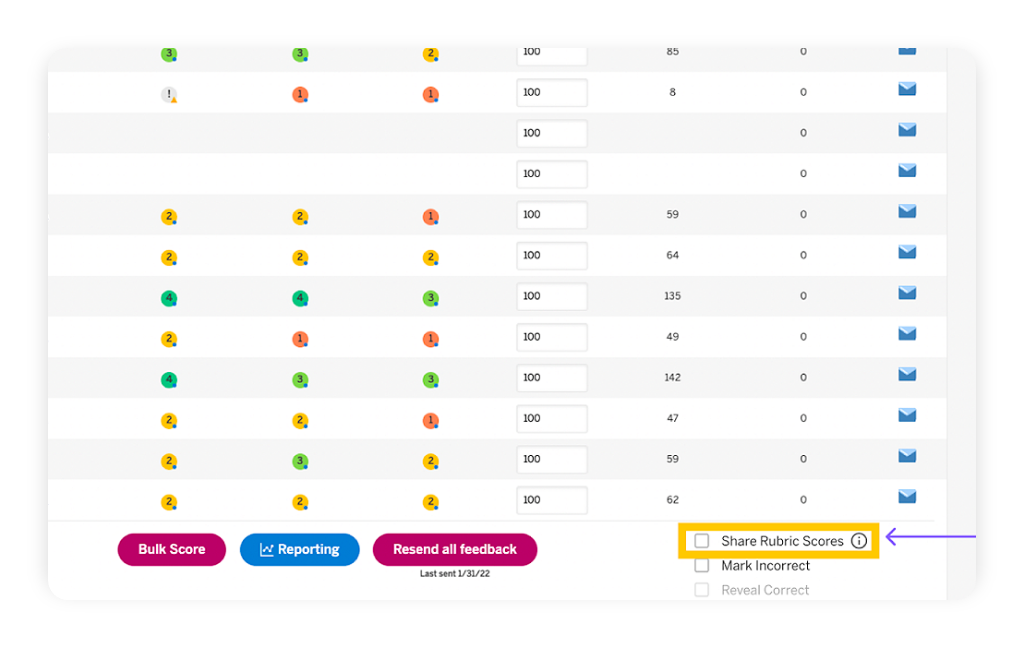
      • Foundational instruction that targets key standards and multiple learning modes.
      • Writing that builds directly from reading complex text and is evaluated by Amplify’s Automated Writing Evaluation (AWE).
      • Reading with the B.E.S.T. Modules have been built to guide teachers and students as they begin to work with Florida’s new reading standards, providing an introduction to each grade-level B.E.S.T. Reading Benchmark. (Example module: Grade 6, Understanding Rhetoric)

      Knowledge matters

      Texts in the Amplify ELA Florida Edition curriculum cover a wide range of topics, themes, and genres with differentiated supports that ensure that all students can work through each reading and lesson. Taken as a whole, the texts show students a diverse picture of the world and help foster a lifelong love of reading. Comprehension develops as students engage with literary and informational text selections that are complex, rich, and meaningful. 

      Texts were selected for Amplify ELA Florida Edition using the following criteria: 

      • Text complexity as defined by qualitative, quantitative, and reader and task measurements as required by the B.E.S.T. Standards and the Amplify Text Complexity Index
      • Balance of literary and informational texts
      • Varied representation of genres: novels, plays, poetry, biographies, and other full-length texts
      • Diverse cultures, perspectives, and authors
      • Engaging texts that extend learning and support students as they build knowledge
      • Grade-appropriate texts, with scaffolding and compelling activities to support student engagement with 100% authentic texts
      • A library with more than 700 complete books, both classic and contemporary, encompassing a wide range of genres, topics, and cultural perspectives
      Collage featuring a violinist with glowing eyes, a man with a background of space, a robotic arm, a tiger on a grassy knoll, and a city skyline under a starry sky.

      Curriculum matters

      Amplify ELA Florida is a blended curriculum designed specifically for grades 6–8. The heart of every lesson is the text. Each grade includes six units centered on literary or informational texts, delivered in several forms of media. Your classroom will also benefit from two or three immersive, project-based experiences and a dedicated Story Writing unit.

      • Full B.E.S.T. coverage: Standards are clearly labeled in each lesson, so teachers can save time planning and get back to what they love: teaching. Also included are Benchmark Modules that support teachers’ and students’ introduction to the new standards for Florida.
      • Five levels of differentiation: Based on each student’s needs and the performance measures within Amplify ELA reports, a teacher can choose the differentiation level that’s the right fit for everyone.
      • Embedded Assessments: Teachers benefit from uninterrupted instructional time and a continuously updated picture of each student’s progress with key skills and standards.
      • Powerful feedback tools: Comprehensive tools help teachers maximize both the quantity and quality of feedback.
      • Robust reporting: Our reporting app offers information on student progress to help inform instructional decisions.

      All in one place: Embedded teacher support, differentiation tools, student data, text, and other curriculum features—they’re all right there.

      Materials

      Amplify ELA Florida Edition is a blended curriculum that seamlessly integrates print and digital resources to be used in any learning environment. The resources are designed to facilitate instruction for planning, teaching, learning, and assessment.

      Student materials

      Available digitally and in print, the student materials guide middle schoolers through complex texts and writing with the following:

      • Student Edition will engage students with high-quality narrative and informational texts.
      • Digital experience will provide videos, a library of more than 700 texts, audio supports, and other online experiences that capture their attention.
      A laptop displays a web page titled "read like a movie director, part 1" from amplify ela, featuring text and an eyeball image under the lesson tab.
      A laptop displaying a webpage from "amplify ela" featuring the title "brain science" and various educational topics alongside an illustrated collage of diverse human figures.

      Teacher materials

      Available digitally and in print, the Teacher Edition contains all of the information teachers need to facilitate classroom instruction, including:

      • From detailed lesson plans.
      • Video teacher tips embedded in the lesson.
      • B.E.S.T. standards alignment and assessments including exit tickets.
      • Real-time differentiation strategies.
      • Clarify and Compare lessons.
      • Robust reporting.

      Professional learning

      Amplify employs a national cohort of more than 50 ELA facilitators, all of whom have experience as former classroom teachers and many of whom are former school and/or district leaders. Our professional learning team has decades of experience working with large districts across the nation. Amplify has experience supporting district launches over multiple years and has partnered with districts of all sizes nationwide. We partner deeply with districts and tailor professional learning to their unique needs.

      Florida ELA Implementation

      Two women are seated at a desk, smiling and working together on a project with a laptop and notebook in an office setting.

      What’s included in our K–8 literacy assessment and instruction suite

      mCLASS DIBELS 8th Edition® provides every teacher, coach, and administrator with a data-driven system that supports each student’s unique needs—from efficient one-minute skills assessments in English and Spanish to granular diagnostic insights. You’ll have all of the tools you need to ensure your students receive effective instruction and discover their true skills as readers.

      Learn more about mCLASS’s precise measurement, predictive results, and preventive instruction.

      Skills at a glance

      mCLASS includes benchmark, progress monitoring and dyslexia screening measures in English and Spanish that are predictive of long-term reading success and detect the critical early warning signs of dyslexia risk. Together, mCLASS DIBELS 8th Edition and mCLASS Lectura identify whether a student is at risk due to a stronger proficiency in one language or difficulties associated with dyslexia.

      Equal skill coverage in English and Spanish

      *Fluidez en nombrar letras (FNL) in Spanish and Letter Naming Fluency (LNF) in English are validated as phonological processing measures (also known as RAN), thus making RAN available in both languages.

      Additional dyslexia screening measures

      Educator and caregiver reports

      The rich data you collect through direct observation is instantly available from a variety of reports that simplify student growth analysis and instructional planning. All stakeholders, from teachers and administrators to parents and guardians, will gain a deep understanding of student performance and know how to provide extra practice. See the complete mCLASS Reporting Guide.

      Class and student reports

      Detailed class and student reports help you quickly pinpoint which students need more support. You’ll be able to see every student’s skill progression from the beginning of their literacy journey to later grades and know exactly when a change in instruction is needed. Measure transcripts from every benchmark and progress monitoring probe also provide you with insight into student responses during assessment.

      Goal setting

      mCLASS includes tools for setting goals and evaluating growth outcomes to ensure the instruction you are providing each individual student is meeting their needs and accelerating their growth. The program uses each student’s initial performance to assign goals, which you can further customize as their learning progresses.

      Administrator reports

      The mCLASS reporting and analysis suite makes it possible to analyze performance trends across a variety of demographic categories at the class, school, district, and state level. Principals, administrators, and district leaders are empowered to evaluate the success of instructional strategies, allocate training resources, or decide where to deploy additional staff.

      Caregiver reports

      The Home Connect letter allows educators to share information about a child’s reading development with parents and guardians in simple charts and family-friendly language. The letters provided include instructional resources in print and online for families to help practice skills at home.

      Data-driven instruction

      mCLASS helps you make sense of data by instantly providing targeted instructional recommendations and teacher resources based on students’ assessment results. mCLASS data also informs instruction within Amplify’s suite of intervention, personalized learning, and core programs grounded in the Science of Reading.

      Automatic small-group and one-on-one instruction

      The mCLASS Instruction feature included with DIBELS 8th Edition and mCLASS Lectura automatically generates skill profiles and recommends teacher-led activities for small groups and individual students. Recommendations can be updated based on the latest benchmark and progress monitoring results.

      Tier 2 and 3 instruction with mCLASS Intervention

      mCLASS data not only helps you identify which students are in need of intensive support, but also places them into Amplify’s Tier 2 and 3 instruction program, mCLASS Intervention. mCLASS Intervention builds a skill profile for each student, forms engaging lesson plans, and updates the instructional recommendations every ten days based on the latest benchmark and progress monitoring results.

      Core instruction with Amplify CKLA

      By combining the results from mCLASS assessments with Amplify CKLA, you can provide targeted whole-class instruction specific to your students’ risk levels and areas of growth. The small-group instruction recommendations in mCLASS provide activities that reinforce what students have learned during Amplify CKLA core instruction.

      Personalized practice with Boost Reading

      mCLASS data seamlessly integrates with Boost Reading to personalize student practice in targeted skill areas. With more than 50 immersive mini-games that build skills in phonics, phonological awareness, vocabulary, and comprehension, Boost Reading provides students with independent practice time they’ll love, while freeing teachers up to provide small-group instruction.

      Explore more programs based on the Science of Reading

      The programs in our literacy suite are designed to support and complement each other. Learn more about our related programs.

      mCLASS Intervention

      Boost Reading

      Amplify CKLA

      Supporting multilingual learners—by supporting their families

      Woman smiling in front of a brick wall, surrounded by colorful illustrations of a turtle, toucan, book, and nature, with the word "¡Hola!" at the top left—celebrating technology in the math classroom and boosting the performance of students.

      Teachers know that multilingual/English learners (ML/ELs) are an important and fast-growing population in today’s classrooms. In 2021, more than 10% of students enrolled in public schools across the U.S. were identified as English language learners, with some projections suggesting this number could reach 40% by 2030.

      But when it comes to partnering with the families of ML/ELs for student success, we’re just beginning to tap into what’s possible.

      I’m an ML/EL teacher and former homeroom teacher at a school serving many ML/ELs.

      Here’s what I’ve learned about best practices for bridging the school-to-home communication gap and partnering with families (all families!) to ensure their child’s success.

      Recognizing the communication gap: Common challenges with multilingual families

      In my experience, three common barriers can stand in the way of strong family engagement and student success:

      • Cultural expectations around parent-teacher communication: In many cultures, school is considered the teacher’s domain. Reaching out may be seen as crossing a line—or simply not expected at all.
      • Logistical challenges: Unpredictable schedules may lead to missed messages, delayed responses, or inconsistent availability.
      • Language barriers: If a message isn’t in a language a caregiver understands, it’s unlikely they’ll respond—not because they don’t care, but because they can’t fully engage.

      Supporting multilingual learners starts with recognizing these barriers not as signs of disconnection, but as invitations to shift our approach. There are best practices we can adopt to help bridge the gap—and build the trust and relationships our students need to thrive.

      Tools and strategies for better parent-teacher communication

      If you want to communicate with families who speak a variety of different languages, the first step is finding the method of contact that works best for each of them. My school uses an auto-translating app called ParentSquare for home communications—but not all families I’ve worked with respond to ParentSquare messages. So if a family isn’t responsive to one mode of communication, try another!

      It’s a good idea to ask families on Back-to-School Night—or whenever your students first arrive—if they have a preferred mode of communication. I’ve found I get the best response rate by creating a Google Voice number and communicating via text, first translating through an app if needed.

      Keep a log of this information so you have it on hand when you need it. In the long run, this will be easier for both you and your students’ caregivers than you chasing them down to get them to download, log into, or check a specific app.

      The important thing is to consider making contact essential, and to keep trying until you find the mode that works for both you and the parents of your ML/EL students.

      Setting the tone for strong family engagement

      If you want to forge a strong family-school partnership (and you should!), you also need to set the tone. When families have a different cultural understanding of school engagement than what you’re used to, I’ve found that it helps to explicitly solicit parent input, explaining how a partnership between caregiver and teacher will help support their child’s success.

      Let them know how and why they should get in touch with you, and make it easy by reaching out proactively with brief, positive updates.

      What multilingual families really want to know

      Perhaps most importantly, ask families what they want to know! I’ve attended many parent-teacher conferences—both for my own students and as an interpreter—and I’m frequently struck by how many multilingual families respond when I ask what questions they have. Many families who haven’t previously reached out are suddenly overflowing with questions.

      The most common one I get is how they can support their child’s academic journey at home. Parents also frequently request updates about behavior. Understand that just because a family isn’t asking these questions proactively doesn’t mean they don’t care. When I explicitly ask parents what they need, their responses make it abundantly clear that they are deeply invested in their child’s schooling and success.

      I’ve also learned that many families—especially those who speak a language other than English at home—may not know that there are many ways to support their child’s growth, even if classroom instruction is not in their home language.

      Think about what tips and resources you can most easily provide: Do your students’ parents know that reading or reciting poems, songs, or chants in their home language helps literacy growth? Could you send home simple board games from the classroom to reinforce key skills? Would signing up for a library card give them access to resources they didn’t know were available? Many caregivers of ML/EL students have told me they lack the tools to get involved—but are eager to engage once given tangible strategies.

      How teachers can go the extra mile

      In order to give our students and their families the support they need, it’s critical that we challenge our internal biases and assumptions. If we assume parents are uninterested or uninvolved, we avoid an opportunity to think creatively about how to bridge communication gaps and facilitate family involvement. We also cut off a world of possibility for our students and limit their access to the academic success that comes from parent involvement.

      Working with the families of ML/ELs may bring added responsibilities—but it’s also a unique privilege, full of new opportunities. In teaching ML/ELs, I’ve found that I get to be a cultural bridge—one of the people providing warmth, stability, and welcome to families navigating a new culture. School can be overwhelming in a new country or different language—but a teacher who goes the extra mile can ensure success for both students and families.

      Additional resources

      A powerful partnership

      Amplify Science was developed by the science education experts at UC Berkeley’s Lawrence Hall of Science and the digital learning team at Amplify. This partnership extends to 2032, allowing us to continuously improve our program and provide our customers with the most up-to-date enhancements, free of charge. Get a glimpse at our latest back-to-school updates here.

      Instructional model

      The Amplify Science program is rooted in the proven, research-based pedagogy of Do, Talk, Read, Write, Visualize. Here’s how each element works:

      Three blue panels describing educational activities: "hands-on science" with lab experiments, "discuss" with collaborative learning, and "read" with literacy in science articles.

      Phenomena-based approach

      In each Amplify Science unit, students take on the roles of scientists or engineers in order to investigate a real-world problem. Students work to define the problem and collect and make sense of evidence. Once the context is clear, students collect evidence from multiple sources and through a variety of modalities. At the end of the unit, students are presented with a brand new problem, giving them an opportunity to apply what they’ve learned over the course of the unit to a new context. This represents a shift from asking students to learn about science to supporting students in figuring out the science.

      Flowchart of a learning unit divided into four chapters, showing stages of student engagement from introduction to application, with assessments indicated at various points.

      Resources to support your review

      Remote and hybrid learning support

      A child sits at a desk using a laptop. Next to the desk is a bookshelf with books, a fishbowl, and a soccer ball.

      See an example of our remote and hybrid learning support below:

      This fall, Amplify launched a new remote learning solution called Amplify Science@Home. Intended to make extended remote and hybrid learning easier, Amplify Science @Home includes two useful options for continuing instruction: @Home Videos and @Home Units.
      Amplify Science @Home Videos are recordings of real Amplify Science teachers teaching the lessons. For those teachers who are unable to meet synchronously with their students, the recorded lessons are a great way to keep their students on track and engaged with Amplify Science while at home. These videos will be produced for all K–5 units, and for the first four units of each 6–8 grade level. Their release will be rolling, beginning in August.

      Amplify Science @Home Units are modified versions of Amplify Science units, strategically designed to highlight key activities from the program. The @Home Units take significantly less instructional time than the complete Amplify Science program and allow students to engage with science at home. @Home Units will be developed for all Amplify Science K–8 units. Each @Home unit includes:

      • Teacher overviews explaining how to use the materials, including suggestions for enhancing the @Home Units if synchronous learning or in-class time with students is available
      • Overviews to send home to families

      Student materials will be available in two formats:

      • @Home Slides (PDF/PPT) + Student Sheets (PDF) for students with access to technology at home
      • Downloadable @Home Packets (PDF) for students without access to technology at home

      Download the remote and hybrid learning guide

      Benchmark Assessments

      Amplify’s Benchmark Assessments are designed to help teachers measure student progress toward the three dimensions—Disciplinary Core Ideas (DCIs), Science and Engineering Practices (SEPs), and Crosscutting Concepts(CCCs)—and performance expectations (PEs) of the NGSS. The assessments provide important insight into how students are progressing toward mastery of different standards ahead of high-stakes, end-of-year assessments.

      The Benchmark Assessments are built to be delivered after specific units in the recommended Amplify Science scope and sequence.* They are given three or four times per year, depending on the grade level. The benchmarks are intended to show progress at various points in time across a school year, and are therefore not summative in nature. Digital items and item clusters are also tagged to specific NGSS standards, allowing customization to align with other course sequences. The assessments are available via the following platforms:

      Print
      PDF files: For administering Benchmark Assessments on paper

      Digital platforms

      • Illuminate
      • SchoolCity
      • Otus
      • QTI (“Question and Test Interoperability”) files
        Not sure whether QTI files are compatible with your assessment platform? Contact your school IT or assessment platform representative for more information.
        Please note that Amplify is able to provide access to the QTI files themselves, but is not able to support the integration process. Your assessment platform provider should be able to assist with QTI file integration.

      Flexible implementation

      One of the key features of Amplify Science is the flexibility that it offers. We give students authentic opportunities to experience the full breadth of what it means to be a scientist or engineer. Just as scientists gather evidence from many types of sources, so do students in our program. Like scientists, students gather evidence not just from physical models, but also from digital models, texts, videos, photographs, maps, data sets, and even their peers!
      Simply put, real scientists don’t just get messy—they read, write, analyze, hypothesize, model, test, and communicate with purpose, too.

      Science articles

      The middle school science articles serve as sources for evidence collection and were authored by science and literacy experts at the Lawrence Hall of Science.

      Illustration of the indirect effects of overfishing on northern benguela jelly populations displayed on a laptop screen.

      Student Books
      Beginning and young readers have unique developmental needs, and science instruction should support these students in reading more independently as they progress through sections of content, the school year, and each grade. One way Amplify Science meets these needs is by strategically deploying different modes of reading throughout each unit: Read-Aloud, Shared Reading, and Partner Reading.

      A collage of various educational book covers related to science and math, featuring illustrated themes like sports, nature, and energy.

      Student Investigation Notebooks

      Available for every unit, the Student Investigation Notebooks provide space for students to:

      • record data.
      • reflect on ideas from texts and investigations.
      • construct explanations and arguments.

      Available with full-color article compilations for middle school units.

      Collection of educational books from 'amplify science' on topics including ocean atmosphere, matter and energy ecosystems, and insect interactions, displayed in various angles.

      Digital student experience

      Students access the digital simulations and Modeling Tools, as well as lesson activities and assessments, through the digital student experience. Students can interact with the digital student experience as they:

      • conduct hands-on investigations.
      • engage in Active Reading and writing activities.
      • participate in discussions.
      • record observations.
      • craft end-of-unit scientific arguments.

      Dive into a quick example of our powerful simulations

      A digital illustration showcasing a laptop and a tablet displaying complex data analysis software interfaces with graphs and heatmaps.

      Hands-on materials kits

      Hands-on learning is at the heart of Amplify Science and is integrated
      into every unit. Students actively take on the roles of scientists and engineers as they gather evidence, think critically, solve problems, and develop and defend claims about the world around them.

      Check out these 2-minute videos to see an Amplify Science hands-on investigation in action.

      Each unit kit contains:

      • consumable and non-consumable hands-on materials.
      • print classroom display materials.
      • premium print materials for student use (sorting cards, maps, etc.).
      A perforated rectangular board, three small containers with different powders, a black battery holder with red wires, and three colored alligator clips are arranged on a white background.

      Teacher’s Guides

      Available digitally and in print, the Teacher’s Guides contain all of the information teachers need to facilitate classroom instruction, including:

      • detailed lesson plans.
      • unit and chapter overview documentation.
      • differentiation strategies.
      • standards alignments.
      • in-context professional development.
      A laptop displaying the Geology on Mars webpage sits beside a book titled "Geology on Mars," both featuring the same cover image of Mars and a spacecraft, perfect for enhancing three-dimensional learning in any science classroom.

      Scope and Sequence

      GRADE UNITS
      Kindergarten
      • Needs of Plants and Animals
      • Pushes and Pulls
      • Sunlight and Water
      Grade 1
      • Animal and Plant Defenses
      • Light and Sound
      • Spinning Earth
      Grade 2
      • Plant and Animal Relationships
      • Properties of Materials
      • Changing Landforms
      Grade 3
      • Balancing Forces
      • Inheritance and Traits
      • Environments and Survival
      • Weather and Climate
      Grade 4
      • Energy Conversions
      • Vision and Light
      • Earth’s Features
      • Waves, Energy, and Information
      Grade 5
      • Patterns of Earth and Sky
      • Modeling Matter
      • The Earth System
      • Ecosystem Restoration
      GRADE UNITS
      Grade 6: Earth Science
      • Launch: Geology on Mars
      • Plate Motion
      • Plate Motion: Engineering Internship
      • Rock Transformations
      • Earth, Moon, and Sun
      • Ocean, Atmosphere, and Climate
      • Weather Patterns
      • Earth’s Changing Climate
      • Earth’s Changing Climate: Engineering Internship
      Grade 7: Life Science
      • Launch: Microbiome
      • Metabolism
      • Metabolism: Engineering Internship
      • Traits and Reproduction
      • Populations and Resources
      • Matter and Energy in Ecosystems
      • Natural Selection
      • Natural Selection: Engineering Internship
      • Evolutionary History
      Grade 8: Physical Science 
      • Launch: Harnessing Human Energy
      • Force and Motion
      • Force and Motion: Engineering Internship
      • Magnetic Fields
      • Thermal Energy
      • Phase Change
      • Phase Change: Engineering Internship
      • Chemical Reactions
      • Light Waves

      Minnesota Academic Standards in Science coverage

      Amplify Science was designed from the ground up to meet the NGSS, a set of standards that closely align with the K–8 Minnesota Academic Standards in Science (MASS). Therefore, most grade levels’ respective set of Amplify Science units address the necessary MASS (see K–5 reverse alignment and/or correlations for K–5 and 6–8). However, for grades 2–4, teachers should also use the resources provided in the sections below to achieve full coverage of the appropriate standards before their students move on to the next grade level. Organized by grade level, each section outlines:

      • companion lesson materials that were written to support 100% alignment to the Minnesota Academic Standards in Science when used with the core Amplify Science units for the grade level
      • the standard being addressed with each companion lesson; and
      • the recommended placement of each companion lesson within a specific Amplify Science unit 

      Companion lesson: “Shelter”

      Standard: 1P.4.2.2.1 Communicate solutions that use materials to provide shelter, food, or warmth needs for communities including Minnesota American Indian tribes and communities.* (P: 8, CC: 2, CI: PS1, ETS2)

      Recommended placement: Following Lesson 5.1 of Spinning Earth

      Materials: Shelter Classroom Slides and Student Sheet

      Companion lesson: “Describing Climates”

      Standard: 2E.4.2.1.2 Obtain and use information from multiple sources, including electronic sources, to describe climates in different regions of the world.** (P: 8, CC: 1, CI: ESS2)

      Recommended placement: Following Lesson 4.5 of Changing Landforms

      Materials: Describing Climates Classroom Slides and Student Sheet

      Note: Students will further investigate the content in this standard, and revisit the book used in this companion lesson, in 3rd grade (Weather and Climate unit)

      Companion lesson 1: Light and Vision

      Standard: 3P.3.1.1.1 Develop a model to describe that light reflecting from objects and entering the eye allows objects to be seen. (P: 2, CC: 2, CI: PS4)

      Recommended placement: Following Lesson 4.5 of Environments and Survival

      Materials: Light and Vision Part 1 Classroom Slides and Student Sheet; Light and Vision Part 2 Classroom Slides and Student Sheet 

      Note: Students will further investigate the content in this standard, and revisit the book used in this companion lesson, in 4th grade (Vision and Light unit)

      Companion lesson 2: Studying Stars

      Standard: 3E.4.2.2.1 Gather information and communicate how Minnesota American Indian Tribes and communities and other cultures use patterns in stars to make predictions and plans. (P 8, CC: 1, CI: ESS1) 

      Recommended placement: Following Lesson 4.4 of Weather and Climate

      Materials: Studying Stars Classroom Slides and Student Sheet

      Note: Students will further investigate the content in this standard, and revisit the book used in this companion lesson, in 5th grade (Patterns of Earth and Sky unit)

      Companion lesson 1: Salt Water and Freshwater

      Standard: 4E.2.2.1.1 Interpret charts, maps and/or graphs of the amounts of salt water and fresh water in various reservoirs to provide evidence about the distribution of water on Earth.** (P: 5, CC: 4, CI: ESS2) 

      Recommended placement: Following Lesson 2.6 of Earth’s’ Features

      Materials: Salt Water and Freshwater Classroom Slides and Student Sheet

      Note: Students will further investigate the content in this standard, and revisit the book used in this companion lesson, in 5th grade (The Earth System unit)

      Companion lesson 2: How Raindrops Form

      Standard: 4E.1.1.1.2 Ask questions about how water moves through the Earth system and identify the type of question. (P: 1, CC: 5, CI: ESS2) 

      Recommended placement: Following Lesson 4.5 of Earth’s’ Features

      Materials: How Raindrops Form Classroom Slides and Student Sheet

      Note: Students will further investigate the content in this standard, and revisit the book used in this companion lesson, in 5th grade (The Earth System unit)

      Explore the digital Teacher’s Guide

      To familiarize yourself with navigation of the digital Teacher’s Guide, watch our navigational guide videos:

      Grades K–5:

      Grades 6–8:

      Looking for help?

      Powerful (and free!) pedagogical support

      Amplify provides a unique kind of support you won’t find from other publishers. We’ve developed an educational support team of former teachers and administrators who provide pedagogical support for every Amplify curriculum, assessment, and intervention program. This service is completely free for all educators who are using our programs and includes:

      • Guidance for developing lesson plans and intervention plans.
      • Information on where to locate standards and other planning materials.
      • Recommendations and tips for day-to-day teaching with Amplify programs.
      • Support with administering and interpreting assessment data and more.

      Timely technical and program support

      Our technical and program support is included and available Monday through Friday, from 7 a.m. to 7 p.m. ET, through a variety of channels, including a live chat program that enables teachers to get immediate help in the middle of the school day.

      Ready to dive in?

      Contact your Minnesota representative:
      Kristi Stengel
      Account Executive
      kstengel@amplify.com
      (612) 306-3941

      Tammy Sigwarth
      Account Executive
      tsigwarth@amplify.com
      (563) 663-0056

      A powerful partnership

      Amplify Science was developed by the science education experts at UC Berkeley’s Lawrence Hall of Science and the digital learning team at Amplify.

      The word "Amplify" is written in orange bold letters with a period at the end against a white background.

      Back to school 2020–21 updates

      Back to school 2020 is coming! Click here for more information on all of the improvements and new features we’re adding to Amplify Science for the new school year.

      Program introduction

      Onboarding: what to expect

      Welcome to Amplify Science! To help you know what’s coming next, we created the following outline of the steps of the onboarding process. You can use it as a reference.

      Administrators receive launch email

      • Share the information with teachers
      • Submit the shipping survey sent to your email

      Log In

      • Go to learning.amplify.com
      • Click on Log in with Clever or Google 
      • Enter your FCPS credentials
      • Demo Account for full access to Amplify Curriculum without access to personalized class rosters:
        • Go to learning.amplify.com
        • Click on login with Amplify
        • Username: t.Fayette2020@tryamplify.net
        • Password:  AmplifyNumber1

      Ensure you have received all materials and components

      • Teachers have access to a series of “Unboxing your materials kit” videos. If you’re interested in watching those, click here.

      Check out the professional learning opportunities and/or access the Getting Started Resources below.

      If you need assistance, please see the help resources or reach out to your Educational Partnerships Manager or PD manager at caffleck@amplify.com, pworks@amplify.com with any questions.

      6–8 resources

      To ensure your first day using Amplify Science in the classroom is as seamless and smooth as possible, we recommend reviewing the following checklist before the first day of school.

      What’s coming to my school?

      Each unit of Amplify Science comes with a hands-on materials kit. Each hands-on materials kit arrives in one to three boxes and contains:

      • Consumable materials for five uses of 40 students
      • Non-consumable materials
      • Classroom wall materials
      • Premium print materials (card sorts, vocabulary rings, etc.).

      You can find complete materials lists for each unit in the following PDF. This information is also available in the digital Teacher’s Guide within the program.

      Onboarding videos

      Our team has created a series of short videos to help get you started with Amplify Science:

      What’s online?

      Planning strategies

      How to log in and navigate

      NGSS introduction

      Introduction to Classwork

      Planning guide

      As you prepare to plan for a unit, download our planning guide to help walk you through the most important resources to locate in either the print or digital Teacher’s Guide to help you plan.

      Additional resources

      New and noteworthy updates to Amplify ELAR and SLAR Texas K–5!

      Big things are coming next school year! Amplify Texas ELAR and SLAR are introducing new enhancements to save you time, extend your impact, and support you in delivering the dynamic learning experiences your students deserve.

      Illustration of children engaging in outdoor activities, with birds, greenery, a cityscape, and a school building, highlighting CKLA’s new features and representing active, diverse environments.

      Updates

      Improved navigation

      We’re rolling out a more user-friendly navigation experience this school year, featuring:

      • An accessible sidebar menu for quick access to key educator resources within sections like Content, PD Library, and Apps.
      • A new Apps menu organized by subject.
      A dashboard interface shows an educator's homepage with program recommendations, navigation menu on the left, and three recommendation cards with icons and “Go” buttons on the right.

      Grade 3 Skills

      Starting this school year, all Amplify ELAR teachers will have digital access to our new Grade 3 Skills supplemental resource, which reinforces and builds on the K–2 Skills Strand. You can use these extra lessons to support core instruction or serve as an intervention, depending on your students’ needs. Instruction follows a familiar sequence and can be taught flexibly, in two 15-minute sessions or one 30-minute session.

      *Grade 3 Skills will also be available in print for additional purchase.

      Noteworthy features

      PD Library

      You’ll find helpful professional development (PD) resources in the PD Library to ensure your Amplify ELAR and SLAR implementation runs smoothly. The PD Library can be accessed through the Programs & Apps menu in the top navigation bar when you’re logged in to Amplify.

      Exciting updates are coming for Amplify Science!

      As you prepare for the upcoming school year, we’re making it easier than ever to support your students with Amplify Science. From time-saving tools to expanded instructional resources, these improvements will further enhance your ability to engage students in rigorous, hands-on learning while streamlining your teaching experience.

      A teacher sits at a table with three students in a classroom, engaging them in an Amplify Science activity using a clear plastic container. Books, bins, and educational posters are visible in the background.

      Updates

      Educator Home: Stream filtering by student

      You can now filter your Stream by student name and see all the assignments for each particular student. You can also preview student work right from the Stream to check in on their progress.

      A classroom management software interface featuring filter menus for programs like Amplify Science, classes, and students, with options to go to a lesson or dashboard, and a partially visible student list.

      Noteworthy features

      PD Library

      Amplify Science’s PD Library is your go-to destination for self-paced professional development. Whether you’re new to Amplify Science or looking to deepen your expertise, you’ll find high-quality training and resources tailored to your needs.

      A welcome screen for Amplify’s PD Library features a video titled “Welcome educators!” and text describing the library as a resource hub for professional learning and Amplify Science program support.

      Caregiver Hub

      Empower families and caregivers to support student learning with the Amplify Science Caregiver Hub, a dedicated resource that provides curriculum overviews, background information, and helpful tools to extend learning beyond the classroom.

      Bite-Sized Science Moments in Amplify Classroom

      Explore a growing library of free science activities that are designed to be flexibly implemented in your day. Each activity takes between 5–20 minutes to complete, and can be used within a science block or any time!

      The digital experience

      The digital experience is an add-on license for K–5 teachers and students that makes lesson planning and student engagement easier than ever. With ready-to-use slides-based lessons, integrated teacher prompts and guidance, interactive student opportunities, robust professional development resources, and more, this tool keeps everything in one place.

      *Interested in using the digital experience? Contact your account representative to learn more.

      Amplify Science classroom showcase

      Looking for inspiring classroom examples from educators nationwide who are bringing Amplify Science to life? Check out the Amplify Science classroom showcase!

      A classroom wall displays grade-level boards, educational posters, a large whiteboard with Amplify Science notes, and a human skeleton model next to desks and bins.

      What is mCLASS?

      mCLASS is a best-in-class assessment platform that houses a suite of proven, gold-standard assessment measures and tools that can be flexibly combined to meet the unique literacy needs of both teachers and students across grades K–6, including:

      • Universal screening
      • Diagnostic assessment
      • Dyslexia screening
      • Progress monitoring
      • Dual language reporting
      • Targeted teacher-led instruction

      What is the DIBELS 8th Edition assessment?

      Developed by the University of Oregon, the DIBELS 8th Edition is the latest version of the DIBELS® (Dynamic Indicators of Basic Early Literacy Skills) assessment.

      With this latest version, the University of Oregon Center on Teaching and Learning (UO CTL) made significant efforts to ensure measures would meet state-level screening requirements for universal screening, diagnostic assessment, and dyslexia screening. To support this, measures were updated based on the latest research to meet increased standards of reliability and validity. In addition, adaptive procedures and discontinue rules focus on the assessment of priority skills and prevent over-testing.

      Summary of changes:

      • Consistent measures within grades will provide improved growth measurement.
      • All subtests have been revised to be grade-specific and to increase in difficulty, covering a full progression of skills and minimizing floor and ceiling effects. This provides the opportunity for students to demonstrate what they know and further pinpoint what they don’t know.
      • Phoneme Segmentation Fluency replaces First Sound Fluency. The expanded coverage minimizes floor effect and provides information about difficulty in Phonemic Awareness skills without the additional First Sound Fluency measure.
      • A new subtest, Word Reading Fluency, helps identify students with poor sight word reading skills that other subtests miss.
      • For all measures, the basic scoring procedures remain the same. For Nonsense Word Fluency, credit is given for recording words as whole words even if the student misses in the first attempt.
      • Oral Reading Fluency is now only one passage, instead of three. Retell has been removed. Thus, Oral Reading Fluency assessment will take a third of the time.

      Assessment measures by grade

      DIBELS measures at each grade level 
      MeasureGrade KGrade 1Grade 2Grade 3
      Letter naming fluency
      Phonemic segmentation fluency
      Nonsense word fluency
      Word reading fluency
      Oral reading fluency
      Maze (basic comprehension)
      Amplify measures at each grade level
      Oral language
      Vocabulary

      Assessment measures sample videos

      DIBELS 8th Edition measure: Phonemic Segmentation Fluency (PSF)

      DIBELS 8th Edition measure: Nonsense Word Fluency (NWF)

      DIBELS 8th Edition measure: Letter Naming Fluency (LNF)

      DIBELS 8th Edition measure: Word Reading Fluency (WRF)

      DIBELS 8th Edition measure: Oral Reading Fluency (ORF)

      How is mCLASS with DIBELS 8th Edition different?

      mCLASS with DIBELS 8th Edition combines the power of the mCLASS assessment platform and the effectiveness of the DIBELS 8th Edition assessment measures. As a result – educators across the state are empowered with the latest and greatest assessment tool.

      More than a test, mCLASS with DIBELS 8th Edition is an integrated system that closes the knowing-doing gap by helping teachers take immediate instructional action that’s right for each and every student.

      Assessment systems must enable and compel educators to answer not just the “What” questions, but also the “So What” and “Now What” questions. These are the questions that are essential in transforming classroom instruction, and the questions that mCLASS with DIBELS 8th Edition helps teachers answer with confidence.

      How is mCLASS with DIBELS 8th Edition different?

      1. It gives teachers access to the latest digital version of the DIBELS assessment. Amplify is the only licensed provider of the digital DIBELS 8th Edition assessment. As such, our solution is the only one to enhance the DIBELS 8th Edition assessment with the power, reliability, and quickness of the mCLASS system.
      2. It makes it faster and easier to understand where every student is in their early literacy journey. By combining 1:1 observational diagnostic assessments, dyslexia screening, progress monitoring, instant scoring, rigorous reporting, automatic student grouping, and targeted instruction all in one place, it reduces the instructional delays associated with manual scoring, manual data analysis, and manual lesson planning.
      3. It brings more equity to the classroom. When used in conjunction with mCLASS Lectura, teachers have access to dual language reports that highlight a student’s strengths and weaknesses in both English and Spanish.
      4. It makes every instructional minute count. In addition to one-minute measures that quickly gauge student progress toward reading proficiency, it leverages a teacher’s most powerful instructional tool — their own 1:1 observations.
      5. It drives growth more efficiently. Rather than relying on broad composite scores alone, granular data and in-depth insights for every student help teachers pinpoint exact skill gaps and areas of unfinished learning, making whole-group, small-group, and 1:1 instruction more targeted and effective.
      6. It saves teachers time. Instant reports, automatic student groups, and ready-to-teach lessons mean teachers spend less time cobbling together materials and more time working directly with students and responding to their needs.

      How does mCLASS with DIBELS 8th Edition support screening for dyslexia risk?

      DIBELS 8th Edition measures have been updated based on the latest research. They now offer stronger measures of processing speed, phonological awareness, and alphabetic principles for dyslexia screening purposes.

      To support this, a new subtest in Word Reading Fluency was introduced and revisions were made to Letter Naming Fluency, Phonemic Segmentation Fluency, and Nonsense Fluency subtests to improve their ability to screen for deficits commonly associated with dyslexia risk, such as phonological awareness, rapid naming ability, and alphabetic principle. These measures provide early warning signs for neurological processing difficulties that contribute to risk for dyslexia (Wolf & Bowers, 1999; Denckla & Rudel, 1974).

      Moreover, measures in Oral Language and Vocabulary are included to provide additional information to help evaluate additional risk areas associated with dyslexia risk.

      How does mCLASS with DIBELS 8th Edition turn data into instant action?

      mCLASS with DIBELS 8th Edition gives you instant results and clear next steps for each student.

      Quick and actionable reports provide detailed insight into students’ reading development across foundational literacy skills for teachers, specialists, administrators, and caregivers.

      Chart comparing student assessment performance across the year in categories: beginning, middle, and end, with a breakout box summarizing results by percentage and student count.

      Diagnostic assessment

      mCLASS with DIBELS 8th Edition analyzes individual student response data through a scoring algorithm which aligns to the Colorado Department of Education’s stated purpose of a diagnostic assessment.

      Our innovative approach to diagnostic assessment leverages an item-level evaluation of individual student responses in order to provide deeper insights into specific student weaknesses and areas of improvement. mCLASS with DIBELS 8th Edition analyzes individual student response data through a scoring algorithm which aligns to the Colorado Department of Education’s stated purpose of a diagnostic: “… to pinpoint a student’s specific area(s) of weakness and provide in-depth information about students’ skills and instructional needs.”

      Ready-to-teach instruction

      Immediately following the analysis of individual student responses, mCLASS with DIBELS 8th Edition provides an in-depth diagnostic report complete with suggested next steps, also known as “mCLASS Instruction.”

      mCLASS Instruction evaluates each student’s responses on each individual subtest and instantly:

      • Provides a list of specific needs by student, such as struggling with medial vowel sounds or difficulty reading words with consonant blends.
      • Groups students automatically based on similar discrete skill needs, not simply composite scores like other assessment tools.
      • Recommends a variety of ready-to-teach lessons that specifically target each individual student’s areas of need or common areas of need for small-group instruction.

      Classroom skill and benchmark summary

      The Classroom Skill Summary report is a dashboard showing benchmark performance on each skill. Teachers can use it to determine which skill areas need instructional focus at a classroom level.

      The Classroom Benchmark Summary report is a classroom-wide view of overall reading performance. Teachers can use this report to determine if composite scores improved, declined, or remained the same each semester.

      Detailed benchmark performance

      Teachers can see each student’s performance during the current school year, on each subtest as well as the overall composite. The benchmark goal displays below the subtest name when applicable. The ability to sort the columns in this report gives teachers more flexibility to analyze data the way they prefer.

      Dyslexia screening

      Identify students who are at risk for reading difficulties, including dyslexia, based on their results from foundational skills measures and additional measures as needed by local policies.

      Progress monitoring summary

      See which subtests have been assessed since the most recent benchmark assessment, how students performed on the three most recent progress monitoring assessments for each measure, and which students have not been progress monitored since the benchmark assessment.

      Goal setting tool

      The Zones of Growth (ZoG) analysis uses a rich set of national data to determine student goals for the next benchmark period. Teachers can use the Goal Setting Tool to view these recommended goals or modify the default goals for individual students as they see fit, if the default goal is too challenging or not challenging enough.

      Growth outcomes

      Teachers and interventionists can see each student’s actual growth achieved and how it compares to the goal that was set for the student.

      Colorado READ Plans

      Amplify recommends that a student who is categorized by the DIBELS 8th Edition composite score as “At High Risk” (denoted in all reports as “red”) be considered as potentially having a “Significant Reading Deficiency,” then further diagnosed using mCLASS’ Instruction diagnostics.

      When devising a READ Plan, teachers and instructional staff should first consider students at high risk on DIBELS 8th Edition as potentially having a “Significant Reading Deficiency,” and eligible for a READ Plan. Students are then further diagnosed using mCLASS’ Instruction diagnostics. When devising a READ Plan, teachers can rely on the relevant mCLASS Instruction and Reports to comply with the READ Act.

      Caregiver supports

      The mCLASS Home Connect website houses literacy resources for parents and caregivers, including at-home lessons organized by skill. Our mCLASS parent/caregiver letters in English and Spanish ensure that families know how to best support their child.

      Screenshot of the mclass home awareness webpage displaying educational games and activities for children, categorized by setting and skill level.

      Explore our self-guided tour

      Our self-guided tour is a great way to orient yourself to the organization of our mCLASS platform. Click the button below to get started.

      Contact us

      Looking to speak directly with your Colorado representative? Get in touch with a team member by emailing HelloColorado@amplify.com or by calling us directly.

      Enrollment over 2,500 studentsEnrollment under 2,500 students
      Monty LammersSenior Account Executive(719) 964-4501mlammers@amplify.comVanessa ScottAccount Executive(602) 690-9216vscott@amplify.com

      New and noteworthy updates to your Amplify programs!

      This back-to-school season, explore new updates and exciting features that will save you time, extend your reach, and enhance your ability to deliver the types of rigorous and riveting learning experiences you and your students deserve.

      Select an Amplify program below to learn what’s coming, and to read about other notable features to keep in mind as you head into a new year of learning!

      A teacher in a red shirt assists a student using a laptop in a classroom, where others work at desks in the background—capturing the Back to School spirit and highlighting the benefits of the Amplify program.

      Ready to learn more about our Amplify products? Fill out this form and we’ll be in touch with you shortly.

      What is mCLASS?

      mCLASS is a best-in-class assessment platform that houses a suite of proven, gold-standard assessment measures and tools that can be flexibly combined to meet the unique literacy needs of both teachers and students across grades K–6, including:

      • Universal screening
      • Diagnostic assessment
      • Dyslexia screening
      • Text Reading and Comprehension (a.k.a. running records via mCLASS: Reading 3D)
      • Progress monitoring
      • Dual language reporting
      • Targeted teacher-led instruction

      What is the DIBELS 8th Edition assessment?

      Developed by the University of Oregon, the DIBELS 8th Edition is the latest version of the DIBELS® (Dynamic Indicators of Basic Early Literacy Skills) assessment.

      With this latest version, the University of Oregon Center on Teaching and Learning (UO CTL) made significant efforts to ensure measures would meet state-level screening requirements for universal screening, diagnostic assessment, and dyslexia screening. To support this, measures were updated based on the latest research to meet increased standards of reliability and validity. In addition, adaptive procedures and discontinue rules focus on the assessment of priority skills and prevent over-testing.

      Summary of changes:

      • Consistent measures within grades will provide improved growth measurement.
      • All subtests have been revised to be grade-specific and to increase in difficulty, covering a full progression of skills and minimizing floor and ceiling effects. This provides the opportunity for students to demonstrate what they know and further pinpoint what they don’t know.
      • Phoneme Segmentation Fluency replaces First Sound Fluency. The expanded coverage minimizes floor effect and provides information about difficulty in Phonemic Awareness skills without the additional First Sound Fluency measure.
      • A new subtest, Word Reading Fluency, helps identify students with poor sight word reading skills that other subtests miss.
      • For all measures, the basic scoring procedures remain the same. For Nonsense Word Fluency, credit is given for recording words as whole words even if the student misses in the first attempt.
      • Oral Reading Fluency is now only one passage, instead of three. Retell has been removed. Thus, Oral Reading Fluency assessment will take a third of the time.

      Assessment measures by grade

      DIBELS measures at each grade level 
      Measure Grade K Grade 1 Grade 2 Grade 3 Grades 4–6
      Letter naming fluency A large, light peach-colored checkmark on a transparent background. A large, light peach-colored checkmark on a transparent background.      
      Phonemic segmentation fluency A large, light peach-colored checkmark on a transparent background. A large, light peach-colored checkmark on a transparent background.      
      Nonsense word fluency A large, light peach-colored checkmark on a transparent background. A large, light peach-colored checkmark on a transparent background. A large, light peach-colored checkmark on a transparent background. A large, light peach-colored checkmark on a transparent background.  
      Word reading fluency A large, light peach-colored checkmark on a transparent background. A large, light peach-colored checkmark on a transparent background. A large, light peach-colored checkmark on a transparent background. A large, light peach-colored checkmark on a transparent background. A large, light peach-colored checkmark on a transparent background.
      Oral reading fluency   A large, light peach-colored checkmark on a transparent background. A large, light peach-colored checkmark on a transparent background. A large, light peach-colored checkmark on a transparent background. A large, light peach-colored checkmark on a transparent background.
      Maze (basic comprehension)     A large, light peach-colored checkmark on a transparent background. A large, light peach-colored checkmark on a transparent background. A large, light peach-colored checkmark on a transparent background.
      Amplify measures at each grade level
      Oral language A large, light peach-colored checkmark on a transparent background. A large, light peach-colored checkmark on a transparent background. A large, light peach-colored checkmark on a transparent background. A large, light peach-colored checkmark on a transparent background.  
      Vocabulary A large, light peach-colored checkmark on a transparent background. A large, light peach-colored checkmark on a transparent background. A large, light peach-colored checkmark on a transparent background. A large, light peach-colored checkmark on a transparent background. A large, light peach-colored checkmark on a transparent background.

      Assessment measures sample videos

      DIBELS 8th Edition measure: Phonemic Segmentation Fluency (PSF)

      DIBELS 8th Edition measure: Nonsense Word Fluency (NWF)

      DIBELS 8th Edition measure: Letter Naming Fluency (LNF)

      DIBELS 8th Edition measure: Word Reading Fluency (WRF)

      DIBELS 8th Edition measure: Oral Reading Fluency (ORF)

      What makes mCLASS with DIBELS 8th Edition different?

      mCLASS with DIBELS 8th Edition combines the power of the mCLASS assessment platform and the effectiveness of the DIBELS 8th Edition assessment measures. As a result – educators are empowered with the latest and greatest assessment tool.

      More than a test, mCLASS with DIBELS 8th Edition is an integrated system that closes the knowing-doing gap by helping teachers take immediate instructional action that’s right for each and every student.

      Assessment systems must enable and compel educators to answer not just the “What” questions, but also the “So What” and “Now What” questions. These are the questions that are essential in transforming classroom instruction, and the questions that mCLASS with DIBELS 8th Edition helps teachers answer with confidence.

      What makes mCLASS with DIBELS 8th Edition different?

      1. It gives teachers access to the latest digital version of the DIBELS assessment. Amplify is the only licensed provider of the digital DIBELS 8th Edition assessment. As such, our solution is the only one to enhance the DIBELS 8th Edition assessment with the power, reliability, and quickness of the mCLASS system.
      2. It makes it faster and easier to understand where every student is in their early literacy journey. By combining 1:1 observational diagnostic assessments, dyslexia screening, progress monitoring, instant scoring, rigorous reporting, automatic student grouping, and targeted instruction all in one place, it reduces the instructional delays associated with manual scoring, manual data analysis, and manual lesson planning.
      3. It brings more equity to the classroom. When used in conjunction with mCLASS Lectura, teachers have access to dual language reports that highlight a student’s strengths and weaknesses in both English and Spanish.
      4. It makes every instructional minute count. In addition to one-minute measures that quickly gauge student progress toward reading proficiency, it leverages a teacher’s most powerful instructional tool — their own 1:1 observations.
      5. It drives growth more efficiently. Rather than relying on broad composite scores alone, granular data and in-depth insights for every student help teachers pinpoint exact skill gaps and areas of unfinished learning, making whole-group, small-group, and 1:1 instruction more targeted and effective.
      6. It saves teachers time. Instant reports, automatic student groups, and ready-to-teach lessons mean teachers spend less time cobbling together materials and more time working directly with students and responding to their needs.

      How does mCLASS with DIBELS 8th Edition support screening for dyslexia risk?

      DIBELS 8th Edition measures have been updated based on the latest research. They now offer stronger measures of processing speed, phonological awareness, and alphabetic principles for dyslexia screening purposes.

      To support this, a new subtest in Word Reading Fluency was introduced and revisions were made to Letter Naming Fluency, Phonemic Segmentation Fluency, and Nonsense Fluency subtests to improve their ability to screen for deficits commonly associated with dyslexia risk, such as phonological awareness, rapid naming ability, and alphabetic principle. These measures provide early warning signs for neurological processing difficulties that contribute to risk for dyslexia (Wolf & Bowers, 1999; Denckla & Rudel, 1974).

      Moreover, measures in Oral Language and Vocabulary are included to provide additional information to help evaluate additional risk areas associated with dyslexia risk.

      How does mCLASS with DIBELS 8th Edition support the use of running records?

      Track your students’ reading progress from every angle with the Text Reading and Comprehension (TRC) assessment. When TRC is paired with the DIBELS 8th Edition assessment, classroom teachers unlock the ability to record reading behaviors through running digital records. Available in English and Spanish, it measures reading comprehension and provides insight into how each student finds meaning in text.

      A laptop screen displays the mCLASS report for a student named Jon Smith, showing his benchmark history and progress across different categories like reading levels and various assessments.

      Measures include:

      • Lesson plans for whole class, small-group, and one-on-one instruction.
      • Small-group advisor, which organizes students into groups based on strengths and gaps.
      • Item-level advisor, which drills deep into student responses to uncover patterns, strengths, and gaps.
      • Instructional resources for each student’s parent/guardian(s).

      How does mCLASS with DIBELS 8th Edition turn data into instant action?

      mCLASS with DIBELS 8th Edition gives you instant results and clear next steps for each student.

      Quick and actionable reports provide detailed insight into students’ reading development across foundational literacy skills for teachers, specialists, administrators, and caregivers.

      Tablet displaying a student performance table. Columns for assessment times; rows for performance levels. Percentages and student counts are provided in each assessment area and level.

      Diagnostic assessment

      mCLASS with DIBELS 8th Edition analyzes individual student response data through a proprietary scoring algorithm that pinpoints a student’s specific area(s) of growth and improvement, providing classroom teachers in-depth insight into a students’ instructional needs.

      Ready-to-teach instruction

      Immediately following the analysis of individual student responses, mCLASS with DIBELS 8th Edition provides an in-depth diagnostic report complete with suggested next steps, also known as “mCLASS Instruction.”

      mCLASS Instruction evaluates each student’s responses on each individual subtest and instantly:

      • Provides a list of specific needs by student, such as struggling with medial vowel sounds or difficulty reading words with consonant blends.
      • Groups students automatically based on similar discrete skill needs, not simply composite scores like other assessment tools.
      • Recommends a variety of ready-to-teach lessons that specifically target each individual student’s areas of need or common areas of need for small-group instruction.

      Classroom skill and benchmark summary

      The Classroom Skill Summary report is a dashboard showing benchmark performance on each skill. Teachers can use it to determine which skill areas need instructional focus at a classroom level.

      The Classroom Benchmark Summary report is a classroom-wide view of overall reading performance. Teachers can use this report to determine if composite scores improved, declined, or remained the same each semester.

      Detailed benchmark performance

      Teachers can see each student’s performance during the current school year, on each subtest as well as the overall composite. The benchmark goal displays below the subtest name when applicable. The ability to sort the columns in this report gives teachers more flexibility to analyze data the way they prefer.

      Dyslexia screening

      Identify students who are at risk for reading difficulties, including dyslexia, based on their results from foundational skills measures and additional measures as needed by local policies.

      Progress monitoring summary

      See which subtests have been assessed since the most recent benchmark assessment, how students performed on the three most recent progress monitoring assessments for each measure, and which students have not been progress monitored since the benchmark assessment.

      Goal setting tool

      The Zones of Growth (ZoG) analysis uses a rich set of national data to determine student goals for the next benchmark period. Teachers can use the Goal Setting Tool to view these recommended goals or modify the default goals for individual students as they see fit, if the default goal is too challenging or not challenging enough.

      Growth outcomes

      Teachers and interventionists can see each student’s actual growth achieved and how it compares to the goal that was set for the student.

      Caregiver supports

      The mCLASS Home Connect website houses literacy resources for parents and caregivers, including at-home lessons organized by skill. Our mCLASS parent/caregiver letters in English and Spanish ensure that families know how to best support their child.

      Screenshot of the mclass home connect website showing educational activities in three categories: word race, count the ways, and mystery game, with navigation options at the top.

      What is mCLASS?

      mCLASS is a best-in-class assessment platform that houses a suite of proven, gold-standard assessment measures and tools that can be flexibly combined to meet the unique literacy needs of both teachers and students across grades K–6, including:

      • Universal screening
      • Diagnostic assessment
      • Dyslexia screening
      • Progress monitoring
      • Dual language reporting
      • Quick 1-minute assessment measures
      • Real-time results, instant analysis, automatic student grouping
      • Targeted teacher-led instruction with ready-to-use mini-lessons

      What is the DIBELS 8th Edition assessment?

      Developed by the University of Oregon, the DIBELS 8th Edition is the latest version of the DIBELS® (Dynamic Indicators of Basic Early Literacy Skills) assessment.

      With this latest version, the University of Oregon Center on Teaching and Learning (UO CTL) made significant efforts to ensure measures would meet state-level screening requirements for universal screening, diagnostic assessment, and dyslexia screening. To support this, measures were updated based on the latest research to meet increased standards of reliability and validity. In addition, adaptive procedures and discontinue rules focus assessment on priority skills and prevent over-testing.

      Summary of changes:

      • Consistent measures within grades will provide improved growth measurement.
      • All subtests have been revised to be grade-specific and to increase in difficulty, covering a full progression of skills and minimizing floor and ceiling effects. This provides the opportunity for students to demonstrate what they know and further pinpoint what they don’t know.
      • Phoneme Segmentation Fluency replaces First Sound Fluency. The expanded coverage minimizes floor effect and provides information about difficulty in PA skills without the additional FSF measure.
      • A new subtest, Word Reading Fluency, helps identify students with poor sight word reading skills that other subtests miss.
      • For all measures, the basic scoring procedures remain the same. For NWF, credit is given for recording words as whole words even if the student misses in the first attempt.
      • Oral Reading Fluency is now only one passage, instead of three. Retell has been removed. Thus, ORF assessment will take a third of the time.

      Assessment measures by grade

      DIBELS measures at each grade level 
      Measure Grade K Grade 1 Grade 2 Grade 3
      Letter naming fluency A large, light peach-colored checkmark on a transparent background. A large, light peach-colored checkmark on a transparent background.    
      Phonemic segmentation fluency A large, light peach-colored checkmark on a transparent background. A large, light peach-colored checkmark on a transparent background.    
      Nonsense word fluency A large, light peach-colored checkmark on a transparent background. A large, light peach-colored checkmark on a transparent background. A large, light peach-colored checkmark on a transparent background. A large, light peach-colored checkmark on a transparent background.
      Word reading fluency A large, light peach-colored checkmark on a transparent background. A large, light peach-colored checkmark on a transparent background. A large, light peach-colored checkmark on a transparent background. A large, light peach-colored checkmark on a transparent background.
      Oral reading fluency   A large, light peach-colored checkmark on a transparent background. A large, light peach-colored checkmark on a transparent background. A large, light peach-colored checkmark on a transparent background.
      Maze (basic comprehension)     A large, light peach-colored checkmark on a transparent background. A large, light peach-colored checkmark on a transparent background.
      Amplify measures at each grade level
      Oral language A large, light peach-colored checkmark on a transparent background. A large, light peach-colored checkmark on a transparent background. A large, light peach-colored checkmark on a transparent background. A large, light peach-colored checkmark on a transparent background.
      Vocabulary A large, light peach-colored checkmark on a transparent background. A large, light peach-colored checkmark on a transparent background. A large, light peach-colored checkmark on a transparent background. A large, light peach-colored checkmark on a transparent background.

      Assessment measures sample videos

      DIBELS 8th Edition measure: Phonemic Segmentation Fluency (PSF)

      DIBELS 8th Edition measure: Nonsense Word Fluency (NWF)

      DIBELS 8th Edition measure: Letter Naming Fluency (LNF)

      DIBELS 8th Edition measure: Word Reading Fluency (WRF)

      DIBELS 8th Edition measure: Oral Reading Fluency (ORF)

      How is mCLASS with DIBELS 8th Edition different?

      mCLASS with DIBELS 8th Edition combines the power of the mCLASS assessment platform and the effectiveness of the DIBELS 8th Edition assessment measures. As a result – educators across the state are empowered with the latest and greatest assessment tool.

      More than a test, mCLASS with DIBELS 8th Edition is an integrated system that closes the knowing-doing gap by helping teachers take immediate instructional action that’s right for each and every student.

      Assessment systems must enable and compel educators to answer not just the “What” questions, but also the “So What” and “Now What” questions. These are the questions that are essential in transforming classroom instruction, and the questions that mCLASS with DIBELS 8th Edition helps teachers answer with confidence.

      How is mCLASS with DIBELS 8th Edition different?

      1. It gives teachers access to the latest digital version of the DIBELS assessment. Amplify is the only licensed provider of the digital DIBELS 8th Edition assessment. As such, our solution is the only one to enhance the DIBELS 8th Edition assessment with the power, reliability, and quickness of the mCLASS system.
      2. It makes it faster and easier to understand where every student is in their early literacy journey. By combining 1:1 observational diagnostic assessments, dyslexia screening, progress monitoring, instant scoring, rigorous reporting, automatic student grouping, and targeted instruction all in one place, it reduces the instructional delays associated with manual scoring, manual data analysis, and manual lesson planning.
      3. It brings more equity to the classroom. When used in conjunction with mCLASS Lectura, teachers have access to dual language reports that highlight a student’s strengths and weaknesses in both English and Spanish.
      4. It makes every instructional minute count. In addition to one-minute measures that quickly gauge student progress toward reading proficiency, it leverages a teacher’s most powerful instructional tool — their own 1:1 observations.
      5. It drives growth more efficiently. Rather than relying on broad composite scores alone, granular data and in-depth insights for every student help teachers pinpoint exact skill gaps and areas of unfinished learning, making whole-group, small-group, and 1:1 instruction more targeted and effective.
      6. It saves teachers time. Instant reports, automatic student groups, and ready-to-teach lessons mean teachers spend less time cobbling together materials and more time working directly with students and responding to their needs.

      How does mCLASS with DIBELS 8th Edition support screening for dyslexia risk?

      DIBELS 8th Edition measures have been updated based on the latest research. They now offer stronger measures of processing speed, phonological awareness, and alphabetic principles for dyslexia screening purposes.

      To support this, a new subtest in Word Reading Fluency was introduced and revisions were made to Letter Naming Fluency, Phonemic Segmentation Fluency, and Nonsense Fluency subtests to improve their ability to screen for deficits commonly associated with dyslexia risk, such as phonological awareness, rapid naming ability, and alphabetic principle. These measures provide early warning signs for neurological processing difficulties that contribute to risk for dyslexia (Wolf & Bowers, 1999; Denckla & Rudel, 1974).

      Moreover, measures in Oral Language and Vocabulary are included to provide additional information to help evaluate additional risk areas associated with dyslexia risk.

      How does mCLASS with DIBELS 8th Edition turn data into instant action?

      mCLASS with DIBELS 8th Edition gives you instant results and clear next steps for each student.

      Quick and actionable reports provide detailed insight into students’ reading development across foundational literacy skills for teachers, specialists, administrators, and caregivers.

      Chart comparing student assessment performance across the year in categories: beginning, middle, and end, with a breakout box summarizing results by percentage and student count.

      Diagnostic assessment

      mCLASS with DIBELS 8th Edition analyzes individual student response data through a innovative scoring algorithm that leverages an item-level evaluation of individual student responses in order to provide deeper insights into specific student weaknesses and areas of improvement.

      Ready-to-teach instruction

      Immediately following the analysis of individual student responses, mCLASS with DIBELS 8th Edition provides an in-depth diagnostic report complete with suggested next steps, also known as “mCLASS Instruction.”

      mCLASS Instruction evaluates each student’s responses on each individual subtest and instantly:

      • Provides a list of specific needs by student, such as struggling with medial vowel sounds or difficulty reading words with consonant blends.
      • Groups students automatically based on similar discrete skill needs, not simply composite scores like other assessment tools.
      • Recommends a variety of ready-to-teach lessons that specifically target each individual student’s areas of need or common areas of need for small-group instruction.

      Classroom skill and benchmark summary

      The Classroom Skill Summary report is a dashboard showing benchmark performance on each skill. Teachers can use it to determine which skill areas need instructional focus at a classroom level.

      The Classroom Benchmark Summary report is a classroom-wide view of overall reading performance. Teachers can use this report to determine if composite scores improved, declined, or remained the same each semester.

      Detailed benchmark performance

      Teachers can see each student’s performance during the current school year, on each subtest as well as the overall composite. The benchmark goal displays below the subtest name when applicable. The ability to sort the columns in this report gives teachers more flexibility to analyze data the way they prefer.

      Dyslexia screening

      Identify students who are at risk for reading difficulties, including dyslexia, based on their results from foundational skills measures and additional measures as needed by local policies.

      Progress monitoring summary

      See which subtests have been assessed since the most recent benchmark assessment, how students performed on the three most recent progress monitoring assessments for each measure, and which students have not been progress monitored since the benchmark assessment.

      Goal setting tool

      The Zones of Growth (ZoG) analysis uses a rich set of national data to determine student goals for the next benchmark period. Teachers can use the Goal Setting Tool to view these recommended goals or modify the default goals for individual students as they see fit, if the default goal is too challenging or not challenging enough.

      Growth outcomes

      Teachers and interventionists can see each student’s actual growth achieved and how it compares to the goal that was set for the student.

      Caregiver supports

      The mCLASS Home Connect website houses literacy resources for parents and caregivers, including at-home lessons organized by skill. Our mCLASS parent/caregiver letters in English and Spanish ensure that families know how to best support their child.

      Screenshot of the mclass home awareness webpage displaying educational games and activities for children, categorized by setting and skill level.

      Explore our self-guided tour

      Our self-guided tour is a great way to orient yourself to the organization of our mCLASS platform. Click the button below to get started.

      mCLASS self-guided tour

      What is mCLASS?

      mCLASS is a best-in-class assessment platform that houses a suite of proven, gold-standard assessment measures and tools that can be flexibly combined to meet the unique literacy needs of both teachers and students across grades K–6, including:

      • Universal screening
      • Diagnostic assessment
      • Dyslexia screening
      • Progress monitoring
      • Dual language reporting
      • Targeted teacher-led instruction

      What is the DIBELS 8th Edition assessment?

      Developed by the University of Oregon, the DIBELS 8th Edition is the latest version of the DIBELS® (Dynamic Indicators of Basic Early Literacy Skills) assessment.

      With this latest version, the University of Oregon Center on Teaching and Learning (UO CTL) made significant efforts to ensure measures would meet state-level screening requirements for universal screening, diagnostic assessment, and dyslexia screening. To support this, measures were updated based on the latest research to meet increased standards of reliability and validity. In addition, adaptive procedures and discontinue rules focus on the assessment of priority skills and prevent over-testing.

      Summary of changes:

      • Consistent measures within grades will provide improved growth measurement.
      • All subtests have been revised to be grade-specific and to increase in difficulty, covering a full progression of skills and minimizing floor and ceiling effects. This provides the opportunity for students to demonstrate what they know and further pinpoint what they don’t know.
      • Phoneme Segmentation Fluency replaces First Sound Fluency. The expanded coverage minimizes floor effect and provides information about difficulty in Phonemic Awareness skills without the additional First Sound Fluency measure.
      • A new subtest, Word Reading Fluency, helps identify students with poor sight word reading skills that other subtests miss.
      • For all measures, the basic scoring procedures remain the same. For Nonsense Word Fluency, credit is given for recording words as whole words even if the student misses in the first attempt.
      • Oral Reading Fluency is now only one passage, instead of three. Retell has been removed. Thus, Oral Reading Fluency assessment will take a third of the time.

      Assessment measures by grade

      DIBELS measures at each grade level 
      Measure Grade K Grade 1 Grade 2 Grade 3
      Letter naming fluency A large, light peach-colored checkmark on a transparent background. A large, light peach-colored checkmark on a transparent background.    
      Phonemic segmentation fluency A large, light peach-colored checkmark on a transparent background. A large, light peach-colored checkmark on a transparent background.    
      Nonsense word fluency A large, light peach-colored checkmark on a transparent background. A large, light peach-colored checkmark on a transparent background. A large, light peach-colored checkmark on a transparent background. A large, light peach-colored checkmark on a transparent background.
      Word reading fluency A large, light peach-colored checkmark on a transparent background. A large, light peach-colored checkmark on a transparent background. A large, light peach-colored checkmark on a transparent background. A large, light peach-colored checkmark on a transparent background.
      Oral reading fluency   A large, light peach-colored checkmark on a transparent background. A large, light peach-colored checkmark on a transparent background. A large, light peach-colored checkmark on a transparent background.
      Maze (basic comprehension)     A large, light peach-colored checkmark on a transparent background. A large, light peach-colored checkmark on a transparent background.
      Amplify measures at each grade level
      Oral language A large, light peach-colored checkmark on a transparent background. A large, light peach-colored checkmark on a transparent background. A large, light peach-colored checkmark on a transparent background. A large, light peach-colored checkmark on a transparent background.
      Vocabulary A large, light peach-colored checkmark on a transparent background. A large, light peach-colored checkmark on a transparent background. A large, light peach-colored checkmark on a transparent background. A large, light peach-colored checkmark on a transparent background.

      Assessment measures sample videos

      DIBELS 8th Edition measure: Phonemic Segmentation Fluency (PSF)

      DIBELS 8th Edition measure: Nonsense Word Fluency (NWF)

      DIBELS 8th Edition measure: Letter Naming Fluency (LNF)

      DIBELS 8th Edition measure: Word Reading Fluency (WRF)

      DIBELS 8th Edition measure: Oral Reading Fluency (ORF)

      How is mCLASS with DIBELS 8th Edition different?

      mCLASS with DIBELS 8th Edition combines the power of the mCLASS assessment platform and the effectiveness of the DIBELS 8th Edition assessment measures. As a result – educators across the state are empowered with the latest and greatest assessment tool.

      More than a test, mCLASS with DIBELS 8th Edition is an integrated system that closes the knowing-doing gap by helping teachers take immediate instructional action that’s right for each and every student.

      Assessment systems must enable and compel educators to answer not just the “What” questions, but also the “So What” and “Now What” questions. These are the questions that are essential in transforming classroom instruction, and the questions that mCLASS with DIBELS 8th Edition helps teachers answer with confidence.

      How is mCLASS with DIBELS 8th Edition different?

      1. It gives teachers access to the latest digital version of the DIBELS assessment. Amplify is the only licensed provider of the digital DIBELS 8th Edition assessment. As such, our solution is the only one to enhance the DIBELS 8th Edition assessment with the power, reliability, and quickness of the mCLASS system.
      2. It makes it faster and easier to understand where every student is in their early literacy journey. By combining 1:1 observational diagnostic assessments, dyslexia screening, progress monitoring, instant scoring, rigorous reporting, automatic student grouping, and targeted instruction all in one place, it reduces the instructional delays associated with manual scoring, manual data analysis, and manual lesson planning.
      3. It brings more equity to the classroom. When used in conjunction with mCLASS Lectura, teachers have access to dual language reports that highlight a student’s strengths and weaknesses in both English and Spanish.
      4. It makes every instructional minute count. In addition to one-minute measures that quickly gauge student progress toward reading proficiency, it leverages a teacher’s most powerful instructional tool — their own 1:1 observations.
      5. It drives growth more efficiently. Rather than relying on broad composite scores alone, granular data and in-depth insights for every student help teachers pinpoint exact skill gaps and areas of unfinished learning, making whole-group, small-group, and 1:1 instruction more targeted and effective.
      6. It saves teachers time. Instant reports, automatic student groups, and ready-to-teach lessons mean teachers spend less time cobbling together materials and more time working directly with students and responding to their needs.

      How does mCLASS with DIBELS 8th Edition support screening for dyslexia risk?

      DIBELS 8th Edition measures have been updated based on the latest research. They now offer stronger measures of processing speed, phonological awareness, and alphabetic principles for dyslexia screening purposes.

      To support this, a new subtest in Word Reading Fluency was introduced and revisions were made to Letter Naming Fluency, Phonemic Segmentation Fluency, and Nonsense Fluency subtests to improve their ability to screen for deficits commonly associated with dyslexia risk, such as phonological awareness, rapid naming ability, and alphabetic principle. These measures provide early warning signs for neurological processing difficulties that contribute to risk for dyslexia (Wolf & Bowers, 1999; Denckla & Rudel, 1974).

      Moreover, measures in Oral Language and Vocabulary are included to provide additional information to help evaluate additional risk areas associated with dyslexia risk.

      How does mCLASS with DIBELS 8th Edition turn data into instant action?

      mCLASS with DIBELS 8th Edition gives you instant results and clear next steps for each student.

      Quick and actionable reports provide detailed insight into students’ reading development across foundational literacy skills for teachers, specialists, administrators, and caregivers.

      Tablet displaying a student performance table. Columns for assessment times; rows for performance levels. Percentages and student counts are provided in each assessment area and level.

      Diagnostic assessment

      mCLASS with DIBELS 8th Edition analyzes individual student response data through a scoring algorithm which aligns to the Colorado Department of Education’s stated purpose of a diagnostic assessment.

      Our innovative approach to diagnostic assessment leverages an item-level evaluation of individual student responses in order to provide deeper insights into specific student weaknesses and areas of improvement. mCLASS with DIBELS 8th Edition analyzes individual student response data through a scoring algorithm which aligns to the Colorado Department of Education’s stated purpose of a diagnostic: “… to pinpoint a student’s specific area(s) of weakness and provide in-depth information about students’ skills and instructional needs.”

      For a full list of diagnostic observations, click the button below to download the Digital Assessment Materials navigation guide.

      Ready-to-teach instruction

      Immediately following the analysis of individual student responses, mCLASS with DIBELS 8th Edition provides an in-depth diagnostic report complete with suggested next steps, also known as “mCLASS Instruction.”

      mCLASS Instruction evaluates each student’s responses on each individual subtest and instantly:

      • Provides a list of specific needs by student, such as struggling with medial vowel sounds or difficulty reading words with consonant blends.
      • Groups students automatically based on similar discrete skill needs, not simply composite scores like other assessment tools.
      • Recommends a variety of ready-to-teach lessons that specifically target each individual student’s areas of need or common areas of need for small-group instruction.

      Classroom skill and benchmark summary

      The Classroom Skill Summary report is a dashboard showing benchmark performance on each skill. Teachers can use it to determine which skill areas need instructional focus at a classroom level.

      The Classroom Benchmark Summary report is a classroom-wide view of overall reading performance. Teachers can use this report to determine if composite scores improved, declined, or remained the same each semester.

      Detailed benchmark performance

      Teachers can see each student’s performance during the current school year, on each subtest as well as the overall composite. The benchmark goal displays below the subtest name when applicable. The ability to sort the columns in this report gives teachers more flexibility to analyze data the way they prefer.

      Dyslexia screening

      Identify students who are at risk for reading difficulties, including dyslexia, based on their results from foundational skills measures and additional measures as needed by local policies.

      Progress monitoring summary

      See which subtests have been assessed since the most recent benchmark assessment, how students performed on the three most recent progress monitoring assessments for each measure, and which students have not been progress monitored since the benchmark assessment.

      Goal setting tool

      The Zones of Growth (ZoG) analysis uses a rich set of national data to determine student goals for the next benchmark period. Teachers can use the Goal Setting Tool to view these recommended goals or modify the default goals for individual students as they see fit, if the default goal is too challenging or not challenging enough.

      Growth outcomes

      Teachers and interventionists can see each student’s actual growth achieved and how it compares to the goal that was set for the student.

      Colorado READ Plans

      Amplify recommends that a student who is categorized by the DIBELS 8th Edition composite score as “At High Risk” (denoted in all reports as “red”) be considered as potentially having a “Significant Reading Deficiency,” then further diagnosed using mCLASS’ Instruction diagnostics.

      When devising a READ Plan, teachers and instructional staff should first consider students at high risk on DIBELS 8th Edition as potentially having a “Significant Reading Deficiency,” and eligible for a READ Plan. Students are then further diagnosed using mCLASS’ Instruction diagnostics. When devising a READ Plan, teachers can rely on the relevant mCLASS Instruction and Reports to comply with the READ Act.

      Caregiver supports

      The mCLASS Home Connect website houses literacy resources for parents and caregivers, including at-home lessons organized by skill. Our mCLASS parent/caregiver letters in English and Spanish ensure that families know how to best support their child.

      Screenshot of the mclass home connect website showing educational activities in three categories: word race, count the ways, and mystery game, with navigation options at the top.

      Explore our self-guided tour

      Our self-guided tour is a great way to orient yourself to the organization of our mCLASS platform. Click the button below to get started.

      A webpage titled "mCLASS overview" featuring text about the mCLASS early literacy suite for grades K-6. The page includes photos of children engaged in reading activities and navigation options on the left.

      Contact us

      Looking to speak directly with your Colorado representative? Get in touch with a team member by emailing HelloColorado@amplify.com or by calling us directly.

      Enrollment over 2,500 students

      Monty Lammers

      Senior Account Executive

      (719) 964-4501

      mlammers@amplify.com

      Enrollment over 2,500 students

      Vanessa Scott

      Account Executive

      (602) 690-9216

      vscott@amplify.com

      DPS, welcome to Amplify Science!

      Welcome! This site contains supporting resources designed for Denver Public Schools Amplify Science adoption for grades K–8.

      Click the button below to preview the digital Teacher’s Guide, and check back for exciting updates to this site!

      Illustration of three children, each in separate colorful vignettes, engaging in different activities: reading, conducting a science experiment, and using a tablet with educational graphics.

      Let’s get started.

      Click the button below to preview the digital Teacher’s Guide, and check back for exciting updates to this site!

      To explore resources, select your role below:

      News for educators

      The world has turned upside down in the last few weeks, and we know it can be stressful to figure out how to adjust to this new reality, both personally and professionally. We at Amplify continue to be dedicated to supporting you as you transition to this unprecedented time of remote teaching and learning.

      Join us! Click here for Remote Learning Office Hours to collaborate with others on remote learning resources, tools and solutions.

      To help you prepare for (and implement) remote learning:

      Go to amplify.com/remotelearning for more remote learning resources.

      Go to freeresources.amplify.com for video lessons and Read-Alouds for grades K–5.

      Welcome back to Amplify Science!

      On this page, you’ll find helpful resources, for returning educators, to support you and your students to ensure you have a successful year with Amplify. Let’s dig in.

      A woman in glasses examining a glass of water, surrounded by illustrations of scientific icons like satellites, a rocket, a telescope, moons, and clouds on an abstract orange and black background.

      Professional learning resources

      Amplify Science K-5

      When you’re ready to log in to learning.amplify.com and get started, begin by watching the navigation video for grades K–5 to familiarize you with the digital organization of materials. Visit the PD Library to learn how to find everything you need to teach with this video about navigating Amplify Science. Note: login required!

      Amplify Science 6-8

      When you are ready to log in to learning.amplify.com and get startedbegin by watching the navigation video for grades 6–8 to familiarize yourself with the digital organization of materials. Visit the PD Library to learn how to find everything you need to teach with this video about navigating Amplify Science. Note: login required!

      Program Hub

      Access self-study professional resources on our Amplify Science program hub (log-in required). Here you will find resources and videos on:

      • Remote learning resources
      • Training videos
      • Hands-on Investigation Videos

      Professional Development Library

      The Professional Development Library is a space for educators to learn more about Amplify Science through short, engaging video collections. The PD Library can be located on the Program & Apps menu when logged into the program. Watch the training videos based on your grade band to learn more about pacing, planning, and teaching Science!

      Level up learning webinars

      Level up your Amplify Science experience with our We Are Scientists webinars! We showcased expert classroom teaching strategies and offered educator tips and tricks on how to get creative with learning with your students.

      Admin tools

      Elementary school resources (grades K–5)

      For a refresher on navigating and locating resources in the digital Teacher’s Guide, access the page for new users for mini on-boarding videos.

      What’s new for 2024-25?
      Amplify Science is launching exciting new and updated features for the upcoming school year. Click here to check out improvements designed to save you time, extend your reach, and support your efforts to deliver the rigorous and riveting learning experiences your students deserve.

      Have a question? Here is where you can look to find the answer..

      Planning guides
      Planning guides for grades K–5 walk you through strategies for planning for a unit, including which resources to locate in either the print or digital Teacher’s Guide to most effectively plan:

      Additional resources
      If you’re interested in learning more about each unit’s anchor phenomena, the Student Books in each unit, and more program features, download the resources below:

      Middle school resources (grades 6–8)

      For a refresher on navigating and locating resources in the digital Teacher’s Guide, access the page for new users for mini on-boarding videos.

      What’s new for 2024-25?
      Amplify Science is launching exciting new and updated features for the upcoming school year. Click here to check out improvements designed to save you time, extend your reach, and support your efforts to deliver the rigorous and riveting learning experiences your students deserve.

      Have a question? Here is where you can look to find the answer…

      Planning guide
      Our planning guide walks you through strategies for planning for a unit, including which resources to locate in either the print or digital Teacher’s Guide to most effectively plan. Click here to download.

      Additional resources
      If you’re interested in learning more about each unit’s anchor phenomena, the Student Books in each unit, and more program features, download the resources below:

      Ready to dig a little deeper?

      Revisiting coherence flowcharts

      Take another look (or look for the first time) at the coherence flowcharts for your unit (found in the printable resources section of the unit guide).

      Sample Coherence Flowchart: First Grade: Plant and Animal Defenses

      Sample Coherence Flowchart: Fourth Grade: Energy Conversions

      Sample Coherence Flowchart: Seventh Grade: Plate Motion

      Enhance your discourse routines 

      Productive Discourse Routines

      Discourse Routines in K-5

      Using Phenomena in NGSS

      Looking for help?

      Timely technical, program, and pedagogical support
      Our technical and program support is included and available from 8 a.m. to 7 p.m. ET, Monday through Friday, through a variety of channels, including a live chat program that enables teachers to get immediate help in the middle of the school day. As a part our support, Amplify also has an Educational Support Team of former teachers and administrators who provide instructional support for every Amplify curriculum, assessment, and intervention program.

      For your most urgent questions:

      • Use our live chat within your program
      • Call our toll-free number: 1 888 850 0945

      For less urgent questions:

      Reach out to our support team at: help@amplify.com

      High Impact Tutoring: ESC Training of Trainers

      To view this protected page, enter the password below:


      Administrators, welcome to Amplify Science!

      Here you’ll find information about enrollment and licensing, technical requirements, professional learning resources, and more.

      Onboarding: What to expect

      Welcome to Amplify Science! There are six basic steps to onboarding. Use this visual as a reference, but also know that our dedicated implementation team will be there to support you during the entire process.

      Technology requirements and guidelines

      To ensure that your hardware and network meet the minimum technical requirements for performance and support of your curriculum products, please see Amplify’s customer requirements page.

      You’ll also want to add the URLs on this page to the corresponding district- or school-level filters so that your teachers and students can access their Amplify Science materials.

      Data sharing agreement

      Partnering with Amplify through our data sharing program deepens learning outcomes and gives you the performance analysis you need to make impactful decisions within your district or school. By signing our data sharing agreement, your district will help us to better understand student performance as it relates to your state’s standards. It also allows us to compare results with the curriculum-embedded assessments and state-level assessments. These analyses will help you identify the areas where your teachers and students are excelling or may be experiencing challenges.

      Stay tuned for additional updates.

      Enrollment and licensing overview

      During the enrollment and licensing call, your Amplify implementation partner will walk you through the enrollment process. We recommend exploring the enrollment web tool ahead of the call for suggestions on which enrollment method may be best for your district.

      The following guides provide additional information about enrollment methods and the data sharing process.

      Preparing for your materials

      Each unit of Amplify Science comes with a hands-on materials kit.

      Each hands-on materials kit arrives in 1–3 boxes and contains the following:

      • Consumable materials
      • Nonconsumable materials
      • Classroom wall materials
      • Premium print materials (cards, maps, etc.)
      • 18 copies of each Student Book (K–5)
      • A blackline master copy of the Student Investigation Notebook (K–5)

      You can find complete materials lists for each unit in the following PDFs. This information is also available in the digital Teacher’s Guide within the program.

      Once your district’s purchase order has been sent to Amplify and is processed, Amplify will provide tracking information on your materials kits and any additional print materials you’ve ordered.

      Administrator Reports

      Self-service Administrator Reports allow insight into teacher and student usage and student performance data for the current school year.

      Access is limited to district and school administrators. Administrators can directly access these reports at my.amplify.com/admin-reports.

      Get more information.

      Announcements

      Summer extension
      With summer fast approaching, we recognize that some districts may be extending the school year and/or continuing the use of Amplify curriculum and programs for summer instruction. If your summer instruction will continue past June 30 and/or you need to make rostering or enrollment changes, follow our guidance on extending your rollover date.

      Use stimulus funding to drive transformation
      Learn about ESSER I, II, and III funding (or CARES, CRRSA, and ARP) and how to use these funds to help with learning recovery and acceleration. Districts have significant flexibility in how to use the ESSER money, with ESSER II and III specifying that some of the funds should be used to address unfinished learning. All Amplify programs and services meet the criteria for the funding. Get more information about funding and guidelines.

      Next steps: How do I support my teachers?

      Pre-launch checklist for teachers
      Please share our Program Hub with your educators. It will provide helpful information as they prepare to implement Amplify in their classrooms, including a pre-launch checklist. Note that they’ll need to be logged into Amplify Science to access the Hub. If they don’t have a login yet, you can also download and share the  Amplify Science pre-launch checklist for teachers PDF.

      Professional learning
      We partner with every district to make sure the Amplify Science rollout meets their unique needs. Check out these sample agendas to get a better understanding of what our team has to offer.

      Advice and answers
      The Science help website is filled with step-by-step resources to address educators’ questions. Encourage your educators to read through these tutorials and search for topics they want to learn more about.

      Contact us

      Powerful (and free!) pedagogical support
      Amplify provides a unique kind of support you won’t find from other publishers. We’ve developed an educational support team of former teachers and administrators who provide pedagogical support at no cost to educators using our programs. This free service includes:

      • Information on where to locate standards and other planning materials.
      • Recommendations and tips for day-to-day teaching with Amplify Science.
      • Support with administering and interpreting assessment data and more.

      To reach our pedagogical team, click the orange icon while logged into the curriculum to get immediate help, call (866) 629-2446, or email edsupport@amplify.com.

      Timely technical and program support
      Our Customer Care and Support team is available Monday through Friday, 7 a.m. to 9 p.m. ET, and Sunday, 10 a.m. to 6 p.m. ET, through a variety of channels:

      • Live chat: Click the orange icon while logged into the curriculum to get immediate help in the middle of the school day.
      • Phone: Call our toll-free number: (800) 823-1969.
      • Email: Send an email to help@amplify.com.

      Join our community
      Our Amplify Science Facebook group is a community of Amplify Science educators from across the country. It’s a space to share best practices, ideas, and support on everything from implementation to instruction. Join today.

      mCLASS® with DIBELS® 8th Edition for Colorado

      To view this protected page, enter the password below:


      New and noteworthy updates to your Amplify programs!

      Explore new updates and exciting features this back-to-school season that will save you time, extend your reach, and enhance your ability to deliver the types of rigorous and riveting learning experiences you and your students deserve.

      Select an Amplify program below to learn what’s coming and read about other notable features to keep in mind as you head into a new year of learning!

      A teacher in a red shirt and glasses is smiling and assisting a student at a desk with a laptop in a classroom. Other students with laptops are in the background.

      Ready to learn more about our Amplify products? Fill out this form and we’ll be in touch with you shortly.

      The English language arts program designed to prepare Arkansas middle schoolers for high school and beyond.

      Amplify ELA is a blended English language arts curriculum designed specifically to support students in grades 6–8 and prepare them for high school and beyond. With Amplify ELA, students learn to tackle any complex text and make observations, grapple with interesting ideas, and find relevance for themselves.

      • An illustration from Amplify ELA
      • A student reading "Summer of the Mariposas"
      • students collaborating and using laptops
      • An illustration of the Space Race from Amplify ELA

      Built for middle school teachers and students

      Built specifically for middle school, Amplify ELA is an interactive core curriculum that brings complex texts to life. Amplify ELA’s 100-Day Pathway is a built-in guide to covering required content for each grade level while allowing teachers time to add supplemental lessons and activities.

      Circular logo of edreports featuring "read the ELA report review year 2020" with a partial bar graph and a book symbol in yellow and blue.

      All-green rating on EdReports

      The results are in! Amplify ELA received a near-perfect score by the independent review group.

      Our approach

      Amplify ELA is the ELA program designed for middle school. It offers rich texts that are a delight to teach, better connections with your students through powerful differentiation and assessment tools, and step-by-step instructional guides that save you time and simplify your day.

      Explore more research behind the program

      We empower students to become critical thinkers.

      With text always at the center, students are encouraged to make meaning for themselves. Rather than focusing on right or wrong answers, they develop ideas and opinions on relevant, real-world, texts.

      Una mujer joven que usa atentamente una tableta para acceder al programa Amplify ELA en una habitación iluminada por el sol, con el cabello castaño recogido.
      A student using a laptop

      We provide six levels of differentiation.

      Multiple entry points and differentiated supports allow every student, regardless of fluency or ability level, to engage deeply with the same complex texts and rigorous curriculum.

      We assess while you instruct.

      Formative assessment reports provide a continually updated picture of how each student is progressing with key skills and standards. Each learning moment provides a small piece of data, allowing you to keep teaching while building a clear understanding of student performance.

      A teacher assists two students with a laptop in a classroom, one wearing a hijab, conveying a supportive educational environment.
      guide icon

      Download a free white paper

      Beyond “make it fun”: Four principles of true engagement in middle school ELA

      Download the white paper

      What’s included

      Amplify ELA is a rigorous core curriculum that empowers teachers and engages middle school students.

      Student edition

      Available digitally and in print, the student materials guide middle schoolers through complex texts and writing by:

      • engaging students with high-quality narrative and informational texts
      • providing videos, audio supports, and digital experiences that capture their attention
      • keeping all of their writing in one place with a personal writing journal

      Teacher Edition

      Available digitally and in print, the Teacher Edition contains all the information teachers need to facilitate classroom instruction, including:

      • detailed lesson plans
      • video teacher tips embedded in the lesson
      • standards alignment and exit tickets
      • real-time differentiation strategies
      • robust reporting

      Interactive Quests

      Quests are fun, week-long immersions into a specific, multilayered topic. They enable students to practice analytical reading, writing, speaking, and listening skills—all while building a strong classroom community.

      Digital library for independent reading

      The expansive Amplify Library includes more than 650 digital fiction, nonfiction, classic, and contemporary titles.

      ELA_teacher_resources_1

      Amplify ELA makes teachers’ lives easier

      We help teachers make sure the standards are covered, the skills are taught, your students are scaffolded and encouraged, and the test is prepped.

      • Embedded differentiation to support all readers.
      • Informative and streamlined assessment system.
      • Robust reporting that tracks progress.
      • Powerful feedback tools.

      Desmos Math 6–A1 is available now for Texas classrooms!

      Brought to you by the team behind Desmos Classroom activities, Desmos Math 6–A1 is available for grades 6–8 now, with Algebra 1 units rolling out over the course of the 2022–2023 school year.

      Illustration of two students hiking and looking at a map, with a texas-shaped logo and text stating "aligned to the TEKS!" in a Desmos Math speech bubble.

      What’s Desmos Math
      6–A1?

      Laptop screen displaying an illustrative mathematics pattern on a grid in a graphics editing software interface, with annotations and tool icons visible.

      TEKS-aligned lessons that help students express their brilliance every day

      Every student is brilliant, but not every student feels brilliant in math class. We designed our program to put students’ ideas at its center. Our lessons pose problems that invite a variety of approaches, and our technology helps teachers celebrate and develop all of that interesting thinking in their classrooms.

      A blend of paper and technology meets the needs of Texas classrooms

      Leveraging our expertise in technology, pedagogy, and design, we based Desmos Math 6–A1 on the top-rated programs from Illustrative Mathematics® and Open Up Resources to create dynamic and interactive digital learning experiences, offered alongside flexible and creative print activities.

      Tablet displaying a colorful sketch of a beach with waves and shells, next to illustrative mathematics worksheets and a pen, on an educational website.
      Computer screen displaying a colorful educational program for teaching operations with polynomials, featuring various interactive modules and Illustrative Mathematics exercises.

      Powerful facilitation tools for teachers

      Our student-centered lessons empower students to explore new ideas, and our teacher dashboard helps teachers bridge those ideas together. Whether teachers are observing student learning on our lesson summary page or guiding productive discussions with our conversation toolkit, our facilitation tools make teaching more effective and more fun.

      Built-in resources support Texas teachers and students

      Desmos Math 6–A1 provides powerful resources teachers need to prepare their students for STAAR and beyond. Better yet, students are provided with an opportunity to practice with the same tools they’ll use on the STAAR exam!

      Illustration showing "Texas resources" including a cowboy hat and boots, surrounded by icons for illustrative mathematics, STAAR review, templates, and coaching guides.
      Screenshot of an educational webpage section titled "Dinopops: Graphs of Proportional Relationships," highlighting Common Core standards and learning goals, with an arrow pointing to standards. This section is part

      TEKS objectives are identified for each lesson at point of use

      Both ‘Addressing’ and ‘Building Towards’ TEKS are identified making it easy for teachers to see exactly what students are learning and what is ahead.

      What are people saying?

      “I have been a teacher for 23 years and this is the most engaged I have seen students in a mathematics classroom.”

      Rebecca Moore

      Math Coach, Naugatuck, CT

      What are people saying?

      “If you’re teaching math and not utilizing Desmos, you may as well be climbing a mountain with your hands tied behind your back.”

      Mike Del Greco

      Math Teacher, Sudbury, MA

      What are people saying?

      “Every lesson that I preview, I fall in love a little more ❤ thank you for this work and thank you for reflecting and listening to the feedback!”

      Jenny Ainslie

      Secondary Math Facilitator, Orange County, NC

      Try a warm-up activity from Desmos Math 6-A1

      Students’ ideas are the engine of our lessons. Their sketches power simulations and their mathematical thinking powers classroom conversations. In this lesson about functions, teachers help students make connections between scenarios and the graphs that represent them. Interact with a warm-up activity below!

      Want to learn more?

      Request more information

      Contact us

      What are the results?

      We surveyed 70 teachers and 1,500 students who piloted our program, asking them to compare it to their prior program. Here’s what they shared with us…

      Map of the USA with marked locations across all states, illustrated in a clear vector style with blue pins and a multicolored background inspired by illustrative mathematics.
      DM6-A1_CurriculumMigration_Chart-StudentsLearn-Update

      Students learn more math

      We design student-centered lessons that promote mathematical curiosity and student engagement, building on the coherence and rigor of the Illustrative Mathematics program. Each unit includes student notes, skill practices, and rich assessments to help students show what they know and can do.

      The result: Students and teachers in the pilot both said that students learned more with Desmos Math 6–A1 than with their prior program.

      Students enjoy math more

      We help students experience the need for new mathematical ideas, and our interactive feedback shows them the value of their own thinking.

      The result: Teachers in the pilot said their students were more engaged using Desmos Math 6–A1 than in their prior program, and students reported enjoying math class more.

      DM6-A1_CurriculumMigration_Chart-StudentsEnjoy-Update
      DM6-A1_CurriculumMigration_Chart

      Teachers enjoy teaching more

      We pair your entire teaching team with a dedicated coach who will support your team’s onboarding and instruction throughout the year. Additionally, we offer just-in-time lesson preview emails, unit overview webinars, and other supports to help your team succeed.

      The result: Teachers in the pilot felt better supported with Desmos Math 6–A1 than with their prior program.

      Questions?

      Please reach out to
      texas@amplify.com

      Contact us

      Website Terms of Use

      Description of Site Services; Acceptance of Terms of Use

      Welcome to www.amplify.com (together with any successor sites and the Site Services and Company Content (each as defined below), in whole and in part, the “Site”). The Site is operated by Amplify Education, Inc. (“Company” or “we”). The services that Company makes available on or through the Site include education-related articles, information and instructional services, purchasing functionality, support chat functionality and any other features, content, services, functionality and applications offered from time to time by Company on or through the Site (collectively, “Site Services”).

      BY ACCESSING OR USING THE SITE, YOU REPRESENT AND WARRANT THAT YOU ARE OF LEGAL AGE TO ENTER INTO THIS TERMS OF USE AGREEMENT (“AGREEMENT”) AND YOU AGREE TO BE BOUND BY THE TERMS AND CONDITIONS OF THIS AGREEMENT. BY PURCHASING GOODS AND SERVICES ON THE SITE, YOU ARE ACCEPTING THE PRACTICES DESCRIBED IN THIS AGREEMENT AS WELL AS ANY ADDITIONAL TERMS OF USE THAT MAY BE ASSOCIATED WITH THE PARTICULAR GOODS AND SERIVICES YOU ARE PURCHASING.

      Please read this Agreement carefully. If you are an employee or other representative of a school or other organization who is accessing or using the Site on behalf of such organization, then you are agreeing to this Agreement on behalf of yourself and such organization. We may modify this Agreement at any time in our discretion, and we may provide such modifications to you by any reasonable means, including by posting the revised version of this Agreement on the Site. You can determine when this Agreement was last revised by referring to the “LAST UPDATED” legend at the top of this Agreement. Your access to or use of the Site following any changes to this Agreement will constitute your acceptance of those changes. Notwithstanding the foregoing, any changes to this Agreement shall not apply to any dispute between you and us arising prior to the date on which we posted the revised version of this Agreement incorporating such changes or otherwise notified you of such changes. If you do not agree to be bound by this Agreement, you must not access or use the Site. Your access to and use of certain parts of the Site may require you to accept additional terms and conditions, and may require you to download certain Software or Content (each as defined below).

      Jurisdictional Issues

      The Site is controlled and operated by Company from the United States, and is not intended to subject Company to the laws or jurisdiction of any state, country or territory other than that of the United States. Company does not represent or warrant that the Site is appropriate or available for use in any particular jurisdiction other than the United States. In choosing to access and use the Site, you do so on your own initiative and at your own risk, and you are responsible for complying with all local laws, rules and regulations. You are also subject to United States export controls and are responsible for any violations of such controls, including any United States embargoes and other federal rules and regulations restricting exports. We may limit the Site’s availability to any person, geographic area or jurisdiction we choose, at any time and in our discretion. Not all products or services described on the Site are available in all states or territories.

      Company content

      The Site contains information, text, files, images, video, sounds, musical works, computer code, works of authorship, applications, and other materials and content (collectively, “Content”) of Company or its licensors (“Company Content”). The Site (including the Company Content) is protected by copyright, trademark, trade secret and other laws, and as between you and Company, Company owns and retains all rights in the Site. Company hereby grants to you a limited, revocable, non-sublicensable license, during the term of the Agreement, to access, display and perform the Company Content (excluding any computer code) solely for your personal, non-commercial use and solely as necessary to access and use the Site. Except as expressly permitted by Company in this Agreement or on the Site, you may not copy, download, stream, capture, reproduce, duplicate, archive, upload, modify, translate, create derivative works based upon, publish, broadcast, transmit, retransmit, distribute, perform, display, sell or otherwise use or transfer any Content. You may not, either directly or through the use of any device, software, online resource or other means, remove, alter, bypass, avoid, interfere with or circumvent any copyright, trademark or other proprietary notice on the Content or any digital rights management mechanism, device, or other content protection or access control measure associated with the Content.

      User content

      You may not access or use the Site for any commercial purpose. You are responsible for all Content that you post, upload, transmit, e-mail or otherwise make available on, through or in connection with the Site (collectively, “User Content”). Please choose carefully the Content that you make available on, through or in connection with the Site. Company does not control any Content other than Company Content, and as such you may be exposed to offensive, indecent, inaccurate or otherwise objectionable Content by accessing or using the Site. Company is not responsible or liable for any Content or the conduct of any Site user. If you become aware of any misuse of the Site, please report such misuse immediately to Company at general@amplify.com. Company reserves the right (but has no obligation) to monitor the Site, including for inappropriate Content or conduct, and to remove any Content in Company’s discretion and without liability to you or any third party.

      Your proprietary rights

      You retain any ownership rights that you have in your User Content. You hereby grant to Company and its affiliates, licensees and authorized users, a perpetual, non-exclusive, fully paid-up and royalty-free, sublicensable (through multiple tiers), transferable (in whole or in part), worldwide license to use, modify, excerpt, adapt, create derivative works and compilations based upon, publicly perform, publicly display, reproduce and distribute such User Content on, through or in connection with the Site and/or any other commercial or non-commercial endeavor of Company or any of its affiliates, including in connection with any distribution or syndication thereof to Third Party Services (as defined below), on and through all media formats now known or hereafter devised, for any and all purposes including promotional, marketing, trade and commercial purposes. The exercise of such rights shall not require any further permission or notice, payment or attribution to you or any third party. Company reserves the right to limit the storage capacity made available for User Content.

      You represent and warrant that: (a) you own the User Content made available by you, or otherwise have the right to grant the license set forth in this Section, and (b) the posting of such User Content through or in connection with the Site does not violate the privacy rights, publicity rights, copyrights, contract rights or any other rights of any person or entity. You agree to pay for all royalties, fees and any other monies owing to any person or entity by reason of the use of such User Content.

      Use of the site

      You agree not to:

      • Post, upload or otherwise transmit or link to Content that is: unlawful; threatening; harmful; abusive; pornographic or includes nudity; offensive; harassing; excessively violent; tortious; defamatory; false or misleading; obscene; vulgar; libelous; hateful; or discriminatory.
      • Violate the rights of others, including patent, trademark, trade secret, copyright, privacy, publicity, contract or other proprietary rights.
      • Harass or harm another person.
      • Exploit or endanger a minor.
      • Impersonate any person or entity.
      • Introduce or engage in activity that involves the use of viruses, bots, worms, Trojan horses, Easter eggs, time bombs, spyware or any other computer code, files or programs that interrupt, destroy or limit the functionality of any computer software or hardware or telecommunications equipment, or otherwise permit the unauthorized access to or use of a computer or a computer network.
      • Interfere with, damage, disable, disrupt, impair, create an undue burden on, or gain unauthorized access to the Site or any Account, or Company’s servers or networks;
      • Restrict or inhibit any other person from using the Site (including by hacking or defacing the Site). Cover, remove, disable, block or obscure the Site (including advertisements on the Site).
      • Use technology or any automated system, such as scripts or bots, to collect user names, passwords, e-mail addresses or any other data from or through the Site, or to circumvent or modify any security technology or software that is part of the Site.
      • Send or cause to send (directly or indirectly) unsolicited bulk messages or other unsolicited bulk communications of any kind through the Site. If you do so, you acknowledge you will have caused substantial harm to Company, and that the amount of such harm would be extremely difficult to measure. As a reasonable estimation of such harm, you agree to pay to Company $50.00 for each actual or intended recipient of such communication.
      • Modify, adapt, translate, reverse engineer, decompile or disassemble the Site.
      • Solicit, collect or request any information for commercial or unlawful purposes.
      • Post, upload or otherwise transmit an image or video of another person without that person’s consent.
      • Use the Site to advertise, promote or engage in any commercial activity (including engaging in sales, contests or sweepstakes) without Company’s prior written consent.
      • Frame or mirror the Site without Company’s express prior written consent.
      • Use the Site in a manner inconsistent with any applicable law, rule or regulation.
      • Use any robot, spider, site search/retrieval application or other manual or automatic device to retrieve, index, “scrape,” “data mine,” or in any way gather content of the Site or reproduce or circumvent the navigational structure or presentation of the Site without Company’s express prior written consent. Notwithstanding the foregoing, Company grants to the operators of public search engines the permission to use spiders to copy material from the Site for the sole purpose of, and solely to the extent necessary for, creating publicly-available searchable indices of such material, but not caches or archives of such material. Company reserves the right to revoke these exceptions either generally or in specific cases.
      • Attempt, facilitate or encourage others to do any of the foregoing.

      Company reserves the right to investigate and take appropriate legal action against anyone who, in Company’s discretion, violates this Agreement or attempts to do so, including terminating or suspending a user’s Account or access to or use of the Site, or reporting any User Content or conduct to law enforcement authorities.

      You (and not Company) are responsible for obtaining and maintaining all telecommunications, broadband and computer hardware, equipment and services needed to access and use the Site, and for paying all charges related thereto.

      User disputes

      You are solely responsible for your interactions with other users of the Site, providers of Third Party Services (as defined below) or any other third parties with whom you interact on, through or in connection with the Site.

      Purchases

      Company may make available products and services for purchase through the Site, and may use third-party suppliers and service providers to enable e-commerce functionality on the Site. You may only purchase products and services that appear on the Site and that are delivered to an address located in the United States. You may only purchase products and services for personal, non-commercial use by you, your educational institution or students of your educational institution. We may limit quantities or refuse any order for any reason or no reason, including if we have reasonable cause to believe an order is for onward sale or resale other than through distribution channels approved by us. We make no promise that products or services available on the Site are appropriate or available for use in locations outside the United States, and purchasing products or services for delivery to or use in territories where their contents are unlawful is prohibited. If you choose to purchase products or services from locations outside the United States, you do so at your own risk. It is your responsibility to ascertain and obey all applicable local, state, federal and international laws (including minimum age requirements) in regard to the possession, use and sale of any product or service made available through the Site.

      If you wish to purchase any product or service made available through the Site, you may be asked to supply certain information relevant to your transaction, including your credit card number, the expiration date of your credit card, your billing address and your shipping information. YOU REPRESENT AND WARRANT THAT YOU HAVE THE LEGAL RIGHT TO USE ANY CREDIT CARD(S) USED IN CONNECTION WITH ANY TRANSACTION. By submitting such information, you grant to Company the right to provide such information to third parties for purposes of facilitating the completion of transactions initiated by you or on your behalf. Verification of information may be required prior to the acknowledgement or completion of any transaction. While it is our practice to confirm orders by e-mail, the receipt of an e-mail order confirmation does not constitute our acceptance of an order or our confirmation of an offer to sell a product or service.

      Details of the products and services available for purchase are set forth on the Site. All prices are displayed exclusive of all taxes and shipping/freight charges. Available payment methods, methods of shipping and shipping charges (including charges for expedited shipping, if available) are detailed on the Site. Company may also collect and remit sales tax on your purchase as required by United States law. If you are a tax-exempt entity, please enter the appropriate information where requested on your order form and we will not collect sales tax on your purchase.

      Generally, credit and debit cards are not charged until we either ship the product(s) or confirm store availability (at which time you will be charged only for the products we have actually shipped along with any applicable taxes and shipping charges). However, we may pre-authorize your order amount with your credit or debit card issuer at the time you place the order, which may have an effect on your available credit line. When paying for a preorder with a debit card, you will be charged at the time you place your preorder. Please contact your credit or debit card issuer for more information. If you ordered a special delivery product, you will be charged once a delivery time is confirmed. For digitally delivered orders, your credit or debit card will be charged at the time that you initiate the download of the product.

      All purchases made through the Site are made pursuant to a shipment contract. As a result, risk of loss and title for products purchased through the Site pass to you upon delivery of the products to the carrier. You are responsible for filing any claims with carriers for damaged and/or lost shipments. Please note that all shipping addresses must be compliant with the shipping restrictions contained on the Site.

      Products, services and specifications

      All products and services described or depicted on the Site, and all related features, content, specifications and prices, are subject to change at any time without notice. Certain weights, measures and similar descriptions are approximate and are provided for convenience purposes only. Packaging may vary from that shown. We make reasonable efforts to accurately display the attributes of our products, including the applicable colors; however, the actual color you see will depend on your computer system, and we cannot guarantee that your computer will accurately display such colors. The inclusion of any product or service on the Site at a particular time does not imply or warrant that such product or service will be available at any time. Occasionally, the manufacture or distribution of a certain product or service may be delayed for a number of reasons. In such event, we will make reasonable efforts to notify you of the delay and keep you informed of the revised delivery schedule. By placing an order, you represent that the products and services ordered will be used only in a lawful manner. All DVDs and similar products are sold for private, non-commercial home use (where no admission fee is charged), non-public performance, or classroom or instructional use only, and may not be duplicated.

      Return and exchange policy

      Unless otherwise specified in the terms associated with a particular product, you may return or exchange any product purchased through the Site within fourteen (14) days of receipt, by calling our customer service hotline, 1–800–823–1969, in the event that the purchased product is defective or you received the wrong product. Except for the foregoing, you may not return, cancel or exchange any product or service. Certain jurisdictions may provide additional statutory rights. Nothing herein is meant to limit your return or cancellation rights under local law. In the event that a return or exchange is due to an incorrect order or faulty product, we will be responsible for the shipping costs associated with such return. We will ship a replacement product upon receiving your defective or incorrect product and verifying the reason for the return or exchange.

      Accuracy of information

      We attempt to ensure that information on the Site is complete, accurate and current. Despite our efforts, the information on the Site may occasionally be inaccurate, incomplete or out of date. We make no representation as to the completeness, accuracy or currency of any information on the Site. For example, products or services included on the Site may be unavailable, may have different attributes than those listed, or may carry a different price than that stated on the Site. If an item’s correct price is higher than our stated price, we will, at our discretion, either contact you for instructions before shipping or cancel your order and notify you of such cancellation. Items in your “Shopping Bag” reflect the current price displayed on the item’s product detail page. Please note that this price may differ from the price displayed when the item was first placed in your Shopping Bag. In addition, we may make changes in information about price and availability without notice.

      Chemicals, agricultural materials, and other hazardous materials

      Certain products made available through the Site may include chemicals, agricultural materials or other material that may be subject to regulations or restrictions with respect to import or export, or to whom we may sell such material or where or how such material may be used. It is your responsibility to read and abide by all warning notices that accompany any products that you purchase. In addition, we reserve the right to request additional information from you, verify your identity, limit sales to certified educational or research institutions, or cancel or delay your order if required by law or if we believe it is necessary or advisable. Due to special shipping and handling requirements, freight companies routinely impose a surcharge on each package of hazardous material shipped. In such event, we will add such surcharge to your order.

      Registration and account security

      You may have the ability to create an account on or through the Site (an “Account”). If you submit registration information to create an Account, you represent and warrant that all information submitted to Company in connection with such registration is complete and accurate, and that you will update such information if it changes. If you create an Account, you are responsible for all use of your Account, and for maintaining the confidentiality of the information used to access your Account (including user name and password). You agree not to share your user name or password with anyone, or use anyone else’s Account at any time. You agree to notify Company immediately if you suspect any unauthorized use of, or access to, your Account (including your user name and password). You acknowledge that the reuse of your password in connection with accounts on other websites increases the risk that the security of your Account may be compromised.

      The Site may make available, or third parties may provide, links to other websites, applications, resources, advertisements, Content or other products or services created, hosted or made available by third parties (“Third Party Services”), and such third party may use other third parties to provide portions of the Third Party Service to you, such as technology, development or payment services. When you access or use a Third Party Service, you are interacting with the applicable third party, not with Company, and you do so at your own risk. Company is not responsible for and makes no warranties, express or implied, as to the Third Party Services or the providers of such Third Party Services (including the accuracy or completeness of the information provided by such Third Party Service or the privacy practices of any third party). Inclusion of any Third Party Service or a link thereto on the Site does not imply approval or endorsement of such Third Party Service. Company is not responsible or liable for the content or practices of any Third Party Service or third party, even if such Third Party Service links to or is linked by the Site, and even if such Third Party Service is operated by an affiliate of Company or a company otherwise connected with us or the Site

      Feedback

      Unless we expressly agree otherwise in writing, if you provide us with any ideas, proposals, suggestions or materials (“Feedback”), whether related to the Site or otherwise, you hereby acknowledge and agree that (a) your provision of any Input is gratuitous, unsolicited and without restriction and does not place Company under any fiduciary or other obligation; and (b) any Feedback is not confidential and Company has no confidentiality obligations with respect to such Feedback.. You hereby grant to us a world-wide, royalty-free, fully paid-up, exclusive, perpetual, irrevocable, transferable and fully sublicensable (through multiple tiers) license, without additional consideration to you or any third party, to reproduce, distribute, perform and display (publicly or otherwise), adapt, modify and otherwise use and exploit such Feedback, in any format or media now known or hereafter developed, and you hereby represent and warrant that you have all necessary rights to grant the foregoing license. We may use Feedback for any purpose whatsoever without permission or notice, compensation or attribution to you or any third party. You are and remain responsible and liable for the content of any Feedback.

      Privacy

      Please review the Privacy Policy for the Site, available at http://www.amplify.com/privacy, to learn about our information collection, usage and disclosures practices with respect to information collected by us through the Site. Please note that certain products or services made available by us, other than the Site, may be subject to different privacy policies. In addition, the Site’s Privacy Policy does not address, and we are not responsible or liable for, the information collection, usage and disclosures practices of any third party or Third Party Service.

      Disclaimers

      THE SITE, USER CONTENT, THIRD PARTY SERVICES, AND ALL PRODUCTS AND SERVICES SOLD THROUGH THE SITE (COLLECTIVELY, THE “SITE PRODUCTS”) ARE MADE AVAILABLE “AS-IS” AND “AS AVAILABLE” AND COMPANY DOES NOT GUARANTEE OR PROMISE ANY SPECIFIC RESULTS FROM USE OF THE SITE PRODUCTS. COMPANY AND ITS AFFILIATES EXPRESSLY DISCLAIM ANY WARRANTIES AND CONDITIONS OF ANY KIND, WHETHER EXPRESS OR IMPLIED, INCLUDING THE IMPLIED WARRANTIES OF MERCHANTABILITY, FITNESS FOR A PARTICULAR PURPOSE AND NON-INFRINGEMENT. IN PARTICULAR, COMPANY AND ITS AFFILIATES MAKE NO WARRANTY THAT THE SITE OR USER CONTENT OR THIRD PARTY SERVICES, OR YOUR ACCESS TO OR USE THEREOF, WILL BE UNINTERRUPTED, TIMELY, SECURE, ERROR-FREE, ACCURATE OR RELIABLE. UNDER NO CIRCUMSTANCES SHALL WE BE LIABLE FOR ANY CONSEQUENCES OF ANY UNAUTHORIZED USE OF THE SITE PRODUCTS THAT VIOLATES ANY APPLICABLE LAW OR REGULATION. CERTAIN STATE LAWS DO NOT ALLOW LIMITATIONS ON IMPLIED WARRANTIES OR THE EXCLUSION OR LIMITATION OF CERTAIN DAMAGES. IF THESE LAWS APPLY TO YOU, SOME OR ALL OF THE ABOVE DISCLAIMERS, EXCLUSIONS, OR LIMITATIONS MAY NOT APPLY TO YOU, AND YOU MIGHT HAVE ADDITIONAL RIGHTS.

      Under no circumstances will Company or its affiliates be responsible for any loss or damage, including property damage, personal injury or death, resulting from use of the Site, Products, problems or technical malfunction in connection with use of the Site, Products, attendance at any Company event or the conduct of any Site users, whether online or offline. Your use of the Site, Products is solely your responsibility and at your own risk. The User Content and Third Party Services do not necessarily reflect the opinions or policies of Company or its affiliates.

      Limitations on liability

      IN NO EVENT WILL COMPANY OR ITS AFFILIATES BE LIABLE TO YOU OR ANY THIRD PARTY FOR ANY INDIRECT, CONSEQUENTIAL, EXEMPLARY, INCIDENTAL, SPECIAL OR PUNITIVE DAMAGES, INCLUDING LOST PROFIT DAMAGES, ARISING FROM YOUR USE OF THE SITE PRODUCTS, EVEN IF COMPANY OR ONE OF ITS AFFILIATES HAS BEEN ADVISED OF THE POSSIBILITY OF SUCH DAMAGES. NOTWITHSTANDING ANYTHING TO THE CONTRARY CONTAINED HEREIN, THE TOTAL LIABILITY OF COMPANY AND ITS AFFILIATES TO YOU FOR ANY CAUSE WHATSOEVER AND REGARDLESS OF THE FORM OF THE ACTION, WILL AT ALL TIMES BE LIMITED TO THE AMOUNT PAID, IF ANY, BY YOU TO COMPANY FOR THE SITE PRODUCTS.

      Indemnity

      You agree to indemnify and hold harmless Company, its affiliates, subcontractors and other partners, and each of their respective officers, agents, partners and employees, from any losses, costs, expenses (including reasonable attorneys’ fees), liabilities, claims or demands, due to or arising out of your use of the Site, your breach or alleged breach of this Agreement, your violation or alleged violation of any rights of another, or any Content that you post or otherwise submit on, through or in connection with the Site.

      Termination

      This Agreement remains in full force and effect while you access or use the Site. If you create an Account, you may terminate your Account at any time, for any reason, by contacting us at general@amplify.com. Company may terminate or suspend your Account and/or your access to or use of the Site at any time, for any or no reason, with or without prior notice or explanation, and without liability. Upon any such suspension or termination, your right to access and use the Site will immediately cease, and Company may immediately deactivate or delete your Account and all files and other information associated with it, and/or bar any further access to such files and other information. Company shall not be liable to you or any third party for any suspension or termination of your Account or of access to or use of the Site or any such files or other information, and shall not be required to make such files and other information available to you after any such suspension or termination. Sections 2, 5, 13, 17, 18, 19, 22, and 26 shall survive any expiration or termination of this Agreement.

      U.S. export controls

      All software made available in connection with the Site (“Software”) may be subject to United States export controls. No Software may be downloaded from or through the Site or otherwise exported or re-exported in violation of U.S. export laws.

      Governing law

      The terms of this Agreement are governed by the laws of the State of New York, U.S.A., without regard to its conflicts of law provisions, and regardless of your location.

      Arbitration

      EXCEPT FOR DISPUTES THAT QUALIFY FOR SMALL CLAIMS COURT, ALL DISPUTES ARISING OUT OF OR RELATED TO THIS AGREEMENT, WHETHER BASED IN CONTRACT, TORT, STATUTE, FRAUD, MISREPRESENTATION OR ANY OTHER LEGAL THEORY, WILL BE RESOLVED THROUGH FINAL AND BINDING ARBITRATION BEFORE A NEUTRAL ARBITRATOR INSTEAD OF IN A COURT BY A JUDGE OR JURY, AND YOU AGREE THAT COMPANY AND YOU ARE EACH WAIVING THE RIGHT TO TRIAL BY A JURY. YOU AGREE THAT ANY ARBITRATION UNDER THIS AGREEMENT WILL TAKE PLACE ON AN INDIVIDUAL BASIS; CLASS ARBITRATIONS AND CLASS ACTIONS ARE NOT PERMITTED AND YOU ARE AGREEING TO GIVE UP THE ABILITY TO PARTICIPATE IN A CLASS ACTION.

      Arbitration procedure

      Any arbitration under Section 23 above will be administered by the American Arbitration Association under its Commercial Arbitration Rules and Supplementary Procedures for Consumer-Related Disputes (“Supplementary Procedures”), as amended by this Agreement. The Supplementary Procedures are available online at http://www.adr.org/aaa/ShowPDF?doc=ADRSTG_015820. The arbitrator will conduct hearings, if any, by teleconference or videoconference, rather than by personal appearances, unless the arbitrator determines upon request by you or by us that an in-person hearing is appropriate. Any in-person appearances will be held at a location which is reasonably convenient to both parties with due consideration of their ability to travel and other pertinent circumstances. If the parties are unable to agree on a location, such determination should be made by the AAA or by the arbitrator. The arbitrator’s decision will follow the terms of this Agreement and will be final and binding. The arbitrator will have authority to award temporary, interim or permanent injunctive relief or relief providing for specific performance of this Agreement, but only to the extent necessary to provide relief warranted by the individual claim before the arbitrator. The award rendered by the arbitrator may be confirmed and enforced in any court having jurisdiction thereof. Notwithstanding any of the foregoing, nothing in this Agreement will preclude you from bringing issues to the attention of federal, state, or local agencies, and, if the law allows, they can seek relief against us for you.

      Employment opportunities

      Company may, from time to time, post Company employment opportunities on the Site and/or invite users to submit resumes to Company. If you choose to submit your name, contact information, resume and/or other personal information to Company in response to such employment listings, you are authorizing Company to use this information for all lawful and legitimate hiring, employment and other business purposes. Company also reserves the right, at its discretion, to forward such information to Company’s affiliates for their legitimate business purposes. Nothing in this Agreement or contained on the Site will constitute a promise by Company to review any such information, or to contact, interview, hire or employ any individual who submits such information.

      The Digital Millennium Copyright Act of 1998 (“DMCA”) provides recourse for copyright owners who believe that material appearing on the Internet infringes their rights under U.S. copyright law. If you believe that any material residing on or linked to from the Site infringes your copyright, please send (or have your agent send) to Company’s Copyright Agent a notification of claimed infringement with all of the following information: (a) identification of the copyrighted work claimed to have been infringed, or, if multiple copyrighted works are covered by a single notification, a representative list of such works; (b) identification of the claimed infringing material and information reasonably sufficient to permit us to locate the material on the Site (such as the URL(s) of the claimed infringing material); (c) information reasonably sufficient to permit us to contact you, such as an address, telephone number, and, if available, an e-mail address; (d) a statement by you that you have a good-faith belief that the disputed use is not authorized by the copyright owner, the copyright owner’s agent or the law; (e) a statement by you that the above information in your notification is accurate and a statement by you, made under penalty of perjury, that you are the owner of an exclusive right that is allegedly infringed or are authorized to act on such owner’s behalf; and (f) your physical or electronic signature. Company’s Copyright Agent for notification of claimed infringement can be reached as follows: Copyright Agent, Amplify Education, Inc., 55 Washington Street, Brooklyn, NY 11201; Facsimile: 212-796-2311; Attn: Legal. Company’s Copyright Agent for notification of claimed infringement can also be reached electronically at: legal@amplify.com. Company reserves the right to terminate infringers’ and suspected infringers’ Accounts or their access to or use of the Site.

      Notice for California residents

      Under California Civil Code Section 1789.3, California users are entitled to the following consumer rights notice: If you have a question or complaint regarding the Site, please contact us by writing to Amplify Education, Inc., 55 Washington Street, Brooklyn, NY 11201 or by calling us at 212–213–8177 or sending a fax to 212–796–2311. California residents may reach the Complaint Assistance Unit of the Division of Consumer Services of the California Department of Consumer Affairs by mail at 1625 North Market Blvd., Sacramento, CA 95834, or by telephone at (916) 445–1254 or (800) 952–5210.

      Other terms

      This Agreement does not, and shall not be construed to, create any partnership, joint venture, employer-employee, agency or franchisor-franchisee relationship between you and Company. You may not assign, transfer or sublicense any or all of your rights or obligations under this Agreement without our express prior written consent. We may assign, transfer or sublicense any or all of our rights or obligations under this Agreement without restriction. The failure of Company to exercise or enforce any right or provision of this Agreement will not operate as a waiver of such right or provision. The Section titles in this Agreement are for convenience only and have no legal or contractual effect. References to and mentions of the word “include,” “includes,” “including,” or “e.g.” will mean “including, without limitation.” References to “discretion” will mean “sole discretion.” This Agreement operates to the fullest extent permissible by law. If any provision of this Agreement is unlawful, void or unenforceable, that provision is deemed severable from this Agreement and does not affect the validity or enforceability of any remaining provisions. Without limitation, you agree that a printed version of this Agreement and of any notice given in electronic form shall be admissible in judicial or administrative proceedings based upon or relating to this Agreement to the same extent and subject to the same conditions as other business documents and records originally generated and maintained in printed form. Company will not be responsible for failures to fulfill any obligations due to causes beyond its control.

      Please contact us at legal@amplify.com with any questions regarding this Agreement.

      Amplify announces launch of new integrated mCLASS® early literacy suite to support all students in reading on grade level by third grade

      Brooklyn, NY – (January 28, 2019) Amplify, a company that creates next-generation curriculum and assessment programs, announced today that it is launching a new mCLASS suite that includes both teacher-led and adaptive student-driven instruction, as well as the mobile version of the DIBELS 8th Edition assessment developed by the Center on Teaching and Learning at the University of Oregon’s College of Education. The updated mCLASS early literacy suite integrates assessment, instruction, and intervention programs to help educators easily provide rich, differentiated reading instruction for all students. The new mCLASS suite is available for educators to begin using in the 2019–2020 school year.

      “At Amplify, we are laser-focused on early literacy and research-based identification of risk, and we are committed to providing teachers with highly effective, time-saving tools to help every student read on grade level by the end of third grade, ” said Krista Curran, senior vice president and general manager, Assessment and Intervention, at Amplify. “For this reason, we’re excited to launch an enhanced version of our gold-standard mCLASS early literacy suite to better support the more than 120,000 educators and 1.65 million students who are using the program across the country today. We have improved our mCLASS assessments and reporting, and added screening for reading difficulties such as dyslexia as well as adaptive instruction tailored to each student’s specific needs. This integrated suite means schools can help support all students in becoming confident readers with one easy-to-use tool.”

      Amplify launched the first version of mCLASS in 2001, making mCLASS one of the longest-running and most extensively researched early literacy programs on the market today. mCLASS has served more than 14 million students in all 50 states over the last 18 years.

      Developed by the University of Oregon, where DIBELS research has been going on for decades, DIBELS 8th Edition is founded on a substantially strong, valid and reliable research base for identifying and supporting struggling readers, including those at risk for dyslexia. As of fall 2018, approximately 21 states have passed legislation for dyslexia screening in order to support the early identification of students at risk for dyslexia, and more states are currently considering enacting similar legislation. The screening tools in the new edition of mCLASS help educators meet the demands of the new legislation.

      “We are excited to deepen our partnership with Amplify with the introduction of mCLASS DIBELS 8th Edition,” said Hank Fien, director, Center on Teaching and Learning at University of Oregon. “Our launch of DIBELS 8th Edition represents our continued commitment to providing evidence-based assessments, reporting, coaching and interventions as part of our education extension mission. This partnership, along with the Center on Teaching and Learning’s ongoing commitment to the highest standards of evidence, make DIBELS 8th Edition a powerful tool for educators.”

      mCLASS with DIBELS 8th Edition features improved assessments, deeper insight into students’ instructional needs, and more intuitive reporting. It offers reduced assessment time and more useful data through adaptive test design and new skill profiles that better support differentiated instruction.

      The updated mCLASS suite also offers adaptive, student-led instruction for the first time in the form of mCLASS: Amplify Reading Edition, in which mCLASS results send students on a highly engaging, game-based journey to learn the specific skills they need to advance their literacy skills. This new option enhances the mCLASS instructional experience, which will also include even more resources for teacher-led instruction.

      About Amplify
      A pioneer in K–12 education since 2000, Amplify is leading the way in next-generation curriculum and assessment. Our captivating core and supplemental programs in ELA, math, and science engage all students in rigorous learning and inspire them to think deeply, creatively, and for themselves. Our formative assessment products turn data into practical instructional support to help all students build a strong foundation in early reading and math. All of our programs provide teachers with powerful tools that help them understand and respond to the needs of every student. Today, Amplify serves four million students in all 50 states. For more information, visit amplify.com.

      About University of Oregon’s Center on Teaching and Learning
      The Center on Teaching and Learning (CTL), one of the largest research centers at the University of Oregon (UO), was established in 2000 as part of the College of Education. Over the last decade, CTL has been awarded 75+ state and federal research grants. CTL is committed to conducting rigorous research on the design, delivery and efficacy of curriculum, instruction, and assessment as individual elements used in schools, especially in the primary, elementary, and middle school grades. CTL’s mission is to conduct, translate, and disseminate research that focuses on the solutions to serious but practical problems in school systems.

      Media contact: media@amplify.com

      The latest edition of Amplify ELA receives highest rating from EdReports for grades six through eight

      Brooklyn, NY— (June 4, 2020) Amplify ELA’s second edition for middle school received an all-green rating and perfect scores from EdReports for grades six through eight. Green ratings represent EdReports’ highest ranking, indicating that the curriculum meets expectations for every gateway of their rigorous, educator-led reviews for quality curriculum programs.  

      Amplify ELA is a standards-aligned, blended language arts curriculum that places text at the center of every lesson. The second edition features rich, updated content and captivating illustrations that reflect the diversity of the students that use the program every day.

      Amplify ELA’s new edition was crafted to respond to the distinct challenges and opportunities faced by middle school students and their teachers. This blended program supports digital, print, and hybrid classrooms. It also features Amplify’s Embedded Assessment Measure (EAM), which is a game-changer for teachers. With EAM, assessment moments are woven into the instructional sequence and embedded in student activities and assignments. Students don’t feel they are being assessed, but teachers get powerful data on their progress to support stronger whole-class instruction and effective personalized support.

      “We are delighted to see this all-green rating,” said Alexandra Clarke, senior vice president of product and general manager for ELA curriculum at Amplify, “At a time when student engagement is more crucial than ever, Amplify ELA is designed to support teachers in connecting with middle school students across ever-changing instructional scenarios. With resources they can trust and fully integrated insights, data, and guidance, educators can spend their time bringing great texts to life. We’re thrilled to see that reality recognized by EdReports.”

      Amplify ELA enables educators to establish classroom environments where students thrive academically, socially, and emotionally, while developing the essential skills of reading, writing, speaking, and listening.

      About Amplify

      A pioneer in K–12 education since 2000, Amplify is leading the way in next-generation curriculum and assessment. Our captivating core and supplemental programs in ELA, math, and science engage all students in rigorous learning and inspire them to think deeply, creatively, and for themselves. Our formative assessment products turn data into practical instructional support to help all students build a strong foundation in early reading and math. All of our programs provide teachers with powerful tools that help them understand and respond to the needs of every student. Today, Amplify serves more than five million students in all 50 states. For more information, visit amplify.com.

      Contact: media@amplify.com

      Amplify customer support hub

      Quickly find support for every step of your journey, whether you’re new to our programs or a long-time partner. Our support hub offers personalized, responsive assistance to drive strong implementation and boost student outcomes.

      Round-the-clock help resources

      Access comprehensive support anytime, anywhere with our 24/7 Help Center. Find articles, answers, and quick links with ease in this collection of resources.

      For system status updates, click on Amplify System Status.

      Screenshot of the Amplify Help Center homepage, featuring a search bar, program links on the left, article categories in the center, and quick links on the right for easy access to customer support.

      Need immediate assistance?

      Whether you have a free account or your district has purchased an Amplify program, we’re here to help.

      Minimalist illustration of an open laptop with an orange abstract shape on the screen and an orange squiggle above the keyboard, symbolizing customer support and enhanced student outcomes.

      Request Support.

      Free account users and customers can open a case for assistance.

      Submit a support request

      Full program customer support

      Phone support

      Speak directly with our knowledgeable agents.

      Call: +1 (800) 823-1969 

      Hours:
      Monday through Friday
      7 a.m. — 7 p.m. ET

      Live chat

      Connect instantly inside your program(s).

      Log in at learning.amplify.com and click the chat button in the bottom right corner.

      Continuous support along your journey

      Personalized assistance

      Our team helps with purchasing, order fulfillment, enrollment, and more.

      Orange flowchart with stages of a project: purchase, customer support outreach, pd and materials, digital setup, launch, continued outreach, and ongoing support from cs partners.
      Illustration of a white clipboard with an orange sheet displaying three wavy horizontal lines, set against a transparent background.

      From purchase to implementation

      Collaborate with our sales team to explore programs tailored to your unique needs.

      Connect with a product expert

      An orange gear icon with eight teeth, symbolizing student outcomes, is centered inside a white circle on a black background.

      Smooth ordering and payment

      Enjoy seamless purchasing with our dedicated team. For quick help, visit our payment support site or contact your account executive.

      VISIT PAYMENT SUPPORT

      Illustration of a document with a dollar sign and check mark, overlapping a SIM card, symbolizing secure mobile payment or digital financial transaction with added support for customer questions.

      Ongoing success and growth

      After processing your purchase, our specialized teams guide you through onboarding, professional development, materials delivery, digital setup, and implementation launch.

      Discover the tools to transform teaching.

      Continued learning and growth

      Learn with us:
      Join our free online webinars and events to explore thought leadership and gain insights. Stay informed about the latest in education.

      Elevate your practice:​​
      Explore paid professional development to enhance your skills and integrate our programs effectively. Our resources are tailored to support your success.

      Your voice matters!

      A laptop and a smartphone display an orange screen with the word "Amplify." in white text, highlighting tools that enhance student outcomes.

      Join our lively Facebook communities to connect with fellow educators, share insights, and be part of a network advocating for student success and innovative education.

      Boost Reading sample site

      To view this protected page, enter the password below:


      Welcome, Program 3 reviewers!

      We’re honored to introduce you to Amplify California Language Arts. We’re confident you’ll find this comprehensive program to be a powerful tool for bringing the vision of the California ELA/ELD Framework to life in classrooms across the state.

      Please start with the video on the right to learn how to navigate the program and access key features referenced within our submission. Below you’ll find additional resources to support your review.

      Your review samples

      We’re excited for you to begin your review of Amplify California Language Arts, a comprehensive biliteracy program for kindergarten through grade 6.

      Reviewer Binders (K–6)

      Your physical samples should have arrived in grade-specific boxes with three Reviewer Binders.

      • The first binder will contain logistical program review information and the printed Evaluation Criteria Map.
      • The second binder will contain the printed Standards Maps for grades K–2.
      • The third binder will contain the printed Standards Maps for grades 3–6.

      Physical samples (trade books)

      Your review of the program will be entirely digital with the exception of the trade books that you will be receiving as physical samples. You can expect to receive 13 boxes of physical materials for your review. Twelve boxes of trade books, one for each grade K–5, in English and Spanish, and one box containing your Reviewer Binders.

      As you begin the process of organizing your materials, please refer to the inventory checklist found inside each box as well as within your Reviewer Binder.

      Digital review materials

      In order to access your digital review materials, you’ll need to log in to our platform using your unique login credentials found on a Digital Review Credential flyer inside of your Reviewer Binder. Once you have located the flyer:

      • Click the orange button below to access the platform.
      • Click “Log in with Amplify.”
      • Enter the username and password provided on your Digital Review Credential flyer.

      Navigation tips

      Before you get started, please review these important functionality notes:

      Criteria Map and Standards Maps must be opened on Microsoft Word on your desktop to function as intended. If you open the documents without Microsoft Word on your desktop, citations will be cut off at the bottom of most tables within the document.

      Many of our citations are deep-links to PDFs, meaning they will take you to the right page or the first page in the sequence for the citation in question. To ensure this functionality works, please disable any PDF-viewing extensions or plug-ins such as Adobe Acrobat Pro Browser Extension.

      [Reviewer program navigation video] Grades K–5

      [Reviewer program navigation video] Grade 6

      Click here for additional information on navigating the program for grade 6.

      Category 1: English Language Arts (ELA) and English Language Development (ELD) content/alignment to standards

      Evaluation Criteria Map

      Linked below is the Evaluation Criteria Map. Please note that you will need to be logged into the digital platform to access the links in the Evaluation Criteria Map.

      ELA Standards Maps

      The links below provide the Standards Maps for Amplify California Language Arts for each grade level.

      ELD Standards Maps

      Category 2: Program organization

      Amplify California Language Arts’ biliteracy program is a comprehensive curriculum provides a full year of evidence-based instruction for each grade level, with both integrated and designated English Language Development instruction designed to give multilingual/English learners the tools to thrive. Amplify’s biliteracy program for grades K–6 includes:

      • Core English language arts instruction: Amplify Core Knowledge Language Arts (CKLA) California (grades K–5) and Amplify ELA California (grade 6) covering knowledge building and foundational skills.
        • Provides upper grade foundational skills instruction for grades 3–6.
      • Core Spanish language arts instruction: Amplify Caminos California, a fully parallel SLA program that works in tandem with English core instruction across all grades.
        • Provides upper grade foundational skills instruction for grades 3–6.
      • Designated English Language Development: Language Studio California is the designated English Language Development companion that directly aligns with and supports core English instruction. 
      • Newcomer Support: Amplify California Language Arts Newcomer Support to facilitate instruction for students who are new to both English and the United States.

      Program structure

      Amplify’s California Language Arts programs are built on what the research shows: Strong readers need both word recognition and language comprehension. Our comprehensive curriculum suite follows the Simple View of Reading bringing together foundational skills and knowledge building to deliver instruction grounded in the Science of Reading.

      This model is integral to the structure of the Amplify biliteracy program, which directly aligns with the CA CCSS ELA and ELD standards by combining rigorous decoding and skills instruction with research-based knowledge and language development instruction. In its early grades, the Amplify biliteracy program uses a two-strand structure—Skills/Lectoescritura and Knowledge/Conocimiento—to effectively address this learning challenge while meeting standards expectations for both language development and academic content mastery.

      Diagram with three orange squares labeled: "Language comprehension," "Word recognition," and "Skilled reading," connected by multiplication and equals signs, with Spanish headings above each square.

      [Reviewer highlight video] Program organization for Category 2

      [Reviewer highlight video] Program structure for grades K–2

      [Reviewer highlight video] Program structure for grades 3–5

      [Reviewer highlight video] Program structure for grade 6

      Amplify Caminos California lessons are designed to allow all students time to work toward learning objectives, including peer collaboration and discussion. Since each lesson activity is aligned to subsequent activities, students’ understanding and analysis develops progressively throughout the lesson.

      Each lesson follows a predictable structure with clearly marked components, beginning with warm-up routines, progressing through explicit instruction with guided practice, and concluding with independent application activities. The program provides detailed teacher language, including question stems and discussion prompts, ensuring clear and consistent delivery of instruction.

      Amplify CKLA California and Amplify Caminos California empower teachers to deliver effective instruction and keep students engaged with the following resources:

      • Teacher Guides
      • Assessment Guides
      • Authentic texts and trade books
      • Knowledge Image Cards
      • Knowledge Flip Books
      • Remediation and intervention resources
      • Decodable readers
      • Student Readers and novels
      • Student Activity Books
      • Dedicated ELD support with Language Studio California
      • Poet’s Journals
      • eReaders
      • Sound Library featuring articulation videos and songs
      • Instructional routine modeling videos
      • Assignable Practice Games
      • On-demand professional development

      Amplify ELA California students stay engaged with the following resources:

      • Teacher Guides that include:
        • Detailed lesson plans
        • Standards alignment and exit tickets
        • Real-time differentiation strategies
        • Robust reporting
      • Student Editions that include:
        • High-quality narrative and informational texts
        • Videos, audio supports, and digital experiences that capture their attention
        • Personal Writing Journal to keep all student writing in one place
      • Dedicated ELD support with Language Studio California
      • Trade books

      Core literacy philosophy

      Support every learner. Meet all learning needs with a Multi-Tiered System of Supports (MTSS) that brings together universal screening, scaffolded core instruction, support for multilingual/English learners, and data-driven intervention to ensure every student gets what they need to succeed.

      Deliver consistent foundational skills instruction. Daily explicit, systematic skills instruction in grades K–2, with targeted yet flexible support for students still building decoding confidence in grades 3–6, ensures mastery of essential reading foundations.

      Build lasting knowledge across all grades. Through coherently sequenced, content-rich instruction that revisits key vocabulary and concepts with increasing complexity, students build meaningful connections that deepen their vocabulary and reading comprehension.

      Strengthen reading through writing at every level. Regular writing instruction grounded in the Science of Writing supports reading comprehension, improves sentence-level writing, and provides the foundation for high-quality composition. As students progress through the upper grades, they engage in increasingly complex analytical tasks—synthesizing ideas, drawing generalizations, and interpreting multiple textual layers through both focused quick-writes and comprehensive essays. 

      Foster oral language development. Structured opportunities for academic conversation and evidence-based dialogue build students’ ability to express complex ideas with precision and allow them to participate confidently in classroom discussions.

      Measure growth with comprehensive assessments. Assessments range from in-the-moment checks for understanding to summative assessments that measure progress toward skills mastery and standards proficiency, providing the data needed to drive targeted instruction.

      Scope and sequence

      Below you can view the scope and sequence documents for each grade level. 

      Routines

      Amplify CKLA California, Amplify Caminos California, and Amplify ELA California include several structured instructional routines that provide predictable patterns for both teachers and students:

      Discussion and collaboration routines:

      • Turn and Talk: Partners discuss text-specific content using sentence starters and frames
      • Think-Pair-Share: Students engage in individual thinking, partner discussion, and whole-class sharing
      • Partner reading: Students sit shoulder-to-shoulder, taking turns reading and listening

      Foundational Skills routines:

      • Sound-spelling review: Warm-up activities that reinforce phonics patterns
      • Oral blending warm-ups: Teacher-guided practice progressing to independent application
      • Finger-tapping: Techniques for blending sounds
      • Chaining activities: Students manipulate letters to transform one word into another
      • Word Work: Daily short activities focused on domain-specific and academic vocabulary

      Knowledge-building routines:

      • Teacher modeling: Demonstration of proper intonation, expression, and pacing
      • Choral reading: Whole-class reading practice
      • Partner reading: Paired fluency practice

      Close reading routines

      The program includes carefully structured close reading activities that guide students through multiple encounters with complex texts. These routines help students develop deeper comprehension through systematic analysis and discussion.

      Each routine includes comprehensive instructional guides with clear-cut directions for implementation, straightforward explanations of concepts, and suggestions for discussion.

      Cross-Linguistic Transfer routines

      The Cross-Linguistic Transfer (CLT) routines are easy-to-implement, 10–15 minute mini-lessons designed to help bridge English and Spanish literacy and language development. These structured routines are organized by grade bands for K–2, grades 3–5 and grade 6, covering five skill areas:

      • Oral language
      • Reading
      • Vocabulary
      • Language
      • Writing

      [Reviewer highlight video] Amplify’s program alignment to Cross-Linguistic Transfer criteria

      Designated English Language Development materials

      Language Studio California is a K–8 content-based companion for English language learners. Built on Amplify CKLA California and Amplify ELA California’s carefully sequenced Knowledge Domains, it combines engaging content knowledge with targeted supports and research-based strategies to help students move swiftly toward language proficiency. This program includes:

      • Real-world content to provide authentic opportunities to practice reading, writing, speaking, and listening.
      • Scaffolding strategies and differentiated instruction to offer targeted support along five English proficiency levels.
      • Progress monitoring tools to help teachers provide consistent and effective support.
      • Teacher Guides that:
        • Provide impactful progress monitoring tools including formative and summative assessments, and Language Proficiency Assessment rubrics.
        • Offer varied differentiation strategies including Support, Challenge, and Access supports in each lesson segment.
        • Are organized into thoughtful lesson segments—Talk Time, Building Background, On Stage and more—that make learning objectives concrete.
      • Activities that:
        • Expand on domain knowledge from core content and read-alouds and prompt collaborative conversation to practice oral fluency.
        • Support hands-on language activities to promote authentic interaction in the classroom.
        • Help students bridge experiences and knowledge with images, vocabulary activities, graphic organizers, anticipation guides, writing space, and more.

      Category 3: Assessments

      Systematic MTSS alignment

      In alignment with the additional 2025 Guidance 3.1.a, the assessment systems align with MTSS tiers, including universal screening, diagnostic assessments for students demonstrating a need for additional support, and progress monitoring tools that complement California’s required reading difficulties screening schedule per SB 114.

      Tier 1:
      Universal/ differentiated support
      Tier 2: 
      Supplemental/ targeted
      support
      Tier 3: 
      Intensified/ intensive
      support
      Core instruction assessments


      Frequency of administration
      Amplify CKLA California, Amplify Caminos California, Amplify ELA California assessments

      Daily, Weekly, Monthly
      Amplify CKLA California, Amplify Caminos California, Amplify ELA California assessments

      Daily, Weekly, Monthly
      Amplify CKLA California, Amplify Caminos California, Amplify ELA California assessments

      Daily, Weekly, Monthly
      Universal screening assessments

      Frequency of administration
      mCLASS DIBELS and Lectura


      3 times per year – BOY, MOY, EOY
      mCLASS DIBELS and Lectura


      3 times per year – BOY, MOY, EOY
      mCLASS DIBELS and Lectura


      3 times per year – BOY, MOY, EOY
      Formal progress monitoring assessments


      Frequency of administration
      mCLASS DIBELS and Lectura


      3 times per year – BOY, MOY, EOY
      mCLASS DIBELS and Lectura


      Monthly
      mCLASS DIBELS and Lectura


      Bi-weekly
      Informal progress monitoring assessments


      Frequency of administration
      Amplify CKLA California, Amplify Caminos California, Amplify ELA California core assessments

      Daily
      Intervention Toolkit progress monitoring assessments


      When linked to a lesson in the toolkit
      Intervention Toolkit progress monitoring assessments


      When linked to a lesson in the toolkit
      Diagnostic assessment


      Frequency of administration
      Amplify skill diagnostic assessment


      Amplify Spanish skill diagnostic assessment

      Optional after universal screening assessment is administered
      Amplify skill diagnostic assessment


      Amplify Spanish skill diagnostic assessment

      After universal screening assessment is administered

      Universal assessment system

      Amplify’s mCLASS® DIBELS® 8th Edition (K–8) and mCLASS Lectura (K–6) are universal and dyslexia screening assessments that should be administered three times per year (BOY, MOY, and EOY) to all students. The assessments evaluate student literacy risk, determine progress toward grade-level goals, and indicate the level of instructional  support a student may need. Beginning-of-year screenings require adequate instructional time before administration, particularly in grades K–1, while mid-year and end-of-year assessments evaluate instructional effectiveness and guide tier placement adjustments. These screenings also identify students at risk for dyslexia. Universal screening provides essential data for targeting instruction and measuring instructional system effectiveness.

      Core instruction assessments

      Amplify CKLA California, Amplify Caminos California, and Amplify ELA California provide a comprehensive suite of assessments for grades K–6 that range from low-stakes, informal formative assessments to more formal summative assessments. These assessments incorporate a variety of methods and question types, including multiple-choice questions, open-ended questions, and oral and written responses.

      Formative assessments:

      • Checks for Understanding: Incorporated into each lesson segment throughout daily instruction. Quick pulse-checks that provide immediate feedback during lesson delivery (grades K–5). 
      • Daily formative assessments: Highlighted moments within each lesson for teachers to plan to track mastery of Primary Focus objectives and standards of each lesson to get a clear snapshot of individual and whole-class progress (grades K–5). 
      • Activity pages: Completed as part of lessons and can be used to assess lesson content understanding through various formats (grades K–5).
      • Exit Tickets: Located at the end of lessons, these provide a quick gauge of students’ ability to meet the lesson’s focus standards (grade 6).  
      • Writing Prompts: Prompts integrated throughout lessons during writing activities that provide skill snapshots within lessons and tracks patterns of skill development over time (grade 6).
      • Independent reading activities (Solos): At the end of every lesson, students complete an independent reading activity (“Solo”) with reading questions that are scored to measure comprehension (grade 6).

      Summative assessments:

      • Skills end-of-unit assessments (grades K–2) 
      • Knowledge end-of-domain assessments (grades K–2) 
      • End-of-unit assessments (grades 3–5) 
      • Unit essays: A culminating end-of-unit set of lessons that guide students through crafting an essay with a rubric to score mastery of writing skills (grade 6)
      • Unit reading assessments: Auto-scored responses and two constructed response items evaluate comprehension, content understanding, and reading skills using the passages students read during the unit (grade 6)

      Performance assessments

      Student Performance Assessments are multi-day assessments administered in Grades K–5 at the beginning, middle, and end of year to help teachers gauge student mastery of grade-level Core content. These assessments provide critical data to help teachers set targeted instructional goals and monitor individual and class-wide progress towards core objectives.

      Progress monitoring

      Amplify’s mCLASS® DIBELS® 8th Edition and mCLASS Lectura provide formal progress monitoring in the discrete skills that are indicative of reading growth and predictive of overall success to provide the most instructionally meaningful information to teachers.

      Informal progress monitoring tools can be found within the Intervention Toolkit, including materials for teachers to record, track, and evaluate student progress.

      Diagnostic assessment

      Interventions within Amplify’s literacy programs are informed by a skill diagnostic assessment that provides detailed data on foundational literacy skill deficits. The Amplify Skill Diagnostic Assessment and Amplify Spanish Skill Diagnostic assessment serve as critical tools in this process, administered specifically to students identified as at risk for reading difficulty through universal screening assessments—particularly those demonstrating mCLASS DIBELS 8th Edition or mCLASS Lectura composite scores in the Well Below or Below Benchmark ranges. These diagnostic assessments provide teachers with the precise skills to begin intervention and remediation.

      Category 4: Universal Access

      Amplify CKLA California, Amplify Caminos California, and Amplify ELA California are developed using the Universal Design for Learning framework to proactively ensure that all learners can access and participate in meaningful, challenging learning opportunities.

      Universal Design for Learning

      Amplify CKLA California, Amplify Caminos California, and Amplify ELA California incorporate opportunities for engagement, representation, action, and expression based on the guidelines of Universal Design for Learning.

      • Multiple Means of Engagement: The programs incorporate interesting and motivating ways for students to interact with information and content. The Universal Access section in the introduction of each lesson provides specific lesson-level options based on the needs of individual classrooms and students. Scaffolding for students with various levels of need is incorporated into the design of each lesson.
      • Multiple Means of Representation: The programs provide multiple means of presenting content to maximize student understanding. This includes digital component files that allow for a range of presentations of images and text to support learning. Amplify provides access to universal supports such as point-of-use audio for all core texts, embedded definitions for critical vocabulary, and glossaries in multiple languages. The programs include clarification on language found throughout the program, with sidebars that include support on transition words and syntax, and illustrations to help students understand the concepts they are learning.
      • Multiple Means of Action and Expression: The programs include a range of methods for all students, including Multilingual/English Learners, to navigate and demonstrate learning. This includes physical actions, a range of methods for response, appropriate tools for composition, and varied scaffolding. Lessons provide multiple ways for students to interact with text, allowing their brains to process the language through distinct pathways. Activities harness multiple learning modes, using media tools, digital apps, and a variety of visual and physical experiences to strategically support and enhance student learning.
      • Accessibility: Universal access features include visual aids, enlarged materials, physical objects, and multiple learning modalities through activities like Push & Say and Wiggle Cards. The Universal Access section in the introduction of each lesson provides specific lesson-level options based on the needs of individual classrooms and students.

      Embedded differentiation

      Amplify CKLA California, Amplify Caminos California, and Amplify ELA California provide built-in differentiation strategies in every lesson for all students.

      • Pre-teaching supports include mini-lessons on:
        • Core vocabulary building
        • Core connections
        • Essential background information building
        • What Have We Already Learned?/What Do We Already Know?
      • Differentiated Support for Core Instruction tables, located in the overview of each K–2 Skills Teacher Guide, provide a list of specific opportunities for reteaching and additional support in each lesson based on skill.
      • Support and Challenge Sidebars in lesson margins offer educators immediate guidance in implementing point-of-use differentiation techniques.
      • Flexible Grouping within lessons provides opportunities for teachers to facilitate small groups, partners, or individualized support based on students’ needs. In the Skills Strand, teachers receive specific guidance for differentiated small group instruction, with targeted support and activities outlined for both Group 1 (students needing additional support) and Group 2 (on-level students) based on data. 
      • Amplify ELA California and Amplify Caminos California provide point-of-use supports embedded within key core lesson activities with six levels of differentiation. The goal of these supports is to fully enable access to grade-level content for all students, including students with disabilities, English learners, and students ready for an additional level of challenge.
      • The Universal Access section of Advance Preparation in each lesson includes varied strategies to ensure all students can access and engage in each lesson.
      • Frequent use of graphic organizers and visual supports in lessons provide opportunities for differentiation based on need. The program also includes a variety of technological supports, such as eReaders with audio.
      • Extension opportunities are suggested throughout lessons, often embedded in writing tasks, which include prompts to use more complex and descriptive vocabulary, figurative language,  multi-clause and complex sentences, and  informational text characteristics.

      Assessment-driven MTSS resources

      • The K–6 Intervention Toolkit is available online and provides easy-to-use resources that assist teachers in filling gaps in students’ reading skills, with activities to support print concepts, phonological awareness, phonics, fluency, and other key skills.
      • Fluency packets (Grades 2–6)
      • Foundational Skills Intervention Program for Grades 3–6 support students who would benefit from direct and explicit intervention instruction in the full continuum of foundational skills in the upper grades
      • Flexible Instructional Time including:
        • Pausing Points built into the curriculum that provide teachers with dedicated time to address specific student needs through targeted reteaching, remediation, practice, and extension activities 
        • Pausing Point activities designed to support multilingual/English learners’ competence and confidence through differentiated whole-group, small-group, or individual instruction
      • Boost Reading and Boost Lectura are student-led digital intervention programs that follow the scope and sequences of Amplify CKLA California and Amplify Caminos California respectively, to reinforce the same foundational skills taught in core instruction. It integrates easily into daily routines, while the robust data provided by mCLASS® DIBELS® 8th Edition offers a detailed view of how students progress across all instructional tiers.

      Category 5: Instructional Planning and Teacher Support

      Amplify CKLA California, Amplify Caminos California, and Amplify ELA California teachers are empowered to deliver effective instruction with various print and digital resources. The program provides comprehensive planning and support materials designed to help teachers prepare for and execute lessons effectively and fulfill the requirements of Category 5.

      Implementation supports across K–6

      Planning and preparation resources

      • Unit Overviews that provide important background and context for the texts students will read, including highlighted elements within the text and guidance for how students will work with those elements
      • Sub-unit Overviews (Grade 6) that provide an overview of Lesson Objectives and reading and writing assignments, as well as a list of any projections, multimedia, or digital apps that can be projected from the teacher’s included digital license
      • Lesson-by-lesson preparation checklists (Grade 6) accompanying each Sub-unit Overview
      • Lesson Briefs for each individual lesson providing important background and context
      • Content knowledge materials regarding topics that students will examine

      Point-of-use instructional guidance

      • Teacher Editions that feature insets of the same text and activity instructions as the corresponding Student Edition, wrapping teacher instruction around these materials
      • Activity guidance at point of use
      • Lesson standards clearly called out
      • Discussion suggestions embedded in lessons
      • Differentiation tips at point of use
      • Detailed Instructional Guides in each activity that include sequencing and grouping suggestions, tips for facilitating discussion, possible student responses and exemplars
      • On-the-Fly supports (Grade 6)—quick call-outs to the identifying features of “on track” and “needs support” students accompanied by short models of student guidance to foster strong performance

      Multimedia and digital support

      • Teacher tip videos provide modeling and guidance for implementing key foundational skills routines within the program
      • Digital platform access where teachers can access printable PDFs of differentiated support materials for multilingual/English learners and students struggling to read, including translated Unit Background and Context documents and Text Previews
      • Teacher Dashboard and reporting tools provide real-time visibility into student progress and work for immediate instructional response

      Caregiver supports

      Communication and overview resources

      • Caregiver Hub available in English and Spanish that provides an overview of the curriculum
      • Caregiver Letters for each K–2 Knowledge Domain and unit in Grades 3–5 that provide an overview of the content, the skills students learn, as well as practical methods that continue the learning and knowledge building at home
      • Unit-specific Caregiver Letters (Grade 6) that provide detailed information regarding what students will read and learn in each unit, including conversation starters that allow caregivers to ask questions and discuss specific aspects of a unit with their student
      • Welcome letters that explain the assessment and placement process while inviting parent involvement and offering support
      • Editable Home-School Communication letters available in English and Spanish
      • Editable Progress Reports for teachers to update parents and guardians on what their child is learning

      Content and learning support materials

      • Unit Background and Context documents that provide an introduction and overview to the unit’s topic and themes, available in English and Spanish
      • Text Previews that provide a brief introduction to formative, independent reading assignments (called Solos in Grade 6), available in English and Spanish
      • Unit Overview and Support documents (Grade 6) designed for caregivers that provide information about important questions, assignments, and key aspects of the unit texts, available in English and Spanish
      • Conversation starters included in Knowledge Strand Caregiver Letters to discuss domain topics at home

      Home practice and extension activities

      • Take-Home pages in the Skills Strand that include copies of decodable passages, enabling students to share their reading progress with families and continue practicing their skills outside of school
      • Take-Home Letters in the Skills Strand that provide specific guidance for parents to support skills practice at home, such as sound-sorting activities, with detailed instructions and materials for home practice activities
      • Take-Home pages in the Knowledge Strand that provide suggested activities families can do together to reinforce and extend learning beyond the classroom
      • Games and activities on Take-Home Pages that extend classroom instruction, including all the materials and instruction necessary to help families assist students in a fun and engaging way
      • Digital access to decodable texts through the Amplify Caregiver Hub, allowing students to practice their reading skills both in class and at home
      • Weekly spelling lists and directions to decoding activities that can be practiced at home

      Welcome, K–8 Program 2 reviewers!

      We’re honored to introduce you to Amplify California Language Arts. We’re confident you’ll find this comprehensive program to be a powerful tool for bringing the vision of the California ELA/ELD Framework to life in classrooms across the state.

      Please start with the video on the right to learn how to navigate the program and access key features referenced within our submission. Below you’ll find additional resources to support your review.

      Your review samples

      We’re excited for you to begin your review of Amplify Core Knowledge Language Arts (CKLA) California and Amplify ELA California, Language Studio California for grades K–8. Physical and digital review materials will vary by grade level.

      Reviewer Binders (K–8)

      Your physical samples should have arrived in grade-specific boxes with three Reviewer Binders.

      • The first binder will contain logistical program review information and the printed Evaluation Criteria Map.
      • The second binder will contain the printed Standards Maps for grades K–4.
      • The third binder will contain the printed Standards Maps for grades 5–8.

      Physical samples (K–5)

      You can expect to receive 15 boxes of physical materials for your review. As you begin the process of organizing your materials, please refer to the inventory checklist found inside each box as well as within your Reviewer Binder. Please note you will not receive any physical samples for grades 6–8 ELA or Language Studio for grades K-8. Your review of the program for grades 6–8 ELA and Language Studio for grades K-8 will be entirely digital.

      Digital samples

      In order to access your digital samples, you’ll need to log in to our platform using your unique login credentials found on a Digital Review Credential flyer inside of your Reviewer Binder. Once you have located the flyer:

      • Click the orange button below to access the platform.
      • Click “Log in with Amplify.”
      • Enter the username and password provided on your Digital Review Credential flyer.

      Navigation tips

      Before you get started, please review these important functionality notes:

      Criteria Map and Standards Maps must be opened on Microsoft Word on your desktop to function as intended. If you open the documents without Microsoft Word on your desktop, citations will be cut off at the bottom of most tables within the document.

      Many of our citations are deep-links to PDFs, meaning they will take you to the right page or the first page in the sequence for the citation in question. To ensure this functionality works, please disable any PDF-viewing extensions or plug-ins such as Adobe Acrobat Pro Browser Extension.

      [Reviewer program navigation video] Grades K–5

      [Reviewer program navigation video] Grades 6–8

      Click here for additional information on navigating the digital materials for grades 6–8.

      Category 1: English Language Arts (ELA) and English Language Development (ELD) Content/Alignment to Standards

      Evaluation Criteria Map

      Linked below is the Evaluation Criteria Map for grades K–8. Please note that you will need to be logged into the digital platform to access the links in the Evaluation Criteria Map.

      ELA Standards Maps

      The links below provide the Standards Maps for Amplify California Language Arts for each grade level. Please note that you will need to be logged into the digital platform to access the links in the Standards Maps.

      ELD Standards Maps

      Category 2: Program Organization

      The Amplify California Language Arts Program 2 submission includes Amplify CKLA California for Grades K–5, Amplify ELA California for Grades 6–8, and Amplify Language Studio California for Grades K–8. This comprehensive curriculum provides a full year of evidence-based instruction for each grade level, with both integrated and designated English Language Development instruction designed to give English learners the tools to thrive.

      Program structure

      Amplify’s California Language Arts programs are built on what the research shows: Strong readers need both word recognition and language comprehension. Our comprehensive curriculum suite follows the Simple View of Reading and The Reading Rope–bringing together foundational skills and knowledge building to deliver instruction grounded in the Science of Reading.

      Flowchart illustrating skilled reading as the product of language comprehension and word recognition, grounded in the science of reading.
      Diagram illustrating the interplay between language comprehension and word recognition in reading, as seen in early literacy stages. It highlights pathways through knowledge, vocabulary, and sentence understanding, reflecting principles from the CKLA reading program.

      Each lesson follows a predictable structure with clearly marked components, beginning with warm-up routines, progressing through explicit instruction with guided practice, and concluding with independent application activities. The program provides detailed teacher language, including question stems and discussion prompts, ensuring clear and consistent delivery of instruction.

      [Reviewer highlight video] Program organization for Category 2

      [Reviewer highlight video] Program structure for grades K–2

      [Reviewer highlight video] Program structure for grades 3–5

      [Reviewer highlight video] Program structure for grades 6–8

      Amplify CKLA California empowers teachers to deliver effective instruction and keeps students engaged with with the following resources:

      • Teacher Guides
      • Assessment Guides
      • Authentic texts and trade books
      • Knowledge Image Cards
      • Knowledge Flip Books
      • Remediation and intervention resources
      • Decodable readers
      • Student Readers and novels
      • Student Activity Books
      • Dedicated ELD support with Language Studio California
      • Poet’s Journals
      • eReaders
      • Sound Library featuring articulation videos and songs
      • Instructional routine modeling videos
      • Assignable Practice Games
      • On-demand professional development

      Amplify ELA California students stay engaged with the following resources:

      • Teacher Guides that include:
        • Detailed lesson plans
        • Standards alignment and exit tickets
        • Real-time differentiation strategies
        • Robust reporting
      • Student Editions that include:
        • High-quality narrative and informational texts
        • Videos, audio supports, and digital experiences that capture their attention
        • Personal Writing Journal to keep all student writing in one place
      • Dedicated ELD support with Language Studio California
      • Trade Books

      Core literacy philosophy

      Support every learner. Meet all learning needs with a Multi-Tiered System of Supports (MTSS) that brings together universal screening, scaffolded core instruction, support for English learners, and data-driven intervention to ensure every student gets what they need to succeed.

      Provide intentional ELD support. Honor students’ linguistic assets while building academic English through both integrated and designated instruction.

      Deliver consistent foundational skills instruction. Daily explicit, systematic skills instruction in grades K–2, with targeted yet flexible support for students still building decoding confidence in grades 3–8, ensures mastery of essential reading foundations.

      Build lasting knowledge across all grades. Through coherently sequenced, content-rich instruction that revisits key vocabulary and concepts with increasing complexity, students build meaningful connections that deepen their vocabulary and reading comprehension.

      Strengthen reading through writing at every level. Regular writing instruction grounded in the Science of Writing supports reading comprehension, improves sentence-level writing, and provides the foundation for high-quality composition. As students progress through the upper grades, they engage in increasingly complex analytical tasks—synthesizing ideas, drawing generalizations, and interpreting multiple textual layers through both focused quick-writes and comprehensive essays. 

      Foster oral language development. Structured opportunities for academic conversation and evidence-based dialogue build students’ ability to express complex ideas with precision and allow them to participate confidently in classroom discussions.

      Measure growth with comprehensive assessments. Assessments range from in-the-moment checks for understanding to summative assessments that measure progress toward skills mastery and standards proficiency, providing the data needed to drive targeted instruction.

      Scope and sequence

      Below you can view the scope and sequence for each grade level. 

      Routines

      Amplify CKLA California and Amplify ELA California include several structured instructional routines that provide predictable patterns for both teachers and students:

      Discussion and collaboration routines:

      • Turn and Talk: Partners discuss text-specific content using sentence starters and frames
      • Think-Pair-Share: Students engage in individual thinking, partner discussion, and whole-class sharing
      • Partner reading: Students sit shoulder-to-shoulder, taking turns reading and listening

      Foundational Skills routines:

      • Sound-spelling review: Warm-up activities that reinforce phonics patterns
      • Oral blending warm-ups: Teacher-guided practice progressing to independent application
      • Finger-tapping: Techniques for blending sounds
      • Chaining activities: Students manipulate letters to transform one word into another
      • Word Work: Daily short activities focused on domain-specific and academic vocabulary

      Knowledge-Building Routines:

      • Teacher modeling: Demonstration of proper intonation, expression, and pacing
      • Choral reading: Whole-class reading practice
      • Partner reading: Paired fluency practice

      Close reading routines

      The program includes carefully structured close reading activities that guide students through multiple encounters with complex texts. These routines help students develop deeper comprehension through systematic analysis and discussion.

      Each routine includes comprehensive instructional guides with clear-cut directions for implementation, straightforward explanations of concepts, and suggestions for discussion.

      Designated English Language Development materials

      Language Studio California is a K–8 content-based companion for English language learners. Built on Amplify CKLA California’s and Amplify ELA California’s carefully sequenced Knowledge Domains and units, it combines engaging content knowledge with targeted supports and research-based strategies to help students move swiftly toward language proficiency. This program includes:

      • Real-world content to provide authentic opportunities to practice reading, writing, speaking, and listening.
      • Scaffolding strategies and differentiated instruction to offer targeted support along with five English proficiency levels.
      • Progress-monitoring tools to help teachers provide consistent and effective support.
      • Teacher Guides that:
        • Provide impactful progress monitoring tools including formative and summative assessments and Language Proficiency Assessment rubrics.
        • Offer varied differentiation strategies including Support, Challenge, and Access Supports in each lesson segment.
        • Are organized into thoughtful lesson segments—Talk Time, Building Background, On Stage and more—that make learning objectives concrete.
      • Activities that:
        • Expand on domain knowledge from core content and read-alouds and prompt collaborative conversation to practice oral fluency.
        • Support hands-on language activities to promote authentic interaction in the classroom.
        • Help students bridge experiences and knowledge with images, vocabulary activities, graphic organizers, anticipation guides, writing space, and more.

      Category 3: Assessments

      Systematic MTSS alignment

      In alignment with the additional 2025 Guidance 3.1.a, the assessment systems align with MTSS tiers, including universal screening, diagnostic assessments for students demonstrating a need for additional support, and progress monitoring tools that complement the California’s required universal screening schedule per SB 114.

      Tier 1:
      Universal/ differentiated support
      Tier 2: 
      Supplemental/ targeted support
      Tier 3: 
      Intensified/ intensive support
      Core instruction assessments


      Frequency of administration
      Amplify CKLA California, Amplify Caminos California, Amplify ELA California assessments

      Daily, Weekly, Monthly
      Amplify CKLA California, Amplify Caminos California, Amplify ELA California assessments

      Daily, Weekly, Monthly
      Amplify CKLA California, Amplify Caminos California, Amplify ELA California assessments

      Daily, Weekly, Monthly
      Universal screening assessments

      Frequency of administration
      mCLASS DIBELS and Lectura


      3 times per year – BOY, MOY, EOY
      mCLASS DIBELS and Lectura


      3 times per year – BOY, MOY, EOY
      mCLASS DIBELS and Lectura


      3 times per year – BOY, MOY, EOY
      Formal progress monitoring assessments

      Frequency of administration
      mCLASS DIBELS and Lectura


      3 times per year – BOY, MOY, EOY
      mCLASS DIBELS and Lectura


      Monthly
      mCLASS DIBELS and Lectura


      Bi-weekly
      Informal progress monitoring assessments


      Frequency of administration
      Amplify CKLA California, Amplify Caminos California, Amplify ELA California core assessments

      Daily
      Intervention Toolkit progress monitoring assessments


      When linked to a lesson in the toolkit
      Intervention Toolkit progress monitoring assessments


      When linked to a lesson in the toolkit
      Diagnostic assessment


      Frequency of administration
      Amplify skill diagnostic assessment

      Amplify Spanish skill diagnostic assessment

      Optional after universal screening assessment is administered
      Amplify skill diagnostic assessment

      Amplify Spanish skill diagnostic assessment

      After universal screening assessment is administered

      Universal assessment system

      Amplify’s mCLASS® DIBELS® 8th Edition and mCLASS Lectura are universal and dyslexia screening assessments that should be administered three times per year (BOY, MOY and EOY) to all students. The assessments evaluate student literacy risk, determine progress toward grade-level goals, and indicate the level of instructional  support a student may need. Beginning-of-year screenings require adequate instructional time before administration, particularly in grades K–1, while mid-year and end-of-year assessments evaluate instructional effectiveness and guide tier placement adjustments. These screenings also identify students at risk for dyslexia. Universal screening provides essential data for targeting instruction and measuring instructional system effectiveness.

      Core instruction assessments

      Amplify CKLA California and Amplify ELA California provide a comprehensive suite of assessments for Grades K–8 that range from low-stakes, informal formative assessments to more formal summative assessments. These assessments incorporate a variety of methods and question types, including multiple-choice questions, open-ended questions, and oral and written responses.

      Formative assessments:

      • Checks for Understanding: Incorporated into each lesson segment throughout daily instruction. Quick pulse-checks that provide immediate feedback during lesson delivery (grades K–5). 
      • Daily formative assessments: Highlighted moments within each lesson for teachers to plan to track mastery of Primary Focus objectives and standards of each lesson to get a clear snapshot of individual and whole-class progress (grades K–5). 
      • Activity pages: Completed as part of lessons and can be used to assess lesson content understanding through various formats (grades K–5).
      • Exit Tickets: Located at the end of lessons, these provide a quick gauge of students’ ability to meet the lesson’s focus standards (grades 6–8).  
      • Writing Prompts: Prompts integrated throughout lessons during writing activities that provide skill snapshots within lessons and tracks patterns of skill development over time (grades 6–8).
      • Independent reading activities (Solos): At the end of every lesson, students complete an independent reading activity (“solo”) with reading questions that are scored to measure comprehension (grades 6–8).

      Summative assessments:

      • Skills end-of-unit assessments (grades K–2) 
      • Knowledge end-of-domain assessments (grades K–2) 
      • End-of-unit assessments (grades 3–5) 
      • Unit essays: A culminating end-of-unit set of lessons that guide students through crafting an essay with a rubric to score mastery of writing skills (grades 6–8)
      • Unit Reading Assessments: Auto-scored responses and two constructed response items evaluate comprehension, content understanding, and reading skills using the passages students read during the unit (grades 6–8)

      Performance Assessments

      Student Performance Assessments are multi-day assessments administered in Grades K-5 at the beginning, middle, and end of year to help teachers gauge student mastery of grade-level Core content. These assessments provide critical data to help teachers set targeted instructional goals and monitor individual and class-wide progress towards core objectives.

      Progress monitoring

      Amplify’s mCLASS® DIBELS® 8th Edition and mCLASS Lectura provide formal progress monitoring in the discrete skills that are indicative of reading growth and predictive of overall success to provide the most instructionally meaningful information to teachers.

      Informal progress monitoring tools can be found within the Intervention Toolkit, including materials for teachers to record, track, and evaluate student progress.

      Diagnostic assessment

      Interventions within Amplify’s literacy programs are informed by a skill diagnostic assessment that provides detailed data on foundational literacy skill deficits. The Amplify Skill Diagnostic Assessment and Amplify Spanish Skill Diagnostic assessment serve as critical tools in this process, administered specifically to students identified as at risk for reading difficulty through universal screening assessments—particularly those demonstrating mCLASS DIBELS 8th Edition or mCLASS Lectura composite scores in the Well Below or Below Benchmark ranges. These diagnostic assessments provide teachers with the precise skills to begin intervention and remediation.

      Category 4: Universal Access

      Amplify CKLA California and Amplify ELA California were built on the principles of Universal Design for Learning (UDL) and reviewed by CAST, a nonprofit education research and development organization. The program is developed using the Universal Design for Learning framework to proactively ensure that all learners can access and participate in meaningful, challenging learning opportunities.

      Universal Design for Learning

      The programs incorporate opportunities for engagement, representation, action, and expression based on the guidelines of Universal Design for Learning.

      • Multiple Means of Engagement: The programs incorporate interesting and motivating ways for students to interact with information and content. In Amplify CKLA California, the Universal Access section in the introduction of each lesson provides specific lesson-level options based on the needs of individual classrooms and students. Scaffolding for students with various levels of need is incorporated into the design of each lesson.
      • Multiple Means of Representation: The programs provide multiple means of presenting content to maximize student understanding. This includes digital component files that allow for a range of presentations of images and text to support learning. Amplify provides access to universal supports such as point-of-use audio for all core texts, embedded definitions for critical vocabulary, and glossaries in multiple languages. Amplify CKLA California includes clarification on language found throughout the program, with sidebars that include support on transition words and syntax, and illustrations to help students understand the concepts they are learning.
      • Multiple Means of Action and Expression: The programs include a range of methods for all students, including English Learners, to navigate and demonstrate learning. This includes physical actions, a range of methods for response, appropriate tools for composition, and varied scaffolding. In Amplify ELA California, lessons provide multiple ways for students to interact with text, allowing their brains to process the language through distinct pathways. Activities harness multiple learning modes, using media tools, digital apps, and a variety of visual and physical experiences to strategically support and enhance student learning.
      • Accessibility: Universal access features include visual aids, enlarged materials, physical objects, and multiple learning modalities through activities like Push & Say and Wiggle Cards. The Universal Access section in the introduction of each lesson provides specific lesson-level options based on the needs of individual classrooms and students.

      Embedded differentiation

      Amplify CKLA California and Amplify ELA California provide built-in differentiation strategies in every lesson for all students.

      Throughout the Teacher Guides, point-of-use Differentiation icons provide targeted instructional strategies and supports. These icons indicate specific guidance for advanced learners, students who need additional support, and English learners, allowing teachers to easily identify and implement appropriate scaffolds and extensions during instruction. In addition, teachers are provided with recommendations for resources to use with each group of students.

      • Pre-teaching supports include mini-lessons on:
        • Core vocabulary words
        • Core Connections
        • Essential Background Information or Terms
        • What Have We Already Learned/What Do We Already Know?
      • Differentiated Support for Core Instruction tables, located in the overview of each K–2 Skills Teacher Guide, provide a list of specific opportunities for reteaching and additional support in each lesson based on skill.
      • Support and Challenge Sidebars in lesson margins offer educators immediate guidance in implementing point-of-use differentiation techniques.
      • Flexible Grouping within lessons provides opportunities for teachers to facilitate small groups, partners, or individualized support based on students’ needs. In the Skills Strand, teachers receive specific guidance for differentiated small-group instruction, with targeted support and activities outlined for both Group 1 (students needing additional support) and Group 2 (on-level students) based on data. 
      • Amplify ELA California provides point-of-use supports embedded within key core lesson activities with six levels of differentiation. The goal of these supports is to fully enable access to grade-level content for all students, including students with disabilities, English learners, and students ready for an additional level of challenge.
      • The Universal Access section of Advance Preparation in each lesson includes varied strategies to ensure all students can access and engage in each lesson.
      • Frequent use of graphic organizers and visual supports in lessons provide opportunities for differentiation based on need. The program also includes a variety of technological supports, such as eReaders with audio.
      • Extension opportunities are suggested throughout lessons, often embedded in writing tasks, which include prompts to use more complex and descriptive vocabulary, figurative language,  multi-clause and complex sentences, and  informational text characteristics.

      Assessment-Driven MTSS resources

      • The K–8 Intervention Toolkit is available online and provides easy-to-use resources that assist teachers in filling gaps in students’ reading skills, with activities to support print concepts, phonological awareness, phonics, fluency, and other key skills
      • Fluency Packets (Grades 2–5)
      • Foundational Skills Intervention Program for Grades 3–8 support students who would benefit from direct and explicit intervention instruction in the full continuum of foundational skills in the upper grades
      • Flexible Instructional Time including:
        • Pausing Points built into the curriculum that provide teachers with dedicated time to address specific student needs through targeted reteaching, remediation, practice, and extension activities 
        • Pausing Point activities designed to support English learners’ competence and confidence through differentiated whole-group, small-group, or individual instruction
      • Boost Reading is a K–5 student-led digital intervention program. Boost Reading follows Amplify CKLA California’s scope and sequence to reinforce the same foundational skills taught in core instruction. It integrates easily into daily routines, while the robust data provided by mCLASS® DIBELS® 8th Edition offers a detailed view of how students progress across all instructional tiers.

      Category 5: Instructional Planning and Teacher Support

      Amplify CKLA California and Amplify ELA California teachers are empowered to deliver effective instruction with various print and digital resources. The program provides comprehensive planning and support materials designed to help teachers prepare for and execute lessons effectively and fulfill the requirements of Category 5.

      Implementation supports across K–8

      Planning and preparation resources

      • Unit Overviews that provide important background and context for the texts students will read, including highlighted elements within the text and guidance for how students will work with those elements
      • Sub-unit Overviews (Grades 6–8) that provide an overview of Lesson Objectives and reading and writing assignments, as well as a list of any projections, multimedia, or digital apps that can be projected from the teacher’s included digital license
      • Lesson-by-lesson preparation checklists (Grades 6–8) accompanying each Sub-unit Overview
      • Lesson Briefs for each individual lesson providing important background and context
      • Content knowledge materials regarding topics that students will examine

      Point-of-use instructional guidance

      • Teacher Editions that feature insets of the same text and activity instructions as the corresponding Student Edition, wrapping teacher instruction around these materials
      • Activity guidance at point of use
      • Lesson standards clearly called out
      • Discussion suggestions embedded in lessons
      • Differentiation tips at point of use
      • Detailed Instructional Guides in each activity that include sequencing and grouping suggestions, tips for facilitating discussion, possible student responses and exemplars
      • Student Supports in all core lessons that provide teachers with targeted supports in daily core instruction, addressing which might serve the student best in the moment—support, strengthen, stretch—with additional call-outs for newcomers

      Multimedia and digital support

      • Teacher tip videos provide modeling and guidance for implementing key foundational skills routines within the program
      • Digital platform access where teachers can access printable PDFs of differentiated support materials for English learners and students struggling with reading, including translated Unit Background and Context documents and Text Previews
      • Teacher dashboard and reporting tools (Grade 6–8) provide real-time visibility into student progress and work for immediate instructional response

      Caregiver supports

      Communication and overview resources

      • Caregiver Hub available in English and Spanish that provides an overview of the curriculum
      • Caregiver Letters for each K–2 Knowledge Domain and unit in Grades 3–5 that provide an overview of the content, the skills students learn, as well as practical methods that continue the learning and knowledge building at home
      • Unit-specific Caregiver Letters (Grades 6–8) that provide detailed information regarding what students will read and learn in each unit, including conversation starters that allow caregivers to ask questions and discuss specific aspects of a unit with their student
      • Welcome letters that explain the assessment and placement process while inviting parent involvement and offering support
      • Editable Home-School Communication letters available in English and Spanish
      • Editable Progress Reports for teachers to update parents and guardians on what their child is learning

      Content and learning support materials

      • Unit Background and Context documents that provide an introduction and overview to the unit’s topic and themes, available in English and Spanish
      • Text Previews that provide a brief introduction to formative, independent reading assignments (called Solos in Grades 6–8), available in English and Spanish
      • Unit Overview and Support documents (Grades 6–8) designed for caregivers that provide information about important questions, assignments, and key aspects of the unit texts, available in English and Spanish
      • Conversation starters included in Knowledge Strand Caregiver Letters to discuss domain topics at home

      Home practice and extension activities

      • Take-Home pages in the Skills Strand that include copies of decodable passages, enabling students to share their reading progress with families and continue practicing their skills outside of school
      • Take-Home Letters in the Skills Strand that provide specific guidance for parents to support skills practice at home, such as sound-sorting activities, with detailed instructions and materials for home practice activities
      • Take-Home pages in the Knowledge Strand that provide suggested activities families can do together to reinforce and extend learning beyond the classroom
      • Games and activities on take-home pages that extend classroom instruction, including all the materials and instruction necessary to help families assist students in a fun and engaging way
      • Digital access to decodable texts through the Amplify Caregiver Hub, allowing students to practice their reading skills both in class and at home
      • Weekly spelling lists and directions to decoding activities that can be practiced at home

      Welcome, K–8 Program 1 reviewers!

      We’re honored to introduce you to Amplify California Language Arts. We’re confident you’ll find this comprehensive program to be a powerful tool for bringing the vision of the California ELA Framework to life in classrooms across the state.

      Please start with the video on the right to learn how to navigate the program and access key features referenced within our submission. Below you’ll find additional resources to support your review.

      Your review samples

      We’re excited for you to begin your review of Amplify Core Knowledge Language Arts (CKLA) California and Amplify ELA California. Physical and digital review materials will vary by grade level.

      Reviewer Binders (K–8)

      Your physical samples should have arrived in grade-specific boxes with three Reviewer Binders.

      • The first binder will contain logistical program review information and the printed Evaluation Criteria Map.
      • The second binder will contain the printed Standards Maps for grades K–4.
      • The third binder will contain the printed Standards Maps for grades 5–8.

      Physical samples (K–5)

      You can expect to receive 15 boxes of physical materials for your review. As you begin the process of organizing your materials, please refer to the inventory checklist found inside each box as well as within your Reviewer Binder. Please note you will not receive any physical samples for grades 6–8. Your review of the program for grades 6–8 will be entirely digital.

      Digital samples (K–8)

      In order to access your digital samples, you’ll need to log in to our platform using your unique login credentials found on a Digital Review Credential flyer inside of your Reviewer Binder. Once you have located the flyer:

      • Click the orange button below to access the platform.
      • Click “Log in with Amplify.”
      • Enter the username and password provided on your Digital Review Credential flyer.

      Navigation tips

      Before you get started, please review these important functionality notes:

      Criteria Map and Standards Maps must be opened on Microsoft Word on your desktop to function as intended. If you open the documents without Microsoft Word on your desktop, citations will be cut off at the bottom of most tables within the document.

      Many of our citations are deep-links to PDFs, meaning they will take you to the right page or the first page in the sequence for the citation in question. To ensure this functionality works, please disable any PDF-viewing extensions or plug-ins such as Adobe Acrobat Pro Browser Extension.

      [Reviewer program navigation video] Grades K–5

      [Reviewer program navigation video] Grades 6–8

      Click here for additional information on navigating the digital materials for grades 6–8.

      Category 1: English Language Arts (ELA) and English Language Development (ELD) Content/Alignment to Standards

      Evaluation Criteria Map

      Linked below is the Evaluation Criteria Map for grades K–8. Please note that you will need to be logged into the digital platform to access the links in the Evaluation Criteria Map.

      ELA Standards Maps

      The links below provide the Standards Maps for Amplify California Core Language Arts for each grade level. Please note that you will need to be logged into the digital platform to access the links in the Standards Maps.

      Category 2: Program Organization

      The Amplify California Language Arts Program 1 submission includes Amplify CKLA California for Grades K–5 and Amplify ELA California for Grades 6–8. This comprehensive curriculum provides a full year of evidence-based instruction for each grade level, transitioning from foundational literacy to advanced text analysis.

      Program structure

      Amplify’s California Language Arts programs are built on what the research shows: Strong readers need both word recognition and language comprehension. Our comprehensive curriculum suite follows the Simple View of Reading and The Reading Rope–bringing together foundational skills and knowledge building to deliver instruction grounded in evidence-based literacy practices.

      Flowchart illustrating skilled reading as the product of language comprehension and word recognition, grounded in the science of reading.
      Diagram illustrating the interplay between language comprehension and word recognition in reading, as seen in early literacy stages. It highlights pathways through knowledge, vocabulary, and sentence understanding, reflecting principles from the CKLA reading program.

      Each lesson follows a predictable structure with clearly marked components, beginning with warm-up routines, progressing through explicit instruction with guided practice, and concluding with independent application activities. The program provides detailed teacher language, including question stems and discussion prompts, ensuring clear and consistent delivery of instruction.

      [Reviewer highlight video] Program organization for Category 2

      [Reviewer highlight video] Program structure for grades K–2

      [Reviewer highlight video] Program structure for grades 3–5

      [Reviewer highlight video] Program structure for grades 6–8

      Amplify CKLA California empowers teachers to deliver effective instruction and keeps students engaged with the following resources:

      • Teacher Guides
      • Assessment Guides
      • Authentic texts and trade books
      • Knowledge Image Cards
      • Knowledge Flip Books
      • Remediation and intervention resources
      • Decodable readers
      • Student Readers and novels
      • Student Activity Books
      • Poet’s Journals
      • eReaders
      • Sound Library featuring articulation videos and songs
      • Instructional routine modeling videos
      • Assignable Practice Games
      • On-demand professional development

      Amplify ELA California students stay engaged with the following resources:

      • Teacher Guides that include:
        • Detailed lesson plans
        • Standards alignment and exit tickets
        • Real-time differentiation strategies
        • Robust reporting
      • Student Editions that include:
        • High-quality narrative and informational texts
        • Videos, audio supports, and digital experiences that capture their attention
        • Personal Writing Journal to keep all student writing in one place
      • Trade Books

      Core literacy philosophy

      Support every learner. Meet all learning needs with a Multi-Tiered System of Supports (MTSS) that brings together universal screening, scaffolded core instruction, support for English learners, and data-driven intervention to ensure every student gets what they need to succeed.

      Deliver consistent foundational skills instruction. Daily explicit, systematic skills instruction in grades K–2, with targeted yet flexible support for students still building decoding confidence in grades 3–8, ensures mastery of essential reading foundations.

      Build lasting knowledge across all grades. Through coherently sequenced, content-rich instruction that revisits key vocabulary and concepts with increasing complexity, students build meaningful connections that deepen their vocabulary and reading comprehension.

      Strengthen reading through writing at every level. Regular writing instruction grounded in the Science of Writing supports reading comprehension, improves sentence-level writing, and provides the foundation for high-quality composition. As students progress through the upper grades, they engage in increasingly complex analytical tasks—synthesizing ideas, drawing generalizations, and interpreting multiple textual layers through both focused quick-writes and comprehensive essays. 

      Foster oral language development. Structured opportunities for academic conversation and evidence-based dialogue build students’ ability to express complex ideas with precision and allow them to participate confidently in classroom discussions.

      Measure growth with comprehensive assessments. Assessments range from in-the-moment checks for understanding to summative assessments that measure progress toward skills mastery and standards proficiency, providing the data needed to drive targeted instruction.

      Scope and sequence

      Below you can view the scope and sequence for each grade level. 

      Routines

      Amplify CKLA California and Amplify ELA California include several structured instructional routines that provide predictable patterns for both teachers and students:

      Discussion and collaboration routines:

      • Turn and Talk: Partners discuss text-specific content using sentence starters and frames
      • Think-Pair-Share: Students engage in individual thinking, partner discussion, and whole-class sharing
      • Partner reading: Students sit shoulder-to-shoulder, taking turns reading and listening

      Foundational Skills routines:

      • Sound-spelling review: Warm-up activities that reinforce phonics patterns
      • Oral blending warm-ups: Teacher-guided practice progressing to independent application
      • Finger tapping: Techniques for blending sounds
      • Chaining activities: Students manipulate letters to transform one word into another
      • Word Work: Daily short activities focused on domain-specific and academic vocabulary

      Knowledge-building routines:

      • Vocabulary preview: Introduction of new words before reading
      • Read-aloud procedures: Established routines for introducing and discussing complex texts
      • Text discussions: Structured comprehension conversations with scaffolded questioning

      Fluency routines:

      • Teacher modeling: Demonstration of proper intonation, expression, and pacing
      • Choral reading: Whole-class reading practice
      • Partner reading: Paired fluency practice

      Close reading routines

      The program includes carefully structured close reading activities that guide students through multiple encounters with complex texts. These routines help students develop deeper comprehension through systematic analysis and discussion.

      Each routine includes comprehensive instructional guides with clear-cut directions for implementation, straightforward explanations of concepts, and suggestions for discussion.

      Category 3: Assessments

      Systematic MTSS alignment

      In alignment with the additional 2025 Guidance 3.1.a, the assessment systems align with MTSS tiers, including universal screening, diagnostic assessments for students demonstrating a need for additional support, and progress monitoring tools that complement California’s required universal screening schedule per SB 114.

      Tier 1:
      Universal/ differentiated support
      Tier 2: 
      Supplemental/ targeted support
      Tier 3: 
      Intensified/ intensive support
      Core instruction assessments


      Frequency of administration
      Amplify CKLA California, Amplify ELA California assessments


      Daily, Weekly, Monthly
      Amplify CKLA California, Amplify ELA California assessments


      Daily, Weekly, Monthly
      Amplify CKLA California, Amplify ELA California assessments


      Daily, Weekly, Monthly
      Universal screening assessments

      Frequency of administration
      mCLASS DIBELS and mCLASS Lectura

      3 times per year – BOY, MOY, EOY
      mCLASS DIBELS and mCLASS Lectura

      3 times per year – BOY, MOY, EOY
      mCLASS DIBELS and mCLASS Lectura

      3 times per year – BOY, MOY, EOY
      Formal progress monitoring assessments


      Frequency of administration
      mCLASS DIBELS and mCLASS Lectura


      3 times per year – BOY, MOY, EOY
      mCLASS DIBELS and mCLASS Lectura


      Monthly
      mCLASS DIBELS and mCLASS Lectura


      Bi-weekly
      Informal progress monitoring assessments


      Frequency of administration
      Amplify CKLA California, Amplify ELA California core assessments


      Daily
      Intervention Toolkit progress monitoring assessments


      When linked to a lesson in the toolkit
      Intervention Toolkit progress monitoring assessments


      When linked to a lesson in the toolkit
      Diagnostic assessment


      Frequency of administration
      Amplify skill diagnostic assessment


      Optional after universal screening assessment is administered
      Amplify skill diagnostic assessment


      After universal screening assessment is administered

      Universal assessment system

      Amplify’s mCLASS® DIBELS® 8th Edition (K–8) and mCLASS Lectura (K–6) are universal and dyslexia screening assessments that should be administered three times per year (BOY, MOY and EOY) to all students. The assessments evaluate student literacy risk, determine progress toward grade-level goals, and indicate the level of instructional  support a student may need. Beginning-of-year screenings require adequate instructional time before administration, particularly in grades K–1, while mid-year and end-of-year assessments evaluate instructional effectiveness and guide tier placement adjustments. These screenings also identify students at risk for dyslexia. Universal screening provides essential data for targeting instruction and measuring instructional system effectiveness.

      Core instruction assessments

      Amplify CKLA California and Amplify ELA California provide a comprehensive suite of assessments for Grades K–8 that range from low-stakes, informal formative assessments to more formal summative assessments. These assessments incorporate a variety of methods and question types, including multiple-choice questions, open-ended questions, and oral and written responses.

      Formative assessments:

      • Checks for Understanding: Incorporated into each lesson segment throughout daily instruction. Quick pulse-checks that provide immediate feedback during lesson delivery (grades K–5). 
      • Daily formative assessments: Highlighted moments within each lesson for teachers to plan to track mastery of Primary Focus objectives and standards of each lesson to get a clear snapshot of individual and whole-class progress (grades K–5). 
      • Activity pages: Completed as part of lessons and can be used to assess lesson content understanding through various formats (grades K–5).
      • Exit Tickets: Located at the end of lessons, these provide a quick gauge of students’ ability to meet the lesson’s focus standards (grades 6–8).  
      • Writing Prompts: Prompts integrated throughout lessons during writing activities that provide skill snapshots within lessons and tracks patterns of skill development over time (grades 6–8).
      • Independent reading activities (Solos): At the end of every lesson, students complete an independent reading activity (“Solo”) with reading questions that are scored to measure comprehension (grades 6–8).

      Summative assessments:

      • Skills end-of-unit assessments (grades K–2) 
      • Knowledge end-of-domain assessments (grades K–2) 
      • End-of-unit assessments (grades 3–5) 
      • Unit essays: A culminating end-of-unit set of lessons that guide students through crafting an essay with a rubric to score mastery of writing skills (grades 6–8)
      • Unit Reading Assessments: Auto-scored responses and two constructed response items evaluate comprehension, content understanding, and reading skills using the passages students read during the unit (grades 6–8)

      Performance Assessments

      Student Performance Assessments are multi-day assessments administered in Grades K–5 at the beginning, middle, and end of year to help teachers gauge student mastery of grade-level Core content. These assessments provide critical data to help teachers set targeted instructional goals and monitor individual and class-wide progress towards core objectives.

      Progress monitoring

      Amplify’s mCLASS® DIBELS® 8th Edition and mCLASS Lectura provide formal progress monitoring in the discrete skills that are indicative of reading growth and predictive of overall success to provide the most instructionally meaningful information to teachers.


      Informal progress monitoring tools can be found within the Intervention Toolkit, including materials for teachers to record, track, and evaluate student progress.

      Diagnostic assessment

      Interventions within Amplify’s literacy programs are informed by a skill diagnostic assessment that provides detailed data on foundational literacy skill deficits. The Amplify Skill Diagnostic Assessment and Amplify Spanish Skill Diagnostic assessment serve as critical tools in this process, administered specifically to students identified as at risk for reading difficulty through universal screening assessments—particularly those demonstrating mCLASS DIBELS 8th Edition or mCLASS Lectura composite scores in the Well Below or Below Benchmark ranges. These diagnostic assessments provide teachers with the precise skills to begin intervention and remediation.

      Category 4: Universal Access

      Amplify CKLA California and Amplify ELA California were built on the principles of Universal Design for Learning (UDL) and reviewed by CAST, a nonprofit education research and development organization. The program is developed using the Universal Design for Learning framework to proactively ensure that all learners can access and participate in meaningful, challenging learning opportunities.

      Universal Design for Learning

      The programs incorporate opportunities for engagement, representation, action, and expression based on the guidelines of Universal Design for Learning.

      • Multiple Means of Engagement: The programs incorporate interesting and motivating ways for students to interact with information and content. In Amplify CKLA California, the Universal Access section in the introduction of each lesson provides specific lesson-level options based on the needs of individual classrooms and students. Scaffolding for students with various levels of need is incorporated into the design of each lesson.
      • Multiple Means of Representation: The programs provide multiple means of presenting content to maximize student understanding. This includes digital component files that allow for a range of presentations of images and text to support learning. Amplify provides access to universal supports such as point-of-use audio for all core texts, embedded definitions for critical vocabulary, and glossaries in multiple languages. Amplify CKLA California includes clarification on language found throughout the program, with sidebars that include support on transition words and syntax, and illustrations to help students understand the concepts they are learning.
      • Multiple Means of Action and Expression: The programs include a range of methods for all students, including English learners, to navigate and demonstrate learning. This includes physical actions, a range of methods for response, appropriate tools for composition, and varied scaffolding. In Amplify ELA California, lessons provide multiple ways for students to interact with text, allowing their brains to process the language through distinct pathways. Activities harness multiple learning modes, using media tools, digital apps, and a variety of visual and physical experiences to strategically support and enhance student learning.
      • Accessibility: Universal access features include visual aids, enlarged materials, physical objects, and multiple learning modalities through activities like Push & Say and Wiggle Cards. The Universal Access section in the introduction of each lesson provides specific lesson-level options based on the needs of individual classrooms and students.

      Embedded differentiation

      Amplify CKLA California and Amplify ELA California provide built-in differentiation strategies in every lesson for all students.

      • Pre-teaching supports include mini-lessons on:
        • Core vocabulary building
        • Core connections
        • Essential background information building
        • What Have We Already Learned?/What Do We Already Know?
      • Differentiated Support for Core Instruction tables, located in the overview of each K–2 Skills Teacher Guide, provide a list of specific opportunities for reteaching and additional support in each lesson based on skill.
      • Support and Challenge Sidebars in lesson margins offer educators immediate guidance in implementing point-of-use differentiation techniques.
      • Flexible Grouping within lessons provides opportunities for teachers to facilitate small groups, partners, or individualized support based on students’ needs. In the Skills Strand, teachers receive specific guidance for differentiated small-group instruction, with targeted support and activities outlined for both Group 1 (students needing additional support) and Group 2 (on-level students) based on data. 
      • Amplify ELA California provides point-of-use supports embedded within key core lesson activities with six levels of differentiation. The goal of these supports is to fully enable access to grade-level content for all students, including students with disabilities, English learners, and students ready for an additional level of challenge.
      • The Universal Access section of Advance Preparation in each lesson includes varied strategies to ensure all students can access and engage in each lesson.
      • Frequent use of graphic organizers and visual supports in lessons provide opportunities for differentiation based on need. The program also includes a variety of technological supports, such as eReaders with audio.
      • Extension opportunities are suggested throughout lessons, often embedded in writing tasks, which include prompts to use more complex and descriptive vocabulary, figurative language,  multi-clause and complex sentences, and  informational text characteristics.

      Assessment-driven MTSS resources

      • The K–8 Intervention Toolkit is available online and provides easy-to-use resources that assist teachers in filling gaps in students’ reading skills, with activities to support print concepts, phonological awareness, phonics, fluency, and other key skills
      • Fluency Packets (Grades 2–5)
      • Foundational Skills Intervention Program for Grades 3–8 support students who would benefit from direct and explicit intervention instruction in the full continuum of foundational skills in the upper grades
      • Flexible Instructional Time including:
        • Pausing Points built into the curriculum that provide teachers with dedicated time to address specific student needs through targeted reteaching, remediation, practice, and extension activities 
        • Pausing Point activities designed to support English learners’ competence and confidence through differentiated whole-group, small-group, or individual instruction
      • Boost Reading is a K–5 student-led digital intervention program. Boost Reading follows Amplify CKLA California’s scope and sequence to reinforce the same foundational skills taught in core instruction. It integrates easily into daily routines, while the robust data provided by mCLASS® DIBELS® 8th Edition offers a detailed view of how students progress across all instructional tiers.

      Category 5: Instructional Planning and Teacher Support

      Amplify CKLA California and Amplify ELA California teachers are empowered to deliver effective instruction with various print and digital resources. The program provides comprehensive planning and support materials designed to help teachers prepare for and execute lessons effectively and fulfill the requirements of Category 5.

      Implementation supports across K–8

      Planning and preparation resources

      • Unit Overviews that provide important background and context for the texts students will read, including highlighted elements within the text and guidance for how students will work with those elements
      • Sub-unit Overviews (Grades 6–8) that provide an overview of Lesson Objectives and reading and writing assignments, as well as a list of any projections, multimedia, or digital apps that can be projected from the teacher’s included digital license
      • Lesson-by-lesson preparation checklists (Grades 6–8) accompanying each Sub-unit Overview
      • Lesson Briefs for each individual lesson providing important background and context
      • Content knowledge materials regarding topics that students will examine

      Point-of-use instructional guidance

      • Teacher Editions that feature insets of the same text and activity instructions as the corresponding Student Edition, wrapping teacher instruction around these materials
      • Activity guidance at point of use
      • Lesson standards clearly called out
      • Discussion suggestions embedded in lessons
      • Differentiation tips at point of use
      • Detailed Instructional Guides in each activity that include sequencing and grouping suggestions, tips for facilitating discussion, possible student responses and exemplars
      • Student Supports in all core lessons provide teachers with targeted supports in daily core instruction, addressing which might serve the student best in the moment—support, strengthen, stretch—with additional call-outs for newcomers

      Multimedia and digital support

      • Teacher tip videos provide modeling and guidance for implementing key foundational skills routines within the program
      • Digital platform access where teachers can access printable PDFs of differentiated support materials for English learners and readers struggling with text, including translated Unit Background and Context Documents and Text Previews
      • Teacher Dashboard and reporting tools (Grade 6–8) that provide real-time visibility into student progress and work for immediate instructional response

      Caregiver supports

      Communication and overview resources

      • Caregiver Hub available in English and Spanish that provides an overview of the curriculum
      • Caregiver Letters for each K–2 Knowledge Domain and unit in Grades 3–5 that provide an overview of the content, the skills students learn, as well as practical methods that continue the learning and knowledge building at home
      • Unit-specific Caregiver Letters (Grades 6–8) that provide detailed information regarding what students will read and learn in each unit, including conversation starters that allow caregivers to ask questions and discuss specific aspects of a unit with their student
      • Welcome letters that explain the assessment and placement process while inviting parent involvement and offering support
      • Editable Home-School Communication letters available in English and Spanish
      • Editable Progress Reports for teachers to update parents and guardians on what their child is learning

      Content and learning support materials

      • Unit Background and Context documents that provide an introduction and overview to the unit’s topic and themes, available in English and Spanish
      • Text Previews that provide a brief introduction to formative, independent reading assignments (called Solos in Grades 6–8), available in English and Spanish
      • Unit Overview and Support documents (Grades 6–8) designed for caregivers that provide information about important questions, assignments, and key aspects of the unit texts, available in English and Spanish
      • Conversation starters included in Knowledge Strand Caregiver Letters to discuss domain topics at home

      Home practice and extension activities

      • Take-Home pages in the Skills Strand that include copies of decodable passages, enabling students to share their reading progress with families and continue practicing their skills outside of school
      • Take-Home Letters in the Skills Strand that provide specific guidance for parents to support skills practice at home, such as sound-sorting activities, with detailed instructions and materials for home practice activities
      • Take-Home pages in the Knowledge Strand that provide suggested activities families can do together to reinforce and extend learning beyond the classroom
      • Games and activities on Take-Home Pages that extend classroom instruction, including all the materials and instruction necessary to help families assist students in a fun and engaging way
      • Digital access to decodable texts through the Amplify Caregiver Hub, allowing students to practice their reading skills both in class and at home
      • Weekly spelling lists and directions to decoding activities that can be practiced at home

      Amplify is proud to be an approved provider for LASO Cycle 4!

      Amplify is the original HQIM leader in change management as the original program that initiated this transformation movement. Now it continues with YOU – our district partners.

      Learn more and request a meeting HERE!

      Two women working together on laptops at a table in an office environment.

      Why choose Amplify?

      For many years, districts across Texas have relied on Amplify as a trusted partner for their curriculum, instruction, and professional development needs. Backed by a strong regional team with deep Texas experience, our services have been thoroughly vetted for quality and expertise across the state supporting urban, suburban, and rural districts. Our partners can continue to count on the Amplify team for comprehensive support that is tailored to their unique district and campus needs. Amplify looks forward to walking alongside your district and school leaders as well as your teachers with coaching that ultimately drives the work forward to positively impact teaching and learning.

      LIFT logo with three upward arrows and text reading “Leadership and Instructional Foundations for Texas.”.

      What LIFT supports:

      Curriculum adoption support
      Conduct needs assessments and prepare for SBOE-approved HQIM or Bluebonnet adoption.

      Professional learning and skill-building
      Build instructional capacity through research-based training and coaching for leaders and teachers.

      Observation and feedback systems
      Design and refine feedback cycles that elevate classroom practice and instructional leadership.

      Implementation training and PLCs
      Establish sustainable systems for lesson internalization, data-driven collaboration, and student-focused improvement.

      Learn more on TEA’s LIFT website.

      Additional LASO Cycle 4 Support

      In addition to LIFT, Amplify is an approved provider for the following LASO Cycle 4 Grants:

      • LIFT Add-On: School Improvement PLC Support (LIFT SI PLC)
      • School Improvement Curriculum and Instruction Support Grant (SI CISG)
      • Blended Learning Grant (BLG) (LIFT-BLG Supplemental Application submitted with updates to SAPL by 11/10)
      Five people sit around a table having a discussion, with notebooks, papers, and coffee cups in front of them in a well-lit office setting.

      What district leaders and teachers are saying

      “Our support with Amplify was outstanding! The coach was knowledgeable, engaging, and provided us with answers to all of our questions. We left ready to go back to our buildings even more prepared and with a clear plan!”

      Welcome to Amplify Desmos Math!

      Your Amplify Desmos Math Experience Kit includes teacher and student materials for one sub-unit of instruction to try in your classroom. Click the orange button below to access the digital lessons for your grade.

      A laptop displays a math problem on its screen with illustrations of fish and a clock, alongside two math activity books titled "Amplify Desmos Math" for grades 3 and 5.

      About the program

      Our structured approach to problem-based learning systematically builds on students’ curiosity to develop lasting grade-level understanding.

      Amplify Desmos Math combines and connects conceptual understanding, procedural fluency, and application. Lessons are designed with the Proficiency Progression™, a model that provides teachers with clear instructional moves to build from students’ prior knowledge to grade-level learning.

      Educational materials featuring various graphs and applications, including rocket motion and quadratic functions, displayed on Desmos and paper.
      Interactive digital math lesson interface with colorful graphics showing parabola exploration and plotting tools on screen, enhanced by the New York math curriculum.

      Structured approach to problem-based learning

      • Differentiation and personalized practice
      • Easy-to-follow instructional guidance
      • Robust assessments and reports
      • Spanish student materials
      A classroom dashboard displays student names and their progress in activities, with checkmarks indicating completed tasks and circles showing ongoing or incomplete tasks.

      Math that motivates

      • Powerful teacher-facilitation supports and tools
      • Students talking and building from each other’s ideas 
      • Every lesson has fully compatible print and digital materials for a collaborative classroom
      Illustration of an Amplify Desmos math learning tool on a student screen showing abacus representations for the sums 8+7, 7+4+5, 3+8+4

      Student thinking is made evident

      • Curiosity-driven lessons that motivate students with interesting problems they are eager to solve
      • Explicit guidance for teachers on what to look for and how to respond
      • Technology that provides Responsive Feedback and is designed to reveal mathematical thinking

      Experience Kit digital lessons

      Use the grade-specific links below to explore our interactive digital lessons. Learn more about assigning a lesson to your class using a single-session code.

      In addition to the sample lessons below, you can view the Experience Kit brochure, which includes helpful print and digital navigation tips.

      Grades K–5 brochure

      Grades 6–A1 brochure

      A digital math activity screen showing block arrangements and a worksheet page titled "Shelley the Snail" with related graphics.
      A girl in a red and pink uniform kicks a soccer ball while two players in yellow attempt to block, showcasing teamwork akin to problem-solving strategies in Amplify Desmos Math. Another player runs in the background.
      Kindergarten, Unit 6: Numbers 0–20

      Sub-Unit 1: Counting Teen Numbers

      A crowd gathers outdoors near a path lined with blueberry displays; musicians play on a stage, and people interact as a woman and child stand in the foreground holding drinks.
      Grade 1, Unit 5: Adding Within 100

      Sub-Unit 1: Adding Without Making a Ten

      A family stands by a mailbox labeled "Three Hundred Two." In New York, a child holds a letter as an adult pats their head. Another adult, with a desmos math guide in hand, looks on proudly.
      Grade 2, Unit 5: Numbers to 1,000

      Sub-Unit 1: The Value of Three Digits

      In an outdoor setting, a girl with glasses attentively washes a chicken in soapy water, surrounded by hills, trees, and buildings. Soap bubbles and leaves float in the air as she ponders New York math challenges amidst this tranquil scene.
      Grade 3, Unit 6: Measuring Length, Time, Liquid Volume, and Weight

      Sub-Unit 1: Measurement Data on Line Plots

      In "Pat's Lei Shop," amidst the floral artistry, one can almost sense the precision akin to solving a New York math problem, with each lei meticulously assembled on a table with scissors, thread, and flowers.
      Grade 4, Unit 6: Multiplying and Dividing Multi-Digit Numbers

      Sub-Unit 1: Multi-Digit Multiplication

      At a bustling puzzle stand, a person interviews a young individual holding a puzzle box. Various puzzles, including "Autumn Day," catch the eye. A sign proudly boasts, "Jonathan & Omar's Pleasing Puzzles!"—where New York math enthusiasts find joy in every challenge.
      Grade 5, Unit 5: Place Value Patterns and Decimal Operations

      Sub-Unit 1: Numbers to Thousandths

      Three raccoons on a seesaw balance with a 21-pound weight in a city park setting under a clear sky.
      Grade 6, Unit 6: Expressions and Equations

      Sub-Unit 1: Solving Equations

      A sheep stands on grass near a number line, with an orange point at zero; a festive sheep with a hat and party blower appears in a thought bubble.
      Grade 7, Unit 6: Expressions, Equations, and Inequalities

      Sub-Unit 3: Inequalities

      Four colorful robots stand in front of a whiteboard with a graph in a classroom setting.
      Grade 8, Unit 6: Associations in Data

      Sub-Unit 2: Analyzing Numerical Data

      A laptop screen displays a math activity with a question about a rocket's height. Icons of a rocket and mathematical functions are on the side.
      Algebra 1, Unit 7: Quadratic Functions

      Sub-Unit 1: Introduction to Quadratic Functions

      Looking for help?

      Support is always within reach. Our team is dedicated to supporting you throughout your review and can be reached at any time by emailing or calling us directly.

      • Live chat: Click the orange icon while logged in to get immediate help.
      • Phone: Call our toll-free number: (800) 823-1969.
      • Email: Send an email to help@amplify.com. In the message body, please include your name and question. Provide as much detail as possible, so we can more quickly help you find a solution.
      A laptop screen displays a curriculum dashboard with a list of core units and colorful thumbnails for a sixth-grade ELA program.

      Ready to learn more?

      Sign up to be among the first to receive updates about Amplify Desmos Math.

      Navigating the shift to three-dimensional science teaching and learning

      Students need science. They need it to succeed in school, and they need it to navigate the world around them—whether interpreting a weather forecast, perfecting a recipe, or troubleshooting the Wi-Fi.

      But only 22% of high school students are proficient in science, and students in grades K–5 get an average of just 20 minutes of science instruction each day. For middle and high school students, access to advanced science courses is often limited. We’re not giving students all the tools they need to succeed in a world that’s increasingly shaped by science and technology.

      Three-dimensional learning can help us solve that. This approach moves science education into the realm of discovery—where students learn to think and act like scientists.

      But unlike hot water melting ice, shifting to this approach won’t happen in an instant! Don’t worry—we’re here to help.

      Science learning: a pivotal moment

      Many of us were taught science the traditional way: learning about the scientific world and how it works. (And many of us did ok!) But we know now that there’s a better way. Students need to figure out science the way scientists do.

      This hands-on, problem-solving, three-dimensional approach (sometimes nicknamed “3D learning”) builds critical thinking, collaboration, and curiosity—all skills that are vital across school subjects and in life.

      With content and lesson plans that focus on Science and Engineering Practices, Crosscutting Concepts, and Disciplinary Core Ideas, this model equips students with critical thinking skills and a deep understanding of scientific principles.

      This shift started with the 2012 publication of A Framework for K–12 Science Education, which introduced the concept of three-dimensional learning. These principles, now embedded in the Next Generation Science Standards (NGSS), focus on three major changes:

      • Helping students move from simply learning about science to actively figuring it out.
      • Encouraging them to explain natural phenomena.
      • Aligning science learning with English language arts and math goals.

      By embracing these changes, educators can help students make meaningful connections across disciplines, setting them up for success in real-world challenges.

      Driving and supporting systemic change

      Transforming science education isn’t a quick fix—it’s a cultural and systemic change. To make it work and make it last, schools and districts need to focus on three key drivers: processpractice, and people.

      1. Process: Pinpoint challenges, create clear plans, and track progress.
      2. Practice: Build the infrastructure for three-dimensional learning, including aligning curriculum, offering professional development, and updating teaching practices.
      3. People: Communicate effectively, support teachers, and highlight science champions who can inspire others.

      Real change takes time and deliberate effort. But with these elements in place, schools can establish lasting improvements and build elementary and middle school programs that benefit every student.

      Amplify Science’s playbook to guide you

      To help educators navigate this shift, our new Science Change Management Playbook offers practical, evidence-based resources for transitioning over time to three-dimensional learning. Here’s what you’ll find inside:

      • Evidence-based practices: Learn structured approaches to problem-based learning, backed by research that highlights their benefits for students and teachers alike.
      • Practical tips: Explore actionable steps for driving meaningful change, from crafting a shared vision to delivering effective professional learning.
      • Real stories: Read testimonials from students and educators who have experienced the transformative power of curiosity-driven, collaborative learning.

      With this playbook, schools can build K–8 and/or middle school science programs that truly engage students, equipping them with skills they’ll use for a lifetime.

      The move to three-dimensional science teaching and learning opens the door to deeper understanding, better problem-solving, greater curiosity, and—more and more—a world built by students who know how to think like scientists.

      More to explore

      • Dive deeper into the shift to three-dimensional teaching and learning with our Science Change Management Playbook to help you navigate the shift to three-dimensional science teaching and learning.
      • Discover how to be a changemaker for science through additional change management resources.
      • Learn more about Amplify Science.

      We are the program for middle school.

      Amplify ELA is a blended curriculum designed specifically for grades 6–8. With Amplify ELA, students learn to tackle any complex text and make observations, grapple with interesting ideas, and find relevance for themselves.

      Students are engaged through dynamic texts, lively classroom discussions, and meaningful digital experiences. Request a free sample of Amplify ELA to see for yourself.

      Built for middle school teachers and students

      Built specifically for middle school, Amplify ELA is an interactive core curriculum that brings complex texts to life. Amplify ELA inspires students to read more deeply, write more vividly, and think more critically.

      All-green rating on EdReports

      The results are in! Amplify ELA received a near-perfect score by the independent review group.

      Our approach

      We are the program for middle school teachers, offering rich texts that are a delight to teach, better connections with your students through powerful differentiation and assessment tools, and step-by-step instructional guides that save you time and simplify your day.

      We empower students to become critical thinkers.

      With text always at the center, students are encouraged to make meaning for themselves. They develop ideas and opinions on real-world, relevant texts, instead of focusing on right or wrong answers.

      We provide opportunities for all students to work “up.”

      Multiple entry points and differentiated supports allow every student, regardless of fluency or ability level, to engage deeply with the same complex texts and rigorous curriculum.

      We assess while you instruct.

      Formative assessment reports provide a continually updated picture of how each student is progressing with key skills and standards. Each learning moment provides a small piece of data, allowing you to keep teaching while building a clear understanding of student performance.

      Download a free white paper

      Beyond “make it fun”: Four principles of true engagement in middle school ELA

      Download the white paper

      What’s included

      Rigorous core curriculum that empowers teachers and engages middle school students

      Student edition

      Available digitally and in print, the student materials guide middle schoolers through complex texts and writing by:

      • engaging students with high-quality narrative and informational texts
      • providing videos, audio supports, and digital experiences that capture their attention
      • keeping all of their writing in one place with the personal writing journal

      Teacher edition

      Available digitally and in print, the Teacher’s Edition contains all of the information teachers need to facilitate classroom instruction, including:

      • detailed lesson plans
      • video teacher tips embedded in the lesson
      • standards alignment and exit tickets
      • real-time differentiation strategies
      • robust reporting

      Interactive Quests

      Quests are fun, week-long explorations where students practice analytical reading, writing, speaking, and listening skills all while building a strong classroom community.

      Digital library for independent reading

      Amplify Library: Our expansive digital library includes more than 650 fiction and nonfiction, classic, and contemporary titles.

      Amplify ELA makes teachers’ lives easier

      We help teachers make sure the standards are covered, the skills are taught, your students are scaffolded and encouraged, and the test is prepped.

      • Embedded differentiation to support all readers
      • Informative and streamlined assessment system
      • Robust reporting that tracks progress
      • Powerful feedback tools

      The 6–8 ELAR solution for Texas Home Learning

      Your TEKS-aligned Texas language arts and reading core and supplemental resources have been built specifically for middle school learners—wherever their learning takes place.

      What is Amplify ELAR?

      Amplify ELAR Texas is a high-interest TEKS-aligned blended language arts and reading curriculum designed specifically for grades 6–8. With Amplify ELAR, students learn to tackle any complex text by making observations, grappling with interesting ideas, and finding relevance for themselves. Students are engaged through dynamic texts, lively classroom discussions, and meaningful digital experiences.

      • Full TEKS coverage: Standards are clearly labeled in each lesson, so teachers can save time planning and get back to what they love: teaching.
      • Five levels of differentiation: Based on each student’s needs and the performance measures within Amplify ELAR reports, a teacher can choose the differentiation level that’s right for everyone.
      • Embedded assessments: Teachers benefit from uninterrupted instructional time and a continuously updated picture of each student’s progress with key skills and standards.
      • Powerful feedback tools: Comprehensive tools help teachers maximize both the quantity and quality of feedback.
      • Robust reporting: Our Reporting app offers information on student progress to inform instructional decisions.
      • All in one place: Embedded teacher support, differentiation tools, student data, text, and other curriculum features—all right at your fingertips.

      Built to engage your students

      Amplify ELAR Texas includes rich multimedia resources designed to engage all your students, wherever they’re learning. Linked directly within the digital program, these resources will allow your students to access text in new ways. This innovative way for students to interact with the text they are presented will expand their personal comprehension toolkit while opening up a new world of literature.

      Amplify Reading Texas 6–8

      Amplify Reading Texas: 6–8 Edition is a digital reading program for grades 6–8, designed to teach analytic reading through instruction and practice using both literary and informational texts. The program takes the form of an interactive graphic novel called The Last Readers, in three “books” of 6–8 chapters.

      Professional learning

      Amplify employs a national cohort of 50+ ELA facilitators, all of whom have experience as former classroom teachers and many of whom are former school and/or district leaders. Our professional learning team has decades of experience working with large districts across the nation. Amplify has experience supporting district launches over multiple years and has partnered with districts of all sizes nationwide. We develop deep partnerships with districts, tailoring professional learning to their unique needs.

      Sign-up

      If you are interested in using Amplify’s Texas Home Learning resources for grades 6—8, select the appropriate button below.
      Individual teachers not part of a school or district enrollment, caregivers and parents watch this video or use this document to guide you through the steps in the self-enrollment process.

      District, school or ESC leader sign up

      you are a leader of a district, school or ESC and want to use these resources school- or district-wide, please fill out the form to the right. If you are a teacher choosing to use Amplify resources for one class (not the whole school or grade) or if you are a parent/caregiver, please click here.

      Screen and intervene faster with mCLASS DIBELS 8th Edition: California SB 114 Approved

      California educators, Amplify’s mCLASS Assessment Suite is one of three approved screeners in California for Reading Difficulties at K–2. 

      mCLASS® DIBELS® 8th Edition is an all-in-one system for Science of Reading-based reading difficulties screening, progress monitoring, and instruction for grades K-6. Amplify’s Spanish language assessment, mCLASS Lectura, works in tandem with DIBELS 8th Edition’s English assessments to help teachers understand where their Spanish-speaking students are in their English and Spanish literacy paths.

      mCLASS_DyslexiaLP_M1

      About the program

      mCLASS offers teacher-administered assessment, intervention, and personalized instruction for grades K–6. Know exactly how to monitor and support every student in your classroom, with features like:

      • Precise one-minute measures based on over three decades of predictive data.
      • Reading difficulties screening in one tool.
      • Instruction that highlights observed patterns and recommends activities.
      • Robust reports for teachers, specialists, administrators, and parents.
      A table shows class summary performance metrics in various literacy skills for beginning, middle, and end of the year, categorized into Well Below Benchmark, Below Benchmark, At Benchmark, and Above Benchmark.

      The right measures at the right time

      With mCLASS DIBELS 8th Edition, you’ll assess students based on grade-specific curriculum and instructional standards, in accordance with SB 114 guidelines.

      mCLASS DIBELS 8th Edition offers one-minute, easy-to-administer measures of processing speed, phonological awareness, alphabetic principle, and word reading.

      DIBELS® 8th Edition subtest alignment with SB 114
      Screening AreamCLASS DIBELS 8th Edition MeasureGrade KGrade 1Grade 2Grade 3Grade 4–6
      Rapid naming abilityLetter Naming Fluency (LNF)A large, light peach-colored checkmark on a transparent background.A large, light peach-colored checkmark on a transparent background.
      Phonological awarenessPhoneme Segmentation Fluency (PSF)A large, light peach-colored checkmark on a transparent background.A large, light peach-colored checkmark on a transparent background.
      Alphabetic principleNonsense Word Fluency (NWF)A large, light peach-colored checkmark on a transparent background.A large, light peach-colored checkmark on a transparent background.A large, light peach-colored checkmark on a transparent background.A large, light peach-colored checkmark on a transparent background.
      Word readingWord Reading Fluency (WRF)A large, light peach-colored checkmark on a transparent background.A large, light peach-colored checkmark on a transparent background.A large, light peach-colored checkmark on a transparent background.A large, light peach-colored checkmark on a transparent background.
      Word readingOral Reading Fluency (ORF)A large, light peach-colored checkmark on a transparent background.A large, light peach-colored checkmark on a transparent background.A large, light peach-colored checkmark on a transparent background.A large, light peach-colored checkmark on a transparent background.
      ComprehensionMazeA large, light peach-colored checkmark on a transparent background.A large, light peach-colored checkmark on a transparent background.A large, light peach-colored checkmark on a transparent background.

      Validated as a universal screener

      Strong reliability and validity evidence shows that DIBELS 8th Edition can effectively assess students in key skills linked reading difficulty. The research supporting DIBELS 8th Edition, conducted by the University of Oregon, is rigorous, meets high technical standards, and empowers educators to make well-informed decisions.

      Read the DIBELS 8th Edition Dyslexia White Paper.

      A document cover titled "Dyslexia Screening and DIBELS 8th Edition" by Christopher Ives, Gina Biancarosa, Hank Fien, and Patrick Kennedy from the University of Oregon College of Education. The cover has a PDF icon.

      A complete system for data-based decision making

      A circular flowchart with images of people tutoring, a line graph, a report card, and a score indicating "Composite Goal 330, Well Below" at the center.

      mCLASS DIBELS 8th Edition provides rich data that helps you make informed instructional decisions and seek out further dyslexia screening evaluation if needed:

      1. Assess skills: mCLASS DIBELS 8th Edition and additional measures in Rapid Automatized Naming (RAN), Spelling, Vocabulary, and Oral Language accurately assess students’ abilities.
      2. Identify risk: The DIBELS 8 composite score shows each student’s risk level, with ‘Well Below Benchmark’ indicating a need for intensive support. Students who are also ‘Well Below Benchmark’ in RAN and/or Spelling have an additional Risk Indicator icon next to their name.
      3. Provide instruction: The mCLASS Instruction feature analyzes student error patterns to key dyslexia-related subtests, then recommends small groups and explicit, multi-sensory activities for reinforcing skills.
      4. Progress monitor: mCLASS includes progress-monitoring measures to track student growth in letter sounds, alphabetic principle, word reading, oral reading fluency, and comprehension, so that informed instructional decisions can be made.
      5. Adapt instruction: mCLASS displays indicators based on progress monitoring performance that indicate when a change in instruction may be needed. It also updates instruction recommendations using the latest data.

      Differentiated literacy instruction

      mCLASS DIBELS 8th Edition lays the groundwork for a strong Multi-Tiered System of Supports (MTSS).

      In addition to identifying students with symptoms of dyslexia, mCLASS DIBELS 8th Edition data recommends early intervention, personalized instruction, and core instruction within Amplify’s early literacy suite. Based on the Science of Reading, Amplify’s early literacy suite programs follow an explicit and systematic structure, build knowledge, and instruct on all of the foundational skills essential to literacy development.

      Diagram showcasing "Science of Reading Skill Development" with three branches: "Universal and Dyslexia screening," "Core instruction," "Personalized learning," and "Intervention," with accompanying photos of people interacting.

      Bilingual dyslexia screening

      By assessing with mCLASS DIBELS 8th Edition and its Spanish counterpart, mCLASS Lectura, you’ll know with confidence whether a student truly shows signs of reading difficulties or is experiencing difficulties learning a new language.

      When used together, mCLASS DIBELS 8th Edition and mCLASS Lectura feature a Dual Language Report that analyzes screening results in both languages. The report also details how each student can leverage their strengths from one language to support growth in the other.

      Student named Marisol Mejía is shown with her English and Spanish literacy scores. English scores are mostly Well Below and Below benchmark; Spanish scores are mostly at Benchmark except for one below.

      Equal skill coverage in English and Spanish

      Screening areas English measure Spanish measure Description*
      Letter Naming and RAN Letter Naming Fluency (LNF) Fluidez en nombrar letras (FNL) Grades K–1: Naming letters in print. 1 minute, 1:1 administration.
      Phonological Awareness
      (Segmentation)
      Phonemic Segmentation Fluency (PSF) Fluidez en la segmentación de sílabas (FSF) & Fluidez en la segmentación de fonemas (FSF) Grades K–1: Hearing and using sounds or syllables in spoken words. 1 minute, 1:1 administration.
      Phonological awareness (Elision)   ¿Qué queda? (QQ) Grades K–2: Produce the part of a word that remains after deleting a syllable or phoneme. 1 minute, 1:1 administration.
      Letter-Sound Knowledge Nonsense Word Fluency Correct Letter Sounds (NWF-CLS) Fluidez en los sonidos de letras (FSL) English: Grades K–3: Identify letter-sound correspondences in the context of pseudo-words. Spanish: Grades K-1: Identify letter-sounds in isolation. 1 minute, 1:1 administration.
      Letter-Sound Knowledge (Receptive)   Fluidez en los sonidos de las letras K-Inicio (FSL K-Inicio) Grade K: Identify (point to) which letter makes a certain sound. Untimed, 1:1 administration
      Decoding Nonsense Word Fluency Words Recoded Correctly (NWF-WRC) Fluidez en los sonidos de las sílabas (LSS) English: Grades K–3: Decode orthographically regular pseudo-words
      Spanish: Grades K-1: Decode orthographically regular syllables 1 minute, 1:1 administration
      Word Reading Word-Reading Fluency (WRF) Fluidez en la lectura de palabras (FEP) Grades K–3: Reading common words easily, quickly and correctly.1 minute, 1:1 administration.
      Fluency Oral Reading Fluency (ORF) Fluidez en la lectura oral (FLO) Grades 1–6: Reading connected text with accuracy and automaticity. 1 minute, 1:1 administration.
      Reading Comprehension Maze ¿Cuál palabra? (CP) Grades 2–6:  Understanding meaning from texts. 3 minutes, group administration.
      Vocabulary Vocabulary Vocabulario Grades K–3: Knowledge of grade-specific words. 15 minutes, group administration.
      Encoding Spelling Ortografía Grades K–3: Arranging letters correctly to spell words with grade appropriate features
      15 minutes, group administration.
      RAN (Numbers) Rapid Automatized Naming Grades K–3: Correctly and quickly naming visual symbols, such as numbers. 3-4 minutes, 1:1 administration.
      Language Comprehension Oral Language Lenguaje oral Grades K–2: Demonstrate the ability to use words and phrases acquired through conversations, reading and being read to, and responding to texts. 5 minutes, 1:1 administration.

      *Students can be assessed using off-grade measures when information on specific skills is needed.

      Dyslexia resources for families

      Families play a crucial role in helping children overcome reading challenges. mCLASS DIBELS 8th Edition and mCLASS Lectura provide a Home Connect letter after each screening to explain the results in family-friendly language, recommend activities, and direct families to a free website for additional at-home support.

      A woman helps a young girl work on a computer in a classroom setting. Both are smiling and focused on the screen. Background has soft shapes in yellow and blue.

      Developmentally appropriate

      Computer-based assessments that require students to complete tasks silently or independently may over-identify students for intervention services, especially young learners who are still developing focus and attention abilities.

      mCLASS requires students to actively demonstrate their proficiency in producing letter sounds, forming words, and reading texts. This approach to assessment aligns with the California Reading Difficulties Risk Screener Selection Panel (RDRSSP) guidelines for effective screening of reading challenges. By choosing mCLASS for reading difficulties screening, you’ll gain accurate information about a student’s risk for dyslexia, and gain the capability to monitor every student’s path to reading proficiency.

      Additional resources

      Demo access

      Please watch the navigation video for a short overview of the mClass platform, and reach out to your Amplify Account Executive (contact information below) for demo access credentials.

      Questions?

      Looking to speak directly with your local representative?
      Get in touch with a California team member to learn more about our early literacy suite or request a demo account.

      Erin King
      Sales Director, CA
      (512) 736-3162
      eking@amplify.com

      NORTHERN CA
      Wendy Garcia
      Senior Account Executive
      (510) 368-7666
      wgarcia@amplify.com

      BAY AREA
      Lisa Marinovich
      Senior Account Executive
      (831) 461-4187
      lmarinovich@amplify.com

      CENTRAL VALLEY and CENTRAL COAST
      Demitri Gonos
      Senior Account Executive
      (559) 355-3244
      dgonos@amplify.com

      VENTURA and L.A. COUNTY
      Jeff Sorenson
      Associate Account Executive
      (310) 902-1407
      jsorenson@amplify.com

      ORANGE and L.A. COUNTY
      Lauren Sherman
      Senior Account Executive
      (949) 397-5766
      lsherman@amplify.com

      SAN BERNARDINO and L.A. COUNTY
      Michael Gruber
      Senior Account Executive
      (951) 520-6542
      migruber@amplify.com

      RIVERSIDE and L.A. COUNTY
      Erin King
      Sales Director, CA
      (512) 673-8526
      eking@amplify.com

      SAN DIEGO COUNTY
      Kirk Van Wagoner
      Senior Account Executive
      (760) 696-0709
      kvanwagoner@amplify.com

      BUTTE, DEL NORTE, HUMBOLDT, and SHASTA COUNTY

      DISTRICTS UNDER 2250 ENROLLMENT

      Kevin Mauser

      Lead Account Executive

      (815) 534-0148

      kmauser@amplify.com

      Welcome to Amplify ELA!

      Amplify ELA is a cutting-edge and effective program that engages middle school students through a unique blend of digital and print lessons, dynamic texts, lively discussions, and interactive Quests. Not only is it the only ELA curriculum truly built for the needs of middle school teachers and students, its instructional approach is designed to extend the Science of Reading into the middle grades.

      Note: We’re continually adding information to this site, including specific details regarding our alignment with your non-negotiables. Keep checking back with us between now and April 20, 2023.

      Getting started

      On this site, you’ll find a variety of resources designed to support your review and evaluation of the program. Before you start scrolling, watch the video below to learn about Amplify ELA’s alignment to Nevada’s literacy initiatives as well as where to find key program resources.

      Curriculum overivew

      Amplify ELA helps students develop the essential skills of reading, writing, speaking, and listening, and features:

      • Comprehensive print materials, including Teacher Editions, Student Editions, and Writing Journals for grades 6–8.
      • A year’s worth of instruction for each grade.
      • Complex, content-rich literary and informational texts.
      • Differentiation that supports all students with reading complex texts, and an interactive eReader with an array of multimedia tools.
      • Embedded assessments that allow for uninterrupted instructional time.
      • The Amplify Library—a digital collection of more than 700 full-length texts.

      In the videos below, hear about current educators’ experience with Amplify ELA and the positive impact it has made in their classrooms.

      Engaging and effective content

      Powerful digital tools and assessments

      Program features

      Amplify ELA’s hybrid curriculum empowers teachers to decide when and how their students use technology without the worry of compromising learning. Whether implemented in high tech or low tech classrooms, teachers can easily and confidently provide 100% standards coverage.

      Amplify ELA’s structured yet flexible lessons are grounded in regular routines while still allowing for a variety of learning experiences and continuous student engagement.

      Take a closer look at the program’s structure and the sequence of activity types that appear in a typical lesson.

      There is never a dull moment on a middle school campus. For that reason, some schools appreciate having a flexible pacing option. Our abridged lesson pathways ensure full coverage of the standards in just 100 lessons.

      Amplify ELA features high-quality lessons grounded in great books, with powerful multimedia tools to immerse young adolescents in reading, writing, and speaking.

      Our rich and relevant texts are more than just excerpts. With more than 700 full titles in our digital library plus a variety of Novel Guides, Amplify ELA engages and inspires middle schoolers with great works, including poetry, rhetoric, and Spanish selections.

      Based on individual student needs and performance measures within Amplify ELA reports, teachers are able to select the differentiation level that’s best for each student. When students reach an activity, the platform delivers the assigned differentiation, allowing all students to experience the same lesson with supports tailored to their unique needs.

      • Our close reading apps bring texts to life for students. Students zoom in on specific moments of the text and trace characters’ emotions throughout a text, gather evidence to build a case, and create storyboards that render their understanding of a text.
      • The Vocab App strengthens vocabulary skills with fun and fully differentiated adaptive games, repeated encounters with new words across multiple contexts, and an interactive stats page that helps students track their own progress.
      • Quests are fun, week-long explorations that help students practice analytical reading, writing, speaking, and listening skills while building a strong classroom community. In each Quest, students step into the world of the text they have been reading. They interact with different complex texts in multiple formats and media, gather evidence from these texts and interactions with classmates, and work together to achieve the Quest goal.

      With Amplify ELA, your students will benefit from embedded assessments that maximize instructional time and allow them to keep learning without the disruption of step-away performance tests.

      In addition, as students complete activities within lessons and units, Amplify ELA teacher and admin reports provide a continuously updated picture of how each student is progressing with key skills and standards. Data is gathered from daily learning moments, allowing you to keep teaching while building a clear understanding of student performance.

      Providing feedback has never been easier. With Classwork, teachers can review student writing and multiple choice answers and easily add scores and comments (and even emojis) all in one place, giving students the immediate feedback they need to further develop their confidence and literacy skills.

      Curriculum review

      Digital navigation walkthrough

      Physical materials walkthrough

      Curriculum implementation

      See our Science of Reading solutions in action! Click here to see a real example of how one Ohio district is implementing and educating their K–8 community on the Science of Reading as a response to Ohio’s Plan to Raise Literacy Achievement Initiative.

      Access the program

      Before logging in, download and review this digital navigation guide.

      Explore as a teacher

      Ready to explore as a teacher? Follow these instructions:

      • Click the ELA Digital Platform button below.
      • Select Log in with Amplify.
      • Enter the username: t1.ccsd-68-ela@demo.tryamplify.net
      • Enter the password: Amplify1-ccsd-68-ela
      • Click the ELA icon
      • Select a grade level

      Explore as a student

      Ready to explore as a student? Follow these instructions:

      • Click the ELA Digital Platform button below.
      • Select Log in with Amplify.
      • Enter the username: s1.ccsd-68-ela@demo.tryamplify.net
      • Enter the password: Amplify1-ccsd-68-ela
      • Click the ELA icon
      • Select a grade level

      Check out these additional resources

      Nevada submission resources:

      Amplify ELA review resources: